Gazillion Industries · Manual

Every key, knob and row on the box, in the order you meet them. What each one does — not what to set it to.

Before any of this. Pick a preset with the arrows and play. Press any key in EDIT SELECT and the five knobs under the screen take on that row’s jobs. That is the whole machine. Everything below is detail.

gazillionindustries.com/winnetka

First

Install and activate

FormatWhere it goes
Mac · AU/Library/Audio/Plug-Ins/Components/WINNETKA.component
Mac · VST3/Library/Audio/Plug-Ins/VST3/WINNETKA.vst3
Mac · AppApplications
Windows · VST3C:\Program Files\Common Files\VST3\WINNETKA.vst3

On a Mac the installer puts each format you tick in its place. On Windows, copy the whole WINNETKA.vst3 folder — the folder, not the file inside it. Then rescan plug-ins in your music software and look for WINNETKA under Gazillion Industries LLC.

macOS 10.13 or later, Apple Silicon and Intel. Windows 10 or later, 64-bit.

The license key

The first time WINNETKA opens, it asks for your key. It is in your receipt email and on your download page. Copy it and press PASTE: the key goes in and activates in one step. If a key is already on your clipboard when the panel opens, it is filled in for you — press ACTIVATE.

Activation goes online once. After that WINNETKA runs offline on that computer. Until it is activated, it makes no sound.
The activation panel: the WINNETKA wordmark, a key field, and PASTE and ACTIVATE buttons.
The first thing it shows

The box

What you are looking at

The WINNETKA panel: a dot-matrix screen at the top, twenty-one EDIT SELECT keys, five colored knobs, MODE and TIMBRE keys and an output meter, on a circuit board seen through a clear shell. 1 2 3 4 5 6 7
  1. Program keys‹ and › step through the factory presets and wrap around at the ends. SAVE names the sound on the panel and keeps it in your library. PRESET opens the preset menu.
  2. ScreenThe top line is the preset. The bottom line is the control under your pointer, with its value. Between them, a live graph of the row you are on. Click anywhere on the screen to open the preset menu.
  3. Edit selectTwenty-one keys, one per row. Press one: its light comes on and the five knobs below take that row’s jobs. VOCODER mode brings its own set.
  4. The five knobsThe red label above each knob names its job and changes with the row. A position the row leaves empty has no label and does nothing. Some rows put a key or a selector where a knob would be.
  5. ModeSINGLE, LAYER, VOCODER.
  6. TimbreFor LAYER. 1 and 2 choose which timbre the knobs edit. SYNC edits both at once.
  7. OutputLeft and right, after the effects. White up to −12 dBFS, yellow above, and a red dot at the end for a second whenever a sample reaches full scale.

The four red lights on the board follow the voices as they sound.

By hand

  • Drag a knob up or down, or turn it with the scroll wheel.
  • Double-click a knob to put it back to its default.
  • Click a knob, then step it with the arrow keys. Hold Shift for bigger steps.
  • A selector with arrows at both ends steps back when you click its left half and forward on its right half. The scroll wheel steps it too.
  • Drag the bottom-right corner to resize, from 80% up to 200%. The size saves with your session.

The box

The screen

128 by 64 dots. What it draws depends on the row you are on, and it moves with the sound.

Screen: a waveform drawn as receding ridges.
Most synth rowsThe waveform of the voice you are playing, one cycle behind the last, newest in front.
Screen: a resonant low-pass curve with a dotted line at the cutoff.
FilterThe response at the cutoff the voice is using right now, envelope and LFO movement included. The dotted line is the cutoff.
Screen: a strip chart of envelope peaks.
F-ADSR and A-ADSRThe envelope of the loudest voice as it runs.
Screen: a strip chart of a sine LFO.
LFO 1 and LFO 2The LFO as it runs.
Screen: an EQ curve.
EQThe three bands as one curve.
Screen: sixteen numbered step boxes in two rows of eight.
Arp A, Arp B, StepThe sixteen steps. Solid boxes are in the loop, filled ones play, and the underline is the step playing now.
Screen: sixteen vertical bars.
Vocoder rowsSixteen bands, low on the left: what the vocoder hears, or the shape it is holding.
Screen: an output waveform.
Mod FX and DelayWhat leaves the box.

Sounds

Presets and your library

350 factory presets in seven groups.

BassLeadPadsFXPercArpVocoder
65606540354540
  1. ‹ ›

    Step through all 350 in order.

  2. Preset

    The menu. FACTORY holds a submenu for each group, with its count. USER LIBRARY holds the sounds you have saved. Then Import, Export and Save.

  3. Save

    Type a name in the bar across the top of the screen. Return saves it to USER LIBRARY; Esc cancels. A name already taken gets a number, as in NAME (2).

  4. Export

    Writes the sound on the panel to a .winnetka file wherever you choose, a held vowel included.

  5. Import

    Opens a .winnetka file, adds it to USER LIBRARY and loads it.

Saved sounds live in Documents › Gazillion Industries › WINNETKA Programs, one .winnetka file each, on Mac and Windows. Share and trade them on the Gazillion Discord; the invite arrives by email after you buy.

A preset holds the whole sound: the mode, both timbres or the vocoder, the effects, the arpeggiator and a held vowel. It never changes the GLOBAL settings listed under Only in your DAW. Your DAW project keeps everything, the window size included.

Modes

Single, layer, vocoder

The MODE keys SINGLE, LAYER and VOCODER, the TIMBRE keys 1, 2 and SYNC, and the output meter.
LAYER, editing timbre 1
  1. Single

    One timbre. Up to 128 voices at once in POLY.

  2. Layer

    Two timbres, both playing every key. Each has its own full set of rows, VOICE through PATCH 4; the effects and the arpeggiator are shared. Two POLY timbres get 64 voices each.

    TIMBRE 1 and 2 choose which one the knobs and the screen show. With SYNC lit, every edit lands on both timbres: the knobs, keys and selectors on the panel, MIDI controllers and the envelope RESET key.

  3. Vocoder

    Audio coming in shapes the notes you play. The rows change to the vocoder’s own; the effects and arpeggiator rows stay. See The vocoder, below.

Single and layer

The synth rows

Fifteen rows make the sound, VOICE through PATCH 4. The last six keys, effects and arpeggiator, work the same in every mode and have their own sections.
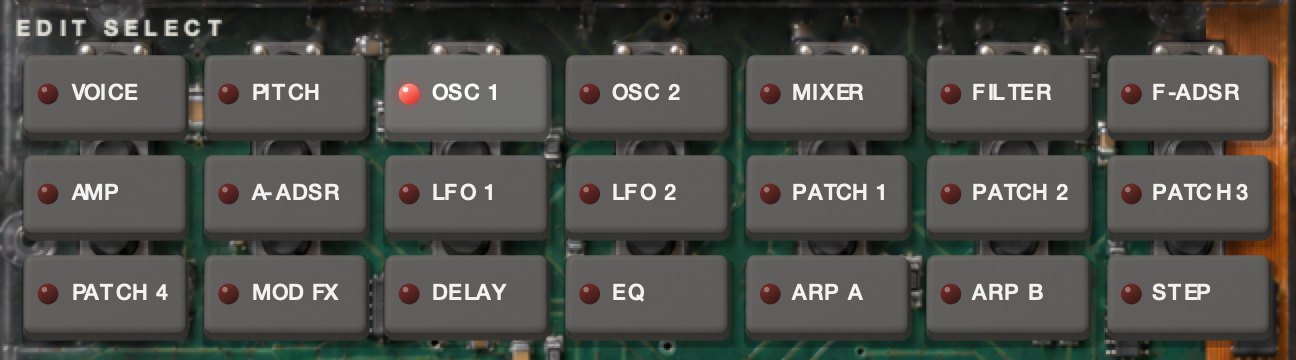
EDIT SELECT in SINGLE mode: VOICE, PITCH, OSC 1, OSC 2, MIXER, FILTER, F-ADSR, AMP, A-ADSR, LFO 1, LFO 2, PATCH 1, PATCH 2, PATCH 3, PATCH 4, MOD FX, DELAY, EQ, ARP A, ARP B, STEP.
Edit select, single and layer
Voice
  1. Assign
    Mono · Poly · Unison

    MONO plays one note at a time. UNISON stacks four voices on every note — two per timbre in LAYER — spread apart by DETUNE.

  2. Trigger
    Single · Multi

    For MONO and UNISON. SINGLE: overlap your notes and the envelopes keep running while the pitch moves; a fresh phrase starts them over. MULTI: every note restarts them.

  3. Detune
    0 – 99 cents

    How far apart the UNISON voices are tuned.

Pitch
  1. Transpose
    ±24 semitones

    Both oscillators. The screen calls it BOTH OSC.

  2. Tune
    ±50 cents

    Both oscillators.

  3. Portamento
    0 – 5 s

    Glide from one note to the next, from 2 ms up. At 0 there is none. The screen calls it GLIDE.

  4. Bend
    ±12 semitones

    Pitch-bend range. Below zero the wheel bends the other way. The screen calls it PB RANGE.

  5. Vibrato
    ±63

    MW VIBRATO on the screen: vibrato the mod wheel brings in. With the wheel down there is none. At 63, with the wheel all the way up, it swings two semitones either way.

    It moves at LFO 2’s rate and in LFO 2’s shape. Below zero the swing is turned upside down.

No mod wheel? Every sound that uses VIBRATO needs the wheel. Draw the MOD WHEEL parameter in your DAW instead — it does exactly what the wheel does.
Osc 1
  1. Wave
    Saw · Pulse · Tri · Sine · Vox · Table · Noise · Audio in
  2. Control 1
    0 – 127

    Reshapes the wave. What that means depends on WAVE:

    Saw
    Blends in a saw an octave up.
    Pulse
    Narrows the pulse from a square. At the top it thins to nothing.
    Tri
    Blends in a triangle an octave and a fifth up.
    Sine
    Cross-modulates it with OSC 2’s wave, whether or not OSC 2 is in the mix.
    Vox
    A voice-like wave. CONTROL 1 moves its formant from dark to bright.
    Table
    No effect.
    Noise
    Noise filtered around the note you play. CONTROL 1 moves the filter in semitones; at 24 it sits on the note.
    Audio in
    WINNETKA’s audio input, played through the synth while you hold keys. CONTROL 1 balances the two channels: 0 is the right only, 127 the left only.
  3. Control 2
    0 – 127

    How far LFO 1 moves CONTROL 1.

    On TABLE the knob becomes TABLE and picks one of 64 stored waves; the screen shows each one’s number and family, as in 36 KEYS. On NOISE it sets the resonance — turn it up and the noise sings at the pitch.

Osc 2
  1. Wave
    Saw · Square · Tri
  2. Osc mod
    Off · Ring · Sync · Ring sync

    RING multiplies OSC 2 by OSC 1. SYNC restarts OSC 2 with every cycle of OSC 1, so SEMITONE and TUNE change its tone instead of its pitch. RING SYNC does both.

  3. Semitone
    ±24 semitones

    Against OSC 1.

  4. Tune
    ±63

    Fine near the middle and wide at the ends: an octave at ±48, two at ±63. The screen reads it in cents.

Mixer
  1. Osc 1
    0 – 127
  2. Osc 2
    0 – 127
  3. Noise
    0 – 127

    White noise, apart from OSC 1’s NOISE wave. All three feed the filter.

Filter
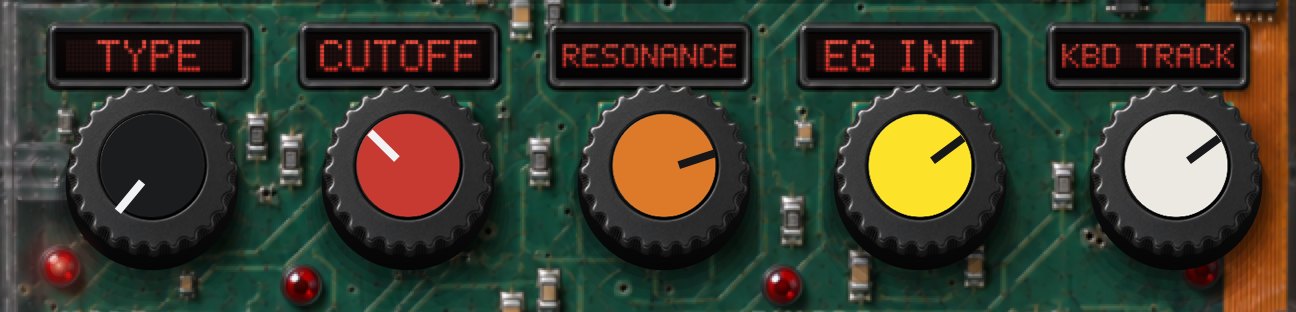
The FILTER row: TYPE, CUTOFF, RESONANCE, EG INT and KBD TRACK knobs.
  1. Type
    24 LPF · 12 LPF · 12 BPF · 12 HPF
  2. Cutoff
    20 Hz – 20 kHz
  3. Resonance
    0 – 127
  4. EG int
    ±63

    How far F-ADSR moves the cutoff, up or down. The ends reach ten octaves.

  5. Kbd track
    ±63

    The cutoff follows the keys, pivoting on middle C. At +48 it moves note for note; below zero it closes as you play higher.

F-ADSRA-ADSR
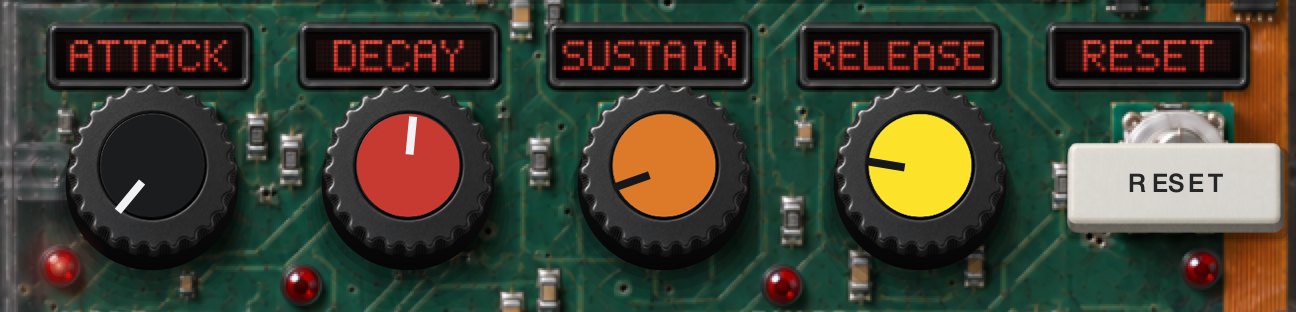
The F-ADSR row: ATTACK, DECAY, SUSTAIN and RELEASE knobs and a RESET key.

F-ADSR is the filter’s envelope, A-ADSR the amp’s.

  1. Attack
    0 – 20 s
  2. Decay
    0 – 20 s
  3. Sustain
    0 – 127
  4. Release
    0 – 20 s

    At 0 a stage is instant; 1 is a millisecond.

  5. Reset
    Key

    Puts the four back where a new sound starts: instant attack, decay and release, full sustain. In LAYER with SYNC lit, on both timbres.

Amp
  1. Level
    0 – 127
  2. Pan
    ±63
  3. Dist
    Key

    Distortion on this timbre.

  4. Kbd track
    ±63

    Level follows the keys, pivoting on middle C: up to 6 dB an octave, louder or quieter as you climb.

LFO 1LFO 2
  1. Wave
    LFO 1: Saw · Square · Tri · S/H    LFO 2: Saw · Square+ · Sine · S/H

    SQUARE+ switches between zero and the top, never below. S/H picks a new random level every cycle.

  2. Key sync
    Off · Timbre · Voice

    OFF: one LFO, running free. TIMBRE: one LFO, started again by the first note of each phrase. VOICE: every voice runs its own, started with its note.

  3. Tempo
    Key

    Locks the rate to the tempo. RATE becomes NOTE: 1/1 to 1/32, dotted and triplet values included.

  4. Rate
    0.05 – 50 Hz

LFO 1 also moves OSC 1, through CONTROL 2. LFO 2 drives VIBRATO. Both can be patched anywhere.

Patch 1Patch 2Patch 3Patch 4
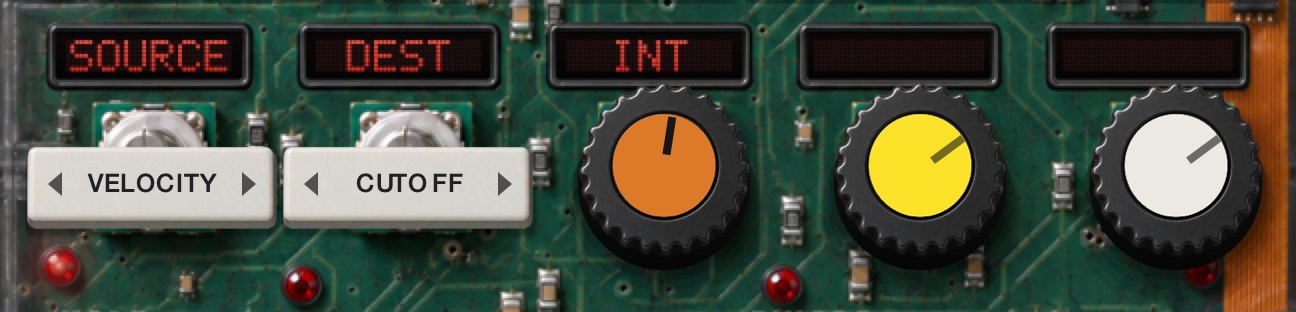
The PATCH 1 row: SOURCE and DEST selectors and an INT knob.

Four patch cords. Each one sends a SOURCE to a DEST by INT, and cords on the same DEST add up.

  1. Source
    Filter EG · Amp EG · LFO 1 · LFO 2 · Velocity · Key track · P.bend · Mod wheel

    KEY TRACK is the note’s distance from middle C. P.BEND and MOD WHEEL let the wheels drive anything on the other list.

  2. Dest
    Pitch · Osc2 tune · Osc1 ctrl1 · Noise · Cutoff · Amp · Pan · LFO2 freq
  3. Int
    ±63

    How far, and which way. On PITCH the full 63 is two octaves, so vibrato lives in single digits.

Vocoder

The vocoder

WINNETKA puts the shape of what it hears onto the notes you play. It needs both: audio coming in, and notes.

Twelve of the forty VOCODER presets hold a vowel inside them. They play without any audio at all.

Getting your voice in

WINNETKA has a stereo audio input. The left channel is the voice it listens to. The right channel can carry an instrument to be played through the vocoder as well — raise INST in the MIXER row.

Ableton Live: on the track your voice is on, set Audio To to the WINNETKA track and pick Audio In-WINNETKA in the box under it. If that track is a live mic, set its Monitor to In.

Other DAWs: send your mic or vocal track to WINNETKA’s audio input.

The standalone app starts with its input muted, so it cannot feed back. Click Settings… in the notice at the top of its window, choose your input and untick Mute audio input. Wear headphones.
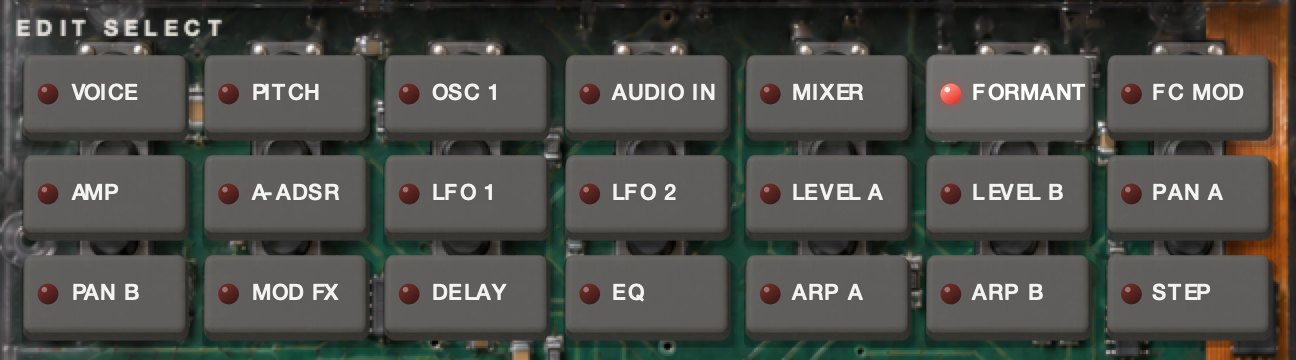
EDIT SELECT in VOCODER mode: VOICE, PITCH, OSC 1, AUDIO IN, MIXER, FORMANT, FC MOD, AMP, A-ADSR, LFO 1, LFO 2, LEVEL A, LEVEL B, PAN A, PAN B, MOD FX, DELAY, EQ, ARP A, ARP B, STEP.
Edit select, vocoder

VOICE, PITCH, OSC 1, A-ADSR, LFO 1 and LFO 2 work as in SINGLE, on the carrier — the screen calls TRANSPOSE and TUNE CARRIER. There is no OSC 2 here, so SINE’s CONTROL 1 adds harmonics instead.

Audio in
  1. Gate sense
    0 – 127

    How long the gate takes to close once the voice stops, from 2 ms to 2 s.

  2. Threshold
    0 – 127

    Below this level the input is shut out. At 0 the gate is off.

  3. HPF level
    0 – 127

    Sends the top of the voice, above about 4 kHz, straight to the output, so the s’s and t’s cut through.

  4. HPF gate
    Key

    Lit: that top end only comes through while you hold a key.

Mixer

The carrier: what the vocoder shapes.

  1. Osc 1
    0 – 127
  2. Inst
    0 – 127

    The right input channel.

  3. Noise
    0 – 127
Formant
The FORMANT row: SHIFT, CUTOFF, RESONANCE and E.F. SENSE knobs and a HOLD key.
  1. Shift
    −2 to +2

    Moves the whole shape down or up, a band at a time.

  2. Cutoff
    ±63

    Slides it smoothly, up to two bands either way.

  3. Resonance
    0 – 127

    How sharp the bands are.

  4. E.F. sense
    0 – 127

    How slowly the shape follows the voice: low values catch every syllable, high values smear them. At 127 it holds.

  5. Hold
    Key

    Freezes the shape that is there now. It keeps playing with no input, and it saves with the preset and with your session. Letting go sets E.F. SENSE to 20.

FC mod
  1. Source
    Amp EG · LFO 1 · LFO 2 · Velocity · Key track · P.bend · Mod wheel
  2. Intensity
    ±63

    Moves the shape with the source, up to four bands either way.

Amp
  1. Level
    0 – 127

    The internal carrier: OSC 1 and noise.

  2. Direct
    0 – 127

    Your voice, dry, into the output.

  3. Dist
    Key

    Distortion on the carrier.

  4. Kbd track
    ±63

    Carrier level follows the keys, as in SINGLE.

Level ALevel BPan APan B

The knobs read BAND 1 to BAND 8, low to high, and each one sets two neighboring bands of the sixteen. LEVEL A and PAN A hold BAND 1 to 4, the lows; LEVEL B and PAN B hold BAND 5 to 8. The LEVEL rows set how loud each is, the PAN rows place it from left (−63) to right (+63).

Every mode

Effects

One chain for the whole instrument, in this order: MOD FX, DELAY, EQ.

Mod FX
  1. Type
    Cho/Flg · Ensemble · Phaser

    CHO/FLG is a chorus at low DEPTH. Turn DEPTH up and it becomes a flanger.

  2. Speed
    0.05 – 10 Hz
  3. Depth
    0 – 127

    At 0 the effect is out.

Delay
The DELAY row: a TYPE knob, ON and TEMPO keys stacked, and TIME, DEPTH and DRY/WET knobs.
  1. Type
    Stereo · Cross · L/R

    STEREO keeps each side’s repeats on its own side. CROSS swaps them with every repeat. L/R bounces the repeats left, right, left.

  2. On
    Key

    The delay in or out. Out leaves the dry sound untouched.

  3. Tempo
    Key, under ON

    Locks TIME to the tempo. TIME becomes NOTE: 1/32 to 1/1.

  4. Time
    1 ms – 2 s
  5. Depth
    0 – 127

    More repeats, and louder ones.

  6. Dry/wet
    0 – 100

    0 is dry only. 50 is the whole dry sound plus the whole of the repeats. 100 is repeats only.

EQ
  1. Low freq
    40 Hz – 1 kHz

    Where the low shelf sits.

  2. Low gain
    ±12 dB
  3. Hi freq
    1 – 18 kHz

    Where the high shelf sits.

  4. Hi gain
    ±12 dB
  5. Mid gain
    ±12 dB

    A broad bell, fixed at 1 kHz.

Every mode

Arpeggiator

Three rows: ARP A, ARP B and STEP.

Arp A
  1. On
    Key
  2. Pattern
    12 patterns
    Up · Down
     
    Alt 1
    Up and back down, without playing the top and bottom notes twice.
    Alt 2
    Up and back down, playing the top and bottom notes twice.
    Random
     
    Trigger
    The whole chord on every step. RANGE does not apply.
    Played
    In the order you pressed the keys.
    Converge
    From the outside in: lowest, highest, next lowest, next highest.
    Diverge
    From the middle out.
    Up2 down1
    Two steps up, one back.
    Down2 up1
    Two steps down, one back.
    Root alt
    The lowest note in between each of the others.
  3. Range
    1 – 4 octaves
  4. Gate
    0 – 100%

    How much of each step the note holds.

  5. Latch
    Key

    Keeps playing after you let go. Your next chord replaces the held one.

Arp B
  1. Rate
    1/1 · 1/2 · 1/4 · 1/6 · 1/8 · 1/12 · 1/16 · 1/24 · 1/32 · 1/64

    The length of each step.

  2. Swing
    ±100%

    Above zero every second step arrives late; below zero, early.

  3. Last step
    1 – 16

    The length of the loop.

  4. Target
    Both · Timbre 1 · Timbre 2

    In LAYER, which timbre the arpeggiator plays. The other one plays your keys as you play them.

  5. Key sync
    Key

    Lit: a new phrase starts the pattern from its first step. Unlit: it joins the clock where it is.

Step
The STEP row: sixteen numbered step keys in two rows of eight; 9 to 16 dimmed.

Sixteen keys, one per step. An unlit step is a rest, and the pattern still moves past it: the note it would have played is skipped. Steps past LAST STEP go dim and keep their settings.

The arpeggiator follows your DAW’s tempo and starts over when the DAW starts playing.

Good to know

MIDI, tempo and your DAW

  1. Tempo

    The arpeggiator, an LFO with TEMPO lit and the delay with TEMPO lit follow your DAW’s tempo. The standalone app runs them at 120 BPM.

  2. Stop

    When your DAW stops, WINNETKA lets go of every note.

  3. MIDI

    It listens on every channel and follows pitch bend and the mod wheel. Velocity reaches the sound through the patch cords: send VELOCITY to AMP and the level rises with how hard you play. Program change 0 to 127 loads factory presets 001 to 128.

    The controllers below edit whatever the panel is editing: the timbre that is lit in LAYER, the vocoder in VOCODER. CC 95 picks the timbre in LAYER — below 64 is timbre 1, 64 and up is timbre 2.

  4. Automation

    Every control is a parameter in your DAW, named by where it lives: T1 and T2 for the timbres, VOC, FX, ARP and GLOBAL.

Only in your DAW

These have no place on the panel.

ParameterRangeWhat it does
Mod wheel0 – 127The wheel. Draw it to bring in VIBRATO without one.
Pitch bend−8192 to +8191The bend wheel.
Global clockHost · InternalHOST follows the DAW’s tempo. INTERNAL uses ARP TEMPO.
Arp tempo20 – 300 BPMThe tempo when GLOBAL CLOCK is INTERNAL.
Global master tune4300 – 4500The pitch of A above middle C, in tenths of a hertz: 4400 is 440 Hz.
Global transpose±12 semitonesEverything, on top of each sound’s own.
Global velocity0 – 127At 0 every note keeps the velocity you played. 1 to 127 fixes every note at that value.
Global volume0 – 127The last level before the output.
FX output trim−48 to +12 dBEach preset’s own level.
EG resetOn · OffOne per envelope. On: a retriggered envelope starts from zero. Off: from where it is.

MIDI controllers

CCSingle and layerVocoder
1Mod wheelMod wheel
5PortamentoPortamento
7Amp levelAmp level
10PanDirect
12Mod FX speedMod FX speed
13Delay timeDelay time
14Osc 1 control 1Osc 1 control 1
15Osc 1 control 2Osc 1 control 2
18Osc 2 semitoneHPF level
19Osc 2 tuneThreshold
20Mixer osc 1Mixer osc 1
21Mixer osc 2Mixer inst
22Mixer noiseMixer noise
23 – 26F-ADSR attack, decay, sustain, release—
27LFO 1 rateLFO 1 rate
28 – 31Patch 1 – 4 int—
70A-ADSR sustainA-ADSR sustain
71ResonanceFormant resonance
72A-ADSR releaseA-ADSR release
73A-ADSR attackA-ADSR attack
74CutoffFormant cutoff
75A-ADSR decayA-ADSR decay
76LFO 2 rateLFO 2 rate
77Osc 1 waveOsc 1 wave
78Osc 2 wave—
79Filter EG intFC mod intensity
82Osc mod—
83Filter typeFormant shift *
85Filter kbd trackE.F. sense
87LFO 1 waveLFO 1 wave
88LFO 2 waveLFO 2 wave
92DistDist
93Mod FX depthMod FX depth
94Delay depthDelay depth
95Timbre select—

* CC 83 in VOCODER: 0–25 is 0, 26–51 is +1, 52–76 is +2, 77–102 is −1, 103–127 is −2. WINNETKA also answers All Sound Off, All Notes Off and Reset All Controllers.