← Gazillion Industries/Reading material
Glue compressor in FL Studio: Fruity Limiter, Maximus, and the free one
The tutorial has the Glue Compressor across a drum group in Ableton. You have FL Studio, a kit of eight channels all pointed at the Master, and a plugin list with nothing called glue in it. Three things fix that, and two of them are already installed.
FL Studio has no Glue Compressor; that device is Ableton's, made with Cytomic, and Cytomic sell the plugin version as The Glue for $99. What FL Studio has in every edition is Fruity Limiter, whose COMP section is a full bus compressor with a sidechain, and Fruity Compressor, which Image-Line now call a legacy plugin. The missing piece is a drum bus to put one on. Build it, load Fruity Limiter, and you have glue for nothing. Or load DRUGS, which is ours, free, and built for exactly this bus with one knob.
The short version
- Is the Glue Compressor in FL Studio?
- no; it is an Ableton device, and the plugin version is Cytomic's The Glue, $99
- Stock, every edition
- Fruity Limiter's COMP section: THRESH, RATIO, KNEE, ATT, REL, SUSTAIN, sidechain
- Stock, Producer Edition and up
- Maximus, a multiband maximizer aimed at the Master
- The drum bus
- select the drum channels, right-click a mixer track, "Route selected channels to this track" (Ctrl+L)
- Free and built for the bus
- DRUGS — ours, one knob called DOSE, VST3 on Windows, VST3 and AU on Mac
- Free with every knob
- TDR Kotelnikov, Klanghelm DC1A
Why there is no Glue Compressor in FL Studio
Because it is a Live device. Ableton's manual describes the Glue Compressor as "an analog-modeled compressor created in collaboration with Cytomic" that is "based on the classic bus compressor from a famous 80's mixing console", and the edition comparison puts it in Standard and Suite, not Intro. Cytomic's own plugin, The Glue, is $99 as VST2, VST3, AUv2 and AAX for macOS 10.13 and Windows 10 and up, and it runs in FL Studio like any other plugin. So the direct answer to "the glue fl studio" is a $99 purchase. The better answer is that glue is a job, and the glue compression guide explains why almost any compressor on a group does it: one gain cell hearing every drum, moving them together, one to three decibels at a time.
Build the drum bus first
Glue needs a group, and FL Studio does not make one for you. Image-Line's manual: "Unless specifically directed, newly added Channels are routed to the Master Mixer Track." Every drum is going straight to the Master, so there is nowhere to put a compressor that hears them all. The fix takes ten seconds and is in the Mixer menu.
- In the Channel Rack, select every drum channel using the selectors at the right of each channel button.
- In the Mixer, right-click an empty insert track and choose "Route selected channels to this track" (Ctrl+L).
- Rename that track DRUMS.
- Open one drum channel's settings and check that its mixer-track selector now reads the DRUMS track number.
- Balance the drums against each other with the channel volumes before inserting anything.
If your drums are already on separate mixer tracks, the menu has the other route: select those tracks, right-click the DRUMS track and choose "Route selected to this track only", which Image-Line say also deselects the selected tracks' own Master sends. That last part matters. A track that goes both to DRUMS and to the Master arrives twice, 6 dB louder than you think, and the compressor on DRUMS is only hearing half of it.
Glue with Fruity Limiter
Fruity Limiter is "a powerful single band Compressor (with sidechain), Limiter & Gate", included in all editions, and the compressor half is the glue tool. In the COMP section, THRESH "sets the level above which the signal will be compressed", with 0 dB switching it off; RATIO sets the amount once the threshold is crossed; KNEE sets "the transition between no and full compression"; ATT and REL are the attack and release in milliseconds; SUSTAIN averages the input over 0 to 1,000 ms, which moves the detector toward RMS. The sidechain selector works with the mixer's track sends. The manual prints no numeric range for RATIO or KNEE, so set them by the meter.
- Insert Fruity Limiter on the DRUMS track and open the COMP section.
- Set RATIO to 2:1 and KNEE toward soft.
- Set ATT to 20 ms.
- Set REL to one eighth note at your tempo: 333 ms at 90 BPM, 214 ms at 140.
- Lower THRESH until the meter shows 1 to 3 dB of gain reduction on the loudest hits.
- In the LIMIT section, use GAIN to match the bypassed level; Image-Line note it sits post-compressor and pre-limiter.
- Toggle the slot on and off at matched level and keep it only if the kit sounds like one take.
Fruity Compressor still works and has printed ranges, Threshold 0 to −60 dB, Ratio 0.4:1 to 30:1, Attack 0 to 400 ms, Release 1 to 4,000 ms, and a Type switch whose knee widths are 0, 6, 7 and 15 dB. The manual calls it legacy and recommends Fruity Limiter. Maximus, from Producer Edition up, is three bands plus a wideband stage, and Image-Line place it "as the last effect in the Master Mixer Track"; it will glue a drum bus, and it is more compressor than the job needs. The drum bus compressor settings page explains each of the numbers above.
Glue with DRUGS, which skips the numbers
DRUGS is our free bus compressor for drums, and it runs in FL Studio as a VST3 on Windows and as VST3 or AU on the Mac. One knob called DOSE moves the curve, the knee, the attack and the release together, so the drum bus gets denser while the peak level barely moves. The release adapts on its own: a hit gets the short time, sustained material gets the long one. Insert it on DRUMS, raise DOSE until the room comes forward under the hits, and stop. That is the whole setup, and it does in one move what steps two through five above do in five.
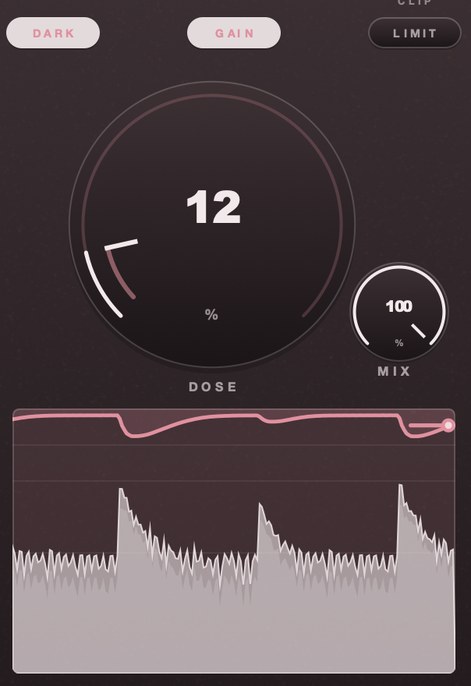
Two things it has that the stock device does not. MIX blends dry and wet with zero latency, so parallel compression on the drum bus needs no second track and never comb-filters. And LIMIT, a soft ceiling at −0.3 dBFS on the output, does the job the Glue Compressor's Soft Clip switch did on the Ableton device, whose manual caps it at −0.5 dB. GAIN adds 5 dB after the compressor; both GAIN and LIMIT are on when it opens, so match levels before you judge.
DRUGS is free for Mac and Windows. Put it on the drum bus in FL Studio, turn DOSE up until the kit sounds like one take, and leave the attack and release to it.
The other free compressors that glue
If you want every control and a different character, two free plugins come up in every thread and both load in FL Studio. TDR Kotelnikov is Tokyo Dawn's free "wideband dynamics processor", with separate release controls for peak and RMS events, a sidechain high-pass, stereo linking built for the bus and a Delta preview that plays only what is being removed. Windows 7 and up as VST2, VST3 and AAX; Mac as VST2, VST3, AU and AAX. Klanghelm DC1A is freeware, "the little brother of the compression monster DC8C", with an input and an output knob plus DEEP, RELAXED and DUAL MONO switches. The free glue compressor guide puts the three side by side. Our order for a drum bus is DRUGS first, because it asks you to listen rather than to know your release time, Kotelnikov when you want the numbers, DC1A for character on a single channel.
What glue in FL Studio costs you
It costs dynamics quietly. A group compressed into one block sounds finished across eight bars and tiring across three minutes, because the fills stop jumping out. Bounce the arrangement once before you decide. It couples everything to the loudest element: with a full-range detector the kick sets the gain for the whole kit, so a louder kick ducks the hats more, and Fruity Limiter's SUSTAIN control, or a sidechain high-pass on Kotelnikov, is how you soften that. And the routing costs a careful eye. FL Studio's send switches are small, a left-click makes an audio send and a right-click opens the sidechain menu, and a drum that reaches the Master twice will win every A/B for the wrong reason.
Questions people ask
Does FL Studio have a glue compressor?
Not by that name. The Glue Compressor is an Ableton Live device. FL Studio ships Fruity Limiter in every edition, and its COMP section is a bus compressor with a sidechain that does the glue job. Fruity Compressor is the older one, and Maximus is the multiband maximizer from Producer Edition up.
How do I make a drum bus in FL Studio?
Select the drum channels in the Channel Rack, right-click an empty mixer track and choose "Route selected channels to this track", or press Ctrl+L. Every selected channel now feeds that track, and the compressor goes in one of its ten effect slots.
Can I get The Glue for FL Studio?
Yes. Cytomic's The Glue is $99, one-time, in VST2, VST3, AUv2 and AAX for macOS 10.13 and Windows 10 and up, and FL Studio hosts VST2, VST3 and CLAP on both platforms plus Audio Units on macOS. It runs in any edition.
Is there a free glue compressor for FL Studio?
Three. DRUGS is ours and free, voiced for the drum bus with one control. TDR Kotelnikov and Klanghelm DC1A are free and give you the usual knobs. Fruity Limiter is free in the sense that it is already there.
What settings glue drums in Fruity Limiter?
Start at 2:1, a 20 ms attack, a release near an eighth note at your tempo and 1 to 3 dB of gain reduction on the loudest hits, with the knee toward soft. The release is the number that decides it: much shorter and the bus pumps on every kick, much longer and the gain never recovers.
Glue compressor or Maximus on the drum bus?
A single-band compressor for glue. Maximus is three bands and a wideband stage, and Image-Line position it as the last effect on the Master. Multiband compression on a drum bus splits the kick from the snare and undoes the one thing glue is for. The drum bus page covers what belongs there.
What is the difference between the FL Studio and Ableton setups?
Only the menu. Ableton groups tracks and puts the device on the Group; FL Studio routes channels to a mixer insert and puts the plugin in a slot. The Ableton drum bus guide is the twin of this page for the other DAW.
What DRUGS does
DRUGS is our free bus compressor with one macro control. DOSE moves the transfer curve, the knee, the attack and the release together, so the drum bus gets denser rather than louder. The release is adaptive and has no user control. Auto-makeup sits after the gain cell, MIX blends dry and wet with zero latency so parallel never comb-filters, GAIN adds 5 dB on the way out and LIMIT holds the output under −0.3 dBFS. It installs as VST3 and AU plus a standalone app on macOS 10.13 or later, and as VST3 on 64-bit Windows 10 or later. FL Studio is among the hosts listed on its page.
Eight channels, one insert, one knob. The tutorial had a device you did not have, and it turns out the device was the bus.
DRUGS — a one-knob bus compressor for drums, free for Mac and Windows. One control called DOSE, with GAIN and a soft ceiling on the way out.
Mac · Winmore info
Keep reading
- Free glue compressor plugins, and the one we would use — The free plugins that do glue, and how to set one.
- How to glue your drum bus in Ableton Live — Glue a drum bus in Ableton Live without squashing the transients.
- Glue compression — What a bus compressor does to a group, and where to start.
- What is a drum bus, and why put things on it? — One channel for the whole kit: how to build it, what to put on it, and why the sum behaves differently.
- Drum bus compressor settings — What each control actually changes, and where to start.