← Gazillion Industries/Reading material
Compression explained
Every producer hits the same wall in the same order. The drums are too quiet, so you turn them up, and now they are too loud in three places and still too quiet in the other forty. There is a machine for this and it has been the same machine since the 1950s.
A compressor automatically turns a signal down when it gets louder than a level you choose, which narrows the distance between the quietest and loudest parts of a performance. Five controls do the work: threshold sets where it starts working, ratio sets how hard it works, attack sets how quickly it reacts, release sets how quickly it lets go, and make-up gain puts back the level it took away. Everything else on the panel is a variation on those five.
The short version
- Threshold
- the level where it starts turning things down
- Ratio
- how much it turns down what crosses it: 4:1 means 4 dB in, 1 dB out
- Attack
- how fast it reacts, in milliseconds
- Release
- how fast it stops, in milliseconds
- Knee
- how abruptly the ratio arrives at the threshold
- Make-up
- gain added afterward, which is why it always sounds better
What it is actually doing
Think of it as a hand on a fader that only moves in one direction. Below the threshold, no hand. Above it, the hand pulls the fader down, and the ratio decides how far: at 4:1, a signal arriving 8 dB over the threshold leaves 2 dB over it. The gain reduction meter shows you that hand moving, in decibels, and it is the only meter on the unit worth watching.
Attack and release are the part people get wrong, because they are what make a compressor sound like anything at all. A slow attack lets the front edge of a hit through before the gain moves, so the transient survives and the body gets squashed: that is punch. A fast attack catches the hit itself, which controls peaks and blunts the sound. A release that is shorter than the gap between hits recovers in time; one that is longer never comes back up, and the whole track sits permanently squashed.
Settings that are a reasonable place to start
- Vocals: 3:1, attack 5–10 ms, release 60–150 ms, 3–6 dB of gain reduction on the loud words.
- Single drums: 4:1, attack 10–30 ms, release short enough to recover before the next hit.
- Drum bus: 2:1, attack 30 ms, auto release, 1–3 dB.
- Bass: 4:1, attack 10–20 ms, release matched to the tempo, so it breathes with the track rather than against it.
- Mix bus: 1.5:1 or 2:1, slow attack, auto release, 1–2 dB and no more.
Those are starting points, not answers. The material decides: a shouted chorus and a whispered verse need different releases, and a sampled break that is already compressed on the record may need nothing at all.
DRUGS is our free bus compressor for drums, built the other way round: one knob called DOSE, and no setup.
The level-matching trap
Make-up gain makes a compressor louder, and louder always wins a quick comparison. Your ear hears more level as more presence, more weight and more excitement, and it will vote for the compressed version whether or not the compression helped. Match the bypassed and compressed levels by ear or by meter before deciding, every single time. Most over-compressed records are the result of skipping that one step.
Where it costs you
Compression trades dynamics for consistency. That is the deal, and it is a good deal right up until the performance stops moving. Fast attacks eat transients, so the snare loses its crack. Long releases hold the gain down through the quiet parts, so the room noise rises and the track breathes at the wrong rate. And on a bus, the loudest element controls everything else, which is useful when you want glue and a problem when the kick starts operating the hi-hats.
If you are choosing one rather than learning one, best free compressor plugins covers what to look for.
Questions people ask
What is a good compressor setting?
There is no universal one, but 4:1 with a medium attack, a release that recovers before the next note, and 3 to 6 dB of gain reduction will be usable on most single tracks. Set the ratio and the timings first, then lower the threshold until the meter shows the amount you want.
What is the difference between a compressor and an equalizer?
An equalizer changes level by frequency: it makes some parts of the spectrum louder or quieter, all the time. A compressor changes level over time: it turns the whole signal down when it gets loud and lets it back up when it does not. One is a balance control, the other is a dynamics control.
Should you EQ or compress first?
Subtractive EQ first, so the compressor is not reacting to a problem you are about to remove. A boomy 200 Hz that trips the compressor on every note will keep tripping it until you cut it. After the compressor, EQ again if you need to, because compression changes the tone.
How much compression is too much?
When you can hear the compressor working rather than the performance: pumping in the quiet bars, transients gone flat, room noise rising and falling. Level-match and bypass. If the compressed version is not obviously better at the same loudness, use less.
What DRUGS does
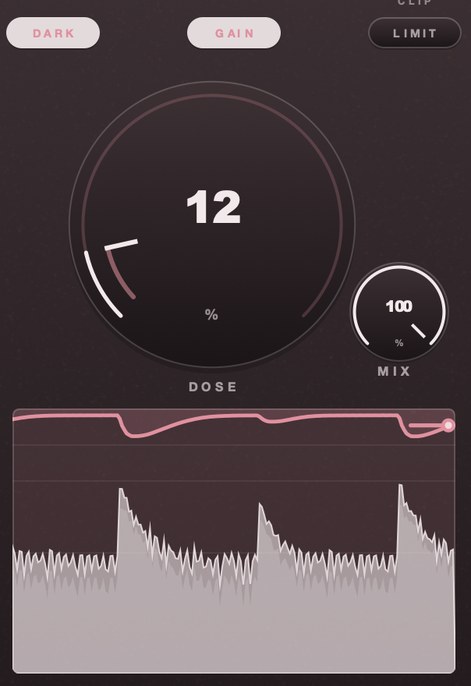
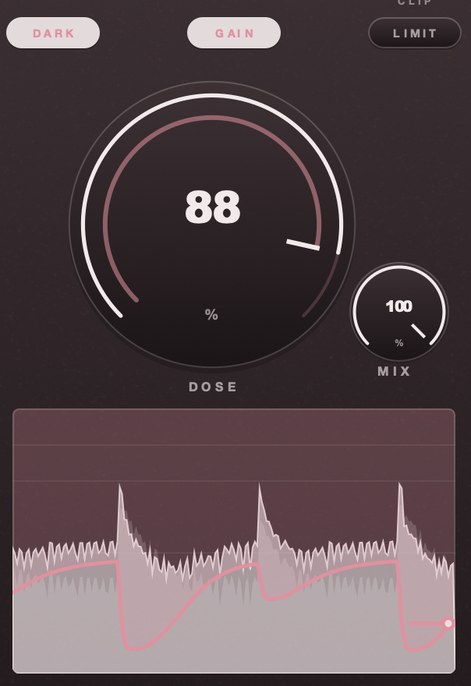
DRUGS is our free bus compressor for drums, with one macro control called DOSE. It moves the transfer curve, the knee, the attack and the release together, the way a single hardware macro would, so there is nothing to set up. Turning DOSE up makes a drum bus denser rather than louder, because peak level barely moves across the whole range of the knob. The release is adaptive: a hit gets the shorter time so gain recovers inside the gap, and sustained material gets the longer one. Auto-makeup is applied after the gain cell, so setting level cannot disturb the dynamics.
Forty places too quiet and three too loud. One hand on one fader, moving faster than yours.
DRUGS — a one-knob bus compressor for drums, free for Mac and Windows. One control called DOSE, with GAIN and a soft ceiling on the way out.
Mac · Winmore info
Keep reading
- Sidechain compression — Ducking one track with another: routing, settings, and when not to.
- Multiband compression — What it is for, how to set it, and why most problems need one band.
- Limiter vs compressor — Where the line sits between them, and which one goes last.
- How to glue your drum bus in Ableton Live — Glue a drum bus in Ableton Live without squashing the transients.