← Gazillion Industries/Reading material
Best free compressor plugins
Gazillion Industries ·
Compressors are the workhorses of mixing, and the free options available now rival paid tools in both sound and control. Whether you are shaping a vocal, taming a bus, or adding glue to a full mix, there is a free plugin that handles the job without compromise. This guide walks through the best options, what makes each one useful, and where they fit in a typical signal chain.
A free compressor is enough for most of what a producer needs it for, as long as it has a clean detector path and a sidechain filter. What free rarely gives you is the character stage - the part that makes a compressor sound like something rather than just quieter. Fill the utility slots for free and pay only where the sound itself is the point.
The short version
- Free is enough for
- utility compression, glue, parallel, control
- Free runs out at
- character - the part that sounds like something
- Must have
- a clean detector and a sidechain filter
- Test in five minutes
- null it, then drive it past sensible
- Hidden cost
- CPU, and whether it is rebuilt for the next OS
- Our answer
- DRUGS, free, one control
What a free compressor has to get right
A free compressor earns its place when the detector path is clean and predictable. The sidechain filter matters more than most producers realize. Without it, a compressor on a vocal bus reacts to the low-end rumble from the mix rather than the vocal itself, and the gain reduction you see on the meter tells you nothing useful about what is actually happening to the voice. A good free compressor gives you a high-pass on the detector so you can tune the response to the material you are working on.
The attack and release curves need to behave in a way that matches what you expect from the label. If a control says fast attack, it should clamp down quickly without introducing distortion or a click at the transient. If it says slow release, it should let the signal breathe back up smoothly rather than pumping in a way that sounds like a broken gate. The knee should be readable, meaning you can hear the difference between soft and hard settings without guessing.
Metering is the other thing that separates a usable free compressor from a toy. You need to see gain reduction clearly, ideally with a scale that maps to the signal you are processing rather than an arbitrary range. If you cannot tell whether the compressor is doing two decibels of reduction or twelve, you are working blind, and no amount of clever circuitry behind the plugin compensates for that.
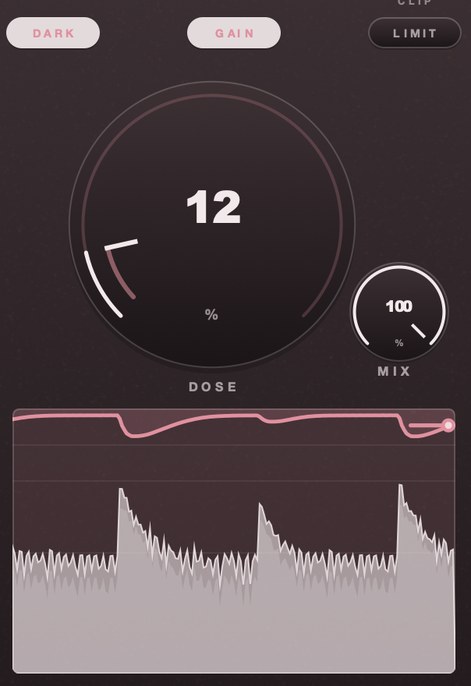 DOSE 12. The line along the bottom is gain reduction; here it barely leaves the top.
The jobs you actually need one for
A drum bus is the first place most producers reach for a compressor, and for good reason. When you send a kit through a single channel, the transients from the kick and snare can punch through while the overheads sit too quiet, or the hi-hat pokes out at the wrong moment. A compressor with a medium attack and a moderate ratio tames those spikes and lets the kit sit as one unit rather than a collection of separate sounds. The trick is knowing whether you want the compressor to react to the whole bus or just the loudest hits, and that choice shapes how the drums feel in the mix.
Glue compression works on a full mix or a group of stems, and the goal is not to squash dynamics but to make everything feel like it belongs together. You are looking for a compressor that barely moves the needle, maybe a few decibels of gain reduction at the peaks, with a slow enough attack that the initial crack of a transient still comes through. The reason this matters is that a mix with no glue sounds like individual tracks stacked on top of each other, and no amount of reverb or panning fixes that feeling.
Parallel compression on vocals or drums asks a different question. You are not replacing the original signal; you are adding a compressed copy underneath it. This gives you sustain and body without losing the natural dynamics of the source. The decision here is how much of the compressed signal you want audible, and that depends on whether the part needs to cut through a dense arrangement or simply fill in the gaps between phrases. Vocals in particular benefit from this because a single compressor on the lead track can flatten the performance, while a parallel layer lets you keep the breath and the grit intact.
Where free runs out
Free compressors tend to fall short when the job demands transparency. Glue compression on a mix bus asks the processor to behave almost invisibly, letting transients through while gently pulling the body of the signal together. Most free options use a straightforward peak or RMS detector with a fixed knee, which means they either squash too hard or do too little. There is no soft-knee interpolation, no lookahead to catch fast transients before they clip, and no program-dependent detector that adapts its response to the material feeding it. The result is a compressor that sounds like a compressor rather than like a mix that has simply settled into place.
Sidechain routing is another common gap. Many free plugins accept only the main input as the detector source, which rules out ducking a pad against a vocal or triggering a gate from a separate track. Even when a sidechain input exists, there is rarely a filter on the detector path, so you cannot isolate the frequency band that should trigger the compression. This forces you to either accept a blunt response or route the signal through a separate equalizer before it reaches the compressor, adding steps that a paid plugin handles internally.
The final limitation is one of consistency. Free compressors often behave differently at higher sample rates, introducing aliasing or phase shifts that a paid plugin corrects with oversampling. They also tend to lack built-in metering, so you are guessing at gain reduction by ear or relying on a separate utility plugin. None of this makes a free compressor useless, but it does mean that the more subtle and integrated your processing chain becomes, the more you will feel the absence of the features that paid tools take for granted.
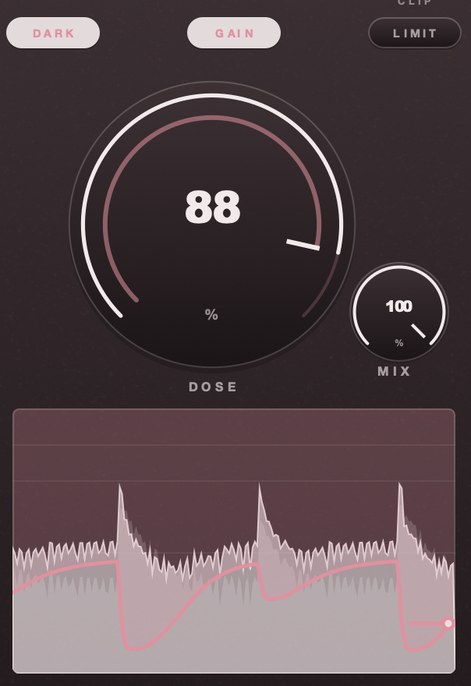 DOSE 88. It dives on each hit and takes the bar to come back.
How to test one in five minutes
Drop the plugin onto a single track that already has some dynamic range in it, something with a clear attack and a sustained body, like a snare or a vocal phrase. Set the ratio to something moderate, pull the threshold down until you see the meter move, and listen. You are not looking for a good sound yet. You are checking whether the compressor does what you expect it to do when you turn a knob. If the output level does not change when you adjust the threshold, something is wrong with the signal path or the plugin is broken.
Now focus on the release. Set it to a short value and listen for the tail of the sound. A compressor that pumps or distorts the sustain when the release is too fast will reveal itself here. Switch to a longer release and check whether the compressor is still doing anything useful or whether it has simply stopped responding. If the release control does nothing audible, the plugin may be poorly implemented or the default behavior may be locked.
Finally, bypass the plugin and compare the dry signal to the compressed signal at matched output levels. A compressor that adds color, even subtle saturation or a slight low-end shift, will show up in this comparison. Some free compressors are nearly transparent and others are not. Neither is wrong, but you need to know which one you have before you reach for it on a bus or a vocal chain where transparency matters.
What to avoid
Avoid free compressors that bury their core function under layers of modes, presets, and visual gimmicks. A compressor plugin that presents you with a dozen selectable topologies, each with its own set of hidden parameters, forces you to reverse-engineer the signal path before you can make a single decision. You want a plugin where the threshold, ratio, attack, and release are immediately visible and immediately adjustable. If the interface requires you to click through three menus to find the knee setting, you will spend more time navigating than you will spend listening, and the mix will suffer for it.
Avoid free compressors that are deliberately crippled versions of a paid product. Some developers release a stripped-down build that removes the sidechain filter, caps the ratio range, or disables the lookahead, then charge you for the full version. This is fine as a business model, but it means the free plugin cannot do the job you actually need. A compressor without a proper sidechain high-pass filter will pump on low-frequency content every time you route it through a drum bus. A compressor earns its keep by how predictably it responds, which is a duller property than character and matters more.
Avoid free compressors that impose a fixed character on every signal passing through them. Some plugins are designed to sound like a particular piece of vintage hardware, and that coloration is baked into the processing regardless of your settings. This is useful when you want that specific flavor, but it becomes a liability when you need a transparent glue compressor on a bus that already has a lot going on. You want a compressor that stays out of the way unless you tell it otherwise, one where the coloration is a choice rather than a default.
The wider question of which categories are worth filling for free is in best free VST plugins.
Questions people ask
Is a free compressor good enough for a release?
A free compressor can absolutely be good enough for a release. The difference between a free plugin and a paid one is rarely audible in a finished mix. What matters more is how well you understand compression itself, how you set your threshold, ratio, and release, and whether you are using the tool to serve the arrangement rather than just squashing everything. Plenty of released records use free plugins throughout.
What should I look for in a free compressor?
Look for a compressor that gives you threshold, ratio, attack, release, and a mix control so you can blend dry and processed signal. Sidechain input is useful if you plan to duck one track with another. Check whether the plugin handles transients cleanly without pumping or distortion at high ratios. A simple interface with clear meters helps you dial settings by ear rather than guessing.
Do I need more than one compressor?
One good compressor handles most of what you need day to day. That said, different plugins behave differently under the same settings, and having a couple on hand lets you reach for the right tool without rethinking your chain. A fast one for transients, a slower one for glue, and maybe a vintage-style one for color covers the ground without overcomplicating things.
Is there a free drum bus compressor that works in FL Studio?
Yes, and two of them are already installed. Fruity Limiter has a compressor mode that does
ordinary bus duty perfectly well, and Maximus will do it with more control than most people
need. Any free VST3 loads in FL Studio the same as it does anywhere else, so the real question
is not the format, it is whether you want to learn another interface. Start with what is in the
browser and move on only when it stops giving you what you want.
Is there a free drum bus compressor that gets that old sampler crunch?
No, because that is not what a compressor does. The crunch is bit depth and sample rate
reduction, and no amount of compression produces it —
bitcrushing explained covers that half.
What a compressor does contribute is the density people hear alongside it: the room and the
decay pulled up, the gaps between hits filled, the whole loop reading as one block rather than
separate drums. Run the two in series and it is the pair that sounds like the record.
What DRUGS does
DRUGS is our bus compressor for drums, free for Mac and Windows. One control called DOSE, with MIX on the face for parallel without a send, GAIN on the way out and a soft ceiling after it. It has no threshold and no ratio, because the whole point is that you do not set them.
DRUGS — a one-knob bus compressor for drums, free for Mac and Windows.
One control called DOSE, with GAIN and a soft ceiling on the way out.
FREE DRUGS
Keep reading
- Compression explained — Threshold, ratio, attack, release, and settings that are a fair place to start.
- How to compress drums — Attack, release and how much gain reduction, on single drums and on the bus.
- Glue compression — What a bus compressor does to a group, and where to start.
- Parallel compression — Blending a crushed copy under the dry track, and the alignment trap.
- Limiter vs compressor — Where the line sits between them, and which one goes last.
- What is a one-knob compressor, and is one knob enough? — What a single macro gives up, what it buys, and when a specific problem still needs threshold and ratio.