← Gazillion Industries/Reading material
Bitcrushing explained
The first video game consoles squeezed whole soundtracks into a handful of bits, and a generation grew up hearing that grit as music instead of a limitation. Now producers pay for plugins that put the limitation back.
Bitcrushing reduces the bit depth of audio, so each sample is stored with fewer possible volume steps. Quiet details get rounded to the nearest step, which adds a gritty, buzzy quantization noise that follows the music. Most bitcrushers also lower the sample rate, which removes high frequencies and folds them back as metallic aliasing. Together they make the crunchy, digital lofi sound, from subtle 12-bit warmth to 4-bit destruction.
The short version
- Bit depth
- fewer volume steps; grit and noise on quiet parts
- Sample rate
- lower top end; high frequencies fold back as aliasing
- 16-bit
- about 96 dB of dynamic range
- 12-bit
- about 72 dB; gentle grain
- 8-bit
- about 48 dB; obvious crunch
- Fold rule
- new rate minus the partial's frequency; one subtraction
- Level matters
- a quiet signal into a crusher is crushed harder
- Use
- drums, samples, vocals, lofi textures; blend to taste
The same one-second source four times: clean, bit reduction alone, rate reduction alone, then both. Play them on whatever you are reading this on, then again on monitors, because the two halves do not survive small speakers equally.
We measured these four files rather than describing them from memory. Peaks fall between −2.3 and −2.9 dBFS, a spread of 0.6 dB, so nothing below is louder-sounds-better. Over the last fifth of the file, where the source has already decayed, the bit-reduced render measures 9.8 dB hotter than the clean one; the rate-reduced render measures within 0.2 dB of it. Run the same measurement the other way and it flips: the frequency below which 99 per cent of the energy sits climbs from 869 Hz clean to 3,348 Hz on the rate-reduced render. One process fills the gaps, the other moves the spectrum. Rendered through F(ilter)12.
What bit depth does
Digital audio measures the wave thousands of times a second, and bit depth sets how many different levels each measurement can land on. Each bit doubles the steps and adds roughly 6 dB of dynamic range: 16 bits gives 65,536 steps and about 96 dB, 12 bits gives 4,096 and about 72 dB, 8 bits gives 256 and about 48 dB. Take bits away and the wave is forced onto a coarser staircase. The error between the real wave and the staircase is heard as noise and grit, loudest on the quiet parts, like reverb tails and fades.
The size of one step is the number to keep in your head. Take full scale as plus or minus one. At 16 bits a single step is one part in 32,768, which sits about 90 dB below a full-scale peak. At 12 bits it is one part in 2,048, about 66 dB down. At 8 bits it is one part in 128, about 42 dB down — loud enough to hear from across a room. The grain you are buying is that step, and every bit you remove doubles its height.
The error is not hiss, and that is why it sounds the way it does. Tape hiss sits there at a constant level whether the music plays or not. Quantization error is produced by the rounding itself, so it exists only while there is signal, and its shape is tied to the signal's shape. At low bit depths the error becomes correlated enough with the source to read as a buzzy edge welded to the note rather than a floor underneath it.
The arithmetic on one source
Bit depth is measured from full scale, not from your track. That single fact explains most of what confuses people about crushers. The quantizer does not know how loud your drum loop is; it rounds to a fixed grid, so a quiet source lands on fewer steps of that grid and comes out more damaged than a loud one at the same setting.
Work it through. Send a loop peaking at 0 dBFS into an 8-bit stage and it uses the whole 256-step grid. Pull the fader before the crusher down by 20 dB and the same loop now spans about 26 steps, which is under 5 bits of actual resolution. You did not touch the BIT control. You changed the input level, and the crush got three bits worse.
- Peak at 0 dBFS, 8-bit
- full 256-step grid; about 8 bits used
- Peak at −6 dBFS, 8-bit
- about 7 bits used
- Peak at −12 dBFS, 8-bit
- about 6 bits used
- Peak at −20 dBFS, 8-bit
- about 4.7 bits used
Two things follow. First, input trim is a second crush control, and on plugins with a drive or input knob it is often the more musical of the two. Second, you cannot compare two crushers, or two settings, unless the levels going in match. See gain staging for the habit that makes this automatic.
What sample rate reduction does
The sample rate sets the highest frequency audio can hold: half the sample rate. Lower it and the top end disappears. In a lofi effect the frequencies that no longer fit aren't filtered away first, so they fold back down as new, out-of-tune tones. That metallic shimmer is aliasing, and it's half the sound of a crushed drum. The full explanation is in what is aliasing in audio.
In the time domain the same process is a staircase in width rather than height. Each sample is held until the next one arrives, so at 44.1 kHz a value stands for 22.7 microseconds, at 11.025 kHz for 90.7 microseconds, and at 8 kHz for a flat 125 microseconds. Hold a value that long and you have drawn a small square wave, which is where the extra harmonics come from before any folding happens.
That hold also costs you top end on its own. A held staircase rolls off toward the new ceiling and arrives about 3.9 dB down at it, so the last octave before the fold line is already dulled before aliasing adds anything back. This is why a rate-reduced loop can sound simultaneously duller and harsher: the real high end is sagging while folded content piles into the mids.
Bitcrushing vs distortion
Distortion bends the waveform on a smooth curve and adds harmonics related to the notes, so it sounds warm or gritty but musical. Bitcrushing chops the wave into steps, so its noise depends on the level and doesn't follow the harmonic series as neatly, which is why it sounds digital. They stack well: a little saturation before a gentle crush often sounds better than either alone. See saturation vs distortion.
The order of that pair is a real decision. Saturation first compresses the crest factor, so the source arrives at the quantizer sitting higher above the step size and the grain lands further back. Crushing first hands the saturator a signal with a raised floor, and the nonlinear stage multiplies that floor into something much larger than you set. Both are usable. Only one is predictable.
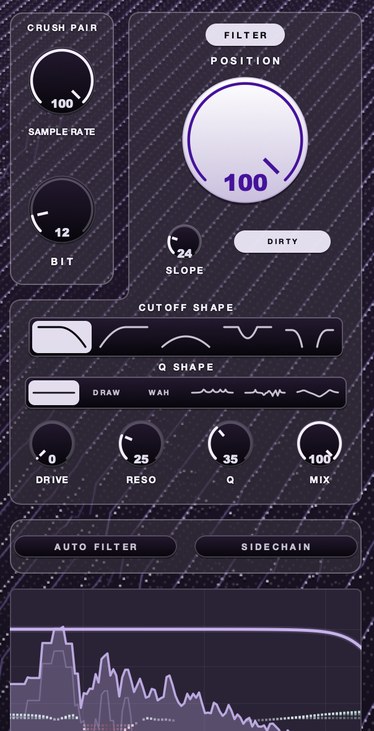
In F(ilter)12, twelve bits is as clean as it gets. It only goes down from there.
Dither changes the grain
Dither is a small amount of noise added before the rounding, and it is the one control that changes the character of a crush rather than the amount. Without it the rounding error tracks the signal and you hear a buzz that moves with the notes. With it the error is broken up into a steadier floor that sits behind the music instead of riding on it.
In mastering this is a correctness tool and the rules are strict, which dithering covers. In a crusher it is a flavor switch. Dither on gives you a tape-like hiss with grain underneath, which suits sustained material, pads and vocals. Dither off gives you the buzzy, gated, falling-apart quality on decays that most people actually mean when they say 12-bit. If your plugin offers it, audition both on the same tail before you decide.
How to bitcrush audio
- Put a bitcrusher on the track or on a return for parallel use.
- Lower the bit depth until you hear grain, often somewhere between 12 and 8 bits.
- Lower the sample rate until the top softens and starts to shimmer.
- Low-pass after the crusher if the aliasing gets harsh.
- Blend with the dry signal or back the settings off, then compare at matched loudness.
How to check it in your own session
Descriptions of grit are close to useless next to five minutes of listening on a file you already know. Run this once on a loop you have heard hundreds of times and you will stop guessing at settings.
- Load a two-bar loop with a decaying element in it: a cymbal, a reverb tail or a held chord.
- Insert the crusher and match the bypassed and processed levels to within 0.5 dB on your meters.
- Bypass and unbypass during the decay, never on the transient, and note what moved.
- Set bit depth to 12 and leave the rate alone. Listen to the space between hits, not the hits.
- Return the bit depth to full and lower the rate until the top dulls. Listen for pitched tones that are not in the source.
- Drop the fader feeding the crusher by 12 dB and make the output back up by 12 dB. The crush should get worse. If it does not, the plugin is trimming input for you.
- Sweep the rate control by hand while it plays and listen for zipper noise on the move.
- Sum to mono and check the low end survived — mono compatibility has the reasons.
- Bounce it and play it on a phone speaker. That is the test that decides it.
Where it works
Drums take crushing well, since the grit sits on transients and tails. Samples and chords get a worn, vintage texture. Vocals can take a little as an effect, or a lot for a robotic, radio-broken sound. On bass, go carefully: heavy crushing adds noise that muddies the low end, so crush a filtered copy instead.
- Drum bus
- 12 to 10 bits, rate around 22 kHz, low-pass after
- Chopped sample loop
- 12 bits, rate 16 to 11 kHz, dry/wet 60 to 80 per cent
- Lead vocal
- 12 bits, rate left alone, blended under 30 per cent
- Broken radio vocal
- 8 bits, rate 8 kHz, band-pass 400 Hz to 3 kHz
- Bass
- crush a high-passed copy only; leave the fundamental clean
Those are starting points, not settings. The right number depends on how loud the source arrives, which is the whole argument above. How to make lofi drums puts the drum case in context, and the telephone effect covers the band-pass half of the vocal one.
Where it goes in the chain
Position decides more than the settings do, because everything before the crusher changes what gets crushed and everything after decides whether you keep hearing it. Four placements cover almost every use.
After a filter, before compression. Filtering first removes the content that would have folded, so you get grain without clang. Compressing after pulls the raised floor up with the music and welds the dirt on. This is the drum bus setting, and it is the one that sounds least like an effect.
Before a filter. Crush wide open, then low-pass the result. The folded content is generated first and then cut, which leaves the mids dirty and the top clean. Cutoff and resonance covers the control side.
On a parallel send. Crush hard, bring it up underneath the dry signal, and the transients stay intact while the grain fills the space between them. Start here if you are unsure. Parallel compression explains why the blend works.
Before reverb. Under-used. The reverb smears the folded content into a wash, and the result reads as a degraded recording of a room rather than a clean room with dirt sprayed over it.
The one position to avoid is the master bus. Crushing a finished mix hits the quietest elements hardest, which is backwards, and it lands the grain on the reverb tails of everything at once.
What goes wrong, and what it sounds like
Crushing fails in a small number of recognizable ways. Each one has a sound, and once you can name it you can fix it in a knob move.
Fizz on small speakers. The mix sounds characterful on monitors and turns to sandpaper on a phone. Folded content sitting between 2 and 5 kHz is exactly where a small driver is most sensitive, and your monitors are hiding it. Low-pass after the crusher, or filter before it.
Mud you cannot EQ out. A crushed hi-hat is putting energy into 1 to 2 kHz that did not exist in the source, so cutting there thins the snare and the hat stays dirty. Fix it at the crusher, not at the EQ.
Punch gone. Heavy bit reduction squares off the top of a transient, and the peak that used to cut through is now a flat plateau. Blend dry signal back in, or move the crusher to a send. What is a transient has the anatomy.
Clicks on automation. Bit depth and sample rate are steppy by nature, and a developer who has not smoothed them hands you a tick on every move. Automate dry/wet instead of the crush controls.
The stereo image pulls apart. A crusher that processes channels independently makes folded content that does not match between them, so the loop spreads and the center loses weight. Check in mono before you commit.
Everything sounds the same. Crushing hard flattens dynamic range, so a whole beat run through one crusher loses the differences between its parts. Crush elements individually, at different amounts.
Where the folded content actually lands
Lower the sample rate and everything above half the new rate does not disappear. It mirrors down. A partial at frequency f comes back at the new rate minus f, so the content that returns is not a harmonic of anything in the music, which is why it reads as metallic rather than bright. The rule is one subtraction, and it tells you in advance what you are about to hear:
- 22.05 kHz — fold line at 11,025 Hz
- a 6 kHz hat partial passes through unchanged
- 16 kHz — fold line at 8,000 Hz
- a 6 kHz hat partial passes through unchanged
- 11.025 kHz — fold line at 5,512 Hz
- a 6 kHz hat partial comes back at 5,025 Hz
- 8 kHz — fold line at 4,000 Hz
- a 6 kHz hat partial comes back at 2,000 Hz
At 8 kHz that 6 kHz hat partial lands at 2 kHz, which is in the middle of where the vocal and snare live, and a 7 kHz one lands at 1 kHz. That is the whole reason a crushed hi-hat can make a mix sound cluttered in a region you never touched. Filtering before the rate reduction removes the content that would have folded; filtering after only attenuates it once it is already sitting on top of the music.
The same arithmetic run in reverse is why oversampling exists. Lift the internal rate before a nonlinear stage and the fold line moves up out of the way, which is the right answer when you want distortion without the clang — oversampling covers when to spend the CPU. A crusher is the one place you turn that protection off on purpose.
What crushing costs you
Three things, stated flatly. You lose dynamic range, and you do not get it back: the rounding is one-way and no amount of processing afterward reconstructs what the step size threw away. Commit late, and keep the clean file.
You lose translation. Folded content concentrates in the band small speakers exaggerate, so a crushed mix is more likely to fall apart on a phone than almost anything else you can do to it — see bass on phone speakers for the other end of the same problem.
And you lose room in the mix. A raised floor between hits is a decision to spend space that reverb, room tone or another element could have used. On one part that is character. On six parts it is a wash, and the beat stops breathing.
Questions people ask
What is the difference between distortion and a bitcrusher?
Distortion reshapes the waveform on a smooth curve and adds harmonics, so it sounds warm or gritty. A bitcrusher reduces bit depth and often sample rate, adding quantization noise and aliasing, so it sounds digital and crunchy.
Is bitcrushing used on vocals?
Yes, as an effect: a little for a lo-fi or radio texture, a lot for a broken, robotic sound. It's usually blended or automated rather than left on a whole lead vocal.
Does 12-bit sound better than 16-bit?
Not technically: 16-bit has more dynamic range and less noise. But 12-bit has a grain and warmth that many producers like, which is why vintage 12-bit samplers are still loved. 12 bit sampler plugins covers what the format does to a sample and what the second half of the sound is.
Is bitcrushing the same as downsampling?
No. Downsampling lowers the sample rate, which drops the ceiling and folds content back down as aliasing. Bitcrushing lowers bit depth, which coarsens the volume steps and lifts a grain out of quiet parts. Most plugins labeled bitcrushers give you both on separate controls, which is why the two get confused.
What bit depth should I use for a lofi sound?
Start at 12 bits and only go lower if you want the process to be obvious. Twelve is audible on decays and almost invisible on loud transients. Eight is a clear effect. Four is a sound in its own right rather than a treatment. Set the input level first, since a quiet source is crushed harder at any setting.
Why does my bitcrushed loop sound fizzy on phone speakers?
Because rate reduction folds high content down into the 2 to 5 kHz region, and that is where a small driver is most sensitive and your monitors are least revealing. Low-pass after the crusher, or filter before it so the content never folds in the first place.
Does a bitcrusher make a track louder?
Not in peak terms, and barely in average terms. On the four renders above, peak level moves 0.6 dB across all of them and full-file average moves under 0.2 dB. What changes is the quiet parts: the last fifth of the bit-reduced file measures 9.8 dB hotter than the clean one. It fills the gaps rather than raising the ceiling.
Does bitcrushing reduce the file size?
No. A crusher inside a session still outputs at whatever depth and rate the project runs at, so the bounced file is the same size as it would have been. The plugin changes the shape of the waveform, not the container it is written into.
Can bitcrushing be undone?
No. Rounding discards information and nothing recovers it, so there is no plugin that reverses a crush. Keep an unprocessed copy of anything you print, and do the crush on a duplicate track or a send if you expect to change your mind.
Bitcrushing in Ableton, FL Studio and Logic
The stock devices differ more than their category name suggests, and the differences change what you can actually get out of them. Details below come from each maker's own manual.
Ableton Live. Redux splits into downsampling on the left and bit reduction on the right. Rate sets the degraded sample rate and Jitter adds noise to the downsampler's clock, which widens and roughens the result. The filter section has separate Pre and Post buttons, and Ableton's manual is explicit that Pre reduces the bandwidth going into the downsampler while Post reduces the imaging afterward — the two positions described earlier, on one device. On the bit side, Bits sets the output depth, Shape bends the quantizer's curve so quiet components are affected less, and DC Shift offsets the signal before quantization, which changes the character of the grain noticeably at low Bits values.
FL Studio. Fruity Squeeze is a bit reducer plus a filter plus something else. Squarize is the bit depth control. The Puncher section is not rate reduction: per Image-Line's manual it replaces a chosen number of samples with a fixed value, interleaved with samples it leaves alone, with Preserve, Impact, Relation and Amount setting the pattern. That gives a stuttering, gated grit rather than aliasing, and the manual notes low Amount settings work best. The low-pass filter has its own Pre/Post switch, plus Mix and Gain.
Logic Pro. Apple lists Bitcrusher among Logic's distortion effects rather than its lofi utilities, which is the right place for it: treat it as a distortion stage and set the input level deliberately before you touch anything else.
Stock plugins that do this
Three of these are already installed. What to listen for when comparing them, and the paid ones worth knowing, are in best bitcrusher plugins.
- FL Studio
- Fruity Squeeze (bit reduction)
- Ableton Live
- Redux
- Logic Pro
- Bitcrusher
What F(ilter)12 does
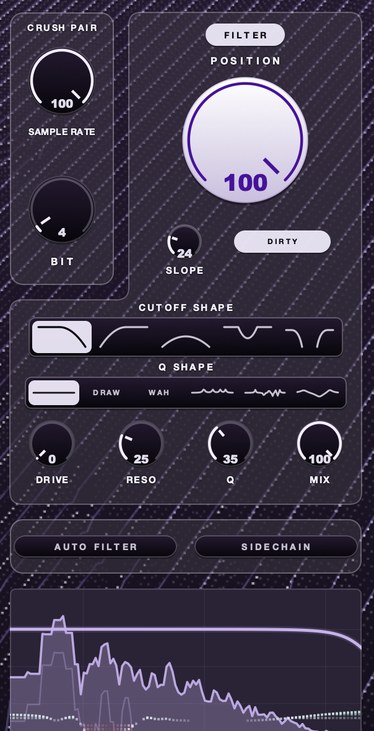
F(ilter)12's lo-fi section is the crush pair. SAMPLE RATE slows the rate the audio is sampled at, so the top goes and what was up there folds back down as new content. BIT coarsens the steps it's measured in, so quiet detail rounds off and what's left picks up a hard edge. Twelve bits is as clean as it gets. Behind the crush sits a filter with five shapes and six resonance shapes, and on top sits AURA, which helps it all sit better.
The consoles had no choice about the bits. You do, which is the whole fun.
F(ilter)12 — a 12 bit sauce filter for Mac and Windows: a lo-fi section, five filter shapes, six resonance shapes and AURA.
Mac · Winmore info
Keep reading
- What is aliasing in audio — What it is, what it sounds like, how to prevent it, and how to use it on purpose.
- How to make lofi drums — Soft hits, heavy swing, low-pass, a little crush, saturation and a dark room.
- Saturation vs distortion — Saturation, overdrive, distortion and fuzz: what changes, and which one you want.
- RC-20 Retro Color — The six modules in order, what Magnitude does, and where it differs from a filter.
- Telephone effect plugins — The band, the slope, the compression and the grit, plus free and paid options.
- Best 12 bit sampler plugins — What 12 bit really does, how to test one, and the free options worth trying.
- Best bitcrusher plugins — What bit and rate reduction do, how to audition one, free and paid picks.
- How to get the sound of an old sampler without buying one — The old sampler sound is a stack of specific limitations, and you can apply each one on purpose.
- What does 12 bit audio actually sound like — Each bit is about 6 dB, so 12 bits gives roughly 72 dB against 16 bit's 96. The audible result is a noise floor that only exists while the music plays, quantization that sits on the signal rather than under it, and tails that go grainy and stop early. Loud material hides all of it.
- Adaptive EQ — A static EQ decides once. An adaptive one keeps re-deciding.
- SP-404 plugin — Four effects and one habit. The habit is the part no plugin gives you.