← Gazillion Industries/Reading material
Oversampling
A setting buried in the corner of your distortion plugin, usually off by default, that costs CPU and latency and fixes a problem most people cannot name. It is worth knowing what it actually does before you turn it on everywhere.
Oversampling runs a process at a higher internal sample rate than your session, then converts back. It exists because distortion creates harmonics above the original frequencies, and any harmonic generated above half the sample rate cannot be represented: it folds back down into the audible range as content that has no musical relationship to what you played. Running the process at two, four or eight times the rate gives those harmonics somewhere to go, and they get filtered off before the audio returns to your session.
The short version
- Problem
- harmonics above half the sample rate fold back as harsh hash
- Fix
- process at a higher rate, then filter and come back down
- Where it matters
- distortion, saturation, clipping, limiting
- Where it does not
- EQ, delay, reverb, volume, panning
- Costs
- CPU, sometimes latency, occasionally a softer top end
- Rule
- on for anything nonlinear, especially on bright material
- Safe below
- roughly 1 kHz of source content, where nothing folds
- Worst case
- bright transients, hats, cymbals, sibilance, a hard clipper
What aliasing sounds like
This is the whole reason the feature exists. Harmonics are orderly: at two, three and four times the input frequency, they stay musically related to the note. Aliased content is not. It appears at frequencies determined by arithmetic rather than by music, it moves in the opposite direction when you play a higher note, and it sits in the mix as a metallic, gritty edge that gets worse the brighter the source.
On a bass line you may never hear it, because the harmonics stay low enough to be legal. On a bright hi-hat, a cymbal or a full mix, a hard clipper without oversampling will generate a great deal of it. What aliasing is covers the mechanism in detail.
Folded content is easier to recognize than to describe, and you can hear it without a distortion plugin involved at all. Sample rate reduction produces the same artifact by a different route. Here is a clean loop, then the same loop with the rate pulled down and nothing else touched. The second file is the sound oversampling exists to keep out of your distortion.
Both files come from F(ilter)12, where fold-back is the point rather than the problem. Listen for the ringing that sits above the loop and refuses to move with it.
The fold arithmetic, one tone at a time
Work it through with a single sine and the whole subject stops being mysterious. Take an 8 kHz tone in a 44.1 kHz session. Half the sample rate is 22,050 Hz, so that is the ceiling. Put the tone through any curve that bends and you get harmonics at 16,000, 24,000, 32,000, 40,000 Hz and upward. Only the second one is legal. Every harmonic above the ceiling reflects around the nearest whole multiple of 44,100 and reappears somewhere below it.
- 3rd, 24,000 Hz
- folds to 20,100 Hz
- 4th, 32,000 Hz
- folds to 12,100 Hz
- 5th, 40,000 Hz
- folds to 4,100 Hz
- 6th, 48,000 Hz
- folds to 3,900 Hz
- 7th, 56,000 Hz
- folds to 11,900 Hz
- 11th, 88,000 Hz
- folds to 200 Hz
Read the fifth and sixth rows again. Two adjacent harmonics of one tone land 200 Hz apart, at 4,100 and 3,900 Hz, in the middle of the range where a snare lives. The eleventh harmonic, more than four times higher than anything you can hear, arrives at 200 Hz, under the bass. Nothing in that list has a musical relationship to 8 kHz, which is why no amount of EQ will make it sound intentional.
Now move the note. Take the same tone up one semitone, to 8,475.7 Hz. The fifth harmonic goes up with it, from 40,000 to 42,378.5 Hz, and because it is reflecting downward off the 44,100 mirror its alias goes the other way: from 4,100 Hz to 1,721.5 Hz. You played a note 100 cents higher and one component of the result dropped 1,502 cents. That is the tell. A line that descends while you ascend is not a harmonic, and no distortion setting will make it behave.
How much of it there actually is
Numbers settle arguments. We ran an 8 kHz sine at 44.1 kHz through a soft curve (a hyperbolic tangent at a drive of four, normalized back to unity) and summed every bit of energy that is not the fundamental. At the session rate, with no oversampling, the folded content totals −7.2 dB relative to the tone that produced it. That is not a subtle artifact. That is a second instrument.
- No oversampling
- −7.2 dB of folded energy
- Two times
- −28.2 dB
- Four times
- −68.3 dB
- Eight times
- −111 dB, which is the measurement floor
- Sixteen times
- −111 dB, identical, no further gain
The first doubling buys 21 dB. The second buys another 40. The third buys nothing you will ever hear, because by then the folded partials are quieter than the filter that removes them. For a smooth curve on a bright source, four times is where the useful part of the curve ends, and that is the whole argument for four as a default.
Swap the curve for a hard clipper at the same drive and the shape changes completely. Hard corners generate harmonics that fall off far more slowly, so there is much more of them up there to fold: −5.8 dB with no oversampling, −24.4 dB at two times, −38.0 dB at four, −47.9 dB at eight and −68.7 dB at sixteen. Every doubling keeps paying. That is why hard clippers advertise sixteen times and gentle saturators do not bother, and it is a better reason to choose a setting than the size of the number.
The reason is in the harmonic rolloff. Measured on the same soft curve at a drive of four, the third harmonic sits 11.9 dB under the fundamental, the fifth 18.9 dB under, the seventh 25.6 dB, the ninth 32.8 dB and the thirteenth 45.7 dB. Back the drive down to two and the same series reads 16.1, 28.4, 40.8 and 53.8 dB; push it to eight and it flattens to 10.6, 15.4, 19.4 and 23.6 dB. Drive decides how much material there is to fold. Gain staging is the aliasing control you already have.
Why a kick is safe and a hi-hat is not
Divide the ceiling by the harmonic number and you get the answer in one line. At 44.1 kHz, every harmonic up to the fifth stays legal as long as the source is below 4,410 Hz. Up to the seventh, below 3,150 Hz. Up to the thirteenth, below 1,696 Hz. Up to the twenty-first, below 1,050 Hz. A 55 Hz sub can produce four hundred legal harmonics before it runs out of room.
Running the same soft curve on different source frequencies gives the measured version of that. A 110 Hz tone produces no measurable folded energy at all. Nor does 1 kHz. At 3 kHz it appears at −27.6 dB. At 6 kHz, −14.8 dB. At 8 kHz, −7.2 dB. At 12 kHz it has stopped getting worse only because there is nothing left that is not folded.
- 110 Hz source
- nothing measurable, at any oversampling setting
- 1 kHz source
- nothing measurable
- 3 kHz source
- −27.6 dB, falling to −107 dB at four times
- 6 kHz source
- −14.8 dB, falling to −88 dB
- 8 kHz source
- −7.2 dB, falling to −68 dB
- 12 kHz source
- −7.3 dB, falling to −46 dB
The crossover sits somewhere between 1 and 3 kHz for this curve, which maps onto session work almost exactly. Kicks, subs, bass guitars and low toms: leave it off and spend the CPU elsewhere. Snares and claps: borderline, and worth a listen. Hats, rides, shakers, vocal sibilance, bright synth leads and anything you are calling a full mix: turn it on. Distorting an 808 is the one job where the setting genuinely does not matter much.
When to turn it on
- Any distortion, saturation, clipper or limiter: yes, if the material is bright.
- On a mix bus or master: yes, because everything bright in the record is passing through.
- On a bass or a kick alone: usually unnecessary; the harmonics are low enough to survive.
- While writing: leave it off to save CPU, then turn it on before you bounce, if the plugin offers a separate render setting.
- Four times is a sensible default. Sixteen times is rarely worth the CPU it costs.
- On a hard clipper doing serious work, go past four; the measurements above keep improving all the way to sixteen.
- On anything you are tracking through in real time, leave it off until you are done performing.
BEEFY is our saturation and loudness effect: three knobs, two output stages, $39 for Mac and Windows. What any plugin does with sample rates inside itself is an implementation detail we do not publish either way, so treat it the way you would treat any nonlinear process. If the source is very bright, feed it less.
Test your own plugin in one pass
You do not have to take a manufacturer's word for any of this. The test takes ten minutes and it works on every plugin you own.
- Set the session to 44.1 kHz.
- Generate a sine at 8 kHz and hold it at −6 dBFS.
- Put the plugin on the channel and drive it until it is obviously distorting.
- Put a spectrum analyzer after it, set to a long average and a 90 dB range.
- Read the peaks. Content at 16,000 Hz is a real harmonic. Content at 20,100, 12,100, 4,100 or 3,900 Hz is folded.
- Turn oversampling on and watch which peaks disappear.
The sweep version is faster to read and harder to argue with. Replace the fixed sine with a slow sine sweep from 1 kHz to 14 kHz over thirty seconds and watch a spectrogram instead of an analyzer. Real harmonics climb in parallel lines. Folded partials come down to meet them and cross, which draws a lattice nobody mistakes for anything else. Turn oversampling on and the descending lines go away while the ascending ones stay.
For a number rather than a picture, bounce the sweep twice: once at 44.1 kHz, once in a session at 176.4 kHz sample-rate-converted back down afterward. Flip the polarity of one and sum them. What is left is the aliasing, and your meter will tell you how loud it is against the program.
Where it belongs in the chain
Oversampling is a per-process decision, not a per-track one. An EQ, a delay, a reverb, a fader and a pan pot are all linear: they move energy that is already there and create no new frequencies, so there is nothing to fold and nothing to fix. Put a multiband compressor or a dynamic EQ in the chain, though, and you have a process whose gain changes with the signal, which makes it nonlinear in the way that matters.
Order matters more than most people expect. A high shelf lifting 4 dB at 10 kHz before a clipper feeds the clipper exactly the material that folds worst, and the same shelf after the clipper does not. If you are going to brighten and clip in the same chain, brighten after. The clipper before limiter question interacts with this too: two nonlinear stages in series each generate their own folded content, and the second one folds the first one's output as well.
One distinction worth holding onto: true-peak detection in a limiter also uses oversampling, and it is a different job. There the extra samples are calculated so the meter can see between the real ones, not so a curve can bend somewhere quieter. True peak covers that side. A limiter can have accurate true-peak detection and still alias, and it can oversample its processing and still report sample peaks only.
Raising the session rate instead
There is a blunter fix. Run the whole session at 96 kHz and the ceiling moves from 22,050 Hz to 48,000 Hz for every plugin at once, with no per-plugin switch to remember. For an 8 kHz source the third harmonic at 24 kHz and the fifth at 40 kHz both become legal, and the folding starts at the seventh instead of the third.
It costs more than people admit. At 24-bit stereo, 44.1 kHz runs 15.88 MB a minute, 48 kHz runs 17.28 MB, and 96 kHz runs 34.56 MB. Every plugin in the session does twice the work whether it needs to or not, including the fifty that are linear and gain nothing. And you still have to convert to 44.1 or 48 kHz at the end, which is one more filter pass with its own sound. Oversampling inside the two or three plugins that actually distort is the cheaper version of the same idea, which is why it won.
Going from 44.1 to 48 kHz, for the record, buys you 1,950 Hz of extra headroom above the old ceiling. That is 8.8 percent more room for harmonics, and it fixes nothing.
What it sounds like when it goes wrong
Each failure has a signature, and knowing them saves you from chasing an EQ move that cannot work.
- Folded content on hats and cymbals. A metallic sheen sitting over the kit that does not change when the pattern changes. Solo the hats, play them an octave up in the sampler, and listen for the ring going down while the pitch goes up.
- Folded content on a bright vocal. Sibilance that has gone grainy and slightly out of tune with itself. De-essing before the distortion helps more than de-essing after it, because after it the artifact is already in the file at its full level.
- Folded content on a full mix. The record gets harder to listen to at volume without any single element sounding wrong. Harshness that survives every EQ cut is usually this.
- An over-soft top after switching it on. The filter that brings the rate back down has to roll off before the ceiling, and a cheap one starts around 20 kHz. Some people hear this as air being lost. If a plugin sounds duller with oversampling on and the material is not bright enough to be folding, believe your ears and leave it off.
- Pre-ringing on transients. Linear-phase conversion filters smear a little energy ahead of a sharp hit. On a naked kick at high oversampling it can read as a tick before the attack. A plugin offering a minimum-phase option is offering you a way out of it.
- Crackles that were not there yesterday. Four times oversampling on twenty instances is eighty instances' worth of work. That is a CPU problem wearing an audio costume; raise the buffer or freeze the tracks.
Where the switch hides
Third-party plugins usually put it on the panel or behind a gear icon, labeled OS, HQ or Quality, with a multiplier next to it. Some split it: a lower setting while you work, a higher one applied only when you bounce. If your plugin has that, use it, because it is the only arrangement that gives you both a responsive session and a clean render.
A DAW's own devices are less obvious. In Ableton Live the setting is not on the device at all: Saturator and Pedal both carry a Hi-Quality mode in the right-click context menu, described in Live's manual as reducing aliasing and improving quality on high-frequency signals for a small increase in CPU. Saturator has a Pre-DC Filter in the same menu, and Wavetable has its own Hi-Quality mode. If you have been using those devices on hats for years and never right-clicked them, that is worth five minutes today.
Where no such control exists anywhere, the session rate is your only lever, and feeding the process less is your only other one.
Where it costs you
CPU first, and the cost scales: four times oversampling is roughly four times the work for that plugin. Latency second, because the filters used to convert up and down introduce delay, which your DAW compensates for but which adds up across a session and makes live monitoring harder.
Put real numbers on the latency. One sample at 44.1 kHz is 22.68 microseconds, so a plugin reporting 64 samples of extra delay has added 1.45 milliseconds, and one reporting 512 samples has added 11.6 milliseconds. At 48 kHz a sample is 20.83 microseconds and 64 samples come to 1.33 milliseconds. One instance is nothing. Four in series on the channel you are singing into is most of a slapback, and delay compensation cannot help you, because the sound has to reach your ears before it can be compensated for.
The CPU arithmetic is worth stating plainly too, because four times is not merely four times. The curve runs on four times as many samples, and on top of that there is an upsampling filter and a downsampling filter that were not running before. A plugin that took one percent of a core can land nearer five.
There is also a quieter cost. The filters are not free acoustically: some implementations soften the very top end slightly, and a few people prefer the sound of a particular plugin without oversampling for exactly that reason. That is a legitimate taste, not an error, as long as you know that what you are enjoying includes a little aliasing.
The phone check
Fold-back lands where you can least afford it. Two of the partials in the worked example above arrive at 3,900 and 4,100 Hz, and that is the region where human hearing is at its most sensitive and where a phone speaker is at its most efficient, since it has almost no low end to spend energy on. Fletcher-Munson explains the first half of that.
So bounce the loop, send it to your phone, and play it out of the built-in speaker at arm's length. On monitors the folded content hides under the bass you can hear and the phone cannot. On the phone there is nothing else down there, and a metallic ring you had been filing under "bright" becomes the loudest thing in the room. Phone speakers covers what else that test tells you.
Questions people ask
Should oversampling be on or off?
On for anything that distorts, particularly on bright material and on the mix bus. Off is fine for EQ, delay and reverb, which do not create new harmonics, and off is a reasonable working setting while you are still arranging.
What is the purpose of oversampling?
To give harmonics generated by a nonlinear process somewhere to exist above the audible range, so they can be filtered away instead of folding back down into the mix as aliasing.
Does oversampling improve sound quality?
It removes a specific artifact. If that artifact was not audible in your material, you will hear no improvement and will have spent the CPU for nothing.
How much oversampling do I need?
Two or four times covers almost everything. Higher settings produce diminishing returns and substantial CPU cost, and they will not rescue a process that is being driven far too hard in the first place.
Is 2x oversampling enough?
For a gentle curve, often. In the measurement above, two times took the folded energy from −7.2 dB to −28.2 dB, and four times took it to −68.3 dB. Two is a large improvement over none. For a hard clipper it is not enough, because that curve is still producing strong harmonics well above the new ceiling.
Does oversampling add latency?
Usually, yes, because the conversion filters delay the signal. Your DAW's delay compensation keeps everything lined up on playback, so the only place you feel it is when you are monitoring a live input through the plugin. At 44.1 kHz, 64 samples of reported latency is 1.45 milliseconds.
Does oversampling use a lot of CPU?
Four times oversampling runs the process on four times as many samples and adds two filters on top, so budget for four to five times the original load on that plugin. It is the single most expensive checkbox in most distortion plugins.
Should I oversample my limiter?
Yes on the final one, because a limiter clamping peaks is a nonlinear process and it is running on the brightest, densest version of your record. Check separately whether the meter is reading true peak, which is a different use of the same technique. Using a limiter has the rest.
Does oversampling make my mix louder?
No. It changes what the distortion produces, not how much level comes out. If the master got louder when you switched it on, the plugin is compensating its output somewhere and you should match levels before judging.
Why does my plugin sound different with oversampling on?
Three possible reasons. The folded content you had grown used to is gone. The conversion filter is rolling off the top a little. Or the change in internal rate has shifted a frequency-dependent part of the design, such as a filter inside the distortion stage. Match levels and A/B on a bright source to work out which.
Do I need oversampling if I work at 96 kHz?
Less of it. A 96 kHz session already gives you a 48,000 Hz ceiling, which is roughly what two times oversampling buys at 48 kHz. Hard clipping bright material can still fold, and the final conversion down to 44.1 or 48 kHz will not undo anything that has already folded.
Does oversampling matter for EQ?
Not for a normal one. A static filter creates no new frequencies. A dynamic EQ, a multiband process or any EQ with saturation built into its bands is nonlinear, and those can benefit.
Can you actually hear aliasing?
On a kick or a bass, usually not. On hats, cymbals, sibilance or a loud master, yes, as a metallic ring that does not track the pitch of what made it. Play the part an octave higher and listen for a component moving the wrong way.
What is the difference between oversampling and upsampling?
Upsampling raises the rate of the audio and leaves it there. Oversampling raises the rate, runs a process, and brings it back to where it started, so the file you end up with has the same rate it went in with.
Does oversampling fix intersample peaks?
Only if the plugin uses it for detection as well as for processing. Those are separate choices, and a plugin can make one and not the other. True peak explains the difference.
Why do some plugins have no oversampling option?
Some run it all the time and do not offer a switch. Some are linear and have nothing to gain from it. And some leave it out. The sine test above tells you which one you are holding in about ten minutes, and it is more reliable than a feature list.
What BEEFY does
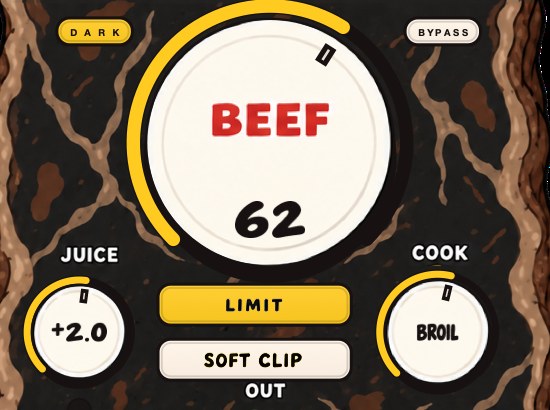
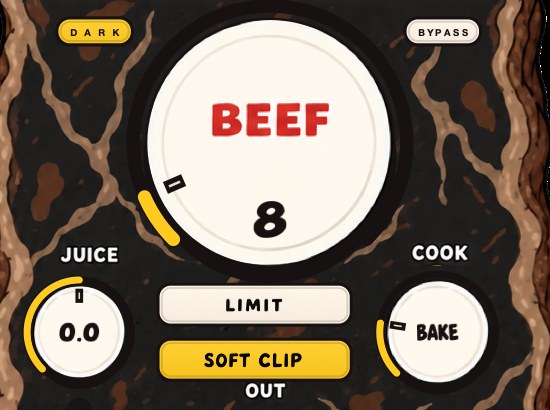
BEEFY is a saturation and loudness effect for making sounds thicker, punchier and more up front. It adds body, squeezes some space out of the peaks, and brings out harmonics that help a sound feel bigger. BEEF brings weight, density and attitude; COOK changes the color and bite from a rounder feel toward a brighter, more cooked edge; JUICE sets the level going in, which is the control that matters most here: feeding a very bright source more gently is the oldest way of managing what a nonlinear process does with it.
A new instance opens with SOFT CLIP on, JUICE at 0 dB, BEEF at 30 and COOK at 30, and LIMIT is the alternative out stage when you want the peaks held rather than rounded. Mapped onto everything above: JUICE is the drive number in the harmonic tables, and turning it down is the move that shrinks the series before anything else in the chain gets a chance to fold it. It runs on Mac and Windows as AU, VST3 and standalone, and it costs $39. Soft clipping and harmonic distortion cover the curve itself.
A setting in the corner that costs CPU and buys you the absence of something. Worth it more often than not.
BEEFY — saturation and loudness plugin for Mac and Windows. There is a 28-second demo with three without/with comparisons on the page.
Keep reading
- What is aliasing in audio — What it is, what it sounds like, how to prevent it, and how to use it on purpose.
- Harmonic distortion — Where even and odd harmonics come from, and why they make things louder.
- What is clipping in audio? — Hard versus soft, why it works on transients, and where it does damage.
- Best soft clipper plugins — Soft against hard, where a clipper belongs, and the free and paid ones worth demoing.