← Gazillion Industries/Reading material
What is clipping in audio?
Every meter in your session is there to warn you about it, every guide tells you to avoid it, and half the records you love were made by doing it on purpose. Clipping is worth understanding rather than fearing.
Clipping happens when a signal goes past the highest level a system can represent, so the tops of the waveform get flattened off. In digital audio the ceiling is absolute: nothing above full scale exists, so anything louder is simply cut flat, which generates harsh harmonics. Done accidentally it sounds broken. Done deliberately, in small amounts and with a rounded curve rather than a flat one, it is the most efficient loudness tool there is.
The short version
- What
- the waveform's peaks flattened at a ceiling
- Hard clipping
- a sharp corner: harsh, odd harmonics
- Soft clipping
- a rounded curve: gentler, and usable musically
- Why it makes things loud
- it lowers peaks without lowering average
- Where it hurts
- sustained tones, bright cymbals, full mixes
- Where it works
- short transients: kicks, snares, drum busses
- How much it touches
- 18 samples out of 235,200 at 3 dB in, measured below
- What 3 dB in returns
- 2.99 dB of level; a limiter at the same drive returned 1.77 dB
- What it charges
- 2.09 dB off the snare's crack, on the hits it reaches
What is actually happening
A waveform is a curve moving between a maximum and a minimum. Turn it up enough and the parts that would go past the system's limit cannot, so they sit at the limit instead. The rounded peak becomes a flat plateau, and that change of shape is new harmonic content: the sharper the corner, the more harmonics and the higher they reach.
Hard clipping puts a right angle in the waveform and generates a long series of harmonics, weighted toward the odd ones, extending far up the spectrum. Soft clipping rounds the corner instead, so fewer harmonics are produced and they fall away faster. That is the entire difference between the two, and it is why one is a fault and the other is a plugin.
How much of the waveform actually changes
Less than the word suggests. A clipper alters only the samples that are over the line, and on drum material there are hardly any of them. Do the geometry on a sine first, because a sine is the worst case: it loiters near its own peak, so a little drive flattens a lot of the cycle.
Drive a sine until its peak sits 1 dB above the ceiling. The clip angle is arcsin(10−1/20) = arcsin(0.8913) = 63.0°, so the flat part spans 180 − 2 × 63.0 = 53.9° of each half cycle. That is 30 percent of the period — two flat stretches of 0.150 ms in every millisecond at 1 kHz. At 3 dB in the angle is 45.1° and the flat part is 89.9°. Three decibels, and half the cycle is a horizontal line.
Drums behave nothing like that, because their peaks are spikes rather than plateaus. The loop used for the measurements on this page is two bars at 90 BPM: a 55 Hz kick with a 90 ms decay constant and a 3 ms click, a snare of noise plus a 190 Hz body, eighth-note hats made of noise between 4 kHz and 18 kHz, the whole thing band-limited at 18 kHz and normalized so the loudest sample sits at exactly 0 dBFS. That is 235,200 samples, 5.333 seconds, RMS −23.92 dBFS, crest factor 23.92 dB. Hard clip it and count what moved.
- +1 dB in
- 3 samples altered — 0.001% of the file, 0.1 ms, longest flat run 1 sample
- +3 dB in
- 18 samples — 0.008%, 0.4 ms, longest flat run 2 samples (0.045 ms)
- +6 dB in
- 204 samples — 0.087%, 4.6 ms, longest flat run 3 samples (0.068 ms)
- +12 dB in
- 3,312 samples — 1.408%, 75.1 ms, longest flat run 38 samples (0.862 ms)
The plateau drawn in every diagram is honest at 12 dB in. At the depths people actually use, it is one sample here and two samples there, 22.7 microseconds each, scattered across a handful of hits. That is the whole of the operation, and it is why a clipper can be almost inaudible while doing something a fader cannot.
Counting the harmonics
Harmonic content is the price, so it is worth knowing the invoice. A 1 kHz sine, hard clipped at various drives, evaluated at thirty-two times the sample rate so that nothing folds back and contaminates the reading. Harmonic levels are relative to the fundamental.
- +0.5 dB in
- THD 2.19% — 3rd at −36.7 dB, 15th at −60.4
- +1 dB
- THD 4.63% — 3rd at −28.7, 15th at −55.5
- +3 dB
- THD 13.38% — 3rd at −17.8, 15th at −48.8
- +6 dB
- THD 23.24% — 3rd at −12.9, 15th at −41.9
- +12 dB
- THD 35.37% — 3rd at −10.3, 15th at −39.6
Two things fall out of that. The first is that the series is odd only: the second harmonic measured −316 dB, which is the arithmetic floor of the calculation rather than a real number, because a symmetrical curve applied to a symmetrical waveform cannot make even harmonics. Asymmetry is what makes those, which is a different flavor and a separate subject — harmonic distortion covers both.
The second is that the fundamental hardly moves. Driving that sine 1 dB past the ceiling raised its fundamental by 0.62 dB; 3 dB raised it 1.27; 6 dB raised it 1.71; 12 dB raised it 2.01. The limit is a square wave, whose fundamental is 4 / π times its own peak, or 20 log₁₀(1.2732) = 2.10 dB. Everything past about 12 dB in buys no level at all on a steady tone. You have stopped making it louder and started manufacturing harmonics.
Hard against rounded, measured
Round the corner and the far end of the series collapses. Same 1 kHz sine, same drives, the corner replaced by a rounded curve of the kind a soft clipper uses, measured the same way.
- +0.5 dB, corner
- 3rd −36.7, 5th −38.4, 9th −45.2, 15th −60.4
- +0.5 dB, rounded
- 3rd −22.7, 5th −43.5, 9th −84.7, 15th −146.4
- +6 dB, corner
- 3rd −12.9, 5th −27.0, 9th −32.9, 15th −41.9
- +6 dB, rounded
- 3rd −15.5, 5th −28.3, 9th −53.5, 15th −91.2
At 6 dB in the two curves are within three decibels of each other at the third harmonic and forty-nine decibels apart at the fifteenth. That gap is the whole argument. Low-order harmonics land close to the note and read as weight and color; high-order harmonics land in the region where the ear is most sensitive and the sample rate is least forgiving, and they read as grit and glass.
The rounded curve does charge you something at light settings, and the table says so plainly: at 0.5 dB in it measured 7.35 percent THD against the corner's 2.19 percent. A rounded curve bends the entire waveform, including the parts nowhere near the ceiling, while a hard clipper leaves everything under the line exactly as it found it. More total distortion, parked in the harmonics that flatter the source. Soft clipping explained goes further into the curve itself.
Why anyone does it deliberately
Because of the arithmetic. The loudness of a record is set by its average level, but its ceiling is set by its peaks, and on drum-led music the peaks are enormously higher than the average. A snare might be 15 dB above everything around it and occupy only a few milliseconds. Shave the top off that spike and you have lowered the peak substantially while barely touching the average, which means you can turn the whole record up.
A limiter does the same job by turning things down and back up over time, which pumps. A clipper does it by reshaping a handful of samples, which does not. On transient material, clipping is simply more efficient. See crest factor for the measurement and clipper before limiter for the running order.
What a decibel of clipping buys, measured
The efficiency claim is testable, so here it is tested. Same loop, driven by the same amount into two different devices, each result renormalized so its sample peak sits at exactly 0 dBFS again. The limiter was a plain peak limiter: 1.5 ms lookahead, 1 ms attack, 50 ms release. The column is how much louder the whole loop came back.
- +0.5 dB in
- clipper +0.50 dB — limiter +0.35 dB
- +1 dB
- clipper +1.00 — limiter +0.71
- +2 dB
- clipper +2.00 — limiter +1.34
- +3 dB
- clipper +2.99 — limiter +1.77
- +6 dB
- clipper +5.91 — limiter +3.12
At 3 dB in the clipper handed back 2.99 of the 3 dB it was given. The limiter handed back 1.77, which is 59 percent of it. The reason is in the release time: the limiter pulls gain down before each hit and lets it back up over the following 50 ms, so everything living in that window comes down with the transient. The clipper never touches the window. It alters 18 samples and leaves the other 235,182 exactly where they were.
Crest factor tells the same story from the other side. The loop started at 23.92 dB between peak and average; after 3 dB of clipping it read 20.93 dB, and after 6 it read 18.01. Crest factor is the number that decides how loud a master can be, and clipping is the cheapest way to move it.
What it charges the snare
There is no free version of this, and the bill arrives on the transient. Take the snare on beat two of that loop and compare its peak with the RMS of its own body, measured from 50 ms after the hit. Untouched, that ratio is 26.55 dB. Then clip the loop and renormalize as before.
- Untouched
- 26.55 dB of crack over body
- +1 dB in
- 26.45 dB — 0.09 dB lost
- +3 dB
- 24.45 dB — 2.09 dB lost
- +6 dB
- 21.45 dB — 5.09 dB lost
- +12 dB
- 15.50 dB — 11.04 dB lost
The pattern is exact rather than approximate. Once a hit's peak is above the line it is pinned there while everything under it rises, so almost every decibel of loudness comes straight off that hit's crack. At 1 dB in this snare was still mostly below the line and lost almost nothing; by 6 dB it was paying full price. Between those two numbers is where the decisions live. See what is a transient for the part being spent.
Where the harshness comes from: folding
Clipping makes harmonics above the sample rate's ceiling, and they do not vanish. At 44.1 kHz nothing above 22,050 Hz can exist, so anything generated above it folds back down and arrives as content at the wrong frequency. Since clipping makes odd harmonics, the third harmonic of any source above 22,050 / 3 = 7,350 Hz is already over the edge. Hats and cymbals live entirely above that line, which is the reason they are the first thing to turn nasty.
Here is a 5 kHz sine hard clipped 6 dB in at 44.1 kHz, with each harmonic's real frequency and where it landed.
- 3rd
- 15,000 Hz, stays at 15,000 — −12.9 dB
- 5th
- 25,000 Hz, folds to 19,100 — −27.0 dB
- 7th
- 35,000 Hz, folds to 9,100 — −35.7 dB
- 9th
- 45,000 Hz, folds to 900 — −32.9 dB
- 11th
- 55,000 Hz, folds to 10,900 — −41.9 dB
- All folded content together
- 25.2 dB below the fundamental
Look at the ninth. A harmonic of a 5 kHz sound arriving at 900 Hz, more than two octaves below its own source, bearing no musical relationship to anything in the track. That is what people are hearing when they say a clipped hat sounds out of tune rather than merely bright. Run the identical clip at eight times the rate and filter back down, and the folded content measured 61.1 dB below the fundamental instead of 25.2 — a difference of 35.9 dB for the same amount of clipping. Oversampling and aliasing cover the mechanism in full.
What clipping a full mix does to everything else
A clipper on the master applies to the sum, so a loud drum modulates every quiet thing underneath it. Put a steady 1 kHz tone at −12 dBFS under a 55 Hz kick that peaks at 0, sum them, and clip. Sidebands appear around the tone at multiples of 55 Hz, because the kick's envelope is now printed onto it.
- +1 dB in
- sidebands at 1 kHz ±110 Hz sit 67.8 dB below the tone
- +3 dB
- 48.1 dB below
- +6 dB
- 37.5 dB below
Two more decibels of drive raised those sidebands by nearly twenty. That is the mechanism behind the complaint that a vocal went hard and grainy only after the master clipper went on, when nothing was done to the vocal. The vocal was collateral.
Density changes the arithmetic too. Adding a sustained bass and a four-note pad to the same loop took its crest factor from 23.92 dB to 12.79 dB, and at 6 dB in the clipper altered 5,825 samples, 2.477 percent of the file, against 204 samples for the drums alone. The level returned was almost identical, +5.87 dB against +5.91. What changed by a factor of twenty-eight is how much of the record got touched to get it.
How to use it without wrecking things
- Clip individual elements before you clip a bus, and a bus before a master.
- Start on drums. Short transients hide the harmonics; sustained tones do not.
- A decibel or two of peak reduction is a lot. Check by watching the peak meter, not by ear alone.
- Listen to the cymbals and hats. They are where clipping shows up first.
- If the clipper offers oversampling, use it, so the new harmonics do not fold back down as harsh, out-of-tune content.
- Level-match before deciding. Clipping makes things louder, and louder always wins a quick comparison.
- Put the clipper before the limiter, never after it.
- Read true peak as a separate number. Flattening the tops lowers sample peak and can raise true peak at the same time.
- Stop where the count starts climbing. On the loop above, going from 3 dB to 6 dB took the altered samples from 18 to 204 and doubled the harmonic content for three more decibels.
Where clipping sits in a chain
Order changes the result more than the settings do. A clipper wants to see the peak it is meant to remove, so anything that moves peaks belongs upstream of it and anything that reacts to level belongs downstream. That puts it after the transient shaping and the element compression, and before the limiter, which should be left with almost nothing to catch.
Two interactions catch people out. EQ after a clipper reshapes the harmonics it just made, so a high shelf added later is boosting distortion as much as source. EQ before a clipper decides which element is tallest, so a 3 dB boost at 8 kHz on the hats can hand the clipper a completely different peak to work on, one whose third harmonic is above 22,050 Hz and folds. If the top end turns harsh after clipping, look at the EQ in front of it before you blame the clipper. Gain staging and how to use a limiter cover the stages on either side.
Check it in your own session
None of this needs specialist metering. It needs a duplicate track and eight bars.
- Bounce eight bars of your drum bus with nothing on the master.
- Import the bounce twice, on two tracks.
- Put a clipper on one copy and drive it 3 dB in.
- Match the two by peak level, not by feel.
- Flip the polarity of one track and play both. What is left is only what the clipper added.
- Listen to that residue on its own. It should be short bursts on the loudest hits and silence in between.
- If the residue plays continuously, or has pitch in it, back the drive off until it does not.
- Zoom the clipped file to sample level on one snare and count the flat samples.
- Read true peak on both files before you decide anything.
The residue test is the one worth keeping. It separates the question of whether clipping is working from the question of whether it is louder, and those two get confused constantly.
What each failure sounds like
Five things go wrong, and they sound nothing alike, so learning to tell them apart saves an hour of moving the wrong control.
- Too deep on drums
- the kit gets closer and smaller at once; the snare loses its snap and the room noise comes up. Measured: 5.09 dB of crack gone at 6 dB in
- Folding
- a fixed, fizzy buzz on hats that does not follow the pitch of anything; it sits still while the music moves
- Sustained material clipped
- a hard, reedy edge that tracks the note, worst on bass, organ, and held vocals
- Whole mix clipped
- quiet elements grain up in time with the kick; the vocal sounds fine solo and rough in the mix
- Converter or fixed-point clipping
- short cracks and tearing on the loudest hits, the same every play, and no amount of turning down fixes the file
Where the ceiling actually is in your DAW
Inside a modern mixer, going over 0 dBFS does no damage at all. The engine works in 32-bit floating point, whose largest value is about 3.4 × 1038. That is 20 log₁₀(3.4 × 1038) = 771 dB above full scale. A signal at +20 dBFS between two plugins is intact. Pull the fader down afterward and it comes back exactly.
The ceiling becomes real at three places, and only three. The first is a fixed-point file: a 16-bit sample cannot exceed its range, and each bit is worth 20 log₁₀(2) = 6.02 dB, giving 6.02 × 16 = 96.3 dB between full scale and the smallest step, with nothing above the top. The second is the converter feeding your speakers, which has a fixed voltage it can produce. The third is any plugin that clamps its own output on the way out.
The practical consequence is one line in your export dialog. Render at 32-bit float and an over is recoverable later; render at 16 or 24 bits and the tops are cut at the moment the file is written. The test takes a minute in any DAW: put a gain plugin at +12 dB and another at −12 dB on the same channel, bounce, and null it against the original. In a floating point engine it cancels to silence. See headroom in mixing for how much to leave and dithering for what happens at the other end of the word length.
Where it costs you
Transients first. Clipping works by removing the top of the spike, and the spike is what makes a snare crack, so past a certain point the drums get flat and lifeless. Bright material suffers next: harmonics generated above the audible range fold back down as inharmonic hash unless the plugin oversamples. And on full mixes, clipping applies to everything sounding at that instant, so the kick's peaks distort the vocal riding over them.
Accidental clipping, at a converter or a fixed-point stage, is a different matter and has no upside. That is what the red lights are for.
Questions people ask
How do I know if my audio is clipping?
The clip indicator on the channel or master will light, and the waveform will show flat tops where the peaks should be curved. On a bounced file, a true-peak meter will show it even when the sample values look legal.
How do I avoid clipping?
Leave headroom while mixing, keep the master bus free of anything pushing into the ceiling, and deal with the loudest transients deliberately rather than letting them hit the limit by accident.
How do you fix clipping in a recording?
You cannot restore what was never recorded: the flattened peaks are gone. Declipping software can estimate the missing curve and will sound better than nothing on mild cases. Re-record it if you can.
Is clipping always bad?
No. Accidental clipping at a converter is a fault. Deliberate soft clipping in small amounts on transient material is standard practice in almost every loud record made this century.
What does clipping sound like?
On drums, at small amounts, it mostly sounds like more level. Past that it sounds like the hits getting shorter and the space between them getting louder. On sustained material it is a hard reedy edge that follows the note, and on cymbals it is a fizz that stays at one pitch while the music moves around it.
How many dB of clipping is safe?
On the drum loop measured above, 1 dB of drive altered three samples and cost 0.09 dB of snare crack, and 3 dB altered eighteen samples and cost 2.09 dB. Those are the two ends of the usable range on transient material. On a full mix the same drive touches far more of the file, so it is worth measuring rather than assuming.
Is clipping better than limiting?
On short transients it is more efficient, measurably: at 3 dB of drive the clipper returned 2.99 dB of level and the limiter returned 1.77 dB. On sustained or dense material that advantage shrinks and the damage spreads, which is why the usual arrangement is a clipper taking the spikes and a limiter catching what is left.
What is the difference between clipping and distortion?
Clipping is one kind of distortion, the kind produced by a transfer curve that flattens above a level. Saturation is the broader family, generally with a rounded curve and often frequency dependent. See saturation versus distortion.
Does clipping cause aliasing?
Yes, unless the plugin runs at a higher internal rate. Clipping makes harmonics far above the source, and at 44.1 kHz anything above 22,050 Hz folds back down. In the measurement above, a 5 kHz sine clipped 6 dB in produced folded content 25.2 dB below the fundamental, including a component at 900 Hz.
Can you clip below 0 dBFS?
Yes. A clipper's ceiling is wherever it is set, and a clipper set to −3 dBFS behaves exactly like one at 0 with the whole signal 3 dB hotter. Full scale matters only at the converter and in fixed-point files.
Why does my mix only clip after exporting?
Because the mixer is floating point and the file is usually not. Levels over the ceiling survive inside the session and get cut when they are written to a 16- or 24-bit file. Lossy encoding can push a legal file over as well, which is a true-peak problem rather than a sample peak one — true peak covers it.
Does 32-bit float mean I can never clip?
It means the mixer and the file will not clip. The converter still will, and so will any plugin that clamps its own output. Floating point moves the problem to the ends of the chain rather than removing it.
Should I clip the drum bus or the master?
The bus, first and by a wide margin. On the drum bus the clipper touches only drum transients; on the master it touches every element sounding at that instant, which is how a kick ends up putting sidebands on a vocal. Measured above: 3 dB into a mix put intermodulation products 48.1 dB below a tone that had nothing done to it.
Why do my hats sound harsh after clipping?
Their third harmonic is above the sample rate's ceiling. Anything above 7,350 Hz has its third harmonic past 22,050 at 44.1 kHz, so hats generate folded content immediately. Clip the hats separately with oversampling, clip the kit before the hats go in, or roll the top off what you send to the clipper.
Does clipping make a track louder on streaming?
It raises average level against a fixed peak, which is the thing that lets a master be turned up before it hits its ceiling. Services that normalize by loudness will turn the result back down, so what survives the round trip is density and harmonic content rather than volume. See how loud should my master be.
What BEEFY does
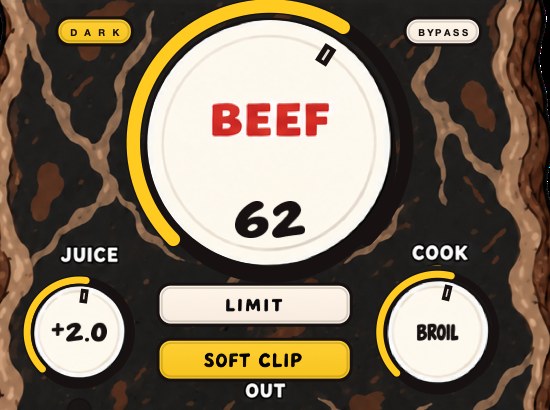
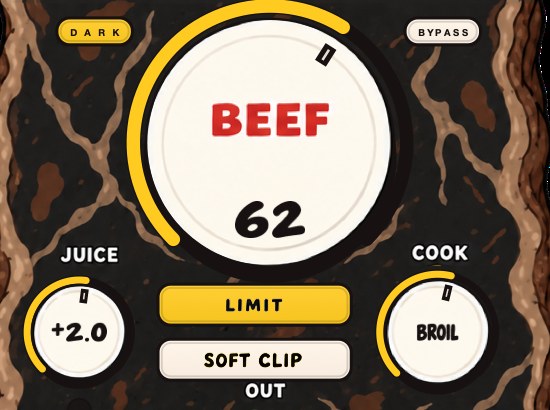
BEEFY is our saturation and loudness effect. SOFT CLIP opens switched on and brings rounded, fuzzy edges to the loudest parts, adding harmonics above the low end so there is more to hear than just sub. LIMIT is the other choice when you want the output peaks held in check instead, and the two are separate decisions you can both turn off. BEEF brings weight and density, COOK changes the color and bite, and JUICE sets the level going in. Input and output clip lights watch both ends.
For the job on this page it goes on the element or the bus making the peak, which on a kit is usually the snare and the hats rather than the kick. SOFT CLIP opens switched on because it handles the initial gain staging, so the clipping finds the sound without you hunting for a magic input level, and you can still add BEEF on top. COOK is the control to watch here, because brighter is the direction that puts more energy into the range this page has been measuring, so if the residue test starts buzzing, COOK is the first thing to pull back.
Run the residue test on it the way this page describes. Two copies of the same bounce, one through BEEFY, matched by peak, one polarity flipped, and listen to what is left. Short bursts on the hits means the harmonics are landing where they should. It is $39, one payment, Mac and Windows, with AU, VST3 and a Mac standalone. The panel resizes and remembers its size, it opens at 80 percent, and the cow reacts to the audio, which is not a metering feature and is not going anywhere.
The thing every meter warns you about, used on purpose, two decibels at a time.
BEEFY — saturation and loudness plugin for Mac and Windows. There is a 28-second demo with three without/with comparisons on the page.
Keep reading
- How to mix drums — Balance first, then EQ, compression, saturation and the bus.
- How to make 808s hit harder — Tuning, the kick, the envelope, saturation, soft clipping and a mono low end.