← Gazillion Industries/Reading material
How to use a limiter
The last plugin in the chain, the one that makes everything louder, and therefore the one everybody reaches for first and leans on hardest. Most of what a limiter gets blamed for is work it should never have been asked to do.
A limiter stops a signal exceeding a ceiling you set. Use it last, set the ceiling at −1 dBTP for anything that will be streamed or encoded, and push into it until you have the loudness you want, watching the gain reduction meter: one to three decibels on peaks is normal and healthy. If you need much more than that, the problem is upstream and no limiter setting will fix it.
The short version
- Job
- prevent anything crossing a ceiling
- Position
- last, after everything else
- Ceiling
- −1 dBTP for streaming and encoded delivery
- Amount
- 1–3 dB of gain reduction on peaks
- Release
- fast enough to recover, slow enough not to distort
- Warning sign
- the meter never returning to zero
What it actually is
A limiter is a compressor with a very high ratio and a very fast attack, aimed at a ceiling rather than at a musical result. A brickwall limiter behaves as if the ratio were infinite: nothing gets past, ever. See limiter vs compressor for where the line sits between them.
Most modern limiters use lookahead: they delay the audio by a few milliseconds so the detector can see a peak coming and start reducing gain before it arrives, rather than clamping down after it has already gone past. That is why a limiter can catch a transient that a compressor with the same attack time would miss, and it is why limiters report latency.
Put a number on that delay, because it decides what the limiter can and cannot see. At 44.1 kHz one millisecond is 44.1 samples, so a 1.5 ms lookahead window holds 0.0015 × 44100 = 66 samples. At 48 kHz the same window is 72 samples, and at 96 kHz it is 144. A 10 kHz transient edge rises in a quarter period of 1 / (4 × 10000) = 25 microseconds, so 1.5 ms is roughly sixty such edges of warning. Nothing in the top of the spectrum can outrun it.
The low end is the opposite story. One cycle of a 30 Hz note lasts 1000 / 30 = 33.3 ms, which is more than twenty times that window. A limiter never sees a bass note coming in the same sense; it sees the front of it and then spends the rest of the note deciding what to do, which is where almost every audible limiter artifact is born.
Threshold, input gain, and which knob you are turning
Every limiter hides the same two decisions behind one of three layouts. There are only ever two quantities in play: how hard the signal is driven into the detector, and where the ceiling sits. Everything printed on the panel is a way of tying those two together, and knowing which way yours does it saves an hour of turning the wrong control.
A threshold-style limiter keeps them separate. Lower the threshold and you get more reduction while the ceiling stays where you put it, so the output does not get louder unless the plugin is adding make-up gain behind your back. Find out whether it is. Automatic make-up means one knob is doing two jobs, and that makes an honest A/B at matched loudness impossible by ear.
An input-gain-style limiter parks the threshold on the ceiling and hands you a drive control instead. Push 3 dB in and you get roughly 3 dB of reduction at the peaks, with the output 3 dB denser under the same ceiling. The maximizer layout links the pair, so one knob raises the input and lowers the ceiling at once — convenient right up to the moment you want one without the other.
One subtraction translates between them. Material peaking at −0.5 dBFS with the threshold at −6.5 dBFS is a request for 6 dB at the loudest instant, which is the same request as pushing 6 dB of input into a limiter whose threshold sits on a −0.5 ceiling. Identical arithmetic, different word above the knob.
The ceiling, and the decibel you give up
The ceiling is the one control on a limiter that has a correct answer. A sample-peak meter reads only the stored points. The converter draws a curve through those points on the way out, and between any two of them the curve can rise above both.
The worst case is computable and it is larger than people expect. Take a tone at a quarter of the sample rate whose peaks land exactly halfway between two samples. Both neighboring samples sit at cos 45° = 0.7071, which a peak meter reports as 20 log₁₀(0.7071) = −3.01 dBFS. The reconstructed waveform reaches 1.0, or 0 dBFS. Three decibels of peak that never appeared on the meter, and the converter or the encoder finds them anyway.
So treat the ceiling as cover for a known error rather than as a rounding allowance. Setting it at −1 dBTP puts your loudest instant at 10−1/20 = 0.8913 of full scale, holding back 10.87 per cent of the available amplitude. In loudness terms you are giving up one decibel, about a tenth of the 10 dB step most listeners hear as twice as loud. For a file that will only ever be played exactly as bounced, −0.3 to −0.5 dBTP is defensible. True peak has the measurement side of this.
Four meters, and the four different questions they answer
Most arguments about limiters are two people reading different meters at each other. Four numbers describe the same file and each one answers something else. Get them straight once and the rest of this page is arithmetic.
- Sample peak
- the largest stored sample, blind to what happens between samples
- True peak
- the largest value of the reconstructed wave, up to 3.01 dB higher
- RMS
- average power over a window, with no ear model in front of it
- LUFS
- average power through a hearing-shaped filter, integrated over the program
The gap between the peak number and the loudness number is the whole game, and it has a name and a subtraction. Peak-to-loudness ratio is peak minus loudness. A mix at −0.5 dBFS and −16 LUFS has a PLR of −0.5 − (−16) = 15.5 dB. A master at −1 dBTP and −10 LUFS has 9.0 dB. One at −1 and −8 has 7.0. Every decibel you take out of that gap upstream is a decibel of loudness you never have to ask the limiter for.
Plain waveforms fix the floor of that gap, and you can compute all three. A sine peaks at 1.0 with an RMS of 1 / √2 = 0.7071, so its crest factor is 20 log₁₀(1 / 0.7071) = 3.01 dB. A triangle has an RMS of 1 / √3 = 0.5774, giving 20 log₁₀(1 / 0.5774) = 4.77 dB. A square wave sits at 1.0 the entire time, so its crest factor is 0 dB and there is nothing left for a limiter to remove.
That last figure is where the loudness argument ends, written as a number. Drive a record far enough and you are walking it toward 0 dB of crest factor, which is a square wave: the loudest and the least interesting thing a file can hold. Crest factor has the measurement, and the VU meter is the same argument in its older, slower form.
How to set one
- Put it last. Anything after it can push the signal back over the ceiling you just set.
- Set the ceiling first: −1 dBTP for encoded delivery, tighter only for files that will be played as they are.
- Turn on true-peak detection if it has it.
- Raise the input or threshold slowly, a decibel at a time, and watch the gain reduction meter.
- Listen to the quiet bars, not the drops. Pumping shows up where there is space, not where it is busy.
- Set release by ear: too fast and you hear distortion on bass notes, too slow and the whole track ducks after every hit.
- Back off one decibel from wherever you stopped. You will not miss it tomorrow.
- Bounce the file and measure the bounce, rather than trusting the plugin's own display.
- Play that bounce on a phone speaker and in a car before you call it finished.
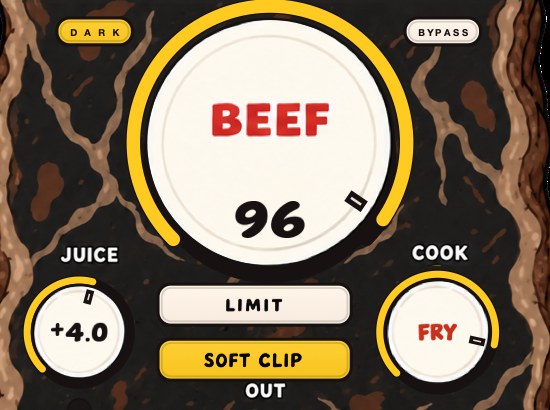
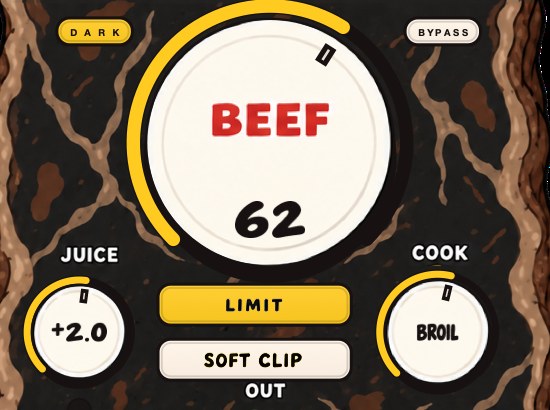
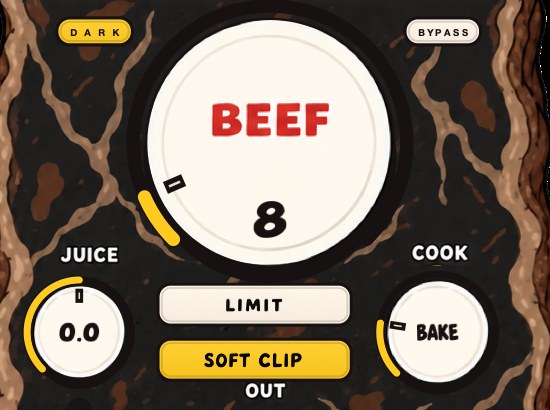
BEEFY has LIMIT as one of two output choices, with SOFT CLIP as the other. They are separate switches and either can be off.
Release, in numbers rather than adjectives
Release has a floor, and the floor is one cycle of the lowest note you care about. Below that the gain envelope is moving inside the waveform instead of above it, and the limiter stops controlling level and starts rewriting shape.
- 20 Hz
- one cycle = 50.0 ms
- 30 Hz
- 33.3 ms
- 40 Hz
- 25.0 ms
- 50 Hz
- 20.0 ms
- 60 Hz
- 16.7 ms
- 80 Hz
- 12.5 ms
- 100 Hz
- 10.0 ms
Here is why crossing that floor sounds like distortion rather than like level. Multiplying a signal by a moving gain is amplitude modulation, and amplitude modulation puts new energy at the carrier frequency plus and minus the modulation rate. A detector that follows the rectified waveform of a 50 Hz note ripples at 100 Hz, so the products land at |50 − 100| = 50 Hz and 50 + 100 = 150 Hz. Both are on that note's own harmonic series, which is why a too-fast release reads as growl and grit.
Move the ripple rate off the harmonic series and the same arithmetic gives you a different complaint. A release retriggered by eighth notes at 100 BPM moves at 1 / 0.3 = 3.33 Hz, putting sidebands around that 50 Hz note at 46.67 and 53.33 Hz. Three and a third beats a second, right underneath the bass line. That is the wobble you cannot find in the EQ.
The depth of the dip is worth the same treatment. A 1 dB reduction is an amplitude factor of 0.8913, so it shaves 10.87 per cent off every cycle it touches. At 3 dB the factor is 0.7079 and you are removing 29.21 per cent. Those are large numbers to apply and remove twenty to a hundred times a second, and the bottom octave is where you hear it first: a low E at 41.2 Hz has a 24.3 ms cycle, A at 55 Hz has 18.2 ms, C at 65.4 Hz has 15.3 ms.
Attack, on a limiter with lookahead, is a shape control rather than a catch control. The ceiling is already guaranteed by the delay line, so a slower attack lets a few samples of the transient through the softer part of the curve before the reduction settles. Use it to choose how much crack survives, not to decide whether the peak is caught.
Release is also slower than the number printed next to it, which catches everybody once. Most release controls set a time constant, and a first-order envelope closes 63.2 per cent of the remaining distance in one of those. From 6 dB down, one time constant still holds 2.21 dB, two holds 0.81, three holds 0.30. Full recovery takes four to five of them, not one.
- 1 × release
- 2.21 dB of the 6 still held down
- 2 ×
- 0.81 dB
- 3 ×
- 0.30 dB
- 4 ×
- 0.11 dB
- 5 ×
- 0.04 dB — call that home
Now put that clock against a tempo. At 120 BPM a sixteenth note lasts 60000 / 120 / 4 = 125 ms. A 100 ms release has had 125 / 100 = 1.25 time constants between hits and is still holding 1.72 dB when the next one lands. Set it to 40 ms and it has had 3.13, arriving with 0.26 dB left. The second one breathes between hits. The first one never gets back up, and that is the flattening further down this page arriving by the clock rather than by the meter.
What the gain reduction meter is telling you
The meter shows one number and the important quantity needs two. Depth is how far it drops. Duty is what fraction of the time it is down at all, and no plugin puts a figure on that — you read it by watching the needle rest rather than flick.
Take the simplest honest approximation: the limiter holds back GR decibels for a fraction d of the program and does nothing for the rest. Average power comes out as (1 − d) + d × 10−GR/10, and the loudness you lose is −10 log₁₀ of that. Run it at a fixed six decibels of depth and vary only the duty.
- 2% of the time
- 0.07 dB lost — you keep 5.93 of the 6 you pushed in
- 5%
- 0.17 dB — keep 5.83
- 10%
- 0.34 dB — keep 5.66
- 20%
- 0.70 dB — keep 5.30
- 40%
- 1.55 dB — keep 4.45
- 60%
- 2.59 dB — keep 3.41
- 80%
- 3.97 dB — keep 2.03
- 100%
- 6.00 dB — keep nothing; the limiter is a volume knob
Read the two ends of that table against each other. Six decibels of reduction on two per cent of the record costs you seven hundredths of a decibel and buys almost the whole push. The same six decibels held down for four fifths of the record returns two. Identical meter readings, completely different masters, and the only thing separating them is how often the needle comes home.
This is the arithmetic behind the advice everybody repeats without the reason attached. The instruction points at the rest of the record rather than at the number on the meter, because the rest is where the loudness comes from and the rest is what disappears first.
Two limiters, or one working twice as hard
Splitting the work across two limiters is ordinary practice on a master, and the reason is time constants rather than decibels. A slow first stage catches the long overshoots. The second stage sees a signal with those already removed, so what reaches it is short and sparse, and it can run a fast release without ever being asked to hold gain down through a bass cycle.
Run the duty formula twice and the average-level side of it is real but modest. Say the loud sections push 6 dB over the ceiling on 30 per cent of the program. One limiter doing all of it costs (1 − 0.30) + 0.30 × 10⁻⁶/10 = 0.7754, which is 1.11 dB. Split it so a slow stage takes 4 dB at that same 30 per cent and a fast stage mops up 2 dB on the 5 per cent that still gets through, and you pay 0.87 plus 0.08 = 0.95 dB.
Sixteen hundredths of a decibel. Say that out loud before you build a two-stage chain for the loudness, because the loudness is not why it works. It works because neither stage is ever combining a large reduction with a short release, which is the pairing that produces every sound in the failure list below. Two moderate stages, two different release times, one job each.
Do the work before the limiter
This is the whole article in one idea. A limiter asked to deliver eight decibels of loudness will pump, flatten and distort, because it is turning the entire mix down every time one snare arrives. Deal with the peaks before it sees them and the limiter has almost nothing left to do.
The tools for that are clipping and saturation, both of which lower peaks without touching the rest of the track. Clipper before limiter covers the order and the amounts, and crest factor explains why it works.
A worked master, with the numbers
Abstract advice about headroom stops being abstract the moment you write the decibels down. Here is one master, twice, with the only difference being where the peak work happened.
The mix bounces at −0.5 dBFS peak and −16 LUFS integrated, so its peak-to-loudness ratio is −0.5 − (−16) = 15.5 dB. You want −10 LUFS under a −1 dBTP ceiling. Straight into the limiter, that means driving it about 6 dB, which puts the incoming peak at −0.5 + 6 = +5.5 dBTP. To hold that under −1 the limiter has to remove 6.5 dB at the loudest instant. At an 8 per cent duty the average gives back 0.28 dB, landing you at −10.28 LUFS. You got the loudness.
You also asked for six and a half decibels where the short version at the top of this page says one to three. Everything the limiter is blamed for lives in that gap.
Now move four of those decibels upstream. Clip or saturate until the peak sits 4 dB closer to the average, taking the peak-to-loudness ratio from 15.5 to 11.5 dB. Push the same 6 dB in and the incoming peak is now +1.5 dBTP, so the limiter removes 2.5 dB instead of 6.5. Same target, same ceiling, same loudness, and the limiter is back inside the range where it is inaudible. How to make a mix louder without clipping and how loud should my master be take the target itself apart.
Linking, and what an unlinked detector does to the picture
A stereo limiter has to decide whether the two channels share one gain envelope. Linked, both are reduced by whatever the louder one demands. Unlinked, each is reduced on its own. The choice shows up as movement in the stereo picture, and you can predict the size of it.
Take a hard-panned hit peaking 3 dB over the ceiling in the left channel only. Unlinked, the limiter removes 3 dB from the left and nothing from the right, so for the length of that reduction the two channels sit 3 dB apart in a direction nobody wrote. An interchannel level difference is precisely what a pan control makes, so the limiter has just panned your record, briefly, on every hit.
Linked, both channels lose the same 3 dB: the picture holds still, and the right channel gets ducked by an event that never happened in it. That is the trade, whole. On a master, link. On a wide source with genuinely independent sides, a partial link is the compromise, and mono compatibility is where you check what you chose.
Mid/side limiting asks the same question from the other end. Hold the mid down and let the sides run, and the record widens as it gets louder — widening, specifically, the part of it that a phone speaker cannot reproduce, which is most listening. Bass on phone speakers covers what survives that trip, and phase cancellation covers what happens to a wide master when a club sums it.
Where the limiter sits in the chain
Last, and then dither, and then nothing. The order that works on a master bus is: everything musical, then the peak work, then the ceiling, then the word-length reduction if you are bouncing to 16-bit.
- Mix moves and bus EQ — anything that changes tone changes the peak, so it has to be settled before the peak tools are set.
- Clipper or saturation — shears the crest factor, which is the work that keeps the limiter honest. Soft clipping explained has the shapes.
- Limiter — the ceiling, and only the ceiling.
- Dither — last of all, and only when reducing bit depth. See dithering.
Two things break this constantly. The first is a gain utility left after the limiter at +0.5 dB from an experiment three days ago. The second is the channel fader itself: on every DAW the master fader sits after the plugin chain, so a master fader nudged to +1.0 dB puts a −1 dBTP master back at 0 dBTP with the limiter none the wiser. Check both before every bounce. Gain staging covers the rest of the path.
Limiting something that is not the master
Almost all limiter advice assumes a master bus, and most of the limiters in a session are not on one. The job changes when a single source is underneath, because a channel limiter is a catch rather than a loudness tool, and different settings follow from that.
- Vocals. Compress for the performance first, then limit only the two or three loudest words, a decibel or two each. Ask a vocal limiter for six and the consonants flatten into the vowels. How to mix vocals covers the stage before it.
- Bass and 808s. The worst place for one. The release floor above sets a minimum of 24.3 ms at 41.2 Hz, and a channel limiter left on a default of a few milliseconds is inside the waveform from the first note. Bend the peaks instead. How to distort 808s has the alternative.
- Drum bus. A limiter here removes the exact transients you spent the session building. If the bus needs to be louder, that is a compressor or a clipper doing it. How to mix drums and what is a transient.
- Loops and one-shots. Legitimate, and the cleanest use there is: a limiter on a loop with one rogue hit takes 4 dB off one event and nothing off the rest of the bar.
- A live input you are monitoring. Bypass it while tracking, and the reason is the clock. A 128-sample buffer at 48 kHz is 128 / 48000 = 2.67 ms each way, 5.33 ms round trip, and a 1.5 ms lookahead window pushes that to 6.83 ms. Singers hear that, and they compensate for it, and you get the take twice.
When the limiter works one band at a time
A broadband limiter turns the whole record down when one part of it goes over, and that part is almost always the bottom. Split the signal into bands and each gets its own detector, so a kick stops taking the hi-hats with it. That is the argument for multiband limiting, and it is a good one.
The cost arrives in the same box. Bands that move independently stop holding their balance, so the tonal shape of the record now changes with level, and the crossovers shift phase around every split point whether anything is being reduced or not. Multiband compression has the mechanism in full.
There is a cheaper move that solves most of the same problem with none of that. High-pass the limiter's detector, or take a decibel off the sub band before the limiter sees it, so the bottom two octaves stop driving the gain envelope for everything above them. The balance stays put and the kick stops acting as a volume pedal on your cymbals.
Doing it in Ableton, Logic and FL Studio
The method does not change and only the device names do. In Ableton Live, the Limiter goes at the end of the Master chain, and the thing to watch is that nothing sits after it: Utility is the usual offender. Choose dither in the export dialog rather than adding a dither device as well, because doing both means dithering twice.
In Logic Pro, both Limiter and Adaptive Limiter live on the Stereo Out, and the Stereo Out fader is downstream of them. Leave it at 0.0 and do your level changes with the plugin. In FL Studio, Fruity Limiter and Maximus both do the job on the master mixer track; Fruity Limiter also has a compressor mode on a separate tab, so check which one you are looking at before you decide the controls are behaving strangely.
Wherever you are, the useful habit is identical: bounce the file, drag the bounce back into a fresh project, and meter that. A limiter reporting its own output is reporting on a signal that has not yet been through the export path.
How to check your own limiter in ten minutes
You can settle every argument in this article inside your own session, with your own material, in one sitting. Do it once and you will stop guessing.
- Bounce eight bars with the limiter bypassed.
- Bounce the same eight bars with it in, at the settings you were about to ship.
- Import both, and pull the limited one down until the two read the same integrated loudness within 0.1 LU.
- A/B them at that match. Louder sounds better to everyone, so a preference that survives matched loudness is a real one — see Fletcher-Munson.
- Invert one against the other and listen to what is left. Isolated transient edges are healthy. Hearing the bass line in the difference means the release is inside the cycle.
- Send a 40 Hz sine through on its own and watch the reduction meter. Ripple in time with the tone means the release is under that note's 25 ms cycle.
- Play the bounce on a phone speaker, where the bottom two octaves are missing and the flattening is at its most obvious. Bass on phone speakers covers what survives that trip.
What goes wrong, and what each one sounds like
Limiter damage is not one sound, and naming which one you have is most of the fix. Each has a different cause and a different place in the track where it shows itself first.
- Pumping. The whole track dips after each kick and swells back up. Cause: release too slow, or too much depth, or both. Where to hear it: the two quiet bars before a drop, never in the busy section.
- Bass growl. Sustained low notes acquire a buzz that was not there. Cause: release shorter than one cycle, per the table above. Where to hear it: a held 808 or a long sub note, solo the low band if you have one.
- Flattening. The record loses front and back; everything sits at the same distance. Cause: sustained high duty. Where to hear it: the reverb tails, which stop receding and start sitting level with the dry signal.
- Sibilance ducking. A hard consonant pulls the entire mix down for a syllable. Cause: one narrow band peaking far above everything else. Fix it with a de-esser or a clip on that channel, upstream.
- Image wander. A hard-panned hit moves the whole stereo picture. Cause: an unlinked detector reducing one side only. Link the channels, and check the result in mono.
- Ticking in the quiet bars. A faint click on isolated hits in an otherwise empty passage. Cause: a release so short that the gain envelope has a corner in it rather than a curve. Where to hear it: intros and fade-outs, monitored louder than you normally would.
- Glassy highs. Cymbals and air take on a hard edge that no EQ move removes. Cause: gain-modulation products landing above the program, and fold-back if the detector path is running without oversampling. Where to hear it: a ride pattern, on headphones.
- Loudness that stops arriving. You push another 3 dB in and almost nothing changes. Cause: the duty has reached the far end of the table above and the limiter is working as a volume knob. Where to hear it: nowhere, which is the tell. Measure the integrated loudness of two bounces instead of trusting your ears on it.
Where it costs you
Transients go first: the snare loses its crack, then the kick goes blunt. Then the sense of depth, because everything gets pushed toward the same level. Then, at the extreme, audible distortion on sustained low notes, where the limiter's release is moving fast enough to modulate the waveform itself.
There is also a strategic cost. Streaming services normalize playback, so past a certain point you are giving up dynamics for loudness that the listener's player is going to take straight back off. How loud should my master be has the numbers.
In money it costs nothing, which is worth saying plainly. Every DAW ships a limiter, the stock ones hit a ceiling accurately, and no purchase will make six decibels of reduction sound like two. If you want to spend something, spend it on the stage before the limiter, because that is the stage doing the work that changes the result.
Questions people ask
What does a limiter actually do?
It prevents a signal exceeding a set ceiling, by reducing gain very quickly whenever the signal would cross it. Used with make-up gain, that lets the whole track sit louder under the same ceiling.
How much gain reduction should a limiter do?
One to three decibels on the loudest peaks for most material. If the meter is showing six or more on average, move that work upstream to a clipper, a compressor or the mix itself.
Should I use a limiter before mastering?
Take it off the mix bus before you bounce for mastering. Leave headroom instead. If you are mastering it yourself, the limiter belongs at the end of the mastering chain, not on the mix you are feeding into it.
When should I use a limiter on vocals?
As a safety catch after compression, taking a decibel or two off the few loudest words, not as the main dynamics control. Compression shapes the performance; the limiter just stops the occasional spike from running away.
What ceiling should I set my limiter to?
−1 dBTP for anything that will be encoded or streamed, which puts your loudest instant at 0.8913 of full scale. Only go tighter, to −0.3 or −0.5 dBTP, for a file that will be played back exactly as bounced.
What attack and release should a limiter use?
Set release no shorter than one cycle of the lowest note in the track: 25 ms at 40 Hz, 20 ms at 50 Hz, 12.5 ms at 80 Hz. On a lookahead limiter the attack chooses how much transient survives rather than whether the peak is caught, so set it by listening to the snare.
How do I stop my limiter from pumping?
Lengthen the release until the track stops swelling back up between hits, then reduce how much you are asking for. Pumping is depth plus duty, so cutting the amount of reduction fixes it even when the release is already right.
Is 6 dB of gain reduction too much?
It depends entirely on how often, and that is the part nobody measures. Six decibels on two per cent of the program costs 0.07 dB of average level and is inaudible. Six decibels held for eighty per cent of it costs 3.97 dB and sounds exactly as squashed as that number suggests.
Should the limiter go before or after EQ?
After. EQ changes peak levels, so any EQ move after the limiter puts the signal back over the ceiling you set. The limiter is the last processor in the chain, with only dither allowed after it.
Can I use a clipper instead of a limiter?
For the loudness, largely yes; for the guarantee, no. A clipper lowers peaks by bending the waveform and adds harmonics instead of moving gain over time, which is why it is the more efficient loudness tool. Most people end up using both, with the clipper doing the decibels and the limiter catching what slips past. What is clipping has the shapes.
What is the difference between a limiter and a maximizer?
A maximizer is a limiter with the input gain and the ceiling linked, so one knob pushes the signal up and holds the ceiling down at the same time. The processing is the same; the control layout hides one of the two decisions from you.
Does a limiter add latency?
Any limiter with lookahead does, because the delay line is the lookahead. A 1.5 ms window is 66 samples at 44.1 kHz and 72 at 48 kHz. Your DAW compensates on playback, but you will feel it while monitoring a live input through the same chain, so bypass it while tracking.
Why does my track still distort with a limiter on it?
Two usual causes. Either something sits after the limiter — a gain utility or a master fader above 0 — or the limiter is set to sample peak and the intersample peaks are going over anyway, which can be up to 3.01 dB higher than the meter shows. Turn on true-peak detection and check the chain below the limiter.
Do I need a limiter on every track?
No. One at the end of the master is the job. A limiter on an individual channel is a safety catch for a source that genuinely spikes, and a limiter on every channel means every channel is quietly removing transients before the mix bus ever hears them.
Why does my mix get quieter after I upload it?
Playback normalization, not the limiter. The service turns loud masters down to its own target, so the decibels you fought the limiter for get taken straight back off while the dynamics you traded away stay gone. How loud should my master be has the argument in full.
What does lookahead do on a limiter?
It delays the audio by a few milliseconds so the detector sees a peak before the audio does, and starts reducing gain on the way in rather than after the fact. That delay is the plugin's reported latency: 1.5 ms is 66 samples at 44.1 kHz, 72 at 48 kHz and 144 at 96 kHz.
Should I turn on oversampling on my limiter?
If you are chasing a true-peak ceiling, yes, because the intersample peaks live between the samples and a detector running at the session rate cannot see them. The cost is CPU and a little more latency. Oversampling explains what it is doing.
How many limiters should I use on a master?
One, unless you have a reason for two. Two works when each has a different release time and a moderate amount to do. Two identical limiters stacked because one was not enough just doubles the depth and the duty, and doubles the damage with it.
Why is my limiter not making my track louder?
Because the duty has run away. Once the reduction is more or less constant, the limiter is pulling back everything you push in, which is a volume knob with extra distortion. Bounce two versions and measure the integrated loudness of each: if 3 dB more drive bought less than a decibel, stop and go upstream.
Should I limit before or after saturation?
After. Saturation reshapes peaks, so anything you saturate after the limiter puts the signal back over the ceiling. The useful order is saturate, clip, then limit, so each stage hands the next one a smaller job. How to use saturation has that stage on its own.
How do I know if my limiter is working too hard?
Watch where the needle rests rather than how far it swings. A meter that returns to zero between events is doing peak work; a meter that never quite gets home is doing level work, and level work is what flattens a record. Then null-test it against the bypassed bounce: hearing the bass line in the difference is the answer.
What is the difference between a limiter and a brickwall limiter?
A brickwall limiter guarantees the ceiling absolutely, usually with lookahead, and nothing passes it. Anything else called a limiter is a very high ratio compressor that will let a fast enough transient through. For a master you want the guarantee; for tone you might not. Limiter vs compressor has the line between them.
Should a stereo limiter be linked or unlinked?
Linked on a master. An unlinked detector reduces one channel without the other, and a level difference between channels is what a pan control produces, so a hard-panned hit drags the image every time it lands. Unlinked has uses on wide stereo sources; a master is not one.
Can a limiter fix a bad mix?
No, and it will tell you which part is bad. Whatever is loudest and least controlled is what drives the gain reduction, so if the meter slams on every kick, the kick is the mix problem. The limiter is a very expensive diagnostic in that mode. Why is my mix muddy is the usual next stop.
What LUFS should I set my limiter to?
A limiter does not set loudness, it sets a ceiling; the loudness comes from how hard you drive it. Set the ceiling at −1 dBTP, then drive until the integrated reading hits your target and check the gain reduction is still in range. How loud should my master be takes the target apart.
Why does my limiter sound worse on headphones than on speakers?
Headphones hand you the bottom two octaves and the stereo picture in full, so both of the things a limiter damages first are audible. Reduction inside a bass cycle and an image that wanders on a hard-panned hit are nearly invisible on small speakers and obvious in a pair of cans. Check both, and a phone, before you call it.
Why does my kick disappear when I turn the limiter up?
Because the kick is what is triggering the reduction, and a broadband detector turns the whole record down every time the kick arrives — including the kick. High-pass the detector, use a multiband split, or take the peak off the kick upstream with a clipper. How to make drums hit harder covers the upstream version.
What BEEFY does
BEEFY is our saturation and loudness effect. SOFT CLIP opens switched on and brings rounded, fuzzy edges to the loudest parts, which is the upstream work that stops a limiter from having to do everything. LIMIT is the other choice when you want output peaks held in check instead, and both can be turned off so you can push it yourself. BEEF brings weight and density, COOK the color and bite, and JUICE the level going in. Input and output clip lights watch both ends.
In the worked example above, the four decibels moved upstream are exactly the job SOFT CLIP is there for: round the peaks first, then let the ceiling catch the two and a half that are left. BEEFY is $39, Mac and Windows, AU and VST3 with a standalone on Mac, and the product page has a demo so you can hear the difference between rounding a peak and holding a ceiling over it before you decide. How to master a beat puts both stages in order.
Those two switches are the two halves of this page, and they are separate choices. SOFT CLIP is the upstream half: rounded edges on the loudest parts, which is how decibels come out of the peak-to-loudness gap before any ceiling gets involved. LIMIT is the downstream half, holding the output peaks in check. Turn both off and you are pushing it yourself, which is the setting to use when a limiter you already trust lives at the end of your master chain. $39, Mac and Windows, and the product page has a 28-second demo with three without/with comparisons on it. The cheapest way to make beats louder puts the same argument in money.
Last in the chain, and the least it has to do, the better it sounds.
BEEFY — saturation and loudness plugin for Mac and Windows. There is a 28-second demo with three without/with comparisons on the page.
Keep reading
- Limiter vs compressor — Where the line sits between them, and which one goes last.
- Clipper before limiter — Why the clipper goes first, how to set both, and why the true-peak limiter stays last.
- True peak — Why a file can read zero and still clip, and what ceiling to use.