← Gazillion Industries/Reading material
How to make drums hit harder
In the headphones your drums sounded like a fistfight. On the kitchen speaker they sound like somebody knocking politely, while the record you love kicks the door in at the same volume.
Drums hit harder when the front edge of each hit stays sharp and the body behind it gets denser. Start with samples that already hit, let the transient through any compressor, shave the peaks with soft clipping so the whole kit can come up, add harmonics with saturation so the hits read on small speakers, clear room in the mix, and judge it against a reference at matched loudness.
The short version
- Samples
- pick hits that already hit; tune kick and snare
- Transient
- keep the first few milliseconds sharp
- Compression
- slow attack, around 10–30 ms, so the hit gets through
- Clipping
- shave the peaks, then raise the level
- Saturation
- harmonics that read on small speakers
- Space
- clear the low mids for kick and snare
- A/B
- against a reference, at matched loudness
Why your drums sound weak
Loudness is an average. Punch is a peak. Your ears judge loudness mostly by average level over time, while your meter and your ceiling only care about peaks. A drum hit is a spike, a loud front edge with a quieter body behind it, so its peak sits far above its average. (A sine wave, for comparison, peaks just 3 dB above its average.)
Those spikes reach 0 dBFS long before the kit sounds loud. Hitting harder is a trade: keep the front edge, bring up the body, and stop the peaks from spending all the headroom. Everything below is some version of that trade.
Start with hits that hit
No plugin rescues a limp sample. Pick hits with a clear attack that already sound finished when soloed, and tune the kick and snare to the song. A snare's body and a kick's low end both have a pitch, and a hit that fights the chord never sounds like it's landing.
If a kick has chest but no click, layer a short click on top rather than EQing one into existence; if it has click but no chest, do the reverse. Line up the starts of every layer, or they flam and soften the exact hit you were building.
Kicks: chest and click
A kick is two sounds pretending to be one. The body usually lives somewhere between 50 and 100 Hz and the click somewhere around 2 to 5 kHz, depending on the drum. On a club system the body does the work. On a laptop it's almost all click, so if the kick disappears there, the click is where to add.
If an 808 shares the low end, the kick has to negotiate for it. That fight is covered in how to make 808s hit harder.
Let the transient through
A fast attack is where punch goes to die. A compressor with an attack under about 3 ms catches the transient and flattens the stick. Set it around 10 to 30 ms instead, and the hit gets through while the body behind it comes up. The rest of the numbers are in drum bus compressor settings.
A transient shaper goes straight at the attack instead: turn the attack up and each hit gets a sharper front edge, no threshold involved. Ableton's Drum Buss has a Transients knob for exactly this.
Soft clip the peaks, then turn it up
This is where the loudness comes from. A soft clipper rounds the tallest spikes on a curve, instantly, with no attack or release to pump. It lowers the peaks a lot and the average a little, so the whole kit can come up before it touches the same ceiling.
- Put a soft clipper on the drum bus, or on the kick and snare separately.
- Raise the input until the loudest hits start to flatten audibly.
- Back off a dB or two.
- Level-match against bypass and compare.
Clipping the whole bus has a catch. Every kick drives everything playing with it into the curve, so the hats get gritty on each downbeat. If you hear that, clip the kick and snare on their own channels instead. More in soft clipping explained.
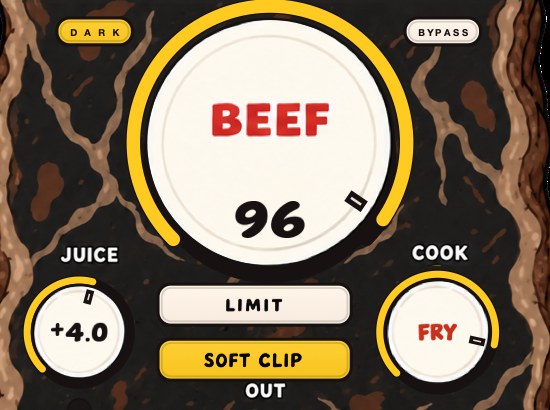
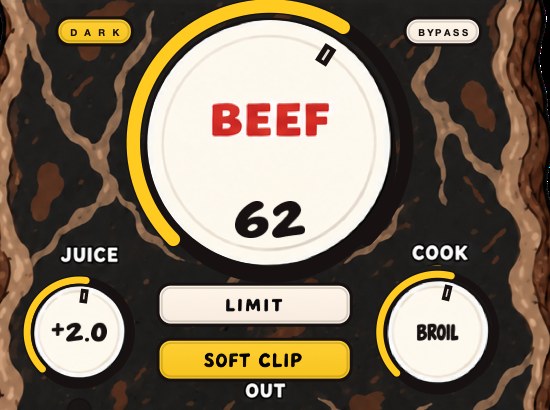
Or put BEEFY on the drum bus: SOFT CLIP is on when it opens, and the demo on the page is 28 seconds.
Saturation for density
Saturation is how a hit gets heard on a phone. It adds harmonics above what the drum already plays, right where small speakers can reproduce them, and it takes a little off the peaks on the way, which pulls the body up toward the hit. A little on the bus thickens the kit. A lot gets loud and rude, fast. The full method is in how to saturate drums.
Parallel: keep the clean hit, add the crushed one
Send the drums to a return track, crush that copy with heavy compression or saturation, and blend it in under the clean kit. The front edge comes from the dry drums, the density from the crushed ones, and neither has to compromise. Most DAWs compensate for plugin latency automatically (check that yours has it switched on), so the blend stays lined up.
Give the drums room
Crowded low mids swallow punch. Pads, keys and guitars tend to pile up somewhere around 200 to 500 Hz, right where the snare's body and the kick's upper weight need to be. High-pass anything that isn't bass or kick, and cut a little space in the busiest parts where the snare lands. The drums get louder without anyone touching their fader.
Judge it against a record
Pull up a record whose drums you would steal if you could. Dr. Dre's 2001 is a fair place to start; so is anything Timbaland made for Missy Elliott around the turn of the century. Match its loudness to your beat with a loudness meter, then flip back and forth.
Louder always wins the first five seconds, so match levels before you believe anything. If your drums only hit harder because they got louder, the fader was the fix.
Questions people ask
How do I get a punchy drum sound?
Keep the front edge of each hit sharp and make the body behind it denser. Pick samples with a clear attack, set compressor attack slow enough (around 10 to 30 ms) to let the hit through, soft clip the peaks, and add a little saturation.
Why are my drums quiet compared to other songs?
Their peaks use up the headroom before the average level gets loud. Lowering the peaks with soft clipping or limiting, then raising the level, closes most of the gap. Match loudness with a meter before you compare, or the louder track wins by default.
Should I clip the drum bus or individual drums?
Clipping the bus is quicker and pulls the kit together, but every kick drives the hats and snare into the curve with it. Clipping kick and snare on their own channels keeps the cymbals clean. Start with the bus and move to individual drums if the top end gets gritty.
Stock plugins that do this
- FL Studio
- Fruity Soft Clipper; Fruity Blood Overdrive for grit
- Ableton Live
- Drum Buss: Transients, Crunch and Boom
- Logic Pro
- ChromaGlow for saturation (Logic Pro 11 and later)
What BEEFY does
BEEFY is our saturation and loudness plugin, and it covers the clipping, saturation and density steps above in one window. Put it on a kick that needs more chest, a snare that needs more smack, or the whole drum bus to pull the hits and the body closer together.
BEEF is the main event: more weight, density and loudness as you turn it up. SOFT CLIP opens switched on and takes care of the initial gain staging, so there is no input level to hunt for. LIMIT keeps output peaks in check instead, if you prefer. COOK moves the tone from rounder toward brighter and more bitten, and JUICE sets the level going in.
Back to the kitchen speaker, at the same loudness as the reference record. This time the drums don't knock. They come in.
BEEFY — saturation and loudness plugin for Mac and Windows. There is a 28-second demo with three without/with comparisons on the page.
Keep reading
- How to make a snare hit harder — Sample and tuning, layers, transients, saturation, soft clipping and a short room.
- How to make drums sound bigger — Room, sustain, density, weight and width: the half of drum sound that punch doesn't cover.
- How to make drums cut through the mix — Fix masking, keep transients, add presence, duck busy parts, pan with purpose and tame the reverb.
- How to mix drums — Balance first, then EQ, compression, saturation and the bus.
- Why do my drums sound weak? — Five causes in order, and why the plugin is the fourth one.
- What is a drum bus, and why put things on it? — One channel for the whole kit: how to build it, what to put on it, and why the sum behaves differently.
- How to get analog warmth without buying hardware — Four mechanisms hide behind one word, and naming the one you want is most of the work.
- Why your mix sounds harsh after mastering — A diagnostic order for a harsh master, from the limiter down to your monitoring level.
- The cheapest way to make your beats louder — Free options first, ranked by what each one buys you, then the one paid step worth making.