← Gazillion Industries/Reading material
The cheapest way to make your beats louder
Gazillion Industries ·
Nobody buys a plug-in to fix an arrangement. The
cheapest loudness in the session is already installed.
The cheapest way to make a beat louder is the stuff the DAW already ships.
Gain stage properly, which costs nothing. Put a stock clipper or saturator on
the drums to take the tops off. Put the stock limiter last and ask it to do a
little. Loudness is mostly crest factor, the distance between the peaks and
the average level, so shrink that distance and the track sits louder at the
same ceiling. When the free tools run out, one saturation and clipping plug-in
is the cheapest thing worth paying for, well under the price of a mastering
chain. Buy the chain last, if ever.
The short version
- Free, do it first
- trim at the top of each channel, faders at zero
- Free, biggest win
- a stock clipper or saturator on the drum bus
- Free, goes last
- the stock limiter, working gently
- Free, uncomfortable
- fix the arrangement and the low-end pileup
- Cheapest paid step
- one saturation plug-in, not a chain of them
- What money buys
- a smaller gap between peak and average, with less damage
- What money does not buy
- headroom you already spent
Why the beat is quiet in the first place
A peak meter reads the single tallest sample. Your ears read the average
over time. The gap between those two numbers is crest factor, and it decides
almost everything about how loud a finished track feels at a fixed ceiling.
The arithmetic is worth doing once. Say the beat peaks at 0 dBFS and
averages 14 dB below that. Get the same material to average 10 dB
below its peaks instead, and at the same 0 dBFS ceiling the average level
has gone up by 4 dB. Nothing was turned up. The tall parts simply stopped
being so much taller than everything else, which left room to raise the
whole thing.
That is the whole game. Every loudness tool does some version of it: turn
the loud parts down over time, reshape them instantly, or spread their energy
into harmonics so the peak stops sticking out. Price has nothing to do with
whether the idea works.
What costs nothing at all
Start with the part that has no plug-in attached to it. Set every channel
fader to zero, put a gain utility or clip gain at the top of each channel, and
trim there until the loudest section peaks somewhere around -12 to
-6 dBFS. Then balance with the faders. The full method is in
gain staging.
This is unglamorous and it is the highest-value free move in the list,
because everything downstream reacts to level. A saturator fed a hot signal
and the same saturator fed a sensible one are two different sounds. A limiter
handed a mix that already sums into the red spends its whole range undoing
the mistake instead of adding level.
Two habits cost more loudness than any missing plug-in: mixing with a
limiter on the master from the first bar, which hides the problem until it is
structural, and dragging faders down to fix levels, which leaves every plug-in
on the channel still getting slammed while the meter looks calm.
The stock clipper, if the DAW has one
A clipper is the best value free tool for this job, and most producers
never open theirs. It rounds or flattens the loudest peaks instantly, with no
attack and no release, so it does not pump or dull the groove the way a
compressor working hard does. Lower peaks mean you can raise the whole signal
before it touches the same ceiling. The mechanism is in
soft clipping explained.
Put it on the drum bus rather than the master. Drums own the tallest peaks
in almost every beat, so that is where the crest factor is hiding, and
clipping the drum group leaves the bass and the vocal out of it. Raise the
input until the front of the kick stops getting louder while the body keeps
getting louder, then back off a little. That moment is audible in about ten
seconds and it is more reliable than any meter.
Two things to watch. Cymbals distort before kicks do, because high
frequency content has the sharpest peaks relative to its energy, so if the
kit turns harsh as it gets louder that is the hats meeting the clipper. And
if the clipper has an oversampling switch, turn it on for anything bright.
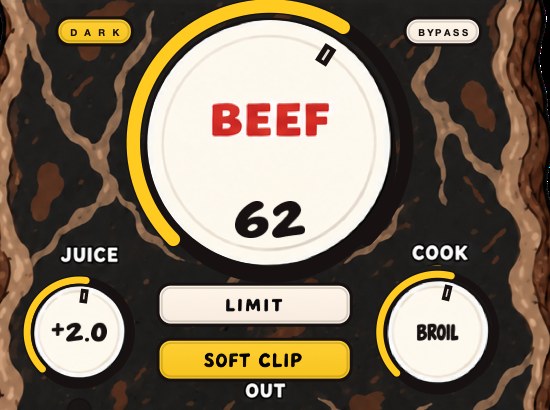 SOFT CLIP as the out stage. The clipper rounds the peak rather than holding a ceiling over it.
The stock limiter, doing less than you think
Every DAW ships a limiter, and every DAW's limiter is good enough for a
beat. The reason yours sounds worse than the reference is rarely the code. It
is being asked for eight decibels of reduction on a mix whose peaks are all
kick, so it ducks the whole arrangement on every downbeat.
Limit last, after the clipper has already shortened the spikes. Ask for a
couple of decibels on the loudest hits, not a wall of reduction. Level-match
against bypass before deciding it helped, because louder always sounds better
for the first four seconds and then stops being true.
If a beat needs the limiter pinned to sound competitive, the limiter is
not the part that is broken.
Most "not loud enough" is arrangement
This is the free fix nobody wants, and it beats every plug-in in this
article. A busy arrangement is quiet because its energy is spread thin and its
peaks are stacked. Three sounds playing the same rhythm in the same register
sum into one tall peak and one muddy average, which is the worst possible
crest factor.
Mute things. Stagger entries so the peaks land at different moments. Give
the loudest element of the beat a bar where nothing competes with it. Space in
an arrangement reads as loudness because the parts that remain get to use the
whole ceiling. More on the drum side of this in
how to make drums hit
harder.
Transients are the other half. A kick with a defined front end reads as
hard at a lower average level, so shaping the attack often removes the need
to push anything at all.
The low end is where the headroom went
A sub note spends much of its cycle near its own peak, so low frequency
content holds the meter up in a way that a hi-hat never will. When the kick
and the bass occupy the same two octaves and hit at the same time, they sum,
and that sum sets the ceiling for the entire track. Everything else in the mix
then lives underneath a number that two elements created.
Fixes, all free. Pick which one owns the sub and high-pass the other. Move
one of them so they are not hitting on the same beat. Check the phase
relationship, because two low sounds slightly out of step can produce a peak
larger than either of them alone. Keep the lowest content centered, since
a wide sub eats headroom for nothing audible.
A mix with a clean relationship between kick and bass is louder before any
processing than a mix with a messy one is after all of it.
So where does paying actually help
After the free list, the returns come from tools that reduce crest factor
with less collateral damage, and from not having to make the same compromise
twice. A stock clipper will take peaks off. A dedicated saturation and
clipping plug-in will take the same peaks off while adding harmonic content
that makes the result read as weight rather than as a reduction, and it will
usually handle the input level so you are not hunting for a working setting.
The order to spend in, if you spend at all:
- Nothing. Gain stage, clip the drum bus, limit gently, fix the low end.
- One saturation and clipping plug-in for the drums and the mix bus. This
is the step that changes the most per dollar.
- A better limiter, much later, and only once you can hear what the stock
one is doing wrong.
- A mastering chain of specialist tools. Last. Most beats never need it,
and a chain bought early mostly gives you more ways to make the same
mistakes.
Note what is not on that list: anything sold as one-click loudness. Those
hand the whole job to a limiter, which is the part that punishes bad crest
factor hardest.
BEEFY is
$19
and opens with SOFT CLIP switched on, so the gain staging is handled before
you touch anything. The demo on the page is 28 seconds.
A free chain to try tonight
- Take the limiter off the master. Leave it off until step 6.
- Faders to zero, trim each channel until the loudest section peaks around
-12 to -6 dBFS, then rebalance.
- Decide whether the kick or the bass owns the bottom, and high-pass the
other one.
- Route the drums to a bus. Put the stock clipper or saturator on it and
push until the kick's attack stops growing, then back off.
- Play the arrangement and mute anything that is not earning its space.
- Now put the limiter back on the master and ask it for a decibel or two.
- Level-match against the original and listen to the hats and the snare,
not the loudness.
If that gets the beat where it needs to be, you have your answer about what
to buy.
Stock plugins that do this
- FL Studio
- Fruity Soft Clipper, then Fruity Limiter
- Ableton Live
- Saturator with soft clip on, then Limiter
- Logic Pro
- Clip Distortion, then Limiter or Adaptive Limiter
Questions people ask
What is the cheapest plugin to make beats louder?
The cheapest useful one is a single saturation and clipping plug-in for the
drum bus and the mix bus, which is where nearly all of the crest factor sits.
That is a much smaller purchase than a mastering bundle and it covers most of
the distance. Before spending anything, get the free version of the job done:
gain staging, the stock clipper, the stock limiter last.
Can I get a loud master with only stock plugins?
Yes, for a beat. Stock clippers, saturators and limiters all reduce crest
factor, which is the mechanism that makes a track sit louder at the same
ceiling. Paid tools mostly do it with fewer side effects and less fiddling,
which matters more on a full mix than on drums.
Do I need a whole mastering chain?
Usually no. A chain of specialist plug-ins solves problems that appear
after the mix is already good. A quiet beat is normally quiet because of gain
staging, a kick and bass fighting over the same octave, or an arrangement with
every peak stacked on the same beat. None of those are fixed further down the
chain.
Should I use a compressor or a clipper to get louder?
A clipper, for peaks. A compressor turns the gain down over time with
attack and release, so when it works hard on a beat you hear the movement. A
clipper reshapes each sample instantly with no gain movement, so it removes
peaks without the pumping. Compression is for shaping the groove; clipping is
for the tops.
Why is my beat quieter than the reference track?
Almost always crest factor rather than a missing plug-in. If the beat peaks
in the same place as the reference and still sounds smaller, the average level
is lower, which points at stacked peaks in the arrangement, an untamed kick or
a kick and bass summing into one tall spike.
Is it better to clip before the limiter?
Generally yes. The clipper takes the fastest spikes off so the limiter has
less to hold back, and the limiter's gain reduction stays small enough to be
inaudible. Reversed, the limiter spends its range on peaks the clipper would
have handled for free.
How loud should a beat actually be?
Loud enough to survive next to what it will be played against, with peaks
below the ceiling and nothing audibly crushed. Chasing a specific number on a
loudness meter matters less than the gap between peak and average, because
streaming platforms turn everything down to a common target anyway.
What BEEFY does
BEEFY is our saturation and loudness plug-in, and it is the one paid step
described above rather than a chain. SOFT CLIP opens switched on and handles
the input staging, BEEF adds weight and density on the way through, and LIMIT
holds the output peaks when that is what the track needs.
BEEFY costs $19, which is the point:
the free work comes first, and this is the small amount of money that buys
back the part the free work leaves on the table.
Loudness was never sold separately. It was sitting in the gap between your
peaks and your average, waiting for someone to close it.
BEEFY — saturation and loudness plugin for Mac and Windows. There is
a 28-second demo with three without/with comparisons on the page.
Hear it
Keep reading