← Gazillion Industries/Reading material
Fletcher-Munson curves
The mix sounded perfect last night at volume. This morning at conversation level the bass has vanished and the vocal is shouting. Your monitors did not change. Your ears did, and they do it every single time.
The Fletcher-Munson curves, published in 1933 and since refined into an international standard as the equal-loudness contours, describe how human hearing changes with level. We are most sensitive in the upper midrange, roughly two to five kilohertz, and considerably less sensitive at the extremes. That imbalance gets worse as things get quieter: at low volume the bass and the top disappear faster than the middle does. Which means every mix decision you make is tied to the volume you made it at.
The short version
- What
- how hearing sensitivity changes with frequency and level
- Most sensitive
- around 2–5 kHz, at any volume
- At low volume
- bass and treble fall away faster than mids
- At high volume
- the curve flattens: everything sounds fuller
- Consequence
- mix loud and you under-do the bass; mix quiet and you over-do it
- Fix
- decide at a consistent moderate level, check at others
Phons and sones: the units the curves are drawn in
A phon is a loudness level pinned to one kilohertz. A contour labeled 60 phon joins every frequency-and-level pair that sounds as loud as 60 dB SPL does at 1 kHz. At 1 kHz the phon number and the dB SPL number are identical by definition, which is why every chart of this kind hangs off that one frequency. Away from 1 kHz they separate, and the distance between them is the whole subject.
Phons still only tell you what matches what. To get at how loud something seems there is a second scale, the sone, defined so that 1 sone is 40 phons and every further 10 phons doubles the number. Run it out: 55 phon is 21.5 = 2.83 sones, 65 phon is 5.66, 75 phon is 11.3, 85 phon is 22.6.
Now take one turn of the monitor knob, 85 phon down to 55. In voltage the signal fell by a factor of 31.6. In power it fell by a factor of 1,000. In sones it fell from 22.627 to 2.828, a factor of exactly 8. Three honest numbers for the same 30 dB, and the one your ear files is the smallest of the three. That gap is why level is such a reliable liar.
One caution about precision. The contours were built from steady pure tones presented under laboratory conditions, and music is neither steady nor pure. Trust the direction and the rough size of the effect. Do not treat a specific decibel offset at a specific frequency as something you can dial into an EQ.
Why loud always sounds better
Turn any record up and the curve flattens: the low end and the air arrive in proportion, and the whole thing sounds bigger and more exciting. That is not the record improving. It is your hearing becoming more even.
This is the mechanism behind the oldest trap in audio, which is that the louder of two things wins the comparison regardless of which is better. It is why level-matching before an A/B is not a nicety but the entire validity of the test, and it is why a mastering engineer turning your mix up by two decibels can appear to have improved it enormously.
Measure your own curve in twenty minutes
The published contours are an average taken across many listeners. Yours are yours, in your room, on your speakers, with whatever your left ear has been through. You can put a number on the part that matters to you in one sitting.
- Render three mono sine tones, ten seconds each, at 1 kHz, 100 Hz and 8 kHz, all at −20 dBFS.
- Load them on three tracks. Put a gain plugin on the 100 Hz track and the 8 kHz track.
- Set your monitor knob to your loud reference level. Do not touch a fader after this point.
- Loop the 1 kHz tone against the 100 Hz tone and move the gain until the two sound equally loud. Write the number down.
- Turn the monitor knob down by 20 dB. Change nothing else.
- Match the two tones again. Write the second number down.
- Subtract. That difference is how much low-end sensitivity you personally lose across those 20 dB, on that system, in that chair.
- Repeat steps 4 to 7 with the 8 kHz tone.
Expect the 100 Hz tone to need more gain at the quiet level than at the loud one. If it needs less, something in the chain is level-dependent and should not be: a compressor left on the master, a subwoofer with its own limiter, or a loudness contour switch on the interface. The test has a second use, too. If the level meters in your session moved when you turned the monitor knob in step 5, that knob is inside the render path and is not a monitor knob at all.
Why saturation reaches the ear when a bass boost cannot
An 808 on E1 sits at 41.20 Hz (440 × 2−41/12 = 41.2034). At 343 meters per second that is a wave 8.33 m long. Nothing a phone can fit behind its grille moves enough air at that wavelength for the fundamental to exist on the other end. On a phone that note has no fundamental at all.
What survives is the harmonic series. Integer multiples of 41.20 Hz land at 82.4, 123.6, 164.8, 206.0, 247.2 and on upward, and the ones that fall inside the 2–5 kHz band where your hearing is most sensitive are harmonics 49 through 121 — 49 × 41.20 = 2,019 Hz at the bottom, 121 × 41.20 = 4,985 Hz at the top. Seventy-three harmonics of a single bass note, sitting in the exact strip of spectrum that needs the least energy to register. Move the note up an octave to E2 at 82.41 Hz and the count drops to 36, from harmonic 25 to harmonic 60, which is one reason a higher bass note needs less help.
That is the whole trick behind making low end audible on small speakers. Distortion generates those harmonics. An EQ boost at 41 Hz cannot, because an EQ can only amplify what is already there, and on a phone there is nothing there to amplify. It also explains an asymmetry in the curves that gets missed: when you turn a track down, the fundamental goes first and the 2–5 kHz harmonics go last, so a saturated bass line survives a volume drop that a clean one does not. More on the speaker side of this in how to make bass audible on phone speakers.
What to do about it
- Pick one moderate monitoring level and do your balance decisions there, every session.
- Use the volume knob as a test, not as a mood: turn up briefly to check the low end, turn down to check the balance.
- Make the important decisions quietly. A balance that works at low volume almost always works loud; the reverse is not true.
- Check on something small and horrible as well, because a phone speaker reproduces almost none of the range your ears are least sensitive to anyway.
- Level-match every comparison you make, between plugins, between mixes, between your track and a reference.
Setting a reference level you can come back to
The discipline above rests on one thing, which is finding the same level again tomorrow. A remembered position on a knob is not the same level. A marked one is.
- Put a pink noise generator on your master and set it to a fixed level, −20 dBFS RMS.
- Bypass everything else on the master.
- Raise the monitor knob until the noise is clearly present, unfatiguing, and you could still talk over it without shouting.
- Measure the result from the listening position with an SPL meter set to C-weighting and slow response. Write the reading down.
- Mark the knob position with a pencil line or a strip of tape.
- Start every session there, and return to it after any loud check.
Two honest caveats. A phone SPL app is not a calibrated instrument and its microphone rolls off low frequencies, so the absolute number it gives you may be several decibels out. That does not matter for the job, because the job is repeatability rather than a certified figure. It matters only if you plan to compare your number against somebody else's, which is not worth doing. And the reading is valid for one room: move the speakers, move the chair, or change the interface and you have to run the noise again.
BEEFY is a saturation and loudness effect, which makes it exactly the kind of plugin that flatters itself in an unmatched comparison. Match the levels before you decide it is working.
Level-matching, with the arithmetic shown
Here is the procedure with real numbers on it, because "match the levels" is advice nobody can act on. Loop eight bars. Meter the bypassed signal and the processed signal separately, both peak and integrated loudness.
- Bypassed
- peak −6.0 dBFS, integrated −14.3 LUFS — crest 8.3 dB
- Engaged
- peak −3.4 dBFS, integrated −8.9 LUFS — crest 5.5 dB
- Loudness rise
- 5.4 LU
- Peak rise
- 2.6 dB
- Trim to apply
- −5.4 dB on the plugin's own output
- Matched peak
- −8.8 dBFS, which is 2.8 dB below the bypassed peak
Read the last line again, because it is the only part that tells you anything. At equal loudness the processed version peaks 2.8 dB lower, and 8.3 − 5.5 = 2.8 says the same thing from the other direction. That 2.8 dB of recovered headroom is the work the plugin actually did. Everything else in the comparison was volume. There is a longer treatment of this number in crest factor.
Three rules follow from the example. Match on loudness, not peak, whenever the process changes the shape of the waveform — compression, clipping, saturation, limiting, any of it. Match on peak only when nothing about the shape moved, such as a plain gain change. And apply the trim at the plugin's own output stage, never by riding the monitor knob, because the monitor knob is the one variable this entire page exists to hold still. If your gain structure upstream is loose the numbers will wander between takes; gain staging comes first.
The part people get wrong
The curves are a description of hearing, not a prescription for mixing. They do not mean you should boost the bass to compensate, because your listener's ears have the same curves: if you correct for the effect, you have simply made a bass-heavy record that sounds wrong at the volume they actually play it at.
What they mean is narrower and more useful: pick a level, work at it, and know that any judgment you make at a different volume is being made by a different instrument.
Four failure modes, and what each one sounds like
The effect does not announce itself. It arrives disguised as a mix decision, and each version has its own signature on playback.
- Balanced too loud. The curve was flat while you worked, so the low end seemed sufficient when it was not. On anything smaller than your monitors the track is thin and papery, the kick reads as a click with nothing under it, and the bass part turns into a rhythm you can follow but not feel. The diagnostic: turning it up fixes it completely.
- Balanced too quiet. You compensated without noticing, so the bass got pushed and the top got pushed. At normal playback level it is woolly underneath and glassy on top, and the mids sound scooped even though you never touched them. Vocals sit behind the music.
- A level that drifted mid-session. You crept up over four hours. The intro was balanced by one set of ears and the last chorus by another, and the record sounds like it changes engineer halfway through — a first half with more weight than the second, or the reverse, with no arrangement reason for it.
- The unmatched A/B, repeated for months. Every plugin that added level won its audition and every plugin that did not lost. The result is a chain where each stage is 1 to 2 dB hotter than the last, nothing is obviously broken, and the master will not get loud because the peaks arrived long before the loudness did. See how loud should my master be.
Where the monitor level lives in each DAW
One structural fact beats every setting: any fader inside the render path cannot be your monitor control. Turn down with the master fader and you have changed the file you export, not the level you are auditing at. Where that line falls differs by program.
- Ableton Live. The Master track fader is in the export. The Cue/preview level is not, but it governs previewed clips rather than the mix you are working on.
- Logic Pro. The volume slider in the control bar is the output fader. It is in the bounce. Treating it as a monitor knob is the single most common version of this mistake.
- FL Studio. The Master mixer track fader is in the render.
- Pro Tools. A bounce is taken at the output of the Master fader, so that fader is in the file too.
- Reaper. Monitoring FX on the master run outside the render, so a gain plugin placed there is an honest monitor trim that cannot contaminate a bounce.
In every one of them the safest control is outside the software altogether: the output knob on the interface, a hardware monitor controller, or the system output level if there is nothing else. None of those touch the file. Whichever you choose, use the same one forever, because the pencil mark from the pink-noise procedure only refers to one physical control.
What the discipline costs
Working quietly is slower for anything that is not a balance. Edit clicks, reverb tails, breaths, hum and noise floors all live below the level you are monitoring at, and you will miss them until you go loud. This is a rule about where the balance decisions get made, not a vow of quiet. Budget the loud passes: one for the low end, one for the faults, then back to the mark.
The setup has a maintenance cost as well. A calibrated position is calibrated for one room, one pair of speakers and one seat, and every part of that changes eventually. And loud monitoring carries a hearing cost that is time-weighted rather than absolute, meaning the louder you go the less time you get. The exposure limits for that are published by occupational health bodies and they are worth twenty minutes of your reading. They are not numbers we are going to invent for you here.
Questions people ask
What is an equal-loudness curve?
A line on a chart showing which levels at different frequencies are perceived as equally loud. The original set was published by Fletcher and Munson in 1933 and later work refined it into the modern standard.
What frequency is the ear most sensitive to?
The upper midrange, broadly between two and five kilohertz, which is where speech intelligibility lives. That sensitivity is why a small boost there feels like a large one.
What volume should I mix at?
A consistent moderate level where you could hold a conversation, with occasional checks loud and very quiet. The exact number matters far less than using the same one every day.
Why does my mix sound different at different volumes?
Because your hearing's frequency response changes with level. At low volume you hear proportionally less bass and less top, so the same mix genuinely sounds different rather than merely quieter.
Is Fletcher-Munson the same as the equal-loudness contours?
In everyday use, yes. Strictly, Fletcher-Munson is the 1933 set of measurements and the equal-loudness contours are the current standardized family that replaced them. The shapes differ in detail, particularly in the low end, and the conclusion for mixing is the same either way.
What is a phon?
A unit of loudness level referenced to 1 kHz. Something at 70 phon sounds as loud as a 1 kHz tone at 70 dB SPL, whatever frequency it happens to be. At 1 kHz phons and dB SPL are the same number by definition.
What is the difference between a phon and a sone?
Phons tell you what matches what; sones tell you how loud it seems. The sone scale sets 1 sone at 40 phon and doubles every 10 phon, so 60 phon is 4 sones and 70 phon is 8. It is the scale that says a 10 dB increase sounds like twice as much.
Should I use a loudness compensation plugin?
For A/B comparisons, yes, that is exactly the job: it holds perceived level constant so you judge the processing instead of the gain. As a monitoring aid that tilts the response at low volume, be careful. It makes quiet listening pleasant, and pleasant is the opposite of what a reference level is for.
Why does my mix sound bass-heavy in the car?
Two things stack. A car is a small sealed box with cabin gain that lifts the low end, and you play it loud, which flattens your own curve and hands you more low end again. A mix balanced quietly, where you were already compensating upward, arrives with all three pushing the same way.
Does this apply to headphones?
Your ears follow the same contours on headphones, so yes. What changes is that you have no idea what level you are at, because there is no room and no distance to calibrate against, and most people sit louder on headphones than they would on speakers. That flatter curve is why headphone mixes so often come back over-compressed and short of low end.
Why do my drums disappear when I turn the music down?
The kick's fundamental and the cymbals' air are at the two ends where your sensitivity falls off fastest. The snare's body sits closer to the middle, so it hangs on longer. That is why a quiet playback of a full mix often collapses into snare and vocal, and why that playback is such a useful test of whether your arrangement has a middle.
Can mastering fix a mix balanced at the wrong volume?
It can move a broad tilt by a couple of decibels and make the record usable. It cannot undo a bass part that was written and performed too loud, or a top end that was hyped to compensate for quiet monitoring, because both of those are inside the balance rather than on top of it. Worth reading next to why is my mix muddy and why is my mix harsh.
Why does everything sound better in the club?
At that level the contour is about as flat as human hearing gets, so every record arrives with its low end and its air in full proportion. The system is also tuned for the room and you are standing in front of it. The records are not better there. You are a better instrument there, and briefly.
What BEEFY does
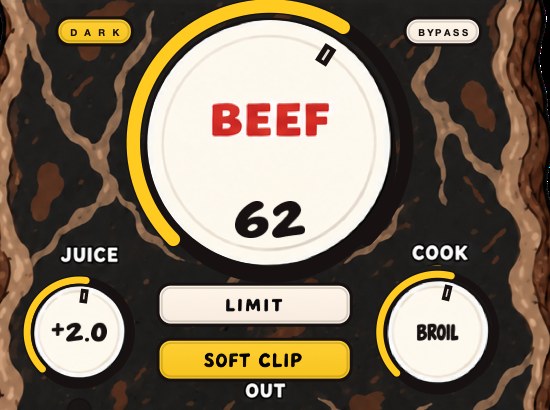
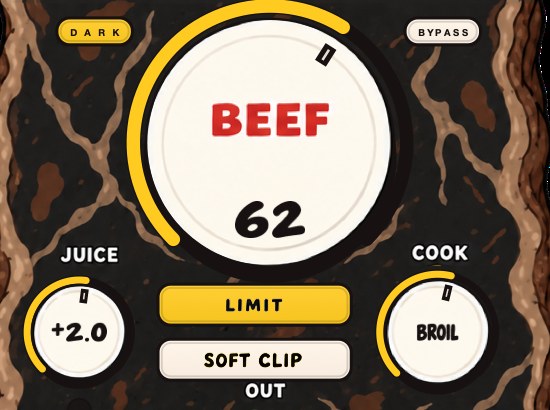
BEEFY is a saturation and loudness effect for making sounds thicker, punchier and more up front. It adds body, squeezes some space out of the peaks, and brings out harmonics that help a sound feel bigger — and those harmonics land in the range your ears are most sensitive to, which is precisely why saturating a bass line makes it audible on a speaker that cannot reproduce the bass note at all. BEEF, COOK and JUICE are the three knobs; SOFT CLIP and LIMIT are the output choices.
A fresh instance opens with SOFT CLIP on, JUICE at 0 dB, BEEF at 30 and COOK at 30, which is a deliberately mild starting point and a good place to run the level-matched A/B above. Turn BEEF up until the change is obvious, meter both states, apply the trim, then decide. On this subject in particular the plugin is the defendant and the meter is the witness.
Your monitors are consistent. You are the variable, and you have been all along.
BEEFY — saturation and loudness plugin for Mac and Windows. There is a 28-second demo with three without/with comparisons on the page.
Keep reading
- Mono compatibility — Which kinds of width survive summing, and how to test for it.
- How to mix drums — Balance first, then EQ, compression, saturation and the bus.
- Why is my mix muddy? — Where mud lives in the spectrum, how to clear it, and what else causes it.