← Gazillion Industries/Reading material
How to make your mix louder without clipping
Your beat comes on in a playlist right after a record mastered by someone with a mortgage and a room full of acoustic treatment, and it sounds like it's playing in the next apartment.
A mix gets louder without clipping by lowering its peaks, not by pushing the fader. Clean up the low end, which uses up the most headroom; balance the mix so nothing needs turning up to be heard; raise the average level with compression and saturation; soft clip the sharpest spikes; and finish with a limiter set to a true-peak ceiling. Then compare against references at matched loudness.
The short version
- Low end
- the kick and bass set the peaks; clean them first
- Balance
- a clear mix sounds louder at the same level
- Density
- compression and saturation raise the average
- Peaks
- soft clip the fastest spikes
- Limiter
- last, with a ceiling around -1 dBTP
- Check
- references at matched loudness
- The budget
- peak minus loudness; every decibel out of that gap is one you keep
- Streaming
- Spotify plays everything at −14 LUFS, so crushing buys nothing
Why the mix won't get louder
0 dBFS is the fire marshal, and the peaks got to the door first. A digital file has a hard ceiling, and your ears judge loudness by average level, not by peaks. When the peaks sit far above the average, the mix hits the ceiling while it still sounds quiet. Every technique below does the same thing: it brings the average up toward the peaks.
The gap between those two numbers has a name and a subtraction. Peak-to-loudness ratio is the peak reading minus the loudness reading. A mix at −1 dBTP and −16 LUFS has a PLR of −1 − (−16) = 15 dB. Hold the same ceiling and reach −11 LUFS and the PLR is 10 dB. At −7 LUFS it is 6 dB. Loud records are records with a small PLR, and there is exactly one way to shrink it: bring the peaks down toward the body.
Which is why the fader does nothing. Push the master up 3 dB and the peak rises 3 dB, the loudness rises 3 dB, and the subtraction lands on the number it started from. In amplitude that move is a multiplication by 103/20 = 1.4125, applied to everything at once, including the transient that was already closest to the door. The mix is louder right up to the moment it hits the ceiling, and after that it is not louder at all. See headroom in mixing for the budget side of this, and gain staging for where the budget gets spent early.
Put a number on the gap
Crest factor is the same subtraction without the ear model, and plain waveforms fix its floor. A sine peaks at 1.0 with an RMS of 1 / √2 = 0.7071, so its crest factor is 20 log₁₀(1 / 0.7071) = 3.01 dB. A triangle sits at 1 / √3 = 0.5774, giving 4.77 dB. A square wave holds 1.0 the whole time, so its crest factor is 0 dB, and there is nothing left in it for anything to remove.
Real program material lives far above that floor. A gaussian noise-like signal whose peaks reach four standard deviations has a crest factor of 20 log₁₀(4) = 12.04 dB before any music is involved. A drum bus with a kick, a snare and open transients typically measures 13 to 17 dB. That number is your working budget, and the sections below are five different ways of spending it. Crest factor has the measurement in full.
Measure yours before you touch anything. Put a meter on the master that reports both peak and integrated loudness, play the loudest eight bars, and write the two numbers down. If your peak is −0.2 dBFS and your loudness is −18 LUFS, you have 17.8 dB of gap and a quiet record. Everything after this is bookkeeping against that figure.
Start with the low end
Low frequencies carry the most energy, so in most beats the kick and the 808 decide where the peaks are. High-pass everything that isn't bass or kick, keep the sub in mono, and stop the kick and 808 from landing on top of each other. Two low notes summing at once make a peak neither makes alone. More in how to make 808s hit harder.
The cost of inaudible rumble is larger than it sounds, and it is measurable. A test mix built here peaked at −6.00 dBFS with an RMS of −13.95 dBFS. Adding a single 25 Hz sine at −12 dBFS underneath it — twelve decibels below the mix peak, and inaudible on a laptop or a phone — pushed the peak to −3.06 dBFS. That is 2.94 dB of headroom spent on content most of your listeners will never hear. Nearly three decibels of your loudness budget, gone to a frequency their speakers do not reproduce.
So pick a slope and know what it buys you. A Butterworth high-pass at 30 Hz is 3.01 dB down at the corner by definition, and what happens below it depends entirely on how steep you went.
- 12 dB/oct at 30 Hz
- −4.88 dB at 25 Hz, −7.83 dB at 20 Hz
- 18 dB/oct at 30 Hz
- −6.01 dB at 25 Hz, −10.93 dB at 20 Hz
- 24 dB/oct at 30 Hz
- −7.24 dB at 25 Hz, −14.25 dB at 20 Hz
- All three
- −3.01 dB at 30 Hz, and barely touching 50 Hz
The collision between the kick and the low note is the other half. Two tones at the same frequency arriving in phase sum to 20 log₁₀(2) = 6.02 dB above either one alone. At 90 degrees apart they sum to 3.01 dB. At 120 degrees they sum to 0.00 dB, which is to say the pair is no louder than one of them. Six decibels of peak or none, decided by where in a cycle the second note starts.
Put that in milliseconds, because that is the unit you can actually move things in. One cycle of a 55 Hz kick lasts 1000 / 55 = 18.18 ms, and one cycle of a 41.2 Hz low E lasts 1000 / 41.2 = 24.27 ms. Half a cycle of that kick is 9.09 ms, so a nine-millisecond nudge on one of the two parts is the whole difference between a doubled peak and a canceled one. When the two are at different pitches the sum wanders: 55 Hz against 41.2 Hz measured 5.93 dB at the worst alignment here, which arrives once per beat whether you planned it or not. How to mix kick and 808 and phase cancellation take the timing apart.
Balance before loudness
Masking makes you reach for the fader. When the vocal, the keys and the snare pile into the same range, each one sounds quieter than it is, and the fix people reach for is more level on everything. Cut a little space in the parts that don't need a range so the ones that do can be heard. A clear mix reads louder at exactly the same meter reading.
There is a diagnostic for it that takes one minute. Rather than soloing, mute one element at a time and listen for what jumps forward. Whatever gets suddenly clearer was being masked by the thing you just muted, and that pair is where an EQ cut earns more than a fader move. Soloing hides the problem, because masking only exists when two things play at once.
Check the bottom in mono while you are there. A sub that is wide sums to less level than a sub that is centered, and on a phone or a club system fed in mono you lose the part you spent the most headroom on. Mono compatibility has the test. Loudness also changes what balance means: quiet playback flatters the middle of the spectrum and starves the ends, so a mix balanced at a whisper arrives bass-heavy when somebody turns it up. Fletcher-Munson covers that, and why is my mix muddy covers the range where most of the fighting happens.
Raise the average
Compression and saturation both lower peaks relative to the body of the sound. A bus compressor doing a couple of dB, a little saturation on the drums and 808: each one closes the gap a bit without anyone hearing a single move. The drum side is covered in how to saturate drums and drum bus compressor settings.
Count the decibels rather than trusting the feel. Two decibels of gain reduction on the loudest hits, made up by two decibels of output, moves two decibels straight out of the peak-to-loudness gap and leaves the quiet parts exactly where they were. Do that on the drum bus, again on the music bus and again gently across the mix and you have found six decibels before a limiter is switched on, which is more than any limiter should ever be asked for.
Timing is what decides whether anyone hears it. An attack in the 10 to 30 ms range lets the front of a snare through and catches the body behind it, which keeps the hit and removes the sustain that was eating room. Release wants to be back to rest before the next hit: at 90 BPM a beat is 60000 / 90 = 666.7 ms and an eighth note is 333.3 ms, so a release near 200 ms recovers in time and one near 600 ms does not. At 140 BPM the same eighth is 60000 / (140 × 2) = 214.3 ms, and the release that worked at 90 is now pumping.
Saturation does the same job with no clock at all. Rounding the top of a waveform adds harmonic content and raises the average without waiting for a detector, so it never pumps and never ducks the track after a hit. The trade is that the harmonics are permanent; a compressor that misbehaves can be turned down, and a distorted transient cannot be undone. Saturation explained has the mechanism, parallel compression the version that keeps the original transient alongside the dense one.
A worked example, in decibels
Here is the whole argument as arithmetic on one signal. A two-second drum pattern was built here at 48 kHz: a 55 Hz kick every 500 ms, snares on the offbeats, eighth-note hats, and a sustained low note underneath. Peak-normalized to 0 dBFS it measures an RMS of −15.36 dBFS, so its crest factor is 15.36 dB. Ordinary numbers for a drum bus.
Then the top gets clipped by a fixed amount and the result is normalized back to the same peak, which is exactly what you do when you clip and then make up the gain. The left column is how far down the clipping threshold was set. The right column is how much average level came back.
- 1 dB clipped
- −14.36 dBFS RMS, +1.00 dB average, 0.009% of samples touched
- 2 dB clipped
- −13.37 dBFS RMS, +1.99 dB average, 0.081% of samples touched
- 3 dB clipped
- −12.41 dBFS RMS, +2.96 dB average, 0.320% of samples touched
- 4 dB clipped
- −11.48 dBFS RMS, +3.88 dB average, 0.661% of samples touched
- 6 dB clipped
- −9.76 dBFS RMS, +5.61 dB average, 1.985% of samples touched
Read the third row twice, because it is the reason this technique exists. Three decibels of clipping altered 307 samples out of 96,000, which is 6.4 milliseconds out of 2,000, and handed back 2.96 dB of average level. Three decibels of loudness for six milliseconds of damage, spread across eight kick hits and four snares where nobody is listening for waveform shape anyway.
Read the last row too, because it is the reason this technique gets abused. Six decibels touches two per cent of the file, which is twenty times as much material, and returns 5.61 dB rather than the 6 you asked for. The returns start bending down at exactly the point the artifacts start climbing. That bend is where the argument about loudness actually lives.
Shave the spikes
A soft clipper rounds off the tallest transients instantly, with no attack or release to pump. Put one on the drums or the 808 before the master and the limiter at the end has much less to catch. The mechanics are in soft clipping explained.
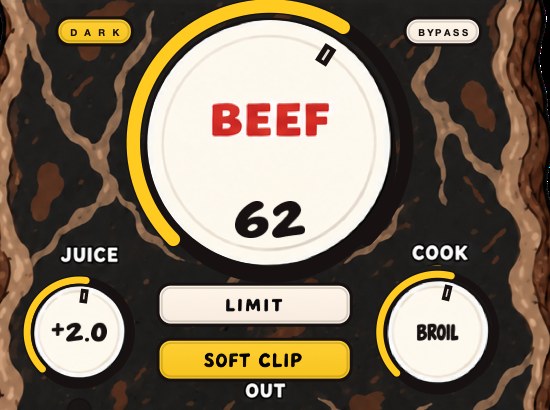
Or put BEEFY on the drums and the 808: SOFT CLIP is on when it opens. The demo on the page is 28 seconds.
How hard the corner is decides both halves of the trade, and the difference is computable. Drive a sine 6 dB into a hard clipper, normalize the result back to full scale, and its crest factor has fallen from 3.01 dB to 1.07 dB. Push the same 6 dB into a smoothly saturating curve and it lands at 1.60 dB. The hard corner buys about half a decibel more level for the same drive, and pays for it in harmonics that reach much further up the spectrum. At 12 dB of drive the two read 0.49 dB and 0.78 dB, both of them most of the way to a square wave.
So keep it small and keep it early. One to three decibels on a drum bus, before the master, is the setting that does the work; anything past that is a sound-design decision rather than a loudness one. Feed the clipper the parts that set the peaks and leave the pads alone, because rounding a sustained chord gives you almost no level and all of the grit. What is clipping covers the failure case, and soft clipper plugins the options.
Four things tell you it is too much, and each has its own sound. Hats and cymbals grow a fizzy ring on top. Kicks lose their point and start reading as a thud with no attack. Sustained low notes take on a growl that follows the note rather than the groove. And the whole record gets harder to listen to for four minutes without anything in particular sounding broken, which is the one that catches people, because it does not show up in an eight-bar loop.
Chain order, and what fights what
Order matters here more than settings do. High-pass and EQ first, because they change what the peaks are. Compression next, because it works on the balance you just set. Saturation and clipping after that, on the parts that set the peaks rather than on everything. Limiter last, catching whatever is left.
Two orderings actively undo work. A clipper placed after a limiter is a clipper fed a signal with no peaks left to round, so it contributes distortion and no loudness. A limiter placed before a saturator hands the saturator a controlled signal and then lets the saturator push it back over the ceiling the limiter just enforced. Clipper before limiter has the pair in detail, and drum bus chain order the upstream version.
Two limiters in series is the other common one, and it is usually an accident: a limiter on the master bus inside the project and another one on the export chain or the mastering preset. The second sees a signal already flattened and spends its reduction on the few peaks the first one let through, which is where the record stops breathing. Find the duplicate before you go looking for a better limiter. How to master a beat puts the stages in order.
Finish with a limiter
- Put a limiter last on the master.
- Set its ceiling to -1.0 dBTP (true peak).
- Raise the input until the loudest section shows a few dB of gain reduction.
- Listen for pumping, dulled transients or distortion, and back off until they're gone.
- Level-match against the unlimited mix and compare.
- Turn on true-peak detection and oversampling if the limiter offers them.
- Check the quiet bars, not the drop. Pumping shows up where there is space.
- Play the last eight bars and the first eight back to back; a limiter set on a loop often falls apart on the intro.
If the limiter needs more than a few dB to get the level you want, the fix is further up the chain, not a harder limiter.
The ceiling is the one control with a correct answer, and it is cover for a known error rather than a rounding allowance. A sample-peak meter reads only the stored points, and the converter draws a curve through them on the way out that can rise above both. The worst case is computable: a tone at a quarter of the sample rate whose peak falls exactly between two samples puts both neighbors at cos 45° = 0.7071, which meters as 20 log₁₀(0.7071) = −3.01 dBFS while the reconstructed wave reaches 0 dBFS. Setting the ceiling at −1 dBTP holds your loudest instant to 10−1/20 = 0.8913 of full scale, giving up 10.87 per cent of the available amplitude to keep that error off the encoder. True peak has the measurement, and oversampling explains what the limiter is doing to see it. How to use a limiter covers release and lookahead.
Check it without fooling yourself
The louder of two otherwise identical files wins every blind comparison, which makes an unmatched A/B worse than no test at all. Every decision on this page has to be made at matched loudness or it is being made by the gain, and the procedure takes about four minutes.
- Bounce the before and the after as separate files at the same length.
- Measure integrated loudness on both with a LUFS meter.
- Trim the louder file by the difference, so both read within 0.2 LU.
- Compare them, switching during a busy bar and again during a sparse one.
- Repeat on a phone speaker and on earbuds before you keep the change.
Do the same against a reference. Drop a commercial track you like into the session, measure its integrated loudness, trim it to match yours, and listen for what it has that you do not. Nine times out of ten the answer is low-end control and midrange clarity rather than level, which is the whole point of doing it this way round. How loud should my master be has the targets.
Phone speakers deserve their own pass, because they reproduce almost nothing below about 500 Hz and they are where most of your plays happen. A mix that depends on the sub to feel heavy vanishes on them, and the fix is harmonic content an octave or two up rather than more level down low. How to make bass audible on phone speakers is the whole argument.
What each failure sounds like
Every one of these has a signature, and knowing them saves you from turning the wrong knob for an hour.
- Pumping
- the whole record ducks after every kick and swells back; compressor or limiter release too slow
- Dulled transients
- hits lose their point and the groove flattens; too much reduction with too fast an attack
- Fizz
- a ringing edge on hats and cymbals; clipping driven past the useful range
- Bass growl
- a buzz that tracks the note rather than the beat; reduction happening inside a low-frequency cycle
- Image collapse
- the stereo picture narrows on loud hits; a linked detector reacting to one side
- Fatigue
- nothing sounds broken and you want it off after three minutes; the crest factor is simply gone
The last one is the expensive one, because it passes every short test. Loop eight bars and a crushed master sounds impressive. Play four minutes on earbuds on a train and it becomes work. Judge loudness decisions on a full pass, in a place you would actually listen, at a level you would actually choose. Why do my drums sound weak covers the version of this that shows up on the drums first.
Where your host can undo the work
Modern hosts mix in 32-bit float, and that changes what an over means inside the project. A single-precision float runs from about 1.1755 × 10−38 to 3.4028 × 1038, which is 20 log₁₀ of the ratio, or roughly 1,529 dB of range. A channel reading +4 dBFS in the middle of the mixer has lost nothing; pull it back down and it returns intact. The damage happens at fixed-point boundaries: the converter, the exported file, and any plugin that clamps internally.
So find the three places where your project meets a boundary and check each one. First, the master output itself, which is where a red light actually matters. Second, the export, where a float mixdown gets written to 24 or 16 bits and anything above full scale gets folded flat; a 16-bit file carries 16 × 6.0206 = 96.33 dB of range and a 24-bit file 144.49 dB, and the loudest sample in either one still cannot exceed the ceiling. Third, any plugin between the limiter and the output, including a stock meter or an analyzer with a gain control.
Two host habits catch people out regardless of which one you use. Check whether your master fader sits before or after the plugin slots, because if it is after, a fader move undoes the ceiling your limiter just enforced and the meter will not tell you. And check whether your export does sample rate conversion; resampling after limiting can lift peaks above the ceiling by the same inter-sample mechanism the ceiling was protecting against, which is why the last decibel of margin is worth keeping. Dithering covers the bit-depth half of the export.
Louder isn't always louder on streaming
Spotify adjusts tracks to -14 dB LUFS: louder masters get turned down, quieter ones turned up, and Premium listeners can switch between Loud (-11), Normal (-14) and Quiet (-19). It recommends keeping true peaks below -1 dBTP, or below -2 dBTP if the master is louder than -14 LUFS. So a master crushed to the ceiling doesn't play louder there. It plays at the same level with less punch.
That doesn't mean mastering to -14. It means loudness should come from a dense, clean mix, not from how much limiting it survives.
Run the subtraction and the whole loudness war collapses into one column. Every master below is delivered at a −1 dBTP ceiling, and the third figure is where its peaks land once playback normalization has done its work.
- −8 LUFS
- turned down 6.0 dB; peaks play at −7.0 dBTP; PLR 7.0 dB
- −10 LUFS
- turned down 4.0 dB; peaks play at −5.0 dBTP; PLR 9.0 dB
- −12 LUFS
- turned down 2.0 dB; peaks play at −3.0 dBTP; PLR 11.0 dB
- −14 LUFS
- unchanged; peaks play at −1.0 dBTP; PLR 13.0 dB
All four arrive at the listener at the same average level. The only thing that differs is how far the loudest hit rises above it, and that distance is the one you spent the session destroying. The crushed master gets turned down six decibels and plays with seven decibels of peak room against the other one's thirteen.
There is a limit on the lift in the other direction, and it is worth knowing before you master quiet on purpose. Spotify accounts for a track's headroom when applying positive gain and leaves a decibel for lossy encoding, so a track measured at −20 LUFS with a true peak of −5 dBFS is only raised to −16 LUFS rather than all the way to −14. On the Loud setting the target is −11 LUFS regardless of true peak, with a limiter engaging at −1 dB on sample values, a 5 ms attack and a 100 ms decay. The web player and third-party devices do not normalize at all.
Other services publish their own targets and they are not all the same number. Read each one's own page rather than a figure somebody repeated in a forum thread, and deliver one clean master rather than a different cut per platform.
What it costs
Say the price plainly, in both currencies. In decibels, the technique on this page costs you crest factor: the worked example gave back 2.96 dB of average level in exchange for 6.4 milliseconds of altered waveform, and there is no setting where the exchange rate is zero. Past about six decibels the trade turns against you, which the 5.61 dB return on a 6 dB clip says out loud.
In money, none of the essential moves cost anything. A high-pass filter, a compressor and a limiter ship with every host on the market, and the eight steps above work with the stock versions. What you buy when you buy a saturation or clipping plugin is a curve somebody voiced and a control range that keeps you in the useful part of it, which saves time rather than making something impossible. Free compressors and the cheapest way to make beats louder take the budget version seriously.
Questions people ask
How do I make my mix sound louder?
Raise the average level while keeping peaks under control: clean up the low end, fix masking with EQ, add gentle compression and saturation, soft clip the sharpest transients and finish with a limiter. A clearer mix also sounds louder at the same measured level.
How do I avoid clipping in a mix?
Trim channels so they peak around -12 to -6 dBFS, keep the master below 0 dBFS while mixing, and put a limiter with a -1 dBTP ceiling at the very end. Clipping on the master output is almost always a gain staging problem upstream.
How do I boost audio without clipping?
Lower the peaks first, then raise the level. A soft clipper or limiter reduces the tallest peaks, which creates room to add gain before anything touches the ceiling.
Why are my mixes so quiet?
Usually the peaks, often from the kick and bass, reach the ceiling long before the average level does. The fix is controlling those peaks and the low end, not pushing faders.
What LUFS should I master to?
Master to whatever loudness the record holds without falling apart, then check the number. Spotify normalizes to −14 LUFS and recommends staying below −1 dBTP, or below −2 dBTP if you deliver louder than −14 LUFS. Most hip-hop and electronic masters land somewhere between −9 and −12 LUFS and sound fine after normalization. How loud should my master be has the detail.
Is clipping ever okay?
Deliberate clipping on individual sources is standard practice and has been for decades. The measured example above altered 0.32 per cent of samples for almost three decibels of level. What to avoid is clipping you did not choose: a channel running hot into a plugin that clamps, or a master output pinned red on export.
Should I use a clipper or a limiter?
Both, in that order. A clipper rounds the fastest peaks with no detector and no timing, so it never pumps; a limiter guarantees a ceiling. Clipping upstream on drums and bass means the limiter at the end has one or two decibels of work instead of six. Clipper before limiter covers the pairing.
How much gain reduction is too much on a limiter?
One to three decibels on peaks is normal. Past that you are asking the limiter to fix a crest factor problem it did not create, and the meter never returning to zero is the clearest warning sign there is. Move the work upstream instead.
Why does my mix get quieter when I add a limiter?
Because the ceiling is below your current peak and the limiter has no make-up gain engaged. Set the ceiling at −1 dBTP, then raise the input or lower the threshold until you see reduction; the loudness comes from driving it, not from inserting it.
My mix is loud but sounds small. Why?
Loudness with no crest factor left reads as small, because the ear judges size partly on the distance between a hit and everything around it. Measure your peak-to-loudness ratio; if it is below about 7 dB, undo two decibels of limiting and recover the difference upstream with cleaner low end and denser sources.
Does a louder master help on Spotify?
No. Playback is normalized to −14 LUFS, so a −8 LUFS master is turned down six decibels and arrives at the same level as everything else, only with its peaks six decibels closer to the body. Deliver the version that sounds best, not the loudest one.
Should I high-pass the master?
A gentle high-pass on the master around 25 to 30 Hz is cheap headroom, and the measurement above shows why: a 25 Hz component sitting twelve decibels below the mix peak still cost 2.94 dB of peak. Do it with a shallow slope and check the kick afterward, because a steep filter at 30 Hz is already 3.01 dB down at the corner.
Why does my mix clip on export but not while playing?
Because the float mixer tolerated what the file cannot. Inside the project a channel can run above full scale and recover; the exported file has a hard ceiling at 0 dBFS, and sample rate conversion or encoding can lift peaks further by the inter-sample mechanism. Keep a limiter with a true-peak ceiling last, and leave the master fader alone after you set it.
How do I make my beat as loud as a commercial record?
Match loudness before you decide you are behind. Bounce your track, measure both integrated readings, trim the reference to your level, and compare; most of the time the difference turns out to be low-end control and midrange clarity rather than level. Then work the gap down in stages, one or two decibels per stage, rather than asking a limiter for six.
Why does my mix distort on phone speakers but not in headphones?
Small drivers get pushed past their excursion limit by low-frequency energy they cannot reproduce, so the sub you cannot hear on them is still the thing breaking them up. High-pass what does not need the bottom, keep the sub mono and centered, and give the bass harmonics an octave or two up so it reads as weight rather than as rattle.
Stock plugins that do this
- FL Studio
- Fruity Soft Clipper for peaks
- Ableton Live
- Saturator with soft clip on; Limiter
- Logic Pro
- ChromaGlow for density (Logic Pro 11 and later)
What BEEFY does
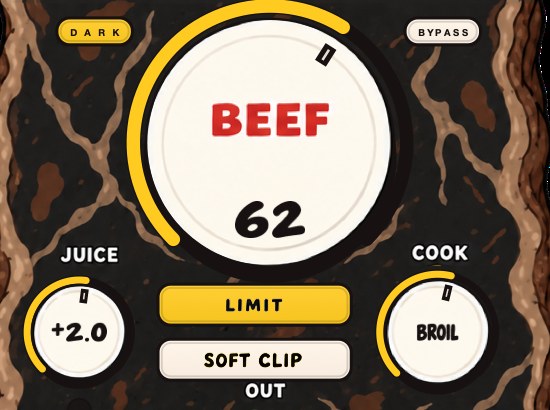
BEEFY is our saturation and loudness plugin, made for the parts that set your peaks: drums, 808s and bass. BEEF brings more weight, density and loudness as you turn it up. SOFT CLIP opens switched on and rounds off the loudest parts. LIMIT keeps output peaks in check instead, if you prefer, and the input and output clip lights show when either end is getting pushed.
The two switches are the two halves of this page, and they are separate choices. SOFT CLIP is the upstream half, the one the worked example is about: round the tallest peaks on the drums and the 808 and the average comes up before any ceiling is involved. LIMIT is the downstream half, holding output peaks in check. Turn both off and you are driving it yourself, which is the setting for when a limiter you already trust lives at the end of the master chain. JUICE sets the level going in and COOK moves the color from rounder toward brighter and more cooked.
$39, Mac and Windows, AU and VST3 with a standalone on Mac, and the product page has a 28-second demo with three without/with comparisons so you can hear the difference between rounding a peak and holding a ceiling over it before you decide. How to make beats sound fuller is the same work aimed at size rather than level.
Same playlist, same record before it. This time the beat is in the room.
BEEFY — saturation and loudness plugin for Mac and Windows. There is a 28-second demo with three without/with comparisons on the page.
Keep reading
- Gain staging for beatmakers — Channel levels, plugin input, buses and the master, plus the common mistakes.
- How loud should a master be — LUFS, true peak, what Spotify does to loud masters, and how to choose a level with references.
- How to make your beats sound fuller — Cover the frequency range, layer and double, add saturation, width and space.
- How to master a beat — Headroom, a plain chain, clipping before the limiter, and the checks.
- How to make 808s louder without clipping — The loudness arithmetic of a sine, and the order that gets it loud on a phone.