← Gazillion Industries/Reading material
Clipper before limiter
On a good basketball team the help defender takes the quick guard before he reaches the paint, so the big man at the rim only has to deal with what's left. Put one of them in charge of everything and somebody gets dunked on.
A clipper goes before the limiter. The clipper takes the fastest, tallest transients instantly, without the attack and release movement a limiter would add, and the limiter after it catches everything else and holds the final true-peak ceiling. Each does a little, so neither's side effects become audible. Start with a dB or two from each, keep the true-peak limiter last, and compare at matched loudness.
The short version
- Order
- mix bus processing, then clipper, then limiter
- Clipper
- catches the fastest spikes; 1–2 dB on the loudest hits
- Limiter
- last, true peak, ceiling around -1 dBTP
- Split
- small amounts from each beat a lot from one
- Earlier
- clipping drums or 808 first means less on the master
- Check
- clipper only, limiter only, both, at matched loudness
Why the clipper goes first
A limiter is fast but not instant. It turns the gain down over a short attack and lets it back up over a release, and when a mix is full of sharp drum hits, that movement is what you start to hear: pumping, dulled snares, a mix that breathes when it shouldn't. A clipper has no timing at all. It reshapes each sample on its own, so it can take the top off a snare without moving anything else.
Put it in front and the limiter receives a signal whose worst spikes are already gone. It needs less gain reduction, so it moves less. The cost moves to the clipper, which distorts a little instead. In small amounts, on short transients, that distortion is hard to hear.
The two tools also pay in different currencies. A limiter pays in time, borrowing level from the moments either side of a peak, so the hat after the snare comes back quieter than it went in. A clipper pays in harmonics, leaving the timing untouched. Reverse the order and most of the benefit goes: a clipper has no detector and no memory of the previous hit, so a signal the limiter has already flattened gives it almost nothing to take.
The arithmetic: what two decibels of clipping buys
Clipping buys loudness by shortening the distance between the peak and the average. That distance is crest factor, and every decibel off the top is a decibel you can add back across the whole file.
Run it on real numbers. A drum bus reads −0.3 dBTP at the peak and −9.0 LUFS integrated, so crest factor is 9.0 − 0.3 = 8.7 dB. Clip 2 dB off the loudest hits and the peak reads −2.3 dBTP while the integrated figure barely moves, because the clipped moments last milliseconds and integrated loudness averages the whole file. Crest factor is now 6.7 dB. Add 2 dB of output gain and you are back at −0.3 dBTP with an integrated reading of −7.1 LUFS.
Two decibels of clipping bought two decibels of loudness, and the limiter behind it never moved to get them. Ask the clipper for 2 dB and the limiter for 2 dB and you have four, with neither one near the level where its signature shows.
Why the limiter stays last
The final stage has to guarantee the ceiling. A true-peak limiter estimates the peaks between samples, the ones that can appear after conversion or lossy encoding, and holds them under the ceiling you set. Put a clipper after it and the output can go back over. Streaming services ask for headroom there: Spotify recommends keeping true peaks below -1 dBTP, or below -2 dBTP for masters louder than -14 LUFS.
Red Hot Chili Peppers' Californication (1999) is still the record people point to when a loud master tips over into audible clipping. Nobody wants to be the next example.
Here is the part with a number on it. A clipper works on samples, and a sample peak is not the peak the converter produces. Take a 12 kHz tone at a 48 kHz sample rate, exactly a quarter of the sample rate, and land the samples 45 degrees either side of the crest. Each one sits at sin 45° = 0.7071 of the true peak, so when those samples read full scale the reconstructed waveform peaks at 1 / 0.7071 = 1.4142, which is 20 log₁₀(1.4142) = +3.01 dB.
Three decibels over the line, with a clipper insisting everything is under it. A true-peak limiter upsamples so it can see those in-between peaks and hold them down, and no sample-domain clipper can do that however good it sounds. That is the whole reason one goes first and the other goes last. The measurement is in true peak, and headroom in mixing covers how much to leave.
What happens to the master after you upload it
Your limiter is not the last one your track meets. Spotify normalizes playback to −14 LUFS to the ITU 1770 standard, turning louder masters down and quieter ones up, and its published mastering guidance asks for true peaks below −1 dBTP, or below −2 dBTP above −14 LUFS integrated.
There is a second limiter down there you never see. A paying listener can select a Loud playback setting at −11 LUFS, and Spotify states that it applies a limiter at that setting, engaging at −1 dB on sample values with a 5 ms attack and a 100 ms decay. Whatever you leave hanging over the line gets handled again by something you did not choose.
Which is the practical argument for splitting the work. Two masters normalized to the same playback level get compared at that level, not at the one you bounced at, so the master that got loud through four decibels of limiting simply sounds smaller. See how loud should my master be.
How to set a clipper before a limiter
- Order the master chain: your mix bus processing, then the clipper, then the limiter.
- Set the limiter to true peak with a ceiling of -1.0 dBTP, and leave its input at zero for now.
- Raise the clipper's input until the loudest transients lose 1 to 2 dB.
- Raise the limiter's input until it shows a couple of dB of gain reduction on the loudest section.
- Bypass the clipper and raise the limiter alone to the same loudness, and note the extra gain reduction it needs.
- Move any EQ boost to before the clipper. A 2 dB shelf after it hands 2 dB of peak straight back.
- Level-match and compare three versions: clipper only, limiter only, both.
- Keep the one with the most punch at the same loudness.
- Bounce the file and measure the bounce, not the session. Meters read differently once plugin latency is in the path.
If the clipper is available with oversampling, use it on the master, where cymbals and vocals make aliasing easy to hear.
How to verify the order in your own session
You do not have to take the order on faith. Two tests settle it in ten minutes, and both have a pass mark you can hear.
- Bounce three files of the same length: clipper only, limiter only, both sharing the work.
- Measure integrated loudness on all three with a loudness meter.
- Trim each file until the three readings sit within 0.1 LU of each other.
- Switch between them over a busy eight bars, listening to the hats and the snare rather than the drop.
- Then invert the polarity of the clipped bounce against the unclipped one and listen to what is left.
That last one teaches you something. The difference signal should be short ticks sitting exactly on the drum hits and nothing else. If you can hear the bass line, or the sustained part of a pad, the clipper has moved past the transients into the body of the mix and you have asked it for too much. Pull it back until the difference goes back to ticks. Run the same test on the limiter and you get a soft, continuous ghost of the whole mix instead, because a limiter moves everything around the peak.
How much distortion you are actually adding
Put a number on the damage and the argument gets easier. A snare transient crosses the clip point for roughly 0.8 ms. At a 48 kHz sample rate that is 0.0008 × 48,000 = 38 samples. One bar of 4/4 at 90 BPM lasts 4 × (60 / 90) = 2.667 seconds, which is 128,000 samples. Say sixteen hits in that bar reach the clip point: sixteen events at 38 samples each is 608 samples out of 128,000, under half a percent of the bar. Everything else passes through untouched.
Now the same sum on the low end, where clipping stops being free. A 50 Hz sine has a period of 1 / 50 = 20 ms. Clip it by 2 dB and you flatten everything above 0.7943 of the peak, since 10 raised to the power (−2 / 20) = 0.7943. The sine crosses that level at 52.6° and comes back down at 127.4°, so 74.8° of every 180° half cycle is flat. That is 41.6 percent of the time.
Under half a percent on the drums, forty-one percent on the sub. Same two decibels, same plugin, two completely different amounts of distortion. That one comparison explains why a clipped 808 growls while a clipped snare only sounds tighter, and why a highpass in front of the clipper, or clipping the drums on their own bus, changes the result so much. If the growl is the point, how to distort 808s goes after it deliberately.
Aliasing, oversampling and the latency they cost
Clipping makes harmonics, and harmonics above half the sample rate do not politely disappear. They fold back into the audible band at frequencies that have nothing to do with the note.
Take a 9 kHz hi-hat partial at 48 kHz, where Nyquist sits at 24 kHz. Clipping generates odd harmonics: the third at 27 kHz, the fifth at 45 kHz, the seventh at 63 kHz. The third folds to 48 − 27 = 21 kHz, high enough to ignore. The fifth folds to 48 − 45 = 3 kHz, in the middle of the vocal range with no harmonic relationship to anything in the track. The seventh folds to 63 − 48 = 15 kHz. Three kilohertz of inharmonic grit on every hat, free with your loudness, and it is the thin glassy edge people hear and blame on the sample.
Four-times oversampling runs the clipper at 192 kHz, where Nyquist is 96 kHz, so harmonics up to the tenth of that partial stay where they belong and get filtered out on the way down. More in oversampling and what is aliasing in audio. The bill arrives as latency, and it adds up, because two plugins in a row can both ask for lookahead. Live's Limiter offers 1.5, 3 or 6 ms of it and says plainly that the longer setting costs more. Put an oversampled clipper in front of a 6 ms lookahead and the master bus runs several milliseconds behind everything else. Your DAW compensates on playback; it cannot compensate for a performer overdubbing through it.
Clip earlier and the master needs less
The drums and the 808 create most of the fast peaks in a beat. Clip them on their own channels or bus and the master clipper has almost nothing to do, which is often the cleaner result. The detail is in soft clipping explained, and the full loudness chain is in how to make your mix louder without clipping.
The advantage is a mixing one before it is a loudness one. Take a decibel off the kick, a decibel off the snare and a decibel off the 808 on their own channels and the master clipper takes half a decibel instead of three. Clipping a kick on its own channel touches the kick. Clipping the same amount on the master touches the kick, the vocal sitting under it and every hat inside that millisecond, because a clipper works on the summed waveform and cannot tell which part belongs to what. Per-channel is in how to saturate drums.
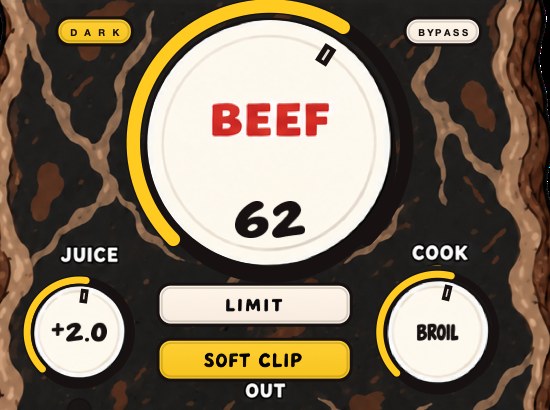
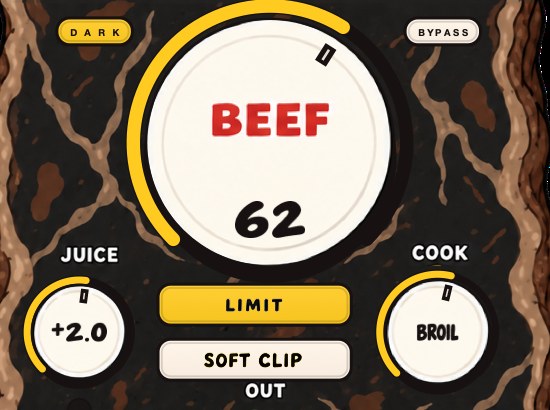
BEEFY has SOFT CLIP and LIMIT as separate buttons, for the drums or 808 before they reach the master. The demo on the page is 28 seconds.
Where the clipper sits in the whole chain
- 1
- corrective EQ and level matching
- 2
- bus compression for glue
- 3
- tone EQ, saturation, stereo work
- 4
- clipper
- 5
- true-peak limiter
- 6
- dither, if you are reducing bit depth
Everything above the clipper changes its input, so every move up there changes how much it takes. Raise a 3 kHz bell by 2 dB after the compressor and the snare arrives 2 dB taller, and the clipper now removes 2 dB more from it than it did five minutes ago. The clipper is doing exactly what a fixed ceiling does. The EQ move is what changed.
Bus compression belongs above the clipper for the same reason: it lowers crest factor first, so the clipper finds less waiting. If that stage is not set yet, glue compression covers it and gain staging covers the levels feeding all of it. Dither goes after the limiter, and nothing goes after dither.
Two things break this order without anybody noticing. A stereo widener after the clipper can push one channel's peak above where it was, and a mastering chain loaded as a single unit may have its own limiter inside it, which means yours is no longer last. Open the chain and look. How to master a beat walks the full order.
What it costs
Split the work and each tool stays quiet. Lean on either and its signature comes out: a clipper doing too much turns snares papery and adds grit to cymbals, and a limiter doing too much pumps and flattens the groove. If the two together need more than a few dB to reach your level, the mix needs work before the master does.
There is a CPU cost and a workflow cost as well. An oversampled clipper is cheap next to most plugins, but its latency makes real-time overdubs awkward, so switch oversampling on at bounce time if yours has a separate render setting. And every decibel taken here cannot be taken back. Keep an unclipped bounce of the mix. You will want it the day somebody asks for a version for vinyl or for a sync, where the loudness target belongs to somebody else.
Failure modes and what each one sounds like
- Papery snare
- clipper too hard; the crack has gone and only the body is left
- Glassy hats
- aliasing; turn on oversampling or take a decibel back
- Growling bass
- the clipper is working on the sub; highpass what feeds it, or clip drums separately
- Pumping under the vocal
- limiter release too long for the tempo
- Flat, small and loud
- both doing too much; the fix is in the mix, not the master
- Fine here, distorted on a phone
- true peaks over the ceiling, found by the encoder
Two of those deserve sitting with. Release time is tempo, not taste: at 90 BPM a sixteenth note lasts 60,000 / 90 / 4 = 167 ms, so a 200 ms release is still recovering when the next hat lands, heard as the track breathing on the offbeats. At 140 BPM the same sixteenth is 107 ms, and anything much over 100 ms will straddle hits.
The last row is the one that costs money. A master that passes on your monitors and distorts through a phone almost always has peaks over the ceiling that only appear once the file is encoded, which is precisely the problem a true-peak limiter in last position exists to prevent. Play it on the phone before you send it anywhere.
Questions people ask
Does a clipper go before or after the limiter?
Before. The clipper removes the fastest transients so the limiter works less, and the true-peak limiter stays last so the output never goes over its ceiling.
Is a clipper the same as a limiter?
No. Both control peaks, but a limiter turns the gain down over time with attack and release, and a clipper reshapes the waveform instantly, adding distortion instead of gain movement.
What goes first, a compressor or a limiter?
The compressor. Compression shapes dynamics inside the mix; the limiter is a safety ceiling at the very end. On a master the usual order is compression, then clipping, then limiting.
Should I clip after the limiter for more loudness?
Not for streaming. A clipper after the limiter can push true peaks back over the ceiling, which risks distortion once the file is encoded. Keep the true-peak limiter last.
How much should a clipper clip before the limiter?
One to three decibels off the loudest hits, measured as the change in peak level with the clipper in and out. Past about 3 dB on a full mix the snares start thinning. On individual drum channels you can go further, because only that one sound is affected.
Can I use two clippers in a row?
Yes, and two often sound better than one doing the same total amount. Two stages of 1 dB round the waveform in gentle steps rather than one abrupt one, and each stage generates lower-order harmonics than a single hard pass. Keep the true-peak limiter after both.
Do I need oversampling on the clipper?
On the master, yes. Clipping a 9 kHz hi-hat partial at 48 kHz folds its fifth harmonic back to 3 kHz, where it reads as grit rather than brightness. On a kick or bass channel it matters far less, because the harmonics generated there stay under Nyquist.
Clipper before or after saturation?
Saturation first. Saturation already rounds peaks as part of what it does, so the signal reaches the clipper with some of the job done, and a clipper in front would only hand the saturator a squared-off waveform to work on. Saturation vs distortion covers the difference.
Should the clipper go before or after EQ?
After the EQ. Any boost placed after the clipper adds peak height back for the limiter to deal with. If you want a brighter top once the clipping is set, use a shelf small enough that the limiter's gain reduction meter does not change.
Does clipping before the limiter make the master louder?
It lets you make it louder without the limiter moving as much. Two decibels off the peaks is two decibels of headroom you can add back across the whole track, and the limiter never has to see them.
What ceiling should the limiter be set to?
−1.0 dBTP with true-peak detection on for anything going to streaming, and −2.0 dBTP if the master ends up louder than −14 LUFS integrated. Those are the figures Spotify publishes in its own mastering guidance.
Is hard clipping or soft clipping better before a limiter?
Soft clipping for anything with cymbals in it, hard clipping when you want the peak gone and the extra harmonics are part of the sound. A soft curve bends over a range of levels rather than at one point, so it generates lower-order harmonics and less aliasing. Soft clipping explained has the curves.
Why does my mix distort on streaming but not in my DAW?
Inter-sample peaks. The samples in your file sit under the ceiling and the waveform reconstructed between them does not. A full-scale tone at a quarter of the sample rate can reconstruct 3.01 dB above its sample peaks. Set the ceiling to −1 dBTP and switch on true-peak detection. What is clipping covers the audible result.
Do I still need a clipper if my limiter has a soft clip mode?
Usually yes, because on some limiters the soft clip mode replaces true-peak mode rather than joining it. Check whether yours can do both at once. If it cannot, put a separate clipper earlier in the chain and leave the limiter set to true peak.
Stock plugins that do this
- FL Studio
- Fruity Soft Clipper before the limiter
- Ableton Live
- Saturator with soft clip on, then Limiter
Both carry a detail worth knowing before you trust them. In FL Studio, Fruity Soft Clipper has two controls, THRES and POST, and Image-Line's own manual describes it as a soft-knee compressor that saturates once the signal passes the threshold, which is the shape you want in front of a limiter. Their documentation points at Fruity Limiter as the more transparent option for the last slot.
Fruity Limiter repays a careful read, because its internal order is not the one you would guess. Image-Line document the signal flow as input, compressor, gain, limiter with the integrated gate, then saturation, then output. The SAT control sits after the limiter, and the manual suggests letting the input peak over the limit threshold and blending that saturation in on purpose. It sounds good, and it also means the last thing the plugin does is add harmonics above your ceiling. Note too that the ATT control doubles as the limiter's lookahead, which is where the plugin's latency comes from.
In Live there are three separate places to clip before you reach the Limiter, and they do not act alike. Saturator has a Post Clip Mode chooser with Soft Clip and Hard Clip, and with either selected its output never exceeds the level set by the Output control. Glue Compressor has a Soft clip switch that Ableton describe as a fixed waveshaper, capping output at −0.5 dB, with the warning that with oversampling enabled very loud peaks can still pass 0 dB. And Live's Limiter has three ceiling modes, Standard, Soft Clip and True Peak, where True Peak is the one that prevents inter-sample peaks.
That last one is the trap on this page. Set Live's Limiter to Soft Clip thinking you have covered both jobs and you have swapped true-peak protection for soft clipping rather than added it. Clip earlier instead and leave the Limiter in True Peak. How to use a limiter has the rest of the settings, and limiter vs compressor the line between the two.
What BEEFY does
BEEFY is our saturation and loudness plugin, and it has both tools as separate choices. SOFT CLIP opens switched on, brings rounded, fuzzy edges to the loudest parts and takes care of the initial gain staging. LIMIT keeps output peaks in check. Or turn both buttons off and push it yourself, with input and output clip lights at either end.
Most people will get the most from it on the drums, 808 and bass, so the master clipper and limiter have less to fix.
The order inside the plugin is fixed, which removes one decision: BEEF and COOK shape the signal, SOFT CLIP or LIMIT handles what leaves, and the clip lights tell you which end is running hot. BEEFY is $39, Mac and Windows, AU and VST3 and standalone. Whatever you run it into, keep a true-peak limiter in last position.
The guard never made it to the paint. The big man barely had to jump.
BEEFY — saturation and loudness plugin for Mac and Windows. There is a 28-second demo with three without/with comparisons on the page.
Keep reading
- How loud should a master be — LUFS, true peak, what Spotify does to loud masters, and how to choose a level with references.
- Soft clipping explained — What a soft clipper does, how it differs from hard clipping and a limiter, and where to use one.
- Gain staging for beatmakers — Channel levels, plugin input, buses and the master, plus the common mistakes.
- How to master a beat — Headroom, a plain chain, clipping before the limiter, and the checks.
- Limiter vs compressor — Where the line sits between them, and which one goes last.
- True peak — Why a file can read zero and still clip, and what ceiling to use.
- Crest factor — Peak minus average, and why it decides how loud a track can get.
- How to use a limiter — Where it goes, what ceiling, and how much gain reduction is normal.
- Best soft clipper plugins — Soft against hard, where a clipper belongs, and the free and paid ones worth demoing.
- Free soft clipper plugins, and the one already in FL Studio — The clipper already in your DAW, six free ones, and how to set them.