← Gazillion Industries/Reading material
Telephone effect plugins
Gazillion Industries ·
Somebody's demo comes in with the hook already committed: the first
eight bars are a voice on a phone, and then the room opens. You know the sound before you
know the song. Then you try to build it yourself and what comes out is a muffled vocal with
the top rolled off.
A telephone effect plugin band-limits audio to roughly 300 Hz to 3.4 kHz with steep
slopes, compresses it hard, adds light distortion, and puts it in mono. Anything with a
band-pass filter, a steep slope and some drive will do it, so the choice comes down to how
steep the slope goes, what the dirt sounds like, and whether the band can move. Dedicated
telephone plugins add handset impulse responses, line noise and dial tones on top.
The short version
- The band
- 300 Hz to 3.4 kHz, steep at both ends
- The slope
- 24 dB per octave minimum; steeper is more convincing
- The dynamics
- hard compression, every syllable the same size
- The dirt
- saturation for a landline, bit and rate reduction for a cell
- The width
- mono, and no reverb from your room
- Free route
- a steep EQ plus any crusher gets you most of the way
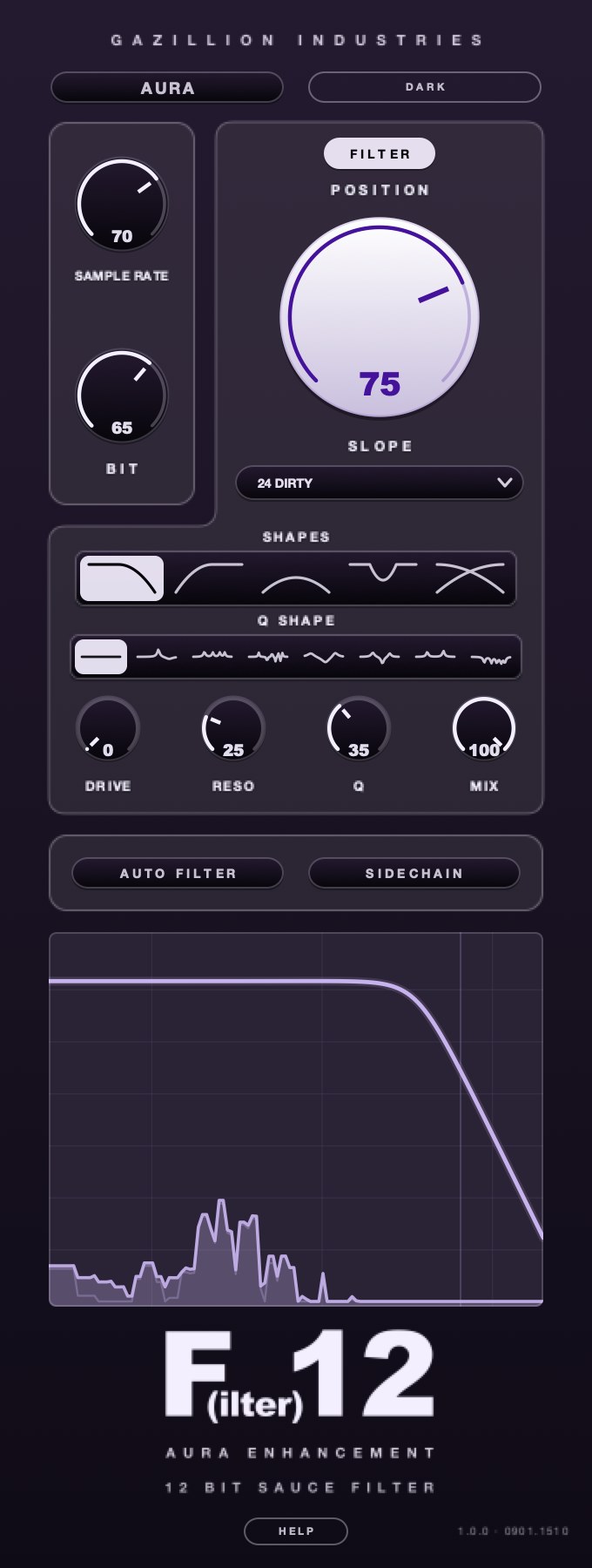 One panel, the whole chain. Crush on the left, filter in the middle, the response drawn underneath so you can see where the band ends.
What a telephone effect plugin is actually doing
Four processes, in this order, and the order matters. A band-pass filter removes the
bottom and the top. A compressor flattens what is left so every word arrives at the same
size. A distortion stage adds the grit of a cheap amplifier and a cheap speaker. A mono
fold collapses the stereo image, because a handset has one earpiece and one microphone.
Skip any of the four and the illusion leaks. Filter without compressing and you get a
thin vocal that still breathes like a studio take. Compress without filtering and you get
a loud vocal. Filter and compress but leave it in stereo and the listener hears a wide,
narrow-band pad, which is not a thing that has ever come out of a phone. Leave the plate
reverb running underneath and you have put a telephone in a cathedral.
The fifth process is the one nobody lists: removing the room you already recorded. A
telephone effect is subtractive before it is additive. Everything that makes a vocal sound
expensive — the low chest weight, the air above 10 kHz, the stereo width, the tail of
the send — has to go before the effect reads as a phone rather than as a filter.
The band: 300 Hz to 3.4 kHz, and why it is those numbers
The traditional telephone network carried speech in a channel of roughly 300 to 3400 Hz.
That was an engineering decision about cost, not about tone: the narrower the channel, the
more calls fit down the same copper. Speech stays intelligible inside it because the
consonants that carry meaning — the s, the t, the k — live in the upper part of
that range, and the ear can rebuild a missing pitch from the harmonics that survive.
That last point is worth sitting with, because it explains why a phone voice still has
a pitch. An adult speaking voice has a fundamental somewhere in the low hundreds of hertz,
and a 300 Hz high-pass removes it outright for most speakers. You still hear the note. The
ear infers the fundamental from the spacing of the harmonics above it, which is why a
band-passed vocal sounds small rather than detuned.
The digital side reinforces the same band. Narrowband telephony samples speech at 8 kHz,
which puts the theoretical ceiling at 4 kHz and the practical one a little under that after
the anti-aliasing filter. If you want the sound the network made, you are copying a
sample rate rather than picking a tone. Set a plugin's rate reduction to 8 kHz and the top
will land in the right place on its own.
Slopes are the other half. A filter's steepness comes in 6 dB per octave per pole, so
24 dB per octave is a four-pole filter and 48 is eight. A gentle 12 dB per octave low-pass
at 3.4 kHz still passes real energy at 7 kHz, which is enough air to break the effect. The
band has to end like a wall, not like a hill. If you only change one setting after reading
this, make it the slope. There is a fuller treatment in
cutoff and resonance.
Landline, cell and video call are three different sounds
Producers ask for “the telephone effect” as though there is one. There are
at least three, and they are separated by decade as clearly as drum machines are.
The landline. Narrow band, hard compression, gentle saturation, no
noise beyond a faint hum. Clean and old. This is the answering-machine sound, the one that
reads as a message left rather than a call in progress. The compression is the giveaway:
telephone circuits squashed level aggressively so that a whisper and a shout arrived at the
same volume, and that flatness is more identifiable than the filtering.
The cell call. Wider band, and broken rather than narrowed. Modern
wideband voice carries roughly 50 Hz to 7 kHz, sampled at 16 kHz, so there is bottom and
there is top, and what tells you it is a phone is the codec failing: swirling artifacts in
the high mids, syllables that arrive late, a quarter-second of nothing where a word was,
and a metallic edge on sibilance. If you narrow a cell call to 300 Hz you have made a
landline by mistake.
The video call. Full bandwidth, gated hard, with automatic level
control riding the gain up in the silences until you can hear the room breathe. It sounds
clean until somebody talks over somebody else and the whole thing folds. Nobody sells a
plugin for this yet. A noise gate with a slow release, an aggressive compressor and a short
delay will get you most of it.
Pick one before you reach for a plugin. The three want different tools, and a plugin
that is excellent at the first is often useless at the second.
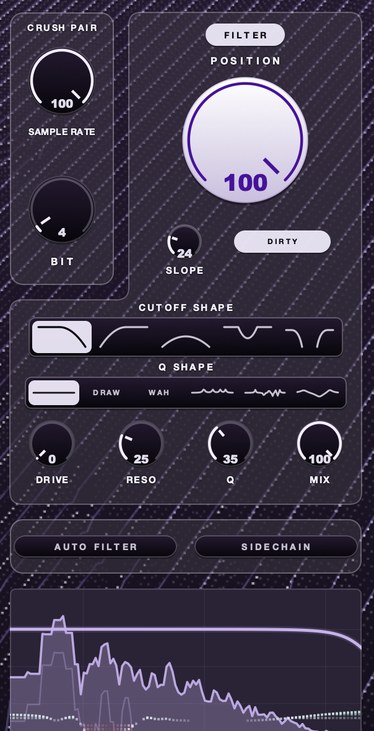 4 bit at 8 kHz. Bits make it grainy, the rate makes it clang. The 8 kHz figure is not a taste; it is the rate narrowband speech was carried at.
What separates a good telephone effect plugin from a bad one
Six things, and you can check all six inside ten minutes of a trial.
How steep the slope goes. This is the single biggest divider. Plenty of
filter plugins stop at 24 dB per octave, which is usable. The ones that reach 48, 96 or
further give you a band that ends, and a band that ends is the difference between a phone
and a muffled vocal. If a plugin exposes slope as a continuous control rather than a
two-position switch, you can find the exact point where the effect stops sounding like an
EQ move.
Whether the filter has a voice. A clean band-pass is transparent, and
transparency is wrong here. Real handset transducers have peaks. A resonance control, or a
filter with some character in its own right, lets you put a bump around 1.5 to 2 kHz that
reads as a small plastic speaker rather than as a boost. The best ones let you shape the
resonance separately from the cutoff.
Where the dirt sits. Distortion before the band-pass gets filtered away
and sounds polite. Distortion after the band-pass stays inside the band and sounds like a
bad line. A plugin that lets you choose the position, or that puts its drive stage in both
places, is worth more than one with a better-sounding distortion in the wrong spot.
What it does to stereo. Some plugins process left and right separately
and leave you to fold the result down yourself. Some have a mono switch. Some run their
noise and their modulation in stereo even when the signal is mono, which quietly widens the
effect and undoes the whole point. Check with a correlation meter, not with your ears.
Whether the band can move. The most useful thing a telephone effect
does in a record is open. A verse arrives inside the band, the downbeat lands, the filters
sweep out and the full vocal is suddenly enormous by comparison. That needs either smooth
automation of the cutoff or a macro that walks both ends of the band at once. A plugin
whose filters zipper under automation cannot do the one move the effect exists for.
What it costs in latency and CPU. Steep filters are not free. A
linear-phase band-pass at 96 dB per octave introduces real latency, which your host will
report and compensate for on playback but which matters if you are tracking through the
effect or performing with it. Minimum-phase filters have no meaningful delay and shift
phase instead, which nobody will hear on a band-limited mono vocal. Oversampling on a drive
stage costs processor time and buys you fewer harmonics folding back down the spectrum. On
a telephone effect, some folding is welcome, so oversampling is one of the few places you
can save CPU without losing anything you wanted.
Controls versus presets. A big preset list looks like value and often
hides a shallow engine. The plugins worth owning give you four or five controls that
interact. If you cannot get from “1940s operator” to “dropped call on a
train” by moving three knobs, the presets are doing the work and you will be stuck
with whatever the designer imagined.
How to test a telephone effect plugin in ten minutes
Use the same source every time, and use a real one. A dry lead vocal with plosives and
sibilance in it, not a loop that was already lo-fi. Then work the list.
- Load the plugin on a dry vocal and bypass every other insert on the channel.
- Set the band as narrow as the plugin allows and listen for the top end to stop
completely.
- Raise the slope to its steepest setting and check whether the sound changes at all.
- Sweep the low cut from 80 Hz to 500 Hz and note where the voice loses its body.
- Add the plugin's drive or crush and listen for whether the grit stays inside the band.
- Check mono compatibility with a correlation meter or a mono button.
- Automate the cutoff across four bars and listen for stepping or zipper noise.
- Play the result through a phone speaker at arm's length.
- Bounce the eight bars and compare them against the dry take at matched loudness.
Two of those steps deserve a note. Step four tells you more about the plugin than any
other: the point at which a voice loses its body is usually somewhere between 200 and
350 Hz, and a filter that takes the body away smoothly across that span is a better filter
than one that drops it in a step. Step nine is a loudness check, not a quality check. Band
limiting changes how loud a signal measures without changing how loud it feels, so any
comparison done at unmatched level will flatter whichever version is louder and tell you
nothing.
Step eight is the one people skip and the one that decides it. Most of your listeners
will hear this on the same class of transducer you are imitating, and a telephone effect
that reads clearly on studio monitors can vanish entirely on a phone, because the phone has
already done the filtering for you.
F(ilter)12
puts the whole recipe on one panel: a band-pass shape, a SLOPE that climbs from 18 dB per
octave to a wall, and SAMPLE RATE and BIT sitting in front of the filter so the grit is
already in the band. There's a demo on the page.
Where the effect goes in the chain
Last on the channel, before the send. Put the telephone effect after your corrective EQ
and your compressor, so it is acting on a vocal that is already even, and before any reverb
or delay send, so the effect does not filter the tail of a space it was never in.
That ordering has one useful exception. If you want the phone to be in a room —
somebody's handset on speaker across a kitchen — then the reverb goes after the
telephone effect, and it should be a short, bright, ugly room rather than a plate. The
filtered signal excites the room, the room is heard fully, and the ear separates the two.
That is a different trick from the one everybody builds, and it is covered properly in
making music sound like
it is in another room.
On a bus, be careful. A telephone effect on a drum bus or a full mix is a much blunter
instrument than it is on a single voice, because the low end you remove was holding the
track together. If you want the whole beat to go through the phone for four bars, automate
the bypass rather than the mix knob, and drop the whole bus level by 3 to 6 dB while it is
engaged so the return feels like a lift.
Parallel is the third option and it is underused. Run the telephone effect on a send at
full wet, and blend a few decibels of it under the clean vocal. You get the boxy 1.5 kHz
honk and the compressed consistency without losing the body. It works especially well on a
double, where the filtered layer sits behind the lead like a bad monitor mix leaking.
Named options, and what their makers say they do
Almost nothing on the market is sold as a telephone plugin. The category is mostly
filters, crushers and lo-fi tools being used for a job they were not named after, plus one
large dedicated product. What follows are the ones whose own pages we read, with the facts
taken from those pages.
Audio Ease Speakerphone 3 is the dedicated one. Audio Ease list it at
$495 in their own store, for macOS and Windows — Windows support arrived with version
3. The scale is the point: their page lists 400 speaker impulse responses, 23 microphones,
106 “covers” from blankets to car trunks, 53 rooms and outdoor spaces drawn from
their reverb product, five gigabytes of ambiences and sound effects, and twelve DSP modules
ranging from a rotating speaker to GSM compression, in over 500 presets. It adds dial tones,
operator recordings and static, and it lets you place ambience on the caller's end or the
receiver's end separately. That last feature is the one you cannot fake quickly with a
filter, and it is what the price buys.
Cableguys FilterShaper XL is a filter built for motion, listed at 79 €
on Cableguys' page. It carries two filters with 20 filter types, a multistage drive, and two
combinable LFOs plus an envelope follower available on every modulatable parameter, with
freehand drawing tools for the LFO shapes. Cableguys describe the DSP as using zero-delay
feedback algorithms with resonance compensation, internal saturation and oversampling of the
whole signal path. For a telephone effect the draw is the automation: the band opening on a
downbeat is a shape you draw rather than a curve you write.
Soundtoys FilterFreak lists at $149 on its own page, with a sale price
showing when we read it. It ships as two plugins — FilterFreak 1 for a single filter,
FilterFreak 2 for two filters in series or parallel — and includes seven saturation
styles, a rhythm mode that syncs to the host with an editor for custom patterns, a groove
control for swing, and envelope and ADSR modes that trigger the filter from the incoming
audio. Two filters in series is the fast route to a hard band: one high-pass, one low-pass,
both driven.
Klevgrand Degrader is $39.99 on Klevgrand's page and is a resampler and
bitcrusher rather than a filter. It resamples anywhere between 250 Hz and 96 kHz, offers a
low-pass with selectable character both before and after the resampling stage with its
frequency fixed at half the sample rate, varies bit depth continuously from 3 to 24 bits,
and adds a jitter control and a separate distortion algorithm. It runs as AU, VST and AAX
on macOS 10.10 or later and Windows 7 SP1 or later, plus AUv3 on iPad, and the demo is the
full version with occasional dropouts. For a cell call, the jitter control is the
interesting one.
Tritik Krush2 combines bit-depth reduction, sample-rate reduction,
filtering and compression in one box, which is close to the full telephone recipe. Tritik's
page lists comb and band-pass filters, a pre/post switch for the filter position, a drive
stage with a character control, two stereo LFOs with adjustable left-right phase offset and
rates up to 20 Hz, a one-knob compressor, dither control on the bit crushing, jitter control
on the downsampling, and up to 8x oversampling on the drive. Their FAQ states a Krush2
license is 10 € and that the original Krush remains available as a free legacy download that
is no longer maintained. It runs VST3, AU and AAX on macOS 10.15 or later and VST3 or Pro
Tools on Windows 10 and 11. The pre/post filter switch is exactly the control that decides
whether the dirt lands inside the band.
MeldaProduction's MFreeFXBundle is free and contains 38 effects. The one
that matters here is MBandPass, which MeldaProduction describe as a filter with slopes up to
120 dB per octave. That is steeper than most paid filters reach, and steepness is the thing
this effect is short of. The bundle also includes MBitFun for distortion. A $56 upgrade
unlocks resizing and styling, the sonogram in the analyzers, saving your own presets,
modulators and upsampling, and removes the reminder box their page says sits at the bottom
of every free interface.
Kilohearts take the modular approach. Snap Heap is listed at $29 and
hosts up to seven serial or parallel effect chains with modulation available on every
parameter, shipping with the Kilohearts Essentials set; their site lists 30 modular effects
plugins free with an account, and offers a ten-day trial. Building a telephone effect as a
chain of small blocks — filter, crusher, distortion, compressor — is a good way
to learn which stage is doing what, because you can reorder them by dragging.
Blue Cat's Triple EQ is a free semi-parametric three-band equalizer in
VST, AU, AAX and VST3, and Blue Cat's changelog shows it went free at version 3.0 back in
2008. It ships in single and dual channel versions. It is not steep, and it is not meant to
be, but it is a clean way to put the 1.5 kHz honk in after something else has done the
band-limiting.
Voxengo's Marvel GEQ is a free linear-phase 16-band graphic equalizer in
AU, AAX, VST and VST3, supporting up to eight input and output channels and mid-side
processing. Graphic bands are a blunt way to build a phone band, and that bluntness is
occasionally the point: pull every fader below 300 Hz and above 3 kHz to the floor and you
have the effect in one gesture.
iZotope Vinyl is free and simulates dust, scratches, warp and mechanical
noise, with a lo-fi effect added to it and support for Native Instruments hardware. It is a
record, not a phone. It earns a place here because the noise bed is the cheapest way to make
a band-passed vocal sound like a transmission rather than a filter, and because the noise it
produces is more interesting than the white noise generator in your host.
Two honest caveats about this list. First, only one of these is a telephone plugin; the
rest are being recommended for a job their makers did not name. Second, plugin prices move
constantly and several of these makers serve prices from scripts rather than from the page,
so treat every figure above as what their own page said on the day and check before you
buy.
Telephone effect plugin free: what you can do with nothing
Everything. This is one of the few effects where the free route loses almost nothing,
because the processes involved — steep filtering, hard compression, a little
distortion, mono — are all things your host already does well. What you pay for with a
commercial plugin is speed, a resonance character you did not have to design, and in the
case of the dedicated product, a library of impulse responses nobody could record
themselves.
Your host's stock EQ is very likely the best free telephone tool you own. Most modern
DAW equalizers offer at least 48 dB per octave on their filter bands, several go to 96, and
a few are steeper than any third-party filter you would buy. Check yours before you download
anything. Then add your stock compressor and whatever saturation ships with it, and you have
the whole chain with no installs.
Where free falls down is character. A stock EQ's band-pass is mathematically clean, and
the phone was never clean. That is what the resonance bump and the distortion stage are
for, and it is why a free bitcrusher matters more than a free filter: the crusher supplies
the ugliness the filter cannot. Any of the free crushers above will do it, and the mechanism
is worth understanding, which is why we wrote
bitcrushing explained and
what aliasing is as separate
pieces.
One practice to avoid. There is a whole tier of free telephone presets circulating as
DAW channel strips and host presets, and most of them are a band-pass at 12 dB per octave
with a preset name doing the persuading. Load one, look at the slope, and you will usually
find the entire effect is two gentle filters. Build it yourself once and you will never use
one again.
Building the effect from stock plugins, step by step
This is the version with no purchases, and it takes about four minutes. Values are
starting points for a landline; the cell variant follows underneath.
- Insert your stock EQ on the vocal and bypass everything else on the channel.
- High-pass at 300 Hz with the steepest slope the EQ offers, 48 dB per octave or more.
- Low-pass at 3.4 kHz with the same slope.
- Add a bell of 4 to 6 dB at 1.5 kHz with a Q of about 2.
- Insert a compressor after the EQ with a 4:1 ratio, a 5 ms attack and a 50 ms release.
- Drive the compressor to 6 to 10 dB of gain reduction and make up the level.
- Insert a saturation or distortion plugin after the compressor and add just enough to
hear the edges of consonants break up.
- Collapse the channel to mono and disable every reverb and delay send on it.
- Raise the whole channel 2 to 3 dB against the beat, because band-limited audio reads
quieter than its meter suggests.
- Automate the high-pass down to 20 Hz and the low-pass up to 20 kHz across the last
half-beat before the drop.
For the cell version, change three things. Move the high-pass to 50 Hz and the low-pass
to 7 kHz. Put a bitcrusher after the compressor set to around 8 bits with the sample rate
pulled down until you hear the metallic ring, then back it off by a third. Then cut two or
three gaps of 80 to 200 ms into the take by hand, on unimportant syllables, and the brain
will supply the whole story of a bad connection from those gaps alone.
The order of steps 5 and 7 is worth experimenting with. Compression before distortion
gives you an even, consistently dirty signal. Distortion before compression gives you a
signal whose dirt varies with the performance, then flattens, which is closer to what an
overloaded circuit actually did. Neither is correct. They are different records.
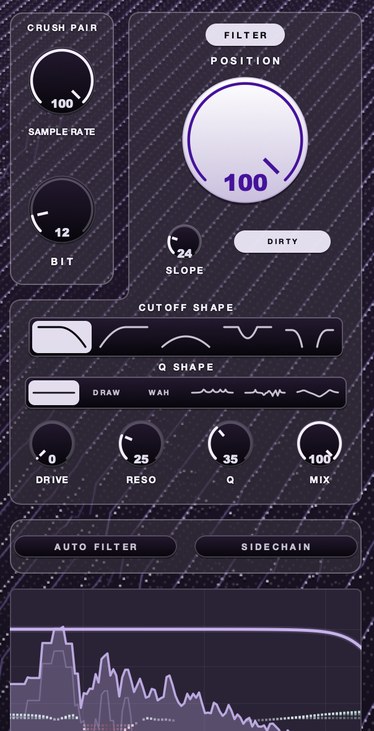 12 bit, full rate. Quantization without losing the top — useful when you want the grain of a transmission but not the narrowness of one.
Five ways a telephone effect goes wrong
The slope is too gentle. By far the most common failure. A 12 dB per
octave low-pass at 3.4 kHz is still passing audible energy an octave up, and the result
sounds like a blanket over a speaker. Doubling the slope usually fixes a telephone effect
that “nearly works” faster than any other change.
The reverb stayed on. A phone has none of your room. If the vocal was
printed with reverb, or the send is still feeding, the effect will always sound like a
filtered studio vocal. Print a dry version if you have to.
It is in stereo. A handset has one microphone and one earpiece. Any
width at all, including width that arrives from a stereo delay or a stereo saturation
plugin later in the chain, breaks it immediately. Mono is not a suggestion here.
The dynamics were left alone. The compression is doing more identifying
work than the filtering. Telephone circuits flattened level hard, and a band-passed vocal
that still has studio dynamics reads as an EQ move. If you can hear the singer lean into a
line, you have not compressed enough.
The whole verse is in it. The effect is a contrast device. It is
thrilling for four bars and exhausting for thirty-two, because you have removed the two
frequency ranges that make a voice pleasant to sit with. Use it on a line, a pre-chorus, a
first half. Then open it.
What it costs you
Intelligibility first. Removing everything below 300 Hz takes the weight off a low voice
and takes the threat out of a low delivery, and heavy distortion on top can turn a clear
lyric into texture. That is fine right up until someone asks what the words are, and on a
rap vocal it is frequently not fine at all. Check the words by playing the section to
somebody who has not heard the song.
Level is the second cost, and it surprises people. Band-limited audio measures louder
than it sounds, because the meter counts the energy in the band and the ear counts the
whole spectrum. A telephone vocal that peaks the same as the dry one will sit too far back
in the beat, and the fix is to ride it up by a couple of decibels and to duck the music
under it rather than pushing it harder.
The third cost is novelty. This effect has been in records for decades and listeners
read it instantly, which is its strength and its ceiling. It will always say
“transmission” and it will never say anything more specific than that, so it
cannot carry a section on its own. Pair it with a real arrangement change — a dropped
drum, a key lift, a different vocal take — or it will read as a plugin rather than
as a decision.
Questions people ask
What is the best telephone effect plugin?
For a dedicated tool with handset impulse responses, line noise and dial tones, Audio
Ease's Speakerphone 3 is the only large product built specifically for this, at $495 on
their store. For most producers a steep filter with drive is a better buy, because the
effect is four simple processes and what you need is control over each one. Judge candidates
on maximum slope, resonance character, where the distortion sits, and how cleanly the band
automates.
Is there a good telephone effect plugin free?
Yes, and your host probably already has it. A stock EQ with 48 dB per octave filters, a
stock compressor and any free bitcrusher will build the effect completely. If you want a
steeper filter than your host offers, MeldaProduction's free MFreeFXBundle includes
MBandPass, which their page lists with slopes up to 120 dB per octave, and the original
Tritik Krush remains a free legacy download for the grit.
How do I get a telephone vocal effect plugin to sound like a cell phone rather than a
landline?
Widen the band instead of narrowing it. Wideband mobile voice carries roughly 50 Hz to
7 kHz, so keep the bottom and the top, then break the signal with bit and sample rate
reduction, a metallic edge on the sibilance, and two or three short gaps cut into the take
by hand. A narrow band with no artifacts always sounds like a landline.
Do I need a telephone sound plugin, or can I just use EQ?
EQ alone gets you about two thirds of the way and then stops, because the band-pass is
only one of four processes. Add hard compression and a small amount of distortion inside the
band and the remaining third arrives. A dedicated plugin saves time and supplies character
you would otherwise design yourself; it does not do anything an EQ, a compressor and a
saturator cannot. The step-by-step build is above, and there is a vocal-specific version in
the telephone effect on vocals.
What F(ilter)12 does
F(ilter)12 is a filter with a lo-fi section standing in front of it, which is the shape
this effect wants. The filter offers five cutoff shapes, one of them
band-pass, and SLOPE runs from 18 dB per octave up to a
wall where almost nothing gets past. POSITION sets where that band sits,
and it is a single control rather than two, so opening the phone on a downbeat is one move
and one automation lane.
SAMPLE RATE and BIT sit together as the CRUSH PAIR
ahead of the filter. Pulling the rate down removes the top and folds what was up there back
into the band as new content; pulling the bits down coarsens the steps the signal is
measured in. DIRTY feeds the filter's own distortion back through itself,
for a line that should sound bad as well as narrow, and DRIVE,
RESO and Q shape how much the band honks and where. There
are six Q shapes, including a drawn one and a wah, so the resonance can
move independently of the cutoff.
AUTO FILTER runs the band on a clock with swing and SIDECHAIN
points it at another signal, which is how you get a phone that pulses with the
kick rather than sitting still. MIX handles the parallel version described
above. It is $49 for Mac and Windows as AU, VST3 and standalone, and DRUGS is included with
it.
Put the first eight bars inside the band and leave them there. Then let the room back
in on the downbeat, and listen to how much bigger the song got without a single note
changing.
F(ilter)12 — a 12 bit sauce filter for Mac and Windows: a lo-fi section,
five filter shapes, six resonance shapes and AURA.
Hear it
Keep reading
- How to make a telephone effect on vocals — The band-pass, the compression, and the modern cell-phone version.
- Filter cutoff and resonance explained — The corner frequency, the slope, the resonant peak, and what each costs.
- Bitcrushing explained — Bit depth, quantization noise, sample rate reduction and what 12-bit and 8-bit sound like.
- How to make music sound like it's in another room — The steep low-pass, the reverb, and why the low end has to stay.
- How to use distortion on vocals — Saturation for presence, parallel distortion for aggression, and heavy drive as an effect.