← Gazillion Industries/Reading material
How to make music sound like it's in another room
You have heard it a hundred times from the wrong side of a door. A party two floors down, a car idling outside, your neighbor's television at midnight: all bass, no words, and somehow more atmospheric than anything in your session.
To make music sound like it is coming from another room, low-pass it steeply somewhere between 500 Hz and 2 kHz, drop the level, collapse it toward mono, and put it in a reverb with a short pre-delay so it arrives as reflections rather than a direct sound. Walls absorb high frequencies far more than low ones, so the top end is what has to go. Everything else is detail on top of that one move.
The short version
- Filter
- low-pass 500 Hz–2 kHz, steep, 24 dB per octave
- Level
- drop it 6–12 dB below where it sat
- Width
- mono, or close to it
- Space
- small room reverb, short pre-delay, fairly wet
- Detail
- a small boost around 100–200 Hz for the wall resonance
- Further away
- lower the cutoff and raise the reverb, together
Why a wall only lets the bass through
Sound loses energy passing through a partition, and it loses far more of it at high frequencies than at low ones. A door is a decent obstacle for a hi-hat and almost none for a kick, so what reaches you is the bottom two or three octaves plus whatever leaks round the frame. That is why you can identify a song through a wall by its rhythm and never its lyrics: consonants live in the range the wall is eating.
The second thing that happens is reflection. By the time the music reaches you it has bounced off the corridor, the stairwell and your own room, so it arrives smeared and from no particular direction. A filter alone sounds like a filter. A filter plus reflections sounds like a building.
How to do it
- Bounce or bus the music you want to push into the other room.
- Put a low-pass on it at 24 dB per octave and set the cutoff around 1 kHz.
- Move the cutoff down for further away, up for the next room with the door open.
- Collapse the stereo image to mono, or leave a little width for a big space.
- Add a small room reverb, 0.6 to 1.2 seconds, pre-delay under 20 ms, mix 30 to 50 percent.
- Cut the level 6 to 12 dB so the listener is not standing next to it.
- Add a gentle boost around 100 to 200 Hz if you want the wall to resonate.
- Roll off below 40 Hz so the rumble does not eat your mix.
Do not high-pass the low end away. That is the instinct, because the result sounds muddy at first, and it is exactly backwards: the mud is the effect. Fix the mud by dropping the level and leaving room for whatever is in the foreground.
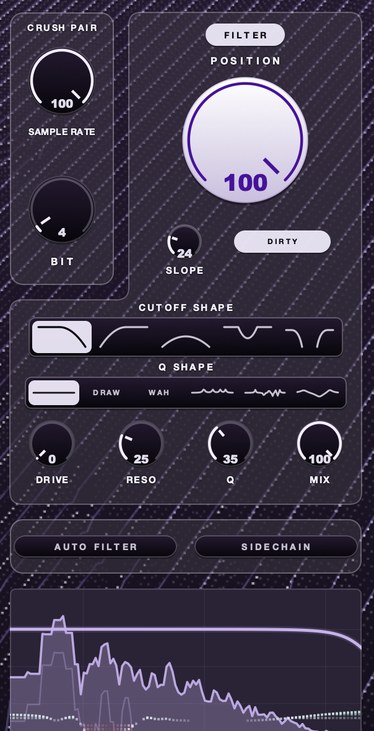
F(ilter)12 does the filtering half of this with a slope that runs from 18 dB per octave up to a wall where almost nothing gets past, and a lo-fi section in front of it if you want the leak to sound cheap as well as distant.
Variations worth knowing
- Through a phone: band-pass instead of low-pass, roughly 300 Hz to 3.4 kHz, with distortion. See the telephone effect.
- In the next room, door open: cutoff up at 3 to 4 kHz, less reverb, keep some stereo.
- Underwater: low-pass near 400 Hz plus slow modulation on the cutoff, so the muffling moves.
- Car outside: low-pass around 250 Hz, heavy compression, and a slow fade as it drives away.
- Club from the smoking area: low-pass near 800 Hz, long reverb, and a door that opens: automate the cutoff up 2 kHz for one bar.
Where it costs you
The effect works by throwing away most of the recording, so anything that lived up top is gone: the vocal's intelligibility, the hats, the air. If the listener needs to recognize the song, you have to let more through than the physics wants. It also stacks badly with a busy mix, because a filtered, reverberant bed occupies the same low-mid space as everything else, and it will fight your kick without ever being audible enough to blame.
Questions people ask
How do you make a sound like it is coming from far away?
Lower the level, low-pass the top end, reduce the stereo width, and raise the amount of reverb relative to the dry sound. Distance is mostly a ratio: the further away something is, the more of what you hear is reflections rather than the source.
How do you make music sound like it is in another room in Audacity?
Apply a low-pass filter around 1 kHz with the steepest rolloff available, then Reverb with a small room size and a high wet level, then Amplify with a negative gain of 6 to 12 dB. Mix down to mono for a more convincing result.
Why does music through a wall sound like only bass?
Partitions attenuate high frequencies much more than low ones, so the top of the music is absorbed and reflected while the bottom passes through. What reaches you is the rhythm section and almost none of the detail.
What F(ilter)12 does
F(ilter)12 is a filter with a lo-fi section in front of it and an adaptive correction called AURA on top. For this job the parts that matter are the shape and the SLOPE: five shapes including low-pass and band-pass, and a slope that runs from 18 dB per octave up to a wall. POSITION sets where in the spectrum the filter sits, and the further it works the more it drives. SAMPLE RATE and BIT are the crush pair in front, for when the music on the other side of the wall should sound like it is coming out of something small.
Now put it two floors down, where it always sounded better than it did in the room.
F(ilter)12 — a 12 bit sauce filter for Mac and Windows: a lo-fi section, five filter shapes, six resonance shapes and AURA.
Mac · Winmore info
Keep reading
- How to make a telephone effect on vocals — The band-pass, the compression, and the modern cell-phone version.
- Filter cutoff and resonance explained — The corner frequency, the slope, the resonant peak, and what each costs.
- How to make a sample sound old — Narrow the range, add warmth and grain, wobble, noise and a small room.
- Telephone effect plugins — The band, the slope, the compression and the grit, plus free and paid options.
- Best slowed and reverb plugins — Why it takes two plugins, which ones, and the settings that make it work.