← Gazillion Industries/Reading material
Best slowed and reverb plugins
Gazillion Industries ·
Somebody takes a song, slows it down, floods it with a hall and uploads
it. By the next morning the comments have stopped talking about the song altogether. They are
asking which plugin did that, and every one of them is assuming there is one.
There is no single slowed and reverb plugin, and hunting for one is what burns the
afternoon. The sound is two jobs stacked: a varispeed or repitch tool that lowers playback rate
so the pitch falls with the tempo, and then a long, dark reverb after it. The first job decides
whether the whole thing works. A pitch shifter that drops the key and leaves the tempo where it
was will never arrive, however expensive the reverb is.
The short version
- What it is
- two plugins in order: a speed change, then a reverb
- The speed
- varispeed or repitch, so pitch falls with tempo
- Not this
- a pitch shifter that holds the tempo steady
- The reverb
- long decay, damped top end, generous mix, some pre-delay
- Free route
- your DAW's repitch mode into a free hall
- Our answer
- SKRUU for the speed half, any long reverb behind it
Hear it
Every page in this category describes what varispeed does and then shows a screenshot of a knob. Here is
one loop through SKRUU at three speeds, then the same thing with the sampling rate stepped down. The figures
are the renderer's own readout.
Unity — PITCH 93 — rate 1.0000, +0.00 semitones
Slowed — PITCH 64 — rate 0.9275, −7.25%, −1.30 semitones
Sped up — PITCH 120 — rate 1.0779, +7.79%, +1.30 semitones
Slowed, LO-FI 2 — PITCH 64 with SAMPLING GRADE at 3.9 kHz
One source loop, rendered offline through the same engine the plug-in runs, no other processing.
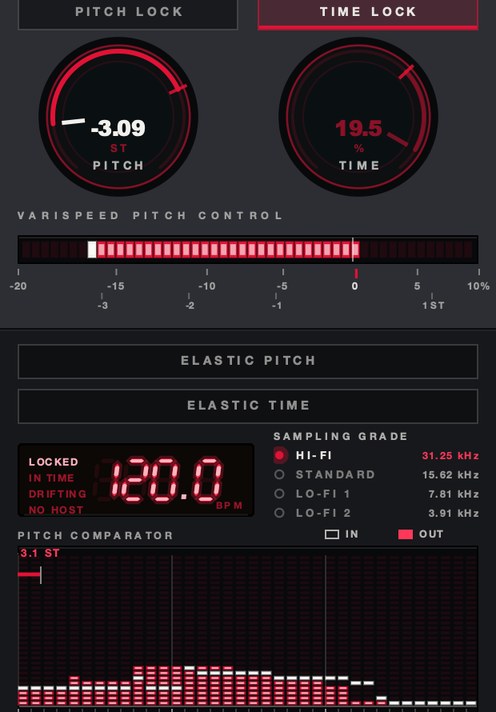 PITCH −3.09 ST. The speed half of the sound, before a single reverb is loaded.
Why a slowed and reverb VST is really two plugins
The genre name is a recipe, and it lists its ingredients in order. Slowed comes first because
it changes the source. Reverb comes second because it is a space the changed source is put into.
Swap the order and you get a normal-speed reverb tail dragged down by a speed control, which is a
different and much stranger effect.
That order also explains why the search keeps failing. Somebody looks for one plugin with
both, finds a product that does one of them well, and concludes the other half is a secret. The
secret is an insert slot. Load the speed tool first in the chain, load a reverb after it, and the
hard part is already done.
The speed half, and the mistake that ruins it
Slowed means varispeed: playback rate drops, and the pitch comes down with it because it is
the same fact stated twice. Halve the speed and the pitch falls exactly twelve semitones. One
semitone is a speed change of about 5.95%, so a 10% slowdown lands about 1.8 semitones down and a
20% slowdown about 3.9 semitones down. That 10 to 20% band is where most of this music lives, and
it is the band worth learning by ear. The full math is in what is varispeed.
The mistake is reaching for a pitch shifter. A pitch shifter is built to move the key and
leave the length alone, which is the opposite of what the style needs. The tempo stays put, the
groove keeps its original swing, and the voice sounds transposed rather than slowed. The
difference shows on a snare before it shows on a vocal, because a transposed snare still cracks
at its original length. Both tools and their proper uses are laid out in
how to change pitch without
changing tempo.
The second mistake is quieter. A speed change is resampling, and resampling done carelessly
folds high frequencies back down the spectrum as inharmonic junk. Slowing down is forgiving,
because everything moves toward the middle. Speeding up is where it shows, and it is why the
sped-up version of a track can sound brittle on the same chain that sounded lush slowed.
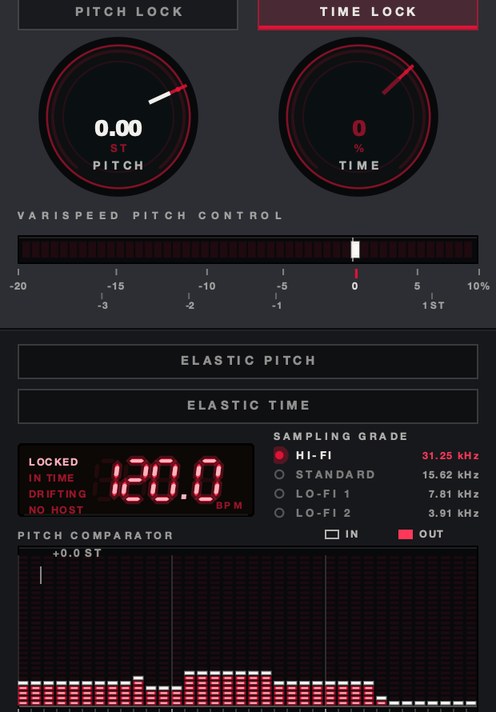 TIME −35%, PITCH at unity. Length on its own — the move varispeed by itself cannot make.
SKRUU
is our varispeed pitch and time stretch plugin, and it handles the first half of this: PITCH
drops the playback rate so pitch and tempo fall together, and TIME moves the length on its own
when you want the drag without the key change. There's a demo on the page.
The reverb half, and what "and reverb" actually means
The reverb in this style is doing something unusual. In a normal mix a reverb sits behind the
source and sells a room. Here it is a foreground element, blended high enough to compete with the
vocal, and its job is distance rather than a room you could name. That changes every setting you
would normally reach for.
Decay runs long. Four to eight seconds is ordinary and is the first thing to try; shorter than
about two and the effect reads as a mix decision rather than a style. Pre-delay of roughly 20 to
40 ms keeps consonants legible, which matters more the further down you have pitched the
vocal, because a slowed voice is already harder to parse. Damping should be heavy: roll the
reverb return off somewhere around 3 to 5 kHz so the tail is dark instead of glassy, and
high-pass it around 200 to 300 Hz so the low end under it stays tight.
Mix is the setting people get shy about. In a normal mix 15% is already a lot. Here you may be
at 40% or past it and it will still sound correct, because the genre is built on the source
sounding remembered rather than present. The general craft of building that distance is in
how to make music sound like
another room.
What separates a good slowed and reverb plugin from the rest
- A continuous, automatable rate. A single button that slows to a fixed
percentage gives you one sound. A knob that reads out in semitones as well as percent lets you
tune the slowdown against the key of whatever it sits next to.
- Clean resampling. Push the speed up, not down, and listen to cymbals and
sibilance. Rough interpolation shows there first, and it is the single most audible difference
between two tools that look identical on paper.
- A reverb with real damping. A tone knob that just tilts the whole output
is not the same as damping inside the tail, where each successive reflection loses more top
end. The second one is what makes a long decay bearable at a high mix.
- Tempo sync where it counts. Pre-delay and decay locked to the host tempo
keep the tail breathing with the track instead of smearing across the bar line.
- Honest CPU. Long tails and high-quality resampling both cost. Check the
meter with the chain running on a full arrangement, not on one loop in an empty session.
- A stated return. When you let a speed control go, does it stay where you
left it or spring back to unity? Either is fine. Not knowing which is what wrecks a take.
How to test one in ten minutes
Demos and marketing pages settle nothing. Ten minutes with material you already know settles
it permanently, and the order below is the order that exposes problems fastest.
- Load a full mix you know well, not a loop.
- Put the speed tool first in the chain and a reverb after it.
- Set the speed to 85% and check that the pitch fell with it.
- Set the reverb to a 6-second decay, 30 ms pre-delay, and 40% mix.
- Low-pass the reverb at 4 kHz and high-pass it at 250 Hz.
- Raise the speed to 115% and listen to the cymbals for grit.
- Automate the speed from 100% to 85% across four bars and listen to the turn.
- Bypass everything and compare loudness, then match levels and compare again.
- Play the result on a phone speaker.
- Check the CPU meter with the full arrangement running.
Step nine is the one people skip and the one that decides it. Most of this music is heard on a
phone or on cheap earbuds, where a heavy low end and a dark tail can collapse into a single
smudge. If the vocal is still legible there, the settings are right.
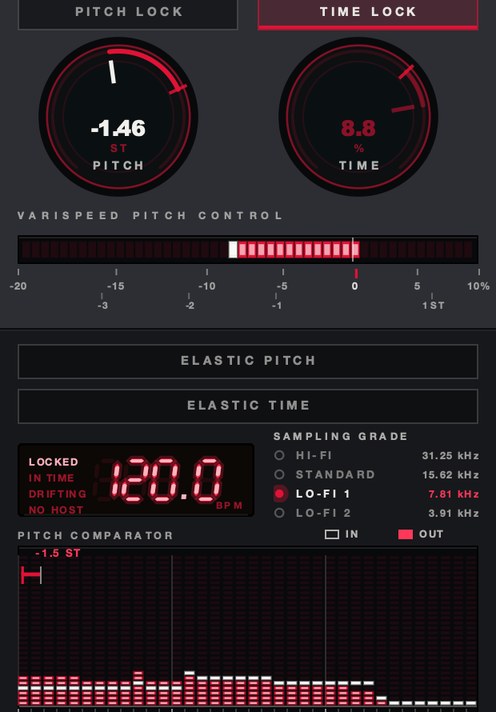 SAMPLING GRADE at LO-FI 1. 7.81 kHz rather than 31.25, for when the slowdown wants a floor under it.
Where each plugin goes in the chain
Speed first, always. Anything that reacts to level or to time needs to see the signal at its
final rate. A compressor placed before the speed change gets its own attack and release times
stretched along with the music, which sounds like a broken compressor rather than a slowed one.
Reverb after. This is the part that gives the style its coherence: the source has already been
dragged down, so the reverb builds a tail around material that is already low and slow, and
everything belongs to the same event. Put the reverb first and the tail keeps its original pitch
and rate while the source sags away from it, which sounds like two recordings playing at once.
A third slot is optional and often decisive. A gentle low-pass across the whole bus after the
reverb, somewhere around 8 to 12 kHz, glues the source and the tail into one object. If you
want grain rather than polish, a sample-rate reduction before the reverb does more for the mood
than any amount of noise layered on top.
Latency matters here in one specific way. If the speed tool reports latency and the reverb
sits on a send rather than an insert, the dry and wet paths can drift apart. Keeping both on the
same insert chain avoids the question entirely.
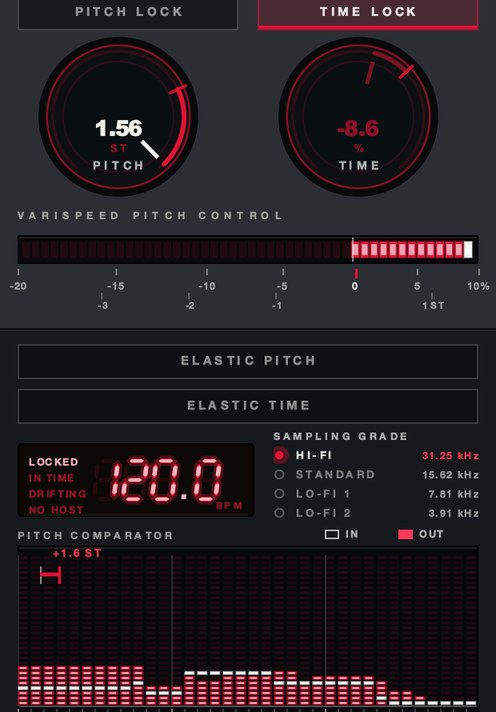
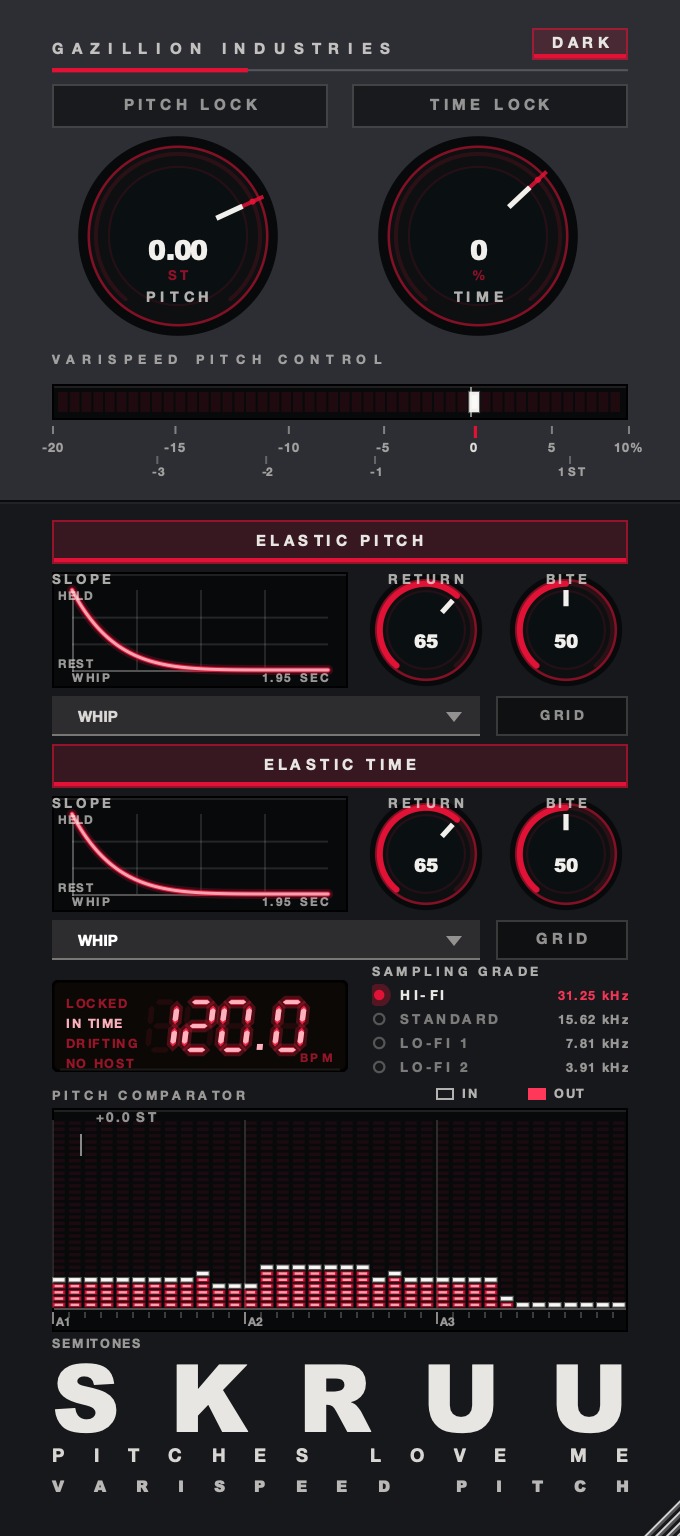 Both knobs at unity. The readout under them says whether the transport is locked to the host, in time with it, or drifting — which is what decides if an automated slowdown lands on the bar.
Named plugins, and what each one is for
Everything below was read off the maker's own page while this was written. Where no price
appears, it is because the page would not surrender one to a plain page fetch, and a wrong number
is worse than no number.
Valhalla Supermassive. Free, from Valhalla DSP, for Mac and Windows, and the
obvious first download for the reverb half. It is built around feedback delay networks in which
each delay can be up to 2 seconds long, and it carries 22 reverb and delay modes with a
MODE control to step through them. The mode names tell you what each one is for: Andromeda has
the slowest attack, a very long decay and very high echo density, Great Annihilator pairs a
medium attack with a very long decay, and Leo adds filtering inside the feedback loop to a very
slow attack and a super long decay. Valhalla state plainly that it is free with no strings, and
the plugin is self-documenting, so rolling over a control brings up its tooltip.
u-he Protoverb. Free, no serial number needed, for macOS, Windows and Linux,
and a genuinely strange thing to have available for nothing. u-he call it researchware: rather
than avoiding room resonances the way most algorithmic reverbs do, it builds up as many as it can
by modeling the body of air in a room, using many parallel, serial and networked delays. A text
box at the bottom of the interface holds two random strings, one setting the network structure
and one seeding the delay lengths, and you can edit them or reroll them. Notes held longer build
resonance, and short melodies come back as ghost echoes. That behavior is unusual on a slowed
vocal and worth ten minutes.
Dragonfly Reverb. A bundle of free audio effects for Linux, macOS and
Windows, released under the GPL-3.0 license, with separate hall, room, plate and early-reflection
plugins. The hall is the one for this job. It needs OpenGL 3.0 or newer to draw its interface,
which is the one compatibility trap worth knowing before you download it.
MeldaProduction MFreeFXBundle. Free, and by count of tools the largest free
pack on this list: Melda list 38 effects in it, including two reverbs and two pitch tools.
MCharmVerb is described on their page as a lush algorithmic reverb built on the MTurboReverb
engine. Melda are upfront that the free versions carry a reminder box at the bottom of the
interface, cannot be resized, and will not save your own presets unless you upgrade. For a
slowed and reverb chain, where you are likely to dial settings by ear anyway, none of that is
fatal.
Baby Audio Crystalline. Paid, in VST, AU and AAX, and the argument for
spending money on the reverb half rather than the speed half. It is an algorithmic reverb built
on an allpass loop, with 15 shaping parameters, pre-delay and decay times that sync to the host
tempo, an onboard ducker, filters, low-end taming, harsh-frequency smoothing, imaging controls,
plus freeze, modulation, shimmer and reverse options and more than 300 presets. Baby Audio's page
injects its price with a script, so no figure is quoted here.
Your DAW's stock reverb. Genuinely worth trying before any download. Every
major host ships a hall or plate that will do four seconds of decay with a damping control, and
the settings in this article are what make the sound, not the algorithm. Start there, find out
what you actually want, then go shopping with a specific complaint.
What it costs you
Three costs, and the first one is unavoidable. A 20% slowdown makes a three-minute song run
three minutes forty-five, and it pulls the entire frequency content down with it, so a mix that
was balanced at full speed comes out bass-heavy. Expect to high-pass the source before the reverb
and to lose some of the top-end air permanently.
The second is legibility. Vocals get harder to follow as they slow, and a long reverb at a
high mix makes that worse. Pre-delay buys some of it back; so does a narrow dip in the reverb
return around the frequencies carrying the consonants. There is a limit, and past it you have a
texture rather than a song.
The third is rights. Altering somebody else's recording and publishing it involves their
copyright, and uploads get claimed or removed for exactly this. Your own music, or music you have
permission to use, removes the problem. The technique is not the risk; the catalog is.
Questions people ask
What is the best slowed and reverb plugin?
There is no single plugin that does both halves, so the honest answer is a pair: a varispeed
or repitch tool that lowers playback rate so pitch drops with tempo, followed by a reverb with a
long decay and heavy damping. Get the speed tool right first. The reverb is the easier half and
your DAW probably already ships one that works.
Is there a slowed and reverb VST that does it in one?
Some plugins combine a speed control with a reverb section, but the two-plugin chain gives you
far more control over each half and costs nothing extra in a modern host. Put the speed tool
first in the insert chain and the reverb straight after it.
Is there a free slowed and reverb plugin?
The reverb half has excellent free options. Valhalla Supermassive is free for Mac and Windows
with 22 reverb and delay modes; u-he Protoverb is free for macOS, Windows and Linux with no
serial number; Dragonfly Reverb is free and GPL-licensed with separate hall, room and plate
plugins. For the speed half, your host's own repitch or varispeed mode is free and already
installed.
How much should I slow a song down?
Somewhere between 10 and 20% is the usual range, which is about 1.8 to 3.9 semitones down.
Below 10% it reads as a slightly sluggish mix. Past about 25% the vocal starts losing words and
the low end starts swamping everything above it. Tune it by ear against the vocal rather than by
picking a number first.
Why does my slowed and reverb sound muddy?
Almost always the reverb return, and almost always the bottom of it. High-pass the return
around 200 to 300 Hz so the tail stops doubling the bass, and low-pass it around 3 to
5 kHz so the top stays dark rather than hissy. If it is still thick, the decay is longer
than the tempo can carry: shorten it a second at a time until the tail clears before the next
downbeat.
Is slowed and reverb the same as chopped and screwed?
Related, and one came from the other. The Houston screw tapes slowed records far harder and
added chopping, doubled phrases and stutters, with nothing like this much reverb. The lineage,
and how to do it properly, is in how to chop and
screw a song.
What SKRUU does
SKRUU is
our varispeed pitch and time stretch plugin, and it is the first slot in this chain rather than
the whole chain. PITCH runs from −20% to +10% in 128 states and reads out
in semitones as well as percent, so you can tune a slowdown against a key instead of guessing at
a percentage. TIME runs from −50% to +25% and moves only the length, which
is how you get the drag without the key change. PITCH LOCK and
TIME LOCK hold one while you play the other.
ELASTIC is the part that makes it a performance. With it on, the knob is
sprung: move it, let go, and it travels home. RETURN sets how long that takes,
free or quantized to the bar, BITE sets how hard it commits, and
SLOPE is the road it takes back, with sixteen shapes — six smooth, five
stepped, five that overshoot and come back. DRAG sets how long a new speed takes
to arrive, from instant to a hand on a platter. SAMPLING GRADE steps the whole
transport down through 31.25, 15.62, 7.81 and 3.91 kHz, and the staircase that puts in is
the sound rather than a filter. It runs as AU, VST3 and standalone on macOS and as a VST3 on
Windows, at zero samples of latency, for $29. The step-by-step build of the whole effect is in
how to make slowed and reverb.
 Pitched up. The same control, the other direction, and the direction that exposes bad resampling.
The comments were never going to get a one-word answer. Two slots, in that order, and the
song sounds like it is being remembered rather than played.
SKRUU — varispeed pitch and time stretch for Mac and Windows. Pitch and
time move independently, with sixteen elastic return shapes.
Hear it
Keep reading