← Gazillion Industries/Reading material
How to make slowed and reverb
Somewhere around the late 2010s, the internet discovered that a pop song slowed down and drowned in reverb sounds like the same song remembered at 3 a.m. in an empty parking lot. The sped-up version arrived soon after, like the same song played by someone who had too much coffee.
To make a slowed and reverb version, lower the playback speed with varispeed (often somewhere around 10 to 20%, so the pitch drops with it), then add a long, dark reverb and blend it well up. For a sped-up version, raise the speed instead (so the pitch rises) and usually skip the big reverb. Varispeed is the key: the pitch moving with the speed is what gives both styles their sound.
The short version
- Slowed
- varispeed down, often around 10 to 20%
- Reverb
- long decay, dark tone, generous mix
- Sped up
- varispeed up; pitch rises with it
- Key
- speed and pitch move together
- Polish
- low-pass the reverb, keep the low end clean
- Rights
- use your own music, or get permission
- The formula
- semitones = 12 × log₂(speed)
- −10%
- −1.82 semitones; 140 bpm becomes 126
- −20%
- −3.86 semitones; 140 bpm becomes 112
- Exact semitones
- −10.91% is two down, −15.91% is three
- Decay
- 3 to 6 s — 4 s is 60 dB of fall at 15 dB per second
- Pre-delay
- 20 to 60 ms; 30 ms is a 10.3 m longer path
- Return filters
- high-pass 200–400 Hz, low-pass 3–5 kHz
- Wet
- 30 to 50%; at 50/50 each side sits 6 dB down
- Order
- speed first, reverb after — never the other way
Hear the drop, then measure it
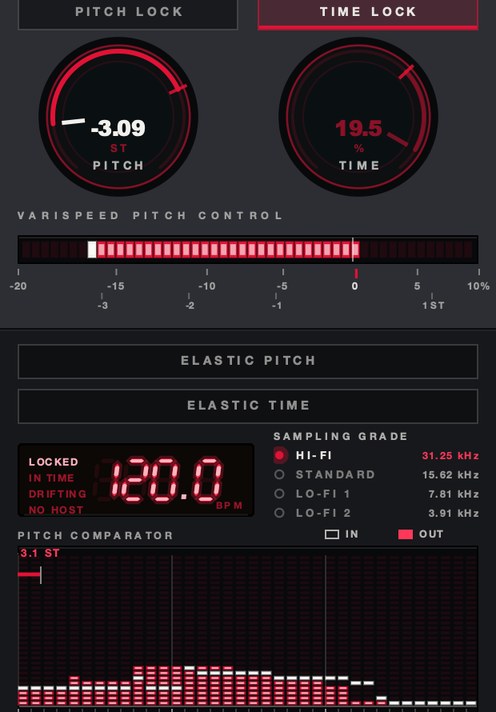
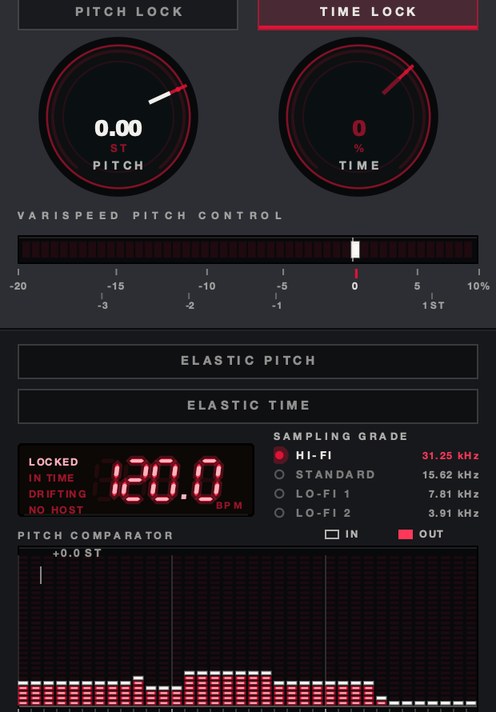
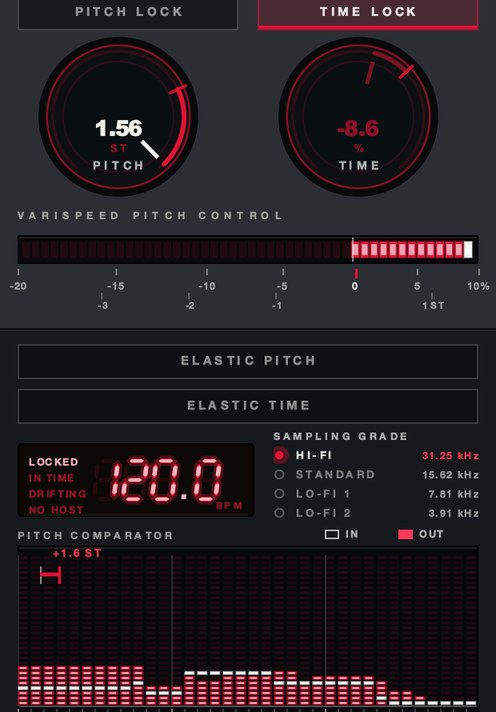
One loop at three speeds, rendered offline through the same engine SKRUU runs, no other processing. The captions are the renderer's own readout. We then ran the files through an FFT to check the readout was telling the truth.
Measured here: the strongest partial sits at 161.96 Hz dry, 150.33 Hz slowed, 175.14 Hz sped up. Ratios of 0.9282 and 1.0814, or −1.29 and +1.36 semitones, against the −1.30 and +1.30 printed on the panel. A 0.8-second window resolves to about 1.9 Hz, near 20 cents at these frequencies, so both agree inside the measurement's own error.
Where it comes from
Slowing songs down isn't new. In the early 1990s Houston's DJ Screw built a whole sound on it, slowing records to a crawl on his screw tapes (see how to chop and screw a song). The slowed and reverb version is its internet-era cousin: less chopping, much more reverb, and a mood that's closer to nostalgia than to a car rolling slow down a Houston street.
Both live off the same fact. A recording read out slower is a recording moved down in pitch, and everything in it moves together — the voice, the snare, the hiss, the reverb that was already on the record. A screw tape spends its second move on chops. A slowed and reverb upload spends it on space.
Slow it down the right way
Use varispeed or repitch, not time stretching, so the pitch drops along with the tempo. That drop is the sound: voices get deeper, the groove gets heavier, and the whole track sounds like it's playing on a tired machine. How far to go depends on the song, but a slowdown in the 10 to 20% range, roughly two to four semitones, is a common starting point. The math is in what is varispeed.
Time stretching is the other operation, and it is the one that gives the job away. A stretcher holds the pitch and invents the extra time, so a 20% slowdown means about one frame in five was reconstructed rather than played. On pads you may never hear it. On a close vocal you get a faint chorus around the consonants, and on hats a flutter where the transient used to be. Varispeed reconstructs nothing — see time stretching explained.
How far to slow it, in numbers
Speed and pitch are one number in two units. Semitones = 12 × log₂(speed), and speed = 2^(semitones/12). Half speed is exactly twelve semitones down. One semitone down is a speed of 0.9439, near enough 5.6%.
- −5%
- −0.89 st — 140 bpm → 133.0
- −7.5%
- −1.35 st — 140 bpm → 129.5
- −10%
- −1.82 st — 140 bpm → 126.0
- −15%
- −2.81 st — 140 bpm → 119.0
- −20%
- −3.86 st — 140 bpm → 112.0
- −25%
- −4.98 st — 140 bpm → 105.0
- −33⅓%
- −7.02 st — 140 bpm → 93.3
Length follows the same ratio. A 3:30 record at −20% runs 262.5 seconds, which is 4:22.5. Bounce the slowed pass and look at the length: if it is still 3:30, your DAW stretched the time instead of changing the speed.
The percentages in common use do not land on semitones, and that matters the moment you play something new over the top. At −10% an A at 440 Hz becomes 396 Hz, which is G plus 17.6 cents. At −15% it is 374 Hz, F sharp plus 18.6 cents. At −20% it is 352 Hz, F plus 13.7 cents. Either detune the new part by that offset, or pick a percentage that lands clean: −10.91% is exactly two semitones down, −15.91% exactly three, −20.63% exactly four.
Picking the slowdown from the tempo you want
Most people need the arithmetic in the other direction. You do not want −14%; you want 120 out of a 140 record. Speed is one division: 120 ÷ 140 is 0.8571, which is −14.29% and −2.67 semitones. Do that division first and the percentage falls out of it, along with the key you are about to land in.
- 140 → 120
- −14.29% — −2.67 st
- 150 → 120
- −20.00% — −3.86 st
- 174 → 140
- −19.54% — −3.76 st
- 128 → 110
- −14.06% — −2.62 st
- 160 → 120
- −25.00% — −4.98 st
- 140 → 70
- −50.00% — −12.00 st, one octave
Two round numbers land close enough to a semitone to use without thinking about it. Three quarters of the speed is −4.98 semitones, 1.96 cents sharp of a clean five. Two thirds is −7.02, the same 1.96 cents flat of seven. Both sit inside what a tuner calls in tune, so −25% and −33⅓% are the two percentages you can slow to and still play a keyboard over the top without touching its fine tune. Every other round number leaves you the cents offset from the section before this one.
Why the top end dies before you touch a filter
Every frequency in the file divides by the same ratio. At −20% a 1 kHz tone lands at 800 Hz, a 6 kHz sibilant at 4.8 kHz, an 8 kHz air band at 6.4 kHz, a hi-hat peaking near 10 kHz at 8 kHz. Nothing was filtered. The spectrum moved down, and the ear reads that as dull. Which is why the last low-pass on the master should be a smaller move than people expect — take another 6 dB out at 5 kHz and you are behind a door rather than far away, which is a different effect.
The low end moves in the direction nobody plans for. A 60 Hz kick fundamental at −20% is 48 Hz and a 40 Hz sub is 32 Hz, under the point where most phones give you anything at all. The formants move too, 3.86 semitones down with the note, which is why a slowed voice reads as a physically bigger person. If you want the depth without the ventriloquism, that separation is what a formant control is for — formant shifting.
The shift, measured off the demo files
One number says all of it. Take the frequency below which 95% of the energy sits: 430.69 Hz on the dry render above, 399.25 Hz on the slowed one, 464.99 Hz on the sped-up one. Those are ratios of 0.9270 and 1.0796, which is −1.31 and +1.33 semitones, against the −1.30 and +1.30 the panel printed. The analysis bins are 0.95 Hz wide, worth 4.1 cents at 400 Hz, so the two readings agree as closely as the measurement can report.
No filter was involved at any point. Every frequency was multiplied by one number and the point where the energy runs out went with them. A −20% pass moves the whole spectrum down by log₂(0.8), which is 0.3219 of an octave — a uniform third of an octave, from the kick fundamental to the top of the cymbals.
The dynamics stayed where they were, which is the part people guess wrong. Crest factor, peak over average in dB, reads 13.74 dB on the dry file, 13.32 on the slowed one and 13.22 on the sped-up one, all three summed to mono. Half a decibel across a 2.6-semitone range. A slowed record keeps the dynamic range it had at speed, and the flattening everyone associates with the style arrives later — from the tail filling the gaps, and from whatever sits on the master after it. More on the measurement itself in crest factor.
What a coarser sampling grade does to the top
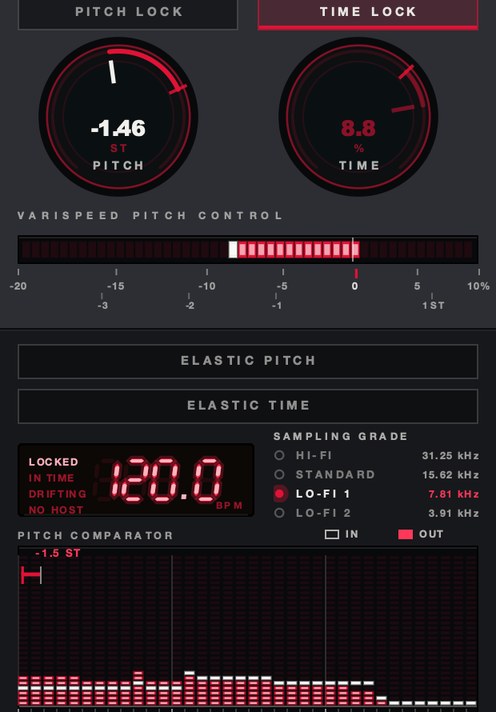
A coarser rate grid adds energy above the music. It reads as dull on a first pass because the music underneath it is dull, and the measurement runs the other way: against the plain slowed render, the LO-FI 2 version in the block above carries 15.62 dB more of its energy above 4 kHz and 22.31 dB more above 8 kHz, and the frequency below which 99.5% of the energy sits climbs from 1,186 Hz to 3,397 Hz. The staircase is up there, and it is broadband.
The same grade with no speed change at all, so you can hear the grid on its own before you stack it on top of a slowdown.
Measured here against the dry file: the strongest partial does not move (162.5 Hz in both), the 95% rolloff does not move (430.69 Hz in both), and the energy above 8 kHz rises 22.92 dB. Crest factor falls 0.27 dB, from 13.74 to 13.46. The pitch is untouched and the top is louder, which is the opposite of what the word lo-fi leads people to expect.
That settles an order-of-operations question. Put the master low-pass after the grade change rather than before it, or you are filtering the music and leaving the staircase on top of what is left.
The reverb
This is the other half of the name, so don't be shy with it. Choose a hall or plate with a long decay, give it a little pre-delay so the vocal stays readable, and low-pass the reverb so it's dark instead of glassy. Blend it higher than you would in a normal mix. High-pass the reverb too, so the low end stays tight under all that space.
Setting the reverb by the numbers
Decay first, because it decides whether the track reads as a song or as a wash. RT60 is the time the tail takes to fall 60 dB, so a 4-second decay is 15 dB per second: 20 dB down at 1.33 s, 40 dB down at 2.67 s. Set it against the harmony. At 112 bpm a beat is 535.7 ms and a bar is 2.14 s, so a 4-second tail runs 7.5 beats — almost two full bars into whatever comes next. Chords moving every bar means two chords sounding at once, and 2 to 3 seconds is the honest ceiling. Chords moving every four bars, and six seconds is free.
Pre-delay next. Sound travels about 343 m/s in room air, so 30 ms of pre-delay is a reflection arriving off a path 10.3 m longer than the direct one, and 60 ms is 20.6 m. Under about 10 ms the voice and the room fuse, and the words go first.
Then the filters on the return, which separate a dark reverb from a loud one. A 12 dB/octave low-pass at 4 kHz puts 8 kHz 12 dB down and 16 kHz 24 dB down; the same filter at 3 kHz costs 17 dB at 8 kHz. Somewhere in 3 to 5 kHz is the whole argument. High-pass the return at 200 to 400 Hz so the kick and the bass never enter the tail; they lose nothing by being kept out of it.
Blend last, and blend in dB rather than in percent. A 30% wet control puts the wet path 10.5 dB down and the dry 3.1 dB down, a 7.4 dB gap. At 50/50 both sit 6 dB down and the gap is zero, roughly where the style announces itself. Past 60% the wet is louder than the dry and the lyrics stop arriving.
Fitting the tail to the slowed bar
A decay in seconds means something different at every tempo, so convert it once and stop guessing. A bar of four beats is 240 ÷ bpm seconds. At 126 that is 1.905 s, at 112 it is 2.143, at 105 it is 2.286, at 93.3 it is 2.572. The same four-second tail therefore covers 2.10 bars at 126 and 1.07 bars at 64. One reverb, two completely different amounts of overlap.
- 126 bpm
- beat 476.2 ms — bar 1.905 s — a 4 s tail is 2.10 bars
- 119 bpm
- beat 504.2 ms — bar 2.017 s — 1.98 bars
- 112 bpm
- beat 535.7 ms — bar 2.143 s — 1.87 bars
- 105 bpm
- beat 571.4 ms — bar 2.286 s — 1.75 bars
- 93.3 bpm
- beat 643.1 ms — bar 2.572 s — 1.55 bars
- 64 bpm
- beat 937.5 ms — bar 3.750 s — 1.07 bars
RT60 divided by the bar length is how many bars of the last chord are still sounding underneath the next one. Under a bar the track reads as a room; at two bars the chords smear together, which works when the progression moves slowly. Two seconds at 112 bpm is 0.93 of a bar, and six seconds is 2.80.
Blend has a second variable almost nobody checks: whether the mix control is linear or equal power. The dB figures above assume linear, so 50% puts both paths 6.02 dB down. An equal-power control at that same 50% puts both 3.01 dB down, three decibels hotter overall, which is enough to make an identical setting sound like a different reverb. Bounce the return alone at 50% and again at 100%: a 6 dB gap means linear, a 3 dB gap means equal power.
The rest of the linear scale, for reference: 20% wet leaves the dry 12.04 dB in front, 40% leaves it 3.52 dB in front, 60% puts the wet 3.52 dB in front and 70% puts it 7.36 dB in front. Four settings, a 19.4 dB swing between the ends of them.
SKRUU gives you varispeed pitch and independent time, with shifts you can play.
How to make slowed and reverb
- Import your track or stems.
- Slow it with varispeed or repitch so the pitch drops with the tempo.
- Set the amount by number: −10% for −1.82 semitones, −20% for −3.86.
- Bounce a few seconds and check the length ratio matches the speed you set.
- Add a reverb on a return: long decay, some pre-delay.
- Set decay against the harmony — under three seconds if the chords move every bar.
- Set pre-delay to 20 to 60 ms so the words stay in front of the room.
- Low-pass and high-pass the reverb return.
- Blend the reverb in until the track sounds far away but still clear.
- Add a gentle low-pass on the whole track if the top end is still bright.
- Check the true peak; a long tail adds to peaks you already balanced.
- Export and compare with the original to make sure it still hits.
Where it goes in the chain
Speed first, everything else after. Slow the source, then feed the slowed signal to the reverb. Do it the other way and the tail gets slowed with everything else: a 4-second decay at −20% becomes 5 seconds and drops 3.86 semitones, so every nudge of the speed changes the shape of the room under you. Usable if you chose it, a nuisance if you did not.
The order that works: varispeed as an insert on the track or the master, reverb on a return fed after it, tape noise or crackle after the speed change as well (noise slowed 20% stops sounding like noise), compression after the reverb rather than before so the tail does not pump the dry, master low-pass last. One thing to watch on the insert is latency, because a host only compensates for what a plugin reports. SKRUU's page states zero samples of it, which is one less thing to line up when the varispeed sits on one track out of thirty.
Three places the speed change can live
Clip, transport or insert, and they do not substitute for one another. A clip setting bakes the ratio into one piece of audio, which is exact and impossible to ride. A transport setting moves the whole session, which is the fastest way to audition a percentage and the worst way to keep one track at speed. An insert turns the ratio into an ordinary automation lane, and it is the only one of the three where the speed can change while the track is running.
The insert charges you for that, because everything downstream of it hears the change. With the reverb on a return fed after the varispeed, a mid-track speed move leaves the tail alone. With the reverb already printed in front of it, every speed move drags the room along. Both are usable; only one is usually what somebody meant.
Slowing stems instead of the two-track
Stems buy control and cost sync. One varispeed on the master applies one ratio to everything and cannot drift. Eight varispeeds on eight stems all have to carry the identical ratio, and a 0.1% mismatch over a three-and-a-half-minute song is 0.21 seconds of drift — a sixteenth note at 112 bpm is 133.9 ms, so by the last chorus you are more than a sixteenth out.
Go to stems when you want the vocal dropped further than the beat. Type every ratio in rather than dragging it, and check the bounce durations against each other before you build on top; identical lengths to the sample are the only proof the ratios matched.
Doing it in your DAW
Four of the five big hosts already have varispeed and none put it in the same place. Ableton Live: the Re-Pitch warp mode, per clip, driven by the Set tempo — see varispeed in Ableton Live. Logic Pro: the Varispeed readout in the control bar, −50% to +100%, in Varispeed (Speed and Pitch) mode rather than Speed Only, which pitch-corrects the output back. FL Studio: Mode set to Resample in the Channel Settings stretch panel. Pro Tools: the Varispeed plug-in inside Elastic Audio, which has no controls of its own. GarageBand has none; its Transpose slider moves pitch and leaves the length alone, which is the opposite operation.
Two of those are global and one is per clip, which is the limitation for this style. If you want the speed to sag into a chorus and come back, it has to be on an insert where it is an ordinary automation lane. Full rundown in varispeed in every DAW, and the plugin side in best varispeed plugins.
Riding the speed instead of setting it once
A single fixed percentage from bar one is what dates an upload. The version that holds up has a speed that sags and comes back: half a bar down into the hook, a slow climb out of it, a hard drop on the last line. All three are automation on one ratio, and the only real question is how the ratio travels between two values.
Set the travel in bars and convert it once. At 112 bpm a one-bar return is 2.143 seconds and a two-bar return is 4.286. A sag that falls over half a bar and recovers over two is 1.071 s down and 4.286 s back, and those two numbers sound nothing like each other even though the depth is identical. Fast down and slow back is a turntable losing power. Slow down and fast back is a tape being caught up.
The shape of the return does as much work as its length. A straight line reads as an edit, a curve that decelerates into the target reads as a mechanism with mass, and one that overshoots and settles reads as a hand. That is what a sprung control is for — a varispeed plugin.
How to make a sped-up version
Do the opposite: raise the speed with varispeed so the pitch climbs. Sped-up and nightcore-style edits usually skip the big reverb and keep the mix bright and punchy. Check the vocal: the higher you go, the more cartoonish it gets, which is the style up to a point and a joke past it.
Same formula, other direction. Plus 10% is +1.65 semitones and takes 140 bpm to 154. Plus 20% is +3.16 and takes it to 168. Most uploads sit between 8 and 15%, one to two and a half semitones up: far enough to hear, near enough that the singer still sounds like a person. The cost inverts too. A 6 kHz sibilant at +20% is 7.2 kHz, so a bright mix turns harsh — de-ess after the speed change, not before, because the frequency you need to catch has moved. The formants climb with the note, which is the mechanism behind pitched-up soul vocals: chipmunk soul.
What goes wrong, and what each one sounds like
Stretched instead of slowed. A faint chorus around the consonants, doubled sibilants, a hi-hat that flutters where it used to snap. The key did not move, which is the giveaway. Put the clip in a repitch mode, or take the speed change off the timeline and onto an insert.
Bright reverb. The "s" sounds get their own long tail and the top of the mix hisses for two seconds after every line. Low-pass the return; 4 kHz at 12 dB/octave is 12 dB off at 8 kHz and usually enough.
No high-pass on the return. The kick loses its front edge and the bass turns into one continuous note. High-pass at 200 to 400 Hz and the low end comes back without the dry signal being touched.
Clipping you did not put there. Crackle on the loudest chord, worst after encoding to a streaming format. A long tail sums with the next transient, so the peaks you balanced before the reverb are not the peaks you have now — true peak and headroom in mixing.
A tail that disappears on a phone. A wide stereo reverb can partly cancel when the sides fold in, and most listening for this style happens on one small speaker — mono compatibility.
The export ends before the tail does. The last chord cuts off square, and it is always the loudest moment of the upload. A 4-second RT60 needs at least 4 seconds of silence after the final note inside the render range, and at −20% that silence is itself 5 seconds of original material. Move the loop end out and bounce again.
Fizz on the sped-up pass. Speeding up pushes content toward the ceiling. In a 44.1 kHz session, material that sat at 18,375 Hz arrives at 22,050 Hz at +20%, and anything that started above 18,375 has nowhere legal to land; a resampler that does not handle it folds the excess back down as a metallic shimmer over the hats — what is aliasing in audio. Slowing down has the mirror problem and no symptom: at −20% the old 22,050 Hz ceiling lands at 17,640 and the top 4.4 kHz of the session is simply empty.
A de-esser that stopped working. You tuned it at speed and then moved the frequency out from under it. A 7 kHz band sits at 5.6 kHz after a −20% pass and 8.4 kHz after a +20% one. Retune every frequency-dependent processor after the speed change, every time.
Headroom, and the peaks the tail invents
Reverb adds level at the worst possible moment. A tail and the next transient are two signals arriving together, and in the worst case they add coherently: a tail sitting 6 dB under a transient pushes the sum 3.53 dB above it, one at −10 dB adds 2.39 dB, one at −20 dB adds 0.83. Random phase gives you the power sum instead — 0.97 dB, 0.41 and 0.04. Real material lands between the two, and it never lands on zero.
So leave three decibels you did not think you needed. Balance the dry mix, add the reverb, and then look at the peak meter again rather than assuming the balance survived. A long dark tail is mostly low-mid energy, which is the range that moves a meter furthest for the least perceived loudness — true peak and headroom in mixing.
Then check the bottom. A 40 Hz sub at −20% is 32 Hz, below what a small speaker reproduces and not below what it attempts: the cone still moves and nothing comes back. High-pass the slowed master near 30 Hz, or add harmonics and let the ear rebuild the note — how to make bass audible on phone speakers.
How to check it in your own session
- Length. Divide the slowed bounce's duration by the original's. That ratio is your speed; 1.000 means you time-stretched.
- Pitch. Put an analyzer on the output, hold a sustained low note, read the strongest partial before and after, and take 12 × log₂ of the ratio. That is what we did to the demo files above: 161.96 Hz to 150.33 Hz is 0.9282, which is −1.29 semitones.
- Cents. A tuner on the master says how far off a semitone you landed, which is the number you detune any new part by.
- Words. Solo the reverb return. If you can make out the lyric in the tail, the pre-delay is too short or the low-pass is too high.
- Rolloff. Put an analyzer in average mode on the master and note where the curve falls away, before and after. That frequency should move by the same ratio the length did: we read 430.69 Hz dry and 399.25 Hz slowed, a ratio of 0.9270.
- Crest. Compare peak and RMS before and after. They should track within about a decibel; ours moved 0.42 dB. A bigger change means something other than the speed moved.
- Mono. Sum the master and solo the tail. If it thins or partly vanishes, the reverb is too wide for the one small speaker most of this gets played on.
What it costs
Three things, worth saying flatly. You lose top end, because the whole spectrum moved down before you filtered what was left. You lose punch, because a long tail fills the gaps that made the drums feel fast. And you land between keys unless you did the arithmetic, so anything added later has to be tuned in cents. The tools cost nothing extra if your DAW has a repitch mode and a hall, which four of the five do; a plugin earns its $29 when you want to ride the speed while the track runs rather than set it once per clip.
Questions people ask
How is slowed music created?
By lowering the playback speed with varispeed so the pitch drops along with the tempo, then usually adding a long, dark reverb. The linked change in speed and pitch is what gives it its heavy, dreamy sound.
How can I make a song slower without changing the pitch?
Use time stretching instead of varispeed: set the audio to follow the project tempo and lower the tempo. The pitch stays the same, but you lose the deeper, heavier slowed sound.
Is it legal to make slowed and reverb versions of songs?
Altering and publishing someone else's recording involves their copyright, so uploading those versions can get removed or claimed. Making slowed versions of your own music, or with permission, avoids the problem.
What percentage should I slow a song down by?
Between 10 and 20% for most material. Ten percent is 1.82 semitones down and takes 140 bpm to 126; twenty is 3.86 semitones and takes it to 112. Below 5% it reads as a mistake rather than a version; past 30% the drums stop sounding like drums.
How many semitones is slowed and reverb?
Usually two to four down. Semitones = 12 × log₂(speed), so 0.90 speed is −1.82 and 0.80 speed is −3.86. For a round number, slow by 10.91% for exactly two semitones or 15.91% for exactly three.
What reverb settings do I use for slowed and reverb?
A hall or plate at 3 to 6 seconds of decay, 20 to 60 ms of pre-delay, the return high-passed at 200 to 400 Hz and low-passed at 3 to 5 kHz, blended 30 to 50% wet. Cut the decay to two or three seconds if the chords change every bar.
Should I add reverb before or after slowing the song?
After. Reverb applied first gets slowed with everything else, so a 4-second tail becomes 5 seconds at −20% and shifts down 3.86 semitones with the track.
Why does my slowed song sound muddy?
The low end moved down with everything else and then went into the reverb. A 60 Hz kick fundamental at −20% is 48 Hz. High-pass the reverb return at 200 to 400 Hz first; that alone fixes most of it and costs the dry signal nothing.
Why does my slowed vocal sound watery or flangy?
You time-stretched rather than repitched. A stretcher invents the extra time, and on consonants the invented material reads as a light chorus. Check the key: if it did not move, the speed did not either.
Does slowing a song change the key?
Yes, and usually to somewhere between two keys. At −10% an A at 440 Hz lands at 396 Hz, which is G plus 17.6 cents. Tune anything you add by that offset, or choose a percentage that lands on a semitone.
What is the difference between slowed and reverb and chopped and screwed?
The first move is the same and the second is not. Screwed material is chopped, doubled and cut by hand and kept fairly dry; slowed and reverb leaves the arrangement alone and puts the work into the space. Method in how to chop and screw a song.
Can I make slowed and reverb for free?
Yes, if your DAW has a repitch or resample warp mode and any hall reverb. Put the clip in repitch, set the ratio, send to a hall on a return at 3 to 6 seconds of decay, high-pass the return at 200 to 400 Hz and low-pass it at 3 to 5 kHz. Everything on this page can be done with stock plugins.
How do I make a slowed and reverb version on my phone?
The operation is the same, so look for a playback-speed or repitch control rather than a tempo control. A tempo control on its own usually means time stretching, which holds the pitch and gives you the wrong sound. Check by exporting: if the file is the same length as the original, the speed did not change.
What BPM should slowed and reverb be?
There is no target tempo, only a target ratio. Divide the tempo you want by the tempo you have: 120 out of 140 is 0.8571, which is −14.29% and −2.67 semitones. Most uploads land between 0.80 and 0.90 of the original, and the arithmetic is the same whatever the record started at.
Why is my slowed version longer than the original?
Because that is what slowing means. Length divides by the speed ratio, so a 3:30 record runs 3:53.3 at −10%, 4:07.1 at −15%, 4:22.5 at −20% and 4:40.0 at −25%. If the length did not change, you time-stretched rather than slowed.
Does slowed and reverb ruin the audio quality?
The speed change itself costs less than people assume. Measured on our own renders, crest factor moved 0.42 dB across a 2.6-semitone range, and the spectrum simply shifted by the ratio. What you do lose is bandwidth: at −20% in a 44.1 kHz session, the old 22,050 Hz ceiling lands at 17,640 and the top 4.4 kHz is empty.
Should I slow the whole mix or the stems?
The whole mix, unless you want the parts moving by different amounts. One instance cannot drift. Separate instances must carry the identical ratio, and a 0.1% mismatch over three and a half minutes is 0.21 seconds, more than a sixteenth note at 112 bpm.
How do I make the speed change during the song?
Put the speed control on an insert rather than in the clip or the transport, then automate it like any other parameter. Set the travel in bars and convert: at 112 bpm one bar is 2.143 seconds and two bars is 4.286. Falling fast and returning slowly sounds like a motor losing power; the reverse sounds like something being caught up.
What is nightcore, and is it the same as sped up?
Same operation, further along. Both raise the playback speed so the pitch climbs with the tempo; sped-up edits mostly sit between 8 and 15%, one to two and a half semitones, and nightcore goes past the point where the voice reads as a character rather than a singer.
Why does my sped-up version sound fizzy?
Aliasing from the resampler. At +20% in a 44.1 kHz session, content from 18,375 Hz lands on the 22,050 Hz ceiling and anything above that has to go somewhere; a poor implementation folds it back down as a metallic shimmer sitting over the hats. Bounce a hi-hat loop on its own at +20% and listen with everything else muted.
How loud should a slowed and reverb version be?
Quieter than you think while you are working, because the tail will take the headroom back. A tail 6 dB under a transient can push their sum 3.53 dB above it in the worst case. Balance the dry mix, add the reverb, then re-check the peaks rather than trusting the balance you set before it.
What SKRUU does
SKRUU is our varispeed pitch and time stretch plugin. PITCH runs from −20% to +10% and moves speed and pitch together, reading out in semitones. TIME moves only the length, from −50% to +25%, so you can slow the groove without dropping the key, or the other way round. DRAG sets how long a new speed takes to arrive, from instant to a hand on the platter, and ELASTIC springs a shift back when you let go.
PITCH LOCK and TIME LOCK hold one while you play the other. SLOPE is the road a sprung knob takes home, and there are sixteen — six smooth, five stepped, five that overshoot and come back — with RETURN for how long the trip takes, free or quantized to the bar. SAMPLING GRADE is the grid underneath it all: 31.25 kHz, 15.62, 7.81 and 3.91. The display is a pitch comparator in semitones, what went in against what came out, with the octaves marked.
For the sag-and-return move above, the elastic section is the whole of it. BITE is how hard the knob commits when you move it, and the sixteen slopes are named — RAMP, GLIDE, SNAP, WHIP, HANG, CREEP, STAIRS, HALVES, RATCHET, DRUNK, LURCH, BOUNCE, WOBBLE, TREMOR, KICK, CLIFF. Pitch and time each carry their own, so the length can spring home while the key stays where you dropped it.
One more thing matters for a tail: all four sampling grades record all the time, so the grade can change while a note is still sounding. A chord can start on the 31.25 kHz grid and finish on the 3.91 kHz one without a gap, which is a different move from filtering the same chord as it dies.
AU, VST3 and a standalone on macOS 10.13 or later, VST3 on 64-bit Windows 10 or later, zero samples of latency, any session rate, $29. There is a demo on the product page.
Same song, same empty parking lot. It just got later.
SKRUU — varispeed pitch and time stretch for Mac and Windows. Pitch and time move independently, with sixteen elastic return shapes.
Keep reading
- How to chop and screw a song — Where DJ Screw's Houston sound comes from, and how to screw and chop a song in a DAW.
- What is varispeed — Speed and pitch together: the math, how it differs from pitch shifting, and how it's used.
- How to make lofi beats — Tempo, chords, swung drums, crush, noise, wobble and a gentle pump.
- Chipmunk soul — Choosing the vocal, how far to pitch it up, and the drums that go under it.
- Time stretching explained — How the algorithms work, which mode to use, and when to repitch instead.
- Varispeed plugin: which one, and how to choose — What the rate control has to do, how to test one, and the free options worth downloading.
- Varispeed in every DAW — What each DAW has built in, where the setting hides, and when a plugin wins.
- Best slowed and reverb plugins — Why it takes two plugins, which ones, and the settings that make it work.
- Varispeed in Ableton Live, and how to slow a sample — Which Ableton warp mode slows a sample without smearing it, and why.