← Gazillion Industries/Reading material
Time stretching explained
The sample is 94 bpm. The beat is 88. You drag the corner of the region, the numbers agree with each other, and the room tone behind the singer starts to sound like it is being spoken through a fan.
Time stretching changes the length of audio without changing its pitch. It works by cutting the audio into short windows and either repeating or dropping them, or by re-synthesizing the sound from an analysis of its frequencies. Both approaches are guesses about material the recording never contained, so the artifacts are structural rather than a sign you did it wrong. Small stretches, monophonic material and transient-aware modes hide them. Big stretches on a full mix do not.
The short version
- What
- length changes, pitch stays
- How
- overlapping windows, or analysis and resynthesis
- Safe
- within about 10% on a full mix
- Further
- monophonic material and drums take more than mixes do
- Artifacts
- smearing, flanging, doubled transients, metallic tails
- Alternative
- repitch instead, and let the key move
- The ratio
- new length ÷ old length — 94 bpm into 88 is 1.0682
- Invented
- (r−1)÷r — at 1.0682, 6.38% of the output was never recorded
- At double length
- r = 2.0, so half the output is guesswork
- Window
- 2048 samples at 44.1 kHz is 46.44 ms and 21.53 Hz per bin
- Smear
- up to half a window each side — 23.22 ms in front of the hit
- Source tempo
- bpm = 960 ÷ the seconds in four bars of 4/4
- Repitch cost
- 94 into 88 is −1.14 semitones and no artifacts at all
- Once only
- two 5% passes land at 10.25% with two rounds of damage
The two families of algorithm
The time-domain method chops the audio into small grains and overlaps them, adding repeats to make it longer or throwing some away to make it shorter, aligning each splice so the waveform matches where it joins. It is cheap, it keeps transients crisp, and when it fails you hear stuttering or a comb-filtered flutter on sustained sound.
The frequency-domain method analyzes the signal into frequency bands and phases, advances them at a different rate, and builds new audio from the result. It handles sustained material far better and blurs attacks, which is the "phasiness" people describe as underwater or metallic. Modern implementations detect transients and switch strategies at each hit, which is why one algorithm can hold a drum loop together and still stretch a pad.
A third family stops pretending. Granular and texture modes scatter overlapping grains with randomized offsets so that nothing lines up into a comb, and the price is that the result stops being the recording and becomes a cloud of it. For a pad, a room tone or a held vowel that has to cover four bars instead of three, that trade is usually the right one. For a snare it is never the right one. The mode list in your DAW is mostly these three families under different names, and choosing among them is a bigger decision than choosing which plugin does the work — best time stretch plugins goes through what separates one implementation from another.
The arithmetic of a stretch ratio
A stretch is one number, and it is worth writing down before you touch anything. To fit a 94 bpm sample into an 88 bpm session, the audio has to get longer by 94 ÷ 88, which is 1.06818. That is 6.818% longer. Four bars of 4/4 at 94 bpm run 4 × 4 × 60 ÷ 94 = 10.213 seconds. The same four bars at 88 run 10.909 seconds. You are asking for 696 milliseconds that nobody played.
The useful figure is the fraction of the output that had no source. Out of every 1.06818 seconds of stretched audio, 0.06818 seconds was manufactured, so the invented fraction is (r − 1) ÷ r = 6.38%. Push the same formula out and it explains the whole difficulty curve: at r = 1.10 you are inventing 9.09% of the file, at r = 1.50 you are inventing a third of it, and at r = 2.0 half of what comes out of the speaker was never recorded. Nothing about the algorithm changes between those numbers. The amount you are asking it to make up does.
Get the source tempo right before any of that, because a wrong tempo makes the stretch fight the grid rather than join it. Select exactly four bars, read the selection length in seconds, and divide: sixteen beats at 60 seconds a minute gives bpm = 960 ÷ T. Our selection measured 10.213 seconds, and 960 ÷ 10.213 = 94.0. If the answer comes back at 93.7 or 94.4, the loop was trimmed by hand and the last chop is short. Fix the edit, then stretch. Stretching a loop that was already the wrong length just spreads the error across the bar.
Window length is the whole argument
Every frequency-domain stretch begins by picking a window length, and that single choice decides what the algorithm can and cannot do. At 44.1 kHz a window of N samples lasts N ÷ 44100 seconds and resolves 44100 ÷ N hertz per bin. Multiply the two and you always get 1. There is no setting, no plugin and no price that escapes that product.
- 512
- 11.61 ms long, 86.13 Hz per bin
- 1024
- 23.22 ms long, 43.07 Hz per bin
- 2048
- 46.44 ms long, 21.53 Hz per bin
- 4096
- 92.88 ms long, 10.77 Hz per bin
- At 48 kHz
- 2048 becomes 42.67 ms and 23.44 Hz
Now put material in front of it. The harmonics of a low E on a bass sit 82.41 Hz apart, because the spacing between harmonics is the fundamental itself. To keep them in separate bins you need resolution finer than about half that spacing, roughly 41 Hz. A 1024-sample window gives 43.07 Hz and just misses. A 2048 gives 21.53 Hz and works — at the cost of a window 46.44 ms long. An A2 at 110 Hz needs better than 55 Hz, so 1024 is enough and the window is 23.22 ms. An A3 at 220 Hz needs better than 110 Hz, so 512 is enough and the window is 11.61 ms. Low material forces long windows. Long windows smear.
That is the whole reason a hi-hat loop or a high female vocal survives a stretch that flattens a bass line or a full mix. It is also where pre-echo comes from. A snare's front edge builds in a couple of milliseconds; a 46.44 ms window is about nine times longer than that, and the window spreads the hit across its own length in both directions. Up to 23.22 ms of snare can end up in front of the snare. On a bounced file you can see it: a little rise in the waveform before the attack that was not there in the original. What is a transient covers what that edge is doing in the first place.
The second constraint is phase. A measured phase is only known to within one whole cycle, so between frames the algorithm has to infer how many complete rotations a partial made. With a hop of 512 samples — 11.61 ms — the widest deviation from a bin's center frequency that can be resolved without ambiguity is 44100 ÷ (2 × 512) = 43.07 Hz. A partial that slides faster than that gets guessed wrong, and every wrong guess is a fleck of warble in the tail. Shorten the hop and the ambiguity narrows; shorten it too far and the transform count climbs into the CPU meter.
How to stretch without wrecking it
- Get the source tempo right first: a wrong tempo means the stretch is fighting the grid.
- Pick the mode that matches the material: transient-aware for drums, spectral for pads and vocals, monophonic for a single line.
- Keep the ratio inside 10 percent on a full mix if you want it transparent.
- Stretch, then bounce, then listen to the bounce rather than the live playback.
- If the attacks doubled, slice at the transients and move the pieces instead.
- If the tails swirl, shorten the analysis window or use a different mode.
- When both fail, repitch instead and accept the key change.
- Measure the source tempo off a four-bar selection first: bpm = 960 divided by the length in seconds.
- Work from the original file every time the ratio changes, never from a bounce you already stretched.
- Check the bounced waveform for sound arriving before the first hit, and shorten the window if it is there.
SKRUU keeps pitch and time as separate knobs: TIME runs from −50% to +25% and moves nothing but the length, and PITCH LOCK holds the pitch while you do it.
What each failure sounds like
Producers describe stretch damage with the same four or five words, and the words map onto different mechanisms with different fixes. Learn which one you are hearing and the fix picks itself.
- Flam
- two attacks 10 to 30 ms apart on one hit. A grain repeat landed a transient a hop away from itself. Set a delay to 25 ms on a solo snare with the mix at full and you have heard the exact sound.
- Metallic tint
- two copies of a sustained tone offset by a small delay comb the spectrum: nulls at odd multiples of 1 ÷ 2τ. At τ = 2 ms the first null sits at 250 Hz and the rest recur every 500 Hz, and because the offset never moves, the tint sits still instead of sweeping.
- Underwater
- partials that belonged to one note lose their phase relationship. RMS depends only on amplitudes, so the meter does not move, while the peak falls and the sound goes soft.
- Pre-echo
- a ghost of the hit arriving before it, up to half a window early — 23.22 ms with a 2048-sample window at 44.1 kHz.
- Warble
- a slow beating in long tails, from partials sitting between bins and being rebuilt at the wrong rate.
- Stretched room
- the reverb tail, the noise floor and the breath get the same treatment as the music, and those are the parts your ear uses to decide whether the recording is real.
- Stutter
- at big ratios in the time-domain family, repeats you can count.
The soft-sounding-but-same-meter case is worth one line of arithmetic, because it is the one people argue about. Ten equal harmonics with their phases lined up have a crest factor of √(2 × 10) = 4.472, or 13.01 dB. Scramble the phases and leave every amplitude exactly where it was: the RMS is unchanged, because RMS is built from amplitudes alone, and the peak collapses. Same reading, less punch. That is the measurable footprint of phasiness, and crest factor is the number to watch for it.
Check it in your own session
You do not have to take any of this on faith, and the test takes four minutes. The point is to find out what your algorithm does when you have asked it to do nothing, because whatever that is, it is also doing it on every stretch you print.
- Set the stretch ratio to exactly 100% and render the region.
- Import the render, line it up with the original, and invert the polarity of one of them.
- Play both. Silence means the algorithm passes unity untouched. Anything audible is its signature, and it is present in every other ratio too.
- Now render the real ratio. Solo one drum hit and compare peak against RMS before and after.
- Zoom to the millisecond grid on that hit and measure how far the smear reaches in front of the attack. Compare it with half your window length.
- Play the bounce on a phone speaker, where the low end is gone and the 2 to 5 kHz metallic band is all you get, then on headphones for the tails.
If the null test does not null, you have learned something more useful than any forum thread: the transparency argument is over for that plugin, and the only question left is whether you like what it adds. Phase cancellation is the mechanism the null test runs on.
Stretching versus repitching
Repitching is what a tape machine or a turntable does: speed and pitch move together, no analysis, no artifacts, and a key change you have to live with. Producers chose it for decades because it was the only option, and the sound of a sample repitched down a tone is baked into entire genres. What is varispeed covers the mechanism, and how to change pitch without changing tempo covers the other direction.
The rule of thumb: if the sample is close to your tempo, stretch it. If it is far away, or if the artifacts are audible, repitch it and build the beat around the new key. A sample pitched to fit sounds like a decision. A sample stretched 20 percent sounds like a plugin.
Price the alternative before you dismiss it. Repitching that 94 bpm loop to 88 means a playback rate of 88 ÷ 94 = 0.93617, and 12 × log₂(0.93617) = −1.14 semitones. A tone and a bit under what the singer sang, with every sample in the file exactly where the band put it. Now take the harder case: a 172 bpm break into a 140 bpm beat is a ratio of 1.2286, a 22.9% stretch with 18.6% of the output invented. Repitched, the same move is 12 × log₂(140 ÷ 172) = −3.56 semitones, a minor third and change. One of those two options has artifacts. The other has a key. There is a reason chop and screw took the key.
Hear the other option
This is the repitch side of that choice, at percentages small enough to argue about. One loop at three speeds, rendered offline through the same engine SKRUU runs, no other processing. The captions are the renderer's own readout. Nothing here was invented: every sample is in the source file, played at a different rate.
The slowed pass is −7.25%, close to the 6.82% this page keeps using as its worked example. Judge the tails and the room tone: that is where a stretch of the same size would be showing its seams.
Where the stretch goes in a chain
A stretch happens to the file, so everything else in the session is downstream of it, and the order is not negotiable. Reverb printed into the sample before you stretch gets stretched with the music, tail and all. Reverb added afterward lands on the stretched length and behaves. Saturation after a stretch multiplies the drifting partials together and turns a warble into sum and difference tones that drift with it, so a tail that was merely odd becomes a texture.
Compression is the one that catches people. A flam is a real hit and a ghost a few milliseconds behind it, and a compressor's whole job is to reduce the distance between loud things and quiet things. Feed a 6 dB gap into a 4:1 ratio with both events above the knee and it comes out at 6 ÷ 4 = 1.5 dB. The artifact you could barely hear before the compressor is now four times closer to the hit it is hiding behind. Print the stretch, fix the flam, then compress — how to compress drums has the rest of that order. And bounce before you mix, so the rest of the session is playing audio rather than running an algorithm.
Where the control is in each DAW
Every major DAW ships a capable stretch at no extra cost, and the mode you pick inside it matters more than which one you own. Varispeed in every DAW covers the pitch-moves-too side of the same controls.
Ableton Live
Warping is the stretch, and the Warp Mode menu is the algorithm choice: Beats for percussion, Tones for a single pitched line, Texture for pads and noise, Complex and Complex Pro for full mixes. Set the clip's segment BPM correctly before you warp, because a wrong source tempo is the most common cause of a bad-sounding warp. Re-Pitch is the exception in that list — it changes the key, and Re-Pitch versus Complex Pro is the whole comparison.
FL Studio
The Channel Sampler's time-stretching section carries the mode list and the TIME control. Pick the mode first and the amount second; changing the mode after you have dialed the amount can move the result under you.
Pro Tools
Elastic Audio is enabled per track, and the plugin you choose on the track is the algorithm: Polyphonic for mixes, Rhythmic for drums, Monophonic for single lines, Varispeed for the tape answer. X-Form is the offline, best-quality option, and it is worth the render time on anything you are going to keep.
Reaper
Two routes. Stretch markers on the item let you move individual points and stretch only what is between them, which is the cleanest way to fix a loop that drifts. The item's playrate does the whole item at once, with a preserve-pitch switch: switch it off and you have a repitch.
Audacity and other editors
Change Tempo holds the pitch and stretches the length. Change Speed moves both, which is the repitch. If a stretch editor offers you only one control and no mode list, assume a long window and keep the ratio small.
Where it costs you
Stretching a full mix stretches the reverb, the room and the noise floor, and those are exactly the parts your ear uses to judge whether something is real. Drums lose the hard front edge of the transient first. Vocals lose breath, then diction. Every stretch also costs CPU while it plays, so a session with twenty stretched regions behaves worse than a session with twenty bounced ones, and bouncing is free.
Put a figure on that CPU. A frequency-domain stretch with a 512-sample hop has to produce 44100 ÷ 512 = 86.13 frames a second for every channel, and each frame is one transform out and one transform back. A stereo region is 86.13 × 2 × 2 = 344.5 transforms a second. Twenty stereo regions is 6,890 transforms a second before your DAW has drawn a waveform or run a single plugin. Halving the hop to gain phase accuracy doubles all of it.
The other cost is that quality does not survive being spent twice. Two 5% passes multiply, not add: 1.05 × 1.05 = 1.1025, so you have landed on a 10.25% stretch and paid for two full rounds of analysis and resynthesis to get there. The second pass analyzes the first pass's artifacts as though they were music and smears those too. Go back to the original file, set the whole ratio, print it once. And once you have printed a stretch, repitching that bounce stacks both costs on the same audio, which is how a sample ends up sounding like a weather report.
Questions people ask
How do you time stretch audio in Logic Pro?
Turn on Flex Time for the track, choose the algorithm that suits the material, and drag the region's end or the flex markers. To fit a region to the project tempo, use the region's Flex & Follow Tempo setting rather than stretching by hand.
How do you time stretch audio in GarageBand?
Enable Follow Tempo & Pitch on the region so it conforms to the project tempo, or hold Option while dragging the region's lower right edge to stretch it manually.
What is the best time stretching software?
Every major DAW licenses a capable algorithm, and the mode you pick matters more than the brand. Dedicated stretching tools pull ahead on extreme ratios and on material with both transients and long tails, where a single mode has to compromise.
How much can you time stretch before it sounds bad?
About 10 percent on a full mix, more on a single instrument, and a great deal on a pad, where there is nothing sharp to smear. Drums are the tell: if the transients start to double, you have gone past what the algorithm can hide.
What is time stretching in audio?
Changing how long a recording lasts while leaving its pitch where it was. The audio is cut into short windows that get repeated, dropped or rebuilt from a frequency analysis, so the output contains material the original never had.
Does time stretching change the pitch?
No, that is the definition. If the pitch moves with the length you are repitching, which is a different operation with different costs: no artifacts, and a key change you have to arrange around.
Why does my stretched audio sound metallic or robotic?
Two copies of a sustained sound are sitting a few milliseconds apart and combing the spectrum. At a 2 ms offset the nulls start at 250 Hz and recur every 500 Hz, and because the offset never moves, the tint never moves either. Try a shorter window or a mode built for sustained material.
Why do I hear sound before the drum hit after stretching?
Pre-echo. The analysis window spreads a transient across its own length in both directions, so with a 2048-sample window at 44.1 kHz up to 23.22 ms of the hit can land in front of it. A transient-aware or drum mode shortens the window at the attack and fixes it.
Is time stretching the same as warping?
Warping is one DAW's name for stretching audio onto a tempo grid, and it uses the same algorithms. The difference is bookkeeping: a warp stores markers and recomputes as the tempo changes, while a stretch bakes one ratio into the file.
How do you time stretch a sample to fit the project tempo?
Measure the sample's real tempo first — four bars of 4/4, then bpm = 960 divided by the length in seconds. Divide the sample's tempo by the project tempo to get the ratio, check the result is inside about 1.10, and only then reach for the region handle.
Can you time stretch in real time?
Yes, and every DAW does it on playback. Real-time modes trade quality for latency and CPU, so the offline or high-quality render of the same algorithm usually sounds better. Print the final version rather than shipping the live one.
Does time stretching lose quality every time?
Yes, and it compounds. Two 5% passes land at 1.05 × 1.05 = 1.1025 with two rounds of damage, where one 10.25% pass from the original has one. Always restretch from the source file.
Can you stretch a sample to double its length?
You can, and half of what comes out was never recorded: at a ratio of 2.0 the invented fraction (r − 1) ÷ r is 50%. On a pad or a room tone that is fine. On anything with attacks, slice at the transients and space the pieces out instead.
What is a phase vocoder?
The frequency-domain family, named. It takes overlapping transforms of the signal, advances each bin's phase by a different amount than it arrived with, and inverse-transforms the result. The guesswork is in the phase: it is only known to within a whole cycle, so the number of complete rotations between frames has to be inferred.
Why does time stretching use so much CPU?
Because it runs transforms continuously. At a 512-sample hop and 44.1 kHz that is 86.13 frames a second per channel, each with a forward and an inverse transform, and the windows overlap so every output sample is a sum of several of them. Bouncing the region removes all of it.
Which algorithm should I use for vocals?
A spectral or monophonic mode, and keep the ratio small. A voice is a low fundamental with closely spaced harmonics, which forces a long window, which is exactly what blurs the consonants. If the singer starts to sound smaller as well as smeared, formant shifting explains the other half of it.
What SKRUU does
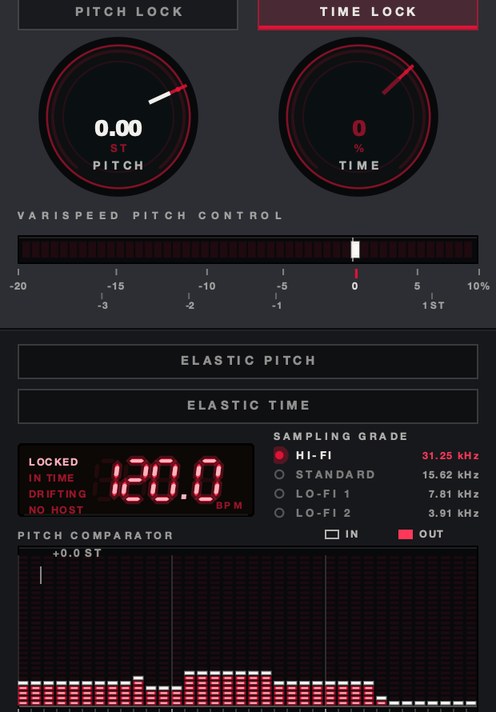
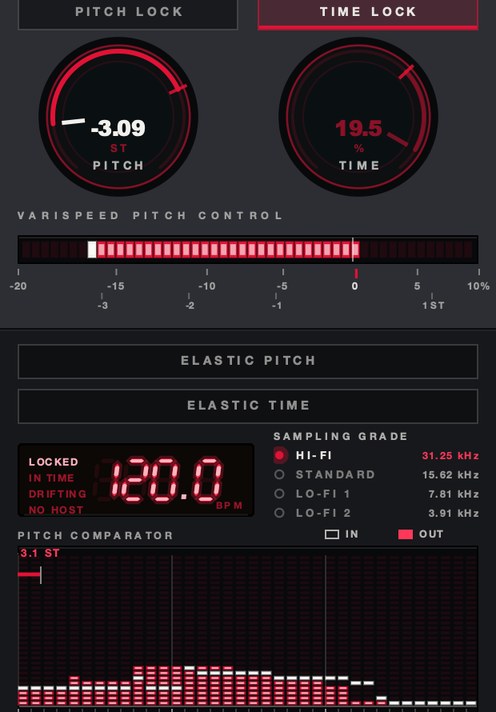
SKRUU is two knobs that do not touch each other. PITCH moves the pitch and TIME moves the length, so you can speed it up while pitching down, or the other way round. PITCH runs from −20% to +10% in 128 states and reads out in semitones as well as speed; TIME runs from −50% to +25%. PITCH LOCK and TIME LOCK hold one while the other moves, DRAG sets how long the new speed takes to arrive, and there is zero latency.
ELASTIC is the part that makes either knob playable. With it on, the knob is sprung: move it, let go, and it travels back on its own. RETURN is how long that takes, free or quantized to the bar; BITE is how hard it commits; and SLOPE is the road it takes home, with sixteen of them — RAMP, GLIDE, SNAP, WHIP, HANG, CREEP, STAIRS, HALVES, RATCHET, DRUNK, LURCH, BOUNCE, WOBBLE, TREMOR, KICK, CLIFF. Six are smooth, five are stepped, five overshoot and come back. Pitch and time each get their own, so a four-bar dive and its recovery can be one gesture instead of a lane of automation.
SAMPLING GRADE is the grid the whole thing rides on: 31.25 kHz, 15.62, 7.81 and 3.91. The lower grades put a staircase in, and the staircase is the sound. All four record all the time, so the grade can change while a note is still ringing. Above the knobs there is a pitch comparator in semitones — what went in against what came out, octaves marked — and the host's tempo with whether the transport is locked to it, in time with it or drifting. It installs as AU, VST3 and a standalone on macOS 10.13 or later, universal for Apple Silicon and Intel, and as a VST3 on 64-bit Windows 10 or later. $29.
The fan noise behind the singer was never in the room. It arrived when you dragged the corner.
SKRUU — varispeed pitch and time stretch for Mac and Windows. Pitch and time move independently, with sixteen elastic return shapes.
Keep reading
- How to change pitch without changing tempo — How pitch shifting and time stretching work, which mode to use, and how to avoid artifacts.
- What is varispeed — Speed and pitch together: the math, how it differs from pitch shifting, and how it's used.
- How to pitch a sample — Find the key, repitch or pitch shift, pitch the chops, and automate for movement.
- Best pitch shifter plugins — Which family to use, what formant control buys, and the free options worth having.
- Best time stretch plugins — Which algorithm for which material, how to test one in ten minutes, and the free routes.
- Varispeed plugin: which one, and how to choose — What the rate control has to do, how to test one, and the free options worth downloading.
- Varispeed in every DAW — What each DAW has built in, where the setting hides, and when a plugin wins.
- Tape speed plugins — What rate change does, the free routes, and how to test a tape speed plugin.
- Free time stretch plugins, and where free runs out — What stretches for free, how far, and the one move that costs $29.