← Gazillion Industries/Reading material
Varispeed in every DAW
Gazillion Industries ·
The question turns up on plugin forums every few months, in the same
shape: is there anything that does what the speed knob on a tape machine did? Pitch and tempo
together, on a fader, while the track runs.
Four of the five big DAWs have something and none of them agree on where to put it: a warp
mode per clip in Ableton Live, a control bar readout in Logic Pro, an Elastic Audio plug-in in
Pro Tools, a stretch mode in FL Studio, nothing in GarageBand. All of them are global or per
clip. None is a knob you can hold while the track runs. SKRUU is ours: PITCH and TIME on
separate controls, on an insert, $29 for Mac and Windows.
The short version
- Ableton Live
- Re-Pitch warp mode, chosen per clip
- Logic Pro
- Varispeed in the control bar, −50% to +100%
- Pro Tools
- the Varispeed plug-in, inside Elastic Audio
- FL Studio
- Resample, in the Channel Settings stretch menu
- GarageBand
- none; transpose only, up to 12 semitones
- The gap
- a continuous, automatable ride on an insert
- What we make
- SKRUU, that ride: AU, VST3 and standalone, Mac and Windows
Hear it
Every page in this category describes what varispeed does and then shows a screenshot of a knob. Here is
one loop through SKRUU
at three speeds, then the same thing with the sampling rate stepped down. The figures
are the renderer's own readout.
Unity — PITCH 93 — rate 1.0000, +0.00 semitones
Slowed — PITCH 64 — rate 0.9275, −7.25%, −1.30 semitones
Sped up — PITCH 120 — rate 1.0779, +7.79%, +1.30 semitones
Slowed, LO-FI 2 — PITCH 64 with SAMPLING GRADE at 3.9 kHz
One source loop, rendered offline through the same engine the plug-in runs, no other processing.
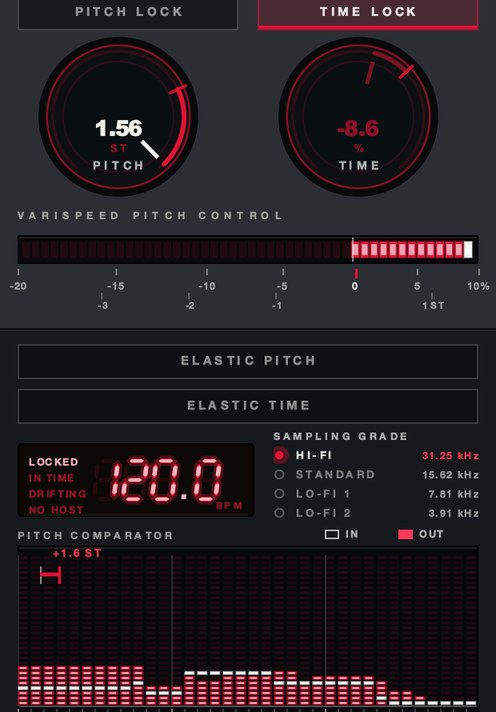 Pitched up. One knob, semitones and speed on the same readout.
One mechanism, five menus
Underneath all five names there is one operation: read the samples out at a different rate
than they went in. The audio gets shorter and higher, or longer and lower, and the whole
recording moves together — the voice, the room behind it, the hiss, the reverb tail.
Nothing is being reconstructed, so nothing can be reconstructed badly. The full picture is in
what is varispeed.
The numbers are the same in every DAW because they are arithmetic, not features. Double speed
is exactly +12 semitones and half speed exactly −12. One semitone is a ratio of about
1.059, near enough 6%. A 45 rpm record played at 33⅓ runs at about 74% speed, roughly
5.2 semitones down. That is why a 3% nudge you can barely see on a fader is a pitch move your ear
files under "different key."
Keep it straight from the other two operations, because the DAWs put all three in the same
menus and that is where the confusion starts. Pitch shifting moves pitch and leaves length alone.
Time stretching moves length and leaves pitch alone. Varispeed refuses to separate them —
see how to change pitch
without changing tempo. So the only live question on this page is whose hand is on the rate
control, and whether you can move it while the music plays.
Varispeed plugin for Ableton: Re-Pitch first, then the knob
Live's varispeed is a warp mode, not a device. Ableton's manual describes warping as a way to
treat audio as elastic, and it says outright that warping can be used to mimic the way analog
tape works by moving pitch and timing at the same time. That mode is called Re-Pitch, and it sits
alongside Beats, Tones, Texture and Complex in the clip's Warp Mode chooser. Pick Re-Pitch and
the clip stops trying to hold its pitch: change the Set tempo and the clip's key moves with
it, the way a record does. It costs nothing and it is the right first move.
Three things follow from it being a clip property. It is set per clip, so a Set full of audio
needs the mode chosen on every one of them. It only responds to tempo — there is no
Re-Pitch amount you can grab and ride. And it does nothing to MIDI tracks or software
instruments, so everything that is not audio stays in the old key while the samples move. The
warp modes are compared in varispeed in
Ableton Live.
So a search for a varispeed VST for Ableton is usually after one of two different things. One
is a whole-Set transpose, which is what the Max for Live devices in this lane do. The other is a
knob on a channel you can automate, perform and record, which is what an insert does — and
an insert is the only one of the two that works on a live input, a return, or the master while
Live is playing.
SKRUU is the
second kind, and it is the one we make: a varispeed pitch and time stretch plugin for Mac and
Windows, AU and VST3, $29. PITCH and TIME are separate controls, so you can speed it up while
pitching down, or the other way round, and lock one and play the other. It loads as an ordinary
insert, so the ride is a normal automation lane in Live, Logic, FL Studio or GarageBand.
There's a demo on the page.
Varispeed plugin for Logic: it is already in the control bar
Logic Pro has the most complete native version, and it is the reason half the people asking
this question are asking it. Apple's user guide describes Varispeed as a way to speed up or slow
down the entire project, with a range of −50%, half the project tempo, to +100%, double
it. There are three modes in the Varispeed display. Speed Only changes the speed and pitch-shifts
the master output back to compensate, so the pitch stays put. Varispeed (Speed and Pitch) lets
the pitch follow the speed. Varispeed and MIDI does the same and also transposes external MIDI
tracks, quantized to semitones. The value reads four ways: as a percentage, as the resulting
tempo in bpm, as a detune in semitones and cents, or as a tuning reference in Hz. If the readout
is missing from your control bar, it is one of the Custom LCD options.
Then the limit, and it is the same one Live has from the other direction: Logic's Varispeed is
global. It moves the whole project, it cannot be drawn as a curve inside a song, and it is a
monitoring and practice tool as much as a production one. One track dropped 4% against a
stationary arrangement is a different musical idea from the whole record dropped 4%, and the
control bar will only ever give you the second. SKRUU is an Audio Unit, so it sits on the one
track, leaves the rest of the session where it was, and holds whatever shape you draw in the
automation lane.
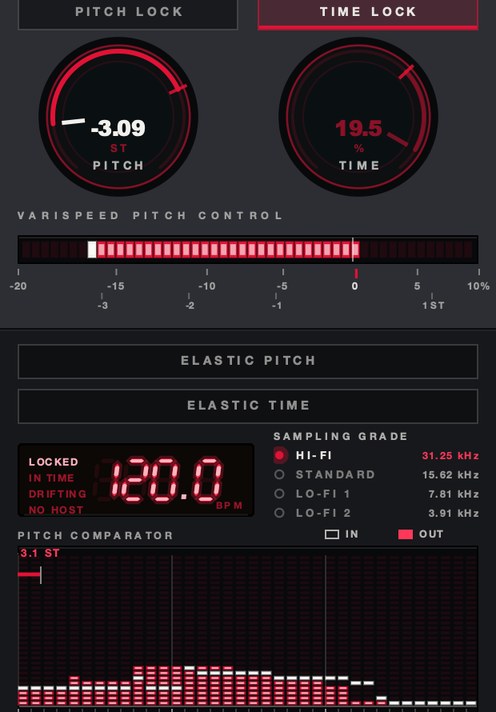 PITCH −3.09 ST. The same move a global varispeed makes, on one track instead of all of them.
Varispeed plugin for FL Studio: the setting is called Resample
FL Studio hides its varispeed in the Time stretching and pitch shifting panel of Channel
Settings, and the setting you want is Mode, set to Resample. Image-Line's manual describes
Resample as standard pitch shifting that varies sample length with sample pitch, and says that
when the TIME knob is set to anything other than "(none)" — locked to Project tempo, for
instance — it works like a tape or a record, where pitch changes with play speed. The panel
gives you PITCH, MUL for a quick length multiplier, and TIME for the resulting duration, with
offline and realtime options; offline is the higher quality of the two but cannot be used with
tempo changes.
Two consequences before you set it. On an Audio Clip, Resample means the clip changes pitch
whenever the project tempo changes or you stretch the clip in the Playlist. In the Piano roll it
means a chord plays each note back at a different speed, which is sampler tuning and sounds like
it. The other modes on that menu run on zplane's Elastique Pro engine and hold pitch while time
moves; Resample is the one that refuses to.
None of it is a performance control, which is the same gap again. FL Studio hosts VST3, so
SKRUU goes in a mixer insert slot and the move becomes an automation clip like every other move
in the project.
Varispeed plugin for Pro Tools: it is an Elastic Audio plug-in
Pro Tools puts varispeed where you would least expect a plugin: in the Elastic Audio slot on
the track, not in an insert. Avid's reference guide lists Varispeed alongside Polyphonic,
Rhythmic, Monophonic, X-Form and zplane's élastique Pro, and describes it as the plug-in to
use to link time and pitch changes for tape-like speed change effects and post production work.
It states plainly that the Varispeed plug-in provides no plug-in specific controls.
You enable Elastic Audio on the track, pick Varispeed from the Elastic Audio Plug-In pop-up
menu, then choose Real-Time or Rendered Processing. Avid's own note on the choice is useful:
real-time is immediate but more demanding of system resources, and rendered is non-real-time but
lighter, so a loaded session should use rendered. Clips go offline while they are analyzed and
come back when the analysis finishes. One documented behavior catches people out: under
Varispeed, pitch and time are always linked, but any transposition applied earlier under
Polyphonic or Rhythmic stays in the clip's metadata, so switching away and back returns the clip
to its original pitch shift while keeping the stretch. Decide which algorithm a track lives in
before you start editing.
This is the one section on the page where we are not the answer. SKRUU ships as an AU, a VST3
and a standalone application, and there is no AAX build, so the insert route is not open to it
here. Use the Elastic Audio plug-in in Pro Tools, or make the move in another host and bring the
file in.
Varispeed plugin for GarageBand: the one that has none
GarageBand has no varispeed. Apple's GarageBand user guide has no Varispeed page, and the
nearest thing is the Transpose slider in the Audio Editor inspector, which moves audio regions up
or down by up to 12 semitones with the Region button selected. That is pitch shifting: the region
keeps its length and the pitch moves on its own, which is the opposite of what a speed change
does.
That makes GarageBand the clearest case for a plugin on this page, and the easiest one to fix,
because GarageBand hosts Audio Units. SKRUU installs as an AU, so it behaves in GarageBand
exactly as it does in Logic Pro: a continuous pitch and speed control on the track, an automation
lane to draw it in, and a host that shipped without one now having one.
The two third-party names that come up
Both get named in these threads, and neither of them is the rideable insert the thread is
asking for. What follows was read off the maker's own page, and where no price appears we could
not read one today and would rather say nothing than guess.
GSi VariSpeed. Free, for Windows, macOS and Linux, currently version 1.0.0.
Know what it is before you download it: GSi describe it as a simulation of a belt-drive tape echo
whose capstan motor can change speed, so the speed control varies the delay time, reproduced as
is with nothing added beyond being digital and MIDI-controllable. A fine free tape echo, and a
different job from moving the key of a session.
Varispeed by Elisabeth Homeland. A Max for Live device rather than a plugin,
so it needs Live with Max for Live rather than a plugin folder. It transposes the audio and MIDI
clips in both Session and Arrangement view while changing the Set's tempo to match, and it can
leave tracks out by a keyword in the track name, so the drums stay where they are. That is the
whole-Set transpose answer for Live, and the nearest thing in Live to what Logic's control bar
does: global, and set rather than played.
Neither one puts your hand on the rate while the track is running, which is the thing that
started the thread. That is what
SKRUU is
for, and the four files further up this page are it, running.
What to check before you commit to one
Four checks, in the DAW rather than in a demo video. They are also the four we built ours
against, so the answers for it are here next to the questions.
The pitch control has to be continuous and not stepped to semitones, or it is a transposer
wearing a speed knob's clothes and it cannot slide. SKRUU's PITCH covers −20% to +10% in
128 states: thirty percentage points of rate cut that fine averages under a quarter of a percent
a step, roughly a twenty-fifth of a semitone, and the readout gives you semitones and speed at
once so you can see both.
It has to report its latency to the host, because an insert that lies about latency drifts
against everything else in the session. SKRUU runs at zero samples of latency, so there is
nothing to report and nothing to line back up afterwards.
It has to render the same offline as it sounds in real time, so bounce a ramp and compare. The
four files near the top of this page were rendered offline through the same engine the plug-in
runs, which is that comparison made in public rather than promised.
And it has to survive movement: every speed change is a resampling operation, and cheap
interpolation puts a gritty edge on fast moves that shows up on a held tone long before it shows
up on drums — the mechanism is
what is aliasing in audio. Ride the
control hard over a pad. If it sounds like sandpaper, you have your answer. The grit in the
fourth audio file is there on purpose, with SAMPLING GRADE set to 3.9 kHz, which is a switch
you throw rather than a symptom you inherit.
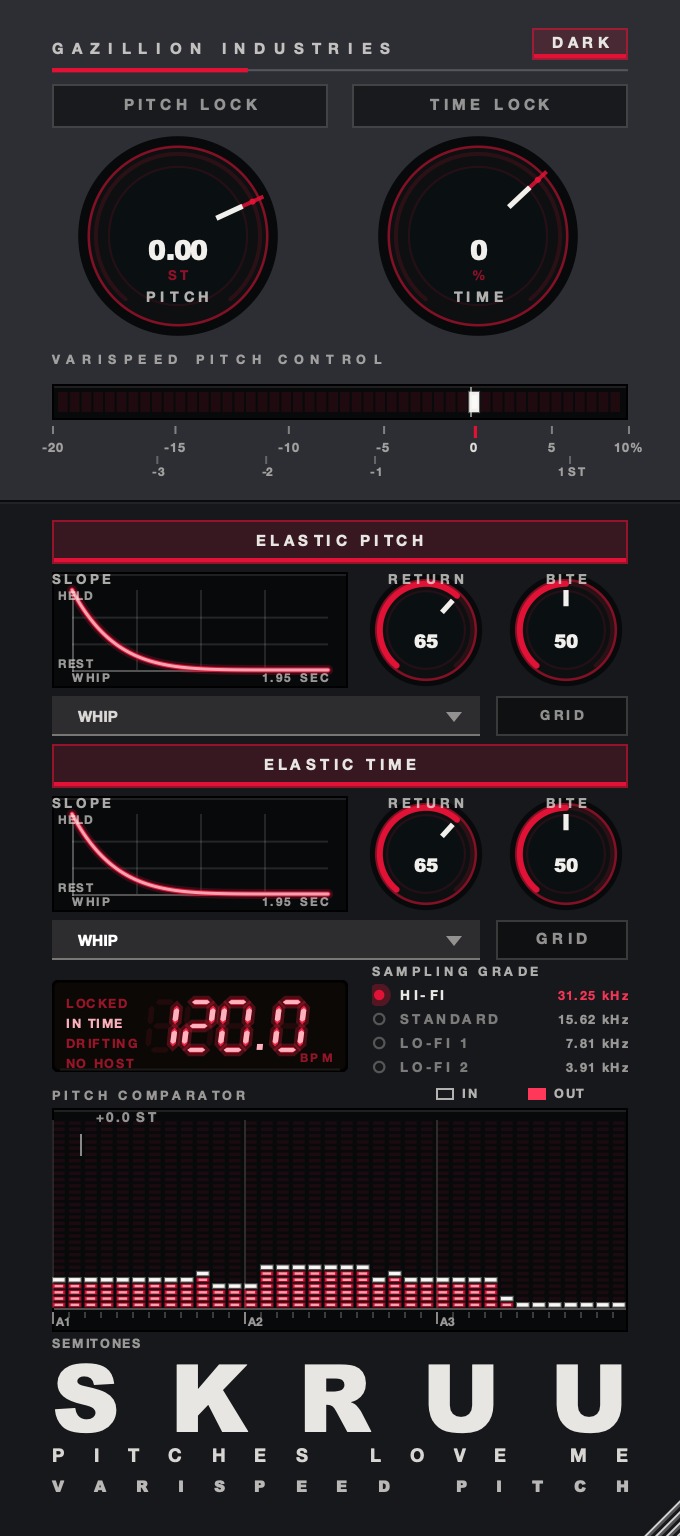 The whole panel. Top half is the two rates, bottom half is what happens when you let go.
Set it up and test it in ten minutes
Ours, in whichever of these hosts you are in. Run the same ten minutes on anything else you
are considering and compare the two sets of notes.
- Load a full-mix loop of about eight bars on an audio track and set it playing.
- Insert SKRUU as the first device on the track, before any other processing.
- Move PITCH to −5% and listen for one full pass.
- Double-click PITCH to return it to unity and confirm the loop still lines up with the grid.
- Write a slow automation ramp on PITCH from unity to −12% across four bars.
- Write a fast ramp over half a bar and listen to the same four bars again.
- Bounce the section and compare the bounce against what you heard live.
- Swap the loop for a held synth pad and repeat both ramps.
- Turn ELASTIC on, move PITCH by hand, and let go.
- Set RETURN and SLOPE until the way back sounds deliberate rather than accidental.
- Set SAMPLING GRADE to 7.81 kHz and play the pad through it once more.
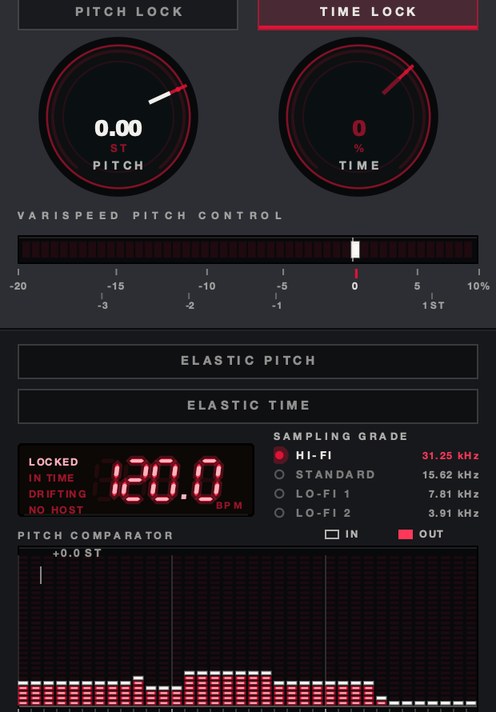 TIME −35%, PITCH at unity. Length without pitch — the half a warp mode gives you and a speed knob does not.
Where it goes in the chain
Put it first on the track, ahead of anything that reacts to level or to time. A compressor
after a varispeed dip hears a quieter, longer signal and responds correctly; a compressor before
one has its release times dragged around, which sounds like a fault in the compressor rather than
a move in the music. If what follows it is a drum bus and you do not already have a compressor
you trust there, DRUGS
is our free one-knob bus compressor for drums, Mac and Windows, with a DOSE control, a GAIN
control and a soft ceiling on the way out. Judge it by bypassing the plugin rather than by
turning DOSE down.
Reverb and delay belong after it too. A move that pulls the tail down with the source reads as
one machine slowing, while a dry source sagging into a stationary tail reads as two recordings
glued together. Either can be right — make the call with a send, on purpose, rather than by
leaving the insert order where it fell. The slowed case is worked through in
how to make slowed and reverb, and
the Houston version of it in how to chop and
screw.
What it costs you
A global varispeed costs you your monitoring reference. Logic's is honest about this: the
tempo display keeps showing the original tempo while the project plays at the new one, so the
numbers on screen stop describing what is in the room. Leave it on and you will mix a record at a
speed it will never be heard at.
A per-track varispeed costs you sync, and ours is no exception. Slow one track by 4% and it is
late by the end of the bar, which is either the point or a problem depending on whether you meant
it. And any deep slow down costs you top end, because the highs move down with everything else:
an 8 kHz cymbal at −12 semitones sits at 4 kHz, and no amount of EQ puts back air
that is no longer in the file.
Questions people ask
So what do I actually use?
If the move is global and you are only auditioning — the whole project up 4% to hear
what it does — your host already has it: Logic's control bar Varispeed, Re-Pitch on the
clip in Live, Resample in FL Studio, the Varispeed plug-in under Elastic Audio in Pro Tools. If
the move is part of the record, so it has to live on one track, be automated, be performed and be
printed, that is an insert. Ours is SKRUU: $29, AU and VST3, Mac and Windows, with a demo and the
full control list on the page.
Is there a varispeed plugin for Ableton?
Yes. SKRUU is one: a VST3 insert with a continuous pitch and speed control you can automate on
a single track, plus a separate TIME control for length, $29 for Mac and Windows. The other kind
is a Max for Live device, which transposes every clip and the tempo together rather than handing
you a knob. Live's own Re-Pitch warp mode is the free starting point, set per clip, and it
follows the Set tempo rather than your hand.
Does Ableton have a Varispeed like Logic Pro?
Not as a single global control. Logic Pro has a Varispeed display in the control bar that
moves the entire project between −50% and +100%. The closest equivalents in Live are a Max
for Live device that transposes all clips and changes the Set tempo to match, or the Re-Pitch
warp mode applied clip by clip. An insert such as SKRUU answers it from the other end: one track,
continuous, automatable, and the same plug-in in every host that takes AU or VST3.
How do you do varispeed in FL Studio?
Open Channel Settings for the sample, find the Time stretching and pitch shifting panel, and
set Mode to Resample. Image-Line's manual states that Resample varies sample length with sample
pitch, and that with the TIME knob set to something other than "(none)" it works like a tape or
a record, with pitch changing along with play speed. For a version you can ride and automate on
the mixer rather than set in a panel, put a varispeed insert on the channel; SKRUU is a VST3.
Does Pro Tools have varispeed?
Yes. Varispeed is one of the Elastic Audio plug-ins. Enable Elastic Audio on the track,
select Varispeed from the Elastic Audio Plug-In pop-up menu, and choose Real-Time or Rendered
processing. Avid document it as the option for linking time and pitch changes for tape-like
speed effects, and note that it has no controls of its own. SKRUU has no AAX build, so in Pro
Tools this is the route in front of you.
Does GarageBand have varispeed?
No. GarageBand's user guide has no Varispeed feature. The Audio Editor can transpose regions
up or down by up to 12 semitones, which moves pitch without moving length. For speed and pitch
together you need an Audio Unit plugin on an insert, which GarageBand hosts; SKRUU installs as
one, on the same Mac, for $29.
Is varispeed the same as time stretching?
No, they are opposites. Time stretching changes length and holds pitch by re-synthesizing
material that was never recorded, which is where artifacts come from. Varispeed changes the
playback rate and lets pitch follow, so there is nothing to invent and nothing to smear. SKRUU
carries both, on separate knobs: PITCH moves the rate, TIME moves the length only. The
trade-offs are laid out in time stretching
explained.
What SKRUU does
SKRUU is two knobs that do not touch each other, loaded as a normal insert in any host that
takes an AU or a VST3. PITCH runs from −20% to +10% in 128 states and
reads out in semitones as well as speed. TIME runs from −50% to +25% and
moves nothing but the length, so you can speed up while pitching down, or hold one with
PITCH LOCK or TIME LOCK and play the other.
ELASTIC makes the knob sprung: move it, let go, and it travels home, with
RETURN for how long that takes, BITE for how hard it commits,
and sixteen SLOPE shapes for the road back. DRAG sets how long
a new speed takes to arrive, and SAMPLING GRADE steps the rate down through
31.25, 15.62, 7.81 and 3.91 kHz. AU, VST3 and standalone, Mac and Windows, zero samples of
latency, $29 — hear
it on the SKRUU page.
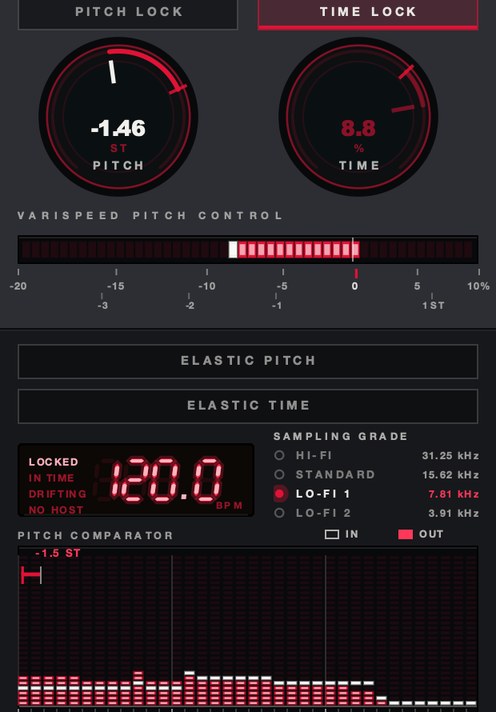 SAMPLING GRADE at LO-FI 1. 7.81 kHz rather than 31.25.
The forum answer is always a list of warp modes, because the warp modes are the true answer to
a narrower question. Every DAW can already change speed and let pitch follow. What a plugin adds
is a hand on the control while the track is running, and that hand is the entire product.
SKRUU — varispeed pitch and time stretch for Mac and Windows. Pitch and
time move independently, with sixteen elastic return shapes.
Hear it
Keep reading