← Gazillion Industries/Reading material
Varispeed in Ableton Live, and how to slow a sample
Gazillion Industries ·
A slowed sample sounds stretched when something had to be invented to
fill the extra time. Live will do it either way, and the choice is one menu inside the
clip.
You do not need a plugin. Ableton Live's Re-Pitch warp mode is varispeed: set a clip to it
and the clip's playback rate follows the Set tempo, so the pitch moves with the length the way
a record does. Complex and Complex Pro do the opposite job — they hold the pitch and
re-synthesize the length, which is time stretching, and that is where stretched-sounding
artifacts come from. Use Re-Pitch when the key may move, Complex Pro when it may not. A plugin
earns its place when you want to ride the speed while the track runs, rather than set it per
clip.
The short version
- Live's varispeed
- Re-Pitch warp mode, chosen per clip
- Where
- Clip View, Audio tab, the Warp Mode chooser
- What it does
- playback rate follows the Set tempo; pitch follows the rate
- Transpose
- deactivated in Re-Pitch — the rate is already setting the pitch
- Complex / Complex Pro
- hold the pitch and change the length; built for full songs
- Warp off
- the clip plays at its own tempo and ignores the Set
- The math
- semitones = twelve times the base-two log of the speed ratio
- Half speed
- exactly 12 semitones down
- 45 rpm at 33⅓
- 74.1% speed — 5.20 semitones down
- What Re-Pitch lacks
- a continuous control you can automate and perform
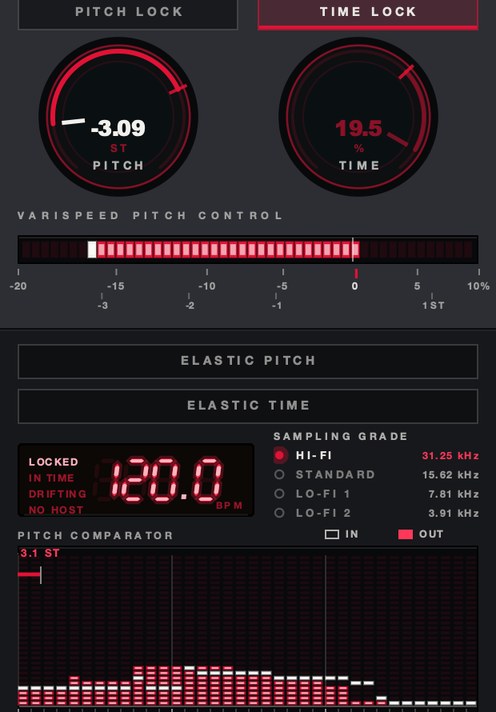 PITCH −3.09 ST. Rate and key on one readout, which is what Re-Pitch is doing silently.
How do I put a clip into Re-Pitch?
Double-click the clip to open Clip View, go to the Audio tab, make sure Warp is switched on,
and open the Warp Mode chooser. Beats, Tones, Texture, Re-Pitch, Complex and Complex Pro are the
six entries. Pick Re-Pitch. The manual describes it as adjusting the sample's playback rate, so
the pitch changes as the tempo changes, the way a DJ changes speed on a turntable.
One thing has to be right before any of it behaves: the clip's own tempo. Live warps against
the figure in the Seg. BPM field, so if a 90 BPM break is marked as 45 the rate it lands on
will be double what you meant. Check that number, fix the first Warp Marker on the downbeat, and
only then change the Set tempo. Re-Pitch has no amount of its own — the Set tempo is the
control.
You will also notice the clip's Transpose and Detune controls go dead. That is deliberate and
documented: in Re-Pitch the playback speed is already deciding the pitch, so a second pitch
control would be arguing with it. If you need Transpose, you need a different warp mode.
What do Complex and Complex Pro do instead?
Complex is for material that has beats, melody and texture at once — a whole song, a
loop off a record, a stem with everything in it. Complex Pro is a variation on the same
algorithm, documented as working especially well on polyphonic textures and full songs, and it
costs noticeably more CPU. Freeze the track or resample it when the meter starts complaining.
Complex Pro adds two controls worth knowing. Formants decides how the
sample's resonant frequencies behave when you transpose it; at 100% the original formants are
held even through a large pitch move, and it does nothing at all unless the transposition has
actually changed. Envelope defaults to 128 and shades the tone: lower values
tend to suit high-pitched material, higher values low-pitched material. Both are worth a pass
before you decide an algorithm has failed you.
The thing to keep straight is the job each mode is doing. Re-Pitch reads the existing samples
out at a different rate, so every part of the recording moves together and nothing is
reconstructed. Complex and Complex Pro hold the pitch where it was and manufacture the extra
duration. The full comparison is in what is
varispeed.
SKRUU puts
varispeed pitch and independent time on two knobs, on an insert, in a normal automation lane.
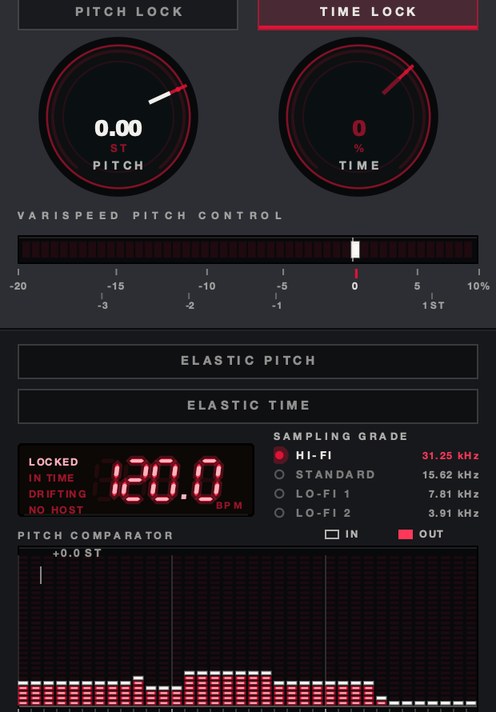 TIME −35%, PITCH at unity. Length on its own — the other half of the same argument.
When is each one right?
Reach for Re-Pitch when the drop in key is part of what you want: a break slowed into a
heavier groove, a vocal dropped until it sits under the beat, a whole record taken down the way
a turntable takes it down. It is also the right call when the sample is short and percussive,
because there is nothing for an algorithm to smear. Anything in the
slowed and reverb family wants
Re-Pitch, since the key moving is the sound.
Reach for Complex Pro when the key is fixed by something else — the song is in F minor
and the sample has to stay in F minor, or the vocal has to land on top of an arrangement that is
not moving. Also use it when the tempo distance is small. Asking for 4% is a different request
from asking for 40%, and the algorithm is much better at the first one.
There is a third answer people forget. Switch Warp off and the clip plays at its original
tempo, ignoring the Set entirely. Switching Warp off slows nothing down, but it is the fastest
way to hear what the sample actually sounds like before Live has done anything to it.
What does a slowdown do to the key?
Varispeed ties pitch and duration together, so every speed change is also an interval, and
the interval is arithmetic rather than opinion. Semitones equal twelve times the base-two
logarithm of the speed ratio. That single line answers every version of the question.
Work an example. A 90 BPM break dropped into a 72 BPM Set is running at a ratio of
0.8. Twelve times the base-two log of 0.8 is −3.86, so the break arrives 3.86 semitones
down — between a major third and a fourth below where it started. The length moves by the
inverse: a quarter note that was 666.7 ms at 90 BPM is 833.3 ms at 72.
- Half speed
- ratio 0.500 — exactly 12 semitones down
- Double speed
- ratio 2.000 — exactly 12 semitones up
- 90 BPM clip in a 72 BPM Set
- ratio 0.800 — 3.86 semitones down
- A 10% slowdown
- ratio 0.900 — 1.82 semitones down
- A 25% slowdown
- ratio 0.750 — 4.98 semitones down
- 45 rpm played at 33⅓
- ratio 0.741 — 5.20 semitones down
- 33⅓ played at 45 rpm
- ratio 1.350 — 5.20 semitones up
- Down three semitones
- ratio 0.841 — a 120 BPM loop lands at 100.9
- One semitone up
- ratio 1.059 — about 5.95% faster
The two turntable rows are why so much sample-based music sits around five semitones from
where it started. Nobody chose that interval. It falls out of the two speeds a record player
offers, and producers have been living inside it ever since.
Why does a stretched sample sound stretched?
Because the algorithm is writing material that was never played. Holding the pitch while
adding duration means inventing the missing time, and the further you push, the more of the
result is invention rather than recording. Transients get doubled or softened, sustained notes
develop a flutter, room tone smears, and a hi-hat turns into a short, tired wash. None of it is
a fault in Live; the cost comes with the operation.
So fix things in this order. First the Warp Markers: half the smearing people blame on
Complex Pro is a marker landing off the beat and the algorithm being asked to fight the grid.
Second the mode: Beats is built around transients and will chop a sustained pad, Tones suits
monophonic pitched material, Texture suits pads and drones, Complex Pro suits everything at
once. Third the distance: if the sample has to travel a long way and still hold its key, expect
to hear it, and consider whether the key really is fixed.
Re-Pitch removes the problem rather than improving it. Nothing is reconstructed, so nothing
can be reconstructed badly. The price is the key, and the key is often negotiable.
Slowing a sample so it still sounds like a record
- Drop the sample in, open Clip View, and check the Seg. BPM reading is the real tempo.
- Put the first Warp Marker on the downbeat and confirm the loop stays in time across
eight bars.
- Set Warp Mode to Re-Pitch.
- Lower the Set tempo until the groove sits where you want it.
- Read the interval off the arithmetic above and move the rest of the arrangement to
match, or transpose the sample's new key into your instruments.
- Consolidate the passage, or freeze and flatten the track, so the rendered audio is what
everything downstream is working on.
- Compare against the original at the original speed. If the slow version has lost weight
rather than gained it, you went too far.
What will Re-Pitch not do?
Three limits, and they are the reason this question gets asked as a plugin question at all.
Re-Pitch is a clip property, so a Set full of audio needs the mode chosen on every clip
individually. It responds only to the Set tempo, so there is no amount to grab, automate, ride
or record — you can automate a tempo, but that moves the entire Set. And it does nothing
to MIDI tracks or software instruments, so every part that is not audio stays put while the
samples move around it.
It also cannot touch a live input, a return or the master while Live is playing, because
there is no clip involved. That is the gap an insert fills, and the options are laid out in
the best varispeed plugins.
Questions people ask
What plugin do I need for varispeed in Ableton Live?
None, if you only need it per clip: Live's Re-Pitch warp mode changes the playback rate and
lets the pitch follow. A VST3 or AU insert is what you need when you want a continuous pitch and
speed control you can automate, perform on a live input, or put on a return or the master.
How do I slow a sample in Ableton without it sounding stretched?
Use Re-Pitch. It changes the playback rate instead of reconstructing the missing duration, so
there is no invented material to hear. The pitch drops along with the tempo, which is the trade.
If the key has to stay, use Complex Pro and keep the tempo distance as small as you can.
What is the difference between Re-Pitch and Complex Pro?
Re-Pitch changes speed and pitch together, like a turntable. Complex Pro holds the pitch and
changes only the length, which means re-synthesizing audio that was never recorded. Re-Pitch is
free of artifacts and moves your key; Complex Pro keeps your key and introduces artifacts.
Why do Transpose and Detune stop working in Re-Pitch mode?
Live deactivates the transposition controls in Re-Pitch because the playback speed is already
determining the pitch. To transpose a clip independently of its length, choose Beats, Tones,
Texture, Complex or Complex Pro instead.
How many semitones is a 20% slowdown?
About 3.86 semitones down. A 20% slowdown is a speed ratio of 0.8, and twelve times the
base-two logarithm of 0.8 is −3.86. Half speed is exactly 12 semitones down, and a
45 rpm record played at 33⅓ runs at 74.1% speed, or 5.20 semitones down.
Should I just turn Warp off instead?
Only to audition. With Warp off the clip plays at its original tempo and ignores the Set
tempo completely, so it will not follow your session at all. It is useful for checking what a
sample sounds like untouched, and for one-shots that should never be warped.
Does Re-Pitch work on a whole Set?
Not by itself. It is chosen clip by clip and follows the Set tempo, so lowering the tempo
moves every Re-Pitch clip but leaves MIDI parts and instruments in their original keys. Moving
everything together needs either manual transposition or a device that does both.
What SKRUU does
SKRUU is our varispeed pitch and time stretch plugin, and it loads as an ordinary insert, so
the speed becomes a knob you can ride and an automation lane you can draw. PITCH
moves rate and key together and reads out in semitones as well as percent.
TIME moves length on its own, which is the half Re-Pitch cannot give you.
DRAG sets how long a new speed takes to arrive, from instant to a hand on the
platter. There is a demo on the SKRUU page.
Live already knows how to change the rate. What it does not give you is somewhere to put
your hand while the track is running.
SKRUU — varispeed pitch and time stretch for Mac and Windows. Pitch and
time move independently, with sixteen elastic return shapes.
Hear it
Keep reading