← Gazillion Industries/Reading material
Best varispeed plugins
Gazillion Industries ·
The same question turns up on plugin forums every few months, in almost
the same words: is there a plugin that does what the speed control on a tape machine does, pitch
and tempo sagging together, on a fader you can ride?
A varispeed plugin changes playback rate, so pitch and time move together: slow it and the
audio gets longer and lower at once. The good ones put that rate on a continuous, automatable
control rather than a single button, resample cleanly enough that a speed-up does not go glassy,
and are honest about whether the control springs home or holds. Free ones exist. Which you want
depends on whether you are transposing a whole session or playing a move into a bus.
The short version
- What it does
- changes playback rate, so pitch and time move as one
- Must have
- a continuous rate control you can automate, not just a stop button
- Second thing
- clean resampling, so a speed-up does not alias
- Third thing
- a stated return: sprung back to unity, or held
- Free route
- your DAW's own varispeed, and GSi VariSpeed for the delay version
- Our answer
- SKRUU, with PITCH and TIME on separate knobs
Hear it
Every page in this category describes what varispeed does and then shows a screenshot of a knob. Here is
one loop through SKRUU at three speeds, then the same thing with the sampling rate stepped down. The figures
are the renderer's own readout.
Unity — PITCH 93 — rate 1.0000, +0.00 semitones
Slowed — PITCH 64 — rate 0.9275, −7.25%, −1.30 semitones
Sped up — PITCH 120 — rate 1.0779, +7.79%, +1.30 semitones
Slowed, LO-FI 2 — PITCH 64 with SAMPLING GRADE at 3.9 kHz
One source loop, rendered offline through the same engine the plug-in runs, no other processing.
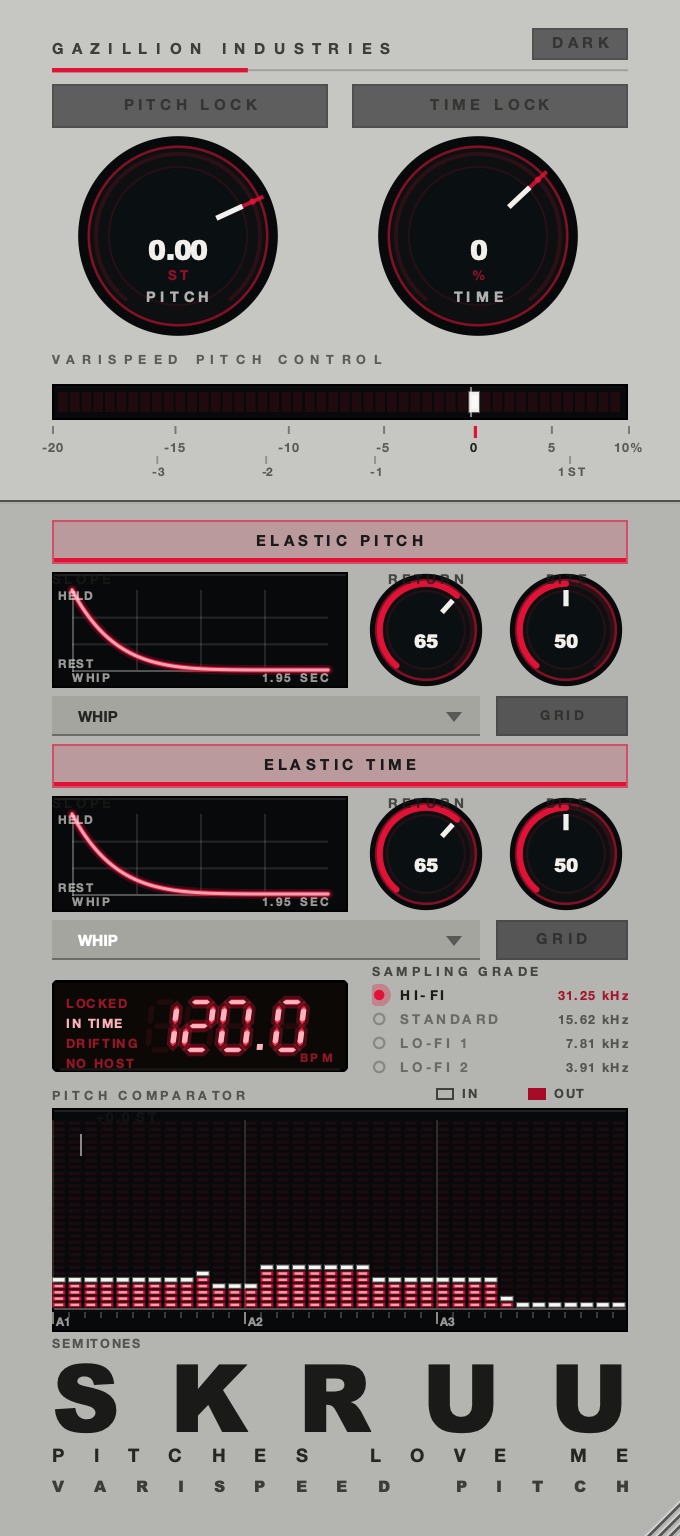 The whole thing. Top half is the two rates, bottom half is what happens when you let go.
Four different things people mean by "varispeed plugin"
The forum threads go round in circles because four unrelated tools answer to the name, and the
person asking rarely says which one they want. Sort yourself before you download anything.
A whole-session transpose. The entire arrangement a tone down so a singer can
reach it, tempo included, and back again afterwards. That is a host-level job rather than an
insert effect. Logic Pro has a Varispeed control built in. Ableton Live has no single control that does
the same job, which is why paid Max for Live devices rank on this search at all.
A playable gesture on an insert. Grab a speed control during playback, pull
the whole bus down half a semitone into the chorus, let it snap back. This is the literal ask in
most of those forum posts, and the narrowest category of the four.
Varispeed inside a tape delay. On a belt-drive tape echo the delay time is set
by how fast the motor spins, so changing speed bends every repeat already in the machine. That
squealing dive is a different effect from transposing a track, searched under the same words.
Whatever the DAW already does. Turn warping off on a clip and transpose it and
you have varispeed: the clip gets longer and lower. Free, immediate, and destructive to the grid,
which is exactly why people go looking for a plugin instead. The mechanism is the same in all four
cases, and it is covered properly in what is
varispeed.
What varispeed actually does to the signal
Playback rate and pitch are the same fact seen twice. Read the samples out faster and every
period in the waveform gets shorter, so every frequency goes up by the same ratio and the file
finishes sooner. Double the rate for exactly an octave up, halve it for exactly an octave down.
One semitone is a ratio of 1.0595, near enough 6%.
That shared ratio is what makes varispeed sound like a machine rather than a process. A pitch
shifter moves the notes and leaves the room where it was. Varispeed takes the notes, the room, the
hiss, the breath and the formants with them, which is why a voice slowed 8% sounds like a bigger
person in a bigger space rather than the same person singing lower. That side effect has its own
page: formant shifting.
It also means the two directions fail in opposite ways. Slowing down is forgiving, because
everything you need is already in the file. Speeding up is not: content at 14 kHz lands at
15.4 kHz after a 10% lift, and content near the ceiling has nowhere to go but back down the
spectrum as a false tone. That is aliasing,
and it is the biggest audible difference between a well-built varispeed plugin and a careless
one.
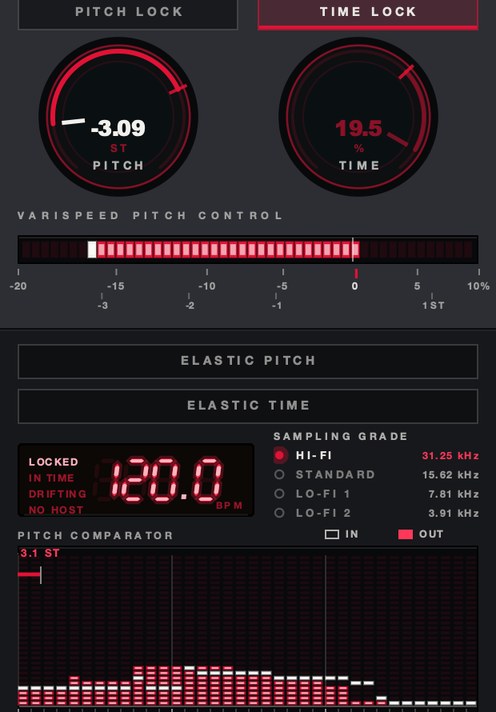 PITCH −3.09 ST. Rate and pitch moving as one, the way a transport does it.
What separates a good varispeed plugin from a bad one
Five things, and only the first is obvious.
The control is continuous and automatable. A tape stop button is a preset
gesture. A rate you can draw, ride and automate is an instrument. Plenty of plugins sold as
varispeed give you the button and call it done.
The resampling is good. Ask for +10% on a bright loop and listen to the
cymbals. Grit that was not there before, or a metallic ring that sits still while the music moves,
means cheap interpolation. Slowing down will not show you this, so test upward.
The return is designed. Hold a slowdown on an insert and the plugin is handing
the host less audio than the host is feeding it, so the gap has to go somewhere: a buffer that
keeps growing, or a trip back to unity. That is the structural reason most insert varispeed is a
gesture rather than a setting, and why the shape and length of the journey home matters more than
the depth of the dip.
It tells you where it is. Percent, semitones, or both. A knob marked 0 to 100
is guesswork, and guesswork is how you end up a quarter-tone out against a bassline you already
printed.
It behaves the same at every buffer size. Set 128 samples, then 1024, and
render the same move twice. If the two files do not line up, the timing is being done in blocks
rather than in samples, and every bounce will be a slightly different take.
SKRUU is our
varispeed pitch and time stretch plugin for Mac and Windows, with PITCH and TIME on separate knobs
and sixteen shapes for the trip back to unity. There's a demo on the page.
How to test a varispeed plugin in ten minutes
Do this with the demo before you pay for anything. One loop, one pass, and it sorts the field
faster than any review will.
- Load an eight-bar loop with cymbals, a sustained pad and a vocal in it.
- Set the rate to +10% and render. Listen to the top end on headphones for ringing or grit.
- Set the rate to −10% and render. Listen to the tails for flutter or stepping.
- Automate the rate from 0 to −6% over one bar and back. Listen to the turn, not the dip.
- Render that automation at a 128-sample buffer and again at 1024, then null the two files.
- Check the reported latency in your DAW's plugin delay compensation display.
- Bypass at unity and null against the dry track. Anything left is coloration you did not ask for.
- Open ten instances on ten tracks and watch the CPU meter before you put it in a template.
Step four decides it. Everybody can fall. The turn at the bottom, and the shape of the climb
back, is where the cheap ones sound like a pitch bend and the good ones sound like something with
mass.
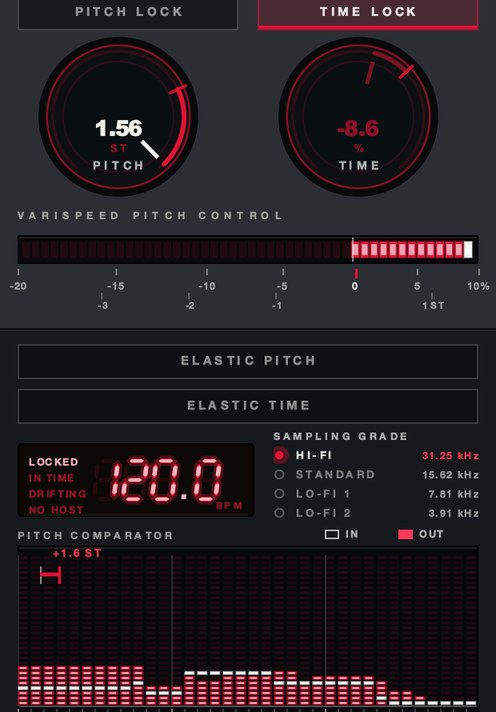 Pitched up. Same control, the other direction, and the direction that exposes bad resampling.
Named varispeed plugins, and what each one is for
Everything below was read off the maker's own page while writing this. Where no price appears,
the page would not give one up, and a wrong number is worse than no number.
GSi VariSpeed. Free, for Windows, macOS and Linux, currently version 1.0.0.
GSi describe it as a simulation of a belt-drive tape echo whose capstan motor can change speed, so
the speed control varies the delay time, and they state plainly that it reproduces the hardware as
is, with its pros and cons and no added features beyond being digital and MIDI-controllable. If
you want the tape-echo dive rather than a track transpose, start here and stop here. They ask for
a donation, and they note the Linux build is experimental and ships as raw binaries you place by
hand.
Kilohearts Tape Stop. Free with an account. Tape speed simulation with four
controls: a Play button holding the state of the motor, Stop Time, Start Time, and a Curve for the
speed ramp. It runs as an ordinary plugin and also as a Snapin inside their modular hosts. The
whole point is the stop and the start, so if you wanted a rate you could park at −4%, this
is not that, but as a free tape stop it is hard to argue with. Longer piece here on how to make a tape stop effect.
Cableguys TimeShaper 3. 29 €, running inside their ShaperBox 3 host, with
a free trial. You draw the position of a virtual playhead inside the audio, which gets you
slow-downs, speed-ups, reverses, scratches and tape stops from one control surface, synced to
beats and bars. There is a separate curve for lows, mids and highs, and Cableguys say the
resampling interpolation is built to keep aliasing down when you modulate speed hard. Drawing is a
different way of working from riding a knob, and for beat-locked gestures it is the stronger
one.
Varispeed by Elisabeth Homeland. €20,00, and a Max for Live device rather
than a plugin, so it needs Live Suite or Live Standard with Max for Live; the page lists Live 11
and Live 12 on Mac and Windows. It transposes every audio and MIDI clip in both Session and
Arrangement view by up to −24 or +24 semitones while changing the Set's tempo to match, and
it can exclude tracks by a keyword in the track name so the drums stay where they are. This is the
whole-session transpose, and it answers the Ableton half of the question.
u-he Satin. 129 €, a tape simulation for macOS, Windows and Linux with a
demo download. Its relevance here is the adjustable tape speed, which runs from 1.87 to 30 ips,
plus a delay mode with two or four heads. It is a tape machine first and a speed control second,
so buy it for the tape and take the speed as part of the deal. The physical side of that
relationship is in tape speed.
AudioThing Reels. $59, for macOS, Windows and Linux in VST2, VST3, AU, AAX and
CLAP, plus iOS, with a demo. Built around a consumer reel-to-reel recorder, it includes tape start
and tape stop with an adjustable speed for the effect, alongside wow and flutter, dropouts,
crosstalk, hiss and motor noise. Same shape as the Kilohearts device with a whole lo-fi machine
attached.
Chow Tape Model. Open source, with the source linked from the developer's own
product page, for Windows, Mac, Linux and iOS, and the subject of a paper presented at the 2019
DAFx conference. Serious work on the tape itself. No transport, so no speed ride, but it belongs in
any answer to "varispeed tape plugin" because it is often what people actually want when they type
that.
Where varispeed goes in the chain
First, before anything that reacts to level or time. A compressor after a varispeed dip hears a
quieter, longer signal and behaves correctly. A compressor before it gets its release times
stretched along with everything else, which sounds like the compressor is broken.
Reverb and delay go after it too, for a better reason: a move that drags the tail down with the
source sounds like a machine, while a dry source sagging into a stationary tail sounds like two
recordings. A stationary tail is a real choice, but make it on purpose with a send rather than by
accident with an insert order. The exception is the tape-echo case, where the varispeed lives
inside the delay and the bending repeats are the whole point.
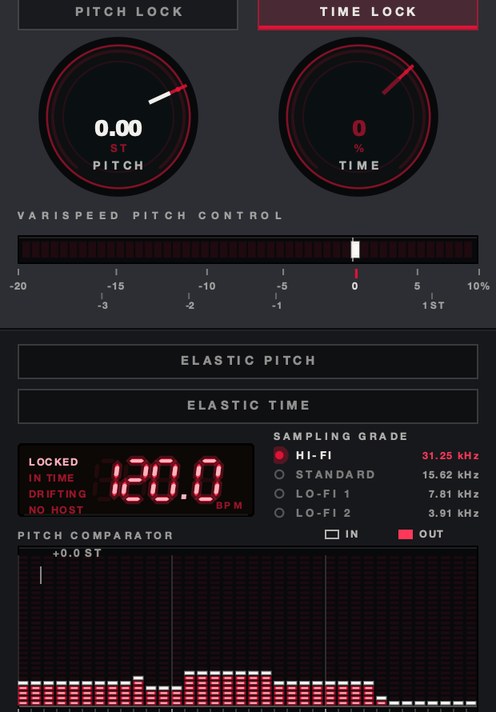 TIME −35%, PITCH at unity. Length without pitch — the half that varispeed alone cannot give you.
What it costs you
Varispeed commits you to a key change, and that is most of the bill. Drop a sample 6% and it is
about a semitone flat of where it was, so either the arrangement follows it or you are writing
around a new root. Producers have taken that trade for fifty years because the sound of the trade
is the point, but it is a trade, and the alternative is on the time stretching page.
Upward moves cost top end and body. Past about +8% on a full mix, cymbals thin out and voices
sound small, because you have shrunk every resonance in the recording including the ones your ear
reads as size. Slowed material has the opposite problem: the noise floor comes down with everything else,
and hiss slowed 20% falls nearly four semitones and stops sounding like air.
And real-time varispeed costs latency somewhere, or costs you the ability to hold the offset.
You will either see the number in your DAW's delay compensation display or find that the control
wants to come home. Both are honest. A plugin claiming neither is worth a close look at step five
above.
Hear SKRUU
Questions people ask
What is the best varispeed plugin?
There is no single best one, because the category holds four different tools. For a whole-session
transpose in Ableton Live, a Max for Live device is the right shape. For a tape-echo dive, GSi
VariSpeed is free and purpose-built. For a beat-locked drawn gesture, Cableguys TimeShaper. For a
continuous rate you ride and automate on an insert, you want a dedicated varispeed plugin with the
rate on a knob and a designed return, which is the category SKRUU is in.
Is there a free varispeed plugin?
Yes, several, covering different jobs. GSi VariSpeed is freeware for Windows, macOS and Linux
and gives you the tape-echo version. Kilohearts Tape Stop is free with an account and gives you
the stop and the start with a curve on both. Both were listed at no cost on the developers' own
pages when this was written. Before either of them, check your own DAW: turning warping off and
transposing a clip is varispeed, and it costs nothing.
Where should you download a varispeed plugin?
From the maker's own site, every time. These searches land on aggregator pages that reprint the
developer's blurb word for word and wrap it in a download button, and those pages are often years
behind the current version. Read the blurb wherever you find it, then go to the developer and get
the file there.
What is a varispeed tape plugin?
Usually one of two things: a tape machine simulation with a speed control, where changing speed
changes pitch, tone and flutter together, or a tape echo where motor speed sets the delay time and
moving it bends the repeats. Decide which one you want before you buy, because they sound nothing
alike.
Why does this keep getting asked on forums?
Because the obvious answers are all slightly wrong. The DAW method is destructive and cannot be
played live. Pitch shifters break the link between pitch and time that people are asking for in
the first place. Tape plugins mostly model the tape rather than the transport. A continuous rate
you can ride on a bus is a narrow piece of engineering, and narrow things are under-supplied.
Does varispeed work on a full mix?
Yes, and it is one of the few processes that holds together on a full mix, because everything
moves by the same ratio and nothing gets out of step with anything else. That is the whole basis of
slowed and reverb and of chopped and screwed.
What SKRUU does
SKRUU is our varispeed pitch and time stretch plugin for Mac and Windows, in VST3, AU and
standalone, and it puts rate and length on two knobs that do not touch each other.
PITCH is the varispeed control: it runs from −20% to +10% in 128 states and
reads out in semitones as well as percent, with the scale printed under it so you can see
−3, −2, −1 and +1 ST where they fall. TIME runs from −50%
to +25% and moves nothing but the length. PITCH LOCK and TIME
LOCK hold one while you play the other, so you can speed a loop up while pitching it
down.
The return took the longest to get right. ELASTIC makes the knob sprung: move
it, let go, and it runs home. SLOPE is the shape of that journey and there are
sixteen of them, drawn on the panel with the time of the trip printed on the curve, and PITCH and
TIME each get their own. DRAG sets how long a new speed takes to arrive.
SAMPLING GRADE steps the rate down in four grades, from HI-FI at 31.25 kHz to
LO-FI 2 at 3.91 kHz, which is the other half of what a slow machine does to a recording.
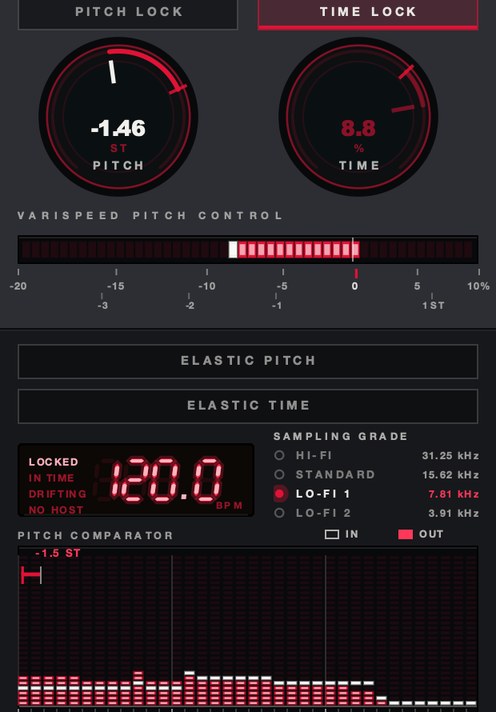 SAMPLING GRADE at LO-FI 1. 7.81 kHz rather than 31.25.
The thread will be back in a few months, phrased the same way, and somebody will say the DAW
can do it. The DAW can. It just cannot do it while the track is playing and your hand is on the
control.
SKRUU — varispeed pitch and time stretch for Mac and Windows. Pitch and
time move independently, with sixteen elastic return shapes.
Hear it
Keep reading
- What is varispeed — Speed and pitch together: the math, how it differs from pitch shifting, and how it's used.
- Time stretching explained — How the algorithms work, which mode to use, and when to repitch instead.
- How to make slowed and reverb — Slow it with varispeed, add a long dark reverb, and make sped-up versions too.
- How to chop and screw a song — Where DJ Screw's Houston sound comes from, and how to screw and chop a song in a DAW.
- How to change pitch without changing tempo — How pitch shifting and time stretching work, which mode to use, and how to avoid artifacts.
- Best doppler plugins — Why most doppler moves sound wrong, and what a real one drives.