← Gazillion Industries/Reading material
Best doppler plugins
Gazillion Industries ·
Two in the morning, an ambulance takes the corner and the siren sags a
couple of semitones as it passes the window. An hour later you try that on a hi-hat, draw a
pitch bend on the clip, and get a hi-hat that goes flat in the middle of the speakers and
never leaves the middle of the speakers.
The best doppler plugins drive four things from one motion: pitch, from a delay line whose
length is changing; level, which falls off with distance; high frequency, which the air absorbs
more of the further the sound has to travel; and position across the image. The pitch bend is
the famous part and the weakest of the four on its own. The other three are what make an ear
put the sound somewhere in the room.
The short version
- What it is
- a source moving past a listener, not an effect applied to one
- Mechanism
- a delay line whose length changes; the rate of change is the pitch
- The four cues
- pitch, level, air absorption, position — all from one path
- The tell
- pitch crosses unity at the closest point of the pass
- Free route
- a modulated delay and an auto-panner in the host you already own
- For music
- a playable bend beats a physics engine you have to draw
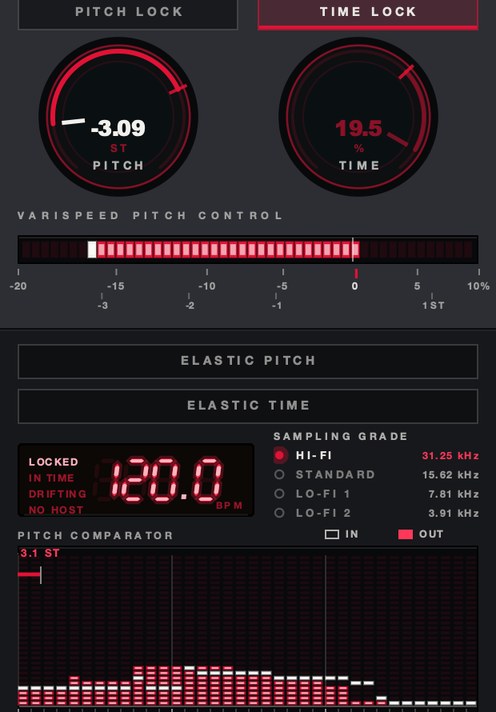 PITCH −3.09 ST. About the size of a whole car pass, on one knob.
What a doppler plugin is actually doing
A doppler effect plugin is a delay line with a length that moves. Write into a buffer at a
fixed rate and read out of it faster than you wrote, and the audio comes out short and high;
read slower and it comes out long and low. Nothing is analyzed and nothing is resynthesized, so
the sound keeps its formants, its room and its noise floor. That is the same mechanism as a
turntable running fast, described in what is
varispeed.
The physics sets the size of the move. Sound travels at about 343 m/s in air at 20 °C.
A car coming straight at you at 30 m/s shifts every frequency by a factor of 343 ÷
313, about 1.6 semitones up. Going away it shifts by 343 ÷ 373, about 1.5
semitones down. Total swing: roughly three semitones, and the rise is slightly larger than the
fall. A passenger jet at 250 m/s swings about 22 semitones up and 9 down, which is why the
curve is lopsided in a way nobody draws by hand.
The part that surprises people is where the shift goes to zero. Only the component of the
speed along the line to your ear counts, so the full shift is reached when the source is far
away and pointed straight at you, and it falls to nothing at the moment the source is level with
you. The pitch crosses its own unshifted value exactly at the closest point of the pass. How
close that pass is decides how fast the bend happens, not how big it gets: a car two meters away
snaps through in under a second, a plane 300 meters up takes five.
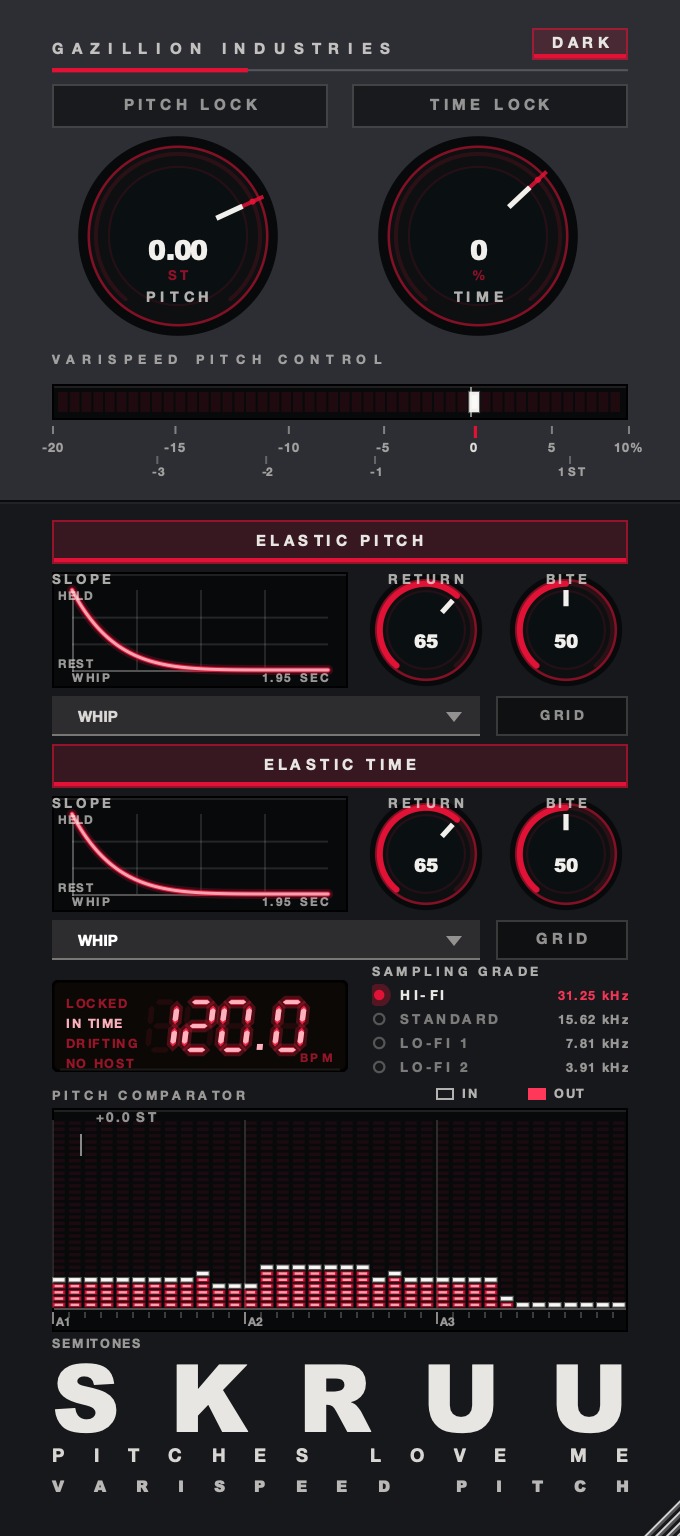 The whole thing. Top half is the two rates, bottom half is what happens when you let go.
Why most doppler moves sound wrong
The common failure is a pitch bend with nothing else attached to it. The note sags, the level
holds, the top end holds, the image holds, and the ear hears a detuned instrument rather than an
object going past. Pitch on its own is the least informative of the four cues. Take it away and
leave the other three and you still hear a pass; take the other three away and leave the pitch
and you hear a synthesizer.
The second failure is a straight fade for distance. Level from a point source falls 6 dB
for every doubling of distance, which means almost all of the change happens in the last few
meters and almost none of it happens between 80 and 100. A linear fade spreads the loudness
evenly along the path and reads as a slider being moved, because that is what it is.
The third is a dry/wet balance that never moves. Distance is carried more strongly by the
ratio of direct sound to reflected sound than by level, which is why a voice at the far end of a
hallway is unmistakably far away even at a matched volume. If the send stays fixed while the
source travels, the room follows the source around and the depth collapses. That mechanism on
its own is how to make
music sound like another room.
The fourth is a top end that never changes. Air absorbs high frequencies far more than low
ones, a few dB per hundred meters at the top octave and almost nothing at 100 Hz, and the
amount swings with humidity. Over a short pass it is subtle. Over a long one it is most of the
effect.
What separates a good doppler plugin from a bad one
- Pitch from a delay line, not from a pitch shifter. A shifter guesses at
material that was never recorded and leaves smearing on the transients. A read-rate change
leaves the signal intact and simply plays it at a different speed.
- An inverse distance law on level. 6 dB per doubling, not a
ruler-straight fade.
- Air damping you can set. A low-pass tied to the same distance value, so
the far ends of the pass go dull on their own.
- A wet ratio that travels. Either a reverb inside the plugin driven by
distance, or a clean way to drive a send with the same curve.
- Panning on the same path. One geometry driving pitch, level, tone and
position. Four separate automation lanes will never stay in agreement.
- A control for where the closest point lands. The whole event is timed off
that instant, and sliding it by 200 ms is the difference between a pass that hits the
snare and one that does not.
- A pitch bypass. On a loop, the bend also moves the timing. Being able to
keep the distance cues and drop the pitch is the single most useful switch on a music
session.
- Something you can play. Drawing a path is fine for a fly-by you plan.
Catching one against a hit you can hear needs a control under your hand.
SKRUU is our
varispeed pitch and time stretch plugin, and it covers the pitch-and-speed half of a pass: a
sprung knob you throw and release, with sixteen shapes for the way it comes home. There's a demo
on the page.
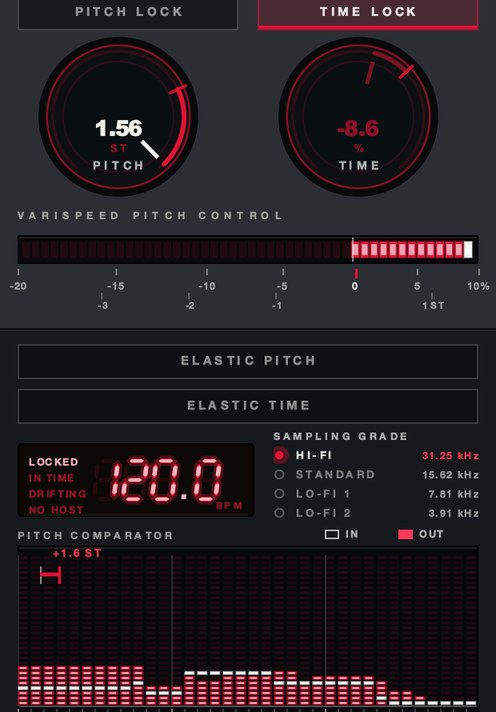 Pitched up. The approach half of the curve, before the crossing.
How to test a doppler plugin in ten minutes
You are testing four behaviors, and three of them are visible on a bounced waveform before
you hear anything. Do this with the plugin's own demo build, on material you know.
- Put a two-second mono noise burst on an empty track at a steady level.
- Set the pass so the closest point lands at one second.
- Bounce it, then look at the waveform. The level should swell on a curve and dump most of
its change in the middle third.
- Play the bounce and listen to the top end at the two ends of the file. It should be dull
at both and bright in the middle.
- Set the source speed to 30 m/s and check the pitch swing. About three semitones,
top to bottom, is correct.
- Check the pitch at the exact center of the pass. It should sit at the unshifted pitch.
- Set the closest approach to 1 m, bounce again, then set it to 50 m and bounce
again. The bend should get slower and gentler, not smaller.
- Swap the noise for a drum loop and look at the grid. Note whether the hits move, and
whether a pitch bypass holds them.
- Listen on headphones for the pan, then fold to mono and listen again.
- Print the best pass and play it on a phone speaker.
The phone is not an afterthought. A pass built on level and top end survives a phone; a pass
built on a wide stereo sweep turns into a mono blip, and most of the ones people upload are the
second kind.
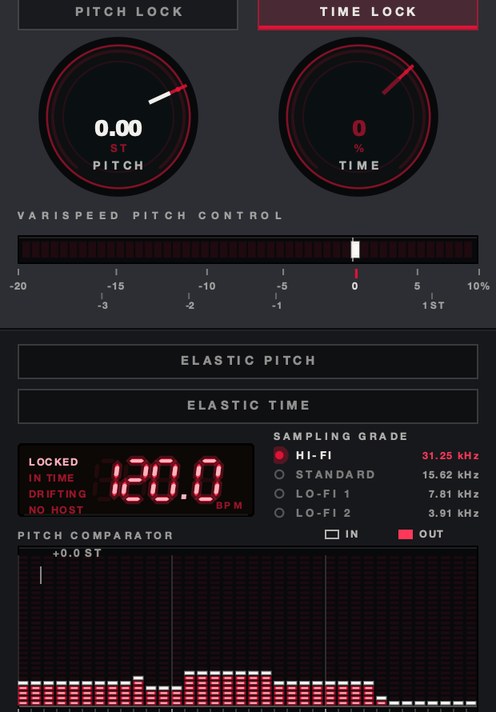 TIME −35%, PITCH at unity. Length moved, pitch held — the switch a pass on a loop needs.
Where it goes in the chain
On the source track, as an insert, before anything that represents the room. The order is the
whole argument: distortion, amp tone and any character processing belong to the object and
happen first; the pass happens to the finished object; the room happens to the pass. Put a
doppler after a reverb and you move the room past the listener along with the source, which is a
sound, but not the one anyone asked for.
Feed the reverb from a send that sits after the doppler, post-fader, so the wet level rides
the distance curve for free. If the plugin has its own distance reverb, use that instead of the
send rather than as well, or you will hear two rooms with different arrival times.
Two practical notes. Delay-line dopplers hold a buffer, so they report latency and can behave
oddly when you automate them hard against a moving playhead; print the pass to audio once you
like it. And keep them off the master, always. A pass is an event that happens to one thing, and
a whole mix cannot move past a listener who is inside it.
Named options, and what each one actually gives you
The category is a small one and the products in it are built for different rooms. What
follows is read off each maker's own page.
Waves Doppler. A post-production fixture, and the one whose vocabulary the
rest of the field borrowed. Its own page lists control of the track curve, center time, pitch, and
start and end points; a display of the path; a reverb tail generator that emulates reflections
from the surroundings; an Air Damp control for high-frequency loss with distance; sweeps
triggered one-shot or continuously, by hand or by threshold; and 20 presets. It also lists an
option to bypass pitch shifting to keep tempo on rhythmic instruments, which is exactly the
switch a music session needs.
Sound Particles Doppler. Listed on soundparticles.com at $99 on its own, or
$149 bundled with their Air plugin. AAX Native, AUv2 and VST3; macOS 10.9 or higher on Intel or
Apple Silicon, and Windows 7 SP1 or higher. The page lists a distance EQ for air damping, units
in either meters and km/h or feet and mph, a sync control that pins the peak of the pass to a
chosen time for picture, and output formats running from mono microphone patterns through
stereo pairs (MS, XY, ORTF, Blumlein, AB) to 5.1, 7.1, a 9.1 Dolby Atmos bed, and Ambisonics up
to third order. That list tells you who it is for. If you are working to picture or to an
immersive bed, it is the one built for your room.
Cableguys TimeShaper. Listed at €29 on cableguys.com, and it runs
inside their ShaperBox 3 host plugin. There is no distance model in it. You draw the position of
a virtual playhead as a curve, which gives slow-downs, speed-ups, reverses, scratches and
tape stops, locked to beats and bars and triggerable by MIDI or by audio. For a producer who
wants the bend on the grid rather than the physics off the grid, drawing the curve is often the
faster route. The tape-stop end of that is covered in
how to make a tape stop effect.
Auburn Sounds Panagement. A free edition, with the full edition listed at
$29 on auburnsounds.com, marked down there from $38.67; VST, AAX, AU and LV2 for Windows, macOS
and Linux. It is a binaural
distance panner with early and late reflections, width, tilt and an LFO, and the free edition
carries everything except the delay and the chip mod. There is no pitch bend in it, so it gives
you the distance half without the doppler half — which makes it the cheapest way to learn
what distance alone actually sounds like, and a good partner for anything that only bends
pitch.
MeldaProduction MFreeFXBundle. Free, 38 effects, with a paid upgrade listed
at $56 on meldaproduction.com. MVibrato, MFlanger and MDelay are all in the free set, and a
delay with a modulated time is the engine of every doppler there is. Automate the delay time,
automate a pan and a low-pass alongside it, and you have built the effect by hand. It takes
longer and it teaches you more.
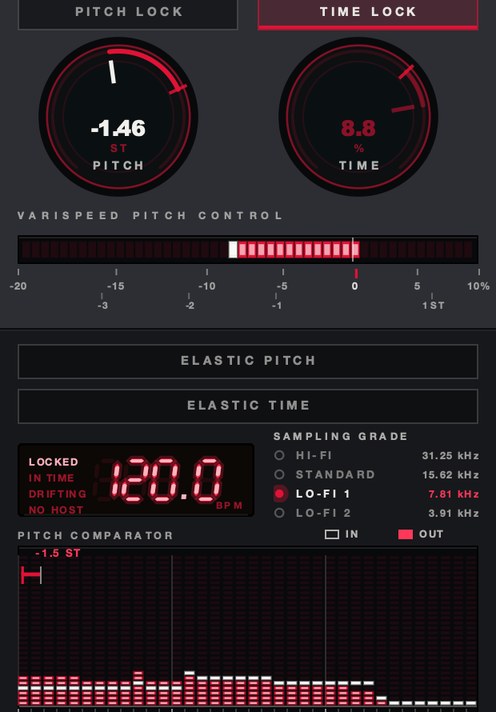 SAMPLING GRADE at LO-FI 1. 7.81 kHz rather than 31.25 — a different kind of distance.
Doppler in a beat, not in a film
Post-production wants the pass to be true. Music usually wants it to be legible, and those
are different targets. Three semitones is what a car does; three semitones over a bar is almost
inaudible in a busy mix. Producers end up exaggerating the bend by a factor of two or three, and
that is a legitimate choice as long as you know you are making it rather than trusting a preset
labeled for a vehicle.
The moves that survive a mix are small and rhythmic. A single hi-hat thrown past the head at
the end of an eight-bar section. An ad-lib that arrives from the left and leaves to the right
across two beats. A snare that passes once, at the turnaround, and never again. A riser that
gains pitch as it approaches and drops through unity on the downbeat, which is the same crossing
the physics gives you and lands harder than any upward sweep because it resolves instead of
stopping.
The one that almost always fails is the whole-mix pass. It reads as a mistake, and if it is
what you actually want, you want a tape stop or a filter sweep, both of which say the same thing
more clearly.
What it costs you
A pass is permanent once it is printed, and it has to be printed, because delay-line
automation that is tight at 90 bpm is not tight at 140. Extreme passes lose real top end and
never get it back, which is fine going away and wrong coming back if you overdid the damping.
Hard stereo passes collapse to a level bump in mono, so anything destined for a phone needs its
distance carried by level and tone. And the pitch move drags the timing with it, which means a
loop that was on the grid is not on the grid after a pass unless you bypassed the pitch or
quantized afterwards. That trade is the same one described in
how to change pitch without
changing tempo.
Questions people ask
What is the best doppler plugin?
For work to picture, a purpose-built physical simulation with distance EQ, units and a sync
control is the right tool, and Waves Doppler and Sound Particles Doppler are both built that
way. For music, the best doppler plugin is usually whichever one lets you draw or play the move
on the grid, because the target is a musical event rather than a true one. Try the demo builds
on a hi-hat before spending anything. The field is small enough that an afternoon covers it.
What is the best doppler effect plugin for music production?
One that can bypass its pitch shifting and still move level, tone and position, so a loop
keeps its grid. Failing that, a curve-drawing tool that locks to beats and bars will get you a
usable pass faster than a physics engine will, because you are working in the units your session
is already in.
Is there a free doppler plugin?
Every piece of it is free, even where the one-window version is not. A modulated delay gives
you the pitch, an auto-panner gives you the position, a low-pass
gives you the air, and a send gives you the distance. MeldaProduction's free bundle has the
delay and the modulation, and Auburn Sounds Panagement has a free edition for the distance and
the reflections.
How do you make a doppler effect without a plugin?
Put a short delay on the source, automate its delay time from long to short and back across
the pass, and the pitch will rise and fall on its own. Then automate three more things on the
same curve: the track fader on an inverse law, a low-pass that opens toward the middle, and the
pan from one side to the other. Set the reverb send so it is loudest at the two ends. Print it,
because that many automation lanes will not survive a tempo change.
What SKRUU does
SKRUU is a varispeed pitch and time stretch plugin, and it owns the pitch-and-speed half of
this move rather than the distance half. PITCH runs from −20% to +10% in
128 states and reads out in semitones as well as speed, so the three semitones a car gives you
is a value you can dial rather than guess. TIME runs from −50% to +25%
and moves nothing but the length, and PITCH LOCK and TIME LOCK
hold one while the other travels — the bypass that keeps a loop on the grid while the rest
of the gesture happens.
ELASTIC is the part that makes a pass playable. With it on, the knob is
sprung: throw it, let go, and it travels back on its own. RETURN sets how long
that takes, free or quantized to the bar. BITE sets how hard it commits.
SLOPE is the road home and there are sixteen, including WHIP, HANG, CLIFF and
BOUNCE — six smooth, five stepped, five that overshoot and come back, with pitch and time
each getting their own. DRAG sets how long a new speed takes to arrive; at the
floor it is instant, turned up it is a hand on a platter. The display is a pitch comparator in
semitones, so what went in against what came out is a picture rather than a number you have to
trust. Pair it with a panner and a distance send and you have the whole pass, built out of parts
you can hear separately. SKRUU is $29, Mac and Windows, VST3, AU and standalone.
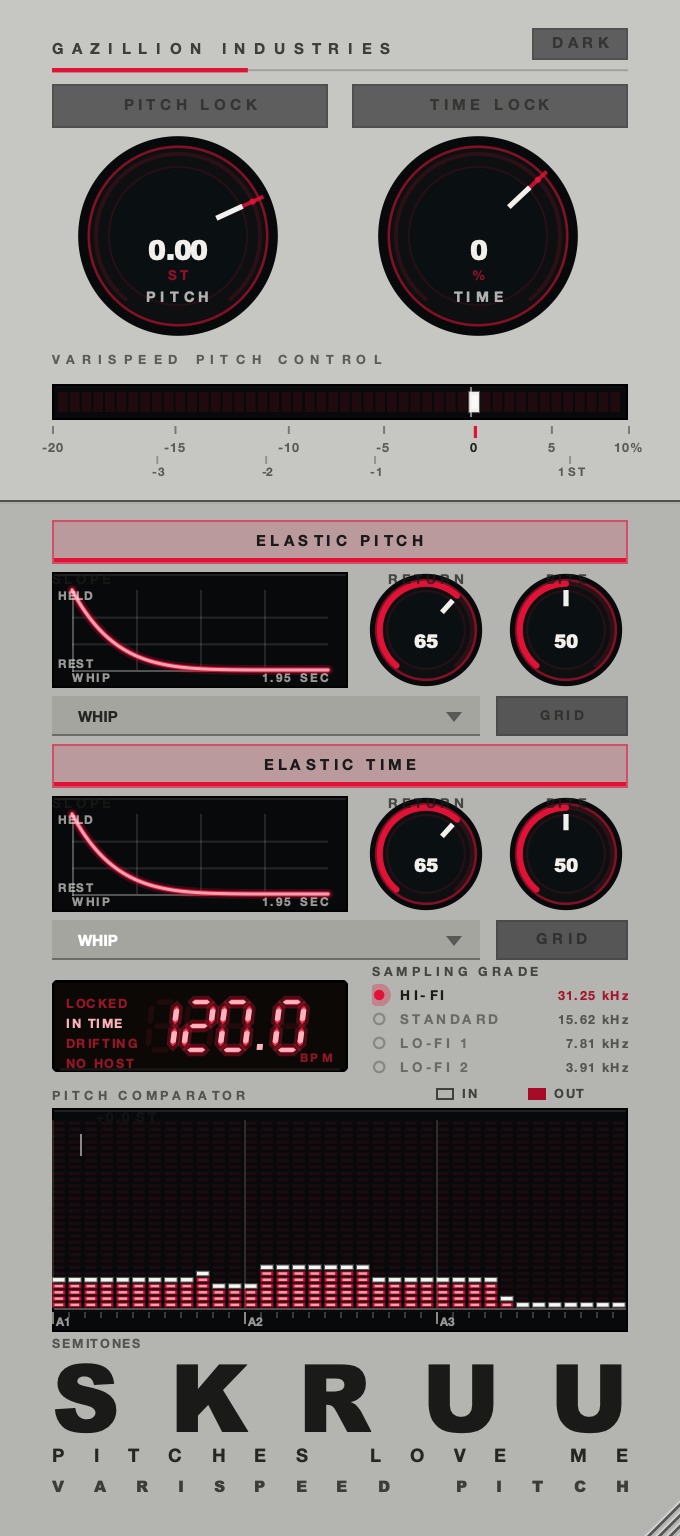 Two finishes, black and brushed aluminum. Same machine, different object.
The ambulance did four things at once and never asked you to draw any of them. Get the other
three moving and the hi-hat will leave the middle of the speakers.
SKRUU — varispeed pitch and time stretch for Mac and Windows. Pitch and
time move independently, with sixteen elastic return shapes.
Hear it
Keep reading
- Best pitch shifter plugins — Which family to use, what formant control buys, and the free options worth having.
- What is varispeed — Speed and pitch together: the math, how it differs from pitch shifting, and how it's used.
- Best varispeed plugins — What the rate control has to do, how to test one, and the free options worth downloading.
- How to pitch a sample — Find the key, repitch or pitch shift, pitch the chops, and automate for movement.
- Best detune plugins — Cents, beating and mono: how to pick a detune plugin, free or paid.