← Gazillion Industries/Reading material
How to pitch a sample
In 2003 a sped-up Chaka Khan hook turned into "Through the Wire," and a whole era of soul samples started coming back an octave brighter and twice as urgent. Pitch is the fastest way to make somebody else's record sound like yours.
To pitch a sample, first find its key, then decide how you want it to move. Repitch it (change speed and pitch together) for a vintage, record-like sound, or pitch shift it (keep the tempo) when the timing has to stay locked. Transpose it into the key of your track in semitones, fine-tune with cents, pitch individual chops separately if needed, and automate pitch for bends and drops.
The short version
- Find the key
- tuner or key detection, then confirm by ear
- Repitch
- speed and pitch together; sounds like a record
- Pitch shift
- pitch only; tempo stays locked
- Transpose
- semitones to the key, cents to fine-tune
- Chops
- pitch each one to fit the chord
- Movement
- automate pitch for bends and drops
- One semitone
- a ratio of 1.0595, so 5.95% of speed
- One octave
- exactly double, or exactly half
- One percent of speed
- 17 cents of pitch
- One cent at A440
- 0.25 Hz
- The bill
- a speed change costs top end, a shift costs artifacts
Find the key first
Load the sample, find a sustained note or chord, and check it with a tuner or your DAW's key detection. Confirm by ear: play the root note on a keyboard under the sample and listen for the note that sounds like home. Old records often sit a few cents off standard tuning because of tape and turntable speed, so expect to fine-tune after you transpose.
Point the tuner at the right part of the file. A tuner reads a steady tone and guesses wildly at an attack, so give it the last chord of a phrase or a held horn line, with the drums muted, rather than the downbeat. If key detection disagrees with itself across two chops of the same loop, the chop with the longest sustained note is the one telling the truth. Everything else in the file is percussion wearing a pitch.
Then treat the tuning offset as a number rather than a mood. A deck running 1% fast puts a whole record 17 cents sharp; 2% fast is 34 cents, a third of a semitone, and that is already far enough to fight a bass line tuned to concert pitch. You do not need the letter name to work, strictly speaking — you need the interval between the sample and your track. But the letter name is how you will talk about it at three in the morning, so write it on the clip.
Semitones, cents and BPM: the arithmetic
Three units describe one ratio, and holding the conversions in your head removes most of the guesswork. A semitone is two to the power of one twelfth, 1.0595, so a semitone up is 5.95% faster and an octave is exactly double. A semitone splits into 100 cents. Run it the other way and 1% of speed is 17 cents, which is why a nudge you can barely see is plainly audible against a held chord.
Cents matter most at the small end. At A440, a single cent is 0.25 Hz. Layer two copies of a sample five cents apart at that pitch and the difference between them is 1.27 Hz, so you hear a beat a little over once a second — slow, wide, and the whole mechanism behind detune. Which also explains why five cents on an exposed vocal is obvious and five cents on a kick is an afternoon you will not get back.
The tempo side is the part that catches people, because a speed change moves the clock by the same ratio it moves the key. Here is a 96 BPM loop taken in whole semitones, which is the table worth memorizing:
- −3 semitones
- rate 0.8409, −15.91%, 80.73 BPM
- −2 semitones
- rate 0.8909, −10.91%, 85.53 BPM
- −1 semitone
- rate 0.9439, −5.61%, 90.61 BPM
- Unity
- rate 1.0000, 96.00 BPM
- +1 semitone
- rate 1.0595, +5.95%, 101.71 BPM
- +2 semitones
- rate 1.1225, +12.25%, 107.76 BPM
- +3 semitones
- rate 1.1892, +18.92%, 114.16 BPM
Sample rate does the same arithmetic to you by accident. Play a 44.1 kHz file at 48 kHz and it runs 8.84% fast and 147 cents sharp, very nearly a semitone and a half, and that 96 BPM loop arrives at 104.49. If a borrowed loop is mysteriously out of tune with everything, check the file's rate before you reach for a shifter.
Repitch or pitch shift
Repitching changes speed and pitch together, the way a sampler or a turntable does. Pitch up and the sample gets faster and brighter; pitch down and it slows and darkens. It keeps the sample sounding like a record, with no artifacts, but it changes the tempo. Pitch shifting keeps the tempo and moves only the pitch, which fits a sample to a fixed grid but can sound processed on big moves. More in what is varispeed and how to change pitch without changing tempo.
Underneath, one of those two operations contains the other. A pitch shift is a speed change with a time stretch layered on top to cancel the length change, and the stretch is the half that invents audio. A speed change invents nothing: every sample value in the file still plays, just on a different clock. That single fact decides most arguments about which one to use, because when you can live with the tempo moving, you pay no processing bill at all. Background on the stretch half is in time stretching explained.
There is a third answer people forget, and on a sample it is often the best one: move the project instead. Setting your track to the tempo the sample already runs at costs nothing, processes nothing, and leaves the record exactly as it was recorded. Do that while the arrangement is still two loops and a drum pattern. Once there are twenty tracks agreeing on 88 BPM, the sample has to bend.
A worked example: a 96 BPM loop into an 88 BPM beat
Numbers make the choice concrete. You have a soul loop that reads 96 BPM, in F minor, and a beat sitting at 88. Eight bars of 4/4 at 96 is exactly 20.00 seconds; the same eight bars at 88 is 21.82. You need to find 1.82 seconds somewhere. Three ways to spend it.
- Pure speed change to 88. The ratio is 88 ÷ 96, or 0.9167, which is −150.6 cents: a semitone and a half down. F minor lands between E minor and E♭ minor, in tune with nothing. Clean sound, unusable key — unless nothing else in the track is pitched, in which case ship it.
- Speed change by a whole semitone count. Take it down 2 semitones instead. Ratio 0.8909, the loop now runs at 85.53 BPM, and the key is a clean E♭ minor. Set the project to 85.5 and everything agrees. You gave up 2.5 BPM of tempo to buy a key you can play over.
- Pitch shift 2 semitones, then stretch to 88. Same E♭ minor, and the beat stays at 88. The stretch you are paying for is only 85.53 to 88, a ratio of 1.0289 — under 3%, small enough to survive almost any mode intact. This is the answer when the tempo is not negotiable.
Read the third option again, because it is the move most people never make. They pitch the sample a semitone and a half to hit the tempo, hate the key, then pitch it back up with a shifter and wonder why it sounds like a fax. Do the speed change in whole semitones first and let the shifter clean up the leftover few percent. The algorithm is only ever as bad as the size of the job you hand it.
How to pitch a sample
- Find the sample's key with a tuner or key detection, then confirm by ear.
- Work out the semitone distance to your track's key.
- Choose repitch for character or pitch shift for locked timing.
- Transpose by that many semitones, then fine-tune in cents.
- If you repitched, adjust your tempo to the sample, or stretch the sample to the tempo.
- Check the sample against your drums and bass, and fix any chop that clashes.
- Bounce the result once you are sure, and keep the untouched file beside it.
- Write the semitone and cent values on the clip name, because you will move them again.
Two things a step list cannot carry. Transposition on a clip or region is a non-destructive property in every major host, so the audio on disk is untouched and the value walks back to zero any time you want — right up until you bounce, which is the moment the decision becomes the file. And the host has an advantage a plugin never will: it can read the whole clip before it plays a sample of it, while an insert only sees the next block arriving. A settled part usually sounds a shade cleaner transposed in the host. The live move is the only one of the two you can perform.
SKRUU lets you play pitch and time on separate knobs, with shifts that spring back.
Hear the size of a small move
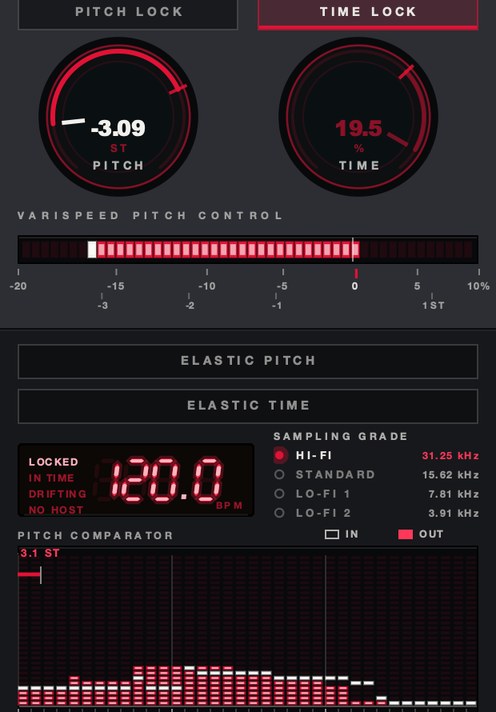
A percentage on a page is easy to dismiss. Here is one loop at three rates, then the slowed pass with the sampling rate stepped down under it. Note how little speed it takes before your ear stops hearing a tempo change and starts hearing a different key. The figures are the renderer's own readout.
One source loop, rendered offline through the same engine the plug-in runs, no other processing.
Pitch the chops, not just the loop
Chopped samples don't have to stay in their original key. Pitch each chop to fit the chord under it and a single phrase becomes a melody. Keep an eye on the tone: chops pitched far up get thin and chipmunky, and chops pitched far down get muddy and slow. If a chop thins out, see how to make a sample sound fuller.
The intervals do the arranging for you once you think in them. Move a chop up 3 semitones and a minor triad becomes its relative major; move it down 5 and you have the same chord a fourth below, which is the oldest turnaround in the book. Two chops a semitone apart, played back to back, read as tension and release even when the source played neither. You are writing with somebody else's chord, and the transpose field is the pen. More on the cutting in how to chop samples and how to flip a sample.
Two cautions, both physical. Pitching up moves the low end up with everything else, so a bass note at 100 Hz sits at 133 Hz five semitones later — still audible, no longer a bass note, and now in the way of the kick. And pitching up on a speed change multiplies every frequency in the file, which pushes high content toward the ceiling of the sample rate; on a badly written shifter that shows up as a metallic fizz that was never recorded. Background in what is aliasing in audio.
Voices are their own case. A rate change moves the vocal fundamental and the resonances of the singer's throat and mouth by the same ratio, and doubling those resonances is the acoustic signature of a body half the size. Your ear reads that as a smaller person, not a higher note, which is the entire chipmunk effect. Turn formant preservation on to keep the body and move only the note, or leave it off on purpose — see chipmunk soul and formant shifting.
Where the pitch move goes in the chain
Put the pitch change first, ahead of anything that reacts to level, time or pitch. A compressor after the move hears the material you actually kept and sets its attack against it. A compressor before the move has its own release times dragged along by a speed change, which arrives at your ears as a fault in the compressor rather than a move in the music. Gates, transient shapers and anything fed from a sidechain behave the same way.
EQ belongs after, and it is the one most people get backward. Every corrective cut you made on the unpitched sample is aimed at a frequency that has since moved: a 240 Hz boxiness notch is pointing at 202 Hz once you drop 3 semitones, and the boxiness has moved with it. Pitch first, listen, then cut.
Reverb and delay are a real decision rather than a default. After the move, the tails travel with the source and the whole thing reads as one room. Fed from the unpitched signal instead, you get a stationary space with a moving source inside it, which reads as two recordings glued together. Both are legitimate. Tempo-synced delays are the trap, because they follow the project clock, so a sample you moved with a speed change is now in a different tempo from the delay chasing it. Set the delay by hand or bounce the sample first. The slowed case is worked through in how to make slowed and reverb.
Automate pitch for movement
A pitch drop at the end of a phrase, a slow bend into a hook, a sample that sinks as the beat drops out: automating pitch turns a static loop into a performance. With repitch, the speed moves too, which is what gives a slow-down its weight.
Shape matters more than depth. A drop of 2 semitones over the last beat of a bar reads as a machine losing power; the same 2 semitones over four bars reads as a room getting warmer, and most listeners will never name what changed. Draw the curve rather than the ramp, and land the value exactly back on zero at the downbeat, because an automation lane that ends at −7 cents will haunt you for an hour.
The costly detail is that a bend needs the pitch change to happen live, and a clip transposition in a host is a static property, not a moving one. Which is why the bend usually has to come from a plugin on the insert, or from bouncing the move and editing the audio afterward. If you go the bounce route, do it once and keep the flat version, because a bend baked into a file is a bend you can never quite talk out of the record.
Test it in your own session
You can measure what a shift costs instead of arguing about it. Fifteen minutes, any DAW, and you will stop guessing.
- Duplicate the sample track so you have two copies of the same clip, A and B.
- On copy B, pitch shift up 12 semitones with the tempo held.
- Bounce B in place, then pitch that bounce back down 12 semitones.
- Bounce again, so B has been through the algorithm twice and should now match A.
- Line the two up to the sample and flip the polarity of one of them.
- Play both. What you hear is everything the algorithm failed to put back.
- Repeat the whole run at 1 semitone and compare the two leftovers.
Two round trips is harsher than anything you would do on purpose, and that is the point: it magnifies the character of the error until you can name it, and once you can name it you will hear it at normal sizes. The leftover from a transient-preserving mode is a rattle of tiny attack fragments. The leftover from a phase vocoder is a soft pitched wash with no edges in it anywhere. Run it once per mode in your DAW and the mode menu stops being a mystery. The method is the same one used for phase cancellation checks.
The tuning check is faster and you should do it every time. Play a sine wave at the root you think the sample is in, at the same time as the sample, and listen to the beating between them. No beating means you are in tune. A slow pulse means a handful of cents. A fast warble means you are a long way out and the tuner lied to you, probably because it was reading a transient.
The failure modes, and what each one sounds like
- Thin and small. Pitched up, and the whole file reads as a toy. Cause: formants moving with the note. Fix: formant preservation, or a smaller move, or commit to it.
- Muddy and slow. Pitched down, and the bottom turns to soup. Cause: everything shifted into a crowded region, plus a rate change dragging the top end down out of the air. Fix: high-pass the sample, and add top back with saturation rather than EQ, since the air is no longer in the file to boost.
- Smeared hits. The snare loses its front edge and turns into a small swell. Cause: a stretch window longer than the attack it covers. Fix: a transient-preserving mode, or chop at the hits and move the chops. See what is a transient.
- Metallic ringing. A thin cast over sustained material, worst on cymbals and distorted guitar. Cause: partial phases no longer lining up after resynthesis. Fix: a higher-quality mode, or a smaller shift.
- Watery shimmer. A slow wobble under held notes. Cause: grain crossfades landing at a slightly different phase each time around. Fix: a tonal mode.
- In tune with itself, out of tune with you. The sample sounds fine solo and fights the bass. Cause: the source was cut a few cents off concert pitch and you transposed in whole semitones. Fix: the cents field, not the semitone field.
- Loop drift. The sample stops landing on the bar. Cause: warp markers on the wrong hits, or a ratio that does not divide into the loop length. Fix: check the markers before you blame the algorithm.
All of them scale with the size of the move and with how much the material looks like noise to the analyzer. A held organ chord takes an octave without complaining. A crash cymbal does not survive two semitones cleanly, and a soul loop has a crash cymbal in it.
Per-DAW: where the transpose field is
The operation is identical everywhere and the menus agree about nothing, which is most of why this question keeps getting asked.
Ableton Live. Clip view: the Transpose control shifts the clip in semitones, with a second value field to the right of it for cents. The Warp Mode chooser holds Beats, Tones, Texture, Re-Pitch, Complex and Complex Pro. Re-Pitch is the linked mode, and Live's manual notes that it turns the transposition controls off entirely, because playback speed is now setting the pitch — so if your Transpose field is inactive, that is where you are. Beats mode carries a Preserve chooser, and Transients is the setting for percussion. Complex Pro carries a Formants control that holds the original formants at 100%, with the caveat that it does nothing unless the clip is actually transposed. Live also flags Complex and Complex Pro as the CPU-heavy pair. The full tour is in varispeed in Ableton Live.
FL Studio. Channel Settings, then the time stretching panel. The PITCH knob changes pitch while holding the length. The Mode menu is where the decision lives: Resample varies the length with the pitch, which Image-Line document as working like a tape or a record, while Realtime Stretch keeps a sample in key and in time as the project tempo moves. Stretch pro adds an F.Shift formant control on top of that. The Elastique entries are offline methods — highest quality, and they will not follow tempo changes. The stretching runs on zplane's Elastique Pro v3.
Logic Pro. Apple splits it three ways: Flex Time for timing, Flex Pitch for note-level pitch inside a region, and Varispeed for moving speed and pitch together across the whole project. Flex Pitch is the one to reach for when a single note in a sampled phrase is wrong and the rest of the phrase is right.
Everywhere else the words change and the physics do not. Look for two things in any host: a field measured in semitones, and a mode chooser with one entry that refuses to separate pitch from tempo. That second entry is the speed change, whatever it is named locally. Varispeed in every DAW has the longer list.
What it costs you
Say the price out loud before you commit. A speed change downward costs top end, because every frequency travels with it: a hi-hat sitting at 9 kHz lands at 8.0 kHz two semitones down, and no EQ puts back air that is no longer in the file. A speed change upward costs weight at the bottom for the same reason, and it shortens the sample, which can leave you a beat short of the bar you needed.
A pitch shift costs artifacts and CPU, and the good modes cost the most of both. Thirty warped clips is the difference between a session that plays and one that stutters, which is why bouncing is a discipline rather than tidying. And every generation stacks: a sample you shift, bounce, shift and bounce again is carrying four passes and has no road back to the record.
The last cost is not technical. A sample pitched far enough stops sounding like the record it came from, which is sometimes exactly the goal and sometimes the quiet loss of the reason you picked it. Bounce a flat copy, leave it in the session, and A/B them once before you close the project.
Questions people ask
How do I change the pitch of a sample without changing the tempo?
Use your DAW's pitch shifting or a stretch mode that keeps the tempo locked, then transpose the sample in semitones. Small shifts sound most natural.
Should I pitch samples up or down?
Either, depending on the feel. Pitching up makes a sample brighter and more urgent; pitching down makes it darker and heavier. Keep it in the key of your track, and watch the tone at larger shifts.
How do I find the key of a sample?
Check a sustained note or chord with a tuner or key detection, then confirm by playing root notes under it until one sounds resolved. Expect to fine-tune a few cents on old records.
How many semitones can I pitch a sample before it sounds bad?
There is no fixed number, because it depends on the material and the method. The shape is reliable, though. A speed change on a full loop stays convincing for three or four semitones either way and starts announcing itself past that. A pitch shift on the same loop shows seams at two or three. Sustained harmonic material takes more than percussion, and noisy content breaks first. Run the null test above on your own loop and find your own limit.
How do I pitch a sample to the key of my song?
Work out the interval, not the letter. Find the sample's root, count the semitones to your song's root, and transpose by that number. Pick the shorter direction: a sample four semitones above your key can go down four or up eight, and down four is a smaller job for the algorithm. Then fine-tune with cents against a sine wave at your root, since old records rarely sit exactly at concert pitch.
Why does my sample sound out of tune after pitching?
Almost always because the source was a few cents off to begin with and you moved it in whole semitones, which preserves the error. Play a sine at your root underneath and listen for beating, then take the offset out in the cents field. The other cause is a sample rate mismatch: a 44.1 kHz file played at 48 kHz is 147 cents sharp before you touch anything.
Does pitching a sample change the BPM?
With a speed change, yes, by the same ratio. A 96 BPM loop taken up 2 semitones runs at 107.76 BPM; taken down 2 it runs at 85.53. With a pitch shift the tempo is held and the BPM stays where it was. That difference is the whole choice on this page.
How do I make a sample sound like an old sampler when I pitch it?
Use a speed change rather than a shifter, so the timing moves with the pitch, and let the playback rate carry the tone with it. Stepping the sampling rate down on top of that adds the staircase and pulls the ceiling in — at a 3.9 kHz rate, nothing above 1.95 kHz survives, which is half the rate and simply how sampling works. See how to get an old sampler sound.
Should I pitch the sample or change my project tempo?
Change the project tempo while the arrangement is still flexible, because it costs nothing and processes nothing. Pitch or stretch once the arrangement is settled, or when the two disagree by more than the sample can absorb. On a chopped sample the tempo route almost always wins, since every chop you stretch is another edge for the algorithm to blur.
Why is the Transpose control not doing anything in Ableton?
Check your Warp Mode. Live's Re-Pitch mode deactivates the clip's transposition controls on purpose, because in that mode the playback speed is what sets the pitch, so the tempo is your pitch control. Switch to Beats, Tones, Texture or Complex and Transpose comes back.
How do I pitch one chop without pitching the whole loop?
Cut the chop onto its own clip or its own sampler slot and transpose that, rather than automating a pitch control across the loop. Per-chop transposition is a static value the host can apply cleanly; automating a single control across a loop makes every chop share one moving number. Per-slot is also how you pitch a phrase into a melody. See how to chop a drum break.
Does pitching a sample lose quality?
A pitch shift always loses something, because audio is played back that was never recorded, and the loss is largest on transients and noise. A speed change loses nothing to processing — it alters the playback rate and invents no new audio — but it moves the frequency content, so you lose top end going down and weight going up. Different bill, same accounting.
What is the difference between transpose and pitch shift?
Transpose is usually the name of the control and pitch shift the name of the operation under it. Transposing an audio clip by a semitone runs a pitch shifter, unless the clip is in a mode that links pitch to speed, in which case it runs a rate change instead. Transposing a MIDI part runs neither, because there is no audio to process, which is why MIDI transposes perfectly and audio never quite does.
Can I pitch a sample in real time while the track plays?
Yes, with a plugin on the insert or a host stretch mode that runs live. The trade is lookahead: a host working through a settled clip can read what is coming and an insert cannot, so a live move on percussive material is the harder of the two cases. Live is also the only one of the two you can play, which is the point of doing it that way.
Stock plugins that do this
- FL Studio
- sample channel pitch and stretch settings
- Ableton Live
- clip Transpose and Detune; Simpler
- Logic Pro
- region Transpose; Flex Pitch; Quick Sampler
What SKRUU does
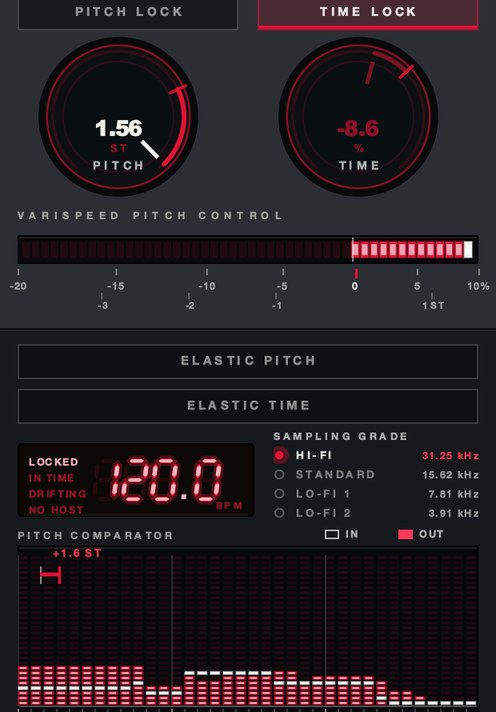
SKRUU is our varispeed pitch and time stretch plugin for drums and samples. PITCH runs from −20% to +10% and reads out in semitones as well as speed, so you know exactly how far off the record you are; the display compares what went in against what came out. TIME moves the length on its own knob, and ELASTIC springs either one back along one of sixteen shapes, from a smooth glide to a ratchet. Four sampling grades, down to 3.91 kHz, add a staircase when you want grit.
That readout is the part that matters for this page. A speed control marked in percent makes you do the conversion in your head every time; a control that shows you 0.9439 and −1.00 ST at the same moment lets you land on a whole semitone by looking at it. SKRUU is $29, runs on Mac and Windows as VST3, AU and standalone, and PITCH and TIME move independently, so the speed change and the length change are two separate decisions rather than one.
Twenty-odd years later, the soul samples still come back brighter. Now you know how.
SKRUU — varispeed pitch and time stretch for Mac and Windows. Pitch and time move independently, with sixteen elastic return shapes.
Keep reading
- How to change pitch without changing tempo — How pitch shifting and time stretching work, which mode to use, and how to avoid artifacts.
- How to make a sample sound fuller — Clean it first, add harmonics, compress for sustain, support it with a bass layer, and give it room.
- How to make lofi beats — Tempo, chords, swung drums, crush, noise, wobble and a gentle pump.
- Chipmunk soul — Choosing the vocal, how far to pitch it up, and the drums that go under it.
- Formant shifting — What formants are, and why a pitched-up voice sounds like a smaller person.
- Best pitch shifter plugins — Which family to use, what formant control buys, and the free options worth having.
- Best time stretch plugins — Which algorithm for which material, how to test one in ten minutes, and the free routes.
- Best formant shifter plugins — What formant shift moves, how to test one, and the free plugins worth installing.
- Best doppler plugins — Why most doppler moves sound wrong, and what a real one drives.