← Gazillion Industries/Reading material
How to chop samples
The loop was perfect for eight bars and then it started to sound like a loop. Same four chords, same little cough of tape noise on the downbeat, coming round again like a bus route.
To chop a sample, set your session to the sample's tempo, cut it at musical points rather than on the grid alone, clean every edge with a zero crossing or a short fade, map the pieces to pads or keys, and play a new arrangement with them. Chopping at transients keeps the rhythm; chopping at chord changes keeps the harmony; chopping every beat gives you the most pieces to rebuild with. The point is to end up with parts you can play, not a shorter loop.
The short version
- Tempo
- match the session to the sample first
- Where
- transients for drums, chord changes for music
- Edges
- zero crossings, or 2–5 ms fades
- Map
- pads or keys, in the order the pieces occur
- Play
- perform the new arrangement before you quantize it
- Keep
- one chop that is obviously wrong: it usually earns its place
- Length
- a sixteenth at 90 BPM is 166.67 ms — 7,350 samples at 44.1 kHz
- Check
- invert your rebuild against the source loop; silence means you looped it
Find the tempo and the key before you cut
Everything downstream depends on those two numbers. Tap the tempo across four bars or let your DAW detect it, then check it by playing a metronome underneath: if it drifts, the record was played by people and you should follow the drift rather than fight it. For the key, play the root against the sample until it stops arguing. How to pitch a sample goes through both, including what happens to the tempo when you move the pitch.
Slice length, in milliseconds and in samples
A chop's length is decided by the tempo before you touch anything. One beat at 90 BPM is 60/90 of a second, which is 666.67 ms. A sixteenth is a quarter of that: 166.67 ms. A bar of 4/4 is 2.667 s and four bars is 10.667 s. At 44.1 kHz that sixteenth is 0.1666667 × 44100 = 7,350 samples exactly, and at 48 kHz it is 8,000. Those are the numbers your slice markers should be landing on.
Knowing them is how you catch a tempo that is nearly right. Say the record runs at 87.4 BPM and you set the project to 90 because 90 looked round. A beat at 87.4 lasts 686.50 ms against 666.67, a difference of 19.83 ms. Over sixteen beats that is 317 ms of drift, close to two whole sixteenth notes, and by bar four your chops are landing in the gaps instead of on the hits.
The fix costs something whichever way you go. Stretching the record to 90 leaves the pitch where it was and spends the money on texture instead. Playing the record faster keeps the texture and moves the key: 90 divided by 87.4 is 1.0297, and 12 × log₂(1.0297) is +0.51 semitones, so the whole sample arrives 51 cents sharp. That is half a semitone, and it will argue with every tuned thing in the session. Time stretching and changing pitch without changing tempo set out the choice properly.
A percentage argues; a loop settles it. Here is one source loop at its own rate, then the same loop slowed and sped by roughly 7.5 per cent — about two and a half times the correction above — and finally the slowed pass with the sampling rate stepped down under it. Listen for the moment your ear stops hearing a tempo change and starts hearing a different key. The figures are the renderer's own readout.
One source loop, rendered offline through the same engine the plug-in runs, no other processing.
How to chop a sample
- Drop the sample into a new project and set the project tempo to match it.
- Trim the start so the first sound lands exactly on beat one.
- Slice at transients for rhythmic material, or at chord changes for melodic material.
- Put a 2 to 5 ms fade on the front and back of every slice so edges do not click.
- Map the slices across pads or keys in the order they occur.
- Play a new pattern with them, longer than a bar, and record the performance.
- Quantize lightly, or not at all, then move any hit that is obviously late.
- Filter or EQ the chops as a group rather than one at a time.
- Lengthen any slice under 100 ms that ends before its own decay does.
- Bounce the pattern and null it against the source loop to confirm the arrangement changed.
Where to cut, and how far in front of the hit
Put the cut before the attack, never on it. A transient has a rise on the front of it, and a slice that starts at the tallest peak has thrown that rise away, which is why some chops sound like they begin halfway through. Back the edit up 5 to 10 ms — 220 to 441 samples at 44.1 kHz — and the hit arrives whole.
Where you cut depends on what the material is, and the three cases are different jobs. Drums: cut at every attack and you end up with a kit, one hit per pad, which is the approach in chopping a drum break. Chords: cut where the harmony changes and you end up with a set of playable stabs. A horn or vocal line: cut at the start of each phrase and you keep the breath in front of it. An automatic slicer does the first well and the other two badly.
Cut off the grid wherever the record is off the grid. Played music moves, and a slicer set to sixteenths will drop its marker at 166.67 ms whether or not the drummer was there. Zoom in, find the actual attack, drag the marker onto it. This is the part that takes an hour and makes the whole difference, and it is why the chops on records people still quote sound played rather than generated.
How many pieces is a decision, not a default. Four bars at 90 BPM cut into sixteenths gives you 64 slices of 166.67 ms each. Put sixteen of those on sixteen pads over a sixteen-step bar and there are 1616 possible patterns, which is 18,446,744,073,709,551,616 of them. You are not short of options. You are short of a reason to pick one, and the reason is usually a melody you can hum before you play it.
Clicks, and why your chops have them
A click at a slice edge is a jump in the waveform: the sample is at some value when you cut it, the next thing is silence, and the speaker has to get there instantly. Cutting at a zero crossing, where the waveform passes through the center line, removes most of them. A very short fade removes the rest and costs you nothing audible at 2 to 5 ms. If a chop still ticks, the problem is usually at the end, not the beginning.
Fade length, and the low note that defeats a short one
Two milliseconds is 88 samples at 44.1 kHz and five is 220. That is plenty for a hi-hat and not nearly enough for a bass note. A fade can only smooth a step it is longer than, and one cycle of 50 Hz lasts 20 ms, so a 2 ms fade covers a tenth of that cycle and leaves most of the lump behind. On material with real low end, go to 10 or 20 ms, or go and find the crossing.
Zero crossings are spaced by the lowest strong thing in the file. A 50 Hz fundamental passes through zero every half cycle, so the nearest crossing can be 10 ms away; at 40 Hz it is 12.5 ms. That is the furthest a snap-to-zero-crossing function will drag your edit, and it explains why an edit that snapped invisibly on a vocal lands visibly late on a bassline. On bass-heavy chops, place the cut yourself and fade it.
If every edit ticks no matter where you put it, check the file for DC offset. A waveform sitting above the center line never crosses zero at all, so there is no clean place to cut and each edit steps from a fixed value down to silence. A high-pass at 20 Hz, or your DAW's DC removal, fixes the entire file in one pass and you cut normally afterward.
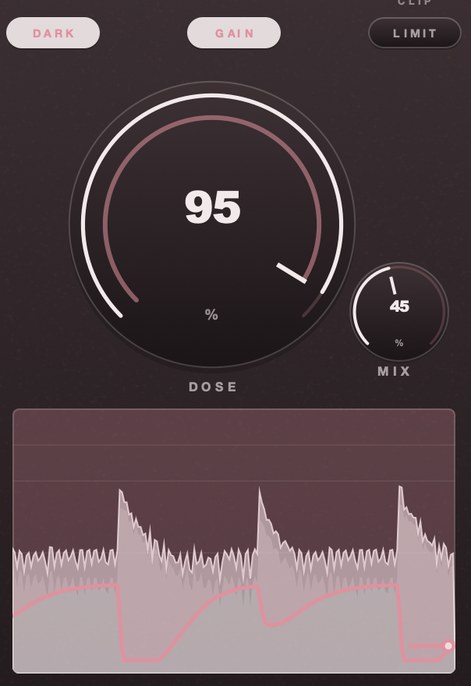
DRUGS is our free one-knob bus compressor. It was built for drums, and a bus of chopped drums is exactly what it was voiced on: turn DOSE up and the room behind the hits comes up with it.
Make the chops sound like a part
Chopped pieces from one record share a room, a tape and a mastering chain, so they already belong together. What breaks the illusion is dynamics: one chop lands 4 dB louder than its neighbor because that is where the horn player leaned in. Ride the levels by hand, then put the whole chop bus through one compressor so they move together, which is the same trick as glue compression on a drum group.
If the chops sound too clean next to your drums, take them the other way: a filter, some crush, a little noise. How to make a sample sound old has the settings.
Five ways to flip a sample
Pitch it until it becomes someone else. A soul vocal up five semitones stops being a man in 1972 and becomes an instrument you have never heard. Down four and the same phrase turns into a threat. Pitching also moves the formants, which is why extreme moves sound like a different singer rather than the same one transposed; formant shifting is the control that separates those two things.
Chop it and change the order. Take the four bars apart and play them back in a sequence the band never played, so the chord you liked lands where the drums hit rather than where the arranger put it. How to chop samples covers the mechanics.
Strip it to one element. Low-pass until only the bass line survives, or high-pass until you have nothing but the ride and the room, then build the rest yourself. What you keep is a groove and a texture, and nobody can name the record from a filtered ride cymbal.
Replay it. Learn the four notes and play them on whatever is in the room. You keep the idea, lose the clearance problem, and get to change the voicing while you are there. Sample your own replay and treat that as the source.
Change the context. A ballad at 72 bpm becomes a different animal under drums at 144, because the ear hears the same phrase at half time. Slow it, swing it, or put a break under it that argues with the original feel.
Chopping in each DAW
The operation is the same everywhere and the menu item is different everywhere, which is most of why the question gets asked at all.
Ableton Live. Right-click an audio clip and choose Slice to New MIDI Track. Live builds a Drum Rack with one chain per slice and a MIDI clip that fires them in order, so the first thing you hear is the record again; the work starts when you move the notes. Choose the division in the dialog, and keep an eye on the clip's warp mode, because Beats holds the pitch when the tempo moves and Repitch lets it ride like varispeed.
FL Studio. Slicex takes the file, finds the slices and maps them in order across the keyboard, so you can play the chops from the piano roll immediately. Fruity Slicer is the lighter version of the same idea. Edison is where you go when the automatic markers are in the wrong place and you want to set them by hand before anything is mapped.
Logic Pro. Drag the file onto a software instrument track and Logic offers Quick Sampler; pick Slice and it lays markers at the transients, one pad per slice. Command-T splits a region at the playhead if you would rather cut in the arrangement and drag the pieces around. Flex Time is the third route, and it is the one for a record that drifts.
Reaper. Dynamic Split cuts an item at its own transients with a sensitivity control and will strip the silence between them in the same pass, which is the fastest way to turn a break into separate hits. Load the results into ReaSamplOmatic5000 across a range of notes and you have a playable kit.
Bitwig and Cubase. Bitwig slices a clip straight into the Sampler or a drum device from the clip's own right-click menu. Cubase finds hitpoints on an audio event, creates slices from them, and Groove Agent takes the pieces. Different words, one operation, and in all of them the automatic marker placement is a starting point rather than an answer.
Where chops sit in a chain
Order matters more with chops than with a whole loop, because you have added edges that every later stage will find. Pitch and stretch first, while the material is still one piece if you can manage it. Clean the edits next. Tone after that, then weight, then whatever holds the group together, then a ceiling. Drum bus chain order makes the same argument at length.
Two stages interact badly with sliced material in particular. A resonant filter rings, and a ring that restarts at every edge turns 64 small edits into 64 small tones sitting a sixteenth apart. A compressor that recovers quickly hears each edge as an event and moves on it, so the group breathes at the slice rate rather than at the tempo. Cleaning the edges before either one fixes both; doing it afterward fixes neither.
Treat the chops as one thing on one bus. They came off one record and they should keep sharing a chain, because processing them separately is what turns an arrangement back into a pile of unrelated sounds. Put the compression on the group, put the saturation on the group, and if you want the crushed version underneath rather than instead of the dry one, run it in parallel.
Six ways chops go wrong, and what each one sounds like
Ticking. A dry tick on the front or back of a slice, loudest on headphones and half gone on a phone speaker, which is why it survives to the master. The edit is away from a zero crossing. Fade it or move it.
Flamming. The chop lands 20 to 40 ms off your own kick and you hear two events where you wanted one, with the low end smeared between them. At 90 BPM, 30 ms is 4.5 per cent of a beat, small enough to look correct on screen and large enough to hear. Nudge the chop, never the kick.
Comb filtering. Two copies of the same material overlap by a few milliseconds and the sum goes hollow. The spacing sets the damage exactly: a 10 ms overlap puts nulls at 50, 150 and 250 Hz with peaks every 100 Hz, while a 2 ms overlap moves the first null up to 250 Hz, straight into the body of a snare. Phase cancellation is the mechanism underneath it.
Machine-gunning. One slice fired eight times in a row, identical on every repeat, which no drummer has ever managed. Alternate two takes of the same hit, or move the start point 2 or 3 ms on every other one.
Gating. A chop that sounds switched off rather than finished. A sixteenth at 90 BPM is 166.67 ms, so a piano note decaying over 400 ms loses 233 ms of itself to that cut. Let the tail run on into the next slice instead of trimming to the grid.
The loop again. Everything is chopped, every edge is clean, and the bar sounds exactly like the record did. You rearranged nothing. The test in the next section catches this in about thirty seconds, and it is worth running before you spend an evening mixing it.
How to check the chops in your own session
- Bounce the rebuilt bar and the source loop to two tracks, invert the polarity of one, and play them together. Silence means you reproduced the record.
- Zoom to sample level on three slice starts and confirm each waveform begins at or near the center line.
- Solo the chop bus and loop eight bars. Anything that ticks once will tick eight times and stop being deniable.
- Play the bounce on a phone speaker. Edge clicks sit well above 2 kHz and survive a small driver better than the kick does.
- Watch a spectrum analyzer while it runs. A click shows as a full-height vertical smear across the whole range, lasting one frame.
- Note every chop more than 3 dB away from its neighbors before you touch a fader, then fix the list rather than the loudest thing you happen to hear.
What chopping costs in tools
Nothing, if you already own a DAW. Every one named above slices and maps without a purchase, and the sampler that came with it will hold sixteen chops as well as anything sold separately. What money buys later is speed and character: faster marker editing, or a particular sort of damage on the way out. Free plug-ins cover more of the second than most people expect.
The real cost is time and it is all at the front. Placing and correcting 64 markers by ear on a record that drifts takes about an hour. The same 64 placed automatically take a minute and sound like a grid. That hour is the technique, and there is no version of this where you buy your way out of it.
Where it costs you
Chopping removes context. A four-bar phrase carries a chord progression, a breath and a decay, and cutting it into sixteenths throws away everything except the attack. It is also easy to end up with a beat that is technically a collage and musically still the same loop, because you rearranged the pieces and kept the original order. And the more you chop, the more slice edges there are to tick, which is why a session can sound crisp in isolation and brittle on the bus.
Questions people ask
How do I chop up samples in GarageBand?
Set the project tempo to the sample, then split the region with Command-T at each point you want a chop, drag the pieces where you want them, and add short fades at the edges. For pad-style playing, load the chops into the Sampler and assign them across the keyboard.
Is music sampling illegal?
Using someone else's recording in a release needs permission from the owner of the recording and the owner of the song, which is what clearance means. Without it you are exposed, and fair use is decided case by case rather than by a rule about length. Royalty-free sample packs and your own recordings avoid the question entirely.
How do you chop a sample without it sounding choppy?
Fade the edges, keep the tails of chords instead of cutting them off, and let one chop ring through the next. Playing the pattern in by hand and leaving it unquantized does more for the feel than any processing afterward.
How do I chop samples in FL Studio?
Load the file into Slicex, which detects the slices and maps them in order across the keyboard, then play or draw the new pattern in the piano roll. Fruity Slicer does the same job with fewer options. When the automatic markers land wrong, open the file in Edison and place them yourself before mapping.
How do you chop samples in Ableton?
Right-click the audio clip and choose Slice to New MIDI Track. Live makes a Drum Rack with one chain per slice and a MIDI clip that plays them in original order, so your first job is to move those notes. Set the division in the dialog, and check the clip's warp mode before you slice.
What is the difference between chopping and slicing?
Slicing is the mechanical part: cutting the file into pieces at markers, usually automatic and usually on transients. Chopping is the whole job, slicing included, and it finishes with the pieces played back in an order the record never had. A slicer can hand you 64 pieces in one second and none of them is a beat yet.
How long should each chop be?
Long enough to include its own decay. At 90 BPM a sixteenth is 166.67 ms and an eighth is 333.33 ms, and a sustained note will usually outlast both, so let the tail run past the boundary rather than trimming to it. For one-shot drums, anything from 60 to 300 ms is normal; for chords, take the whole ring.
Why do my chops sound out of time?
Almost always the project tempo is close to the record's rather than equal to it. A 2.6 BPM error at 90 BPM is 19.83 ms per beat, which is 317 ms after four bars, so bar one sounds fine and bar four does not. Check the tempo against a metronome over eight bars, not two, before you blame your timing.
Should I quantize chopped samples?
Play the part first, then decide. Quantizing everything to a sixteenth grid pins each chop to a 166.67 ms lattice at 90 BPM and removes the exact thing you chopped a human record to get. Partial quantize, at 30 to 50 per cent strength, pulls the worst hits in without flattening the rest — the approach behind unquantized drum programming.
Do I need pads or a keyboard to chop?
No. Every method above works from a mouse and a piano roll, and drawing notes gets you closer to the grid than playing them, which is a cost rather than a benefit. Pads help because they make you commit to a performance in one pass, and a performance with three mistakes in it is usually better than a perfect grid.
Why do my chops sound thinner than the original loop?
Three usual causes, in order of likelihood: the attacks have been cut off, so the front of each sound is missing; the tails have been cut off, so nothing overlaps and the low end never sustains; or two chops overlap by a few milliseconds and comb-filter against each other. Fix them in that order and the thinness usually goes with the first one.
What DRUGS does
DRUGS is our free bus compressor with one macro control, called DOSE. It makes a drum bus denser rather than louder, because peak level barely moves across the range of the knob, and it brings the room up underneath the hits. MIX is dry/wet with zero latency, so you can blend it parallel against your chops without them smearing, and LIMIT is a soft ceiling at −0.3 dBFS on the output.
On chopped material the first thing you notice is the edges being pulled toward each other. Sixty-four slices off one record arrive with sixty-four different starting levels, and one control moving over the whole bus is a faster way to even them out than sixty-four fader moves. GAIN adds 5 dB after the compressor and before LIMIT, and both are on when the plug-in opens, so the chop bus comes out louder as well as denser without a gain stage of your own. Free, Mac and Windows, AU and VST3 and standalone.
The bus route is still out there. You just stopped riding it round in circles.
DRUGS — a one-knob bus compressor for drums, free for Mac and Windows. One control called DOSE, with GAIN and a soft ceiling on the way out.
Mac · Winmore info
Keep reading
- How to chop a drum break — Finding a break, slicing it, keeping the swing, making it sit.
- How to pitch a sample — Find the key, repitch or pitch shift, pitch the chops, and automate for movement.
- DJ Premier — Two machines, one job each, and chops recombined from sections nobody takes.