← Gazillion Industries/Reading material
Best free VST plugins
Gazillion Industries ·
Free VST plugins cover a wide range of tools that producers rely on daily, from synthesizers and samplers to effects and utilities. Many of these are fully functional and well-maintained, offering capabilities that rival paid alternatives. This guide walks through the most useful options available right now, organized by category, so you can find what fits your workflow without spending anything.
The best free VST plugins for producers are those that fill gaps in your workflow without requiring a paid upgrade. Look for tools that handle tasks you already do manually but slowly, like compression, saturation, or spectral shaping. The strongest free options tend to come from developers who also sell paid ones. The free tool has to stand next to what they charge for, so it gets finished.
The short version
- Fill for free
- utility EQ, basic dynamics, tuners, metering
- Pay for
- character, and anything you will use on every session
- The real cost
- CPU, maintenance, and the time to audition
- Audition in ten minutes
- one source, matched level, bypass hard
- Stop collecting when
- you have one you reach for per job
- Ours
- DRUGS is free for Mac and Windows
The categories worth filling for free
Equalization is the first category to fill for free, because the gap between a good free equalizer and a paid one is almost invisible in a mix. You need a parametric with a decent interface, maybe a linear-phase option for mastering work, and a few shelf and high-pass filters for quick surgical cuts. Free options cover all of these without compromise. Compression sits in the same tier. A free compressor that handles a single band well, with a sidechain input and a reasonable range of ratio and attack settings, will do everything a paid single-band compressor does in a mixing context. The differences you hear in reviews between free and paid compressors mostly show up in the top five percent of use cases, which most producers never reach.
Reverb is the category where free options surprise people most. A good free reverb with a clean algorithmic engine and a few plate and hall presets will sit in a mix just as well as a paid unit costing several times more. The paid reverbs earn their price through convolution engines, extensive modulation, and workflow features like send-return management, but the raw sound of a well-tuned free reverb is genuinely competitive. Utility plugins round out the free tier. Gain staging costs nothing and fixes more than most plug-ins do. Gain stages, meters, stereo wideners, and simple transient shapers are all categories where the free options are so capable that paying for them feels like buying a slightly nicer screwdriver.
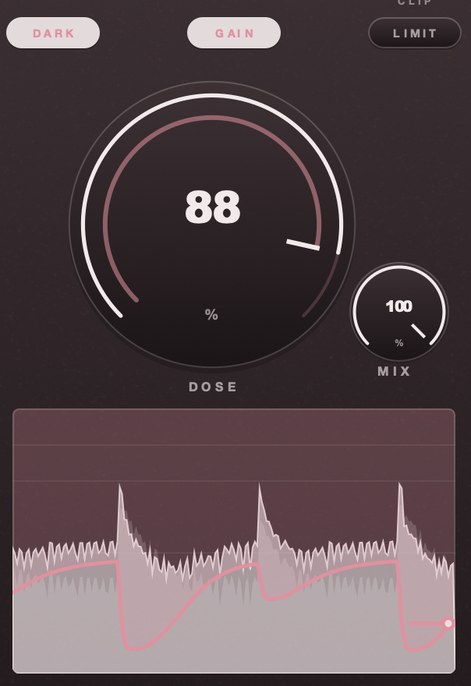 DOSE 88. It dives on each hit and takes the bar to come back.
What free genuinely does as well as paid
An equalizer is a set of filters applied to a signal. The mathematics behind a parametric band, a shelf, or a high-pass slope are public knowledge, and a free plugin that implements them cleanly sounds the same as a paid one charging a premium. The difference you pay for is usually the interface, the presets, the brand story, and the workflow conveniences like mid-side routing or linear-phase options. If you need a straightforward EQ and you are comfortable with a slightly less polished interface, a free option handles the job without any audible compromise.
The same logic applies to basic dynamics. A compressor is a gain envelope follower with a threshold, a ratio, an attack, and a release. Free compressors that implement these controls with reasonable defaults do not sound worse than expensive ones. What you lose is often the analog circuit emulation layer, the sidechain flexibility, or the visual feedback, not the core function. For utility tasks like gain staging, noise gating, or simple delay, free plugins are genuinely equivalent because the underlying operation is trivial.
Where free plugins fall short is usually in the areas that require proprietary research or extensive testing: complex multiband processing, convolution engines with large impulse libraries, or anything that depends on a company's ongoing development budget. But for the bread-and-butter processing most producers reach for daily, the gap between free and paid is narrower than marketing suggests.
The costs nobody mentions
Every plugin you install, free or paid, lives on your drive and occupies a slot in your plugin manager. The file itself is small, but the real cost is the time you spend deciding whether to keep it. You download something, open it once, close it, and then it sits in your list forever, adding a line of text you have to scan every time you load a session. Multiply that by dozens of plugins and you get a plugin browser that feels like a cluttered desktop. The fix is not to delete everything aggressively but to be honest about what you actually reach for. If you have not opened a plugin in three months, it is not a tool you use. It is a thing you collected.
There is also the matter of CPU and memory. A free compressor might sound perfectly fine in isolation, but if it runs a heavy internal process, it adds up across a mix. You do not notice the cost until you are trying to run a session with a lot of tracks and your system starts to struggle. The same is true of disk space. A few plugins are negligible, but a folder of free effects and instruments can quietly grow to a size that matters, especially if you are working on a laptop with limited storage. None of this is a reason to avoid free plugins. It is a reason to treat them like any other tool and ask whether they earn their place.
How to audition in ten minutes
Start with a plain project: one synth patch, one drum loop, one vocal stem. Nothing fancy. You are not evaluating the plugin in a mix context yet, you are checking whether it does the thing you need it to do. Load it, turn one knob, listen. If the core function is not immediately obvious or sounds wrong, close it and move on. You do not owe any plugin a fair hearing.
The ten-minute rule exists because free plugins are cheap to acquire and expensive to maintain. Every plugin you keep is a slot in your scan, a folder on your drive, and a decision you will make again next time you open your session. So the audition is not about finding the best option, it is about finding the one that is good enough and does not create friction. If two plugins do the same job, pick the one that loads faster and has fewer controls you will never touch.
After the audition, delete everything that did not earn its place. Do not file it in a folder labeled maybe. You will not come back to it. The folder is a lie you tell yourself to avoid the small discomfort of removing something that cost nothing.
When to stop collecting
You know you have too many when downloading feels better than making something. The browser tab opens, you read a description, you install, you load it once, you close it, and you feel a small hit of satisfaction that has nothing to do with music. That feeling is the problem. It is the same feeling you get from saving a recipe you will never cook or bookmarking a tutorial you will never watch. The plugin folder becomes a museum of intentions rather than a working set of tools.
The real cost is not disk space. It is the time you spend scrolling through a plugin menu trying to remember what each one does, the extra seconds every project takes to load because your sequencer is scanning hundreds of entries, and the quiet decision fatigue of choosing between five compressors that all sound close enough to make the choice meaningless. A bloated plugin folder slows your hands and your thinking at the same time.
A simple rule helps: if you have not opened a plugin in the last few projects, delete it. You are not losing a tool. You are losing a download. The folder is not a library. It is a workbench, and a workbench covered in things you never pick up is just a mess that makes you feel busy while producing nothing.
Questions people ask
Are free VST plugins safe to install?
Free plugins from well-known developer sites are generally safe. The risk comes from downloading from random file-sharing pages or clicking through ad-laden download portals. Stick to the developer's own page or a trusted plugin directory. Scan the installer with your antivirus before running it. If a plugin asks for admin permissions or bundles extra software you did not expect, close the installer and walk away.
How many plugins do I actually need?
You need fewer than you think. A solid compressor, an equalizer, a reverb, and a delay will carry most of your work. Add a saturator and a limiter when you feel the gap. Resist the urge to collect. Each new plugin you download is a decision you have not made yet. Pick the ones that solve the problem in front of you and move on.
What DRUGS does
DRUGS is our bus compressor for drums, free for Mac and Windows. One control called DOSE, with MIX on the face for parallel without a send, GAIN on the way out and a soft ceiling after it. It has no threshold and no ratio, because the whole point is that you do not set them.
DRUGS — a one-knob bus compressor for drums, free for Mac and Windows.
One control called DOSE, with GAIN and a soft ceiling on the way out.
FREE DRUGS
Keep reading
- Best free compressor plugins — What to look for, and the jobs you actually need one for.
- Compression explained — Threshold, ratio, attack, release, and settings that are a fair place to start.
- How to compress drums — Attack, release and how much gain reduction, on single drums and on the bus.
- Best free tape plugins — What free tape plugins do well, and where they run out.
- How to make lofi beats — Tempo, chords, swung drums, crush, noise, wobble and a gentle pump.
- Best synth VST under 100 — Free picks, what $249 buys instead, and why one voice teaches fastest.
- Best synth VST with presets — What a good preset bank does, the free ones worth having, and how to audition one fast.
- Best free vocoder plugins — The free vocoders that are really free, and where they run out.