← Gazillion Industries/Reading material
Best free tape plugins
Gazillion Industries · · updated
Free tape plugins are not a compromise version of paid ones. Some of
them are academic physical models given away under an open license, and on the tape itself
they hold their own against anything. What free tools reliably do not give you is the
machine around the tape.
The best free tape plugins cover saturation, high-frequency behavior and the basic
compression of a tape path. The gaps are convincing speed instability, cassette-specific
noise, and any transport you can play. Knowing which side of that line you need saves you
the money or tells you exactly what you are buying.
The short version
- Free is strong at
- saturation, high-frequency loss, tape compression
- Free is weak at
- speed instability, cassette noise, transport
- Best free route
- an open-source physical model of a reel machine
- Also free
- trials with limits, and your DAW's own stretch modes
- Watch for
- reel models when you wanted a cassette; different sound
- Our answer
- TRIPLE OG, $29, when you want the machine too
TRIPLE OG is our cassette sim for Mac and Windows, with the transport on the face rather than in a menu. There is a demo on the page.
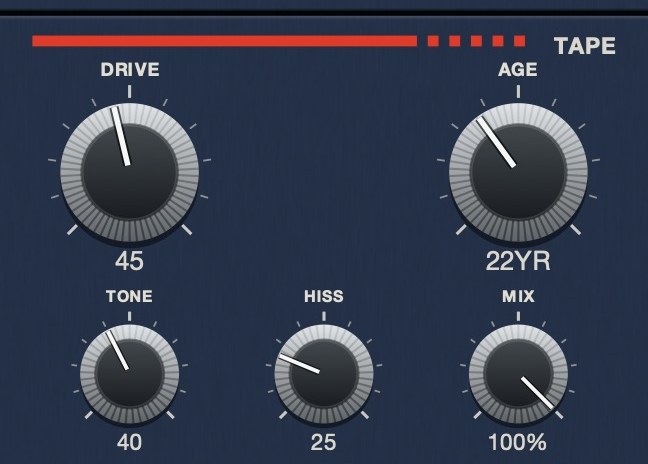 The medium, as five controls.
What a free tape plugin can genuinely do
The physics of a tape path are well documented, and modeling them is a solved problem
that people have published on. CHOW Tape Model is the clearest example: a physical model
of an analog tape machine, originally based on a Sony TC-260, described in a paper
presented at the DAFx conference in 2019, and released under the GPL. It runs as VST,
VST3, AU, AAX, AUv3 and CLAP, and there is an iOS version.
That is not a cut-down tool. On saturation and the way the top end behaves under level,
a good free model is doing the same job as a paid one. If what you need is tape color on a
bus, you can stop reading here and go and get one.
Where free runs out
- Speed instability. Convincing
wow and flutter is harder than it looks,
because it is two different rates of movement interacting, and a single LFO reads as a
chorus. This is the most common gap.
- Cassette rather than reel. Nearly every free model is a reel-to-reel
machine, which is fast, wide, quiet and stable by design. If you are chasing a lofi
sound, you are starting from the wrong reference, and no setting fixes that.
- Noise that sits right. A hiss bed needs filtering, a level control
and some decorrelation between the channels or it collapses in mono. See
tape hiss.
- The transport. Stopping, dragging, rewinding. This is the rarest
feature in the category at any price, and it is essentially absent from free tools,
because a model of tape running at speed has no reason to have one.
TRIPLE OG
is a cassette tape simulation with the transport on the face: SLAM,
SCRUB and CATCH. $29, Mac and Windows. There's a demo on
the page.
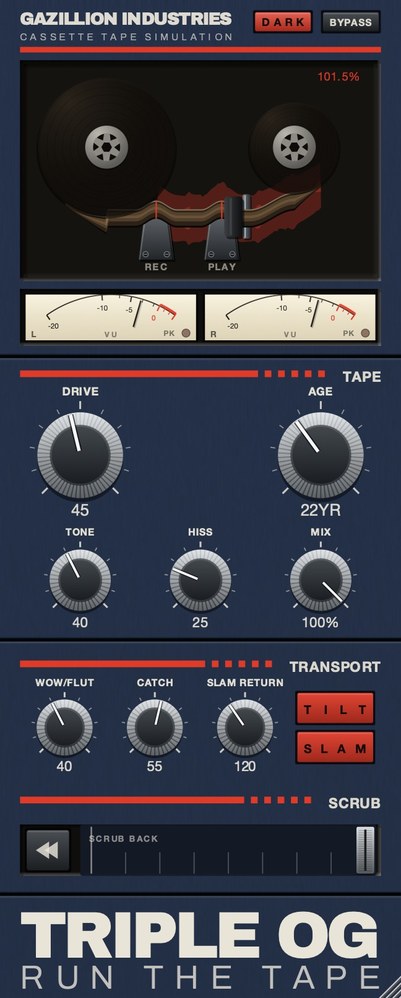 The whole thing. Top half is the machine, bottom half is the tape, and the SCRUB on TRIPLE OG strip along the bottom is played by hand.
The other two free routes
Trials with limits. Several paid plugins ship a restricted demo rather
than nothing. AudioThing's Reels, which bills itself as a tape plugin with echo and a tape
stop effect, offers a trial that goes silent for three seconds every forty-five and will
not save its settings. That is annoying to work with and perfectly good for deciding
whether you want it.
Free tools for the neighboring medium. iZotope's Vinyl is a free
download and it is excellent, but vinyl is not tape: it gives you crackle, dust and
surface noise rather than hiss, bandwidth loss and speed drift. Useful, and not a
substitute.
Your DAW. Every major DAW has a stretch or varispeed mode that moves
pitch and time together, which is the core of a tape stop and costs nothing. Most also ship
a saturator and a filter. What none of them ships is speed instability you can dial in, and
that is exactly the thing you would be buying. The step-by-step for the free route is in
how to make a tape stop
effect.
How to decide without spending anything
Install a free reel model and put it on your drum bus. Push it until it thickens. If
that is the sound you were looking for, you are done, and you saved the money.
If you find yourself reaching for a noise plugin to sit underneath it, and then
automating something to make the timing less rigid, and then bouncing the section to fake a
stop, you have found the three gaps in one session. That is the shopping list, and it
points at cassette-referenced plugins with a transport rather than at another reel model.
 Stereo VU against a 0 VU reference, with a peak lamp. Tape level is read here, not on a bar graph.
Hear TRIPLE OG
What free actually costs
Free plugins are free to install, not free to use, and the costs show up later.
Maintenance. A free plugin maintained by one person in their spare time
may or may not be rebuilt for the next operating system. A project shipped as source can be
rebuilt by somebody; a free binary from a site that has gone quiet cannot. If a session has
to open in three years, that matters more than the panel does.
CPU. Physical models are expensive by design, because computing a
machine's behavior from its parts is more work than applying its results. One instance is
nothing. Sixteen instances across a session, on a laptop, is a real constraint and it tends
to be discovered at the worst moment.
Time. The commonest hidden cost is assembling from several free plugins
what one paid plugin does in a single stage, then managing that stack on every channel. If
the chain is three plugins deep on eight tracks, the saving has been spent.
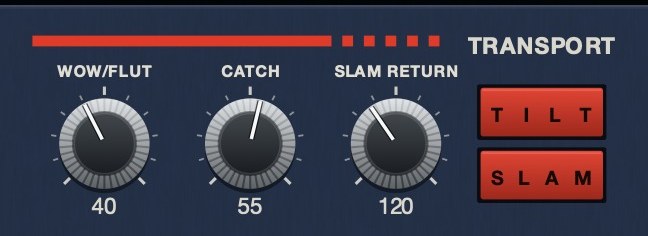 The machine rather than the tape. SLAM is a stop you press, SLAM RETURN sets how long it takes to fall, and CATCH is the drag and the sprint back.
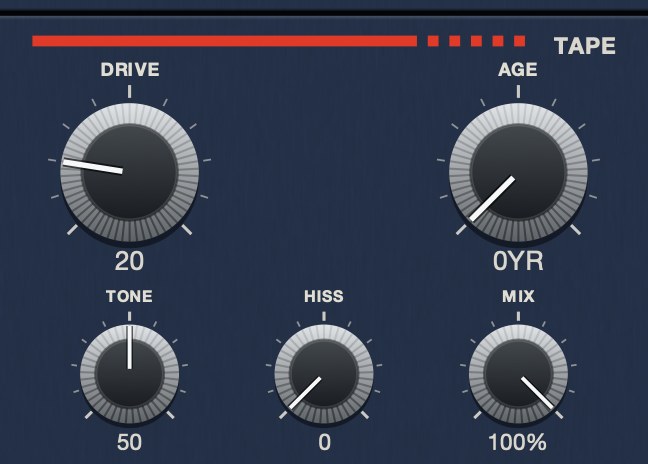 HISS at 0. The tape is quiet; everything you hear is the material.
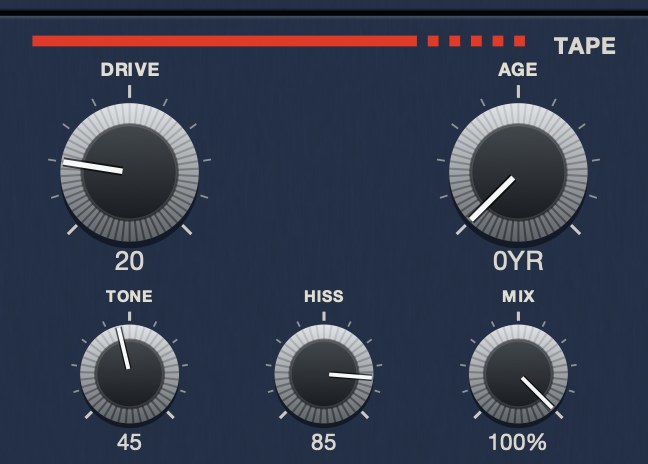 HISS at 85. Same panel, same everything else. The bed sits under the music rather than on top of it.
Building a free chain that holds up
If the budget is genuinely zero, the order matters more than the choices. Start with one
good saturation stage, because that is where free is strongest and the difference between
free and paid is smallest. Add filtering next, gently, using a plugin your host already
ships rather than another download. Add noise last and low, and accept that free noise is
usually a generated bed rather than something tied to the signal.
Where free chains run out is movement. Speed instability is the hardest of the tape
behaviors to do convincingly and the least likely to be given away, and a transport you can
play is essentially absent from the free field. That is the point at which paying for one
plugin replaces stacking four.
Formats, hosts and the things that break
Free plugins fail in ways paid ones mostly do not, and all of them are foreseeable.
Format coverage is uneven. A free plugin may ship VST3 and nothing else,
which is a problem in hosts that want AU, and AAX is rare outside commercial products. Check
before you build a session rather than after.
Signing and notarization. Recent macOS versions refuse to load plugins
that have not been signed, and free projects frequently have not been, because the
certificates cost money annually. The plugin is not broken; the system simply will not run
it, and the workarounds change with every OS release.
Silent abandonment. A paid plugin that stops being updated usually
announces it. A free one just stops, and you find out when a host update arrives. Projects
that ship their source survive this, because somebody can rebuild them; a binary from a
site that has gone quiet cannot.
None of this argues against free tools. It argues for treating a free plugin the way you
would treat any dependency: know what happens to your sessions if it disappears, and keep
bounced audio of anything you would be unable to recreate.
Hear it
What the paid end of the category sounds like at full tilt, for reference while you judge the free options. One loop clean, then the same loop through a worn deck.
Dry — no processing — speed holds at 1.000
Age 35, hiss 45, drive 30, wow 40 — a worn deck — speed 0.951 to 1.059
The same eleven seconds each time, rendered offline through TRIPLE OG at the settings shown. No other processing, no master bus, no edits.
Everything below is answered the same way we built TRIPLE OG — the tape is the easy half, the transport is the half almost nothing does.
The same trade-offs across every category: best free VST plugins.
Questions people ask
What is the best free tape plugin?
An open-source physical model of a reel machine is the strongest free option for tape
color and saturation. CHOW Tape Model is the best known, released under the GPL and based
on published research.
Is there a free cassette plugin?
Free tools lean heavily toward reel-to-reel machines. Cassette behavior, which means
more noise, less bandwidth and much less speed stability, is where the free field thins
out fastest.
Is free tape emulation as good as paid?
On saturation and high-frequency behavior, often yes. On speed instability, cassette
noise and transport controls, generally no. Which answer applies depends entirely on which
of those you need.
Can I get a tape sound with only my DAW?
Partly. Stock saturation, a filter and a stretch mode will get you tape color and a
usable tape stop. The missing piece is speed movement you can set and automate, which is
the thing tape plugins are actually sold on.
Are free tape plugins good enough for a release?
For saturation and tone, frequently yes, and the gap between free and paid there is
smaller than the marketing suggests. The gap widens at speed instability and disappears
entirely at anything you can perform, which is where the free field essentially stops.
What is the catch with free tape plugins?
Mostly maintenance and CPU. A free plugin may not be rebuilt for the next OS, and
physical models cost real processing because they compute behavior rather than apply
results. Both costs arrive later than the download does.
What TRIPLE OG does
TRIPLE OG is our cassette tape simulation, and it sits on the far side of every gap
above. WOW FLUT is the speed instability, HISS a
continuous broadband bed partly decorrelated across the channels, and AGE
runs from nought to sixty years, taking wear, noise and stability together.
TONE and DRIVE handle brightness and thickness. The
transport is on the face: SLAM stops the tape and returns it in sync,
SCRUB runs the head backward and springs home, and CATCH
makes it drag and then sprint to catch up.
Get the free one first. If you end up building the rest of it by hand, you will know
exactly what you are missing.
“Most tape plugins treat the transport as something to model quietly in the background, but this one hands it to you as an instrument.”
Best Tape Emulation Plugins · AudioColour.com
TRIPLE OG — cassette tape simulation for Mac and Windows, with a transport
that drags, jams and sprints to catch up. There is a demo on the page.
Hear it
Keep reading