← Gazillion Industries/Reading material
Best tape stop plugins
Gazillion Industries · · updated
The tape stop is the sound of a machine losing its grip: pitch and
time sagging together as the reel slows, then either silence or a scramble back up to
speed. Every producer wants one. Most reach for an automation curve and wonder why it
sounds like a pitch bend rather than a machine.
The best tape stop plugins are the ones that slow pitch and time together, let you
set how long the stop takes, and put the transport under a control you can play in real
time rather than draw in afterwards. A DAW's stock pitch automation can approximate it;
a transport-based plugin gets the sag, the dropout and the return.
The short version
- What to look for
- pitch and time slowing together, not pitch alone
- Second thing
- a stop length you can set, in time or in seconds
- Third thing
- a return, so the track comes back in sync
- Playable
- a control you can hit live and automate afterwards
- Free route
- stock pitch automation, or a bounced and time-stretched copy
- Our answer
- TRIPLE OG's SLAM, with SLAM RETURN for the length
TRIPLE OG is our cassette sim for Mac and Windows, with the transport on the face rather than in a menu. There is a demo on the page.
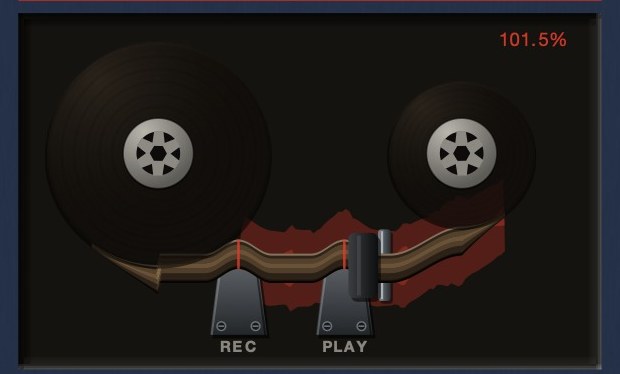 The readout is speed, not level. At 101.5% the transport is running fast.
Why most tape stops sound wrong
On a real machine the tape itself slows down. Everything recorded on it slows with it:
the pitch falls because the tape passes the head more slowly, and the tempo falls for
exactly the same reason. The two are locked, because they are the same fact. That is
covered properly in tape speed and pitch.
A pitch-shift plugin breaks that lock. It drops the pitch and leaves the timing alone,
so the hits stay on the grid while the note sags, and the ear hears a synthesizer rather
than a machine. This is the single most common mistake, and it is audible immediately on
drums, where the grid is the thing you are listening to.
The second giveaway is the shape. A hand-drawn automation line falls in a straight
line. A reel does not. It has mass, and mass means it loses speed fastest at the start
and then crawls the last part of the way down, which is why a real stop has that long
droop at the bottom before the sound dies.
What a good tape stop plugin has to do
- Slow pitch and time together. Non-negotiable. If a plugin lets you
change one without the other, that setting is not a tape stop.
- Let you set the length. A half-second stop is a stumble. A
four-second stop is an ending. They are different effects and you need both.
- Come back. The stop is half of it. What sells it is the transport
picking back up and rejoining the track in time, rather than the session limping along
an eighth-note late for the rest of the song.
- Be playable. You want to catch the stop against a specific hit.
A control you can hit, and automate afterwards, beats drawing a curve blind.
- Degrade like tape. As the speed falls the top end goes with it, and
on a worn machine the level wobbles. Pitch alone is thin without that.
The free routes, and what they cost you
You can get most of the way with what you already own. Bounce the section, drop it on
an audio track, and use your DAW's varispeed or tape-mode stretch so pitch and time move
together. It works, it sounds right, and it takes you out of the flow of the session and
makes the move permanent.
The other free route is automating the transport-style pitch control that several DAWs
expose on an audio clip. It is quick and it commits nothing, but the curve is straight
unless you draw the droop yourself, and there is no return: you get the stop and then a
hole.
TRIPLE OG
is a cassette tape simulation with the transport on the face. Hold SLAM
and the tape drags to a halt; let go and it comes back up to speed and rejoins your
session in time. SLAM RETURN sets how long the stop takes. There's a demo
on the page.
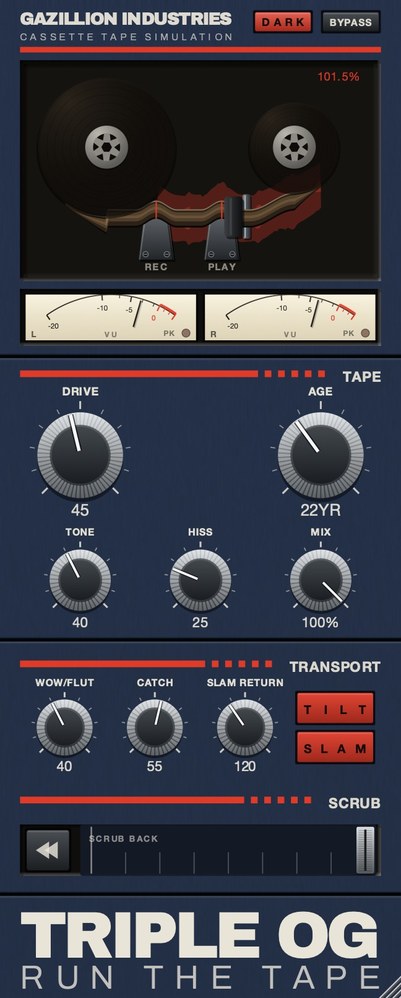 The whole thing. Top half is the machine, bottom half is the tape, and the SCRUB on TRIPLE OG strip along the bottom is played by hand.
Who actually builds one in
Most tape plugins do not have a tape stop at all, because most of them model the tape
rather than the machine. The ones that do tend to say so on the box: AudioThing's Reels,
for instance, bills itself as a tape plugin with echo and a tape stop effect, and runs on
macOS, Windows and Linux in every common format. Its trial goes silent for three seconds
every forty-five and will not save, which is enough to judge a stop by.
Free physical models of tape machines exist and are excellent at the tape itself.
CHOW Tape Model is one, released under the GPL, originally based on a Sony TC-260 and
described in a paper presented at the DAFx conference in 2019. What it does not give you
is a transport, because a reel-to-reel model is a model of tape running at speed.
Tape stop on drums versus on a full mix
On a drum bus the stop is a rhythmic event. It works best short, caught against a snare,
with the return landing on the downbeat of the next bar. Because the whole kit slows
together, the room and the cymbals smear in a way a pitch shifter cannot fake.
On a full mix it is an arrangement move: an ending, a transition into a half-time
section, a drop into a chorus. Longer stops suit it, and the loss of top end as the speed
falls does most of the work. If you want the wobble on the way down as well, that is
wow and flutter, and a slowing transport
makes it worse in a way that is entirely correct.
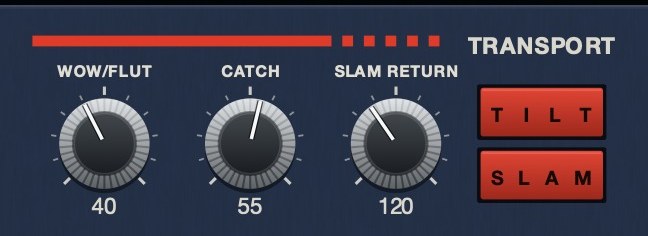 The machine rather than the tape. SLAM is a stop you press, SLAM RETURN sets how long it takes to fall, and CATCH is the drag and the sprint back.
Hear TRIPLE OG
Getting one in time
A tape stop is a rhythmic event, and most of them land wrong because the length was
chosen by feel rather than by the bar.
Decide first whether the stop should finish on a beat or run past it. A stop that
completes exactly on the downbeat reads as tidy and slightly polite. A stop that is still
falling when the next section arrives reads as a machine that was actually stopped, because
that is what happens when somebody hits a button without consulting the tempo. The second
is usually the one people are imagining.
Length then follows from tempo rather than from a millisecond value you liked once. A
stop that takes about half a bar is dramatic and still musical at most tempos; a quarter of
a bar reads as an effect; two bars reads as an ending. Because it is tempo-relative, a
setting that worked at 90 will be wrong at 140, and this is the single commonest reason a
stop that sounded great in one track feels off in the next.
The restart matters as much as the stop. Coming straight back at full speed is the
giveaway, because a real transport had mass and took a moment to get there. The recovery is
where most plugins are thin, and it is the part a listener registers without being able to
name.
 SCRUB is played rather than set: drag it and the head runs back across the tape, let go and it springs home.
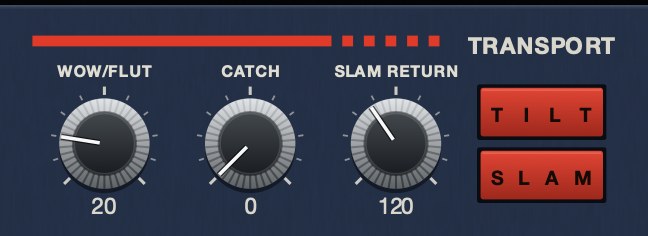 CATCH at 88. This is the drag and the sprint — the render of it falls to 0.211 speed and overruns to 1.854.
Beyond the stop
The stop is the famous one, but a transport does four things and the other three are
rarer and more useful once you have them.
The drag. Slowing without stopping, then recovering, which is the
gesture that sounds like a hand resting on a reel rather than a button being pressed.
The catch-up. Having fallen behind, sprinting to rejoin where the music
now is. This is the one that is almost never modeled, and it is the one that makes the
machine sound like it is trying to keep up with something.
The reverse scrub. Pulling the head backward across the tape and
letting it spring home, which is a performance you do with a hand rather than a setting you
dial.
A plugin with only the stop gives you one punctuation mark. A plugin with the other
three gives you something you can play across a whole arrangement, and that is a different
category of tool.
Doing it without a plugin
Every host can produce a tape stop, and knowing how makes it much easier to judge
whether a dedicated tool is worth it.
The manual method is to automate the pitch or playback rate of a clip downward to zero
over the length you want, with a curve rather than a straight line, because a real transport
decelerates fastest at the start. That gets you most of the way for a one-off, and it is
free.
What it does not get you is the recovery, the ability to perform it live, or the correct
behavior when the audio is not a clip but a bus with several things arriving on it. The
automation approach works on a rendered piece of audio and becomes awkward the moment you
want the stop to happen to a whole mix in real time, which is exactly when people want it.
So the useful test for a dedicated plugin is not whether it can stop the tape, because
anything can. It is whether the stop can happen live, on a bus, with a believable return to
speed, and whether you can perform it repeatedly and get a slightly different result each
time the way a hand on a machine would.
Hear it
This is the behavior the whole page is about, and it is the one nobody publishes audio of. One loop at speed, then the same loop with the transport dragged down and released: the speed falls to about a fifth and then overruns on the way back, which is the part that sells it.
Dry — no processing — speed holds at 1.000
CATCH 100 — speed falls to 0.211 and sprints back to 1.854
The same eleven seconds each time, rendered offline through TRIPLE OG at the settings shown. No other processing, no master bus, no edits.
Everything below is answered the same way we built TRIPLE OG — the tape is the easy half, the transport is the half almost nothing does.
Questions people ask
What is the best tape stop plugin?
The one whose transport slows pitch and time together, lets you set the stop length,
and returns to speed in sync. Plugins built around a transport do this; plugins built
around a pitch control approximate it.
Is there a free tape stop plugin?
There are free options, and your DAW can already do a version of it with varispeed or
tape-mode stretching on a bounced clip. The paid difference is playability and the return,
not the basic falling pitch.
How do I make a tape stop effect in my DAW?
Bounce the section, place it on an audio track, and use a stretch mode that moves pitch
and time together, then draw a curve that falls fast and flattens out at the bottom. The
step-by-step is in
how to make a tape stop effect.
Why does my tape stop sound like a pitch bend?
Because the timing is not moving with the pitch. Use a varispeed or tape stretch mode
rather than a pitch shifter, and let the top end fall away as the speed drops.
How long should a tape stop be?
Set it against the bar rather than in milliseconds. Roughly half a bar is dramatic and
still musical at most tempos, a quarter reads as an effect, two bars reads as an ending.
Because it is tempo-relative, a setting that worked at 90 will be wrong at 140.
Why does my tape stop sound fake?
Usually the restart rather than the stop. Coming straight back at full speed gives it
away, because a real transport had mass and took a moment to reach speed. The recovery is
the part listeners notice without being able to name it.
Can I do a tape stop without a plugin?
Yes, by automating a clip's pitch or playback rate down to zero along a curve rather
than a straight line. What that does not give you is a live performance on a bus, or a
believable return to speed, which is the part listeners actually notice.
What TRIPLE OG does
TRIPLE OG is our cassette tape simulation, and the transport is half the plug-in.
SLAM is the stop: hold it and the tape drags to a halt, let go and it
comes back up to speed, and whatever you do to it, it rebounds back into sync with your
session. SLAM RETURN sets how long the stop takes.
SCRUB is the one you play by hand, running the head backward across the
tape and letting it spring home, and CATCH with the TILT
key makes the tape drag and then sprint to catch up. TONE,
DRIVE, AGE, HISS and
WOW FLUT handle the tape itself.
A stop is easy. A stop that comes back in time is the part everyone gets wrong.
“Most tape plugins treat the transport as something to model quietly in the background, but this one hands it to you as an instrument.”
Best Tape Emulation Plugins · AudioColour.com
TRIPLE OG — cassette tape simulation for Mac and Windows, with a transport
that drags, jams and sprints to catch up. There is a demo on the page.
Hear it
Keep reading
- How to make a tape stop effect — Why speed and pitch fall together, length and curve, and variations.
- Tape speed — Why faster tape is cleaner, and what each standard speed sounds like.
- Wow and flutter — What causes them, what they sound like, and how to add them on purpose.
- Best tape plugins for drums — Why drums show tape more than anything else, and where to put it.
- How a tape machine works — The transport, the heads, bias, tape speed, and why tape sounds like tape.
- Best tape emulation plugins — Reel and cassette are different products. Pick the machine first.
- Best free tape plugins — What free tape plugins do well, and where they run out.