← Gazillion Industries/Reading material
How to make a tape stop effect
A DJ slaps the stop button on a turntable and the record groans down to nothing, pitch and tempo sliding into the floor together. It's rude, it's dramatic, and it tells the whole room something is about to change.
A tape stop effect slows audio to a halt so its pitch and speed fall together, like a tape machine or turntable losing power. To make one, apply a speed ramp that drops to zero over a short time (usually a quarter note to a bar), shape it so it sheds speed fastest at the start and crawls at the bottom, and duck the volume at the very end. You can automate a pitch-and-speed change, use your DAW's built-in slow-down, or use a tape stop plugin.
The short version
- What
- speed and pitch fall together to a stop
- Length
- a quarter note to one bar
- Curve
- fastest at the start, crawling at the bottom
- Pitch
- 12 semitones down for every halving of speed
- Ending
- fade the last moment so it doesn't click
- Lag
- a straight ramp to zero leaves you half its length behind
- Test
- if the hits stay on the grid, you have a pitch shifter
- Reverse
- a tape start ramps up from silence
- Use
- transitions, drops, ends of sections
What a tape stop actually is
When a motor stops, the tape or platter doesn't halt instantly: it coasts down, and everything playing slows and drops in pitch at the same time. That's varispeed taken all the way to zero, which is why a real tape stop can't be faked with a volume fade or a pitch shift that keeps the tempo. The speed has to fall. See what is varispeed for how speed and pitch are tied.
The arithmetic is one line, and everything else here follows from it. Pitch in semitones equals 12 times the base-2 logarithm of the speed. Halve the speed and you are exactly 12 semitones down and everything takes exactly twice as long. Quarter it and you are 24 down. At a tenth speed, 12 × log2(0.1) = −39.9 semitones: three octaves and very nearly a major third, from a control that has only moved nine tenths of its way.
Put real material through that. A kick whose fundamental sits at 55 Hz arrives at 27.5 Hz when the speed reaches 0.5 and at 5.5 Hz when it reaches 0.1. A snare body at 190 Hz becomes 19 Hz. A hi-hat at 9 kHz becomes 4.5 kHz and then 900 Hz. So by the halfway point the kick has already left the speaker, and what you are hearing at the bottom of a stop is cymbals and sibilance sliding down into the midrange, thickening as they go. The mix drains from the bottom up.
One more consequence worth holding on to. At any instant the material is stretched by 1 divided by the speed: 2:1 at 0.5, 4:1 at 0.25, 10:1 at 0.1. A tape stop is a time-stretch whose ratio runs away to infinity, which is why the last moments smear and why weak implementations fall apart at the bottom rather than at the top. Time stretching explained covers the general case.
The curve, and what the last tenth costs you
Draw a straight line from full speed to zero and the pitch does not fall in a straight line at all. It falls slowly, then quickly, then off a cliff, because the logarithm does that for you. Take a one-second ramp that is perfectly linear in speed and read the pitch at each checkpoint.
- 0.50 s
- speed 0.500 — 12.0 semitones down
- 0.75 s
- speed 0.250 — 24.0 semitones down
- 0.90 s
- speed 0.100 — 39.9 semitones down
- 0.95 s
- speed 0.050 — 51.9 semitones down
- 0.99 s
- speed 0.010 — 79.7 semitones down
Read it from the other end. The first half of the ramp buys you one octave; the last tenth buys you more than three. Every complaint that a tape stop "does nothing and then suddenly dies" is that table and nothing else, and the fix is never a longer ramp. The fix is a shape that keeps the speed above about 0.2 for more of its life, where the ear can still follow a pitch.
An exponential fall does that by itself, and it has a tidy property: a speed decaying as e to the minus t over tau is a perfectly straight line in pitch. The rate is 12 divided by the natural log of 2, or 17.3 semitones per time constant, forever. Set tau to 0.5 s and the track descends at 34.6 semitones per second, dead even. It also never reaches zero, so you have to cut it off, and where you cut it off becomes a decision rather than an accident.
What a machine does is one of those two. Friction that ignores speed — a brake pad, tape dragging across the heads and guides — gives constant deceleration and a straight line to zero. Drag that scales with speed — air, a good bearing under a heavy platter — takes the most when there is the most to take, so the speed collapses early and then crawls. Neither one eases in, because nothing in a transport gets grabbier as it slows. The straight line is a machine that was stopped; the exponential is a machine that was let go. How a tape machine works has the capstan and flywheel doing the deciding.
Length, measured in bars
Milliseconds are the wrong unit here, and they are the reason a stop that killed on one track feels limp on the next. A bar of 4/4 lasts 240 divided by the tempo, in seconds.
- 70 BPM
- bar 3.429 s — beat 857 ms
- 87 BPM
- bar 2.759 s — beat 690 ms
- 120 BPM
- bar 2.000 s — beat 500 ms
- 140 BPM
- bar 1.714 s — beat 429 ms
- 170 BPM
- bar 1.412 s — beat 353 ms
Work in beats and the gesture travels. Two beats is 1.379 s at 87 BPM and 857 ms at 140, and both read the same way because the listener is counting rather than timing. Fix the milliseconds instead and a stop that was two beats at 87 becomes 3.2 beats at 140, which is why it suddenly sounds like the song fell over.
How to make a tape stop effect
- Pick the moment: the last beat or bar before a transition.
- Bounce or group the parts you want to stop so they move together.
- Apply a speed ramp that falls to zero, with pitch following the speed.
- Set the length between a quarter note and a bar.
- Curve the ramp so it loses the most speed at the start and crawls at the bottom.
- Add a very short fade at the end so it doesn't click.
- Leave a beat of silence, or hit the next section right on the downbeat.
- Make that end fade 5 ms or shorter — 240 samples at 48 kHz, 220 at 44.1 kHz. Enough to walk a full-scale sample down to zero, short enough that nobody hears a fade.
- High-pass the output at 25 Hz after the stop. Everything the ramp drags below hearing still has level, still moves a woofer and still triggers a limiter.
- Account for the lag. A ramp plays less material rather than skipping any, so a linear stop of length T consumes T/2 of source and anything still playing afterwards is T/2 late.
- Bounce it and check the first hit of the next bar against the grid line before you move on.
A worked stop at 87 BPM
A beat at 87 BPM is 60/87 = 689.7 ms and a bar is 2.759 s. Start the stop on beat 3 of the last bar and finish it by the downbeat, so the ramp is two beats: 1.379 s. A linear ramp over that has an average speed of exactly 0.5, so it eats 689.7 ms of source — one beat of music stretched across two. That is the area under a triangle, and it hands you the two numbers you need: keep at least one beat of material past the stop point, and expect anything still running afterwards to be exactly one beat late.
The pitch checkpoints follow. At 690 ms in you are one octave down; at 1,241 ms you are 39.9 semitones down; the last 138 ms carries the rest of the way to nothing. The 55 Hz kick is at 27.5 Hz by the halfway mark, so from there the low end of the record is gone and the 9 kHz hats, now at 4.5 kHz, carry the whole gesture. Then a 5 ms fade, then the downbeat.
Check it on a phone before you sign it off. Small drivers give up somewhere in the hundreds of hertz, and where exactly depends on the handset, so on a phone the second half of that stop is hats descending over near-silence. If the move has to work there, put the drama in the top of the ramp and finish sooner.
In your DAW
Logic Pro's region fades include Slow Down and Speed Up types that do this directly. In other DAWs, automate a pitch and speed drop on a bounced clip (in Ableton, a clip set to the Re-Pitch warp mode follows tempo changes with its pitch), or use a tape stop or gross-beat-style plugin. Whatever the tool, check the result on the drums: a good tape stop makes the kick and snare groan down, not just the melody.
The one setting that decides it
Every host ships an algorithm that holds pitch while it changes time, and that algorithm is the enemy here. Find the preserve-pitch switch, or the stretch modes named complex, polyphonic, elastic or professional, and turn them off. The mode you want is called resample, repitch, varispeed or tape, and it is usually described as the cheap one. It is the correct one, because it does arithmetic on the read rate instead of trying to be clever. If your host hides its clip rate entirely, bounce the section to a file and use the offline stretch with pitch preservation disabled. Varispeed in every DAW lists where each one keeps it, and changing pitch without changing tempo is the same switch thrown the other way.
Ableton Live
Set the clip's warp mode to Re-Pitch and its pitch follows the tempo, so global tempo automation drags the clip down with it. Two limits before you build a set around that. Tempo automation bottoms out well above zero, so it cannot finish the job — check the lowest tempo your version accepts and you will find the ramp runs out somewhere near a quarter speed, about 24 semitones down. And it moves the whole transport, so every track slows, which is either what you wanted or a disaster. For one bus only, bounce and automate a Re-Pitch clip's own rate. Varispeed in Ableton Live has the longer version.
Logic Pro
The region fade is the direct route: grab the end of an audio region, set the fade type to Slow Down, then set the length and the curve. It is per-region and it needs audio rather than MIDI, so bounce in place first. Logic's global Varispeed control looks like the answer and is not one, because it runs the whole project as a monitoring speed rather than one section you are printing.
FL Studio
A sampler channel's own pitch control resamples when the stretch mode is left off, so pitch and length move together and automating it downward across the last bar gives you the effect on that channel. For a bus, render the section to an audio clip and automate the clip, or put a time-manipulation plugin on the mixer insert. The check never changes: if the hits hold their grid positions, the stretch mode is on and you are hearing a pitch bend.
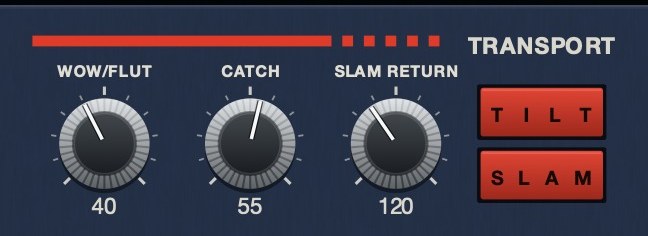
TRIPLE OG's SLAM is a tape stop you hold down, and CATCH drags, jams and sprints back. There's a demo on the page.
Where it sits in the chain
A tape stop is a speed change applied to a signal, so everything upstream of it slows and everything downstream of it does not. That one sentence settles most of the questions.
Reverb and delay. Before the stop, the tail slows with the music, which is what a room recorded onto tape would do and the version that sounds like one event. After the stop, the tail holds its pitch and tempo while the source collapses underneath it, which splits the sound into a dying machine and a room that stayed still. Both are usable. Only one of them should be an accident.
Anything tempo-synced downstream. A ping-pong delay at an eighth, an auto-pan, a tremolo, a sidechain fed by a kick that has itself slowed to a crawl: none of them slow down, because they read the host clock and the host clock has not moved. Two tempos at once sounds like a fault. Freeze the stopped material, or move the synced device in front of the stop.
Limiters and clippers. As the ramp runs, the spectrum piles into the bottom and much of that energy sits below hearing but very much not below your metering, so a limiter after the stop ducks the whole mix for something nobody can hear. That is what the 25 Hz high-pass in the steps above is for. Watch your true peak through a stop before deciding the master is fine.
How to check your stop in your own session
- Replace the material with a sustained sine and bounce the stop. The period should lengthen smoothly; visible stair-steps mean the rate is updating once per buffer.
- Count the steps if you see them. A 512-sample buffer at 48 kHz is 10.67 ms, so a 1.379-second stop gets 129 rate updates and sounds grainy on sustained material. Dropping to 128 samples gives you 517.
- Run it on four-to-the-floor kicks at a known tempo. If they hold their grid positions while the pitch falls, you are using a pitch shifter and no curve will save it.
- Measure the length off the bounce, from the first deviation to silence, against 240 divided by your tempo. If it does not match the bars you meant, it will not match at the next tempo either.
- Zoom to sample level at the tail. A step from a non-zero sample straight to silence is your click, and it is visible before it is audible.
- Put a hit on the downbeat after the stop and check it against the grid line. At 48 kHz, 1 ms of drift is 48 samples.
What goes wrong, and what each one sounds like
- Pitch moving without time. A whammy pedal. The hits stay nailed to the grid while the notes sag, and drums give it away inside one bar.
- Time moving without pitch. A loop going into slow motion in the same key, with the warble and smeared transients of a stretch algorithm working hard.
- No end fade. A tick or a thump at the bottom, loud out of all proportion, because it is a step to a DC value from a signal that had already got quiet.
- Rate updated per buffer. A staircase, a zipper, a faint metallic granularity. Loudest on pads, sustained vocals and anything with a strong fundamental.
- Too short. Under about a quarter note it reads as a dropout rather than a machine, because the ear never gets enough glide to identify what happened.
- No return. Everything after the stop is late by half the ramp length, permanently, and it compounds every time you do it.
Variations
- Tape start: reverse it, so the audio ramps up from nothing into the downbeat.
- Half stop: slow down and snap back before reaching zero.
- Drag: a brief slow-down that recovers, like a tape catching; see wow and flutter for the smaller version.
- Selective stop: stop the music but let the drums play through, or the other way round.
- The catch-up: let it drag, then push the speed above 1.0 until the material has caught back up with where the song now is. The overshoot is what sells it, because it says the machine was trying.
- Stutter stop: three or four sixteenth-length stops in a row, each one recovering, so the transport reads as failing rather than stopping.
- Screwed, not stopped: hold the ramp at 0.75 or 0.6 and never release it, which is the adjacent technique in how to chop and screw.
Hear the drag
The drag is the variation nobody publishes audio of, and it shows the speed curve most clearly. One loop at speed, then the same loop with the transport pulled down and let go.
The same eleven seconds each time, rendered offline through TRIPLE OG at the settings shown. No other processing, no master bus, no edits. A speed of 0.211 is 26.9 semitones down; 1.854 is 10.7 semitones up.
What it costs
It costs a bar of arrangement and it costs the low end for the second half of its length, which on a phone is most of the effect. It is loud in the other sense too: the listener always knows a decision was made, so a record with three of them has no punctuation left. It also commits, because a bounced stop prints the tempo of that passage and the arrangement edit you want in two weeks means building it again. One per track, in the place where the change was going to happen anyway.
Questions people ask
What is the tape stop effect?
An effect that slows audio down to a complete stop, with pitch and speed falling together, imitating a tape machine or turntable losing power. It's commonly used for transitions and drops.
How do I do a tape stop in FL Studio?
Use a tape stop or time-manipulation plugin on the channel or bus, or automate a speed and pitch drop on a bounced clip over the last beat or bar before the transition. On a sampler channel, leaving the stretch mode off makes the pitch control resample, so pitch and length fall together when you automate it down.
How do I do a tape stop in Logic Pro?
Use a region fade set to Slow Down on the end of the region, and adjust the fade length and curve to control how quickly it stops. The region has to be audio, so bounce in place first if the part is MIDI.
How do I do a tape stop in Ableton Live?
Set the clip's warp mode to Re-Pitch so pitch follows the playback rate, then automate the rate or the tempo downward across the last beat or bar. Tempo automation cannot reach zero, so it gets you roughly two octaves down before the ramp runs out; for the rest of the way, or for one bus rather than the whole set, bounce the section and use a plugin with a transport.
Why does my tape stop click at the end?
Because playback stopped on a sample that was not at zero, which is a step straight to a DC value. Add a fade of 5 ms or less over the very end — 240 samples at 48 kHz — and it goes away without ever being audible as a fade.
Why is my track out of time after a tape stop?
A speed ramp plays less material rather than skipping any, so a straight ramp to zero over a length T consumes only T/2 of your source and anything still running afterwards is T/2 behind. Either use a tool that returns to the host's position, or bounce the stop and place the next section on the grid yourself.
What curve should a tape stop use?
One that loses the most speed at the start and crawls at the bottom. Constant braking force gives a straight line to zero; drag that scales with speed gives an exponential fall. Either works. The shape to avoid is an ease-in, because nothing in a transport gets grabbier as it slows down.
How many semitones does a tape stop drop?
As many as you like, because pitch is 12 times the base-2 logarithm of the speed and that runs to negative infinity. Half speed is 12 semitones down, a quarter is 24, a tenth is 39.9 and a hundredth is 79.7.
Why does my tape stop sound stepped or grainy?
The speed is probably updating once per audio buffer rather than per sample. At 48 kHz a 512-sample buffer is 10.67 ms, so a 1.4-second stop gets about 129 discrete speed values. Lower the buffer size and listen again; if that fixes it, the plugin is the problem rather than your curve.
How do I do a tape start instead?
Run the same ramp backward: begin near zero speed and bring it to 1.0 so the material arrives on the downbeat at pitch. Start it around 0.1 rather than at 0, because everything below that is nearly four octaves down and mostly inaudible, and beginning there only adds dead time.
Can I do a tape stop on a whole mix in real time?
Yes, with a plugin whose speed control sits on the master or a bus and which returns to the host's position afterwards. Clip-based methods cannot, because they act on one piece of audio rather than on whatever is arriving at a bus.
Do I need a plugin for a tape stop?
No. Every host can do it on a bounced clip with pitch preservation turned off. What a plugin buys you is doing it live, on a bus, with a return to speed, which is the half most automation curves cannot reach. The comparison is in best tape stop plugins.
What TRIPLE OG does
TRIPLE OG is our cassette tape simulation, with a transport you can grab. SLAM is the tape stop: hold it and the transport drags to a halt, let go and it comes back up to speed, and SLAM RETURN sets how long the stop takes. CATCH is the machine losing its footing on its own: it drags, jams and then recovers, on its own clock or from a trigger on the panel. SCRUB is you doing it by hand: drag the lever and the head runs back across the tape, and it rebounds home when you let go.
Because the transport is the thing being moved, the stop happens to whatever is arriving at the plug-in, on a bus, live, and the return lands back in your session's time rather than half a ramp behind it. TONE, DRIVE, AGE from zero to sixty years, HISS and WOW FLUT handle the tape itself. Mac and Windows, AU, VST3 and standalone.
The room already knows what that groan means. Give it a new section to walk into.
“Most tape plugins treat the transport as something to model quietly in the background, but this one hands it to you as an instrument.”
TRIPLE OG — cassette tape simulation for Mac and Windows, with a transport that drags, jams and sprints to catch up. There is a demo on the page.
Mac · Winmore info
Keep reading
- Wow and flutter — What causes them, what they sound like, and how to add them on purpose.
- What is varispeed — Speed and pitch together: the math, how it differs from pitch shifting, and how it's used.
- How a tape machine works — The transport, the heads, bias, tape speed, and why tape sounds like tape.
- Best tape stop plugins — What separates a real tape stop from a pitch bend, and what to look for.
- Tape speed plugins — What rate change does, the free routes, and how to test a tape speed plugin.