← Gazillion Industries/Reading material
Tape speed plugins
Gazillion Industries ·
The horn loop ran at 96 BPM and the beat sat at 88. Stretched onto
the grid it arrived with a faint flutter around every attack, as though the brass were
being played through a fan. Pulled down by speed instead, the same eight bars landed
heavy, sat down, and stopped arguing with the drums.
A tape speed plugin changes playback rate, so pitch and length move together: slow it
and everything gets longer and lower, speed it and everything gets shorter and higher.
Half speed is exactly an octave down. Double speed is exactly an octave up. The ones worth
owning put that rate on a continuous, automatable control, give the return a shape, and
make no attempt to hold the grid while you move it.
The short version
- What it does
- changes playback rate, so pitch and length move together
- Half speed
- exactly 12 semitones down, exactly twice as long
- Semitone
- about a 6% change in rate
- Must have
- a continuous rate you can automate and play
- Also
- a return shape, so the move comes home in time
- Free route
- Live's Re-Pitch warp mode, or Logic's Varispeed
Hear it
Every page in this category describes what varispeed does and then shows a screenshot of a knob. Here is
one loop through SKRUU at three speeds, then the same thing with the sampling rate stepped down. The figures
are the renderer's own readout.
Unity — PITCH 93 — rate 1.0000, +0.00 semitones
Slowed — PITCH 64 — rate 0.9275, −7.25%, −1.30 semitones
Sped up — PITCH 120 — rate 1.0779, +7.79%, +1.30 semitones
Slowed, LO-FI 2 — PITCH 64 with SAMPLING GRADE at 3.9 kHz
One source loop, rendered offline through the same engine the plug-in runs, no other processing.
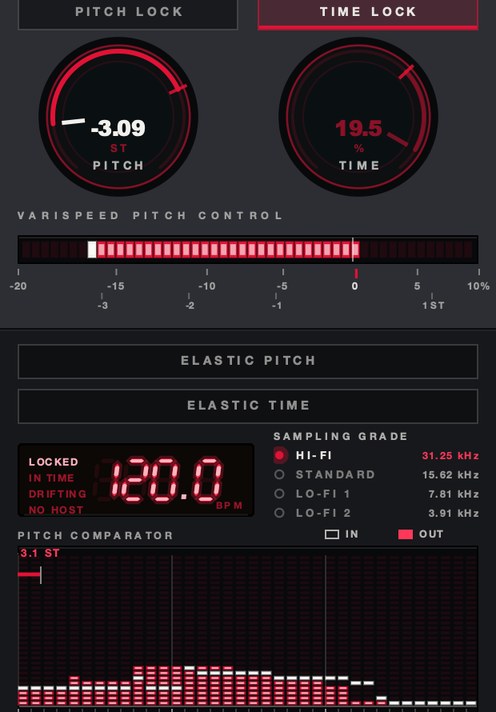 Pitch down, time up. The two controls are not tied to each other.
What a change in tape speed does to a signal
Tape holds a fixed physical pattern along its length. Run it past the head at half the
speed and every frequency in that pattern halves, and the program takes twice as long to
arrive. Those are the same fact stated twice, which is why a speed control moves pitch and
time together and cannot be talked out of it.
In software the move is resampling. The plugin reads the incoming audio at a rate other
than the one it came in at and interpolates between samples to fill the gaps. A ratio of
0.5 is exactly −12 semitones, 2.0 is exactly +12, and one semitone is a ratio of
about 1.059 — call it 6% per semitone and you will be close enough to guess by ear.
A 45 rpm record played at 33⅓ runs at about 74% of its rate, which is roughly
5.2 semitones down. The arithmetic is laid out properly in what varispeed is and tape speed and pitch.
Why a tape speed plugin and a pitch shifter are different tools
A pitch shifter holds the length and moves the pitch. To do that it has to cut the
audio into short grains, move them, and hide the joins, and the joins are where the
smearing, the doubling and the metallic ring come from. A rate change has no joins to
hide, because nothing is being reassembled. That is covered in time stretching explained.
The audible tell is formants. Slow a voice by rate and the resonances of the throat and
mouth come down with it, which is why the singer sounds like a larger person standing in a
larger room. Shift the same voice down while holding its length and those resonances stay
where they were, so it reads as the same person singing lower. Both are useful. Choosing
between them is most of the work, and the mechanics are in changing pitch without changing
tempo.
What separates a good tape speed plugin from a bad one
- Continuous rate, not a semitone menu. A control that offers only
whole semitones cannot sit between two of them, and cannot sag from one to the next. The
sag is most of the effect.
- Smooth under automation. The rate has to update per sample, not per
block. If it updates per block you hear a staircase on every move, most obviously on a
sustained note where there is nothing to hide behind.
- A return with a shape. A reel has mass. It loses speed fastest at
the start of a slowdown and crawls the last part of the way down. A straight line between
two values is the commonest giveaway in the category, and a curve you can pick is the
difference between a machine and a pitch bend.
- Filtering before it resamples. Push the rate above unity and content
near the top of the band gets shoved past half the sample rate, where it folds back down
as inharmonic noise that moves the wrong way against the music. Oversampling the rate
change is the usual cure, and the good ones do it without being asked.
- An honest readout. Percent and semitones together, with unity
marked and a way back to it. Guessing from a knob position is how a bass part ends up
17 cents flat for a whole record.
- A stated position on drift. Run a live stream through a rate change
and the output moves away from the input by the amount of the change, and it keeps moving
for as long as you hold it. That is arithmetic, not a fault. What varies between plugins
is the answer: buffer the difference and let the track rejoin the session when you come
back to unity, or run on and leave you late for the rest of the song.
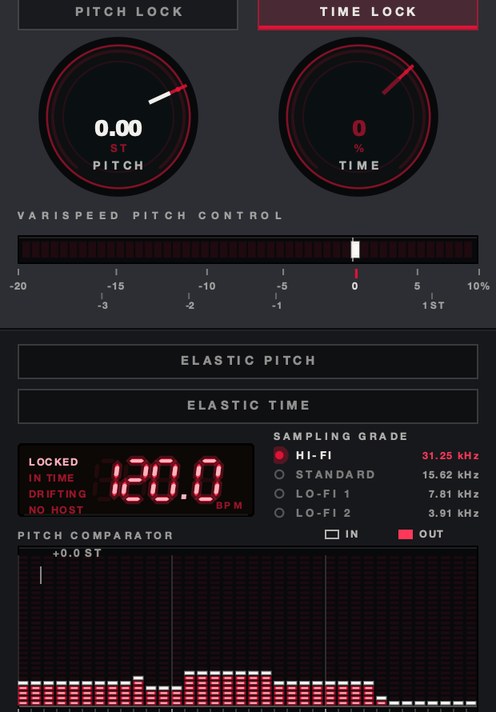 Length only. TIME at −35% with the pitch left where it was.
How to test a tape speed plugin in ten minutes
- Load a two-bar drum loop with a busy hi-hat pattern and bypass everything else on
the track.
- Set the rate to −50% and play the loop. Listen to the hats for grain, and for
a flutter that repeats at a fixed interval.
- Return the rate to unity and check that the loop is back in time with the session.
- Set the rate to +6% and hold it for eight bars. Listen above 8 kHz for a thin
whistle that moves down as the pitch moves up.
- Automate the rate from unity to −20% across one bar, then back across one
beat. Compare the two curves.
- Repeat steps 2 and 5 on a sustained vocal or a pad. Drums hide joins; sustained
material does not.
- Bounce the result and play it on a phone speaker. Slowed low end that was
convincing on monitors often turns to mud on a small driver.
SKRUU
is our varispeed pitch and time stretch plugin, and it keeps the two on separate controls
so you can speed a part up while pitching it down. With ELASTIC on, the knob is sprung:
move it, let go, and it runs home along one of sixteen return shapes. There's a demo on
the page.
Where a tape speed plugin goes in the chain
Last on the track, or close to it. Everything upstream of a rate change gets the rate
change too, and that includes the parts you thought were settled. A reverb placed before it
stretches with the source, so a 1.8 second tail at half speed becomes a 3.6 second
tail an octave down — a sound, and a large one. The same reverb placed after stays at
its own speed and drops the slowed part into a normal room. Those are two different records.
Put it on a bus rather than a track when you want a whole section to move together. A
rate change on the horns and not the bass is not a transition, it is an argument, and the
listener hears the argument first. For a stop or a start, the transport version of the same
idea is in how to make a tape stop
effect.
Named options, and what each one actually is
Read these as descriptions rather than rankings. What you need depends on whether you
want to move one clip, one track, or the whole session.
- Logic Pro's Varispeed. Apple's guide describes it as speeding up or
slowing down the whole project between −50% and +100%, with three modes: Speed
Only, which holds the pitch; Varispeed, which lets pitch follow speed; and Varispeed and
MIDI, which also transposes external MIDI tracks, quantized to semitones. The readout
switches between percent, resulting tempo in BPM, detune in semitones and cents, and a
tuning reference in Hz. If the button is missing, Control-click the control bar, choose
Customize Control Bar and Display, set the LCD to Custom and tick Varispeed.
- Ableton Live's Re-Pitch warp mode. Per clip rather than per project.
Live's manual says Re-Pitch adjusts the sample's playback rate, so changing the tempo
changes the pitch with it, and that the clip's transposition controls are deactivated
while the mode is on, because the rate is already doing that job. Double the speed and the
pitch goes up an octave.
- Varispeed by Elisabeth Homeland. A Max for Live device, listed on the
maker's own store at €20,00, that transposes every audio and MIDI clip in a Live Set
by up to −24 or +24 semitones while changing the Set's tempo to match. The page lists
Live 11 and Live 12, Mac and Windows, and states that it needs Live Suite or Live Standard
with Max for Live. This is the whole-session answer for Live users.
- GSi VariSpeed. Free, and the maker's page lists Windows, macOS and
Linux builds, with the Linux one marked experimental and supplied as raw binaries. It is a
tape echo whose delay time changes with the speed of the motor, so it is a varispeed
delay rather than a rate control for a whole track. Worth knowing before you
download it expecting the other thing.
Tape speed plugin free: the routes that cost nothing
Two of them, and both are already on your drive. The first is the warp or varispeed mode
your DAW ships with, covered above. It is free, it sounds correct, and it is bound to the
clip or the project rather than to a knob you can play.
The second is the bounce. Some editors let you reinterpret a file's sample rate without
converting it: declare a 44.1 kHz file as 22.05 kHz and it plays exactly an octave
down and exactly twice as long, with every original sample used once and no interpolation at
all. It is the cleanest half speed there is. It is also destructive, it takes you out of the
session, and it gives you one value rather than a move.
What the free routes cost you is the performance. You can set a rate with any of them.
Catching the slowdown against the third snare of the bar, letting go, and having the track
come back up to speed in time is a different job, and it wants a control under your hand.
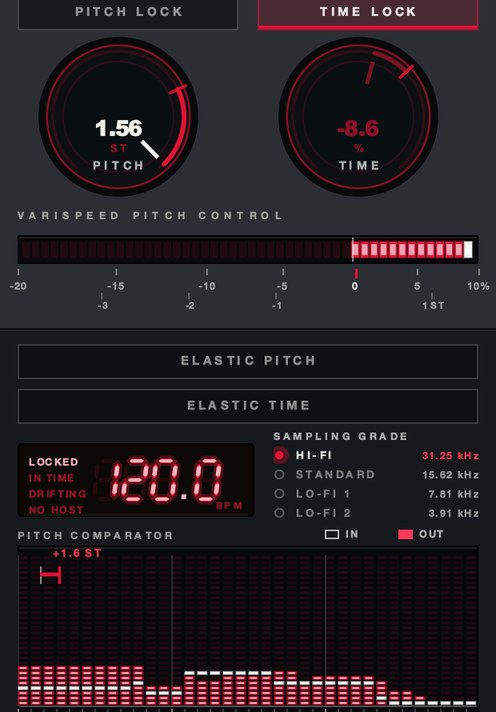 Above unity. Speeding up is where the top end needs watching.
What it costs you
Length. Anything you slow down is now longer than the hole it came from, and the rest of
the arrangement did not move with it. On a loop that is a free bar. On a vocal take it is an
edit you did not plan to make.
Top end, in the other direction. A tape machine speed up plugin, or any rate increase,
pushes the whole spectrum upward, and whatever sat at 14 kHz is now above the ceiling
and coming back down as noise unless the plugin filtered first. Cymbals and breath are where
you hear it.
And weight. Slowing a break down makes it heavier and also makes it slower to arrive; the
transients soften because they are literally longer. If the point was impact, a rate change
alone will not get you there, and a clipper or a transient control after it is the other half
of the job.
Questions people ask
Is there a free tape speed plugin?
Yes, and there is probably one in your DAW already. Live's Re-Pitch warp mode and Logic's
Varispeed both change playback rate so pitch follows, and both cost nothing on top of the
software you own. GSi also gives away VariSpeed, though that one is a tape echo with a speed
control rather than a rate control for a track.
What is the best tape speed up plugin?
The one with a continuous rate control you can automate, filtering before the resampler
so the top end does not fold back, and a readout in semitones as well as percent. Speeding up
is harder on a plugin than slowing down, so test upward first: set +6%, hold it, and listen
above 8 kHz for anything that moves down while the music moves up.
How do I get a half speed tape effect?
Set the rate to 50% and leave everything else alone. That is exactly 12 semitones down and
exactly twice the length. If you want it permanent and clean, bounce the part and reinterpret
the file at half its sample rate, which uses every original sample once.
Can a tape speed change plugin keep the tempo?
Not by itself. A rate change moves pitch and time together by definition, so holding the
tempo means adding a second process: a pitch shifter to put the pitch back, or a time stretch
to put the length back. Logic exposes exactly this as its Speed Only mode, which shifts the
master output to cancel the pitch change the speed caused.
What SKRUU does
SKRUU is our varispeed pitch and time stretch plugin for Mac and Windows, and the two
controls do not touch each other. PITCH runs from −20% to +10% across
128 states and reads out in semitones as well as speed, with unity marked and a double-click
back to it. TIME runs from −50% to +25% and moves nothing but the
length. PITCH LOCK and TIME LOCK hold one while the other
moves, so you can speed a part up while pitching it down.
The playable part is ELASTIC. With it on, the knob is sprung: move it,
let go, and it travels back on its own. RETURN is how long that takes, free
or quantized to the bar. BITE is how hard it commits. SLOPE
is the road home, and there are sixteen — six smooth, five stepped, five that overshoot
and come back. Pitch and time each get their own. DRAG sets how long a new
speed takes to arrive; at the floor it is instant, turned up it is a hand on the platter.
SAMPLING GRADE is the grid the whole thing rides on: 31.25 kHz,
15.62, 7.81 and 3.91. The lower grades put a staircase in, and the staircase is the sound.
All four run all the time, so the grade can change while a note is sounding. The display is a
pitch comparator in semitones — what went in against what came out, octaves marked
— with the host tempo above it and whether the transport is locked, in time, or
drifting. Zero samples of latency, any session sample rate. AU, VST3 and standalone on macOS
10.13 or later; VST3 on Windows 10 or later, 64-bit. $29.
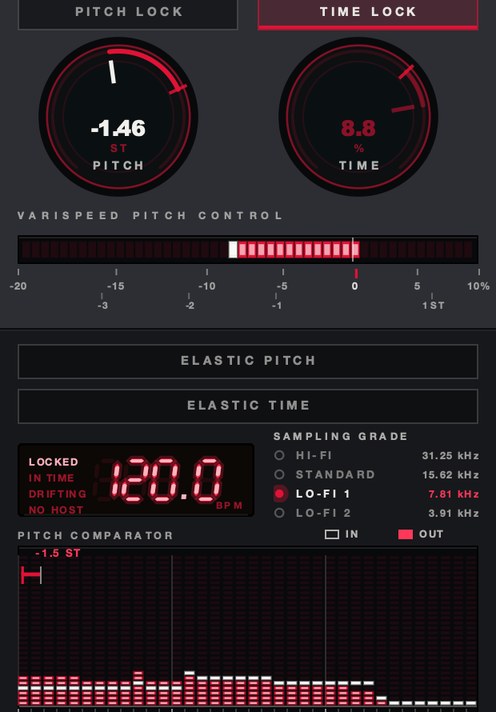 SAMPLING GRADE at LO-FI 1. 7.81 kHz rather than 31.25.
The horns went down 8 BPM by rate and never went back. They were never a horn loop at 96.
They were a horn loop at 88 that had been waiting in the wrong place.
SKRUU — varispeed pitch and time stretch for Mac and Windows. Pitch and
time move independently, with sixteen elastic return shapes.
Hear it
Keep reading