← Gazillion Industries/Reading material
How to chop and screw a song
On Houston's South Side in the early 1990s, DJ Screw was selling gray cassette tapes out of his house, and the music on them sounded like somebody had poured syrup into the tape deck. Those screw tapes turned into a whole city's sound, and more than two decades after his death in 2000, rap still borrows it.
To chop and screw a song, "screw" it by slowing it down so the pitch drops heavily with the tempo, then "chop" it by repeating and stuttering words, beats and phrases, originally done by cutting between two copies of the same record. In a DAW: slow the track with varispeed, duplicate it, and cut between the copies to repeat lines and create stutters, with a few quick backspins and slowdowns as transitions.
The short version
- Screw
- slow it down with varispeed; pitch drops with it
- Chop
- repeat and stutter words, beats and phrases
- Origin
- DJ Screw, Houston, early 1990s
- Old method
- two copies of a record, cut between them
- DAW method
- two copies of the track, cut and repeat on the grid
- Landing tempo
- 60 to 70 quarter-note beats per minute
- Speed to get there
- usually 70% to 85% of the original
- Pitch that costs
- 75% speed is almost exactly five semitones down
- Feel
- heavy, slow, hypnotic, never rushed
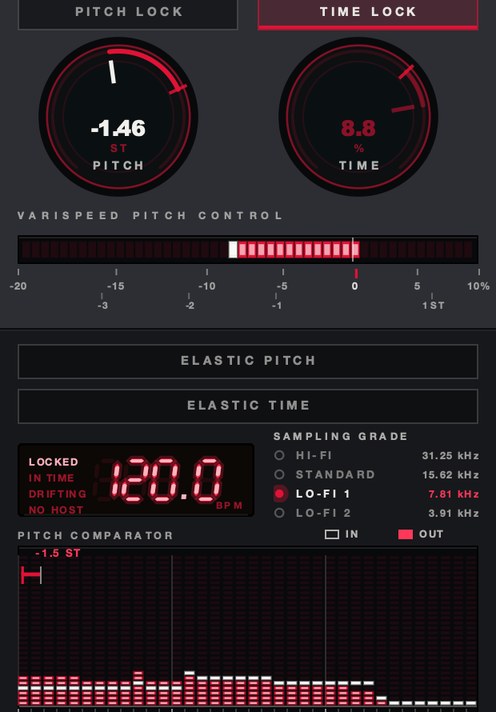
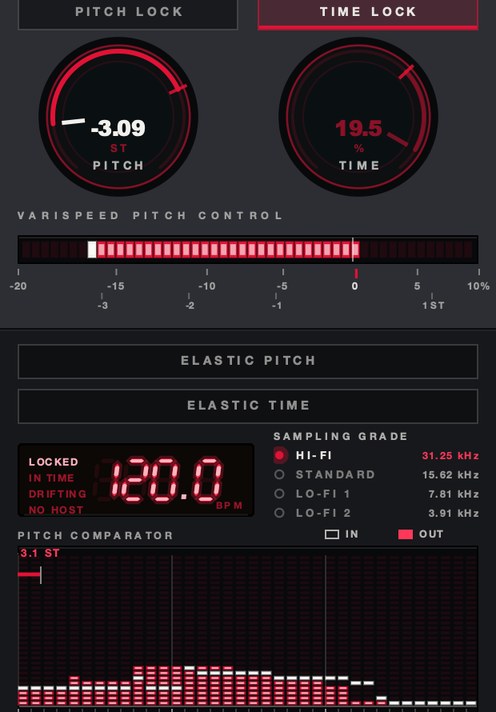
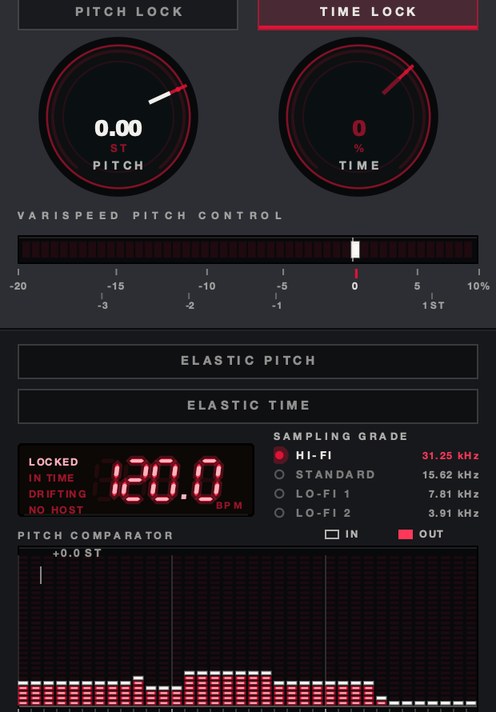
Hear the slowdown
Before any of the arithmetic, hear what a percentage does. One loop at three speeds, then the same slowed pass with the sampling rate stepped down. The figures are the renderer's own readout, and the move on the second file is smaller than any screw you would actually print.
One source loop, rendered offline through the same engine the plug-in runs, no other processing.
Where it comes from
DJ Screw (Robert Earl Davis Jr.) built the style mixing records on turntables with the speed turned way down, recording hours-long mixes onto tapes that spread across Houston and through his crew, the Screwed Up Click. On the North Side, Michael "5000" Watts and OG Ron C took the idea in their own direction, and chopped-and-screwed remixes became a standard way to hear Southern rap. The sound is patient on purpose: you're meant to ride with it, slowly.
The dates matter, because they tell you the technique arrived before the tools did. Davis was born in Smithville, Texas in July 1971 and started DJing at twelve, in 1983. The slowed mixes begin in 1990 and become the main work in late 1991 and early 1992. He made them for friends first and sold the first one for ten dollars. By the time he died in Houston in November 2000, at twenty-nine, he had released over 350 mixtapes. Nothing in that sentence involves a plugin.
The vocabulary split early and never healed. Watts, on the North Side, credits Davis as the originator and still says "screwed and chopped" rather than "chopped and screwed" — same operation, two word orders, two sides of one city. OG Ron C went on to co-found Swishahouse Records and later the Chopstars, who label their work ChopNotSlop, a name that is itself an argument about how much care a chop is supposed to take. In 2011 the University of Houston Libraries acquired over a thousand albums Davis owned, and put them in front of researchers in 2013. The record collection became a research collection. That is how thoroughly this went from a house on the South Side to the whole language.
Screwing: the slowdown
The slowdown has to move the pitch with it, which is why it's done with speed, not time stretching. Voices drop into a heavy, dragging register, 808s turn to rolling thunder, and the song feels like it's melting. How slow is a feel decision; go until the vocal is deep and heavy but the words still come through. The mechanics are in what is varispeed.
There is a target, though, and it is narrower than most people guess. The screwed tempo sits around 60 to 70 quarter-note beats per minute, which is close to a resting pulse and is the reason the music feels like it is happening inside your own chest rather than in front of you. Work backward from that number instead of turning a knob until it sounds nice. An 84 bpm song has to run at 75% to land on 63. A 96 bpm song needs 68% to land on 65. A 72 bpm song only needs 90%, which is a screw so light you will be tempted to go further, and going further is how the vocal stops being a vocal.
How much pitch a slowdown costs
Speed and pitch are locked by one ratio, and the ratio is not gentle. Halving the speed is exactly twelve semitones down, and one semitone is a speed change of about 6%. So 85% speed is 2.8 semitones down, 80% is 3.9, 75% is 5.0 almost exactly, and 70% is 6.2. Screwing a song from 84 bpm to 63 does not "darken" it. It moves every note in it down a perfect fourth, which means a track in A minor comes out in E minor and anything you play over it has to know that.
Everything moves by the same factor, which is what keeps it convincing. At 75% a 440 Hz A lands on 330. A 200 Hz bass note lands on 150. An 8 kHz hi-hat lands on 6 kHz, and a 12 kHz cymbal shimmer lands on 9, which is the whole reason a screwed record sounds like it is under a blanket: the air is still there, it has just been carried down into the region where a phone speaker gives up. A 1.2-second reverb tail in the original becomes 1.6 seconds. The room the song was recorded in gets bigger, and nobody asked it to.
Length goes the same way, and it is the number people forget until the bounce is done. A three-minute song at 75% runs four minutes exactly. At 70% it runs 4:17. If you are screwing a whole tape, the running time of the thing you are making is a decision you already made when you picked the ratio.
Chopping: the repeats
Chopping is the performance. With two copies of the same record a beat apart, a DJ flips between them to repeat a word or a line, stutter a beat, or double a phrase for emphasis. The repeats land on the lyrics that matter, so chopping is also editing: it tells you which lines to listen to.
Stated plainly, a chop divides a phrase into smaller segments and puts them back in a different order. The segments are almost always musical lengths, and at screwed tempo those lengths are long enough to hear individually, which is exactly why the technique works down here and sounds like a glitch at 140 bpm. At 63 bpm a quarter note is 952 ms, an eighth is 476, a sixteenth is 238 and a thirty-second is 119. A stutter built from sixteenths at this tempo has four events a second. The same stutter at 140 bpm has nine, and nine is a machine.
SKRUU's PITCH moves speed and pitch together, with DRAG for a hand-on-the-platter slowdown.
The four chops, and what each one is for
There are not many moves, and they do different jobs. Learning them as four named things is faster than learning them as a feel.
- The double. Take a word or a half-bar and play it twice. One repeat, on the grid, right before the phrase carries on. This is the punctuation mark of the whole style and it is the one you will use most.
- The triple. The same segment three times. Three is the point at which the listener stops hearing an echo and starts hearing a decision, so save it for the line you want remembered.
- The stutter. A short segment, a sixteenth or a thirty-second, repeated four to eight times across a beat. It works on a consonant or a drum hit, and it fails on a sustained vowel, which turns into a siren.
- The throw-back. A backspin or a hard slowdown that lands on the downbeat of the next section. It is a transition, not a garnish, and one per section is plenty.
The rule underneath all four: chop on the transient, not near it. Cut a syllable at its attack and the repeat sounds deliberate. Cut it 30 ms early and you get a flam, which is the sound of an edit rather than the sound of a hand. At screwed tempo 30 ms is only 3% of a quarter note, and it is still audible, because your ear times drum attacks far more finely than it times melodies.
How to chop and screw a song in a DAW
- Import the track and slow it with varispeed or repitch until the vocal is deep and heavy.
- Set your project tempo to match the slowed track.
- Duplicate the track onto a second channel.
- Pick the lines you want to emphasize.
- Cut a word, beat or line from one copy and repeat it on the grid before the original continues.
- Add short stutters by repeating single beats two or three times.
- Use quick slowdowns or a backspin at section changes.
- Keep the edits musical and on the beat; the groove never rushes.
- Put a 5 to 10 ms fade on both sides of every cut.
- Offset the second copy by one beat so the repeat is already lined up before you edit.
- Mute the original underneath any chop so two copies never play the same words at once.
- Bounce the chopped pass to a single file before you mix it.
A worked example, with the numbers
Take a song at 84 bpm, three minutes long, in A minor. You want it at 63.
63 divided by 84 is 0.75, so the speed is 75%, the pitch drops 5.0 semitones and the key comes out E minor. The length goes to 4:00. Set the project to 63 bpm and the slowed file now agrees with the grid, which means every chop you draw is on a real subdivision instead of on a guess. A bar is 3.81 seconds. A beat is 952 ms. Duplicate the channel and slide the copy 952 ms later, and the second channel is now permanently one beat behind the first, which is the DAW version of two records a beat apart.
Now find the hook. Say the vocal lands "ride slow" across beats 3 and 4 of bar 9. Cut the word "slow" out of the delayed copy, drop it on beat 4 of bar 9 and again on beat 1 of bar 10, and mute the original underneath both. That is a double. Then take the last 238 ms of the word, repeat it four times across beat 2 of bar 10, and you have a stutter that ends on the downbeat of beat 3 with the original picking up cleanly. Twelve edits, fades on all of them, and the whole move takes 7.6 seconds of finished music.
Where the screw goes in the chain
Order is not a preference here. The speed change has to come first, because everything downstream inherits its tempo, its key and its spectrum, and anything you tune before the slowdown gets untuned by it. Screw, print, set the tempo, chop, then mix.
That gives you four stages and one rule each. Screw: one ratio for the whole song, decided against the target tempo. Print: bounce the slowed pass to audio so the edits cut into a file and not into a live process. Chop: edits only, no tone moves. Mix: everything else, on the chopped bounce.
Saturation and tape tone go in the mix stage, after the chopping, and that ordering has a cost worth knowing: saturation sharpens edit points, so a chop that was inaudible on the dry bounce can start to tick once you drive it. If that happens, lengthen the fade rather than backing off the drive. For what the tone stage is actually doing, see how to use saturation and how to make music sound like cassette.
Per-DAW: where the speed control is hiding
Four of the five big hosts can screw a file natively, and all four put it somewhere different. None of them give you a knob you can ride.
Ableton Live. Set the clip's Warp Mode to Re-Pitch and the clip stops holding its pitch, so changing the Set tempo moves the key with it. It is a clip property, so it has to be chosen on every clip, and MIDI tracks ignore it entirely. Consolidate the slowed audio before you start chopping or the warp markers will fight your edits.
Logic Pro. Varispeed lives in the control bar, and it is global: it moves the whole project and cannot be drawn as a curve. Use the Varispeed (Speed and Pitch) mode, not Speed Only, because Speed Only pitch-shifts the output back and that is the opposite of a screw. Since it is a monitoring control, bounce in place before you chop.
FL Studio. Channel Settings, the Time stretching and pitch shifting panel, Mode set to Resample. That is the one mode that lets pitch follow speed; the others hold pitch while time moves. On an Audio Clip it means the clip re-keys whenever the project tempo changes, so set the tempo once and leave it.
Pro Tools. Varispeed is an Elastic Audio plug-in on the track rather than an insert, and it has no controls of its own. Pick Rendered Processing on a loaded session. Decide the track's algorithm before you edit, because a transposition applied earlier under another algorithm stays in the clip's metadata and comes back when you switch.
GarageBand. No varispeed at all. The Transpose slider in the Audio Editor is pitch shifting — the region keeps its length — which is the wrong operation. It hosts Audio Units, so an insert is the route. The full tour is in varispeed in every DAW.
How to check it before you commit
Four checks, in order, each of which takes under a minute.
- Tap the tempo on the bounced slowed pass. If it is not inside a beat of your project tempo, the ratio and the grid disagree and every chop after this is wrong.
- Solo the vocal and read along. If you cannot make out the consonants, you went too far; come back 3 to 5% and try again.
- Loop each chop on its own for eight bars. An edit that survives eight repeats will survive the song.
- Play the bounce on a phone speaker. The weight you added at 40 to 60 Hz will not be there, and what is left has to still feel slow. If it turns into a thin tapping sound, the problem is the low end, and how to make bass audible on phone speakers covers the fix.
Then check mono, because screwed material is played in cars and on single speakers more than most music, and a slowed stereo file has had its phase relationships moved down with everything else. See mono compatibility.
Failure modes, and what each one sounds like
Five things go wrong, and each has its own sound, so you can diagnose by ear.
A tick at every edit. The cut landed off a zero crossing. It sounds like a tiny dry click riding the top of the music, and it gets worse the more you saturate. Fades of 5 to 10 ms on both sides fix it without softening the attack.
A flam on the chop. Two attacks arriving a few milliseconds apart, heard as a doubled, smeared hit. Either the cut is early or the original underneath was not muted.
Mud. Slowing pushes a mix's whole energy distribution downward, and the 200 to 400 Hz region that was merely warm at full speed arrives as a wall. It sounds like the track is behind a door. Why is my mix muddy has the cleanup.
Sludge in the low end. Different problem, lower down. The 808 that was tight at 84 bpm now has a 40% longer tail and a fundamental five semitones lower, and consecutive notes overlap. It sounds like one continuous hum under the song. Shorten the tail before you reach for EQ; how to make 808s hit harder is the companion here.
A vocal that has stopped being words. Consonants are short, high-frequency events, and both of those work against you in a slowdown. When the sibilants have turned into soft smears and the plosives have turned into thuds, no amount of EQ brings the sentence back. The only fix is less screw.
Keep it heavy
A slowed track loses energy in the top end and can turn muddy. A little low-mid cleanup and some saturation on the drums and 808 keep the weight from turning to sludge; see how to make 808s hit harder. For the reverb-heavy internet cousin of the style, see how to make slowed and reverb.
Concretely: a narrow cut of 2 to 3 dB somewhere between 200 and 400 Hz buys back more clarity on a screwed mix than anything you can do at the top, because that is where the slowdown deposited material that used to sit higher. Then add the top back as harmonics rather than as EQ. Saturating the drum bus generates new content above the band the slowdown emptied, which is a different thing from lifting a shelf over air that is no longer there. Keep the saturation on the drums and the low end and off the vocal, which has already lost enough definition. How to saturate drums and parallel saturation both apply, and parallel is the safer of the two here because it leaves the dry weight untouched.
What it costs
Every part of this is a trade, and the trades are large. The running time grows by the inverse of the ratio, so a 75% screw makes a fourteen-track album eighteen tracks long in minutes. The key moves, which means any new part you write has to be written in the new key, not the old one. Intelligibility drops, and on a lyric-driven record that is the actual budget you are spending. The top octave leaves and does not come back. And once the chops are printed the arrangement is fixed, because a chop is an edit in time and there is no undoing it later with a knob.
Against that: it costs almost nothing in processing, it invents no material, and every artifact it has is an artifact of reading the same samples at a different rate. Nothing is being reconstructed, so nothing can be reconstructed badly. That is the reason the technique aged the way it did while more sophisticated time processing from the same years sounds dated.
Questions people ask
How is chopped and screwed music made?
By slowing a song down so the pitch drops heavily ("screwing"), then repeating and stuttering parts of it ("chopping"), originally by mixing between two copies of the same record on turntables.
Who invented chopped and screwed?
DJ Screw, from Houston, developed the style in the early 1990s through his screw tapes. Michael "5000" Watts and OG Ron C helped spread chopped-and-screwed remixes further.
What's the difference between chopped and screwed and slowed and reverb?
Chopped and screwed slows the song and adds DJ-style repeats and stutters. Slowed and reverb slows the song and adds a long, heavy reverb, usually without the chopping.
What BPM is chopped and screwed?
Around 60 to 70 quarter-note beats per minute. Work backward from that: divide the target tempo by the original tempo and the answer is the speed ratio you need.
How much do you slow a song down to screw it?
Usually to somewhere between 70% and 85% of the original speed, depending on where the song started. 85% is 2.8 semitones down, 80% is 3.9, 75% is 5.0 and 70% is 6.2.
Is it chopped and screwed or screwed and chopped?
Both, and the difference is geographic rather than technical. Michael "5000" Watts, who carried the style to Houston's North Side, credits DJ Screw as the originator and uses "screwed and chopped".
What key does a song end up in after you screw it?
Lower by however many semitones the speed ratio implies. At 75% speed everything drops five semitones, so A minor becomes E minor. Anything you play over the screwed version has to be in the new key.
Can you chop and screw a song in Ableton?
Yes. Set the clip's Warp Mode to Re-Pitch so pitch follows tempo, set the Set tempo to your target, consolidate the clip, then duplicate the track and cut between the two copies.
Do you need two turntables to chop and screw?
No. Two copies of the same audio on two channels, offset by one beat, does the same job, and the grid makes the repeats land exactly where a hand was aiming.
Why does my chopped and screwed track sound muddy?
Because the slowdown moved everything down into the low mids. Cut 2 to 3 dB somewhere between 200 and 400 Hz, shorten the 808 tails, and add the top back as saturation rather than as EQ.
Why do my chops click?
The edits are landing off a zero crossing. Put a 5 to 10 ms fade on both sides of every cut. If the ticking only appears after saturation, lengthen the fades rather than lowering the drive.
What is ChopNotSlop?
The name the Chopstars collective, co-founded by OG Ron C, gives their chopped remixes. Ron C also co-founded Swishahouse Records, and the collective has worked on official chopped versions with artists including Brent Faiyaz and Don Toliver.
What SKRUU does
SKRUU is our varispeed pitch and time stretch plugin. PITCH runs from −20% to +10%, moving speed and pitch together and reading out in semitones. DRAG sets how long a new speed takes to arrive: at the floor it's instant, turned up it's a hand on the platter. TIME moves the length on its own, and ELASTIC springs a move back along one of sixteen shapes, including DRUNK, LURCH and CREEP.
For this job it does two separate things, and it helps to keep them apart. The whole-song screw is a ratio you decide once, and PITCH covers the first 20% of it; for a drop deeper than that, screw the file in the host and use PITCH for the ride on top of it. The ride is the other thing, and it is the part a static ratio cannot do: a dip into the downbeat, a backspin at a section change, a slur under one line. Turn PITCH down with DRAG up and the speed arrives like a hand rather than a jump. With ELASTIC on, let go and it runs home along the SLOPE you chose, so the throw-back is a gesture you perform once instead of an automation curve you draw. SAMPLING GRADE steps the rate down underneath all of it, with LO-FI 2 at 3.9 kHz, which is the furthest the tape ever got from the record. VST3, AU and standalone, Mac and Windows, $29.
The gray tapes are collector's items now. The syrup never stopped pouring.
SKRUU — varispeed pitch and time stretch for Mac and Windows. Pitch and time move independently, with sixteen elastic return shapes.
Keep reading
- How to make slowed and reverb — Slow it with varispeed, add a long dark reverb, and make sped-up versions too.
- What is varispeed — Speed and pitch together: the math, how it differs from pitch shifting, and how it's used.
- How to pitch a sample — Find the key, repitch or pitch shift, pitch the chops, and automate for movement.
- Varispeed plugin: which one, and how to choose — What the rate control has to do, how to test one, and the free options worth downloading.
- Varispeed in every DAW — What each DAW has built in, where the setting hides, and when a plugin wins.
- Best slowed and reverb plugins — Why it takes two plugins, which ones, and the settings that make it work.