← Gazillion Industries/Reading material
How to make music sound like a cassette tape
In 1982 Bruce Springsteen recorded demos for Nebraska at home on a four-track cassette recorder, and the demos were the album. The studio versions couldn't beat the tape. Cassette has been making ordinary rooms sound like somewhere more honest ever since.
To make music sound like a cassette tape, recreate what the format does: roll off the high end and the deepest lows, add gentle tape-style saturation, a steady hiss bed, slow wow and faster flutter, a slight mismatch between the left and right channels, and the occasional dropout. Keep each move subtle. Or simply record to a real cassette and back, which does all of it at once.
The short version
- Tone
- softer highs, trimmed lows
- Saturation
- gentle, rounded peaks
- Hiss
- a quiet broadband bed
- Wow and flutter
- slow drift, fast tremble
- Stereo
- slightly mismatched channels
- Dropouts
- rare, brief dips in level
Why cassettes sound like cassettes
A cassette runs its tape at 1⅞ inches per second on narrow tracks, a fraction of what studio machines use. Less tape per second means less room for the signal: the high end softens, noise rises, and loud peaks saturate and round off early. The small mechanism adds speed wobble, the heads rarely line up perfectly so the channels drift apart in level and timing, and worn tape produces brief dropouts. Every one of those is part of the sound.
The numbers behind the format
A cassette moves 4.76 centimeters of tape past the head every second. A studio machine at 15 inches per second moves eight times that, and at 30 inches per second, sixteen. Thirty minutes a side works out to roughly 86 meters of tape. The tape itself is 3.81 mm wide and carries four tracks, two in each direction, so one channel gets under a millimeter of width to live in.
That budget explains everything else. At 4.76 cm/s a 15 kHz tone is written as a magnetic pattern about three microns long, the length of a bacterium, and the head gap and the oxide particles are in the same neighborhood. A 100 Hz tone gets half a millimeter of tape to itself. The high end is the first thing the format cannot hold, and the rest of the character follows from the same shortage.
Narrow tracks also put the noise floor closer to the music, which is why hiss is a cassette signature and not a reel-to-reel one. And a small spring-loaded mechanism pulling tape through a pinch roller cannot hold speed the way a heavy studio transport can. See how a tape machine works for the transport, and tape speed for what changing it does to pitch.
How to make music sound like a cassette tape
- Low-pass the track to soften the top end, and high-pass away the deepest lows.
- Add gentle saturation so peaks round off.
- Add a quiet hiss bed underneath.
- Add slow wow and a little flutter.
- Make the left and right channels slightly different in level and brightness.
- Add an occasional short dip in level for a dropout.
- Compare with the original at matched loudness and pull back anything that sounds like an effect.
The same moves, with numbers on them
Those seven are the shape. Here are opening positions for each one, in units you can dial. They are starting points rather than settings, because the right value depends on how bright the source already is and how loud it will end up.
- Low-pass at 12 kHz, 12 dB per octave, then sweep between 10 and 16 kHz.
- High-pass at 50 Hz, 12 dB per octave.
- Drive until the loudest hits peak 1 to 3 dB lower than they did dry, then match the level back.
- Set the hiss between −65 and −55 dBFS RMS with the music muted.
- Set wow near 0.7 Hz at 3 to 8 cents of depth.
- Add flutter near 8 Hz at 1 to 3 cents.
- Delay one channel by one to three samples, drop it 0.3 to 0.8 dB, and shelve it slightly darker.
- Place one or two dropouts a minute, 40 to 150 ms long and 2 to 4 dB deep, off the downbeat.
Do them in that order and stop after each one to check that the mix still reads. Seven small moves that each sound like nothing add up to a mix that sounds like a different decade; seven moves that each sound like something add up to a novelty.
Wow and flutter, in cents
Pitch wobble is a speed change, and speed changes are easier to aim in cents than in percent. A 6 percent speed increase is almost exactly one semitone. That gives you the conversion: 0.1 percent is 1.7 cents, 0.5 percent is 8.6 cents, and 1 percent is 17.2 cents, which on a sustained pad is already more than you want.
If you have no pitch-modulation tool, a delay will do it. Moving a delay time changes pitch while it moves, and a delay swinging by A seconds at f hertz produces a peak speed deviation of 2πfA. So a delay in free time, swung ±1 ms at 1 Hz, gives 0.63 percent, or 10.8 cents. Run it backward to aim: 5 cents of wow at 0.7 Hz needs a swing of ±0.66 ms.
One sine is the mistake everybody makes. Your ear finds a fixed period inside two cycles and files the result under chorus. Run two or three motions at rates that share no factor — 0.4 Hz, 1.1 Hz and 7.3 Hz, say — so nothing repeats inside a bar. Wow and flutter goes into the difference at length.
Depth depends on what is under it. Pads, keys, guitars and chopped samples take 8 to 15 cents and sound better for it. A lead vocal holds 3 to 5 cents before it reads as a bad take. Bass and 808s stay under 2 cents or stay off the effect, because a sub drifting against a kick sounds out of tune rather than old.
Setting the hiss bed
Meter the hiss instead of guessing it. Mute everything except the noise, put a meter on the bus and read the RMS. Somewhere between −65 and −55 dBFS sits under a loud mix and stays audible in a gap. Then unmute and find the quietest bar in the song, because that bar is where a listener decides whether the noise is character or a fault.
Filter the noise before you set its level. Raw white noise is brighter than any tape ever was and it goes straight for the cymbals. High-pass it near 800 Hz so it stops crowding the low mids, and low-pass it at the same corner you used on the music, so the noise and the program lose their top end together.
The expensive mistake is putting it on every channel. Uncorrelated noise sums by power, so eight tracks carrying the same hiss bed land 9 dB louder than one, and sixteen land 12 dB louder. Print it once, on the bus that feeds the master. Tape hiss covers removing it as well as adding it.
The two channels should not match
Azimuth is the angle of the head gap across the tape, and it is the reason no two decks agree. The gap is supposed to stand square to the tape path. When it tilts, one channel reaches the gap slightly ahead of the other, and the pair arrives at the amplifier out of step.
The arithmetic is small and the result is not. Four tracks divide 3.81 mm of tape, so the two channels of a stereo pair sit a little under a millimeter apart. Tilt the gap a tenth of a degree and the path length between them differs by about 35 microseconds at 4.76 cm/s. Two channels 35 microseconds apart cancel first at 14 kHz. Three tenths of a degree drops that first cancellation to about 4.8 kHz, which is why a misaligned deck sounds hollow rather than simply quiet.
In a session, three small moves get most of it: delay one channel by one to three samples (22.7 microseconds each at 44.1 kHz), pull that channel down half a decibel, and shelve it a little darker. Then check in mono, because you have just built a comb filter on purpose. See mono compatibility and phase cancellation.
The details that sell it
The top end and the wobble do most of the work; hiss and dropouts sell it. Keep the wobble irregular rather than a steady sine, which just sounds like chorus. See wow and flutter and tape hiss. And don't forget saturation: cassette doesn't only lose detail, it squashes a little, which is part of why cassette mixes feel glued.
TRIPLE OG is a cassette transport in a plugin: tone, hiss, age, drive, wow and flutter. There's a demo on the page.
Where the chain goes
Put the moves in the order the machine puts them. Drive happens on the way to the tape, so saturation comes first, then the tone loss, then the noise the tape carries, then the transport wobble, then the head mismatch, then dropouts. The hiss belongs after the drive: noise generated by the tape never went through the record amplifier, and saturating a hiss bed turns it into distortion instead of air.
Run the whole chain on the mix bus or on one stem bus rather than on thirty channels. Reverb goes before it, because a tape captured a room instead of adding one afterward. Anything that measures pitch goes before it too — tuning correction and time stretching placed downstream of a wobble spend the whole song chasing it.
Watch what sits after. A limiter on the master pulls the hiss up every time the music gets out of the way, so the gaps get noisier as the master gets louder. And saturation generates harmonics above 22.05 kHz in a 44.1 kHz session, which fold back down as tones that were never played. See oversampling and aliasing.
Doing it in Ableton Live, Logic Pro and FL Studio
All three ship enough stock devices to build the whole chain by hand. What differs is which device handles the awkward parts, and there is one trap common to all of them.
Ableton Live. EQ Eight for the low-pass and high-pass, Saturator for the drive, Utility for channel level and width. For the wobble, put Delay after the source, switch its time off sync so it reads in milliseconds, and drive that time from an LFO. Freeze and flatten the track to commit the result before you mix around it. Tape plugins for Ableton Live has more.
Logic Pro. Channel EQ for tone, Overdrive or Clip Distortion for the drive, Gain for level and channel trim. Logic has one device that makes the head mismatch trivial: Sample Delay sets a per-channel offset in samples, so the whole azimuth move above is one plugin and two numbers. See tape plugins for Logic Pro.
FL Studio. Fruity Parametric EQ 2 for both filters, Fruity Soft Clipper for the drive, Fruity Balance for the channel trim. Automation clips are the strength here: draw the wow by hand as a slow, uneven curve on a delay-time or pitch parameter and you get irregular motion without stacking three LFOs. Tape plugins for FL Studio covers the rest.
The trap is tempo sync. A delay left on note values wobbles in time with the track, and a wobble locked to the grid reads as an effect you switched on. Take every modulation source off sync and give each one a rate with no musical relationship to the tempo.
How to check it worked
- Match loudness within 0.5 dB, then bypass and compare.
- Send a 1 kHz sine through the chain and watch a tuner.
- Mute the music, meter the hiss alone, then listen to the quietest bar.
- Sum to mono and listen for the top end thinning.
- Play it on a phone speaker.
- Bounce a 128 kbps file and listen to the noise floor.
The sine test is the one people skip and the one that ends arguments. A tuner reads the wobble in the same unit you set it in, so ten seconds tells you whether the 5 cents you dialed is 5 cents or 40. Drums, cymbals and reverb tails all hide pitch movement from your ears. A steady tone hides nothing.
The 128 kbps bounce matters because noise is expensive to encode. A lossy encoder spends bits describing a broadband hiss bed that it could have spent on the music, and a hiss that sounded like air at full resolution can come back swirling. Find that out before the master leaves your room, not after.
Six ways it goes wrong
It sounds like chorus. One modulation source at one rate. Add a second and a third at unrelated rates, and cut the depth of all three.
It sounds like a blanket. The low-pass went too far, or it landed on a mix that was already dark. Cassette softens the top end and does not remove it. Put the corner back up to 14 or 16 kHz and take the brightness out with saturation instead.
The hiss will not leave. You set it against a loud chorus. Set it against the intro.
Everything sounds better and nothing changed. The saturation added level, and louder reads as better for about four seconds. Match and listen again; gain staging is the boring fix.
It collapses in mono. The channel offset is too large, or something widened the mix after it. Reduce the delay to one sample and check again.
The bass is out of tune. Wow is reaching the low end. Split the sub off, run the chain on everything above it, and bring the sub back clean.
What it costs you
All of it is one-way once you print it. The top end you filtered is gone, the hiss is in the master, and a client who asks for a brighter vocal next week is asking you to rebuild the chain around a different mix. Keep the clean bounce.
The hiss is the part that keeps coming back. It survives every stage after it, it rises whenever the music gets out of the way, it costs bits in a lossy encode, and it is the first thing a mastering engineer will ask about. That is the price of the glue. It is usually worth paying, and you should pay it knowingly.
Wow costs you tuning. Anything sustained and pitched argues with anything sustained and pitched beside it, and two parts wobbling independently sound less like a tape and more like a fault. Saturation costs headroom and processing, and an oversampled stage on every channel adds up fast on a laptop, which is the practical argument for keeping the chain on a bus.
Or use a real cassette
Recording a mix to a cassette deck and back is the most honest version and still surprisingly easy. Records like Nebraska and Daniel Johnston's home-taped albums are proof that the format's limits can be the character of the work. Even some modern samplers ship a cassette simulation, because producers keep asking for the sound.
The hybrid is usually the best of it. Print the drums and the sample to tape and bring them back, then keep the vocal and the sub clean in the box, so the mix carries the wobble and the noise where they flatter it and stays steady where they would hurt. Four-track recording covers doing it while you write rather than afterward.
Hear it
Six paragraphs of description are worth one loop. Here are the three moves on their own, and then a deck that has all of them at once.
The same eleven seconds each time, rendered offline through TRIPLE OG at the settings shown. No other processing, no master bus, no edits.
Questions people ask
How do cassette tapes make sound?
Sound is stored as magnetic patterns on the tape. During playback, the tape passes the playback head, and the changing magnetic field induces a small electrical signal that's amplified back into sound.
Why do cassettes sound warm?
Mostly because they soften the high end and gently saturate loud peaks, which rounds off harshness, plus a little speed wobble and noise that make the sound feel less clinical.
How do I make vocals sound like an old tape?
Roll off the highs and lows, add gentle saturation, a little wow and flutter and a quiet hiss bed, and make the vocal slightly narrower. Keep the effects subtle so the words stay clear.
What plugin makes music sound like a cassette?
Any cassette or tape simulation that puts tone, saturation, noise and speed instability in one place will do it, and most producers reach for one rather than wiring six devices together. Best cassette plugins lays out the field.
How do I make a cassette effect in Ableton?
EQ Eight for the filters, Saturator for the drive, a noise sample for the hiss, and Delay with its time off sync and an LFO on it for the wobble. Put all four on one bus rather than on every track.
Why does my tape plugin sound like chorus?
Because the pitch is moving at one steady rate. A single sine at a fixed depth is vibrato, and the ear identifies the period almost at once. Lower the depth and add a second, slower motion at an unrelated rate.
How much hiss should I add?
Enough to hear in the gaps and not in the choruses. Meter it with the music muted, aim between −65 and −55 dBFS RMS, and judge it against the quietest bar of the song rather than the loudest.
Should the cassette effect go on the master or on each track?
On a bus. A real deck ran the whole mix at once, and per-channel copies stack the hiss and multiply the processing cost for nothing.
What frequency does a cassette cut off at?
There is no single number. It depends on the tape, the deck and how hard the recording was pushed. Treat 10 to 16 kHz as the useful range for the filter and choose by ear against the source.
How do I make a beat sound like a cassette without plugins?
Record it to a deck and back, which does every part of it in one pass. How to record to cassette has the connections and the levels.
What is the difference between cassette and vinyl sound?
Cassette gives you a steady hiss bed, a soft top end and slow pitch drift. A record gives you crackle, clicks and surface noise, with drift tied to the platter instead: an off-center record at 33⅓ rpm sways at 0.56 Hz, and at 45 rpm at 0.75 Hz. See vinyl sim plugins.
Does an old tape sound different from a new one?
Yes. Oxide sheds, the top end goes first, dropouts get more frequent, and a badly stored reel can print one layer through to the next. That is the direction an age control moves in: darker, noisier and less steady, all at once.
Why does my cassette effect disappear on phone speakers?
A phone speaker gives you next to nothing below a few hundred hertz and rolls off early at the top, so a chain living in the bottom octave and the last octave has nothing left to show. Keep some character in the mids — the saturation and the dropouts survive a small speaker, the sub filter and the 16 kHz shelf do not.
How do I make a whole beat sound like it is playing on a tape in another room?
Do the cassette chain first, then put the result through a filter and a short, dark reverb, and let the reverb be the only thing that reaches you. Music that sounds like another room has the specific moves.
What TRIPLE OG does
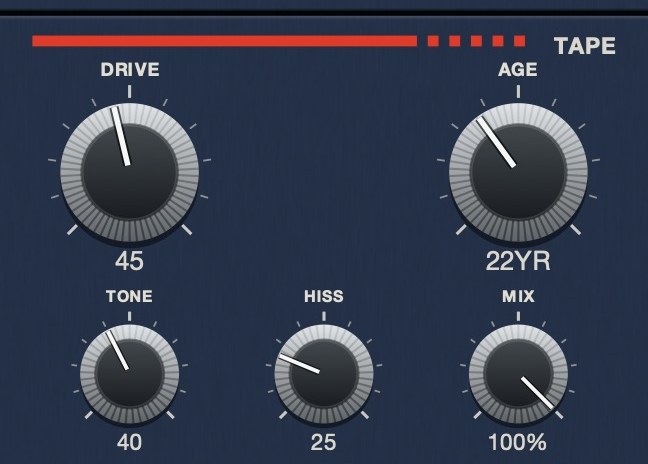
TRIPLE OG is our cassette tape simulation, a cassette transport rather than a single effect. TONE is the playback system's brightness. HISS is a broadband bed. AGE runs from nought to sixty years, darker, noisier, slightly more saturated, less speed-stable and less matched left to right, all on one knob. DRIVE is soft asymmetric saturation that gets dirtier without getting louder. WOW FLUT and CATCH make the transport drift and jam, SCRUB drags the head back by hand, and SLAM stops the tape.
It runs on Mac and Windows as AU, VST3 and standalone, and it is $39. Everything above sits on one panel in the order the machine puts it, which is the argument for a transport over a rack of six devices: you stop building the chain and start playing it.
Springsteen's four-track didn't sound expensive. It sounded true, and that's what people are still chasing.
“Most tape plugins treat the transport as something to model quietly in the background, but this one hands it to you as an instrument.”
TRIPLE OG — cassette tape simulation for Mac and Windows, with a transport that drags, jams and sprints to catch up. There is a demo on the page.
Mac · Winmore info
Keep reading
- Wow and flutter — What causes them, what they sound like, and how to add them on purpose.
- Tape hiss — Where it comes from, how to reduce it cleanly, and how to add it on purpose.
- The SP-404 and the sound of Los Angeles — How a cheap sampler its makers underestimated became the instrument of LA's beat scene.
- Four-track recording on cassette — Four tracks on one cassette, bouncing, and what each generation costs.
- Best tape plugins for drums — Why drums show tape more than anything else, and where to put it.
- Best cassette plugins — What makes a cassette sound like a cassette, and what the field costs.
- Best lofi tape plugins — Mastering tape and lofi tape want opposite settings. Which to invert.
- Best lofi plugins — The four jobs a lofi chain needs, and what to buy first.
- Best tape plugins for vocals — Why a voice shows tape differently, and how low to set it.
- Why old Memphis rap tapes sound so distorted and blown out — The sound came from the medium and the method: cheap gear, mixed loud to cassette, then dubbed tape to tape for sale. Each generation added noise, lost top end and squashed the peaks further. A history of the format, and the settings that get there now.
- How to make phonk drums sound like a cassette dub — Cowbell tuning, a wrecked 808, and the second-generation copy on top.