← Gazillion Industries/Reading material
Tape plugins for Ableton Live
Gazillion Industries · · updated
Live gives you a lot of ways to damage a sound and no way to slow
one down. Roar, Saturator and Erosion between them cover saturation and degradation
thoroughly, and none of them is a tape machine, because none of them touches the one thing
tape does that nothing else does: speed.
So the thing you load is
TRIPLE OG,
our cassette tape simulation, $29, as VST3 on Windows and macOS and as an Audio Unit on a
Mac. WOW FLUT is the speed instability, HISS the noise
bed, and SLAM, SCRUB and CATCH put the
transport on the face, playable while the set runs.
The short version
- Load this
- TRIPLE OG, $29 — speed, cassette noise, a transport
- Spend nothing first
- DRUGS is free and loads in Live; a drum bus compressor, not tape
- Live covers
- saturation, distortion, degradation, bitcrushing
- Live does not cover
- speed instability, tape noise, a transport
- Roar
- Live 12's coloring and saturation device
- Warping is not tape
- it holds pitch by design; tape does not
- Formats
- VST3 on both platforms, AU on macOS
- Where
- on the drum group, after the glue, before the mix bus
Where TRIPLE OG goes in a Live set
On a group, not the master. Select the drum tracks, press Cmd-G on a Mac or Ctrl-G on
Windows, and put the tape in the group's device chain so any instability moves the whole
kit together. Match the level before you judge it, because a tape path running a decibel
hot always sounds better for the wrong reason.
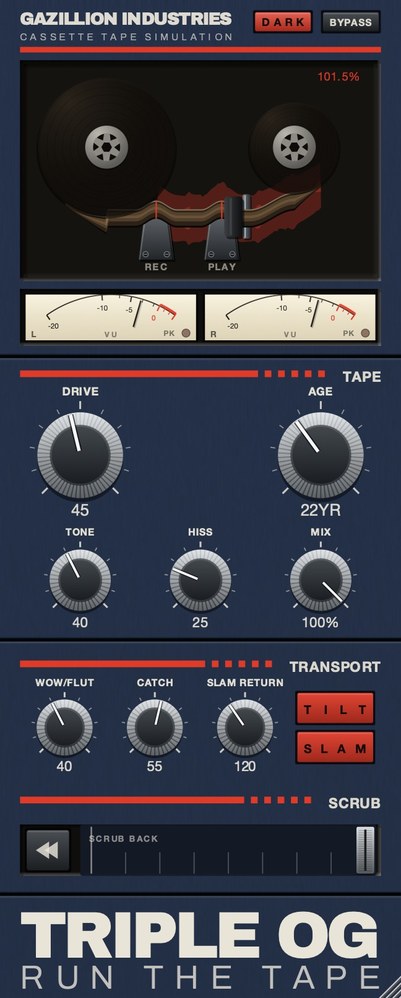 Top half is the machine, bottom half is the tape, and the SCRUB strip
along the bottom is played by hand.
Top half is the machine, bottom half is the tape, and the SCRUB strip
along the bottom is played by hand.
- Drop it on the drum group, after whatever glues the kit together
and before the mix bus.
- Set DRIVE for thickness. Stop at the point where the break stops
sounding thin.
- Bring AGE up to about 15 years. Go further only when you want the
wear to be audible on its own.
- Set HISS against the quietest bar in the arrangement, not against a
looped bar.
- Add WOW FLUT last, and check the most tonal element in the set for
tuning before you commit.
- Hold SLAM through the last beat of a bar and let go.
- Put Utility at the end and trim it to match loudness before you
A-B.
WOW FLUT is where the number matters. In the render below, set to 65, playback speed
moves between 0.941 and 1.071 of nominal — 105 cents flat to 119 cents sharp, a swing
of more than two semitones peak to peak. On a drum break that reads as a machine. On a held
chord it reads as bad tuning, which is the cost, and it is why the tonal parts get checked
before the drums do.
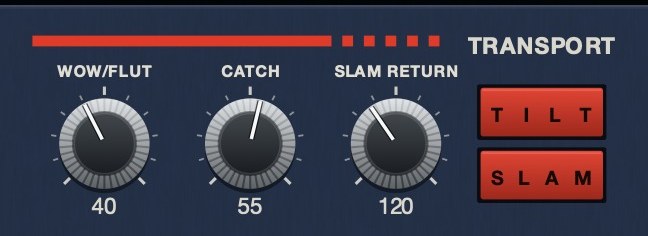 The machine rather than the tape. SLAM is a stop you press,
SLAM RETURN sets how long it takes to fall, and CATCH is the drag and the
sprint back.
The machine rather than the tape. SLAM is a stop you press,
SLAM RETURN sets how long it takes to fall, and CATCH is the drag and the
sprint back.
Hear it
Same eleven seconds three times: clean, then the speed moving on its own, then a worn
deck with the noise bed under it.
Dry — no processing — speed holds at 1.000
Wow and flutter 65 — speed moves between 0.941 and 1.071
Age 35, hiss 45, drive 30, wow 40 — a worn deck — speed 0.951 to 1.059
Rendered offline through TRIPLE OG at the settings shown. No other processing, no master bus, no edits. Play them on a phone as well as on monitors; the speed movement survives a small speaker, and most of the harmonic work does not.
The part Live has no device for
Speed. Every behavior in Live's degradation set processes a signal arriving at the right
time; none of them changes when the signal arrives. Tape does, constantly and slightly.
There are three of these gaps, and TRIPLE OG is laid out along them.
- Speed instability. Nothing in Live's stock devices varies playback
speed slightly and continuously the way a transport does. That is
wow and flutter, and it is most of what
separates a bandwidth-limited noisy track from one that sounds like it came off a
cassette. On our panel it is WOW FLUT, composite instability rather than
one sine wave: slow drift and fast warble at unrelated rates.
- A cassette noise floor. Live has noise generators; a cassette needs
a filtered, level-matched, partly decorrelated bed that sits under the music rather than
on top of it. See tape hiss. Ours is
HISS, with AGE from nought to sixty years moving wear,
noise and stability together.
- A transport. Stopping, dragging, rewinding and coming back in sync.
See tape stop plugins.
SLAM, SCRUB and CATCH are three
separate controls for it, on the face rather than in a menu.
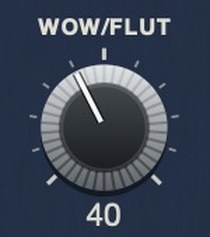 WOW/FLUT on TRIPLE OG is the one control on this page with no counterpart anywhere in Live's device set.
TRIPLE OG
loads in Live as VST3 on Windows and macOS, and as an Audio Unit on macOS, and it is $29.
WOW FLUT and the SLAM transport are the parts Live has no
device for. There's a demo on the page.
What Live already does well
Roar arrived in Live 12 as a coloring and saturation effect, with three
saturation stages that can be configured in series, parallel, mid/side or multiband, plus a
feedback generator and an extensive modulation matrix. It is a deep device and it is more
than enough saturation for a tape-adjacent sound.
Saturator was updated in the same version with a Bass Shaper curve and
a more focused interface. Erosion, Live's signal degradation device, was
revamped with real-time spectrum visualization and blending between sine and noise
modulation.
So if what you want from tape is harmonic thickening and a bit of grit, you already own
it, and reaching for a tape plugin to get saturation in Live is buying something you have.
Use Roar or Saturator for the harmonic half and put TRIPLE OG after it for the half they
leave alone. That ordering is also the honest case for the $29: the three behaviors Live
has none of, rather than more of the one it already gives you.
Warping is not varispeed
Live's warping is built to hold pitch while time changes, which is the opposite of what
a tape machine does. On tape, pitch and time are the same fact, because both come from how
fast the tape passes the head. Complex and Complex Pro are doing sophisticated work to
prevent exactly the artifact you want.
Repitch mode is the exception and it is the closest thing in Live to a tape behavior:
it lets pitch move with tempo the way a machine would. It is useful, and it is a clip
setting rather than a device, so it applies to the audio you warped rather than to the
signal on a bus. For speed as something you play on a bus, TRIPLE OG's transport is the
device answer here, and if you want the varispeed move itself as a control — pitch
and time dragged by hand, with a sprung return —
SKRUU
is ours for that job, $29. Background in
tape speed and pitch and
varispeed in Ableton Live.
A chain that works in Live
- Group the drums and work on the group, not on each channel, so any
instability moves the whole kit together.
- Glue first. Whatever settles the kit goes before the tape, so the
tape reacts to a kit that already sits together. Ours is
DRUGS,
free, one knob called DOSE with a GAIN and a soft ceiling on the way out.
- Saturation from Live. Roar or Saturator, set for thickness rather
than for grit.
- TRIPLE OG after it, for the bandwidth, the noise and the speed
movement. This is the only device in the chain doing something Live cannot.
- Utility at the end to match level before you A-B, because every
step here changes loudness and louder always wins an unmatched comparison.
- Check in mono with Utility, since noise and modulation that sound
wide can collapse.
Hear TRIPLE OG
Questions people ask
Does Ableton have a tape emulation plugin?
Not as such. Live has saturation and degradation devices — Roar, Saturator,
Erosion — which cover the harmonic side. It has no device for speed instability,
cassette noise or a tape transport, which is what a tape plugin gets bought for. Ours is
TRIPLE OG,
$29, VST3 and AU.
What is the best tape plugin for Ableton?
One that supplies what Live does not, rather than more saturation. Weight your choice
toward wow and flutter, a cassette-shaped noise floor and transport behavior, which is
exactly how TRIPLE OG is laid out: speed and noise on the tape half, three transport
controls on the machine half. Wider field in
best tape emulation plugins.
Does Ableton load VST3?
Yes, on Windows and macOS, and Audio Units on macOS as well. TRIPLE OG ships VST3 on
both and AU on Mac, plus a standalone app.
Can I get a tape stop in Live without a plugin?
You can approximate one by automating a warped clip's transposition, or by bouncing and
using Repitch. Neither gives you a stop you can play and neither returns to speed in sync
on its own. SLAM on TRIPLE OG does both, and SLAM RETURN
sets how long the fall takes.
Is there a free tape plugin for Ableton?
Our free one is DRUGS,
a one-knob drum bus compressor rather than a tape simulation, so it is the free way to get
one of ours into Live and not the free way to get tape. For what free tape actually gets
you, see best free tape plugins.
What TRIPLE OG does
TRIPLE OG
is our cassette tape simulation, $29, and in Live it is doing the half the stock devices
leave alone. WOW FLUT is the speed instability, HISS a
continuous broadband bed, and AGE runs from nought to sixty years, taking
wear, noise and stability together. TONE and DRIVE handle
brightness and thickness. The transport is on the face: SLAM stops the tape
and returns it in sync, SCRUB runs the head backward and springs home, and
CATCH makes it drag and sprint to catch up. VST3 on Windows 10 or later,
and on macOS 10.13 or later as VST3, Audio Unit and a standalone app.
Live will make anything sound damaged. It will not make anything sound late.
“Most tape plugins treat the transport as something to model quietly in the background, but this one hands it to you as an instrument.”
Best Tape Emulation Plugins · AudioColour.com
TRIPLE OG — cassette tape simulation for Mac and Windows, with a transport
that drags, jams and sprints to catch up. There is a demo on the page.
Hear it
Keep reading