← Gazillion Industries/Reading material
Tape plugins for FL Studio
Gazillion Industries · · updated
FL has more ways to wreck a signal than almost any other DAW, and
Distructor puts most of them in one window. What none of them does is change when the
audio arrives, which is the one behavior a tape machine has and a distortion rack does
not.
So the thing you load on top is
TRIPLE OG,
our cassette tape simulation, $29, shipping VST3 on Windows and macOS so FL finds it either
way. WOW FLUT is the speed instability, HISS the noise
bed, and SLAM, SCRUB and CATCH put the
transport under your hand while the pattern runs. FL has no stock device for any of the
three.
The short version
- Load this
- TRIPLE OG, VST3, $29 — speed, noise, transport
- Spend nothing first
- DRUGS is free and ships VST3; it glues a drum bus, not tape
- FL covers
- distortion, bitcrush, rate reduction, filters, cabinets
- FL does not cover
- speed instability, tape noise, a transport
- Distructor
- four slots, most of FL's distortion in one plug-in
- Soundgoodizer
- a maximizer front end for Maximus; loudness, not a medium
- Format
- VST3 on Windows and macOS; AU and standalone on macOS as well
- Windows install
- a zip you drop in your VST3 folder, then rescan in FL
- Common mistake
- stacking distortion to chase a tape sound
Where TRIPLE OG goes in the FL mixer
On a bus, not the master, and never per channel. Send every drum channel to one mixer
track and put the tape there, so the speed movement applies to the kit as a single object.
Speed that wanders independently on the kick and the hats reads as two machines rather than
one, and a listener hears the seam before they hear the tape.
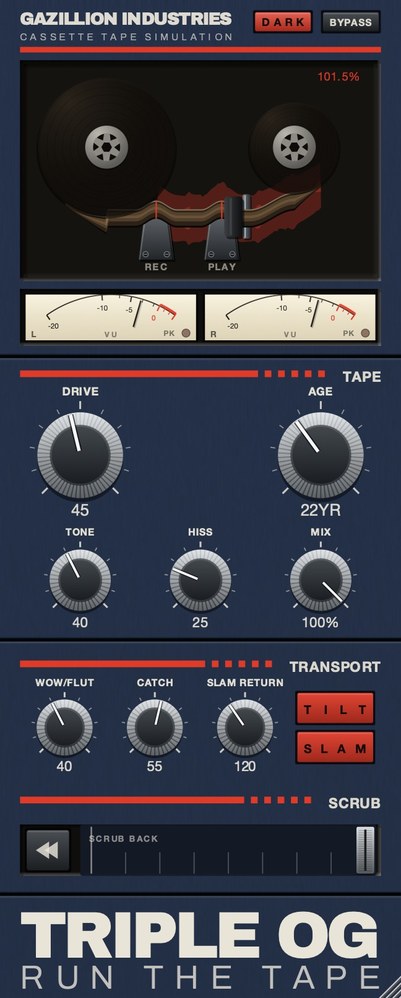 Top half is the machine, bottom half is the tape, and the SCRUB strip
along the bottom is played by hand.
Top half is the machine, bottom half is the tape, and the SCRUB strip
along the bottom is played by hand.
A chain that works in FL
- Put the whole kit on one mixer track and build the rack there, left
to right, in the order below.
- Distortion from FL, first in the rack. One Distructor with two
modules usually beats three separate plug-ins, and it is easier to level-match.
- Load TRIPLE OG in the next slot, for bandwidth, noise and the speed
movement.
- Set DRIVE for thickness. Stop at the point where the break stops
sounding thin. Level holds inside half a decibel from one end of that knob to the other,
so what you are judging is dirt and not volume.
- Bring AGE up to about 15 years. Go further only when you want the
wear to be audible on its own.
- Set HISS against the quietest bar in the song, not against a soloed
loop.
- Add WOW FLUT last, and check the most tonal element in the
arrangement for tuning before you commit.
- Hold SLAM through the last beat of a bar and let go.
- Match level on the mixer fader or Fruity Balance before you compare,
because every step changes loudness.
- Check in mono before you commit; modulated noise is the usual
casualty.
WOW FLUT is where the number matters. Set to 65, playback speed moves between 0.941 and
1.071 of nominal. Put those through the conversion and it is 105 cents flat to 119 cents
sharp, a swing of 224 cents peak to peak, more than two semitones. On a drum break that
reads as a machine. On a held chord it reads as bad tuning, which is the cost, and it is
why the tonal parts get checked before the drums do.
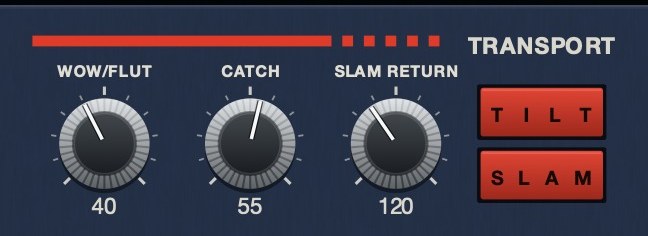 The machine rather than the tape. SLAM is a stop you press,
SLAM RETURN sets how long it takes to fall, and CATCH is the drag and the
sprint back.
The machine rather than the tape. SLAM is a stop you press,
SLAM RETURN sets how long it takes to fall, and CATCH is the drag and the
sprint back.
Hear it
The same eleven seconds three times: steady, then the speed wandering on its own, then
the transport giving up entirely.
Dry — no processing — speed holds at 1.000
Wow and flutter 65 — speed moves between 0.941 and 1.071
CATCH 100 — speed falls to 0.211 and sprints back to 1.854
Rendered offline through TRIPLE OG at the settings shown. No other processing, no master bus, no edits. The third file drops 2,694 cents and overshoots 1,069 cents the other way, a span of just over three octaves; the sprint runs close to nine times the speed of the drag. Play them on a phone as well as on monitors, because the speed movement survives a small speaker and most of the harmonic work does not.
What Distructor already gives you
Distructor is a modular plug-in with four slots. Image-Line describes it as taking the
distortion from Harmor, Blood Overdrive, Fast Dist and Soft Clipper, plus the bit and rate
reduction from Delay 3, then adding the filters from FLEX and the choruses from Delay 3,
all wrapped in speaker cabinets using Fruity Convolver. You can run four of the same module
or any combination, and there is a soft clip across the output of the whole rack.
That is a serious amount of damage available from one device, and it covers the
harmonic and digital halves of a lofi sound comfortably. If what you wanted from a tape
plug-in was grit, bitcrushing or a cabinet color, you own it already, and nothing we sell
replaces it. For the digital side specifically, see
bitcrushing explained. What that rack
leaves untouched is the next section, and it is the part people actually go shopping
for.
What it cannot do, and why
Every module in that list is a waveshaper, a filter or a convolution. All of them
transform a sample and hand it back at the same instant. A tape machine does not: it
stores the signal on something moving, and the speed of that something is never exactly
constant.
That is why stacking distortion never gets you to a cassette sound. You can make a
break as dirty as you like in Distructor and it will still sit rigidly on the grid, which
is the giveaway. The behavior you are missing is
wow and flutter, and there is no
combination of FL's stock effects that produces it. On our panel it is a single control,
WOW FLUT, built from several motions running at unrelated rates rather
than one sine, because one sine is a chorus and everybody hears it. The noise bed is
HISS, shaped and partly decorrelated across the channels rather than a
generator left running; see tape hiss. The
transport is three controls, on the face, playable while the pattern loops:
tape stop plugins covers why that
matters.
TRIPLE OG
loads in FL as VST3 on Windows and macOS, and it is $29. WOW FLUT and the
SLAM transport are the parts FL's stock set has nothing for. There's a
demo on the page.
Getting it into FL, and the one that costs nothing
On Windows, TRIPLE OG arrives as a zip you drop into your VST3 folder; there is no
installer yet. Point FL at that folder, rescan, and it turns up with the rest of your VST3
effects. Windows 10 or later, 64-bit. On macOS it installs as an Audio Unit and a VST3
alongside a standalone app, macOS 10.13 or later, a universal binary for Apple silicon and
Intel, so the same $29 covers whichever machine the session is on.
If you want one of ours in the FL mixer before spending anything,
DRUGS
is free: our one-knob bus compressor for drums, VST3 on Windows and macOS, a single
DOSE control with GAIN and a soft ceiling on the way out.
It handles the glue stage in front of the tape rather than the tape itself, it costs
nothing, and on a drum bus that makes it the sensible thing to put in slot one before you
buy a single plug-in. Where to set it is in
drum bus compressor settings.
Hear TRIPLE OG
Soundgoodizer is not a tape plug-in either
Image-Line calls it a stereo maximizer-enhancer built on the Maximus engine, and says
the big knob moves the same parameter as the LMH mix in Maximus: the blend between the
input and the low, medium and high compressor outputs. It will make a bus louder and
denser and it is genuinely useful for that. It has nothing to do with a medium, and using
it to chase a lofi sound gets you a loud modern mix.
The same applies to the reflex of putting a low-pass filter on everything. Bandwidth is
one quarter of a tape sound, and on its own it produces a muffled recording rather than an
old one. The full chain is in
how to make lofi beats, and the tape
quarter of that chain is
TRIPLE OG.
Questions people ask
Does FL Studio have a tape plugin?
No tape machine. It has distortion, bit and rate reduction, filters and cabinets, most
of which Distructor collects into one device. Speed instability and transport behavior are
not in the stock set, and that gap is what ours is built for:
TRIPLE OG,
VST3, $29.
What is the best tape plugin for FL Studio?
One that supplies what FL does not. Since FL's distortion tools are strong, weight your
choice toward wow and flutter, cassette-shaped noise and a transport, which is exactly how
TRIPLE OG is laid out: speed and noise on the tape half, three transport controls on the
machine half. Wider field in
best tape emulation plugins.
Does FL Studio support VST3?
Yes, on Windows and macOS. TRIPLE OG ships VST3 on both, plus a standalone app and an
Audio Unit build on macOS.
Can I get a lofi sound with FL stock plugins?
Most of it. Distortion, bitcrushing and filtering are all there and all good. What you
cannot build is timing that is not perfectly locked, and that is usually what is missing
when a stock lofi chain still sounds modern. The rest of the kit work is in
how to make lofi drums.
Is there a free tape plugin for FL Studio?
There are free tape plug-ins, and there are three places they reliably run out; the
field is in best free tape plugins.
Ours that costs nothing is
DRUGS,
a one-knob drum bus compressor rather than a tape simulation, so it is the free way to get
one of ours into the FL mixer and not the free way to get tape. For tape, TRIPLE OG is
$29.
What TRIPLE OG does
TRIPLE OG
is our cassette tape simulation, $29, and it ships VST3, so FL finds it on Windows and
macOS. WOW FLUT is the speed instability, HISS a
continuous broadband bed, and AGE runs from nought to sixty years, taking
wear, noise and stability together. TONE and DRIVE handle
brightness and thickness, and MIX sits on the face at 100% by default, so
nothing dry is blended in behind your back. The transport is on the face too:
SLAM stops the tape and returns it in sync, SCRUB runs the
head backward and springs home, and CATCH makes it drag and then sprint to
catch up. Windows 10 or later, 64-bit; macOS 10.13 or later, Apple silicon or Intel, where
it also installs as an Audio Unit and a standalone app.
You can break a sound in fifty ways in FL. None of them is late.
“Most tape plugins treat the transport as something to model quietly in the background, but this one hands it to you as an instrument.”
Best Tape Emulation Plugins · AudioColour.com
TRIPLE OG — cassette tape simulation for Mac and Windows, with a transport
that drags, jams and sprints to catch up. There is a demo on the page.
Hear it
Keep reading