← Gazillion Industries/Reading material
Best tape plugins for vocals
Gazillion Industries · · updated
Tape on a vocal does something no compressor and no saturator does:
it makes the take sound like a recording of a person rather than a capture of one. The
trouble is that a vocal is also the least forgiving place to put it, because the ear
tracks a voice more closely than anything else in the mix.
The best tape plugin for vocals is the one you can set gently. Bandwidth loss and light
compression flatter a voice; speed instability and heavy noise usually do not, because
pitch drift on a sustained note is audible in a way it never is on drums. Set it far lower
than you would on a bus.
The short version
- Good on vocals
- gentle compression, softened top end
- Risky on vocals
- speed instability; drift is audible on held notes
- Noise
- fine under a dense mix, exposed on a solo verse
- Where
- after your compressor, before the reverb send
- Doubles
- tape on the double, not on the lead, is the safer move
- Our answer
- TRIPLE OG for lofi vocals, set low
TRIPLE OG is our cassette sim for Mac and Windows, with the transport on the face rather than in a menu. There is a demo on the page.
Why a voice shows tape differently
A drum hit lasts a fraction of a second and the ear has no reference for what its pitch
should have been. A sung note lasts seconds and the ear knows exactly. So the behavior that
does most of the work on a drum bus, speed instability, is the one that gives you away on a
vocal. A few cents of drift that reads as character on hats reads as a tuning problem on a
held note.
What transfers well is the rest of it. Tape reduces peaks before it distorts, which is
a gentler action than most compressors and sits nicely in front of one. The top end going
soft under level takes the edge off a bright condenser without the surgical feel of an EQ
cut. And a small amount of noise under the vocal glues it to the track, because a
perfectly silent gap between phrases is a modern artifact.
Settings that work on a lead
- Start with the wear at nothing. Get the tape in the path clean and
match the level before you judge a single control.
- Bring drive up until the peaks stop poking, then stop. On a voice
the useful range is short and it ends well before anything sounds distorted.
- Take the top end down by feel, not by number. You are looking for
the point where the sibilance stops being the loudest thing, which is usually a small
move.
- Leave speed instability alone on a lead, or use a fraction of what
you would use elsewhere. Check it on the longest held note in the song, not on a busy
phrase.
- Judge the noise in the gaps, with the whole mix playing. What is
inaudible in a chorus can be obvious in a verse.
TRIPLE OG
is a cassette tape simulation, so on a lead vocal it wants AGE and
WOW FLUT low and TONE doing the work. On a double or an
ad-lib, open it up. There's a demo on the page.
The move that actually gets used
Put the tape on the double, not on the lead. A doubled vocal or a stacked harmony can
take far more damage than the main take, because the lead underneath is carrying the
intelligibility and the pitch reference. Push the wear and the noise on the double until
it sounds like it came off a different recording, and the pair reads as depth rather than
as an effect.
The same logic applies to ad-libs, backgrounds and anything panned wide. These are the
parts where a cassette reference earns its place, and where you can use the settings that
would ruin a lead. For the fully committed version of this, see
how to make music sound
like a cassette tape.
Tape, saturation and distortion are three different jobs
They get used interchangeably and they are not the same. Saturation adds harmonics.
Distortion adds a lot of them, deliberately. Tape does a little of both and adds bandwidth
loss, compression and instability on top, which is why it reads as a medium rather than as
an effect.
On a vocal that distinction decides which one you want. If the voice needs to be louder
and more present, that is
saturation. If it needs to be an
effect, that is distortion on vocals.
If it needs to sound like it was recorded somewhere else, on something else, that is tape.
Sibilance, and why tape makes it worse before better
The expectation is that tape softens a harsh vocal. What frequently happens is the
opposite for the first few decibels, and knowing why saves a lot of confused knob
turning.
Saturation generates harmonics above what it is given. Applied to a voice, that means
the region where sibilance lives gets new content added to it before the top-end softening
starts taking content away. On a vocal that was already a little sharp, a moderate tape
setting can make the esses more prominent rather than less, which reads as the plugin being
harsh when it is doing exactly what saturation does.
The order that avoids it is de-ess first, tape second. Dealing with sibilance before the
saturation stage means there is less for the harmonics to build on, and the tape then does
the softening you wanted without amplifying the problem on the way. De-essing after tape
works too but has to work harder, and heavy de-essing has a sound of its own.
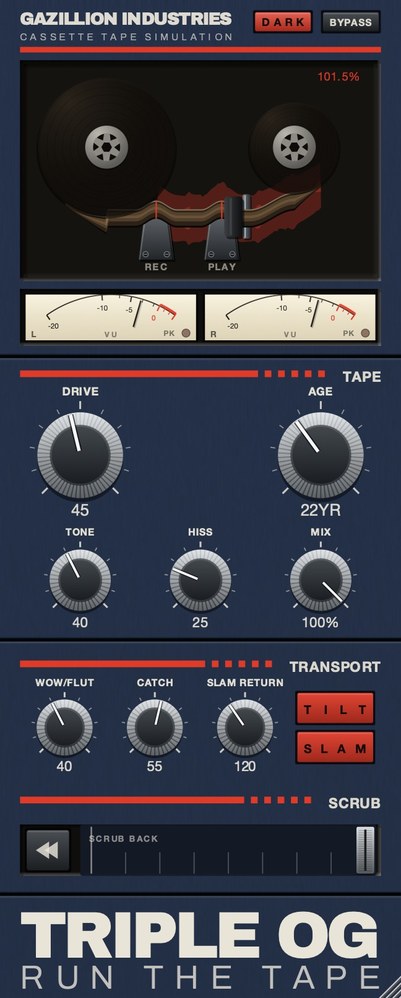 The whole panel. On vocals almost everything happens in the TAPE half.
 A voice punishes level error more than anything else, so the meters matter here.
Hear TRIPLE OG
Doubles, thirds and the tape stack
One of the more useful things tape does on vocals has nothing to do with warmth. Running
each layer of a stacked vocal through its own tape instance, with the instability engaged,
makes the layers drift against each other in a way that quantized copies never do.
That drift is most of why a stack of real takes sounds wider and more alive than the same
part copied three times. Each pass had its own small timing and pitch differences, and the
ear reads the sum as thickness rather than as three copies. Speed instability reintroduces
some of that on copies, and because the instances are independent they drift independently,
which is the whole point — one tape plugin across the whole stack bus moves all the
layers together and gets you none of it.
Keep the amount small. This is a case where the setting that works is well below what
you would use for character, because the goal is difference between layers rather than an
audible effect on any one of them.
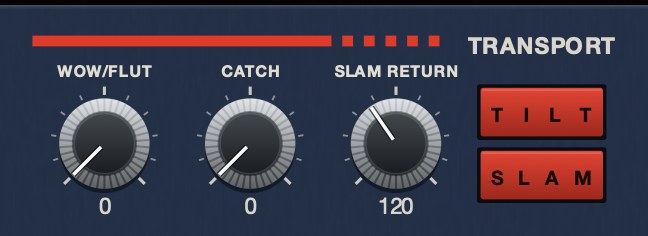 WOW/FLUT at 0. The transport holds speed.
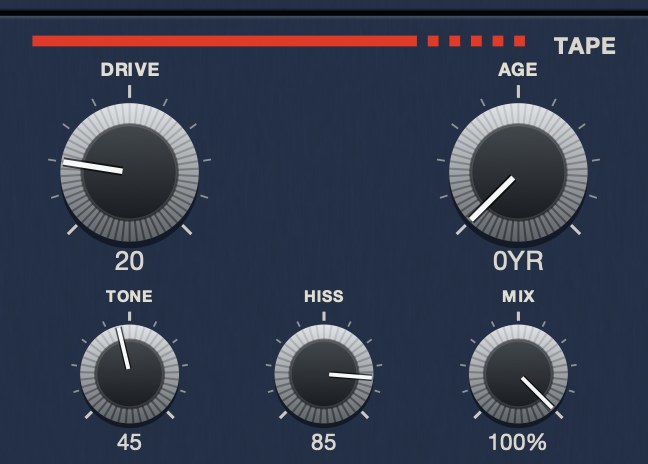 HISS at 85. Same panel, same everything else. The bed sits under the music rather than on top of it.
Keeping the words
Every decision on this page runs into the same constraint: a vocal has to be understood,
and most of what makes it understandable is fragile.
Consonant definition lives in the upper midrange and the top, which is the first thing a
tape stage softens. Level stability matters more on a voice than on anything else, because
a word that drops below the arrangement is gone rather than quiet. And pitch is the one
parameter the listener tracks unconsciously, so speed instability is far more noticeable
here than it is anywhere else.
The practical rule is to check aged vocals quietly and in the mix, never loud and in
solo. Solo playback flatters the character and hides the intelligibility cost; quiet
playback in context is where words go missing, and it is the condition most listening
actually happens in.
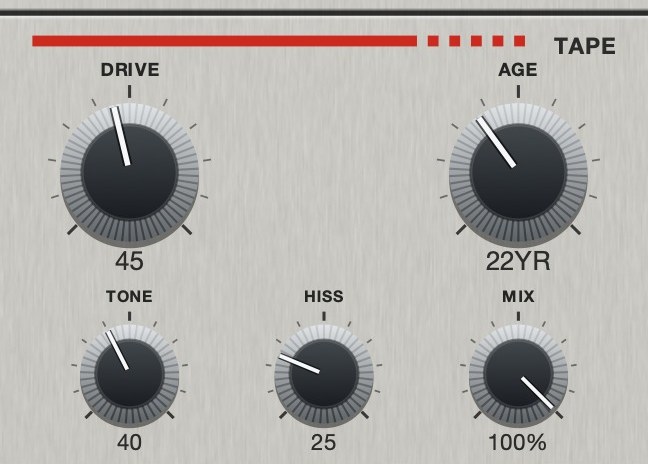 On a voice, MIX is the control that matters most. Parallel keeps the
clean take intact underneath whatever the tape is doing.
On a voice, MIX is the control that matters most. Parallel keeps the
clean take intact underneath whatever the tape is doing.
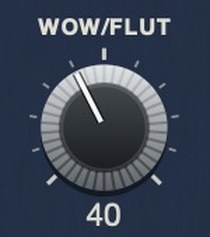 Keep WOW/FLUT on TRIPLE OG well below where you would set it on keys. A voice is
the one source where the listener knows what the pitch was meant to be.
Keep WOW/FLUT on TRIPLE OG well below where you would set it on keys. A voice is
the one source where the listener knows what the pitch was meant to be.
Hear it
Two of the four behaviors on their own. The noise bed is the one that survives on a voice; the speed movement is the one to keep well down.
Dry — no processing — speed holds at 1.000
Hiss 60, tone 45 — a noise bed, nothing else
The same eleven seconds each time, rendered offline through TRIPLE OG at the settings shown. No other processing, no master bus, no edits.
Everything below is answered the same way we built TRIPLE OG — the tape is the easy half, the transport is the half almost nothing does.
Questions people ask
What is the best tape plugin for vocals?
One with fine enough control that you can use a little of it. The specific behaviors
that flatter a voice are gentle compression and a softened top end; the ones that flatter a
drum bus mostly do not transfer.
Should tape go before or after compression on a vocal?
After your main compressor in most chains, and before the reverb and delay sends so the
effects hear the tape rather than the other way round.
Does tape emulation help with harsh vocals?
Often, yes. The top end goes soft under level rather than being cut, which handles
brightness more naturally than an EQ move. It will not fix sibilance, which is a different
problem with a different tool.
How much tape is too much on a lead vocal?
The moment you can hear pitch drift on a held note. That is the limit, and it arrives
much sooner on a voice than on anything else in the mix.
Does tape help with sibilance?
Eventually, but not at first. Saturation adds harmonics in the range sibilance occupies,
so a moderate setting can make esses sharper before the top-end softening starts to help.
De-ess before the tape stage rather than after it.
Should tape go on every vocal layer or the vocal bus?
Depends what you want. One instance on the bus gives the whole stack a shared character.
Separate instances with instability engaged make the layers drift against each other, which
is most of why a stack of real takes sounds wider than copies.
What TRIPLE OG does
TRIPLE OG is our cassette tape simulation. On a lead, TONE and
DRIVE do the useful work while AGE,
HISS and WOW FLUT stay low. On a double, a stack or an
ad-lib, open all five and let it sound like a different recording. The transport,
SLAM, SCRUB and CATCH, is there when a
vocal needs to fall apart on purpose at the end of a phrase.
The safest place for a cassette on a vocal is underneath another one.
“Most tape plugins treat the transport as something to model quietly in the background, but this one hands it to you as an instrument.”
Best Tape Emulation Plugins · AudioColour.com
TRIPLE OG — cassette tape simulation for Mac and Windows, with a transport
that drags, jams and sprints to catch up. There is a demo on the page.
Hear it
Keep reading