← Gazillion Industries/Reading material
How to use distortion on vocals
When Kanye West released Yeezus in 2013, some of the vocals came through so blown out they sounded like they'd been recorded inside a furnace. It wasn't a mistake. It was the point.
To use distortion on vocals, decide first whether you want presence or an effect. For presence, add gentle saturation after EQ and compression. For aggression that stays intelligible, send the vocal to a return, distort it hard, band-limit the return and blend it under the clean vocal. For an obvious effect, distort the vocal directly on the parts that need it. De-ess before the distortion, and automate it so it hits where it matters.
The short version
- Presence
- gentle saturation after EQ and compression
- Aggression
- parallel distortion, band-limited, blended under
- Effect
- heavy distortion on hooks, ad-libs, drops
- Sibilance
- de-ess before any distortion
- Clarity
- keep the clean vocal leading
- Automation
- more on the loud moments, less on the verses
- Chain
- de-ess, EQ, compress, distort, then the reverb sends
- Judging
- match levels within 0.5 dB before you decide
- Pitch
- low voices need more drive than high ones for the same bite
Why distort a vocal
Energy. Distortion adds harmonics in the range ears are most sensitive to, so a vocal sounds more urgent and cuts through a dense beat without being turned up. It also changes the character: gentle drive sounds confident and upfront, heavy drive sounds unhinged. The risk is intelligibility, because distortion blurs consonants, which is why most of the techniques below keep a clean vocal in charge.
There is a second reason, and it is level. A clipper flattens the peaks; the makeup gain lifts everything underneath them. Shave 4 dB off the tops and put 4 dB back, and the loudest syllable lands exactly where it started while the body of the take rises by a factor of 104/20, about 1.58 in amplitude. The fader never moved. The vocal is further forward anyway, and its crest factor dropped by roughly the same 4 dB you clipped.
The harmonics, in numbers
Distortion builds new tones at whole-number multiples of what you feed it. Symmetric curves, which most soft clippers are, make odd harmonics first: the third, the fifth, the seventh. Asymmetric curves add even ones, the second and fourth, and those read as warmer and less spiky. That single difference decides how a voice responds more than the drive amount does.
Do the multiplication for your own singer. A low rap vocal sitting around 110 Hz puts its third harmonic at 330 Hz, its fifth at 550 Hz and its seventh at 770 Hz, all still down in the chest. To reach 3 kHz, where the ear is at its most alert, you need the 27th harmonic: 110 × 27 = 2,970 Hz. Only real drive builds anything that far up.
Now run the same arithmetic on a sung line at 440 Hz. Third harmonic 1,320 Hz, fifth 2,200 Hz, seventh 3,080 Hz. Three steps up the series and you are already in the band the ear defends most fiercely, which is the band equal-loudness curves are shaped around. Same plugin, same knob, and the high line turns brittle while the low one barely flinches.
The rule that falls out of that is worth writing on the wall: less drive on high sung lines, more on low spoken ones, and an automation lane between them. One setting has never covered a verse and a hook, and now you know the reason in hertz. The general mechanism is in harmonic distortion.
Subtle: saturation for presence
A little saturation on the lead vocal, usually after EQ and compression, brings it forward and thickens it without anyone hearing distortion. Drive it until you notice it, back off, and match levels against bypass. This is the setting that ends up on most vocals, even when nobody calls it distortion.
- Bypass everything after the compressor.
- Raise the drive until the change is obvious on the loudest line.
- Halve it.
- Trim the output until processed and bypassed measure within 0.5 dB.
- Toggle bypass with your eyes closed and pick one.
If you genuinely cannot pick, you are at the quiet end of the useful range, which is where most lead vocals want to live. Note what this does upstream, too: saturation after the compressor raises average level without asking the compressor for another decibel of gain reduction, so the ride you spent an hour on stays intact. More on the gentle end in how to use saturation.
Where distortion sits in the vocal chain
Order changes the result more than the choice of plugin does. The default that survives contact with a real session: de-esser, subtractive EQ, compressor, saturation, tone EQ, and the delay and reverb sends after all of it. Everything below is a reason for one of those positions.
De-ess first, because a clipper cannot tell a sibilant from a snare. A 7 kHz "s" arrives as a peak, gets flattened like any other peak, and comes out the far side as a short burst of broadband noise. Four decibels of de-essing before the drive saves ten decibels of apologetic EQ after it.
Compress before distorting, because a nonlinearity reacts to level. Feed it an unruly take and the quiet words get politely warmed while the loud ones get shredded, so the effect wobbles line to line and never settles into a sound. A compressor narrows the range going in, which makes the distortion consistent.
Distort before reverb, without exception. A nonlinearity fed a reverb tail multiplies the tail against the dry signal and produces sums and differences that belong to neither, and it hangs in the air after the word has ended like smoke in a room with the windows shut. Put the drive on the channel and the reverb on a send.
There is one worthwhile inversion. Clip before the compressor and you hand the compressor a signal with its spikes already gone, so it does less work, breathes less, and the take reads steadier. You lose the compressor's own character on the transient. Try both orders on the same eight bars; the difference is not subtle.
Aggressive: parallel distortion
- De-ess the vocal first so sibilance doesn't turn into static.
- Send the vocal to a return track.
- Put a distortion or soft clipper on the return and drive it hard.
- High-pass the return around 200 Hz and low-pass it where the fizz starts.
- Blend the return under the clean vocal until it has bite.
- Automate the return up on the loud lines and down on quiet ones.
The clean vocal keeps the words; the return adds the teeth. The general method is in parallel saturation.
Those two filter points are arithmetic, not taste. A 200 Hz high-pass sits log2(200/110) = 0.86 of an octave above a 110 Hz fundamental, so at 12 dB per octave the fundamental arrives on the return about 10 dB down (0.86 × 12 = 10.4). The return carries harmonics and consonants. The clean track keeps the chest. Steepen the filter to 24 dB per octave and that figure doubles to roughly 21 dB down.
On the top end, start the low-pass at 8 kHz and walk it down until the spit leaves, then stop. Then blend by numbers rather than by feel: pull the return to −20 dB, raise it in 1 dB steps until the words grow teeth, and drop back 1 dB. Done right, you notice the return mainly when you mute it.
A worked example, with the numbers
Take one hook, eight bars, a rap lead. Peaks at −6 dBFS, average around −18 dBFS, so the crest factor is 12 dB. Here is a full pass with values you can copy and then argue with, because the point is to be wrong in a specific direction rather than wrong in an unknown one.
- De-esser at 6.5 kHz, 4 dB of reduction on the worst syllables only.
- Subtractive EQ: high-pass at 90 Hz, one narrow cut wherever the room rings.
- Compressor at 3:1, threshold set for 5 dB of gain reduction on loud words.
- Saturation on the channel, gentle, output matched to bypass within 0.5 dB.
- Return: clipper driven so the loudest line pushes 6 dB past the clip point.
- Return filters: high-pass 200 Hz at 24 dB per octave, low-pass 6.5 kHz.
- Return fader at −14 dB, automated up 3 dB for the last two bars.
The result, measured the same way: peaks still at −6 dBFS, average up to about −15 dBFS, crest factor now 9 dB. Three decibels of density with the peak ceiling untouched. That is the whole trade, stated in the only units that settle an argument. Check what the peaks are actually doing with a true peak meter before you send it on.
BEEFY works on a vocal that could use some attitude. The demo on the page is 28 seconds.
How to check it in your own session
Distortion flatters. That is the problem with it, and the reason for five minutes of checking before you commit an hour of work. Every test below runs on material you already have open.
- Bounce eight bars bypassed and eight bars processed, measure both, and trim until they sit within 0.5 dB of each other. Judge only after that.
- Duplicate the vocal, distort the copy, invert the copy's polarity and play both. What remains is the difference the plugin made, on its own. Filters and latency show up in there too, so treat it as a listening test rather than a measurement.
- Put a spectrum analyzer on the return and hold one sustained note. New peaks piling up below 1 kHz means mud; new peaks above 6 kHz means spit.
- Fold the mix to mono and listen again. If the vocal thins out, the distortion on a doubled or widened part is fighting itself; see mono compatibility.
- Bounce it and play it on a phone. The speaker hands you the harmonics and almost none of the fundamental, which makes it the fastest honest test of whether the drive is earning its place. Same reason it works for bass on phone speakers.
Obvious: distortion as an effect
Heavy distortion straight on the vocal is a statement. It works best in doses: a hook, an ad-lib stack, a single line before a drop. A band-passed "telephone" sound, with the lows and highs cut and some drive, reads as an effect instantly. Keep these choices deliberate and short, so the clean sections still have contrast.
The telephone sound has a real band behind it. The wired voice network passed roughly 300 Hz to 3.4 kHz and discarded everything outside, which is log2(3400/300) = 3.5 octaves out of the ten or so you can hear. Set a high-pass at 300 Hz and a low-pass at 3.4 kHz, make both steep, add drive inside the band, and listeners name the effect before the first word finishes. The full setup is in telephone effect on vocals, and the plugins in telephone effect plugins.
The other dose that works is the pre-chorus lift: a clean verse, then the same vocal hard-clipped for four bars, then clean again. Contrast does the work. Distort every line and the loud section has nowhere left to go.
Watch these
- Sibilance: "s" sounds distort into harsh noise. De-ess first.
- Intelligibility: check that every word still reads in the full mix.
- Reverb: distort before reverb, not after, or the tail turns to mush.
- Harshness: low-pass the distorted signal and use a darker setting.
For which kind of drive to reach for, see saturation vs distortion.
What each failure sounds like
Four things go wrong on vocals, and each one has its own signature. Learn the sound and you stop guessing at the fix.
- Sprayed sibilance. A burst of white noise on every "s" and "t", as if the word arrived from an aerosol can. Cause: the clipper treating a 5 to 9 kHz consonant as a peak. Fix: de-ess ahead of the drive, or notch that band on the distorted path only and leave the clean vocal alone.
- Intermodulation haze. A gritty tone sitting under sustained notes that refuses to move with the melody. Two loud frequencies through one nonlinearity create their sum and their difference: 300 Hz and 440 Hz produce 140 Hz and 740 Hz, and neither belongs to the harmonic series of either note. Fix: less drive, or split the vocal by band and distort only the upper one.
- Aliasing. A thin metallic ring that slides down as the melody goes up, which is the giveaway. In a 48 kHz session everything above 24 kHz folds back: the seventh harmonic of a 5 kHz sibilant lands at 35 kHz, and 48 − 35 = 13, so it reappears at 13 kHz unrelated to anything in the music. Fix: turn on oversampling, or low-pass before the distortion. Background in what aliasing is.
- Lost intimacy. Breaths, chair creaks, headphone bleed and the dying ends of words all come up together, and the singer sounds like they took a step backward while the room took a step forward. Fix: gate or clip-edit the gaps before the return, not after.
Routing the return in each DAW
Every DAW does this, and they differ mostly in vocabulary. The thing worth knowing in all of them is whether the send is pre-fader or post-fader, because a post-fader send moves the distorted copy every time you ride the vocal, and a pre-fader send leaves it where you set it.
- Ableton Live
- Create a Return track, then turn up the vocal's Send knob. Sends are post-fader by default and can be switched to pre.
- FL Studio
- Select the vocal's mixer insert, then click the send arrow under a spare insert. Mixer routing follows the source track's fader.
- Logic Pro
- Add a Send on the vocal channel strip to a bus; the Aux appears on its own. The send can be set pre-fader from the send slot.
- Anything else
- Bus, aux, FX channel: same signal path, different noun.
One latency note that catches people. Oversampling on the return adds delay to that path only, and the host compensates on playback but not always while a singer is monitoring live. Track the vocal first, add the distorted return afterward, and you never meet the problem. Related reading: gain staging.
What the technique costs
Distortion is one of the few moves in mixing you cannot fully take back, so price it honestly. Once a vocal is bounced with the harmonics in it, the crest factor you spent is gone, and the take will never again be as quiet in the gaps as the microphone captured it.
It costs intelligibility at the margins, and the margin is where a listener on a bus with one earbud lives. It costs revision speed, unless you keep the drive on a return where a single fader answers a note from the artist. It costs tuning tolerance too, because distortion multiplies whatever the pitch corrector did, so tune first and drive second. And on streaming, the loudness you gained gets leveled away on the way out; what survives the trip is the density and the bite, not the volume. Which is still the part you wanted.
Questions people ask
How do I use distortion on vocals?
For presence, add gentle saturation after EQ and compression. For aggression, send the vocal to a return, distort it hard, filter the return and blend it under the clean vocal. De-ess before distorting, and automate the amount.
What is vocal distortion called?
In mixing it's usually called saturation, overdrive or distortion, depending on how strong it is; a band-passed version is often called a telephone or lo-fi effect. Singers also use "distortion" or "grit" for techniques that make the voice itself rasp.
How do I get rid of distortion in a vocal recording?
If the recording clipped, the best fix is re-recording with lower input gain. Declipping tools can reduce mild clipping, but heavily clipped takes can't be fully restored.
Should I put distortion before or after compression on vocals?
After, as a default. A compressor narrows the range first, so the drive behaves the same on every line instead of warming the quiet words and shredding the loud ones. Before the compressor is the useful exception: clipping the peaks first means less gain reduction and a steadier read, at the cost of the compressor's own character on the transient.
How much distortion should I put on a vocal?
For presence, enough that you hear it in solo and lose track of it in the mix. For an effect, as much as you like on short sections only. The test that settles it: level match within 0.5 dB, then check that every consonant still reads in the full mix on a phone speaker.
Does distortion make a vocal louder?
It raises the average level without raising the peak. Clip 4 dB off the tops, add 4 dB of makeup, and the ceiling is where it was while everything under it is 4 dB hotter. Harmonics landing in the sensitive 2 to 5 kHz region add to the impression on top of the measured change.
Why does my distorted vocal sound thin?
Usually the high-pass on the distorted path is too high, or the drive is hard enough that the fundamental has lost level against the harmonics stacked above it. Drop the high-pass, back the drive off, and keep an unprocessed vocal underneath carrying the body.
How do I stop distorted vocals from sounding harsh?
Four fixes in order of payoff: de-ess before the drive, low-pass the distorted path from 8 kHz downward until the spit goes, switch oversampling on, and use less drive on high sung lines than on low spoken ones.
What distortion do rappers use on vocals?
Mostly soft clipping and drive, kept parallel so the words stay readable, plus heavier band-passed treatments on ad-libs and hooks. The family matters less than the routing: a clean vocal in front and a hard-driven, band-limited copy underneath covers most of what you hear on records.
Can distortion replace a compressor on vocals?
Partly. A clipper controls peaks with no attack or release to set, so nothing pumps and nothing breathes. What it cannot do is shape an envelope over time or bring a whole quiet phrase up. Most vocal chains use both, in that order.
Does vocal distortion work in mono?
Yes, and mono is where you should check it. Distorting a stereo double or a widened stack can collapse differently than you expect when the mix folds down, so fold to mono and listen before committing; see phase cancellation.
Should I distort the vocal or the whole mix?
The vocal, if the vocal is what needs it. Drive on the mix bus moves everything at once and the loudest element, usually the drums, decides what the nonlinearity does to the voice. Treat them separately and the vocal choice stays yours.
Stock plugins that do this
- FL Studio
- Fruity Blood Overdrive; Fruity Soft Clipper
- Ableton Live
- Saturator; Roar (Live 12)
- Logic Pro
- ChromaGlow (Logic Pro 11 and later)
What BEEFY does
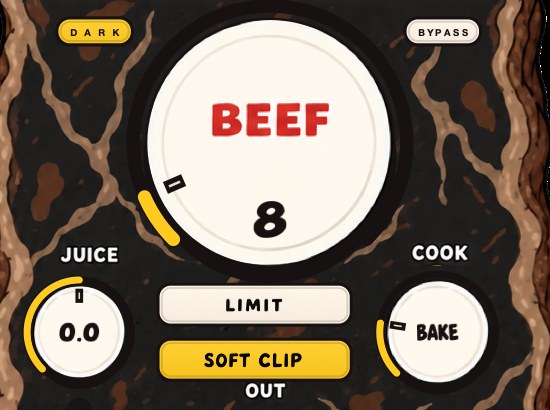
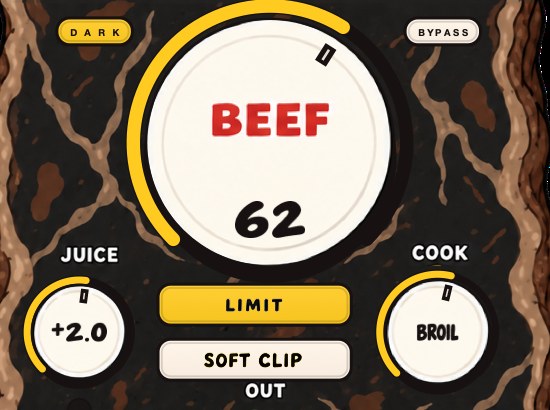
BEEFY is our saturation and loudness plugin, and there's no drum-only rule: it's for a vocal that could use some attitude too. Use a little BEEF for weight and presence, or push it for a more obviously saturated sound. COOK moves the tone from rounder toward brighter and more bitten, and SOFT CLIP, on by default, handles the initial gain staging. For the parallel method, run it on the return.
Two more controls matter on voices. JUICE sets the level going in, which is the knob that decides how hard the vocal hits the curve, so a quiet take and a hot one can be brought to the same starting point before you touch anything else. LIMIT is the alternative output stage to SOFT CLIP, and the two are separate choices rather than a pair. The input and output clip lights tell you which end of the plugin is running out of room. It loads as AU, VST3 and standalone on Mac, and VST3 on Windows, so the same setting travels between the DAWs above. More on the rounded end of the curve in soft clipping explained, and on the hard end in what clipping is.
Nobody has to go all the way to the furnace. A little heat still gets heard.
BEEFY — saturation and loudness plugin for Mac and Windows. There is a 28-second demo with three without/with comparisons on the page.
Keep reading
- Saturation vs distortion — Saturation, overdrive, distortion and fuzz: what changes, and which one you want.
- Parallel saturation — Set it up on a return, drive it hard, filter the burnt copy, and blend it under the dry signal.
- How to make your beats sound fuller — Cover the frequency range, layer and double, add saturation, width and space.
- How to mix vocals — Rides before compression, the chain, and making a voice fit the track.
- How to EQ vocals — The frequency map, how to sweep for resonances, and what not to boost.
- Telephone effect plugins — The band, the slope, the compression and the grit, plus free and paid options.
- How to make robot vocals — The three effects people call a robot voice, and the no-mic route.