← Gazillion Industries/Reading material
How to make robot vocals
Gazillion Industries ·
The hook needs a robot by Thursday. Every tutorial that comes back
opens with routing a microphone into a vocoder, and there is no microphone here — a
laptop on a kitchen table, and a chorus that has to sound machine-made in two days.
Robot vocals come from a vocoder. Your voice opens and closes a bank of filters, a synth
plays through them, and the synth ends up speaking your syllables at the pitch you hold.
WINNETKA is
$49 and is the vocoder worked through below: twelve of its forty vocoder presets hold a vowel,
so they sing on the keys with no microphone at all. Then the two other effects people call a
robot voice, and the per-DAW notes.
The short version
- What it is
- a vocoder — your voice sets the filter levels a synth plays through
- Three versions
- vocoder, ring modulator, and hard pitch correction; they sound nothing alike
- No microphone
- 12 of WINNETKA's 40 vocoder presets hold a vowel and play on the keys alone
- What to use
- WINNETKA, $49 — 16-band vocoder, 350 presets, formant and shift
- What ships free
- Live, FL Studio and Logic each include a vocoder; routing is the work
- What it costs
- words get harder to follow, and the effect takes a whole lane of the arrangement
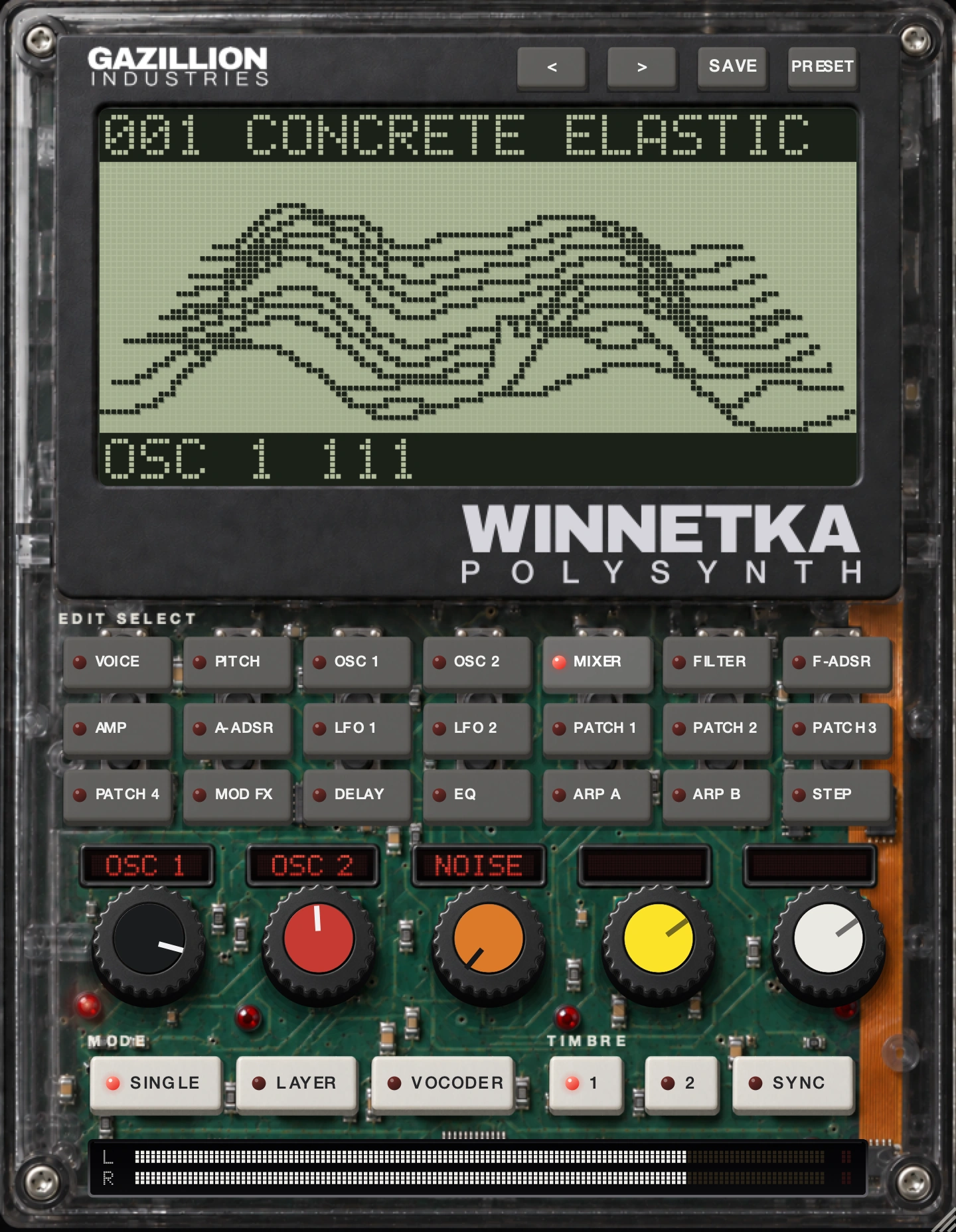 One row at a time. Press a key in EDIT SELECT and the five knobs below the
screen take that row's jobs. In VOCODER the rows change to the vocoder's own.
One row at a time. Press a key in EDIT SELECT and the five knobs below the
screen take that row's jobs. In VOCODER the rows change to the vocoder's own.
Three different effects get called a robot voice
People search one phrase and mean one of three things. Picking the wrong one is why a session
ends with a vocal that sounds broken rather than mechanical. Each has a different mechanism, a
different sound and a different amount of setup.
A vocoder: the synth that sings your words
A vocoder splits your voice into frequency bands, measures the level in each one, and uses
those levels to set the gain of the matching band on a second sound. Ableton's manual puts the
two halves plainly: the voice is the modulator, the synth is the carrier. What comes out has
the synth's pitch and the voice's articulation.
This is the one that holds a chord. Play three notes and three robots sing the same word at
once, which is why it has carried choruses since the 1970s — Apple's Logic manual credits
the classic version of the sound to groups such as Kraftwerk. It also needs the most setup,
because two signals have to meet inside one device.
A ring modulator: metal with no key
A ring modulator multiplies your voice by a fixed tone and outputs the sum and difference
frequencies, none of them related to the original pitch. The result is clangorous and tuneless
on purpose. Live 12 puts this in Shifter, which the manual describes as a pitch and
frequency-shifting effect that can add ring modulation to incoming audio.
Keep the modulation frequency under about 30 Hz and it reads as tremolo. In the low
hundreds of hertz the voice turns into a buzzing grille. Higher still and the words stop
arriving. There is no chord and no melody here, which suits a shouted line and ruins a verse.
Hard pitch correction: a person, snapped to a grid
Set a tuner's retune time to zero and every pitch in the take jumps to the nearest note in the
scale. The voice stays a human voice; what reads as mechanical is the missing slide between
notes. Live 12's Auto Shift corrects against a defined scale or against MIDI notes from another
track, with its own vibrato and formant controls.
Tell them apart with one question: does the line need to hold a chord? Vocoder. Does it need
to sound broken with no key at all? Ring modulator. Does it need to stay recognizably a singer
while sounding processed? Hard tuning. There is a fourth answer — moving the formants
without moving the pitch — and our guide on
formant shifting covers where that one lands.
How a vocoder actually gets you there
Four things decide whether a vocoder sounds like a talking machine or like a kazoo. Band
count, carrier choice, the path for the consonants, and how fast the bank follows the voice.
Everything else on the panel is trim.
Band count, and why sixteen is a number and not a compromise
More bands means finer resolution and a more literal reading of the vowel. Fewer bands means
a coarser, more obviously electronic result. Audacity's built-in vocoder defaults to 40 bands;
WINNETKA runs 16, low to high, with the eight knobs each holding a pair. Sixteen keeps the
reading coarse enough that it still sounds like a vocoder.
The carrier has to be harmonically rich
A vocoder can only pass what the carrier already contains. Hand it a sine wave and fifteen of
the sixteen bands have nothing to open, so the words vanish. Image-Line's manual says the same
thing about Fruity Vocoder: the best carriers cover the whole frequency range, and pads work
well. A saw wave is the safe default because it carries every harmonic.
In WINNETKA the carrier is built in the vocoder's own MIXER row: OSC 1, INST for the right
input channel, and NOISE. Set OSC 1 WAVE to SAW and the bank has something in every band. VOX
is the interesting one — a voice-like wave whose CONTROL 1 moves its formant from dark to
bright, so the carrier already has a throat before your voice reaches it.
Consonants need their own road
The s and t sounds have almost no pitch, so a filter bank fed by them opens nothing and the
words turn to mush. Every good vocoder solves this by sending the top of the voice past the
bank. Live's Vocoder does it with an Unvoiced knob and a sensitivity control. WINNETKA does it
with HPF LEVEL, which sends the voice above about 4 kHz straight to the output, and an
HPF GATE key so that top end only arrives while a key is held.
Speed, and the one control that changes everything
A bank that follows the voice instantly catches every syllable and every breath with it. A slow
one smears the words into a pad. WINNETKA calls this E.F. SENSE, from 0 to 127: low values catch
each syllable, high values smear them, and at 127 the shape stops moving. Start low, then raise
it until the consonants stop chattering.
WINNETKA
is a polysynth with a 16-band vocoder, $49, and it holds 350 presets with 40 of them in the
vocoder group. Play your voice through it, or play the held-vowel presets with nothing plugged
in. There's a demo on the page.
Robot vocals with no microphone at all
This is the route most people searching the term actually need, and almost nobody writes it
down. A vocoder normally wants both halves: audio coming in, and notes played. Take away the
audio and you have a synth with a strange filter bank and nothing to say.
WINNETKA's HOLD key is the way out. It freezes whatever shape the bank is holding right
now, keeps that shape playing with no input, and saves it with the preset and with your
session. Twelve of the forty vocoder presets ship with a vowel already frozen inside them, so
they play on the keyboard alone. That is 12 out of 40, a little under a third of the group,
and it covers the sung-robot-choir job completely.
What you give up is words. A frozen vowel is one vowel: it holds an "ahh" across a four-bar
chord and sounds like a machine choir, and it will never say anything. For a hook that is
texture rather than lyric, that trade is free. For a talking robot you need a microphone or a
vocal file.
Two controls do most of the work once the vowel is held. FORMANT SHIFT moves the whole shape a
band at a time across a −2 to +2 range, which is the difference between a small voice and
a large one. FORMANT CUTOFF slides the same shape smoothly, up to two bands either way. Set
SHIFT first, then trim with CUTOFF.
Do it
Fifteen minutes, in your own session. Steps 5 through 9 are the microphone path; skip them
if you do not have one.
- Load WINNETKA on an instrument track and set MODE to VOCODER.
- Open the PRESET menu and choose the VOCODER group.
- Step through until you find one that plays with no audio arriving.
- Hold a three-note chord for two bars and listen to the vowel.
- Route your voice to WINNETKA's left input channel.
- Set THRESHOLD to 0, then raise it until the room noise stops.
- Set GATE SENSE near the bottom of its 2 ms to 2 s range.
- Set E.F. SENSE to 20 and speak a line with hard consonants in it.
- Raise HPF LEVEL until the s and t sounds arrive.
- Set OSC 1 WAVE to SAW and raise MIXER OSC 1 to 127.
- Raise FORMANT RESONANCE until the vowels read, then back off by a quarter.
- Set FORMANT SHIFT to +1, then to −1, and keep the one that fits the track.
- Set TRANSPOSE to −12 and play the same chord.
- Raise DIRECT to about 30 if the words are still hard to follow.
- Bounce eight bars and play them back on a phone speaker.
Step fifteen is the one that gets skipped. A vocoder does its work in the midrange rather than
the low end, so it usually survives a small speaker better than bass does — but a shape
that read as words on monitors can read as a buzz in a car.
Per-DAW notes, where they actually differ
The device changes, the physics do not. What changes from one DAW to the next is how you get
two signals into one place, and that is where most of the hour goes.
Ableton Live
Live ships a Vocoder audio effect, absent from the Intro and Lite editions. Insert it on the
track holding the voice and set the Carrier chooser to External, which the manual calls the
option for classic robot voice work, then pick the synth track underneath. Enhance brightens a
dull result by normalizing the carrier's spectrum, and Depth at 100% is classic vocoding.
For WINNETKA in Live the routing runs the other way. On the track your voice is on, set Audio
To to the WINNETKA track and pick Audio In-WINNETKA in the box below. If that track is a live
microphone, set its Monitor to In. Then play.
FL Studio
Fruity Vocoder takes both signals in one mixer track: by default the left channel is the
modulator and the right the carrier. Image-Line's manual says to arrange that by panning the
two source channels hard left and hard right. The input is mono as a result, the output stereo,
and FORM changes the pitch relationship between modulator and vocoded bands.
Logic Pro
Logic's EVOC 20 PS is a vocoder and a polyphonic synthesizer in one instrument. Apple's guide is
specific: insert it into the Instrument slot of an instrument channel strip, then choose the
voice from the Analysis Input pop-up in the plug-in header, which feeds it by side chain. Logic
also has a Vocal Transformer with a Robotize button, under Pitch in the audio effect menu.
GarageBand
GarageBand hosts Audio Units, which is the whole answer here. Tick Enable Audio Units in
GarageBand's Audio/MIDI settings, then on a software instrument track click the right side of
the Instrument slot, choose AU Instruments, and pick your synth. WINNETKA installs as an AU on
macOS, so it appears in that list and brings its own vocoder with it.
Audacity
Audacity's Vocoder sits under Effect > Distortion and Modulation > Vocoder and renders
rather than playing live. The manual is strict about format: unsplit stereo tracks only, with
the modulator in the left channel and the carrier in the right. It defaults to 40 bands, and the
white noise amount starts at 0%, which is the first thing to raise when consonants go.
How to make vocals sound less robotic
The opposite search is just as common, and it is a different problem with a different cause.
A vocal that sounds robotic when nobody asked for a robot is almost always a tuner set too
hard, and the giveaway is that it happens on the slides rather than on the held notes.
Three fixes, in the order worth trying. Lengthen the retune time until the pitch takes a few
tens of milliseconds to arrive, because the slide between two notes is most of what makes a
voice sound like a person. Correct only the notes that are out. And check what the tuner does to
the formants: Logic's Vocal Transformer has a Keep unvoiced formants option that leaves
sibilants alone, which its manual says gives a more natural result on some signals.
If it still sounds synthetic with the tuner bypassed, the cause is upstream. Heavy
time-stretching leaves a granular flutter, a narrow midrange boost turns a voice nasal, and a
noise reduction pass with too much depth strips the breath out. Our guide on
EQ on vocals covers the midrange half, and
pitch without tempo
the stretching half.
The plug-ins people name
Everything in this section was read on the maker's own page while writing. Where no price
appears, the maker does not publish one beside the product. Ours is first because it answers
the no-microphone case, which is the case most people have.
Gazillion Industries WINNETKA
WINNETKA
is $49, one payment, AU and VST3 and standalone on macOS and VST3 on Windows. A 16-band vocoder
with FORMANT SHIFT, CUTOFF, RESONANCE and E.F. SENSE, a HOLD key that freezes a vowel, HPF LEVEL
for the consonants, and DIRECT to blend your dry voice back in. 350 presets across bass, lead,
pads, FX, percussion, arp and vocoder, 40 of them vocoder patches and 12 of those playable with
nothing plugged in.
iZotope VocalSynth 2
VocalSynth 2 is $199 on iZotope's page. Five blendable modules — Biovox, Vocoder, Talkbox,
Polyvox and Compuvox — plus a seven-module stompbox effects chain, in three modes.
Sidechain mode pipes your own audio in as the carrier; MIDI mode plays the harmonies from a
keyboard.
Waves OVox Vocal ReSynthesis
Waves describe OVox as a voice-controlled synth and vocal effects processor covering vocal
morphing, tuning, harmonizing, vocoder and talkbox effects, as a plug-in or a standalone app.
Waves runs rotating sales and sells by subscription too, so check the number on the day you
buy.
TAL-Vocoder
TAL describe TAL-Vocoder as a vintage-style vocoder with 11 bands that produces the sound of
vocoders from the early 80s, with an integrated synth and flexible sidechain routing for the
carrier. VST, VST3, AU, AAX and CLAP, on Windows, macOS and Linux. Eleven bands is coarse on
purpose, and it sounds it.
Antares
Antares is the name attached to hard tuning, and their product page lists Auto-Tune Pro 11,
Auto-Tune Advanced and a plain Auto-Tune alongside creative vocal effects including Vocodist.
No price loaded while writing. If the robot you want is the rap-vocal kind, this is the shelf
that term points at.
We make one free plug-in and it is DRUGS, a one-knob bus compressor for drums, which is no
help on a vocoder question. Our vocoder is
WINNETKA
at $49, with the demo on the page. If the budget is genuinely zero this month, the vocoder
already inside Live, FL Studio, Logic or Audacity will make the sound; you will spend the
difference in routing.
What each approach costs you
Every one of these takes something. Knowing which bill arrives is most of choosing.
The vocoder costs intelligibility. Pushed far enough for the effect to
register, a vocoded line sheds consonants, and a listener who does not already know the lyric
will not follow it. The usual answer is to print the dry vocal underneath, well down, or to
raise DIRECT until the words come back.
The ring modulator costs the key. Sum and difference frequencies are not in
your scale and never will be, so the part cannot sit under a chord change without a fight. Use
it on one line, or on a word, and print it.
Hard tuning costs the performance. Snap every pitch to the grid and you take
the slides with it, which is the part of a take that carries feeling. Reach for it on every
vocal and each chorus on the record starts to sound like the last one.
All three cost arrangement space. A machine voice is bright, narrow and
insistent, and it sits in the 1 to 4 kHz band where the lead vocal and the snare already
live. If you pan the bands wide — WINNETKA places bands 1 to 4 and 5 to 8 separately, from
−63 left to +63 right — check it in
mono, because width built from difference is
width a club system can take back. Two cheaper machine-voice tricks:
the telephone effect and
distortion on the vocal, and WINNETKA has a
DIST key on the carrier for the second.
Questions people ask
How do you make robot vocals?
Put a vocoder between your voice and a synth. The voice sets the level of each frequency band,
the synth supplies the tone, and the output speaks your syllables at the pitch you play. Use a
saw wave or a pad as the carrier so every band has something to open, and send the top of the
voice past the bank so the consonants survive. WINNETKA is $49 and runs 16 bands.
How do I make robot vocals without a microphone?
Use a vocoder that can hold a vowel. WINNETKA freezes the filter shape with its HOLD key and
keeps playing it with no input at all, and 12 of its 40 vocoder presets arrive with a vowel
already frozen inside them, so they play from the keyboard alone. You get a machine choir on a
held chord. You do not get words, because a frozen vowel is one vowel.
What is the best robot voice plugin?
The one that lets you set the carrier, move the formants, and route the consonants separately.
Those three decide whether the words arrive; band count and preset totals decide much less.
WINNETKA covers all three at $49 with a 16-band bank. VocalSynth 2 at $199 covers them with five
modules, if you want one box for every vocal treatment.
How do I make a robot voice in FL Studio?
Load Fruity Vocoder in a mixer track that is not the master. By default it reads the left
channel as the modulator and the right as the carrier, so pan your voice channel hard left and
your synth channel hard right and route both into that track. The input is mono as a result. FL
also ships Vocodex, and any VST3 vocoder loads in the same slot.
How do I make a robot voice in Logic Pro?
Two routes, and they sound different. EVOC 20 PS goes in the Instrument slot of an instrument
channel strip, with your vocal chosen from the Analysis Input pop-up in the plug-in header, and
gives you the singing-synth version. Vocal Transformer goes on the vocal itself under Pitch, and
its Robotize button flattens the melody toward a single note.
How do I make a robot voice in Audacity?
Put the modulator in the left channel of an unsplit stereo track and the carrier in the right,
then run Effect > Distortion and Modulation > Vocoder. It defaults to 40 bands. If the
consonants disappear, raise the white noise amount from its default of 0%. Audacity renders this
rather than playing it live, so budget for a few passes.
Why do my vocals sound robotic when I did not want them to?
Almost always a tuner with the retune time at or near zero, which removes the slides between
notes. Lengthen the retune, correct only the notes that are out, and check what the tuner is
doing to the formants. If it still sounds synthetic with the tuner off, look at time-stretching
and at any noise reduction that took the breath out with the noise.
Can a vocoder make a robot voice out of drums or a guitar?
Yes, and it is worth an afternoon. Any signal with clear level changes works as the modulator,
so a drum loop through a pad gives you a rhythm that chews. WINNETKA takes an instrument on the
right input channel through INST in the vocoder's MIXER row.
What WINNETKA does
WINNETKA
is a polysynth with a vocoder, $49, one payment, in AU, VST3 and standalone on macOS and VST3 on
Windows. Three MODES: SINGLE for one timbre, up to 128 voices at once in POLY;
LAYER for two timbres playing every key, 64 voices each; and VOCODER, where
audio coming in shapes the notes you play.
The vocoder runs 16 bands, low to high, drawn live on the screen. Eight band
controls cover them two at a time: LEVEL A and PAN A hold BAND 1 to 4, LEVEL B and PAN B hold
BAND 5 to 8, panned from −63 to +63. FORMANT gives SHIFT across
−2 to +2 bands, CUTOFF sliding up to two bands either way, RESONANCE for how sharp the
bands sit, and
E.F. SENSE for how fast the shape follows the voice.
HOLD freezes the shape that is there now and keeps it playing with no input,
saved with the preset and the session. AUDIO IN has THRESHOLD and GATE SENSE
from 2 ms to 2 s, and HPF LEVEL sends the voice above about
4 kHz straight out so the consonants cut. The carrier is set in the vocoder's own MIXER:
OSC 1, NOISE, and INST for the right input channel. DIRECT blends your dry
voice back in, and a DIST key drives the carrier.
Around all that is a synthesizer. OSC 1 offers SAW, PULSE, TRI, SINE, VOX, TABLE with 64 stored
waves, NOISE and AUDIO IN, with CONTROL 1 reshaping the wave — on VOX it
moves the formant from dark to bright. TRANSPOSE runs ±24 semitones. A
16-step arpeggiator splits across ARP A and ARP B: twelve patterns, RANGE to
four octaves, GATE, LATCH, SWING, LAST STEP, and rates from 1/1 down to 1/64, which at
120 BPM is a step every 31.25 ms. Then MOD FX, DELAY and a three-band EQ.
350 presets in seven groups — 65 bass, 60 lead, 65 pads, 40 FX, 35
percussion, 45 arp and 40 vocoder. Save your own, export them, trade them.
Thursday, the kitchen table, no microphone. Hold the chord and the machine sings anyway.
WINNETKA — a polysynth with a vocoder and 350 presets. AU, VST3 and
standalone on Mac, VST3 on Windows.
Hear it
Keep reading