← Gazillion Industries/Reading material
How to use a vocoder
Gazillion Industries ·
The mic is plugged in, the vocoder is loaded, the chord is held down, and the
only thing coming out of the speakers is the chord. You talk over it. Nothing. You talk louder,
which is what everybody does, and still nothing.
A vocoder needs two signals and you have given it one. The synth is the carrier,
the sound you hear. Your voice is the modulator, the sound that shapes it. The voice
has to arrive on a second input, and every host wires that differently, which is the whole of the
difficulty. WINNETKA
is $49 and keeps a 16-band vocoder inside the synth, so the carrier and the notes are already
together and only the voice has to be routed. Below: that routing, host by host.
The short version
- What a vocoder does
- splits a voice into frequency bands and uses each band's level to open the same band on a synth
- The two inputs
- carrier, the synth you hear; modulator, the voice you mostly don't
- Why it looks broken
- the modulator never arrives — the host has to be told to send it
- The wire, per host
- Audio To in Live, a Side Chain menu in Logic, a sidechain send in FL Studio, channels 3/4 in Reaper
- No microphone
- twelve of WINNETKA's vocoder presets hold a vowel and play with no audio at all
- What it costs
- consonants, two performances in one take, and CPU that climbs with the band count
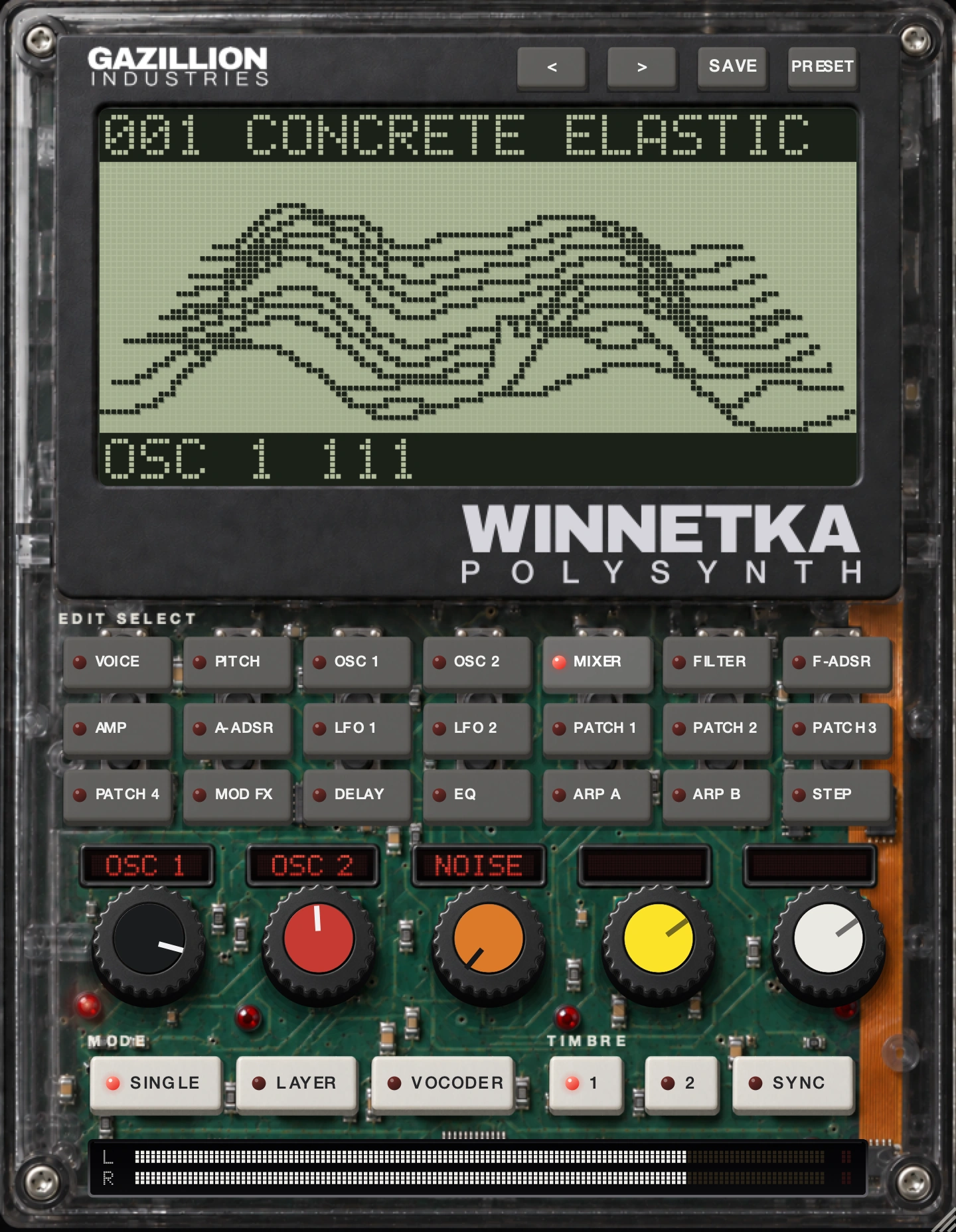 Twenty-one rows, five knobs. Press VOCODER and the five knobs take that
section's jobs, and the screen draws sixteen bands, low on the left.
Twenty-one rows, five knobs. Press VOCODER and the five knobs take that
section's jobs, and the screen draws sixteen bands, low on the left.
What a vocoder actually does
A vocoder is two matched banks of band-pass filters with a level detector between them. Apple's
Logic Pro user guide puts it plainly on its Vocoder basics page: the analysis bank and the synthesis
bank hold a matching number of bands, band 1 to band 1 and band 2 to band 2, and an envelope follower
on each analysis band tracks volume changes in that slice of the incoming audio. Those tracked levels
control the levels of the matching synthesis bands. The synth hears nothing and understands nothing.
It is being turned up and down in sixteen or twenty places at once, quickly. The stage-by-stage
version is in what is a vocoder.
Which means a band with no carrier energy in it opens onto silence. Image-Line's Fruity Vocoder
page says the same thing from the other end: the vocoder acts like a series of gates, and where a
gate opens and the carrier has nothing, that part of the tonal character is lost. A thin carrier
makes an unintelligible vocoder, and no work on the voice will fix it.
Carrier and modulator, and which is which
The carrier is what you hear. The modulator is what you understand. Ableton's reference manual
describes the modulator as generally something with a clear rhythmic character, speech or drums, and
the carrier as typically a harmonically rich synthesizer sound. Keep the words straight, because the
hosts do not agree on them: Cockos' effects guide for Reaper calls the vocal the detector
track and the synth the modulator track, the reverse of everybody else. Read the routing,
never the label.
Bands, and what the count buys
More bands means a finer copy of the original spectrum. Apple states it directly — the more
bands a vocoder offers, the more precisely the original sound character is reproduced — and
gives EVOC 20 PS up to 20 bands per bank. Ableton's manual adds the cost in the same breath: more
bands is a more accurate analysis and more CPU. Fruity Vocoder offers 4 to 128, Audacity's built-in
Vocoder defaults to 40, WINNETKA runs sixteen. Push a filter bank fine enough and it resynthesizes
the voice rather than cartooning it, so pick the count for the sound you want.
The routing problem, in one paragraph
Three things have to be true at once. A track has to be playing notes into the carrier. A second
track has to be carrying your voice. And a wire has to exist between them that does not also dump the
raw voice into the mix. Hosts differ only on the third, and they differ a lot. What follows is each
host's own documented path, read off each maker's own pages while writing this.
How to use a vocoder in Ableton Live
Live's own Vocoder is an audio effect, and it goes on the voice. That sentence undoes most of the
confusion, because the instinct is to put it on the synth. Ableton's manual is explicit: Live's
Vocoder should be inserted on the track that contains the audio material you plan to use as your
modulator. The Carrier chooser then picks what gets shaped — Noise, External, Modulator or
Pitch Tracking — and External is the one the manual names for classic robot voice work, with
Audio From choosers underneath for pointing at the synth track.
Ableton's own singing synthesizer walkthrough: insert Vocoder on the vocal track, put a
synthesizer on another track, set the Carrier chooser to External, select the synth track in the
Audio From choosers with Post FX in the bottom one, and arm both tracks if you are playing and
speaking at once. Solo the voice track to hear the vocoded signal alone. The manual also notes that
Vocoder is absent from the Intro and Lite editions, which answers anyone who cannot find it.
A plug-in with the synth already inside reverses the picture, and Ableton documents that too.
Section 17.5.2.7, Feeding Sidechain Inputs, says that where the vocoder plug-in includes its own
carrier synthesizer, the only difference is that the vocoder instrument is dragged into a MIDI track,
and feeding the sidechain audio input works as described: set the speech track's Output Type chooser
to the track holding the instrument, then pick the plug-in's input from the Output Channel chooser
below it. In the mixer those read Audio To and the box under it. WINNETKA's manual gives the
same path in its own names — Audio To set to the WINNETKA track, Audio In-WINNETKA picked
below, and Monitor set to In if the source is a live mic rather than a clip. Its audio input is
stereo and the left channel is the voice it listens to, so a mono vocal panned hard left is the safe
way in.
How to use a vocoder in Logic Pro
Logic keeps the wire in the plug-in header, which makes it the tidiest of the five. Apple's setup
instructions for EVOC 20 PS: insert it into the Instrument slot of an instrument channel strip, then
choose an input source from the Analysis Input pop-up menu in the plug-in header, which can be an
audio track, live input or bus. Apple then lists the step everyone forgets — mute the audio
track serving as the side chain input — because otherwise the dry voice sits in the mix beside
the vocoded one and the result reads as a doubling effect.
Third-party plug-ins use the same menu under its ordinary name. Apple's page on working in the
plug-in window says that for plug-ins with a Side Chain pop-up menu you can use audio from an audio
or software instrument track, hardware input or bus to trigger the plug-in, and that the side chain
signal controls the plug-in without being processed by it. One caveat from the same page saves an
afternoon: some third-party Audio Units do not allow the side chain to be controlled internally, and
those show None where Internal would be.
WINNETKA installs as an Audio Unit in /Library/Audio/Plug-Ins/Components, so it loads into that
same Instrument slot with the notes and the carrier already on the channel strip, leaving the voice
as the only thing to route. The level you send it at matters as much as the path, because a modulator
arriving 15 dB quiet sits under the gate threshold and reads as a dead vocoder.
Gain staging is the unglamorous half of this too.
WINNETKA
is our polysynth with a 16-band vocoder built in, $49, AU and VST3 and standalone on Mac and VST3 on
Windows, with 350 presets and 40 of them vocoder programs. Carrier and notes live in the same
instrument, so the voice is the only signal you have to route. There's a demo on the page.
How to use a vocoder in FL Studio
FL Studio has two vocoders and both read their inputs off the mixer. Fruity Vocoder is the simple
one, and its convention is worth memorizing because WINNETKA and Audacity share it: Image-Line's page
says that by default the left channel is the modulator and the right channel is the carrier, so it
processes a mono input and outputs stereo, and the assignment swaps from the MIX section. Their
suggested way to build that pair is panning — route both instrument channels to the vocoder's
mixer track, then pan the modulator hard left and the carrier hard right.
Vocodex is the larger one, with MOD and CAR input selectors that work through the mixer sidechain
routing system. Image-Line's production method: load Vocodex in a mixer track effect slot rather than
the Master, label a separate mixer track MOD for the voice, and with that track selected right-click
the Vocodex track's send switch and choose Sidechain to this track only. That last click is the part
people skip, and the wrapper page says why — failure to do it leaves a parallel audio signal,
one entering through the effect's input and another passing through the effect stack as normal. The
carrier reaches Vocodex by setting the carrier plug-in's Channel Settings FX selector to Vocodex's
mixer track number.
One documented limit decides which route you take. Image-Line notes that Vocodex does not respond
to Piano roll notes, because there is no path from the Piano roll or Step Sequencer to effects
plug-ins, so its internal carrier synth is aimed at live use. An instrument with a vocoder inside sits
in the Channel Rack instead and takes Piano roll notes like anything else. For its audio input,
Image-Line's plug-in wrapper page documents manual assignment for plug-ins loaded in Channels: the
input and output numbers are mixer-track offsets relative to the Channel Settings mixer track, so a
plug-in on mixer track 10 with an input of −2 receives audio from track 8. Right-click the input
field to pick from the list.
How to use a vocoder in GarageBand
GarageBand is the one with nothing in the box. Apple's GarageBand user guide has no vocoder page
and documents no bus, send or side chain anywhere in it, so the two-track wire the other four hosts
provide does not exist here. What it does document is Audio Units: instrument plug-ins can be used on
software instrument tracks only, added from the Plug-ins area of the Smart Controls pane by clicking
the right side of the Instrument slot and choosing AU Generators or AU Instruments. Apple also flags
the checkbox that catches people, Enable Audio Units in
GarageBand › Settings › Audio/MIDI.
So two honest answers, both skipping routing entirely. The first is the no-microphone route below,
which needs only MIDI notes. The second is WINNETKA's standalone application, which takes its own
input from your interface, carries the whole bank, and records into GarageBand as audio afterwards.
One warning from its manual: the standalone opens with its input muted so it cannot feed back, and
you turn it on in Settings by choosing your input and unticking Mute audio input.
How to use a vocoder in Reaper
Reaper does it with extra track channels, and once seen it is the most flexible of the five. Cockos'
own effects guide walks ReaVocode through it: record the vocal on a track by itself, put a synth on a
second track with a fairly bland sound, and give both tracks four channels with their master/parent
sends disabled, set from each track's I/O button. Then create a third track, insert ReaVocode into its
FX chain, send the vocal to Channels 1/2 and the synth to Channels 3/4, and balance the two with the
vertical faders on the plug-in.
The channel numbers matter because of the pin connector, explained in section 17.4 of the user
guide: the connectors work like virtual cables deciding which track channels feed the plug-in's inputs,
with channel 1 going to the FX left input and channel 2 to the FX right by default. A track holds two
channels until you raise the count in the track channels dropdown, and anything past 1/2 exists only
for the plug-in looking for it.
An instrument carrying its own carrier makes the arithmetic simpler, because the synth track is the
vocoder track and there is no second send. Put WINNETKA in the FX chain, send the vocal track to
Channels 1/2, and the default pin mapping already feeds the plug-in's left and right inputs. Left is
the voice. Keep the vocal track's master/parent send off so the dry voice does not also arrive at the
mix — the same discipline Apple asks for with the muted side chain track and Image-Line asks for
with Sidechain to this track only. Three hosts, three menus, one instruction.
The route with no microphone in it
A vocoder with nothing plugged in can still sing, and this is the part people skip. WINNETKA's
manual: twelve of the forty vocoder presets hold a vowel inside them, and they play without any audio
at all. Load one, play a chord, and the formant shape a voice would have supplied is already frozen in
the preset. No mic, no interface, no routing, no take.
The control behind it is HOLD in the FORMANT row, which freezes the shape that is there now, keeps
it playing with no input, and saves it with the preset and the session; letting go drops E.F. SENSE to
20. So: sing one vowel into the vocoder once, freeze it, and play that vowel as an instrument for the
rest of the record. Two neighbors finish the idea. FORMANT SHIFT moves the held shape a band at a time
from −2 to +2, and FORMANT CUTOFF slides it smoothly by up to two bands either way, which is the
vowel-changing move — same mechanism as
formant shifting. FC MOD then drives that shift from an
envelope, an LFO, velocity, key track or the mod wheel, at up to four bands of travel.
How to make a vocoder intelligible
Intelligibility is a carrier problem first. Ableton say so in their own Vocoder tips: you will
generally get the best results if the synthesizer sound is bright and rich in harmonics, and
sawtooth-based patches improve the intelligibility of the voice. A sine pad is the worst carrier in the
world for speech and one of the best for texture, so choose by what you want the listener to do.
Then the consonants, which always go missing, because sibilants and plosives are broadband noise and
a tuned oscillator has almost nothing to put in those bands. Every maker answers it the same way.
Image-Line: try mixing in some noise if you need to hear speech — s and t sounds — vocoded
more clearly. Ableton has the Unvoiced knob, an extra noise generator that resynthesizes the pitchless
portions of the modulator, with a Sens. control for the detection. Audacity offers white noise and what
it calls radar needles, a pulse train more broadband than noise. WINNETKA has NOISE in its vocoder
MIXER row beside OSC 1 and INST.
WINNETKA's second answer is a cheat and a good one. HPF LEVEL sends the top of the voice, above about
4 kHz, straight to the output without passing through the bands, so the real s's and t's cut through
under the synthetic vowels. HPF GATE then confines that top end to the moments you are holding a key, so
it stops sounding like an open mic between phrases. Start low, raise it until the words land, stop.
Speed and dynamics carry the rest. Ableton's Attack and Release set how quickly the Vocoder responds
to amplitude changes in the modulator, and their manual warns that very fast times preserve the transients
but can cause distortion artifacts; Audacity calls the same idea Distance and says the higher the distance,
the slower the response. WINNETKA calls it E.F. SENSE, 0 to 127, low for every syllable and high for a
smear, holding entirely at 127. Underneath it, THRESHOLD shuts the input out below a level and is off at 0,
and GATE SENSE sets how long the gate takes to close once the voice stops, from 2 ms to 2 seconds.
Image-Line's advice to compress the modulator does the same job from outside.
Two more knobs, then stop turning things. RESONANCE in the FORMANT row sets how sharp the bands are,
sharper reading as more vocal and more brittle — background in
cutoff and resonance. And DIRECT in the vocoder
AMP row puts your dry voice into the output alongside the carrier, which is the honest fix when the vocoder
alone will not carry a lyric. A little of it under the effect is how most vocoder hooks are built.
Set one up in ten minutes
Do this in your own session, with your own mic, in whichever host you are in. The control names are
WINNETKA's; the shape of the ten minutes transfers to any vocoder with the same parts.
- Load the instrument on a track that takes MIDI and set its mode to VOCODER.
- Load a vocoder preset and hold a three-note chord to confirm the carrier is sounding.
- Route your vocal track or live input to the instrument's audio input, left channel.
- Turn monitoring on for the vocal track, and turn off its send to the master.
- Speak at working volume and set THRESHOLD so the gate opens on speech and closes on silence.
- Raise GATE SENSE, which spans 2 ms to 2 seconds, until words stop clipping off at the ends.
- Hold the chord, speak a full sentence, and note which consonants are missing.
- Raise NOISE in the MIXER row until the s's and t's appear, then back it off by a third.
- Raise HPF LEVEL until the words are legible, then switch HPF GATE on.
- Set E.F. SENSE low for diction, raise it until the phrase blurs, and settle between the two.
- Move FORMANT CUTOFF one band down and one band up, and keep the one that suits the voice.
- Press HOLD on a vowel you like, put the mic down, and play the frozen shape for a bar.
- Bounce eight bars and play them on a phone speaker before you decide it works.
Step thirteen is the one people skip, and a vocoder punishes it harder than most effects. Band levels
that read as articulate on monitors collapse into a buzz on a small speaker, because the bands doing the
intelligibility work sit where a phone is weakest.
Using a vocoder live
Live use changes two things: monitoring and feedback. The mic is open in the same room as the speakers
and a vocoder is a bank of resonant filters aimed at whatever it hears, so it finds a howl faster than a
plain channel does. WINNETKA's standalone opens with its input muted for that reason, and its manual's
advice when you unmute is one word long: headphones.
The rest is arrangement. Set THRESHOLD higher than you would in the studio so stage noise never opens
the bands. Put LATCH on in the ARP A row if you want the chord to keep playing after you let go, which
frees both hands for the mic; your next chord replaces the held one. And pick one route for the dry voice,
because DIRECT and the front-of-house channel do the same job.
What a vocoder costs you
It costs consonants. The design throws away the parts of speech that carry no pitch, and every fix above
is a way of smuggling some of them back. A vocoder line is a hook rather than a verse.
It costs two performances in one take, because you are playing the chord and speaking the line at the
same time and both have to land together. The workaround is to record the voice first and play chords
against it, which is what Apple, Ableton and Image-Line all assume in their own walkthroughs, and which
loses the thing that makes live vocoding fun.
It costs arrangement space. A vocoder occupies the lead vocal's register and the pad's harmonic job at
once, so a track carrying all three has an argument in it. Cut the pad while the vocoder sings, or move the
vocoder where the others are not; EQ on the vocal is the
second half of that fix. And it costs CPU that scales with the band count, which matters most on a laptop
at a show.
Questions people ask
How do you use a vocoder plugin, in one answer?
Give it two inputs. Put notes into the carrier and audio into the modulator, and make sure the raw
modulator does not also reach the mix. In a plug-in carrying its own synth that is one route instead of
two, because the notes are already there and only the voice has to travel. WINNETKA is $49, runs a 16-band
vocoder inside a polysynth, and takes the voice on the left side of its stereo audio input.
Why is my vocoder silent when I talk into it?
Four things, in the order they go wrong. The modulator never arrived, which is the routing above. The
carrier is not sounding, so hold a chord on its own and check you hear it. The gate is closed, so drop
THRESHOLD to 0 and see whether the sound returns. Or the dry voice is reaching the mix in parallel and
masking the effect, which is what Apple's muted side chain track, Image-Line's Sidechain to this track only
and Reaper's disabled parent send all exist to prevent.
How do you use a vocoder in Audacity?
Build both signals into one stereo track before you run the effect. Audacity's manual says Vocoder
synthesizes a modulator in the left channel of a stereo track with a carrier wave in the right channel, that
it works only on unsplit stereo tracks, and that it lives under Effect › Distortion and
Modulation › Vocoder. It defaults to 40 bands and can add white noise or a pulse train to the
carrier. It is offline processing, so nobody plays along with it.
How do you use a vocoder in Studio One?
The same three things are true, and we are not printing a menu path we could not read today —
PreSonus's online manual would not serve us its pages while this was written, and a wrong routing path is
worse than none. So: find the sidechain send in your version's documentation, point the vocal at the
instrument holding the vocoder, and stop the vocal reaching the mix twice. WINNETKA is a VST3, the format
Studio One takes on both platforms.
How do you make a robotic voice with a vocoder?
Hold one chord and keep it still. The robot comes from stripping the pitch movement out of speech and
replacing it with a fixed harmonic set, so a sustained chord, a bright sawtooth or pulse carrier and a fast
envelope response get you most of the way. Then add noise until the consonants come back. On WINNETKA, drop
the octave with TRANSPOSE, which reaches ±24 semitones, keep E.F. SENSE low, and put a little DIST on
the carrier.
How do you use a vocoder live?
On headphones, with the gate set high. An open mic beside a bank of resonant filters is a feedback path,
which is why WINNETKA's standalone opens with its input muted and asks you to choose an input and untick Mute
audio input before it will listen. Raise THRESHOLD until stage noise cannot open the bands, latch the
arpeggiator so your hands are free, and pick one route for the dry voice.
Do I need a microphone to use a vocoder?
No, for two separate reasons. Any recorded audio works as a modulator — a drum loop shaping a string
pad is standard, and Apple names exactly that in their own vocoder primer. And a vocoder that can freeze a
formant shape needs no live input at all: twelve of WINNETKA's forty vocoder presets hold a vowel and play
from the keyboard on their own.
What WINNETKA does
WINNETKA
is a polysynth with a vocoder, $49, in AU, VST3 and standalone on macOS and VST3 on Windows.
350 presets across bass, lead, pads, FX, percussion, arp and vocoder, 40 of them vocoder
programs. It plays a single timbre or two layered ones, and the whole instrument edits through twenty-one
row keys and five knobs that change job with the row.
The vocoder is 16 bands, drawn low to high across the screen as it moves. Audio arrives
on a stereo input where the left channel is the voice it listens to and the right can carry an instrument,
raised with INST in the MIXER row beside OSC 1 and NOISE. The AUDIO IN row
holds THRESHOLD, GATE SENSE from 2 ms to 2 seconds, and HPF LEVEL, which sends the
voice above about 4 kHz straight to the output so the consonants survive, with HPF GATE to confine it
to held keys. The FORMANT row carries the vowels: SHIFT from −2 to +2 bands, CUTOFF
sliding smoothly up to two bands either way, RESONANCE for how sharp the bands are, E.F. SENSE for how fast
the shape follows, and HOLD to freeze it and keep playing with nothing plugged in.
FC MOD puts that shape under an envelope, an LFO, velocity, key track or the mod wheel, and
LEVEL A/B and PAN A/B set the loudness and stereo position of each pair of
bands across the sixteen.
Around it sits the rest: a carrier built on OSC 1 with eight waves, among them a VOX wave whose CONTROL 1
moves its own formant from dark to bright; TRANSPOSE of ±24 semitones; a sixteen-step arpeggiator
across ARP A and ARP B with rates from 1/1 to 1/64, swing, latch and twelve patterns; and a shared chain of
mod FX, delay and a three-band EQ. Every control is a DAW parameter. If presets are how you learn a panel,
our piece on synths with presets worth reading
makes the case.
Same mic, same chord, same held note. This time the chord talks.
WINNETKA — a polysynth with a vocoder and 350 presets. AU, VST3 and
standalone on Mac, VST3 on Windows.
Hear it
Keep reading