← Gazillion Industries/Reading material
Vocoder plugin for FL Studio: the two it ships with, and the third
The hook wants the robot chorus, the vocal is on mixer track 1, the synth is on track 2, and the vocoder on track 3 is making exactly nothing. Nine FL Studio vocoder sessions out of ten die right there, and the fix is one right-click.
FL Studio ships two vocoders. Fruity Vocoder is in every edition and reads its two inputs off the left and right channels of one mixer track. Vocodex is in Producer Edition and up and takes its modulator and carrier through the mixer's sidechain system. A third-party VST3 vocoder loads in any edition and gets its carrier by sidechain. Ours is WINNETKA, a $49 polysynth with a 16-band vocoder, and twelve of its vocoder presets hold a vowel, so in FL Studio they play with no routing at all.
The short version
- In every edition
- Fruity Vocoder, 4 to 128 bands; left channel is the modulator, right is the carrier
- Producer Edition and up
- Vocodex, 5 to 100 bands, sidechain MOD and CAR inputs, built-in carrier for live use
- The right-click
- select the voice track, right-click the vocoder track's send switch, "Sidechain to this track only"
- Free VST3 vocoders
- TAL-Vocoder, 11 bands; Full Bucket FBVC, 20 bands with its own tone generator
- Ours
- WINNETKA, $49: 16-band vocoder in a polysynth, 40 vocoder presets, twelve of them playable with no mic
- In Ableton instead
- the Vocoder device, Standard and Suite, inserted on the voice track
Fruity Vocoder: the one in every edition
Image-Line describe Fruity Vocoder as "an advanced real-time vocoder effect with a wide range of adjustable parameters and zero latency", and it is included from Fruity Edition up. The band count runs from 4 to 128. The FREQ section has FORM, a formant slider that shifts the vocoded result toward a higher or lower voice, Min and Max for the frequency range, Scale for linear or logarithmic spacing, INV to invert the modulator bands and BW for the width of the carrier filters. ENV sets the follower's attack and decay, and HOLD freezes the band levels where they are.
The routing is the part nobody reads. Fruity Vocoder does not use the sidechain system. In Image-Line's words, "by default, the left channel is the modulator and the right channel is the carrier", and the L and R labels in the MIX section swap them. So you build a stereo pair: route the vocal channel and the synth channel to the vocoder's mixer track, pan the vocal hard left and the synth hard right. The manual's other method is two mixer tracks with Fruity Mute 2 killing one side of each, both sent into the vocoder track. Either way, a mono voice arrives on the left and a mono carrier on the right.
Vocodex: the one from Producer Edition up
Vocodex is "the last word in vocoders" by its manual's account, with 5 to 100 variable-width bands, articulation envelopes, a built-in carrier synth and a Soundgoodizer stage. It is available in Producer Edition, Signature Bundle and All Plugins Edition, and this one does use the mixer's sidechain system, with separate MOD and CAR input selectors. A selector at 0 uses Vocodex's own track; a selector at three dashes blocks external input.
Image-Line document two ways in. The "Immediate" method loads Vocodex on a mixer track, routes the voice to that same track, and picks a preset from the Immediate category, which switches the carrier to the internal synth. Their own caveat is worth quoting: "The internal Carrier synthesizer is provided for live 'demo' purposes, use the external Carrier 'Production Method' for project work." The internal synth does not respond to the Piano roll or the Step Sequencer. For a sequenced carrier, the manual points you at the same sounds in Sytrus's Vocoder carriers presets, routed in from outside.
The controls go deep once the signal arrives. WET and SG set the vocoder and Soundgoodizer levels; MOD and CAR pass-through levels with a high-pass on the voice and a low-pass on the carrier; NOISE adds noise to the carrier for consonants; Contour follows the carrier's envelope or the modulator's sibilants; ATT and REL set the band envelopes, and a per-band Modulation Mapping lets you draw gain, pan, noise and width across the bands. There is no control named Formant; the equivalent is Modulator pitch shift, which Image-Line describe as slewing "the pitch of the vocoder down for a more masculine sound".
The production method, step by step
This is the routing that makes Vocodex, and any sidechain vocoder, work. Menu wording is Image-Line's.
- Load Vocodex in an effect slot on an empty mixer track, never the Master.
- Route the vocal to its own mixer track and label it MOD.
- Select the MOD track, right-click the Vocodex track's send switch and choose "Sidechain to this track only".
- Deselect the MOD track's send to the Master, so the dry voice stops reaching the mix.
- Set the carrier instrument's Channel Settings mixer-track selector to the Vocodex track number.
- In Vocodex, set the MOD input selector to the MOD track and leave CAR at 0.
- Play a chord on the carrier and speak.
- Raise NOISE until the "s" and "t" sounds appear, then back it off by a third.
Step four is the one that gets skipped, and the mixer page says why: "the sidechain source Mixer Track will remain routed to the Master Mixer Track" until you stop it. Leave it and you hear the dry vocal and the robot at once, and the robot loses.
How a third-party vocoder gets its carrier in FL Studio
Any VST or VST3 vocoder with a sidechain input uses the same send. The Plugin Wrapper's Processing tab has a Connections section, which Image-Line say exists for "multi-input or multi-output plugins such as a compressor that accepts side-chain inputs". Sidechain the carrier track to the vocoder's track as in step three, then click Auto map inputs, which assigns "the sidechained Mixer track with the lowest number to the first plugin input". Or right-click the input number fields and pick by hand. Waves' own support article for OVox in FL Studio describes exactly this: carrier on track 2, right-click the arrow on the OVox track, "Sidechain to this track only", set the sidechain connections to 1, then set the plugin's Synth Source to Sidechain.
The free ones first. TAL-Vocoder is listed under TAL's free plugins: an 11-band design that "produces the sound of vocoders from the early 80's", with a built-in VCO synth as the carrier and sidechain routing to feed it a carrier of your own. VST, VST3, AU, AAX and CLAP, Windows 7 and up, macOS 10.9 and up, Linux. Full Bucket FBVC is a 20-band stereo vocoder with a 64-voice tone generator inside it, so it can be its own carrier, plus an external carrier on inputs 3 and 4. Windows gets VST2, VST3, CLAP and AAX; macOS adds AU. Version 1.1.3, November 2024, with direct downloads on the maker's page and no price attached.
Paid options that load in FL Studio: MeldaProduction MVocoder, $55, up to 100 bands and an external sidechain only, so it always needs a carrier track. Arturia Vocoder V, 149 euros, 16 bands from 50 to 5,080 Hz with a synth and sampler inside. XILS 5000, 179 euros list and 49 on sale when this was written, two synth cores and 22- and 20-band filter banks with a sidechain for an external carrier. Waves OVox runs an internal synth by default and takes a sidechain carrier as above. The best vocoder plugins guide weighs them against each other.
WINNETKA in FL Studio
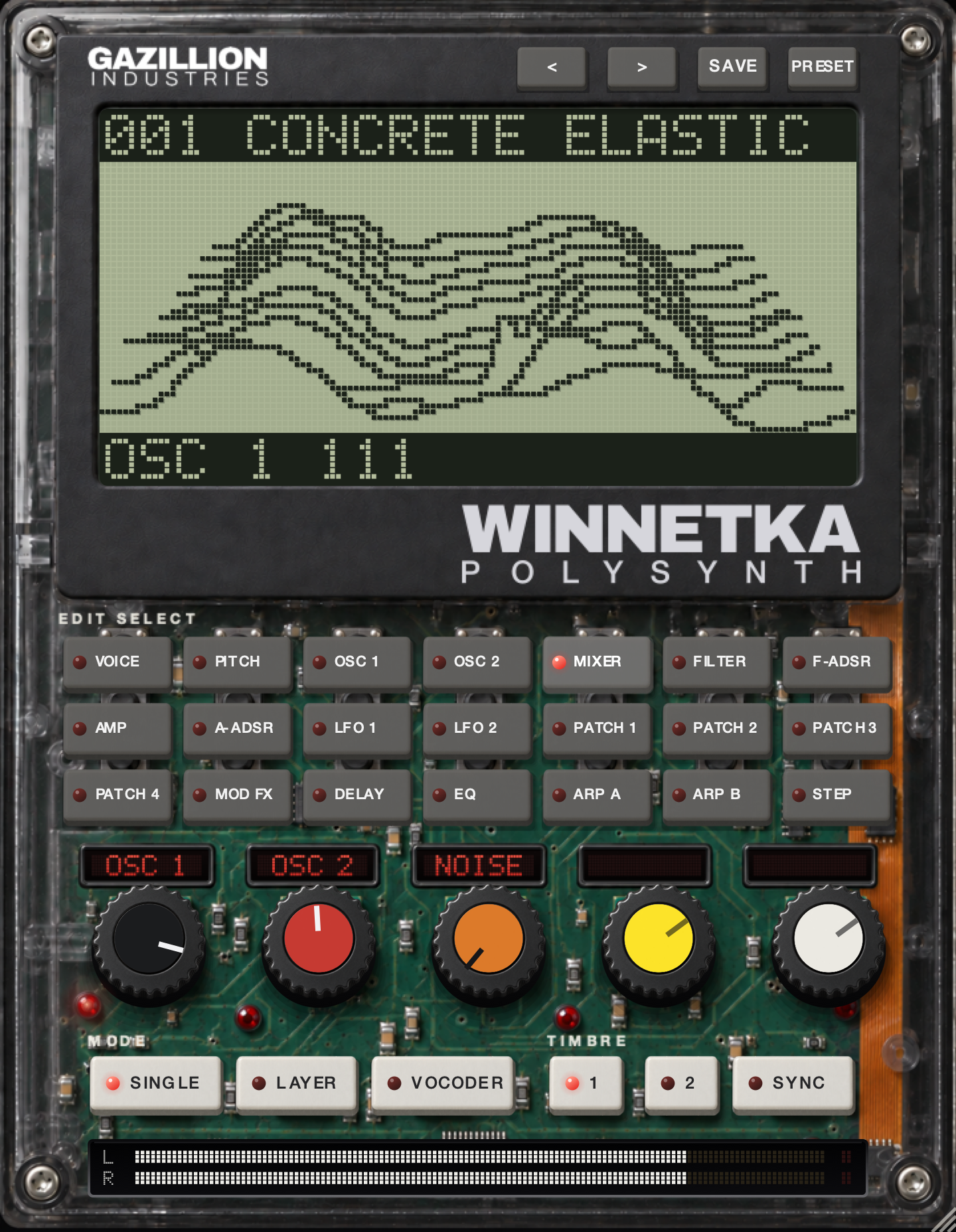
WINNETKA is an instrument, so it sits in the Channel Rack and takes Piano roll notes like any synth, and its vocoder is a mode of the synth rather than an effect slot. Forty of its 350 presets are vocoder sounds, and twelve of those hold a vowel inside them. Load one, play a chord, and the formant shape a voice would have supplied is already frozen in the preset. In FL Studio that means the routing above never happens: no MOD track, no send switch, no Master to deselect.
For a live microphone into it, the voice has to reach an instrument's audio input, and Image-Line's wrapper page documents manual input assignment for plug-ins loaded in Channels as mixer-track offsets, set by right-clicking the input field. How to use a vocoder in any DAW walks that, host by host. The honest advice for FL Studio is to let Vocodex handle the live-mic session and use WINNETKA for the carrier that costs the most in the free field: a real polysynth, up to 128 voices, with the vowel already in it.
WINNETKA is $49, a VST3 on Windows and AU, VST3 and standalone on the Mac. Load a vocoder preset, hold three notes, and it talks before the microphone is plugged in. There is a demo on the page.
If you are in Ableton Live instead
Live's Vocoder is in Standard and Suite, and not in Intro; Ableton's shop lists the three at USD 349, 749 and 99. The manual's placement rule is the opposite of most plugin vocoders: "Live's Vocoder should be inserted on the track that contains the audio material you plan to use as your modulator", meaning the voice. The Carrier chooser then offers Noise, External, Modulator and Pitch Tracking; External "allows you to select any available internal routing points", which is where you pick the synth track. Unvoiced runs a second noise generator over the "f" and "s" sounds with its own sensitivity, Depth at 100 percent gives what the manual calls "classic" vocoding, Formant shifts the carrier's filterbank, and Gate silences bands below a threshold. For a plugin vocoder in Live, including WINNETKA, the voice travels the other way, through Audio To on the vocal track, and the routing guide has that path in Live's own menu names.
What a vocoder in FL Studio costs you
Consonants first. A filter bank measuring tone finds nothing in an "s", so every one of these tools has a noise or unvoiced control, and the evening is spent on it. It costs two performances in one take: the chord and the words have to land together, which is why Vocodex's internal carrier exists and why it is for live use only. It costs CPU that climbs with the band count, and 100 bands in Vocodex on a laptop is a decision. And the routing costs you the first session, every time, in every host except the one where the vowel is already in the preset.
Questions people ask
Does FL Studio have a vocoder?
Two. Fruity Vocoder is in every edition and uses the left channel as the modulator and the right as the carrier. Vocodex is in Producer Edition and up, with 5 to 100 bands and sidechain inputs for modulator and carrier.
How do I use a vocoder in FL Studio?
For Vocodex: load it on an empty mixer track, select the vocal's track, right-click the Vocodex track's send switch and choose "Sidechain to this track only", deselect the vocal track's send to Master, route the carrier synth to the Vocodex track, then set MOD to the vocal track. For Fruity Vocoder, pan the voice hard left and the synth hard right into one track.
Is there a free vocoder plugin for FL Studio?
Fruity Vocoder is already there in every edition. Beyond it, TAL-Vocoder is listed as free by its maker and Full Bucket's FBVC has direct downloads with no price on the page; both load as VST3. The free vocoder guide covers the rest.
Why is my vocoder silent in FL Studio?
The carrier or the modulator never arrived. Check that the send switch was right-clicked, not left-clicked; a left-click makes an audio send, and the mixer page notes a sidechain exists only when the send knob is at 0 percent. Then check that the carrier's Channel Settings selector points at the vocoder's track number.
Can I use a vocoder in FL Studio without a microphone?
Yes, two ways. Any recorded audio works as a modulator, so a vocal clip on a track does the job. Or use an instrument whose vocoder presets hold a vowel: twelve of WINNETKA's forty vocoder presets play with no audio input at all.
Does Ableton Live have a vocoder?
In Standard and Suite, yes. It goes on the voice track and picks the synth through the Carrier chooser's External setting. Intro does not include it, and a plugin vocoder fills the slot there.
Which is better in FL Studio, Fruity Vocoder or Vocodex?
Vocodex, if your edition has it: sidechain inputs, up to 100 bands, noise for consonants and per-band mapping. Fruity Vocoder is the simpler one and is in every edition, and its panning routing is quicker to set up for a single line.
What WINNETKA does
WINNETKA is our polysynth, $49, one payment, AU, VST3 and standalone on macOS 10.13 or later for Apple Silicon and Intel, and VST3 on Windows 10 or later, 64-bit. Play a single sound or layer two timbres. Switch to VOCODER and the edit rows become the vocoder's own, with sixteen bands drawn across the screen, formant and shift controls, and a HOLD key that freezes the shape and keeps it playing with nothing coming in. 350 presets: bass, lead, pads, FX, percussion, arp and 40 vocoder sounds, twelve of them holding a vowel so they play with no microphone. A 16-step arpeggiator with rates to 1/64, filters, envelopes, modulation, EQ and delay. How to make robot vocals is the sound this page is for.
Track 3 is making the robot now. It took one right-click, and a second one to stop the dry voice from singing along.
WINNETKA — a polysynth with a vocoder and 350 presets. AU, VST3 and standalone on Mac, VST3 on Windows.
Mac · Winmore info
Keep reading
- Best vocoder plugins — The three controls that decide whether your words survive the filter bank.
- Best free vocoder plugins — The free vocoders that are really free, and where they run out.
- How to use a vocoder — The routing problem solved host by host, and how to stay intelligible.
- How to make robot vocals — The three effects people call a robot voice, and the no-mic route.