← Gazillion Industries/Reading material
How to make a sample sound fuller
The sample came from a record that sounded enormous in the store. Chopped, filtered and dropped into the session, it sounds like a postcard of that record: the right picture, a lot less of it.
To make a sample sound fuller, put back what the chopping and filtering took away. Restore a little body with gentle EQ, add harmonics and density with saturation, even out its level with compression so it sustains, support it with a bass or octave layer, give it a small amount of room, and widen only its mids while keeping its low end centered. Fix muddiness and harshness first, because a muddy sample gets muddier when you try to make it bigger.
The short version
- Clean
- cut mud and hiss before adding anything
- Body
- gentle low-mid EQ where it thinned out
- Harmonics
- saturation for density and presence
- Sustain
- compression so chops don't drop away
- Support
- a bass or octave layer under it
- Space
- a little room; width on the mids only
What thin measures as
Thin is two measurements, and they get argued about as one word. The first is how many octaves the sound occupies. The second is how far its peaks sit above its average. Both are things you can read off your own chop in about a minute, and knowing which one is wrong tells you which half of this page to do.
Count the octaves first. A record that covers 40 Hz to 16 kHz spans log2(16000 ÷ 40) = 8.64 octaves. Chop it, high-pass at 200 Hz to lose the old bass, and low-pass at 8 kHz to lose the hiss, and what's left spans log2(8000 ÷ 200) = 5.32 octaves. You kept 62% of the range and threw away 3.32 octaves, 2.32 of them off the bottom. The postcard is cropped rather than shrunk.
Then measure the crest factor. Bounce eight bars of the chop, read the sample peak and the RMS, and subtract. A chop that peaks at −6 dBFS with an RMS of −20 dBFS has a crest factor of 14 dB, which means it spends almost all of its life 14 dB below the loudest thing in it. That gap is the sound disappearing between hits. Crest factor has the full method.
Why samples sound thin
Most of the thinness is self-inflicted. Filtering out the old bass line takes body with it. Short chops cut off the sustain and the room. Pitching up shrinks the tone. Low-quality sources have little top and a lot of noise. Figure out which of those happened to your sample, because each has its own fix.
What the high-pass actually removed
A high-pass does not stop at its cutoff, and the number on the knob is not where the sound stops. A 12 dB/octave filter is down 3 dB at the cutoff and 12.3 dB an octave under it, following 1 ÷ √(1 + (fc ÷ f)⁴). Set it at 200 Hz and here is what it does to the notes underneath.
- E3, 164.81 Hz
- −5.01 dB — audibly thinner already
- C3, 130.81 Hz
- −8.11 dB
- A2, 110.00 Hz
- −10.77 dB — the fundamental is now a ghost
- E2, 82.41 Hz
- −15.53 dB
- C2, 65.41 Hz
- −19.46 dB — effectively gone
Read the middle row again. If the sample's chords sit around A2 and C3, a 200 Hz high-pass has taken 8 to 11 dB out of their fundamentals while leaving every harmonic above 200 Hz untouched. The chord still plays. Its root is a rumor. That is the specific sound people mean by hollow, and no amount of saturation further down the chain puts a fundamental back.
So find the lowest note in the sample, look it up, and put the high-pass at least an octave under it. If the lowest note is C3 at 130.81 Hz, a filter at 65 Hz removes the old bass and leaves the chord's own bottom alone. Use a steeper slope rather than a higher cutoff when the two collide: at 24 dB/octave the same 200 Hz setting is 24.1 dB down one octave below, which clears the bass line faster and lets you set the cutoff lower.
Clean it before you build it
Muddy and thin can happen at the same time. If the sample sounds boxy, cut a little in the low mids where it rings; if it hisses, low-pass the noise. Removing what's in the way often makes a sample sound fuller before you add anything, and it keeps the next steps from amplifying the problem.
Finding the boxy frequency instead of guessing
Boxiness has an address, and it is worth an extra thirty seconds to find it rather than cutting 300 Hz because a tutorial said so. Put a parametric band on the sample, set it to +8 dB with a narrow Q around 6, and sweep it slowly from 150 Hz up to 800 Hz on a loop. One spot will jump out and sound like the sample is being played through a drawer. Stop there, read the frequency, then invert the band to a cut.
Cut less than you boosted. A sweep at +8 dB exaggerates on purpose; the fix is usually 2 to 4 dB at a wider Q of 1.5 to 3. Two narrow cuts are common on old sources, because the room the record was cut in had more than one thing ringing in it. Three or more and you are carving, which thins the sample faster than the high-pass did. Why is my mix muddy covers the buildup case, where the ring is not in the sample at all but in four parts stacked on the same band.
Add harmonics and density
Saturation is the fastest way to fill out a thin sample. It adds harmonics above the notes and brings the quieter parts of the sound up toward the peaks, so the sample takes up more space without getting much louder. Start gentle and check at matched loudness. The method is in how to use saturation in a mix.
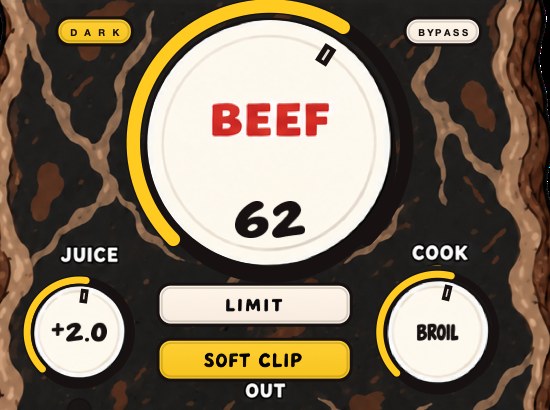
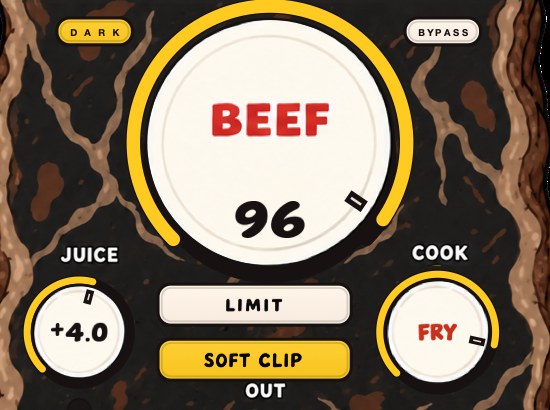
Feed BEEFY a chopped sample and turn up the big knob. The demo on the page is 28 seconds.
Where the new harmonics land
Saturation builds a harmonic series on top of every note already there, at exact integer multiples of it. A symmetric curve adds the odd ones. An asymmetric curve adds the even ones as well. For a sample whose root sits at 150 Hz, the odd harmonics arrive at 450, 750, 1050 and 1350 Hz, and the even ones at 300, 600, 900 and 1200 Hz.
Every one of those is above 200 Hz, which is the whole trick. A phone speaker puts out almost nothing below roughly 500 Hz, so the 150 Hz root never leaves the grille; the harmonics at 450, 600, 750 and 900 do, and the ear rebuilds the 150 Hz pitch from their 150 Hz spacing. Boosting 150 Hz with an EQ sends more of something the speaker cannot move. Saturating it sends a copy of the same information somewhere the speaker works. See how to make bass audible on phone speakers.
Odd against even is a color decision, and on a sample it usually decides between weight and edge. Odd harmonics sit at 3, 5 and 7 times the root, well clear of it, and read as hard and hollow. Even harmonics land on the octave and the octave-plus-fifth, which is the same interval the sample is probably already playing, so they read as thicker rather than dirtier. Most saturators give you both in some ratio, and the tone control is usually moving that ratio.
How to make a sample sound fuller
- Cut any boxy low mids and low-pass hiss.
- Add a gentle low-mid boost where the body went missing.
- Saturate until it thickens, then match levels against bypass.
- Compress lightly so the tails of the chops hold up.
- Add a bass note or an octave-down layer under the sample, filtered so they don't overlap.
- Send it to a short room reverb, blended low.
- Widen its mids a little if it's narrow, and keep its low end in mono.
- Sum the session to mono and confirm the low end and the level survive.
- Play it on a phone speaker at the volume the record gets heard at.
Compression for sustain, in numbers
Compression makes a chop fuller by shrinking the distance between its loudest moment and its tail. Here is the arithmetic on a chop that peaks at −6 dBFS with a tail sitting at −28 dBFS, a 22 dB gap. Set 3:1 with the threshold at −18 dBFS. The peak is 12 dB over, so it comes out at −18 + 12 ÷ 3 = −14 dBFS, which is 8 dB of gain reduction.
Add 8 dB of makeup and the peak is back at −6 where it started. The tail, which never crossed the threshold, is now at −28 + 8 = −20. The gap has gone from 22 dB to 14 dB, and the 8 dB it lost is the sustain you can suddenly hear. Nothing was added. The quiet part was carried up.
Times matter more than the ratio on a sample. An attack of 10 to 30 ms lets the front of the chop through before the compressor closes, which keeps it from sounding blunted. Set the release against the tempo: at 90 BPM a beat is 60000 ÷ 90 = 666.7 ms, an eighth is 333.3 ms and a sixteenth is 166.7 ms. A release around 150 to 200 ms recovers between sixteenths and breathes with the loop. A release of 30 ms recovers inside every note and pumps. More at what is a compressor.
Support it from underneath
When the original bass is filtered out, something has to replace the weight. A simple bass line following the sample's root notes, or the sample pitched an octave down and low-passed, gives it a floor. Keep it quieter than you think; the goal is the sample sounding complete, not a new part.
Where to cross the layer over
An octave-down layer can land somewhere nothing plays back. If the sample's lowest note is C2 at 65.41 Hz, an octave down puts the fundamental at 32.70 Hz, and its harmonics run 65.4, 98.1, 130.8 and 163.5 Hz. On a phone that rolls off around 500 Hz, the first thing to arrive is the fifteenth harmonic. You have spent a layer on weight that exists in your room and nowhere else.
Two ways out. Play a bass note at the root instead of an octave below it, so the fundamental is 65.41 Hz and the harmonics start at 130.8 and 196.2. Or keep the octave layer and saturate it, which puts its own harmonics up where small speakers live. Either way, low-pass the support layer around 100 to 120 Hz and high-pass the sample at the same point, so the two are not both describing the same band.
Watch the phase where they overlap. Two sources playing the same note a few milliseconds apart comb-filter, with notches at odd multiples of 1 ÷ 2D. A 10 ms offset notches at 50, 150, 250 and 350 Hz; a 20 ms offset notches at 25, 75, 125 and 175 Hz, straight through the weight you just built. Nudge the layer until the low end is loudest, or flip its polarity and take whichever is bigger. Phase cancellation is the long version.
Pitching, and what it costs
A speed change moves pitch, tempo and length together, and it moves the body with them. Pitch a sample up 3 semitones and every frequency multiplies by 2^(3 ÷ 12) = 1.1892: a 100 Hz fundamental becomes 118.92 Hz, the body around 200 to 400 Hz moves to 237.8 to 475.7 Hz, and a 2.000-second chop becomes 1.682 seconds. Up 5 semitones the multiplier is 1.3348 and the chop runs 1.498 seconds. Up an octave it is exactly 2, and half the time.
Nothing was removed, and the sample still sounds thinner, because the weight moved up out of the band the ear reads as weight. The fix is not to undo the pitch. Rebuild the body where it now sits, or take the support layer down to cover the floor the sample vacated. Going the other way, pitching down 12 semitones doubles a 1.500-second chop to 3.000 seconds and moves every harmonic into the lower half of its old range, which thickens and dulls at the same rate.
Worth hearing rather than taking on trust. The same phrase at three speeds, and the whole point is that pitch and length move together — you cannot have one without the other from a speed change. Rendered with our SKRUU.
If the tempo has to stay put, that is a different tool and a different set of costs. How to pitch a sample and how to change pitch without changing tempo have both.
Width and room
A mono chop sounds small next to a stereo record. A little widening on the mids and a short room reverb make it feel like it's in a space. Don't widen the low end, which gets weaker in mono, and don't drown the sample in a long reverb, which makes it sound further away rather than bigger.
Why the widening vanishes on a phone
The mono sum ignores the side channel completely, and the algebra says so in one line. A widener works in mid and side, where L = M + S and R = M − S. Sum them and the sides cancel: L + R = 2M, whatever S is doing. Every dB you add with the width control is a dB that does not exist on a phone, a laptop, a shop PA or a club sub.
Put numbers on it. With the mid at 1 and the side at 0.5, each stereo channel carries √(1 + 0.25) = 1.118, or 0.97 dB. Raise the side to 1.0 and each channel carries √2 = 1.414, or 3.01 dB. The stereo signal got 2.04 dB louder and the mono sum stayed exactly where it was. Set the sample's level with the widener engaged and you have set it 2 dB too quiet for half your listeners. Mono compatibility is the full case.
So widen last, check in mono, and set the level in mono. The width is a bonus for the people on headphones, never the thing carrying the part.
Sizing the room in milliseconds
Reverb makes a sample bigger by putting reflections around it, and the two controls that decide bigger from further away are pre-delay and decay. Sound travels 343 m/s at 20 °C, so 1 ms of pre-delay is 34.3 cm of extra path. A 20 ms pre-delay is a first reflection off a surface about 3.43 m away, since the sound has to get there and back.
Reflections arriving inside roughly the first 30 ms fuse with the direct sound and read as size. Later than that and they start to read as a separate event, which is when a sample stops sounding bigger and starts sounding like it is being played in the next room. Keep pre-delay in the 10 to 25 ms range and the sample stays in front.
Size the decay against the tempo instead of the preset name. A 0.4-second room at 90 BPM decays across 400 ÷ 666.7 = 0.60 of a beat, so it is gone before the next downbeat and the loop stays legible. Push it to 1.8 seconds and the tail covers 2.7 beats, overlapping two chords, and the mud is arriving from the reverb rather than the sample. A high-pass on the reverb return around 250 Hz keeps the tail out of the band the support layer owns.
Where it goes in the chain
Order changes the result, because every stage feeds the next one a different signal. The working order is subtractive EQ, additive EQ, saturation, compression, then the layer, then width, then the reverb send. Each of those is upstream of something that reacts to it.
- EQ before saturation
- the saturator builds harmonics on what you feed it, so a boxy 320 Hz gets a harmonic series of its own
- Saturation before compression
- peaks are already rounded, so the compressor works less and sounds steadier
- Compression before saturation
- a denser signal hits the curve harder and for longer, which is more color and less control
- Layer after both
- otherwise the sample's processing is chasing a bass note it was never meant to see
- Width after everything
- saturating a widened signal turns side content into new center content
- Reverb on a send
- so the dry sample keeps its transients while the tail carries the size
The last row is the one people skip. A reverb inserted in line processes the whole sample including its attack; a send lets you high-pass and compress the tail on its own without touching the front of the chop.
Check it in your own session
Fullness is the easiest thing in a mix to fool yourself about, because almost every move here also makes the sample louder, and louder reads as better for about four seconds. Four checks, in this order, every time.
- Match loudness before judging. Put a loudness meter after the chain, note the reading with the processing bypassed, then trim the output until the processed version reads the same. Now A/B.
- Sum to mono. The low end should not drop and the level should not fall; if either does, the width or the layer is fighting itself.
- Play it in the arrangement, not soloed. A sample that sounds enormous alone and vanishes under the drums has a range problem, not a fullness problem.
- Bounce it and play it on a phone speaker at the volume people listen at. Then again at conversation level on the monitors, where the ear's own frequency response flattens the low end you have been admiring.
The phone test is the one that decides most arguments. Sixteen bars is enough, and it takes ninety seconds including the bounce.
The failure modes, and what each one sounds like
Every one of these has a sound, and learning the sound is faster than learning the cause.
- Louder, not fuller
- the improvement disappears the moment you match loudness — you added gain and called it density
- Honky
- a nasal ring around 500 Hz to 1 kHz — the low-mid boost was too narrow, or too high
- Blunted
- the front of every chop has gone soft — compressor attack too fast, try 20 to 30 ms
- Pumping
- the loop breathes once per note — release shorter than a sixteenth at your tempo
- Hollow in mono
- full in stereo, gutted in the mono sum — width on the low end, or a comb notch from the layer
- Brittle
- a thin metallic edge on top that was not in the source — harmonics folding back below Nyquist, see aliasing
- Distant
- bigger and further away at once — reverb too long, or pre-delay past 30 ms
- Noisy
- the hiss came up with everything else — the compressor's makeup gain is raising the noise floor by the same amount it raised the tail
Doing it in Ableton, Logic and FL Studio
The method is identical everywhere and only the device names move. In Ableton Live, EQ Eight does both EQ passes, Saturator does the harmonics, Glue Compressor handles the sustain, and Utility covers the two checks: it has a mono-below control for the low end and a mono switch for the sum. Live 11 and later show integrated LUFS on the master track.
In Logic Pro, Channel EQ has an analyzer that shows you the ring before you sweep for it, ChromaGlow (Logic Pro 11 and later) or Overdrive adds the harmonics, and Compressor set to Platinum Digital at 3:1 is a sensible default. Direction Mixer's Spread sets the width, the Gain utility has a mono button, and Loudness Meter does the matching.
In FL Studio, use Fruity Parametric EQ 2, Fruity Blood Overdrive for the drive and Fruity Limiter in compressor mode for the sustain. Fruity Stereo Enhancer's stereo separation, turned toward mono, is both the width control and the mono check. Where a DAW has no mono-below device, build one in thirty seconds: duplicate the track, low-pass one copy at 110 Hz and collapse it to mono, high-pass the other at 110 Hz and widen that.
What the fullness costs
Every move on this page sends a bill. Saturation costs transients: crest factor you pull out is attack you do not get back, and a chop that started at 14 dB peak-to-RMS and finishes at 6 has stopped moving, whatever the meter says about its level. Compression costs noise floor, at exactly the makeup gain you dialed in, which on a dusty source is 8 dB more hiss in every gap.
Width costs mono, at 100 cents on the dollar, because the sum throws the side away entirely. Reverb costs definition, and on a busy loop it arrives as mud from a direction you are not looking. Layers cost headroom and they cost arrangement: a support layer under the sample is a part, whether you wrote it as one or not, and it is now in the way of the 808. Headroom in mixing covers the budget.
The largest cost has nothing to do with the sample. A full sample occupies the range the vocal, the snare or the bass was counting on. Decide early which of them is the record, and thin the other one on purpose rather than by accident. How to make beats sound fuller is that decision at the level of the whole track.
Questions people ask
How do I make a low-quality sample sound better?
Low-pass the hiss and harsh top, cut boxy low mids, then add saturation for density and a bass layer for weight. Don't boost the high end of a lo-fi sample; it only raises the noise.
Why does my mix sound so muffled?
Usually too much low-mid buildup from several parts at once, or samples with the top end filtered off. Cut the low mids on parts that don't need them and let one or two elements carry the brightness.
How do I make a mix sound full?
Cover the low end, body, presence and top across the parts without piling them up in one range, add saturation for density, and use a little shared room reverb so the parts sound like they're in the same space.
Why does my sample sound thin after chopping?
Three usual causes, and they stack. The chop cut off the sustain and the room tail that made the source sound big. The high-pass you used to clear the old bass also took the chord's own fundamentals, which at 200 Hz and 12 dB/octave is 10.77 dB off an A2. And short chops have a high crest factor, so the loop reads quiet between hits. Fix the filter first, since it is the only one that removed something.
How do I add low end to a sample?
Play a note rather than boosting one. Once the fundamental has been filtered out there is nothing left there to raise. Play a bass line on the sample's root notes, low-pass it at 100 to 120 Hz, and high-pass the sample at the same frequency. Boosting with EQ works only when the low end is present and quiet, which you can check on an analyzer in five seconds.
Should I EQ or saturate first?
Subtractive EQ first, always, because a saturator builds a harmonic series on whatever you feed it, and feeding it a 320 Hz ring gives you that ring at 640, 960 and 1280 Hz as well. Additive EQ can go either side: before the saturator to steer where the drive bites, after it to correct what the drive did.
Does layering the same sample twice make it fuller?
Not on its own. Two identical copies sum to exactly 6.02 dB more level and nothing else, and if one of them is a few milliseconds late you get comb notches instead — at 10 ms, holes at 50, 150 and 250 Hz. Change something on the second copy: an octave, a filter setting, a different saturation, a small pitch offset. Then it is adding material.
Why does my sample disappear when the drums come in?
The drums are occupying the same band and arriving with much bigger transients. Two fixes that work together: compress the sample so its own average sits higher, which is the 8 dB move earlier on this page, and give the sample a range the drums are not using by cutting the drums where the sample's body lives rather than boosting the sample there.
How do I make a sample sound like the record it came from?
You cannot get back what the chop removed, so rebuild it deliberately. The record had a bass line, a full room tail, the harmonics of a whole arrangement and a master that glued them. A support layer covers the first, a short send covers the second, saturation covers the third. The one thing that never works is turning the sample up.
Why does my sample sound fuller in solo?
Because in solo it is the only thing in the band, and the 3.32 octaves it lost are not being filled by anything competing. Judge it in the arrangement at the mix level you will keep, never soloed, and never louder than the bypass. The solo button is for finding problems, not for deciding.
How do I make a sample sound fuller on my phone?
Saturate it, and keep the center mono. A phone speaker has almost nothing below roughly 500 Hz, so weight has to arrive as harmonics: a 150 Hz root sends its odd harmonics to 450, 750 and 1050 Hz, and the ear rebuilds the pitch from their spacing. Width does nothing at all, because the mono sum is 2M and drops the side entirely.
How much saturation is too much on a sample?
When the transients stop moving. Measure it: read the crest factor before and after, and if a 14 dB chop is down to 6 dB you have flattened the attack that made it a chop. Also listen for a metallic edge in the top that was not in the source, which is harmonics folding back rather than stacking up.
Does reverb make a sample fuller?
It makes it bigger and further away, which are two different sales. Reverb adds density around the note without adding anything inside it, so a soloed chop improves and the same chop in a busy loop blurs. Short, on a send, high-passed around 250 Hz, decaying in under 0.6 of a beat. Use it after the thickening, not instead of it.
What compressor settings make a sample fuller?
Start at 3:1, threshold set for 6 to 8 dB of gain reduction on the loudest hits, attack 20 ms, release set against the tempo. At 90 BPM a sixteenth is 166.7 ms, so a release of 150 to 200 ms recovers between hits. Add makeup equal to the gain reduction, then match loudness against bypass before you decide it helped.
Should I make the sample fuller or layer another sample?
Process first, because a second sample brings a second key, a second room and a second noise floor with it. If the first one still will not carry the section after EQ, saturation, compression and a support layer, the problem is the source, and another chop of the same record in the same key will usually beat any amount of processing on the wrong one. How to flip a sample covers picking better.
Why does my sample sound harsh after saturating it?
Either the drive is bringing up something the source already had, or the harmonics are landing in the 2 to 5 kHz range where the ear is most sensitive. Low-pass the saturated path around 8 kHz, move the saturator's tone darker, or saturate in parallel so the harsh copy is only part of the sound.
Stock plugins that do this
- FL Studio
- Fruity Parametric EQ 2; Fruity Blood Overdrive; Fruity Reeverb 2
- Ableton Live
- EQ Eight; Saturator; Utility for width
- Logic Pro
- Channel EQ; ChromaGlow (Logic Pro 11 and later); ChromaVerb
- Any DAW
- duplicate the track, low-pass one copy at 110 Hz and sum it to mono, widen the other
What BEEFY does
BEEFY is our saturation and loudness plugin for making sounds thicker, punchier and more up front, and there's no drum-only rule. Feed it a chopped sample and it adds body, squeezes some space out of the peaks, and brings out harmonics that help the sound feel bigger. BEEF sets how much, COOK sets how round or bright, and SOFT CLIP, on by default, handles the initial gain staging.
Every new instance opens the same way: SOFT CLIP on, JUICE at 0 dB, BEEF at 30, COOK at 30. On a thin chop that is already a working start. Raise BEEF until the body arrives, set COOK by ear — lower for weight, higher for the edge that gets a sample through a phone speaker — then pull JUICE back until the processed version matches bypass and decide from there. LIMIT is the other output stage: run both at the same drive and keep whichever one leaves the chop's attack intact, because that attack is what tells the listener it was played rather than held. BEEFY is $39, Mac and Windows, AU, VST3 and standalone.
Same postcard. Now it's closer to the picture.
BEEFY — saturation and loudness plugin for Mac and Windows. There is a 28-second demo with three without/with comparisons on the page.
Keep reading
- How to make 808s hit harder — Tuning, the kick, the envelope, saturation, soft clipping and a mono low end.
- How to mix drums — Balance first, then EQ, compression, saturation and the bus.