← Gazillion Industries/Reading material
Best bitcrusher plugins
Gazillion Industries · · updated
The crush that sounded like dust in headphones at midnight comes back
through a phone speaker the next morning as a thin, wiry glare. Nothing broke. Both halves
of a bitcrusher add new content in the upper mids, and headphones are where that hides
best.
Judge a bitcrusher on what happens after the crush. Bit reduction is close to arithmetic
and most plugins land in the same place; what separates them is the resampler and the filter
standing behind it. That is the order
F(ilter)12
is built in — crush pair in front, a full filter behind, so you crush first and then
choose what survives. It is $49 and there are four demos on this page. Everything below is
how the category works and what else is in it.
The short version
- Two controls
- bit depth for grain, sample rate for clang
- Judge it on
- the resampler and the filter behind it, not the bit knob
- Must have
- a filter after the crush and a dry/wet mix
- What we make
- F(ilter)12, $49: the crush pair, then five filter shapes
- Free tier
- the device already in your DAW, plus the modular ones below
- Pay for
- filter placement, a cutoff that moves, automation that holds up
- Audition on
- a held note and a quiet tail, not a drum loop
What a bitcrusher actually does
A bitcrusher runs two unrelated destructions in one box, and almost every argument about
which plugin is best is really an argument about which of the two the arguers had turned up.
Bit depth reduction is vertical. Sample rate reduction is horizontal. They sound nothing
alike and they fail in opposite directions.
Bit depth sets how many levels each measurement of the wave can land on.
Each bit doubles the number of steps and buys roughly 6 dB of dynamic range: 16 bits is
65,536 steps and about 96 dB, 12 bits is 4,096 steps and about 72 dB, 8 bits is 256
steps and about 48 dB, 4 bits is sixteen steps and about 24 dB. Take bits away and
the wave gets forced onto a coarser staircase. The gap between the real wave and the
staircase is the error, and the error is what you hear. It is loudest, in relative terms,
where the signal is quietest, which is why crushing eats reverb tails and fade-outs first
and leaves the hit itself alone.
Sample rate sets the highest frequency the signal can carry, at half the
rate. Drop the rate and the top end above the new half-rate has nowhere to go, so it folds
back down the spectrum as new, out-of-tune tones that move against the music instead of with
it. That is aliasing, and it is the clangy, metallic half of the sound. The detail is in
what is aliasing in audio, and the
wider mechanism in bitcrushing
explained.
The practical consequence: the bit knob is a grain control and the rate knob is a pitch
control in disguise. Rate reduction generates tones whose frequencies depend on the input,
so the same setting behaves differently on a bass note and on a hi-hat. Bit reduction is
level-dependent instead, so the same setting behaves differently loud and quiet. Neither of
them is a fixed color you can dial once and forget.
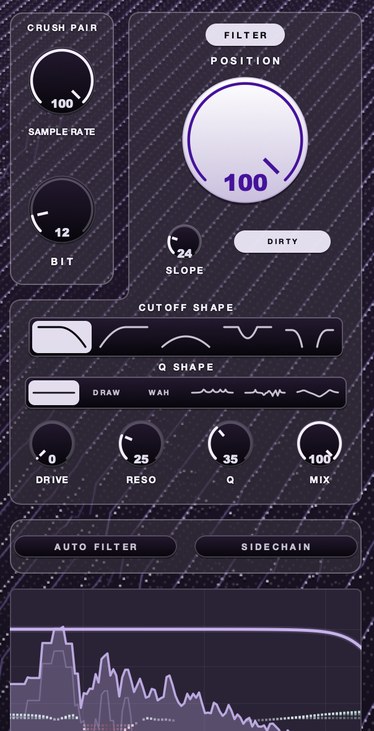 12 bit, full rate. The quantization is present and the top end is untouched. This is the setting most people actually want and almost nobody starts from.
Hear the two halves apart
Every page written about this category describes the sound in adjectives. Here is one
loop four ways, so you can check the adjectives against the thing.
Dry — no processing
Bit reduction only — grain, no new clang
Sample rate reduction only — the metallic half
Both — grain and clang together
The same 1.05 seconds each time, through
F(ilter)12.
Peak levels sit within 0.05 of each other and RMS within two per cent, so what changes
across the four is spectrum rather than volume.
Crushing adds top end rather than removing it
This is the single most useful thing to know before you shop, and it is the opposite of
what the word "lo-fi" suggests. Take the 99 per cent spectral rolloff of those four files
— the frequency below which ninety-nine per cent of the energy sits. Dry, that loop
rolls off at 869 Hz. Bit reduction alone pushes it to 1,462 Hz. Sample rate
reduction alone pushes it to 3,348 Hz. Both together, 3,406 Hz. The crushed
versions are brighter than the clean one, by a factor of almost four.
That makes sense once you look at the mechanisms. Quantization error is broadband noise
spread across the whole spectrum. Aliasing images are folded copies of high-frequency
content arriving at new frequencies. Both are additions. Neither is a low-pass filter, and
the widespread belief that a bitcrusher darkens a sound comes from plugins that quietly put
a low-pass after the resampler and never mention it.
So the failure mode of a bitcrusher on a busy mix is harshness, not dullness. The added
energy lands in the two to five kilohertz region where small speakers put most of their
output and where human hearing is at its most sensitive — see
Fletcher-Munson. That is the band that
survives a phone, a laptop and a car dash intact. A crush that felt like character on studio monitors arrives on a commute as glare,
which is the whole of the opening paragraph explained in one sentence.
Which bitcrusher to use
Ours, and here is the plain reason. Everything above says the same thing twice: crushing
is an addition in the band that travels, so the tool that matters is the filter you get to
aim at it afterwards. Most crushers hand you a low-pass tied to half the rate and stop
there.
F(ilter)12
is $49 and puts the crush pair in front of a whole filter instead. SAMPLE RATE and BIT do the
crushing. Behind them, POSITION sets where the filter sits, and there are five shapes to
choose from — low-pass, high-pass, band-pass, notch, and a morph that runs from a
closing low-pass through untouched in the middle to an opening high-pass. SLOPE runs from
18 dB per octave up to a wall. RESO, Q, DRIVE and MIX finish it, and AUTO FILTER or
SIDECHAIN will move the cutoff for you. Crush, then choose what survives, on one panel, in
that order. Mac gets AU, VST3 and a standalone; Windows gets VST3.
DRUGS, our free one-knob drum bus compressor, comes
with it.
The honest edges, because a verdict without them is worth nothing. It is not free, and
three of the free options further down will crush a loop perfectly well. It is also not a
glitch box: if what you want when you type "bitcrusher" is stutter, buffer repeats and
rhythmic mangling, Glitchmachines Fracture and Sonic Charge Permut8 are built for that and
ours is not. Everything else on this page is here so you can tell which of those two
sentences applies to you.
What separates a good bitcrusher from a bad one
Seven things, in the order they matter. The first is the one that decides how the crush
lands in a mix, and it is the one most plugins in this category treat as an afterthought.
One: the filter behind the crush. Quantization error and aliasing images
are both additions, so the only thing standing between them and your mix is whatever filter
comes after the resampler. On F(ilter)12 that is five shapes, a SLOPE knob from 18 dB
per octave up to a wall, RESO and Q, plus Q SHAPE, which parks peaks and dips at fixed
distances from the cutoff so the whole shape travels with the knob — WAH is one peak
at the cutoff, VOWEL is four spaced like a voice, COMB alternates peaks and nulls, SCOOP
lifts both ends. Klevgrand's Degrader fixes its filter frequency to half the sample rate
value and lets you pick the character on both sides. Ableton's Redux sets its Post low-pass
in octaves above or below half the rate shown. Both of those are low-pass filters at a fixed
relationship to the rate, and a shape you choose is a different amount of control over the
same artifacts.
Two: a filter before the resampler. Aliasing images come from content
above half the new rate. Remove that content before the rate reduction and the folding has
less to work with, so the effect gets more controlled and less random. Plugins that expose
this call it a pre filter or an anti-alias filter: Redux describes its Pre button as engaging
a filter before downsampling to reduce the bandwidth of the signal being processed. You can
also do it with any high cut sitting in front of whatever you crush with, which is step three
further down.
Three: a cutoff that moves. Static crush is the boring half of this
effect. The useful half is a filter that travels while the crush stays put, because the
artifacts are fixed in the spectrum and the window on them is not. F(ilter)12 does it two
ways, one at a time: AUTO FILTER hands the cutoff to a clock with a shape, a division, a
grid, SWING to push it off that grid and PHASE for where in the shape each cycle starts;
SIDECHAIN hands it to a signal instead. Tritik's Krush2 carries a modulation section with
two stereo LFOs. The method itself is in
the auto filter effect and
how to make a filter sweep.
Four: dither on the quantizer. Dither is a small amount of noise added
before the bits are thrown away, and it converts the ugly, level-dependent distortion of raw
truncation into a steady noise floor. Kilohearts' Bitcrush exposes it directly and describes
it as noise added to reduce the distortion caused by quantization. Whether you want it is a
taste question — the ugly version is frequently the point — but you want the
choice. The background is in dithering.
Five: jitter on the clock. Jitter randomizes when each sample is taken
rather than what it measures. Redux describes it as noise added to the downsampler's clock,
which makes the result noisier and wider in stereo. Degrader has a jitter amount in its
resampler. It is the control that separates a downsampler from something that sounds like a
circuit, and it is also the one most likely to cost you mono compatibility, so audition it
folded to mono — see mono
compatibility.
Six: a dry/wet mix that works. Parallel is how this effect is used in
practice, and a mix knob that simply crossfades is not the same as one that keeps phase
alignment across the blend. F(ilter)12 puts MIX next to DRIVE, RESO and Q on the filter
section. Test whichever one you own: set mix to 50 per cent, then bypass, and listen for
whether the low end thins. If it does, the wet path is delayed relative to the dry and you
are hearing partial cancellation rather than a blend.
Seven: parameter smoothing. Bitcrushers get automated more than almost any
other effect, and a rate knob that steps rather than glides produces audible zipper clicks
on every automation move. This is invisible in a demo video and obvious the first time you
draw a filter sweep over eight bars. Tritik's notes on the second version of Krush list
reworked parameter handling and smoother parameter automation as changes from the first,
which tells you the problem is real enough to be worth a rewrite.
How to audition a bitcrusher in ten minutes
Demo videos are cut to flatter the plugin and the audio on maker pages is chosen the same
way. The four files above are one loop through F(ilter)12 with nothing else in the chain, so
start there, then run these four checks on your own material and you will know more in ten
minutes than a week of reading roundups will tell you.
One: the held note. Feed it something sustained — a pad, a bass
note, a vocal held for two seconds. Rate reduction artifacts are pitched, and pitched
artifacts against a sustained note either sit in the key or fight it. On a drum loop this is
nearly inaudible, which is why a plugin auditioned only on a break always sounds fine. Most
disappointing purchases in this category were auditioned on a break.
Two: the quiet tail. Find a passage with a real decay in it: a snare
ring, a reverb tail, the last two beats before a drop. Quantization error is worst relative
to signal at low levels, so the tail is where the plugin's quantizer shows its manners. A
good one turns the tail grainy. A poor one makes it sputter and cut out unevenly, which is
raw truncation with no dither and nothing else.
Three: the mono fold. Engage whatever jitter or stereo widening the
plugin offers, then sum to mono. Downsampler jitter generates different noise on each
channel by design, and different noise on each channel is width that partially disappears
when a club system, a phone or a radio sums it. You are not looking for zero change. You are
looking for how much of the effect you bought is still there.
Four: the automation sweep. Draw a rate automation from full to a quarter
over four bars and play it. Listen for clicks at each automation node. Then do the same on
the bit control. A plugin that survives both is one you can use as a transition effect, which
is half of what these get bought for.
How to set a bitcrusher up
The steps use F(ilter)12's control names because that is the panel the four demos came
off. They map onto any crusher with a filter after the crush pair.
- Insert the plug-in on a duplicate of the track, not on the track itself.
- Set MIX to 100 per cent so you can hear what the controls do.
- Cut the top off the source before the crush if it is wild up there.
- Lower BIT until grain appears, usually between 12 and 8 bits.
- Lower SAMPLE RATE until the top end starts to ring, and stop at the first setting you like.
- Bring POSITION down until the ring stops being painful.
- Raise SLOPE if the ring is still getting past.
- Trim the duplicate's fader until bypassing changes the texture and not the level.
- Blend the duplicate under the original, starting at minus 12 dB.
- Raise the blend until you hear it, then lower it by 3 dB.
- Check the result on a phone speaker before you commit.
Step ten is the one people skip and it is the one that matters. Crushing is an upper-mid
addition, the upper mids are where attention lives, and every setting that sounded correct in
solo is roughly double what the arrangement wanted.
Where a bitcrusher goes in the chain
Before the filter, after the compressor, on a parallel path if you can afford the CPU.
Each of those has a reason.
Before the filter, because the filter is how you choose which artifacts
survive. Crushing first and filtering second gives you a crush whose brightness you control.
Filtering first and crushing second gives you a crush that generates new brightness after
your filter has stopped being able to do anything about it. Both are usable. Only one of them
is steerable, and that one is the reason
F(ilter)12
has the crush pair and the filter in a single box in that order rather than as two plug-ins
you have to remember to keep in line. Cutoff and resonance behavior is covered in
filter cutoff and resonance.
After the compressor, because quantization error is level-dependent and a
compressor changes levels. Crush before the compressor and the grain rises and falls with
gain reduction in ways you did not ask for; crush after it and the grain sits still. If that
compressor is sitting on a drum bus, ours is free:
DRUGS is a one-knob drum bus compressor for Mac and
Windows, DOSE and GAIN and a soft ceiling out, and it costs nothing — see
the one-knob compressor and
how to compress drums. There is a
creative use for the reversed arrangement, and it is a creative use rather than a
default.
On a parallel path, because the one thing this effect does not do well is
full-strength across a whole mix. A parallel crush lets you keep transient definition from the
dry path and take grain from the wet one. Parallel technique transfers directly from
parallel saturation.
One placement to avoid: after the limiter. Bit reduction after your final gain stage will
push samples past full scale on the way back up, and the resulting intersample overs are the
kind of problem that only shows up after encoding. See
true peak.
Those three placements collapse into one panel on
F(ilter)12:
the crush pair, the filter behind it, MIX for the parallel blend, and AURA over the top.
$49, Mac and Windows, four demos further up and more on the page.
Best free bitcrusher plugins
The free tier in this category is deep, because bit and rate reduction are cheap to
compute and every developer writing a modular effect suite includes one. What free plugins
generally leave out is filter placement and a cutoff you can move, which is the part that
decides how the result sits in an arrangement rather than how it sounds in solo.
Kilohearts Bitcrush. Free with a Kilohearts account, and the most complete
free control set on this list. Its page lists a Rate display that downsamples to a minimum of
200 Hz, a Bits knob, a Dither knob, separate ADC Q and DAC Q knobs for the quality of the
analog-to-digital and digital-to-analog conversion, and a Mix knob. The two quality controls
are unusual: lowering ADC Q adds dissonant aliasing in the low frequencies, lowering DAC Q
adds it in the high frequencies, so you can put the folding where you want it. It runs as a
regular VST, AU or AAX plugin and as a Snapin inside Phase Plant, Multipass and Snap Heap, and
it belongs to the modular set Kilohearts now lists as The Free Effects, thirty plugins free
with an account.
MeldaProduction MBitFun. Free, and included in the MFreeFXBundle, which
Melda's page describes as a set of 38 completely free effects. MBitFun converts audio to
limited fixed-point precision from one single bit up to 16 bits per sample and then lets you
access each bit individually and apply operations to it. That is a different instrument from a
bit depth knob: you are not choosing a resolution, you are reaching into the binary word. It
makes sounds nothing else on this list makes, and it is harder to aim than everything else on
this list. Melda's free versions carry a reminder box on the interface and leave preset
management, upsampling and the modulators to the paid upgrade.
Tritik Krush, version one. Tritik's page keeps the original Krush
available as a free legacy download, version 1.3.0 for macOS and Windows, with the note that
it is no longer maintained. Unmaintained matters over a five-year project life, so treat it as
a tool for finishing something rather than one to build a template around. The company has
moved to a second version, which is not free.
Glitchmachines Fracture. Free, and a different animal: a buffer effect
with a multimode filter, three LFOs and a delay, with a configuration menu that reorders the
chain. Its page describes it as geared toward robotic artifacts and musical malfunctions,
which is the honest description. If what you actually want when you type "bitcrusher" is
glitch and stutter rather than quantization grain, this is closer to the thing you meant. It
runs Win/Mac, VST3/AU, 64-bit, and its stated requirements are macOS 11 or later and
Windows 11.
Any of those will crush a loop. The step up from all four is control over what happens
after the crush, which is what the paid section below is about, and where ours sits.
Free bitcrusher plugins already in Ableton, FL Studio and Logic
Before downloading anything, open the device you already paid for. All three major DAWs
ship bit reduction, and knowing exactly what each one gives you is how you tell whether you
need anything else.
Ableton Live: Redux. The answer to "free bitcrusher plugin Ableton".
Live's manual splits it into downsampling on the left and bit reduction on the right.
Downsampling gives you Rate, Jitter for noise on the downsampler's clock, a Pre filter that
reduces the bandwidth going into the downsampler and a Post low-pass that reduces imaging,
with the post cutoff set in octaves relative to half the rate. Bit reduction gives you Bits
and a Shape control that varies the quantizer's characteristic curve, with higher values
giving finer resolution at small amplitudes so that quiet components are affected less than
loud ones. That is a complete downsampler with a low-pass behind it, and the cutoff of that
low-pass tracks the rate rather than going where you send it.
FL Studio: Fruity Squeeze. The answer to "best bitcrusher plugin FL
Studio" if the budget is zero. Image-Line's manual describes it as a bit-reducing, distortion
and filtering plugin, with Squarize reducing the bit depth of the input stream, a low-pass
Filter Freq and Filter resonance that can be switched pre or post, and Mix and Gain. Its
distinguishing section is Puncher, which replaces audio sample data with a fixed user-set
value: Preserve sets how many samples pass untouched, Impact sets how many get forced to the
nominal value, Relation sets the proportion between the two, and Amount sets the value they
get forced to, with the manual noting that low settings work best. That is a
sample-replacement effect rather than a quantizer.
Logic Pro: Bitcrusher. Logic ships a device called Bitcrusher, listed in
Apple's user guide under distortion effects alongside Clip Distortion, Overdrive and Phase
Distortion. It is the plainest of the three stock options and the quickest to get a usable
result from.
The general rule: the stock devices get you the crush, and the crush is the cheap half.
What you pay for after that is the filter behind it, a cutoff that moves, and automation that
does not click — which is the shortlist at the top of this page and the reason
F(ilter)12
exists at all.
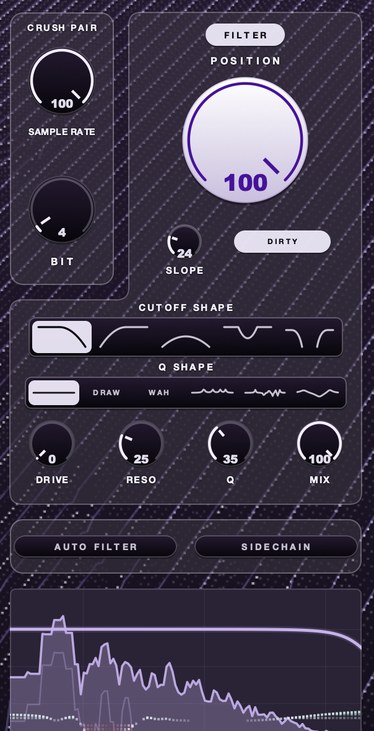 4 bit at a reduced rate. Bits make it grainy; the rate is what makes it clang. Almost nobody needs both this far down, which is why both knobs exist separately.
Paid bitcrusher plugins worth knowing
Ours first, because this is our page and hiding it at the bottom would be coy. Prices for
everything else were read off each maker's own page on 26 September 2026 and they move, so
check before you buy. Where a page did not state a price, none is given here.
Gazillion F(ilter)12. $49, and the layout is the argument: the crush pair
in front, the filter behind. SAMPLE RATE slows the rate the audio is sampled at, BIT coarsens
the steps it is measured in, and twelve bits is as clean as it gets. POSITION then sets where
the filter sits, with five shapes, SLOPE from 18 dB per octave up to a wall, RESO and Q,
DRIVE, and DIRTY, which feeds the filter's own distortion back through itself. Q SHAPE parks
peaks and dips at fixed distances from the cutoff — WAH, VOWEL, COMB, SCOOP, PLAIN, and
DRAW, which is your own curve clicked in on the display. AUTO FILTER or SIDECHAIN moves the
cutoff, one at a time, and AURA sits on top. Mac builds are AU, VST3 and a standalone;
Windows is VST3. DRUGS comes with it at no extra
cost. The four demos further up are all of it and nothing else, and there are more on
the F(ilter)12
page.
Tritik Krush2. Tritik describes it as a bitcrusher combining bit-depth
reduction, sample-rate reduction, filtering and compression, with a drive stage, analog-modeled
resonant filters and a modulation section holding two stereo LFOs. Their FAQ prices a Krush2
license at 10 euros. The feature list for version two includes two LFOs with adjustable
left/right phase offset, LFO rate up to 20 Hz, sawtooth LFO shapes, comb and band-pass
filters, a pre/post filter position switch, a one-knob compressor with a Phat mode, a
downsampling jitter control, a bitcrushing dither control and up to 8x oversampling. Mac builds
are VST3, AU and AAX; Windows builds are VST3 and AAX; stated requirements are Windows 10 or 11
and macOS 10.15 or later on Intel and ARM. The demo is fully functional with an occasional
audio fade. For a plugin at that price, the oversampling and the dither and jitter controls are
the notable parts — see oversampling for what
that buys.
Klevgrand Degrader. Listed at $39.99 on Klevgrand's page and showing
$19.99 as the current price when this was checked, described as a combined resampler and
bitcrusher. It resamples between 250 Hz and 96 kHz, offers a low-pass filter with
selectable character both before and after resampling with the frequency fixed to half the
sample rate value, and takes bit depth continuously between 3 and 24 bits. Continuous bit
depth is worth noting: most plugins step in whole bits, and the fractional positions between
them are usable. It adds a jitter amount, a separate distortion algorithm, parameter linking
so one knob can drive several, input and output gain, and a dry/wet control. Stated
requirements are macOS 10.10 or later, Windows 7 SP1 or later, AU, VST or AAX in a 64-bit
host, with an iPad AUv3 version. Klevgrand's demo is the full version with occasional audio
dropouts.
d16 Group Decimort 2. Listed at 59 euros, and the one on this list
aimed squarely at the sound of vintage digital sampling hardware rather than at destruction.
Its page describes an approximative anti-alias filter and an image filter, adjustable jitter
and dithering, two alternative quantization algorithms, and a multimode filter that works pre
or post alongside a resampler module. The claim worth understanding is their statement that the
plugin has zero internal aliasing, and that the only aliasing present is the emulated aliasing
of the classic samplers they modeled. Read plainly, that means the artifacts are computed
deliberately rather than falling out of a cheap resampler, which is a real engineering
distinction and also the reason it costs what it costs. Installers are listed for Windows
32-bit, Windows 64-bit and Mac OS X. If that era of converter tone is the whole of what you
are after, the wider set of options is in
12 bit sampler plugins.
Sonic Charge Permut8. Listed at $66, with a three-week trial. Sonic Charge
describes it as an effect that embraces the sounds of primitive signal processing hardware,
built around a 12-bit digital delay with a variable sample rate from 0 to 352 kHz, with the
delay controlled by a programmable processor whose behavior you change with operators, and
input and output stages carrying virtual analog saturation, limiting and filtering. It ships
with 11 program banks holding 320 presets in total, and it can be extended with alternative firmwares
loaded as bank files. Stated requirements are Windows XP or later and macOS 10.13 or later, in a
host supporting VST 2.4, VST3 or Audio Units 2. Calling it a bitcrusher undersells it and also
explains why people who want a bit knob sometimes bounce off it.
What a bitcrusher costs you
Every technique has a bill. This one has four.
Harshness in the band that travels. Covered above and worth repeating,
because it is the failure that reaches listeners rather than the one you hear in the room. The
added energy sits where phones, laptops and car dashes are loudest, and the only cure is a
filter you can put exactly where the glare is.
Low-end definition. Quantization noise is broadband, which means it also
lands under your bass. On a sub-heavy arrangement a crushed bass gains a gray haze that reads
as thickness in solo and as mud in the mix. Crush a filtered copy and leave the fundamental
clean.
CPU, if you want it clean. Oversampling is how a plugin keeps its own
internal distortion from folding back on top of the aliasing you asked for. It costs
processing, and on a session with a crusher on twelve channels it costs enough to notice.
Reversibility. Crushing is destructive in the useful sense — it
removes information — so a print you make today cannot be softened tomorrow. Keep the
plugin live until the arrangement is finished, or keep the dry stem.
And the non-cost worth naming: bit reduction does not make anything louder. If loudness is
the goal, the direct route is in
making a mix louder without
clipping, and the difference between grit that adds level and grit that only adds noise is
in saturation versus distortion.
Settings that work, by source
Starting points, not destinations, written against F(ilter)12's controls. Every one of them
wants checking against the arrangement rather than in solo.
Drums. The most forgiving source and the reason most people buy one. Grain
sits on the transient and the tail, and the grid hides pitched aliasing. Start at 12 BIT and a
SAMPLE RATE around a quarter of session rate, then pull POSITION down until the hats stop
spitting. Full method in
how to make lofi drums and
how to make drums sound dusty.
Sampled loops and chords. This is where 12-bit earns its reputation. A
loop at 12 bits with the rate barely touched picks up a worn quality without announcing that a
plugin was used, which is the whole trick of
making a sample sound old and the
shortest route to an old sampler
sound.
Vocals. Small amounts, automated. A held vowel is the worst case for rate
reduction because the artifacts are pitched and the vowel is pitched, so they beat against each
other. Ride MIX up on consonants and down on sustained notes, or crush a parallel copy and duck
it under the lead.
Bass and sub. Split it. Crush a high-passed copy at around 200 Hz and
leave the fundamental untouched, then blend. Crushing a full-range bass is the most common way
to lose a low end and not understand why.
Synths and pads. The place rate reduction sounds best, because the added
tones become part of the timbre rather than an artifact on top of one. Hand the cutoff to AUTO
FILTER with a slow division and the pad develops on its own while the crush stays put.
The full mix. Rarely, gently, and in parallel. A crush across a summed mix
applies its harshness to everything at once, including the vocal, and the vocal is where a
listener notices first.
Why the recommendation threads never agree
Ask which bitcrusher is best in any producer forum and you get four answers that do not
overlap, which reads as noise and is actually information. The category contains at least four
distinct products sharing one name.
There is the vintage sampler tone, where the goal is a specific warmth from a specific era
of converters and the correct plugin is one with careful anti-alias and image filtering. There
is the destruction tool, where the goal is the sound of something failing and the correct
plugin is whichever one has the ugliest quantizer. There is the glitch and stutter instrument,
where the goal is rhythm rather than tone and a buffer effect beats every bitcrusher made.
And there is the mix seasoning, where the goal is grain you do not consciously hear, and that
one is decided entirely by the filter standing behind the crush, which is the job
F(ilter)12
was built for.
Four people arguing are usually holding four of those goals. Name yours before you shop and
the shortlist collapses to two. For the wider set of tools around this one, see
lofi plugins.
Questions people ask
What is the best bitcrusher plugin?
For grain that has to sit in a mix rather than sit in solo, F(ilter)12 at $49, because the
crush pair runs into a full filter with five shapes and a cutoff you can move, and the filter
is the part that decides where the added harshness lands. The category holds four different
products under one name — vintage sampler tone, destruction, glitch, and subtle mix
grain — so if yours is glitch, a buffer effect will beat every bitcrusher made.
What is the best free bitcrusher VST?
Kilohearts Bitcrush is the most complete free option, with rate down to 200 Hz, a bits
knob, dither, separate converter-quality controls for where the aliasing lands, and a mix
control. Before downloading it, check what you already own: Ableton's Redux has a pre filter, a
post filter, jitter and a variable quantizer curve. Both give you the crush and a low-pass
behind it, and the paid step up from either is a filter you can shape and steer.
What is the best free bitcrusher plugin for Ableton?
Redux, which ships with Live. Its manual documents downsampling with Rate and Jitter, a Pre
filter that reduces bandwidth before downsampling, a Post low-pass that reduces imaging with its
cutoff set in octaves relative to half the rate, and bit reduction with Bits plus a Shape
control for the quantizer curve. It costs nothing and it is already installed. The thing it
cannot do is land a notch or a band-pass on the folded content and then sweep it, which is
what F(ilter)12 is for.
What is the best bitcrusher plugin for FL Studio?
Fruity Squeeze is included and does more than its age suggests: bit reduction via Squarize, a
low-pass with resonance switchable pre or post, mix and gain, plus the Puncher section, which
replaces sample data with a fixed value. Any VST3 bitcrusher works in FL Studio, so everything
on this page is open to you, F(ilter)12 included.
Is there a bitcrusher with a real filter built in?
That is what F(ilter)12 is. The crush pair sits in front of a filter with five shapes
— low-pass, high-pass, band-pass, notch and a morph — a SLOPE knob from 18 dB
per octave up to a wall, RESO and Q, DRIVE, and Q SHAPE for peaks and dips that travel with the
cutoff. AUTO FILTER or SIDECHAIN moves it. Most crushers give you a low-pass whose frequency is
fixed to half the sample rate instead.
What is the best bitcrusher plugin according to Reddit?
Recommendation threads in this category do not converge, and the reason is structural rather
than a failure of the people posting. Four goals share one search term, so four correct answers
arrive at once and each looks wrong to the other three. Read the threads for the goal being
described rather than the plugin being named, and you will find yours faster.
Is a bitcrusher the same as distortion?
No. Distortion bends the waveform along a smooth curve and adds harmonics related to the
notes, so it stays musical. A bitcrusher quantizes amplitude and time, so its added content is
broadband noise and inharmonic folded tones. They stack well: a little saturation before a
gentle crush usually beats either at full strength.
Does a bitcrusher make a sound darker?
Not by itself. Measured on one loop through F(ilter)12, the frequency below which 99 per
cent of the energy sits moved from 869 Hz dry to 3,406 Hz with both bit and rate
reduction engaged. Crushing adds high-frequency content. Plugins that seem to darken a sound are
applying a low-pass filter after the resampler.
What bit depth should I use?
Twelve bits for grain you do not consciously notice, eight for obvious crunch, four or fewer
for destruction. Twelve is where most producers end up on loops and drums, because it changes
the texture without announcing that anything was done — the detail is in
what 12 bit sounds like. There is no
technically correct value; each bit removed costs roughly 6 dB of dynamic range.
Where should a bitcrusher go in the chain?
Before the filter, so the filter chooses which artifacts survive, and after the compressor,
so the grain does not rise and fall with gain reduction. Never after the limiter: bit reduction
at the end of a chain pushes samples past full scale and produces intersample overs that only
appear after encoding.
Is a paid bitcrusher worth it over a free one?
Only for specific things: filter placement, a cutoff that moves, exposed dither and jitter,
continuous rather than stepped bit depth, and smooth parameter automation. The first two are
what F(ilter)12 sells at $49, with DRUGS in the box. Audition anything on a held note and a
quiet tail before deciding, since those are the two places the difference shows.
What F(ilter)12 does
F(ilter)12 puts the crush pair in front of the filter rather than behind it.
SAMPLE RATE slows the rate the audio is sampled at, so the top goes and what
was up there folds back down as new content. BIT coarsens the steps it is
measured in, so quiet detail rounds off and what is left picks up a hard edge. Twelve bits is
as clean as it gets; it only goes down from there.
Behind them sits the part this article says to judge a crusher on.
POSITION sets where the filter sits, and the further it works the more it
drives. There are five filter shapes — low-pass, high-pass, band-pass, notch, and a morph
that runs from a closing low-pass through untouched in the middle to an opening high-pass.
SLOPE is how hard it falls away past the corner, from 18 dB per octave up
to a wall. DIRTY feeds the filter's own distortion back through itself.
Q SHAPE puts peaks and dips at fixed distances from wherever the cutoff is, so
the shape travels with the knob: WAH is one peak at the cutoff, VOWEL is four spaced like a
voice, COMB alternates peaks and nulls, SCOOP lifts both ends and pulls the middle down, PLAIN
adds nothing, and DRAW is your own, clicked in on the display. DRIVE,
RESO, Q and MIX finish it. Either
AUTO FILTER or SIDECHAIN can move the cutoff, one at a time.
AURA sits on top, drawn on the display in green where it is adding and red
where it is taking away.
Crush, then choose what survives. That is the order the problem asks for. $49, Mac and
Windows, AU and VST3 with a standalone on Mac, and
DRUGS in the box.
Hear it on the
F(ilter)12 page.
Which is the whole answer to the phone speaker the next morning. Nothing made a filter
decision after the crush, because nothing was there to make one.
F(ilter)12 — a 12 bit sauce filter for Mac and Windows: a lo-fi section,
five filter shapes, six resonance shapes and AURA.
Hear it
Keep reading
- Bitcrushing explained — Bit depth, quantization noise, sample rate reduction and what 12-bit and 8-bit sound like.
- What is aliasing in audio — What it is, what it sounds like, how to prevent it, and how to use it on purpose.
- How to make lofi drums — Soft hits, heavy swing, low-pass, a little crush, saturation and a dark room.
- How to make a sample sound old — Narrow the range, add warmth and grain, wobble, noise and a small room.
- Best lofi plugins — The four jobs a lofi chain needs, and what to buy first.
- Best lofi VST plugins — The four we make, sorted by job: bandwidth, tape, speed and drum bus density.