← Gazillion Industries/Reading material
Best lofi VST plugins
Gazillion Industries ·
Four lofi plugins on the master, and at midnight in headphones the loop
sounded properly aged. In the car the next morning it was a quiet mix with the top cut off.
Nothing in the chain was wrong; nothing in it was doing a different job from anything else in
it.
Straight answer, and the conflict of interest first: the four plugins on this page are the
four we make. A lofi chain has four jobs — bandwidth and grain, the medium and its
transport, speed and pitch instability, density on the drum bus. F(ilter)12 does the first,
TRIPLE OG the second, SKRUU the third, DRUGS the fourth and DRUGS is free. Most people need
two of the four.
The short version
- Bandwidth and grain
- F(ilter)12 — filter and 12 bit crush on one face, $49, DRUGS included
- The medium
- TRIPLE OG — cassette tape simulation with a playable transport, $29
- Speed and pitch
- SKRUU — varispeed, with pitch and time on separate knobs, $29
- Drum density
- DRUGS — one knob on the drum bus, free, Mac and Windows
- Start with
- the job your loop is failing at, not the plugin with the best demo
- You may already own
- a bitcrusher, a filter, a warp mode and a bus compressor
Why a search for the best lofi VST gives you six answers
Lofi is four kinds of damage and they do not substitute for each other. Bandwidth and grain:
the top goes, and the quiet detail gets coarse rather than smooth. The medium: noise under the
music, saturation that arrives gradually, a machine that was never steady. Speed: pitch and time
that wander, because nothing mechanical holds a rate exactly. Density: drums pressed together
until the bus reads as one instrument instead of four channels.
Stack three plugins that all do the first job and you get a duller track at the same address.
That is the usual reason a hunt for the best lofi VST plugins ends with six of them on the
master and a mix that still sounds like a modern export with a filter over it. The ear is not
counting plugins. It is looking for evidence that the sound went through something.
So here is the disclosure in plain words. We make all four of these. This page is our shelf,
not a survey of the market, and you should read it the way you read any manufacturer describing
its own products. What we can do is tell you which job each one takes, what it refuses to do,
and which free tool already covers part of it. Some of those paragraphs are an argument against
buying, and they are in here on purpose.
Bandwidth and grain: F(ilter)12
The first job is subtraction with a texture attached. A plain low-pass makes a track quieter
at the top and nothing else happens; an old sampled signal loses its top and picks up
grain in the quiet parts and gets a metallic edge from content folding back down out of
range. Three separate mechanisms, and the reason a bitcrusher on its own usually sounds broken
is that it only supplies one of them.
F(ilter)12 is a 12 bit sauce filter for Mac and Windows, $49, in AU, VST3 and standalone, with
DRUGS included. The CRUSH PAIR holds the two controls that matter here:
SAMPLE RATE steps the rate down, so the top disappears and what used to live
above the new rate folds back into the audible range at unrelated frequencies;
BIT coarsens the steps the wave is measured in, so quiet detail rounds off and
picks up an edge. Twelve bits is the clean end of the travel. It only goes down from there.
Behind the pair sits the filter, which is why the two are on one face.
POSITION is the big knob, SLOPE sets how steeply it falls, and
DIRTY changes its manners. There are five CUTOFF SHAPE options
and six Q SHAPE options, with DRIVE, RESO,
Q and MIX underneath. AURA sits over the top,
and the visualizer along the bottom draws what the crush and the filter are doing to the
spectrum while you move them. Rate reduction throws debris upward; the filter is what sweeps it.
Put them in the wrong order and the result is harsh instead of old.
F(ilter)12
is the one to look at if the complaint about your loop is that it sounds too clean and too wide
awake. Twelve bits down to four, five filter shapes, six resonance shapes, and a picture of the
damage while you do it. There's a demo on the page.
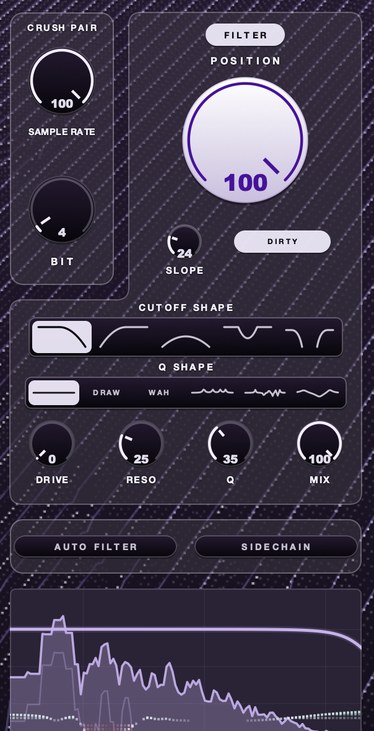 4 bit at 8 kHz. Bits make it grainy, the rate makes it clang.
What it does not do. No noise floor. No hiss, no crackle, no room. No speed
movement of any kind, so a loop that is stiff will still be stiff at four bits. No compression on
its own, though DRUGS comes with it. And it is an effect, so it will not hand you a sound the way
an instrument library does. If your problem is that the arrangement is thin rather than clean,
this will not fix it.
What you already have. Every major host ships a bitcrusher and a filter, and
in ten minutes you can put them in series and hear most of this category for nothing. What the
stock pair tends to lack is a filter worth sweeping after the crush, and any view of what the
aliasing is doing. Start there anyway. Bitcrushing
explained and what aliasing is cover
the mechanism, and what 12 bit sounds
like is the audition.
The medium and its transport: TRIPLE OG
The second job is the thing the music was recorded onto. A medium contributes four signatures
at once, which is why one medium plugin tends to do more work than three specialists: reduced
bandwidth, a noise floor that sits under the quiet parts, saturation that comes in gradually
rather than as a wall, and a speed that never holds perfectly still. Those four arriving together
is what the ear reads as age.
TRIPLE OG is our cassette tape simulation, $29, Mac and Windows, AU, VST3 and standalone.
TONE sets playback brightness and DRIVE the thickness.
AGE runs from nought to sixty years and makes the tape darker, noisier and less
steady as it climbs, which is one control instead of three. HISS is a continuous
broadband bed, partly decorrelated across the channels so it survives a fold to mono.
WOW FLUT is the speed instability.
The transport is the half almost nothing else offers. SLAM stops the tape and
returns it in sync, so the beat is where it should be when the machine comes back.
SCRUB runs the head backward and springs home. CATCH drags,
then sprints to catch up. Those are performance moves rather than settings, and they are the
reason a lot of people searching for the best lofi tape VST end up wanting a machine rather than
a saturation curve.
TRIPLE OG
covers three of the four lofi jobs in one pass — bandwidth with TONE and AGE, the noise
floor with HISS, and the speed movement with WOW FLUT and the transport. If you are only ever
going to own one of ours, most people should own this one. There's a demo on the page.
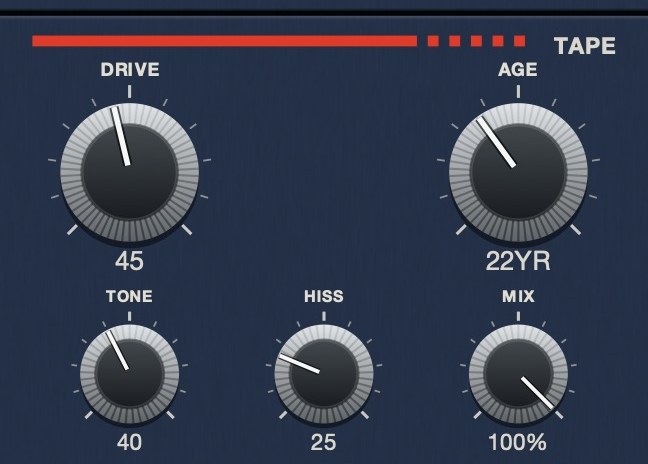 AGE reads in years because that is what the quantity is. Here it is set to 22.
What it does not do. No bit reduction and no rate reduction, so the digital
half of the lofi sound is not in here. No filter shapes to choose between, and no resonance to
sweep. Pitch and time are locked together the way they are on a tape machine, so it cannot hold
a length while it moves a note. It also will not press your drums together; that is a different
job and it is further down this page.
What you already have. Tape-style saturation ships in most hosts, and it will
give you the thickness and some of the top-end softening. What stock devices almost never give
you is instability you can play by hand. Wow and
flutter explains the movement, tape hiss the floor,
and how to make music sound like
cassette puts the whole chain in order.
Speed and pitch instability: SKRUU
The third job is the one people leave out, and it is the one that carries the most. A track
can be bandwidth-limited and noisy and still read as a modern recording with damage applied,
because it is metronomically rigid. Older equipment could not hold a rate exactly. Half a percent
of drift over a bar is inaudible as pitch and completely audible as age.
SKRUU is our varispeed pitch and time stretch plugin, $29, in VST3, AU and standalone on Mac
and Windows. PITCH and TIME move independently, so the note and
the length are two decisions rather than one: lock either and play the other. Because the offset
is a change in playback rate rather than a splice, there is no grain window to hear on a
transient. ELASTIC makes the knob sprung — move it, let go, and it runs
home — with SLOPE choosing the return shape out of sixteen.
SAMPLING GRADE steps the rate down when a copy should not share the original's
bandwidth: LO-FI 1 runs at 7.81 kHz against a base of 31.25 kHz, and LO-FI 2 runs at
3.9 kHz.
The everyday use is smaller than the demos suggest. Two copies of a keys part, one nudged up
by a few cents and one down, and the width is built out of speed rather than a stereo widener.
A sprung dip on the last beat of a four bar loop, so the phrase arrives back slightly late and
then corrects. A vocal sent to LO-FI 1 for one line, so that line sounds like it came off a
different machine.
SKRUU
is the one for the complaint nobody can name: the loop is dirty enough and still feels typed in
rather than played. Pitch and time on separate knobs, sixteen return shapes, and a sampling grade
that drops the bandwidth of a copy without touching the original. There's a demo on the page.
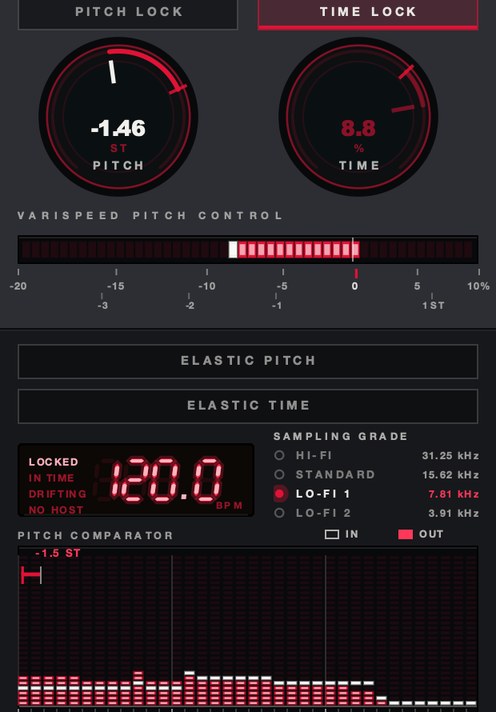 SAMPLING GRADE at LO-FI 1. 7.81 kHz rather than 31.25.
What it does not do. No noise, no hiss, no crackle. No saturation and no
compression. No filter with shapes to pick from. Used alone on a clean source it will make that
source move, and the source will still be clean while it moves. It is also the easiest of the
four to overdo: enough drift to shift a downbeat reads as a mistake rather than as tape.
What you already have. Every host has some route to varispeed, and most
people never use it. Ableton Live has the Repitch warp mode. Logic Pro has Varispeed at the
project level and Flex Time on the region. FL Studio will resample a channel when you move its
pitch. Reaper changes item playback rate with pitch preservation switched off.
Varispeed in every DAW has the exact route
for each, and what varispeed is covers why it
sounds different from a pitch shifter.
Density on the drum bus: DRUGS, which is free
The fourth job is the one that decides whether a lofi beat has any weight. Dusty drums that
are also weak are the standard failure of this genre, because every process above removes energy:
the filter takes the top, the tape softens the transient, the speed movement smears the attack.
Something has to put the hits back together at the end, and on a drum bus that something is
compression.
DRUGS is a one knob bus compressor for drums, free, Mac and Windows. DOSE is
the compression, and it moves the transfer curve, the knee, the attack and the release together,
so a drum bus gets denser rather than louder as you turn it up. The release is adaptive: a hit
gets the shorter time so gain recovers inside the gap, and sustained material gets the longer one
so it holds still. MIX is dry/wet with zero latency, which gives you parallel
without a send. GAIN adds 5 dB after the compressor, and
LIMIT is a soft ceiling at −0.3 dBFS on the output, transparent below
about −0.9 dBFS. One knob, and nothing underneath it for you to set.
DRUGS
is free and it is the last stage of a lofi chain rather than the first. Put it across the drum
bus after the character plugins, not before them, so it is gluing the damaged version rather than
the clean one. There's a demo on the page.
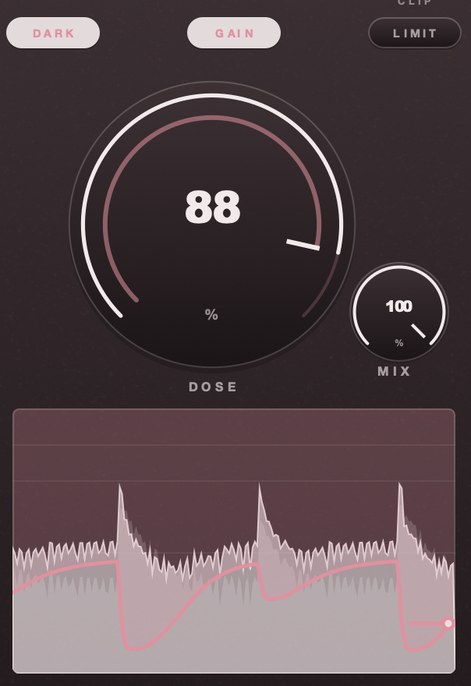 DOSE 88. It dives on each hit and takes the bar to come back.
What it does not do. No tone controls, no saturation section, no filter, no
noise. It has one macro and a mix knob, which is the whole design and also the whole limitation:
if you want a specific attack time on a specific snare, this is the wrong tool and a full
featured compressor is the right one. One more thing worth saying out loud, since we would rather
you heard it from us than found it in a session. Turning DOSE down is not a way back to the
source. At the bottom of its travel the plugin is still in the signal path and still working on
the sound, so when you want an honest before and after, bypass it at the host rather than backing
the knob off.
What you already have. A bus compressor, in every host on the market. Ableton
Live has the Glue Compressor, Logic Pro has Compressor with selectable circuits, FL Studio has
Fruity Limiter in its compressor mode, Reaper has ReaComp. Any of them will do this job if you
know the settings, which are in
drum bus compressor settings and
how to compress drums. DRUGS exists because
most people do not want to learn four controls to make drums denser, and because free removes the
argument.
What none of the four will do for you
Four gaps, stated plainly, because the fastest way to waste money in this category is to buy
an effect when you needed an instrument.
No instrument. Lofi keys, lofi guitars, dusty drum kits: those are sample
libraries recorded through the character, and none of ours is one. An effect improves what you
already played. A library gives you something to play. If your loop is boring, a search for the
best lofi effect VST is the wrong search.
No crackle and no field noise. TRIPLE OG gives you a broadband hiss bed. It
does not give you needle noise, surface pops, rain, a coffee shop or a cassette door closing. A
vinyl sim or a noise library covers that, and a
looped noise file in a spare track covers it for nothing.
No space. None of the four is a reverb or a delay. A great deal of what people
hear as lofi is actually a small dark room around a dry sample, and no amount of bit reduction
substitutes for it.
No loudness. BEEFY, our saturation and soft clipping plugin at $19, is not a
lofi tool and we would rather say so than sell it to you sideways. It makes things bigger and
more present, which is the opposite journey from the one this page is about. It belongs after the
lofi chain, or on a different record.
What you probably already own, per host
Read this section before the price section. It is easier to judge whether a paid plugin is
worth it once you have heard the free version of the same idea in your own project.
Ableton Live. Redux does bit depth and sample rate. Auto Filter does the
filter, with an LFO if you want movement. Saturator and Vinyl Distortion cover the dirt, Erosion
adds noise, and the Glue Compressor handles the drum bus. Repitch warp mode is your varispeed.
That is four of the four jobs, at a lower ceiling.
Logic Pro. Bitcrusher and AutoFilter for the first job, Tape Delay and the
vintage console channel strips for flavor, Compressor on the bus, Varispeed at project level and
Flex Time per region for speed. Logic is the best equipped of the big hosts here out of the
box.
FL Studio. Fruity Squeeze covers bit depth and resampling together with a
filter, Fruity Filter does the sweeps, Fruity Limiter in compressor mode does the bus, Edison
handles stretching, and moving a sampler channel's pitch with resampling on gives you the speed
change.
Pro Tools. Lo-Fi is one plugin covering bit depth, sample rate, saturation
and noise, which makes it the single most useful stock device in this list. Dyn3 Compressor for
the bus, Elastic Audio for time.
Reaper. ReaComp on the bus, ReaEQ and the JS effects for filtering and
degradation, and item playback rate with pitch preservation off for varispeed. Least polished,
most complete.
The ten minute audition, in order
Do this before you buy anything, including ours. It is the test we use, and it is designed to
stop you buying the plugin that was simply louder in the demo.
- Bounce eight bars of your loop to an audio file at the project sample rate and work on the
file, not the live arrangement.
- Set the monitoring level once and do not touch it again until the test is finished.
- Play the eight bars twice with nothing inserted, and write down one word for what is
missing: dull, clean, stiff or thin.
- Load only the plugin that matches that word. Dull means bandwidth, clean means the medium,
stiff means speed, thin means density.
- Turn its main control up until the effect is obviously too much, then back it off until you
stop hearing the plugin and start hearing the change.
- Trim the output until the loudest bar reads within 0.5 dB of the original bounce.
- Bypass the plugin at the host, not at its own mix control, and switch back and forth four
times.
- Keep it only if the bypassed version now sounds worse. If it does not, remove it and go
back to step three.
- Repeat once with a second plugin. Never more than two in a single pass.
- Play the result on a phone speaker before you add a third.
Step six is the one people skip and it is the one that decides the outcome. Every process on
this page changes loudness, louder wins almost every blind comparison, and an unmatched A/B is a
test that cannot fail.
What all four cost, and what they cost you
In money: DRUGS is free. TRIPLE OG is $29 and SKRUU is $29. F(ilter)12 is $49 with DRUGS
included, so buying F(ilter)12 first and adding the other two comes to $107 for the set. Nobody
needs the set on day one.
In sound, the costs are more interesting, and each one is real.
Bandwidth and grain cost you presence. Everything you crush and filter moves
backward in the mix. Do it to all four elements and the record has no front row.
The medium costs you the transient. Tape softens attacks, which is most of
why it sounds friendly, and it is also why a heavily aged drum bus stops cutting through on a
laptop speaker. That is what the compression at the end is for.
Speed movement costs you tuning. Anything you drift is now slightly out with
everything you did not drift. Bass lines and sustained keys expose this first; drums and short
chops hide it.
Density costs you dynamics. A drum bus squeezed hard reads as loud and stops
reading as performed. The fix is the mix control rather than a smaller dose, since parallel keeps
the peaks and adds the body underneath.
What the threads get right
The best lofi VST Reddit threads land on the same three pieces of advice, and all three are
correct. Buy fewer plugins. Learn one deeply. Your DAW already does most of this.
The fourth thing those threads tend to agree on is worth repeating too: the sound people are
chasing usually came from a specific sampler with specific limits, not from a plugin at all, and
the honest route is to understand the limit rather than to buy an approximation of it.
How to get an old sampler sound
goes through what those limits actually were. What the threads are worse at is the free part of
the answer, because nobody ever posts to recommend the device already installed in their
host.
Where we disagree with the consensus is small but it matters. The advice to pick one plugin
and learn it is right about depth and wrong about coverage, because one plugin cannot cover four
jobs. Two can cover three of them. Start with a medium plugin and a bus compressor, work at those
for a month, and add the others only when you can say in one sentence what is missing.
Questions people ask
What is the best lofi VST?
The one that does the job your track is failing at. Dull and wide awake needs bandwidth and
grain. Clean and modern needs a medium. Stiff needs speed movement. Weak drums need density. A
medium plugin covers the most ground of the four, which is why it is the usual first purchase.
The best VST plugins for lofi, taken as a set, are the ones that cover different jobs from each
other rather than the ones with the best individual reviews.
What is the best lofi VST free?
The stock devices in your host, in almost every case. A bitcrusher, a filter, a saturator and
a bus compressor ship with every major DAW, and together they cover three of the four jobs.
DRUGS is free and handles the fourth. The gap in free tools is speed instability and a transport
you can play by hand. Free VST plugins has
more.
What is the best VST for lofi drums?
Two plugins in series, in this order: something that damages the sound, then something that
glues it. Most best lofi drum VST lists mix sample libraries in with effects, and both of these
are effects. The damage is bandwidth, grain or tape. The glue is a bus compressor, and DRUGS does
that for nothing. Running the compressor first flattens the dynamics that the character stage
needed to work on. How to make lofi drums
is the full chain, and drum bus chain order
covers the order.
What is the best lofi tape VST?
Look for speed instability and a transport, because saturation on its own is available almost
everywhere. A tape plugin that only warms the signal is doing the same job as the saturator
already in your host. TRIPLE OG is ours, at $29, with SLAM, SCRUB and CATCH on the face. Others
are surveyed in best lofi plugins.
What is the best VST for lofi hip hop specifically?
Lofi hip hop leans harder on the drum bus than the rest of the genre, because the loops are
usually sparse and the drums carry the record. Start with density, then add a medium, then leave
it alone. The chain in how to make lofi
beats works for it, and how to make
Dilla type beats goes deeper on the timing side.
What do people on Reddit recommend as the best lofi plugin?
Consistently: fewer plugins, learned properly, plus whatever your DAW already ships. That
advice is correct. The part it misses is that one plugin cannot cover bandwidth, medium, speed
and density at once, so two well chosen tools beat one deeply learned one in this particular
category.
How many lofi VST plugins do I actually need?
Two, for most people. A medium plugin and a bus compressor will get a clean loop most of the
way there, and adding a third before you can name what is still wrong is how chains get to six
plugins doing one job. Audition with the ten step test above and stop when the phone speaker
agrees with the headphones.
What order should lofi VST plugins go in?
Speed and pitch first, while the material still has its full bandwidth. Bit and rate reduction
next. Filtering after that, so it can sweep the aliasing the rate reduction threw upward. Tape
and noise near the end, because the medium is the last thing the sound was recorded onto.
Compression last of all, on the bus, gluing the damaged version rather than the clean one. A
chain that sounds harsh instead of warm almost always has the filter in front of the crush.
Back in the car. The mix that was quiet with the top cut off had four plugins doing one job
between them. Two doing different ones would have survived the drive.
Gazillion Industries makes plugins tuned by ear: DRUGS, F(ilter)12, SKRUU,
TRIPLE OG and BEEFY.
See the plugins
Keep reading
- How to make lofi beats — Tempo, chords, swung drums, crush, noise, wobble and a gentle pump.
- How to make lofi drums — Soft hits, heavy swing, low-pass, a little crush, saturation and a dark room.
- Best lofi plugins — The four jobs a lofi chain needs, and what to buy first.
- Best bitcrusher plugins — What bit and rate reduction do, how to audition one, free and paid picks.
- What is varispeed — Speed and pitch together: the math, how it differs from pitch shifting, and how it's used.