← Gazillion Industries/Reading material
How to make a filter sweep
A filter sweep is the oldest trick in the club and it still works every time. The DJ closes the low-pass, the room leans in, and when it opens again the floor behaves like it's been let out of a car after a long drive.
A filter sweep is a change in a filter's cutoff over time, usually to build tension or release it. For a build, slowly raise a high-pass so the low end drains out, or close a low-pass so the track gets muffled; then snap back open on the drop. Automate the cutoff over two to eight bars, add a little resonance for emphasis, and put the sweep on the parts you want to disappear, not always the whole mix.
The short version
- Build
- high-pass rising, or low-pass closing
- Release
- snap the filter open on the downbeat
- Length
- two to eight bars
- Resonance
- a little, for a singing edge
- Curve
- slow start, faster finish
- Target
- a group or return, not always the master
- Travel
- counted in octaves, never in hertz
- Slope
- steeper takes more away per octave of travel
- Cost
- level — the swept render below sits 4.1 dB under the open one
What a filter sweep does
A low-pass filter lets frequencies below its cutoff through; close it and the sound gets darker and further away. A high-pass lets frequencies above its cutoff through; raise it and the kick and bass drain out, leaving a thin, anxious version of the track. Either way, taking something away makes its return feel bigger, which is the whole point of a sweep.
The number on the cutoff is a corner rather than a wall. The convention puts it where the output has fallen about 3 dB below the passband, and past that point level falls at a rate set by the slope, in decibels per octave. A 12 dB per octave low-pass parked at 1 kHz leaves 4 kHz sitting 24 dB down. At 24 dB per octave the same 4 kHz is 48 dB down. Two filters showing the same number can do completely different amounts of work.
A sweep is therefore a level move as much as a tone move, and the amount is bigger than most people expect. Removing the top also costs more loudness than the meter admits, because hearing is least sensitive at the extremes of the range (see Fletcher-Munson). A low-passed section reads quieter than its meter says, which is the effect you want in a build and the trap you fall into the moment you compensate for it with a fader.
Hear the level go
Writing about filters is mostly adjectives. Here is one loop through one filter at three positions and then swept, so the numbers above can be checked against the thing itself. Peak and mean figures are measured off these four files.
Four renders of the same one-bar loop at 44.1 kHz, no other processing. Closing the filter to 30 took 8.3 dB off the peak and 7.9 dB off the mean, and no fader moved. The swept file lands between the open and the closed, which is exactly what a sweep is: an average of every position it passed through.
The arithmetic: count octaves, not hertz
Frequency is heard in ratios, so the unit of a sweep is the octave. The audible range is roughly ten of them: start at 20 Hz, double ten times, and you land just past 20 kHz. A low-pass running from 18 kHz down to 200 Hz travels the base-two logarithm of 90, which is 6.5 octaves.
Draw that as a straight line in hertz and half the automation does nothing. Halfway between 18,000 and 200 is 9,100 Hz, and almost nothing in a record lives above 9,100 Hz except air and cymbal wash. So the first half of a linear sweep covers about one octave. The second half dumps the remaining five and a half. That is the crawl-then-lurch shape everybody recognizes and nobody wants.
Equal octaves per second is what sounds even. Over an eight-bar build at 120 BPM — sixteen seconds — 6.5 octaves works out at 0.41 octaves per second, so the cutoff halves roughly every 2.5 seconds, start to finish. Some filter knobs are already scaled that way, in which case a straight line in the automation lane is already exponential in hertz. Find out which kind you have before you start bending curves: draw a straight line, play it, and listen for whether the movement is even or back-loaded.
How to make a filter sweep
- Put a filter on the group or tracks you want to sweep.
- Choose high-pass for a draining build or low-pass for a muffled one.
- Set the slope before you draw anything; a steeper slope removes more per octave and needs less travel.
- Draw automation on the cutoff across two to eight bars before the drop.
- Shape the curve so it moves slowly at first and faster at the end.
- Add a little resonance so the sweep is audible.
- Automate the resonance up into the drop and back off at the reset.
- Reset the cutoff exactly on the downbeat of the drop.
- Leave the kick or the vocal unfiltered if they need to carry through.
- Loop the last two bars of the build and the first two of the drop, and fix the landing before anything else.
Two details decide whether that reset lands. The first is automation resolution: hosts write control changes once per audio block, not once per sample, so a hard snap can arrive up to a buffer late. At 512 samples and 44.1 kHz that is 11.6 ms, enough to smear the move against a kick sitting on the same downbeat. Drop the buffer to 128 samples for the final pass and the same move lands within 2.9 ms.
The second is smoothing. A filter that jumps its cutoff with no interpolation clicks; a filter that smooths heavily rounds your snap into a short fade. If the reset sounds soft when you wanted a cut, the smoothing is why, and the fix is to place the reset one grid step early so the fade finishes on the downbeat rather than starting there.
A worked eight-bar build
Eight bars, 120 BPM, four-four. One bar is 2 seconds, the build is 16 seconds, and the low-pass runs from 18 kHz down to 200 Hz. Halving every 2.5 seconds puts the breakpoints where the card below has them. Write those five values into the lane and the straight lines between them are close enough to the curve that nobody will hear the difference.
- Bar 1, beat 1
- 18 kHz — filter open, nothing happening yet
- End of bar 2
- 5.8 kHz — the air goes, hats thin out
- End of bar 4
- 1.9 kHz — snare loses its crack, the room closes
- End of bar 6
- 620 Hz — everything is behind a door now
- End of bar 8
- 200 Hz — bass and kick only, muffled
- Drop
- back to 18 kHz inside one grid step
Each two-bar step divides the cutoff by 3.1. That constant ratio is the whole trick: the ear hears the same distance between every pair of numbers on that list, so the move reads as an even slide rather than a long nothing followed by a lurch.
For the draining version, invert it. A high-pass from 40 Hz to 800 Hz over the same sixteen seconds is 4.3 octaves, multiplying by 2.1 every two bars: 40, 85, 179, 378, 800. The kick loses its weight first, then its body, and the last two bars leave you with a radio in the next room. Tempo takes care of itself as long as you write the sweep in bars: at 90 BPM a bar is 2.67 seconds, the eight-bar build runs 21.3 seconds, and the same 6.5 octaves simply travel at 0.30 octaves per second instead.
Make it musical
Frequency is heard logarithmically, so a straight-line sweep in hertz seems to crawl at the start and rush at the end. Curve the automation to compensate, or use a filter whose cutoff knob is already scaled musically. Resonance adds a whistle that follows the cutoff; a touch of it makes a sweep sing, too much makes it scream. And don't sweep everything: filtering the music while the drums keep playing clean often builds more tension than filtering the whole track.
Resonance has a number attached to it, and it is worth holding. Q is the cutoff frequency divided by the width of the peak, so a high Q is a narrow boost and a low one is broad. At a Q of 0.707 a filter has no peak at all, which is where a clean corner lives. Push past that and you have a boost that tours the whole spectrum during a sweep, finding every loud partial on the way. Set resonance by playing the entire pass and listening for the worst moment, never by parking the cutoff somewhere flattering (there is more on the two knobs in filter cutoff and resonance).
You can also aim the peak. A resonant filter near self-oscillation traces an audible pitch at the cutoff, so land the sweep on the root of the track and the whistle becomes part of the harmony rather than a passenger. In A, that is 110 Hz for A2 or 220 Hz for A3 at concert pitch. Time the arrival for the bar before the drop and the build resolves instead of just stopping.
F(ilter)12's resonance shapes travel with the knob, so a sweep carries its whole character with it. There's a demo on the page.
Where the sweep sits in the chain
Order changes what a sweep does, and three placements go wrong often enough to name.
Before saturation, a low-pass barely reads. Distortion generates harmonics above whatever you feed it, so the top you just removed comes back as new content, and an eight-bar close sounds like four. Put the filter after the drive stage unless that bloom is the point you are making.
Before a compressor, the level runs backward. Drain the low end out of a compressor's input and it stops finding anything to work on, so gain reduction relaxes and the build gets louder as it empties. The same thing happens on a bus limiter with a low-pass: take the top off and the limiter releases, so the section rises exactly where you wanted it to sink.
Before or after a reverb send is a real choice. Filter pre-send and the tail stays bright while the dry part goes dark, so the section opens into a haze. Filter post-send and everything drains together. Both are useful; pick one deliberately rather than by accident of where you dropped the plug-in.
One thing survives a sweep intact. Sidechain compression already on the bus keeps pumping all the way down, because that is a level move and the filter is working on tone. The groove keeps ticking while the color drains out of it, which is usually the result you wanted anyway.
Test it in your own session
- Loop the last two bars of the build and the first two of the drop, and listen only to the seam.
- Put a spectrum display after the filter and check that the corner halves at even intervals.
- Bypass the filter, match levels by ear, and only then decide whether the sweep helped.
- Take the solo off. A sweep that is huge in solo often vanishes against live drums.
- Bounce the loop and play it on your phone; the build should still read with the low end gone.
- Render the same passage at two buffer sizes and compare how tight the reset is.
- Watch the peak meter at the top of the build and at the drop. If the drop is not higher, the sweep is decoration.
What goes wrong, and what it sounds like
Stepping. A fine gravel or a staircase riding along with the move. The cutoff is being updated once per block with nothing in between. Shorter buffer, or a filter that interpolates.
The screaming peak. Resonance drags a narrow boost across everything, so sooner or later it parks on a loud partial and shouts. Six dB of resonance is six dB of boost on whatever the cutoff happens to be crossing at that instant.
A whistle that outlives the sweep. Resonance close to self-oscillation leaves a tone sitting at the cutoff after the gesture ends. Stop at 110 Hz and you have an A2 drone under the drop that nobody asked for.
Metallic ring traveling the wrong way. A resonant filter with drive on it makes content above the source material, and with no oversampling some of that folds back down and slides in the opposite direction to the sweep (see aliasing). Once you hear it you cannot stop hearing it.
The sweep that never arrives. High-passing a part with nothing much below 200 Hz. Look at what is actually down there before spending eight bars removing it.
Combing on the wet/dry. Any minimum-phase filter shifts phase around its corner, so running it at 50% mix against the untouched signal sums the two into a comb that moves with the sweep (see phase cancellation). Run full wet and use a fader if what you wanted was level.
The drop that punishes the master. You turned the build up so you could hear it, the reset opened on top of that, and now the loudest bar of the record is the one after the drop. Build with the filter, not with the fader (see gain staging).
Tapping. Low-pass the drums past the kick's fundamental and the transients stay while the weight leaves, so the loop turns into somebody knocking. Worth doing once in a record. Never twice.
Per-DAW: where the sweep is stored
Every host will move a cutoff for you. They disagree about where the move is kept, and that decides how easily you reuse it when the arrangement shifts by a bar.
Ableton Live. Two places. Clip envelopes loop with the clip; arrangement automation does not. A one-time build belongs in the arrangement lane, and a repeating movement belongs in the clip or in an auto filter. Mixing the two up is why a build sometimes restarts halfway through itself.
FL Studio. The sweep becomes an automation clip, an object living in the playlist, so you can copy it to the next build and it keeps its shape. Each point carries a tension handle, and that handle is where you set the octave curve.
Logic Pro. Decide between track automation and region automation before you draw. Region automation travels with the region, which is what saves you when a build gets nudged a bar later in the arrangement.
REAPER. Automation items hold a stretch of envelope as its own object, so a build can be copied, looped and stretched onto a different bar count without redrawing it.
Anything else. If the lane has no curve control at all, write the five breakpoints from the worked example above and let the straight lines do the work. Five points beats a perfect curve you never finish drawing.
What it costs
Level. The renders put a number on it: 8.3 dB off the peak and 7.9 dB off the mean at the closed position, 4.1 dB of mean across the swept version. Everything downstream that reacts to level reacts to that, and it is why the compressor and limiter placements above matter.
Attention. A sweep is a promise, and listeners learn the shape within about two choruses. Three builds in a row with the same eight-bar close and the fourth one is furniture. Change the length, change the target, or skip one and let the drums do the lifting.
Room to move. You can only take a frequency away once. Filter the whole mix in the verse and the chorus has nowhere left to open from, which is why the sweep belongs on a group — the music without the drums, the loop without the vocal — more often than on the master (see how to make drums cut through the mix).
CPU, if you are running a steep slope with oversampling on twelve tracks at once. That is the cheapest of the four to fix and the only one a faster machine solves.
Beyond builds
- Intros: start a loop low-passed and open it over the first eight bars.
- Breakdowns: close a low-pass on the drums so the vocal carries the section.
- Transitions: a quick high-pass on the last beat before a new section.
- Endings: close a low-pass over the last four bars instead of pulling the master fader, so the record recedes rather than turns down.
- Sends: sweep the return rather than the source, so the dry part holds still and only the ambience moves.
- Repeating movement: for sweeps that loop, use an auto filter instead of automation.
Questions people ask
What is a filter sweep?
A filter sweep is a gradual change of a filter's cutoff frequency, such as a low-pass opening or a high-pass rising, used to build tension, create transitions or add movement.
How long should a filter sweep be?
Commonly two to eight bars for a build, matched to the phrase length. Shorter sweeps work as quick transitions; longer ones build slow tension in intros.
Should I filter sweep the whole mix?
Not always. Sweeping only the music or only the drums, while other parts stay clean, often creates more tension and keeps the energy from collapsing.
How do I make a filter sweep in FL Studio?
Put a filter on the mixer insert, right-click its cutoff and create an automation clip. Place a point at the start of the build and one at the drop, then bend the line with the point's tension handle so the cutoff falls in even octaves rather than even hertz.
How do I make a filter sweep in Ableton Live?
Use an arrangement automation lane rather than a clip envelope for a one-time build. Open the lane for the filter's cutoff, draw a breakpoint at the start of the build and one on the downbeat of the drop, then curve the segment between them.
Why does my filter sweep sound like nothing happens at first?
The automation is straight in hertz. Halfway between 18 kHz and 200 Hz is 9,100 Hz, and almost nothing in a record lives above that, so half the move is inaudible. Curve it so the cutoff halves at even time intervals instead.
Why does my filter sweep click or crackle?
The cutoff is being updated once per audio block with no interpolation between updates, which is heard as stepping. Lower the buffer size for the render, or use a filter that smooths its cutoff changes.
How much resonance should a filter sweep have?
Enough to trace the movement and no more. Resonance is a boost that travels across the whole spectrum during a sweep, so set it by playing the entire pass and listening for the loudest moment, not by parking the cutoff at one flattering spot.
High-pass or low-pass for a build?
A rising high-pass drains weight and leaves an anxious, thin version of the track, which suits a build that gets more frantic. A closing low-pass muffles everything and suits a build that pulls away from the listener. Some records use both at once from opposite ends.
Is a filter sweep the same as a riser?
No. A riser is an added sound, usually noise or a synth, climbing into a transition. A filter sweep changes what is already playing. They stack well, and a riser is often the thing that keeps a heavily filtered build from feeling empty.
Why does my drop sound quieter than the build?
Usually because the build was raised with a fader to compensate for the level the filter removed. Let the filter do the whole gesture and leave the fader still, or the loudest bar in the record ends up being the one before the drop.
How fast should the reset at the drop be?
One grid step or less, so it reads as a snap rather than a short fade. If the filter smooths its cutoff, place the reset one step early so the smoothing finishes on the downbeat instead of starting there.
Stock plugins that do this
- FL Studio
- Fruity Love Philter; automation clips
- Ableton Live
- Auto Filter; clip or arrangement automation
- Logic Pro
- AutoFilter; track automation
Stock is fine for the gesture. What separates a filter built for sweeping is how the resonance behaves at the top of its travel and whether the slope is adjustable, which is the ground covered in the low-pass and high-pass plugin roundup.
What F(ilter)12 does
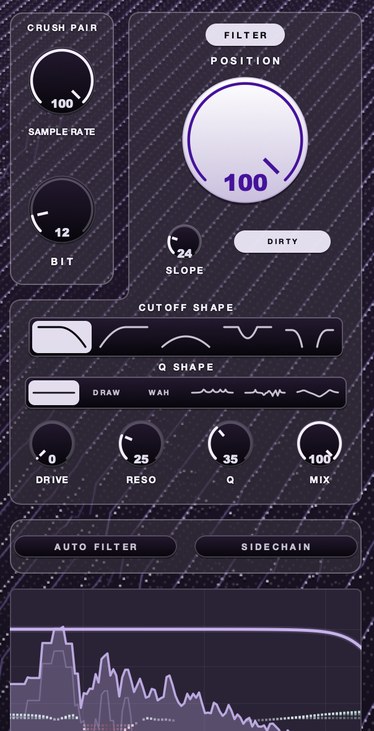
F(ilter)12 is our 12 bit sauce filter. POSITION sets where in the spectrum the filter sits, and the further it works the more it drives and the more it sings. There are five shapes, including a morph that runs from a closing low-pass through untouched in the middle to an opening high-pass, which makes a single knob a full sweep. Six resonance shapes travel with it, and SLOPE, DRIVE, RESO and Q shape the edge.
Three of those matter specifically for a sweep. SLOPE is a knob, running from 18 dB per octave up to a wall almost nothing gets past, so you set how much each octave of travel takes away. The six Q shapes ride the cutoff, so WAH drags one peak along the whole move and VOWEL drags four spaced like a voice. And the morph crosses its middle without clicking, which is what lets one gesture run from a closing low-pass through untouched to an opening high-pass. AURA works only on what the filter is letting through, so its range closes as the sweep does.
Close it, let the room lean in, open it. It still works every time.
F(ilter)12 — a 12 bit sauce filter for Mac and Windows: a lo-fi section, five filter shapes, six resonance shapes and AURA.
Mac · Winmore info
Keep reading
- How to use an auto filter — LFO and envelope modes, sidechain filtering, and keeping it in the groove.
- How to make lofi beats — Tempo, chords, swung drums, crush, noise, wobble and a gentle pump.
- How to make drums cut through the mix — Fix masking, keep transients, add presence, duck busy parts, pan with purpose and tame the reverb.
- Filter cutoff and resonance explained — The corner frequency, the slope, the resonant peak, and what each costs.
- Best low pass and high pass filter plugins — Slope, resonance, drive and sync: what separates filter plugins, plus free picks.
- Best auto filter plugins — Resonance, envelope followers, sync and swing: how to pick an auto filter.
- Best filter plugins — Three things separate good filters from bad, and a ten-minute test that settles it.