← Gazillion Industries/Reading material
Best arpeggiator VST
Gazillion Industries ·
Four notes held down, the arpeggiator on, and for two bars it is the best
thing in the session. By bar six it is furniture. Nothing about it has moved, so the ear files it
under machinery and goes back to the drums.
The best arpeggiator VST is one you can keep changing while it runs: patterns that alter the
contour, rates past sixteenths, a gate short enough to make the notes percussive, swing, and
per-step rests.
WINNETKA is $49,
a polysynth with a vocoder, and its arpeggiator has all five. Below: what the patterns do, how a
MIDI arp differs from a built-in one, the millisecond arithmetic, a ten-minute audition, and what
your DAW already has.
The short version
- What an arpeggiator does
- holds the notes you play and sounds them one at a time, on a clock
- Two different products
- a MIDI arp that drives any instrument, and a synth whose arp is wired to its own voice
- What decides quality
- pattern choice, how far the rate reaches, gate, swing, and per-step rests
- What to use
- WINNETKA, $49 — sixteen steps, twelve patterns, 1/1 to 1/64, 45 arp presets
- Free route
- the MIDI arpeggiator your DAW already ships, or Helm, free under GPL-3.0
- What it costs
- a phrase nobody wrote, and an arp inside a synth drives only that synth
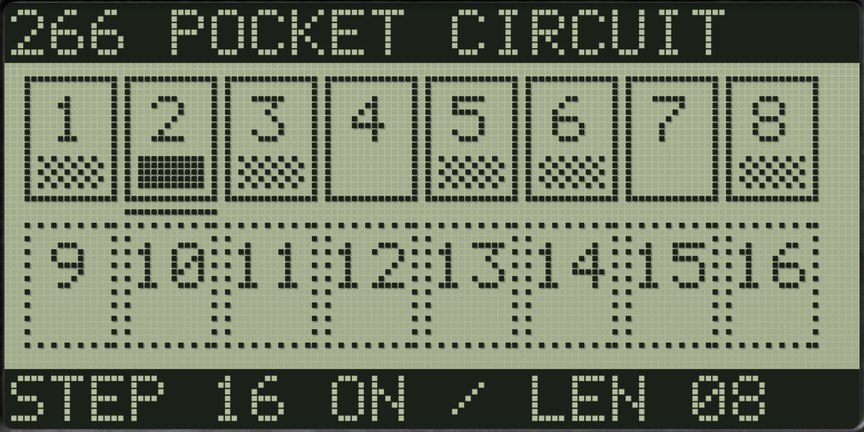 Sixteen steps, and you can see which one is sounding. Solid boxes are inside
the loop, filled ones play, and the underline moves with the clock.
Sixteen steps, and you can see which one is sounding. Solid boxes are inside
the loop, filled ones play, and the underline moves with the clock.
What an arpeggiator actually does
An arpeggiator takes the notes you are holding and plays them one after another on a clock
instead of together. Hold C, E and G and you get C, E, G, C, E, G at whatever speed the rate is
set to. Let go and it stops, unless latch is on.
Everything else is order, speed and length: the pattern decides which held note gets the next
step, the rate decides how long a step lasts, and the gate decides how much of the step the note
holds. Arpeggios sound like a machine because a machine is playing them, with no accent and no
variation. The work is putting back what a hand would have done: a rest where the phrase should
breathe, a shorter gate on the fast notes, a loop length that does not agree with the bar.
The patterns worth having
Up and down are the two everybody knows and the two that wear out fastest. WINNETKA carries
twelve patterns, and they divide into four families.
The straight runs. Up and Down. Alt 1 goes up and back down without playing
the top and bottom notes twice; Alt 2 does play them twice. That reads like a footnote until you
count it: on a three-note chord Alt 1 is four notes long and Alt 2 is six, so against sixteen
steps one of them lines up with the bar and the other takes three bars to come around.
The shapes that move outward and inward. Converge plays from the outside in:
lowest, highest, next lowest, next highest. Diverge starts in the middle and works out. Both put
a wide interval between consecutive notes, which is what makes a line read as a line rather than
as a scale, and both survive far more repeats than Up does.
The limping ones. Up2 down1 takes two steps forward and one back, and Down2
up1 is the mirror. Root alt puts the lowest note in between each of the others, which is the
pedal-and-melody figure sitting under half the synth lines ever written for a
lead part. Then the ones barely arpeggiating
at all: Played follows the order you pressed the keys, Trigger fires the whole chord on every
step and ignores the range setting, and Random is random.
Range covers one to four octaves, and it multiplies. A four-note chord with the range at 4 is
a sixteen-note pattern, exactly the number of steps on the panel, so the phrase repeats once a
bar. Set the range to 3 and the same chord gives twelve notes, and now the pattern and the bar
disagree, which is usually the better sound.
A MIDI arpeggiator and a built-in arpeggiator are different tools
Most pages answering this search treat them as one product. They are two, and picking the
wrong one is the usual way to spend money on something that does not do what you wanted.
A MIDI arpeggiator generates notes and sends them somewhere else. You put it
in front of any instrument you like: a sampler, a piano, a drum rack, an external synth. Nothing
about the sound is its business. Ableton Live, Logic Pro, Bitwig Studio, Cubase and Studio One
all ship one, and Xfer Records Cthulhu, Kirnu Cream and Sugar Bytes Thesys are paid ones with
more under the hood.
A synth with an arpeggiator built in runs the arp against its own voice and
nothing else. What you get for that limit is that the pattern lives inside the preset: load the
sound and the phrase, rate, gate, rests and swing arrive with it, already set to the sound they
were written for. No routing to rebuild, no second device to remember to save.
WINNETKA is the second kind. If what you need is a MIDI arp driving a sampler and three other
instruments from one held chord, this is the wrong tool for that job, and the arpeggiator in the
DAW you already own does it without another purchase.
Rate, gate and swing, in milliseconds
All three are time, and all three are worth computing once rather than guessing at forever.
Everything below is in 4/4.
Rate
A sixteenth is 60000 / bpm / 4 milliseconds. At 120 BPM that is 125 ms; at 90 BPM,
166.7 ms; at 140 BPM, 107.1 ms. Sixteen steps of a sixteenth is 16 × 125 =
2000 ms, exactly one bar at 120 BPM.
WINNETKA's rate runs 1/1, 1/2, 1/4, 1/6, 1/8, 1/12, 1/16, 1/24, 1/32 and 1/64. The plain
numbers are straight divisions and the odd ones are triplets: 1/12 is twelve steps to the bar, so
at 120 BPM each is 2000 / 12 = 166.7 ms, the same length as a sixteenth at 90 BPM. That
equivalence is the fastest way to borrow a feel from a slower tempo.
The fast end is where most arpeggiators stop being useful. At 120 BPM, 1/32 is 62.5 ms
per step and 1/64 is 31.25 ms, so all sixteen steps at 1/64 take 16 × 31.25 =
500 ms, which is one beat. A whole pattern inside a single beat is short enough that the ear
stops counting notes and starts hearing texture, and a plug-in stopping at 1/32 cannot give you
that.
Gate
Gate is how much of the step the note holds, from 0 to 100 percent. At 120 BPM with the rate
at 1/16 the step is 125 ms, so a gate of 40 percent gives a 50 ms note and a
75 ms gap. At 100 percent the notes butt together and the line reads as legato. Below about
30 percent each note becomes an event with a front edge. One thing catches everybody: the gate
only decides when the key lets go, and an amplifier release longer than the gap fills the gap
back in. If the gate is at 25 percent and the line still smears, look at the release.
Swing
Swing runs from −100 to +100 percent. Above zero every second step arrives late; below
zero it arrives early, which is the one almost nobody tries and the one that makes a line push.
At 90 BPM a pair of sixteenths spans 2 × 166.7 = 333.3 ms, and swing decides where
inside that span the second note lands. Set it by ear against the drums, because the value that
works is the one agreeing with whatever is already swinging.
Last step, and how long a phrase takes to come around
The loop length is set by last step, from 1 to 16, and any step left unlit is a rest. The
pattern still moves past an unlit step, so the note that step would have played is skipped rather
than delayed: muting steps changes which notes land where, not just where the holes are.
Then the arithmetic. A four-note chord on Up is a four-note pattern; put last step at 6 and
the rhythm loop is six steps, so the phrase repeats every twelve steps, and twelve sixteenths
against a sixteen-step bar returns to the downbeat after 48 steps, or three bars. Set last step
to 7 and the loop is 7 × 125 = 875 ms at 120 BPM, realigning with the bar after 112
sixteenths, which is seven bars. Odd loop lengths are the cheapest movement an arpeggiator has,
and almost nobody touches the control.
WINNETKA
is a polysynth with a vocoder, $49, and its arpeggiator has twelve patterns, one to four octaves
of range, rates from 1/1 to 1/64, swing either way, latch, key sync and sixteen steps you can
rest individually. There's a demo on the page.
One arpeggiator, two timbres
WINNETKA layers two timbres, and the arpeggiator is shared between them rather than
duplicated. What makes that useful is the target control: aim it at timbre 1 or timbre 2 and the
arp plays only that one, while the other timbre plays your keys exactly as you press them.
That is a held pad under a moving figure, from one instance and one hand. Put a slow, open
sound on the timbre you play live and a short, bright one on the arpeggiated timbre, and the
chord sustains while the figure runs across the top of it. Set target to both and the two lock
together instead, which is thicker and much more literal.
Key sync decides how a new chord enters: lit, every fresh phrase restarts the pattern from
step one; unlit, the new chord joins the clock where it already is, which keeps a long passage
from resetting every time the harmony moves.
How to audition an arpeggiator in ten minutes
Do this in your own session, against your own drums, before you spend anything. It answers the
questions no feature list answers.
- Load the plug-in on a fresh track and set your project to 90 BPM.
- Hold a four-note chord and switch the arpeggiator on.
- Set the rate to 1/16, which is 166.7 ms per step at this tempo.
- Step through every pattern with the chord held, and count how many you would use twice.
- Set the range to 1, then 2, then 4, holding the same chord through each.
- Take the gate from 100 percent down to 25 percent and listen for the notes separating.
- Shorten the amplifier release until the gaps you set are audible.
- Move swing to +30, then to −30, against a drum loop.
- Set the rate to 1/64 and check that it plays cleanly at 41.7 ms per step.
- Mute steps 4, 7 and 11, set the loop length to 7, and let it run eight bars.
Step ten is the test. A plug-in that can only loop in fours sounds identical on bar eight to
how it sounded on bar one. Step nine matters almost as much: an arp that smears or drops notes at
41.7 ms is an arp with a ceiling.
What your DAW already ships
Know what you have before buying. All the major hosts include a MIDI arpeggiator, and for
driving other instruments they are the answer.
Ableton Live has an Arpeggiator MIDI effect, which the manual describes as
creating rhythmical patterns using the notes of a chord or a single note. The Style chooser
covers Up, Down, Converge, Diverge, Play Order, Chord Trigger and three random variations. Rate
runs in milliseconds or synced divisions, Gate sets note length as a percentage of the rate, and
there is Groove, Hold, Retrigger, a Repeats count, Pattern Offset, and Distance and Steps for
transposing the pattern as it goes.
Logic Pro ships an Arpeggiator MIDI plug-in with direction buttons, a
Variation switch for the type of note order variation, and a four-position switch Apple names Oct
Range/Inversion that sets either the octave range or the chord inversion pattern.
Bitwig Studio has an Arpeggiator note FX device that cycles through the held
notes in a set order, timed rhythmically or in milliseconds, with a pitch control and a step-skip
toggle on every step.
Cubase has Arpache 5: Step Size sets the speed as a note value against the
project tempo, Length sets note length the same way, Key Range sets the arpeggiated range in
semitones counted up from the lowest key you play, and Play Order includes a User option with
twelve slots you fill by hand. Studio One has an Arpeggiator Note FX traveling
up, down, up-and-down, down-and-up or randomly, plus whole-chord and played-order modes, with a
32-step sequencer for velocity and gate. FL Studio works differently: its
Arpeggiator and Riff Machine live in the Piano roll and write notes into the clip rather than
running live under your hands, which is better for editing afterward and worse for playing
something in.
The arpeggiator plug-ins people name, and ours
Everything here was read on the maker's own page while writing, and where no price appears
the maker does not publish one beside the product. Ours is first because it is the one we would
put the chord into.
Gazillion Industries WINNETKA
WINNETKA is
$49, a polysynth with a vocoder, and the arpeggiator spreads across three rows. ARP A: ON, twelve
patterns, RANGE of one to four octaves, GATE from 0 to 100 percent, LATCH. ARP B: RATE at 1/1,
1/2, 1/4, 1/6, 1/8, 1/12, 1/16, 1/24, 1/32 and 1/64, SWING at plus or minus 100 percent, LAST
STEP from 1 to 16, TARGET set to both timbres or either one, KEY SYNC. STEP is sixteen keys, one
per step, any of them a rest. It follows your DAW's tempo and restarts when the DAW starts
playing. 350 presets, 45 of them arps. AU, VST3 and standalone on Mac, VST3 on Windows.
Xfer Records Cthulhu
Cthulhu is $39 and is a chord and arp MIDI effect rather than an instrument, so it drives
whatever you put after it. Xfer describe a pattern-based arpeggiator with eight tabs of the step
sequencer, a chord-arpeggio mode, ties, duration and velocity sequencing, intelligent transpose
and harmony, the tabs able to run independently for polymetric results. VST, AudioUnit and AAX,
Windows 7 SP1 or later and macOS 10.11 or later.
Kirnu Interactive Cream
Cream is a MIDI performer plug-in for Windows and Mac in VST, AU and Logic MIDI FX. Kirnu list
four independent tracks, each with its own key area and MIDI in and out, twelve patterns per
track, nine step data controls managed in tabs, a chord memory with sixteen slots, and a pattern
sequencer that changes patterns automatically. The product page carries no price beside it.
Sugar Bytes Thesys
Thesys is $99 and does an arpeggiator's job from a step sequencer's side: a 32-step MIDI
sequencer, a pitch recorder, pattern triggering over MIDI, an internal synth, a randomizer, MIDI
out with drag and drop, and MIDI export. Mac and Windows in AU, VST2, VST3, AAX and standalone,
plus iPad.
u-he Hive 2
Hive 2 is 149 € and is a synth with the arpeggiator inside it, the same family as
ours. u-he list up to three octaves of range, six direction options and four for the order, plus
ClockDiv and Restart, which sets how many notes play before the pattern jumps back to the
beginning. Its sequencer can capture the arpeggiator's output in record mode. CLAP, AUv2, VST3
and AAX on macOS; VST3, CLAP and AAX on Windows.
Arturia Pigments
Pigments is $199 and puts the arpeggiation inside what Arturia call a fully-fledged generative
sequencer, with an advanced random sequence generator. Standalone, VST, VST3, AAX, Audio Unit and
NKS, Windows 10 and later, macOS 11 and later.
Free arpeggiators worth the download
The honest free answer is the one already installed. If you own any of the hosts above you
own a capable MIDI arpeggiator, and you should exhaust it before spending. Beyond that, Helm is
free software under GPL-3.0 for Linux, Mac and Windows, standalone or as LV2, VST, VST3 and AAX,
and its feature list names a simple arpeggiator alongside a step sequencer. Simple is the
operative word, and free is the other one.
We make one free plug-in and it is DRUGS, a one-knob bus compressor for drums, which is no
help with an arpeggio. Our synth with an arp in it is
WINNETKA
at $49, and there is a demo on the page. Our roundup of
free plug-ins worth installing covers the
rest of a starter chain.
What an arpeggiator costs you
Three things, and all three arrive later than the purchase.
It costs the phrase. An arpeggiator hands you a figure nobody wrote, a gift for sixteen bars
and a problem across a record. Treat it as a source rather than a part: run it, keep the two bars
better than anything you would have played, build around those.
It costs arrangement room. Sixteenths at 125 ms are a wall of events in the exact
register where a vocal and a snare live, and the fix is ducking rather than a filter sweep. Our
piece on sidechain compression is the
method, and it works better on an arpeggio than on almost anything, because the events are short
and regular.
It costs the other instruments, when the arp sits inside a synth: one arpeggiator playing one
instrument is the trade for having the pattern travel with the preset. And whatever the source, a
filter moving under the pattern is what keeps sixteen bars from flattening out.
Cutoff and resonance is the background
there.
Questions people ask
What is the best arpeggiator VST?
The one with the most patterns you would actually use, a rate reaching past 1/32, a gate you
can take below 30 percent, and per-step rests. Those four decide whether a phrase survives eight
bars. WINNETKA is $49 and has all four: twelve patterns, rates to 1/64, gate from 0 to 100
percent, sixteen steps you can rest individually.
What is the best free arpeggiator VST?
The MIDI arpeggiator your DAW already ships. Ableton Live, Logic Pro, Bitwig Studio, Cubase
and Studio One all include one, and Live's alone has nine styles, synced or millisecond rates, a
gate as a percentage of the rate, groove and retrigger. Outside that, Helm is free under GPL-3.0
on Linux, Mac and Windows and its feature list names a simple arpeggiator.
What is the best arpeggiator VST for Ableton?
Start with Live's own Arpeggiator MIDI effect, because it is installed and it drives anything
on the track. Buy a plug-in when you want the arpeggiated sound and the pattern saved together,
or when you want rates and loop lengths the stock device does not reach. WINNETKA loads as VST3
on Windows and as AU, VST3 or standalone on Mac, and restarts when Live starts playing.
Do I need a MIDI arpeggiator if my synth has one built in?
Only if you want to arpeggiate something else. A built-in arp saves inside the preset, so the
pattern, rate, gate and rests come back with the sound and there is nothing to rewire. A MIDI arp
sits in front of any instrument at all, which is the one thing a built-in arp cannot do.
Why does my arpeggio sound stiff?
Because three settings are still at their defaults. The gate is at 100 percent so nothing
separates, swing is at zero so every step is on the grid, and the loop is sixteen steps long so
bar two is bar one. Take the gate to 40 percent, put swing near the drums, set the loop length to
an odd number, then mute two steps.
How many steps does an arpeggiator need?
Sixteen, and then the ability to use fewer. Sixteen sixteenths is one bar in 4/4, the unit
almost everything is written in. The control that matters more than the count is loop length: at
sixteenths, a seven-step loop is 875 ms at 120 BPM and takes seven bars to line back up with
the downbeat.
Can I record what the arpeggiator plays as MIDI?
With a MIDI arpeggiator, yes, because it emits notes your DAW can capture. With an arp inside
a synth, no, because the notes never leave the instrument, so you record the audio instead. That
is rarely a loss, since the reason to use a built-in arp is that the pattern and the sound belong
to each other anyway.
Is an arpeggiator the same as a step sequencer?
No. An arpeggiator gets its pitches from the keys you hold and decides only order and timing,
so the harmony is yours and the rhythm is the machine's. A step sequencer stores the pitches too,
and plays the same notes whatever you hold. Holding a chord at all is a
polyphonic instrument's job, which is why the
arp lives there.
What WINNETKA does
WINNETKA
is a polysynth with a vocoder for Mac and Windows, $49, in AU, VST3 and standalone on macOS and
VST3 on Windows. The arpeggiator occupies three rows: twelve patterns, four
octaves of range, gate, latch, rates from 1/1 to 1/64, swing, last step, target, key sync, and
sixteen step keys where an unlit one is a rest the pattern moves past.
Three modes. SINGLE plays one timbre, up to 128 voices in POLY. LAYER plays
two timbres from every key, 64 voices each, with the effects and the arpeggiator shared and TARGET
choosing which timbre the arp drives. VOCODER puts audio coming in over the notes you play across
sixteen bands, with FORMANT holding SHIFT, CUTOFF and RESONANCE, an envelope-follower sensitivity
and a HOLD key that freezes the shape and keeps it playing with no input at all.
The voice assigns to MONO, POLY or UNISON, and UNISON stacks four voices on
every note, spread apart by DETUNE from 0 to 99 cents. TRANSPOSE reaches plus or minus 24
semitones, portamento 2 ms to 5 seconds. Then filters, two envelopes, two LFOs and four
modulation patches per timbre, and effects shared by everything: MOD FX as chorus, flanger,
ensemble or phaser; a delay in stereo, cross or bouncing left-right, its time lockable to the
tempo from 1/32 to 1/1; a three-band EQ with shelves at 40 Hz to 1 kHz and 1 to
18 kHz, both at plus or minus 12 dB.
350 presets across bass, lead, pads, FX, percussion, arp and vocoder, 45 of
them arps, and you can save, export and import your own. A finished arp preset shows you where
the settings were when it worked, which is the argument for
presets generally.
Same four notes, same held chord. Bar six is where you find out.
WINNETKA — a polysynth with a vocoder and 350 presets. AU, VST3 and
standalone on Mac, VST3 on Windows.
Hear it
Keep reading