← Gazillion Industries/Reading material
Best tape sim plugins
Gazillion Industries · · updated
Tape simulation is a bundle of separate behaviors sold as one word.
Saturation, compression, high-frequency loss, noise, speed instability and transport
movement are six different things, and every plugin in the category picks a subset. Most
arguments about which is best are really arguments about which subset somebody wanted.
The best tape sim plugin is the one whose subset matches your use. Mastering work needs
saturation and head-bump control. Character work needs noise, bandwidth loss and speed
instability. Very few plugins are strong at both, and a demo that only plays a clean loop
tells you nothing about which you are hearing.
The short version
- Six behaviors
- saturation, compression, HF loss, noise, speed, transport
- For mastering
- saturation and gentle compression, stable speed
- For character
- noise, bandwidth loss and speed that moves
- Test it on
- hats and a sustained note, not a full mix
- Trap
- judging at unmatched level; tape always flatters
- Our answer
- TRIPLE OG for the character end, $29
TRIPLE OG is our cassette sim for Mac and Windows, with the transport on the face rather than in a menu. There is a demo on the page.
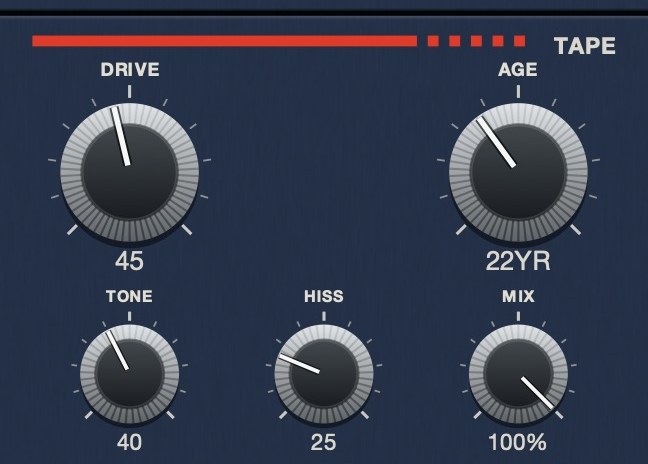 The medium, as five controls.
The six behaviors, and which ones you can hear
- Saturation. The soft ceiling as level rises. Every plugin in the
category has it and dozens outside the category do it as well, so it is the weakest
reason to pick one.
- Compression. Tape reduces peaks before it distorts, so transients
round off on the way in. Audible on drums, largely invisible on pads.
- High-frequency loss. The top goes soft under level rather than
getting cut. This is the behavior most often modeled as a filter, and the difference is
obvious on cymbals.
- Noise. A floor under the quiet parts. Slower and narrower formats
hiss more, which is why a cassette plugin should be noisier than a reel plugin.
- Speed instability. The one that cannot be faked with any other
plugin you own. Wow and flutter.
- Transport. Stopping, rewinding, dragging. Rare, and the only one
that turns a processor into something you play.
How to test one properly
Do not start with a full mix. A finished mix hides everything in this list except
loudness, which is why nearly every tape plugin sounds good on one.
Use three sources instead. A hi-hat pattern shows the speed instability and the
high-frequency behavior, because hats are fast and bright and any wobble in the grid is
immediately audible. A single sustained note shows drift and noise, because there is
nothing else happening. A drum break shows the compression and the saturation together,
which is the combination you will actually use.
Then match the level. Every process in the list changes loudness, and an unmatched A-B
measures which setting is louder, not which is better. This is the single biggest source
of bad plugin decisions in the category.
TRIPLE OG
covers the character end of the list, including the one most plugins leave out: the
transport. SLAM, SCRUB and CATCH are on
the face, not in a menu. There's a demo on the page.
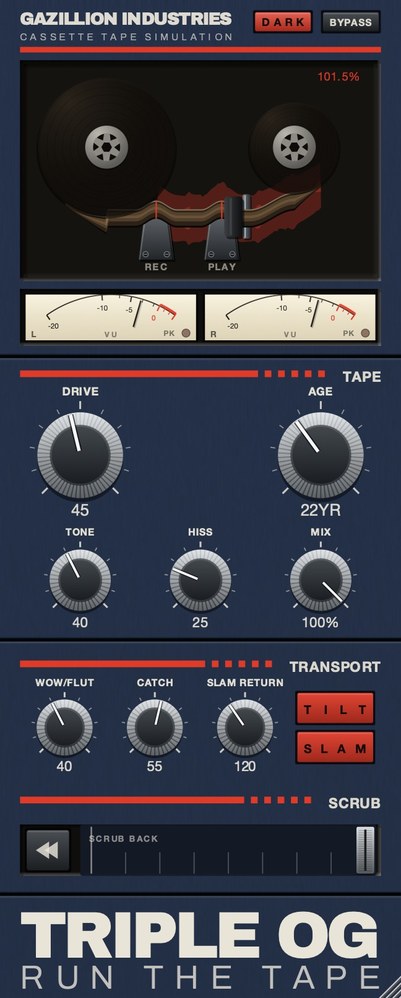 The whole thing. Top half is the machine, bottom half is the tape, and the SCRUB on TRIPLE OG strip along the bottom is played by hand.
Reel simulations and cassette simulations are different products
A studio reel runs fast and wide, and the machines were maintained. They are quiet,
stable and bright, and a reel simulation that is noisy and unstable is modeling a broken
machine. That is why reel plugins tend to lead on saturation and head bump.
A cassette runs at 1⅞ inches per second on a strip of tape that everyone calls
eighth-inch and that is actually 0.15 inches wide, carrying two stereo pairs so it can be
played in both directions, through a consumer
transport. Noise, bandwidth loss and instability are not faults to be minimized;
they are the product. Picking a reel simulation for a lofi track is the most common wrong
purchase in the category, and it is why people end up stacking a noise plugin on top of a
tape plugin to get back what they should have bought in the first place. See
how a tape machine works.
What "free" gets you, and what it does not
Free tape plugins are genuinely good at the first three behaviors. Saturation,
compression and high-frequency loss are well-understood and several free tools do them as
well as paid ones.
The gap is further down the list. Convincing speed instability is harder to get right
than it looks, and a transport you can perform is rare at any price. If a free plugin
covers what you need, use it; if you keep reaching for automation to fake movement, that is
the gap you are paying to close.
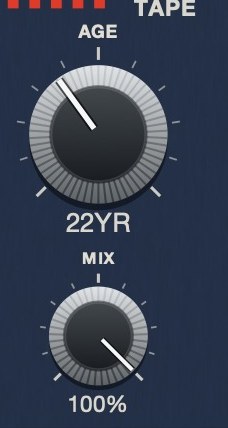 AGE is in years because that is what the quantity is. Nought to sixty, darker and noisier and less steady as it climbs.
Reading the controls across plugins
Tape sims label the same handful of behaviors differently, which makes comparing two of
them harder than it should be. Translating is worth doing once.
A control called drive, input, saturation or hot almost always means the same thing:
how hard the signal hits the tape, which sets thickness and harmonic content together. A
control called tone, brightness, head or bias usually shapes the top end, though bias on a
real machine changed distortion and noise as well as treble, so a plugin that models it
properly will move more than the highs. Wow, flutter, warble and instability are all speed
error, split into slow and fast in some plugins and combined into one knob in others.
Noise, hiss and asperity all add a noise bed, but asperity noise is modulated by the signal
rather than constant, which is why it sits inside the music instead of behind it.
The upshot is that two plugins with completely different panels are often offering the
same five or six behaviors. The real differences are how those behaviors interact, how far
each one goes, and whether there is anything on the panel that is not a tape behavior at
all.
Hear TRIPLE OG
What a tape sim cannot do
Worth stating plainly, because most of the disappointment in this category comes from
expecting one of these.
It will not fix an arrangement. Tape is a finishing texture. If the
parts are fighting for the same space, a tape sim makes a blurrier version of the same
fight, because everything is still there and now shares a narrower window.
It will not make a thin recording full. Saturation adds harmonics above
what is already there, so it can suggest weight the recording never had. If the low end was
not captured, tape does not supply it.
It will not, by itself, sound like a record from the era. Those records
went to tape through a room, a desk and a set of microphones, and got mastered and cut. The
tape was one stage of many and rarely the one doing the most.
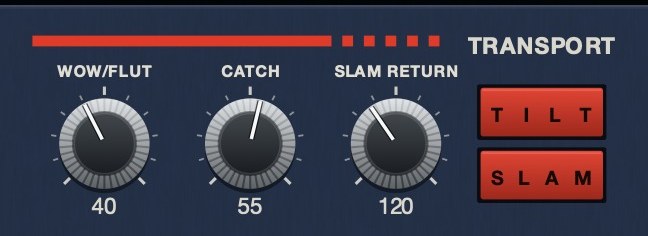 The machine rather than the tape. SLAM is a stop you press, SLAM RETURN sets how long it takes to fall, and CATCH is the drag and the sprint back.
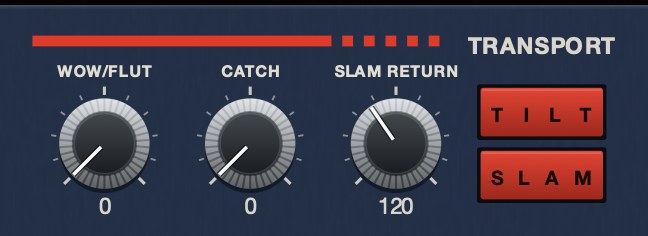 WOW/FLUT at 0. The transport holds speed.
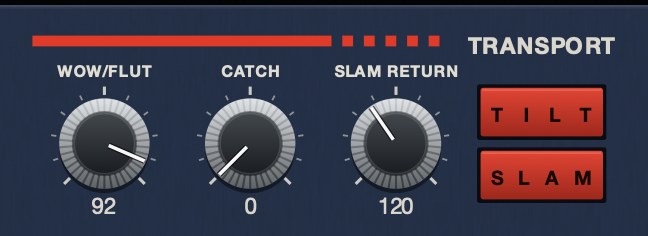 WOW/FLUT at 92. Slow drift and fast warble at unrelated rates, not one sine.
The behavior almost nobody simulates
Run through any list of tape sims and you will find the same six behaviors: saturation,
bandwidth, noise, compression, speed error and sometimes crosstalk. All six describe the
tape. None of them describes the machine.
A tape machine had a transport, and the transport made sounds that had nothing to do
with magnetic particles. It dragged to a halt when you stopped it. It took a moment to come
back up to speed. You could put a hand on the reel and hear the pitch sag. Those are
performances rather than settings, they happen in time, and they cannot be approximated by
automating a pitch control afterwards because the recovery behavior is the part that sells
it.
This is the one axis where the field is genuinely thin, and it is worth deciding whether
you want it before comparing anything else, because it is the only item on the list you
cannot add later.
 Stereo VU against a 0 VU reference, with a peak lamp. Tape level is read here, not on a bar graph.
CPU, and how many you can actually run
Rarely mentioned in a roundup, and it decides what you can use on a real session.
Physical models are expensive because they compute a machine's behavior from its parts,
every sample. Effect-style plugins apply the results and cost far less. Oversampling, which
most of these use to keep saturation from aliasing, multiplies whatever the base cost was.
The practical consequence is that a plugin which feels weightless on one instance can stop
a session at sixteen, and the discovery usually happens at the worst possible moment.
Two habits make this a non-issue. Put tape on buses rather than channels, which is
better practice anyway and cuts instance count by an order of magnitude. And if a plugin
offers an oversampling or quality switch, run the cheap setting while writing and raise it
at the end; the difference is real and it is almost never the difference between a good
take and a bad one.
Why the presets mislead
Tape plugin presets are, almost without exception, louder and more extreme than anything
you would choose yourself, and both of those bias the comparison.
Louder sounds better. A preset that adds three decibels will beat a neutral setting in
any quick comparison, regardless of whether the processing is any good, and this is the
single biggest reason people conclude one tape plugin is warmer than another.
More extreme demos better. A preset has to show what the plugin does within a few
seconds of being clicked, so it goes well past where you would actually leave it. That is
fine as a demonstration and misleading as a starting point, because it teaches you the
plugin's voice at a setting you will never use.
The fix is dull and it works: match levels by ear before judging anything, and audition
at the neutral setting first so you learn what the plugin does at rest. Whatever you decide
after doing that will still be true in a week.
Hear it
The null check described above, as audio. One loop at rest and the same loop with only the speed instability engaged, so you can hear what that behavior does on its own.
Dry — no processing — speed holds at 1.000
Wow and flutter 65 — speed moves between 0.941 and 1.071
The same eleven seconds each time, rendered offline through TRIPLE OG at the settings shown. No other processing, no master bus, no edits.
Everything below is answered the same way we built TRIPLE OG — the tape is the easy half, the transport is the half almost nothing does.
Questions people ask
What is the best tape sim plugin?
It depends which of the six behaviors you need. For mastering, one strong on saturation
and gentle compression. For lofi and character work, one strong on noise, bandwidth loss
and speed movement.
Is there a good free tape simulator VST?
Yes, for saturation and high-frequency behavior. Free options are weakest on speed
instability and on transport controls, which is usually what people are missing when they
go looking for a paid one.
Does tape simulation actually sound like tape?
The individual behaviors are well understood and modeled closely. What varies is how
many of them a given plugin implements and how they interact under load, which is why two
plugins claiming the same thing can sound very different at high settings.
Where should a tape plugin go in the chain?
On a bus rather than on every channel, after your compression, before the mix bus. On
drums specifically, see
tape plugins for drums.
What is the difference between a tape sim and a tape emulation?
Nothing consistent. Makers use the words interchangeably, and neither one tells you
whether the plugin computes a machine's behavior from its parts or simply offers you the
results as controls. Read what it says it models rather than which noun it picked.
Can a tape sim replace a compressor?
Partly, and only at the top. Tape saturation rounds peaks, which does some of what a
limiter does, but it has no threshold, no ratio and no timing you can set. It is a texture
that happens to control peaks, not a dynamics tool you can aim.
Do I need more than one tape plugin?
Most people end up with two, because reel and cassette are different products with
different faults. One quiet, fast and stable for glue on a bus or a master, one slow, noisy
and unstable for character. Trying to get both from one plugin usually means running it at
settings it was not voiced for.
How many tape plugins can I run at once?
Depends entirely on the type. Physical models compute behavior every sample and cost
real processing, particularly with oversampling on; effect-style plugins apply results and
cost much less. Putting tape on buses rather than channels solves it either way.
Should I start from a preset?
Start from neutral. Presets are almost always louder and more extreme than anything you
would choose, and louder always wins a quick comparison, so a preset teaches you the
plugin's voice at a setting you will never actually use.
What TRIPLE OG does
TRIPLE OG is our cassette tape simulation, so it sits at the character end of that list
by design. DRIVE and TONE handle saturation and playback
brightness, HISS the noise floor, AGE the wear from
nought to sixty years, and WOW FLUT the speed instability. The transport
is the other half: SLAM stops the tape and returns it in sync,
SCRUB runs the head backward and springs home, and CATCH
makes it drag and then sprint to catch up.
Six behaviors. Most plugins pick three. The sixth is the one you can play.
“Most tape plugins treat the transport as something to model quietly in the background, but this one hands it to you as an instrument.”
Best Tape Emulation Plugins · AudioColour.com
TRIPLE OG — cassette tape simulation for Mac and Windows, with a transport
that drags, jams and sprints to catch up. There is a demo on the page.
Hear it
Keep reading
- How a tape machine works — The transport, the heads, bias, tape speed, and why tape sounds like tape.
- Wow and flutter — What causes them, what they sound like, and how to add them on purpose.
- Best tape plugins for drums — Why drums show tape more than anything else, and where to put it.
- Best cassette plugins — What makes a cassette sound like a cassette, and what the field costs.
- Tape hiss — Where it comes from, how to reduce it cleanly, and how to add it on purpose.
- Best tape emulation plugins — Reel and cassette are different products. Pick the machine first.
- Best free tape plugins — What free tape plugins do well, and where they run out.