← Gazillion Industries/Reading material
Tape vs tube saturation
The Beatles made Sgt. Pepper's on four-track tape, bouncing tracks together to free up room and letting every pass shave off a little top end and add a little glue. Fifty-odd years later, plugin menus sell that accident back to you as a feature, next to a picture of a glowing tube.
Tape saturation and tube saturation both add harmonics and soften peaks, but in different ways. Tape tends to round off transients, compress the high end and add a low-frequency bump, with mostly odd harmonics: good for smoothing and gluing drums, buses and whole mixes. Tube saturation tends to add more even harmonics and a rounder, fuller color that keeps transients a little more intact: good for vocals, bass and anything that needs warmth up front.
The short version
- Tape
- softer transients, gentler top, low bump; glue
- Tube
- rounder color, fuller mids; warmth
- Clipper
- most aggressive on transients; loudness and grit
- Drums, buses
- tape first
- Vocals, bass
- tube first
- Truth
- drive level matters more than the label
What tape does
Magnetic tape can only take so much signal. Push it and the magnetization levels off gradually, which rounds the peaks. Because that curve is roughly symmetric, tape adds mostly odd harmonics. High frequencies saturate first, so a hard-hit tape darkens and softens the top; transients lose their sharpest edge; and many machines add a low-frequency bump, a "head bump", whose position depends on the tape speed and the heads. Wow, flutter and hiss come along if the emulation includes the transport.
Two of those are worth pulling apart, because producers treat them as one thing. The curve — rounded peaks, odd harmonics — happens at any speed on any machine. The darkening happens because of how much tape passes the head every second, a different mechanism with a different fix. Confusing the two is why people reach for a drive knob when what they want is a high shelf.
The tape arithmetic: speed, wavelength and the vanishing top
Tape stores a frequency as a length. The recorded wavelength is the tape speed divided by the frequency, and almost every claim about tape top end falls out of that one division.
At 15 inches per second, a 15 kHz tone occupies 15 ÷ 15,000 = 0.001 inch of tape, about 25 micrometers. At cassette speed, 1 7/8 inches per second, the same tone gets 1.875 ÷ 15,000 = 0.000125 inch, about 3.2 micrometers: eight times shorter, because the speed is eight times lower. A 50 Hz tone at 15 ips gets 0.3 inch to itself, three hundred times the room.
That ratio is the whole story of tape top end. Short wavelengths crowd the head gap and partly cancel themselves inside the oxide, so they run out of level long before the low end does. Push the tape and the treble goes first, every time. That is geometry, not a tone decision the machine made for you.
The head bump obeys the same rule from the other end. It is set by a physical length, the dimensions of the playback head core, so its frequency scales directly with speed: halve the speed and the bump drops an octave. Which is why "tape adds low end" only means something if it says where. See how a tape machine works and tape speed.
What tubes do
A tube stage's response is often asymmetric: it bends the top and bottom of the wave differently. That leans toward even harmonics, especially the second, which sits an octave above the note and tends to sound full rather than edgy. (Some tube circuits cancel much of that out, so "tube" is a family, not a single sound.) Transients generally survive better than on tape, and the effect reads as warmth and thickness in the mids.
The even harmonics arrive with a passenger. Square a sine and the algebra is exact: A²sin²(ωt) = A²/2 − (A²/2)cos(2ωt). A second harmonic, and a DC term of precisely the same size. Every asymmetric stage does some of this, so the waveform leaves the plugin sitting slightly off center, and the offset moves as the input level moves.
Symmetry is what decides odd or even
The odd-versus-even split has nothing to do with glass or oxide. It is a property of the transfer curve's symmetry, and you can read it off the shape before you hear a note. If the curve is odd-symmetric — if it treats a negative input exactly the way it treats a positive one, flipped — then a sine comes out carrying only odd harmonics. No second, no fourth, none at all. Bend the top of the wave differently from the bottom and the even harmonics appear, in proportion to how unalike the two halves are.
That is also why the labels leak. Plenty of tube circuits are built in pairs specifically so the two halves cancel, which strips out most of the even content and leaves a curve that behaves like the tape description above. A plugin can be asymmetric and called tape. Judge the curve, not the front panel.
The harmonics in cents, so you know what you are adding
Harmonics are intervals. Working out which ones a stage throws tells you in advance whether it will read as fullness or as sourness.
- 2nd
- 1200 cents — an octave up, dead in tune
- 3rd
- 1902 cents — an octave and a fifth, 2 cents sharp of tempered
- 4th
- 2400 cents — two octaves, dead in tune
- 5th
- 2786 cents — two octaves and a major third, 14 cents flat
- 6th
- 3102 cents — two octaves and a fifth
- 7th
- 3369 cents — two octaves and a minor seventh, 31 cents flat
- 9th and up
- denser, and further off the grid with every step
Read down that list and the received wisdom stops being mysterious. The second and fourth are octaves, which is why even-heavy stages read as thickening rather than as an added note. The seventh lands 31 cents under a tempered minor seventh, almost a third of a semitone, and a stack of high odd harmonics gets its sour edge from that and from everything above it. See harmonic distortion.
Which one for what
- Drums and drum buses: tape, when you want the kit glued and the edges softened; a clipper, when you want the hits loud and aggressive.
- Vocals: tube, for warmth and presence without dulling the consonants; tape, for a smoother, older sound.
- Bass and 808s: tube-style harmonics help them read on small speakers; tape's softening helps a busy bassline sit.
- Mix bus: tape, lightly.
The honest caveat: drive level changes these more than the label does. Hit a tape emulation gently and a tube emulation gently and they sound more alike than the artwork suggests.
Where clipping fits
Clipper-style saturation is the third option and the least polite. It leaves quiet signal alone and rounds peaks instantly, so it's the most obvious on transients and the most direct route to loudness. See soft clipping explained and saturation vs distortion.
Want actual cassette behavior, hiss, age and wow included? That's TRIPLE OG, our cassette tape simulation. For weight and loudness, it's BEEFY.
A worked example on a drum bus
"It gets louder" is not a number. Here is the move written out, so you can run the arithmetic on your own bus instead of taking anyone's word for the size of it.
Start with a drum bus peaking at −3.0 dBFS with a short-term RMS of −15.0 dBFS. The crest factor is the difference: 12.0 dB. Drive a saturation stage 6 dB harder and pull its output 6 dB back, so everything under the knee comes out exactly as it went in.
The body of the signal passes at unity, so RMS stays near −15.0. The peaks, pushed to +3, get rounded by roughly 3 dB, and after the output trim they land near −6.0 dBFS. Crest factor is now −6.0 − (−15.0) = 9.0 dB. Raise the whole bus 3 dB: peak back at −3.0, RMS reading −12.0.
Three decibels of average level at the same peak, from one stage. That is the entire trade, written out: 3 dB of crest factor spent to buy 3 dB of loudness, plus whatever harmonics the curve threw along the way. See crest factor and gain staging.
How to choose by ear
- Put a tape emulation and a tube emulation on two copies of the same track.
- Drive each until you can just hear it.
- Match their output levels to each other and to the dry track.
- Switch between them in the full mix.
- Keep the one that fixes the actual problem: edges, warmth or weight.
Step three is the one everybody skips, and skipping it invalidates the other four. Match the outputs to within 0.5 dB. A 2 dB gap is a 1.26× amplitude ratio, and at that size you are no longer comparing two processors.
How to see it, not only hear it
Ears settle arguments about taste. An analyzer settles arguments about what the stage is doing, and it takes about ninety seconds.
- Render a 1 kHz sine at −12 dBFS onto an empty track.
- Insert the saturation stage and set the drive where you would actually use it.
- Open a spectrum analyzer after it. Set the FFT size to 16384 and the window to Hann.
- Read the peak heights at 2, 3, 4 and 5 kHz.
- Compare the second harmonic at 2 kHz against the third at 3 kHz. A taller second means an asymmetric curve. A missing second means a symmetric one.
Those heights are percentages once you convert them. A harmonic 40 dB below the fundamental is 1 percent distortion; 34 dB below is 2 percent; 26 dB below is 5 percent; 20 dB below is 10 percent. Our working range on a mix bus is the low single digits.
The second test is subtraction. Duplicate the track, invert one copy, match the two exactly and sum: what is left is only what the stage added. Saturation leaves a fizzy ghost of the source; a stage that is mostly filtering leaves something that sounds like a shelf. Oversampled plugins report latency, so print both copies and align them by sample rather than trusting the null to happen live.
Per-DAW notes, where the drive genuinely differs
Saturation is level-dependent, which makes one boring question the important one in every DAW: what changes the level before the stage sees it?
In Ableton Live, Logic Pro and FL Studio alike, mixer inserts run ahead of the channel fader, so the fader changes how loud the result is and not how hard the stage is driven. That is the opposite of what people assume when a setting stops working after a balance pass. Put a trim in front instead: Utility in Live, Gain in Logic, Fruity Balance in FL. FL carries one extra trap, in that the Channel Rack volume sits before the mixer track, so that one does change the drive.
For the analyzer, Live has Spectrum, Logic has the display inside Channel EQ, FL has the one in Fruity Parametric EQ 2. And one that catches everybody: some plugins run more oversampling on an offline bounce than in real time. If your export sounds cleaner, or duller, than the session did, check that before you look anywhere else.
What neither of them is
Both words get used for things they do not describe, and the confusion costs people real time in a mix.
Neither is a volume control. Both change the signal at every level, not only at the top. If you want peaks caught and nothing else touched, that is a clipper or a limiter, not a saturation stage.
Neither is a fix for a thin recording. Harmonics are generated above what is already there, so a saturation stage can imply weight a recording never captured, but it cannot supply a fundamental that was not recorded.
Neither is automatically analog. A plugin named for tape or tubes may be a physical model, or a waveshaper with a name on it. The name tells you the intended flavor and nothing at all about the method, which is why judging these by ear on your own material beats reading the description.
On a track or on the bus
The choice changes the effect more than picking between the two flavors does.
On a single track, saturation is a tone control that also thickens. You hear it as that instrument changing, and you can push it fairly hard before anything sounds wrong because the rest of the mix stays clean around it.
On a bus it becomes a glue: everything present at that instant interacts inside the same stage, so a loud kick changes how the hats are being saturated. That interaction is most of why bus saturation sounds cohesive, and it is also why the same setting that flattered one arrangement can sound congested on a busier one. Less on a bus, always.
There is a second reason bus saturation misbehaves, and it comes with numbers attached. A nonlinear stage does not only make harmonics of each input; it makes sum and difference tones between everything present at once.
Send a 55 Hz kick and an 82 Hz bass note through one together and the stage generates 82 − 55 = 27 Hz, 2 × 55 − 82 = 28 Hz, and 2 × 82 − 55 = 109 Hz. The first two are 1 Hz apart and beat against each other once a second. The third sits 1 Hz under the kick's own second harmonic at 110 Hz and beats with that too. None of the three belongs to the key. That slow unsteadiness under a hard-saturated low end is what people are hearing when they call a bus muddy, and EQ will not fix it, because the tones sit on top of notes you want.
Where saturation sits in the chain
Order matters more here than with most processors, for one reason worth memorizing: anything that changes level before a nonlinear stage changes its tone, and anything after it only changes its volume. A 3 dB move in front of a saturation stage is a tone edit. The same 3 dB behind it is a level edit. That asymmetry answers most chain questions on its own.
- EQ before: decides what gets saturated. Pull 4 dB at 250 Hz ahead of the stage and that mud never generates harmonics at all.
- EQ after: shapes what the stage produced, including the top end it just added. Both positions are legitimate. Doing both by accident is not.
- Compression before: evens the level out, so the stage is hit consistently and the color stops moving with the performance. Sometimes that is the point, sometimes it kills the thing you liked.
- Limiter last: always. Saturation ahead of a limiter reduces what the limiter has to catch. See clipper before limiter.
- High-pass after an asymmetric stage: 20 Hz, first order, to take out the DC the even harmonics dragged in with them.
All of this assumes you left yourself somewhere to work. Feed the stage a bus that already peaks at −0.2 dBFS and the drive control and the headroom become the same knob, which is a bad way to decide either. See headroom in mixing.
Running tape and tube together
You can use both. The order is not arbitrary, and the reason is the level dependence again: whichever runs first decides what the second is handed. Tape then tube gives you a softened, slightly darker signal that then gets an even-harmonic lift, which suits a spiky source you want settled before it is thickened. Tube then tape adds the body and rounds off everything including the harmonics you just made, which is the smoother of the two and much the easier to overdo.
Halve the amount of each against what you would use alone. Two stages at 2 percent measured distortion do not add up to one at 4, because the second is generating harmonics of the first stage's harmonics, and those land higher and further out of tune than anything either curve makes on its own. Parallel saturation is the other way to run two flavors at once, and it keeps the dry transients intact.
The part of "tape" that is not saturation at all
A large share of what producers mean by tape has nothing to do with the magnetization curve. It is the transport: hiss under everything, speed that will not sit still, a top end that comes and goes as the tape meets the head.
That distinction is practical, because none of it is available from a drive control. If what you want is the wobble, turning saturation up will never get you there; it only makes the track darker while you keep going. A one percent speed change is 17 cents, about a sixth of a semitone: obvious on a held chord, invisible on a closed hat.
The two halves get bundled under one word, so here they are apart. The same eleven seconds each time.
Rendered offline through TRIPLE OG at the settings shown. No other processing, no master bus, no edits.
The middle one has no drive on it whatsoever, and most listeners still call it tape. That is the point. More on each: wow and flutter and tape hiss.
Failure modes, and what each one sounds like
Every one of these has a signature. Learn the six and you stop debugging by undo.
Tape driven too hard. The hats go first, then the snare's crack, then the whole kit sounds like it is playing through a shut door. Kick attack disappears before kick weight does. The tell: backing the drive off brings the top back and an EQ boost does not, because the transients were softened as well as the treble.
Tube driven too hard. Honk in the mids, and a buzz an octave up on sustained bass notes. On vocals it shows in the sibilants: an 8 kHz "s" puts its second harmonic at 16 kHz and its third at 24 kHz, which at a 44.1 kHz sample rate folds back down to 20.1 kHz. That is the glassy ring on top of a harsh vocal.
Aliasing. A thin metallic ringing that will not sit with the music, and it has a giveaway: it moves the wrong way. At 44.1 kHz a 3 kHz tone fits seven harmonics under the 22.05 kHz Nyquist limit; the eighth, at 24 kHz, folds to 44.1 − 24 = 20.1 kHz. Raise the note to 3.5 kHz and that folded partial falls to 16.1 kHz. Play a rising line and hear something descending behind it. Fix with oversampling; background in what aliasing is.
DC offset. The waveform sits off center, one side of the peak meter runs higher than the other, and edits click where they used to be silent. It comes free with even harmonics, as the algebra above shows. A first-order high-pass at 20 Hz after the stage removes it for nothing you can hear.
The mono fold changing. Pure arithmetic. Sum a stereo pair through a saturation stage and what survives is twice the even part of the curve. A symmetric, tape-style stage leaves anti-phase side content canceling in mono exactly as before. An asymmetric one does not: the sides start contributing to the sum, so a wide bus arrives louder and busier on a phone than it was on your monitors. Test it by inverting one channel of a mono source, saturating, and summing. See mono compatibility.
The louder one winning. Not a sound, a trap. Any unmatched comparison between a dry signal and a saturated one is a loudness test in a costume, and it picks the saturated version every time.
What the technique costs
Every technique has a bill. This one arrives with four line items, none hidden.
CPU. Oversampling is the fix for aliasing and it is not free. Running a nonlinearity at 4× from a 44.1 kHz session means the stage and its two resampling filters work at 176.4 kHz, four times the samples per second, on every instance you have open.
Latency. Those resampling filters delay the signal. Your DAW compensates on playback, but the delay is real while you are tracking through it, and a chain of oversampled stages adds up into something a singer can feel.
Dynamics. You spend crest factor to buy level, and the spending is permanent. The drum bus above cost 3 dB of it. Do that on four buses and the master arrives with nothing left to hand a limiter.
Reversibility. Printed saturation cannot be taken back out. Harmonics that were never in the recording cannot be subtracted from it afterwards. Commit late, or commit to a duplicate.
Questions people ask
Is tape saturation good for vocals?
It can be, for a smoother, older sound: tape softens the top and the consonants. For a vocal that needs warmth while staying clear and forward, tube saturation is usually the first thing to try.
What type of saturation should I use on vocals?
Start with gentle tube-style saturation for warmth and presence. Use tape for a softer, vintage tone, and save obvious distortion for a deliberate effect.
Is tape or tube saturation better for drums?
Tape, if you want the kit glued with softer transients. For hits that stay sharp and get louder and more aggressive, clipper-style saturation usually does more than either.
Should saturation go on tracks or the bus?
Both do different jobs. On a track it is a tone control that thickens one thing. On a bus everything interacts inside the same stage, which is where the cohesion comes from and also why a busier arrangement needs much less of it.
Does tape saturation add odd or even harmonics?
Mostly odd, because the magnetization curve is close to symmetric and bends the top and bottom of the wave the same way. Even harmonics only appear where a curve is asymmetric, and a plugin called tape can still be built asymmetric. Measure it with a 1 kHz sine rather than trusting the artwork.
Is tape or tube saturation better for mastering?
Tape, lightly, is the usual answer on a mix bus, for the softened transients and the glue. Keep it in the low single digits of measured distortion and gain-match before judging. If the master needs weight rather than smoothing, a clipper ahead of the limiter does more than either flavor.
Can I use tape and tube saturation at the same time?
Yes, at roughly half the amount of each. Whichever runs first sets the level the second sees, so the order changes the result. Tape then tube settles the signal before thickening it; tube then tape rounds off the harmonics you just made.
Why does saturation make my mix sound quieter?
Because the stage lowers peaks, and a plugin that compensates its own output may pull everything down to keep those peaks where they were. Look at the output trim. If the peaks fell 3 dB, you have 3 dB to put back.
How much saturation is too much?
Measure instead of guessing. Send a 1 kHz sine through and read the tallest harmonic against the fundamental: 40 dB below is 1 percent, 26 dB below is 5 percent, 20 dB below is 10. Low single digits on a bus; on one track inside a busy arrangement you can go well past that.
Do I need oversampling on a saturation plugin?
On anything bright, yes. Harmonics above half the sample rate fold back to frequencies that are not multiples of the note, which is the metallic ring that will not tune to anything. On low material it matters less: at 44.1 kHz a 100 Hz source fits 220 harmonics under Nyquist, an 8 kHz one fits two.
Is tape saturation the same thing as tape emulation?
No. Saturation is the curve on its own. A full tape emulation usually adds the head bump, the high-frequency loss, hiss, and wow and flutter, and those are separate mechanisms that sound nothing like each other. Turning one up will not give you another.
Tape or tube on 808s?
Tube-style even harmonics, usually. An 808 at 55 Hz gets a second harmonic at 110 Hz and a fourth at 220 Hz, both dead-in-tune octaves, and those carry the note on a speaker that cannot reproduce 55 Hz at all. Tape's top-end softening does nothing for that. See how to make bass fatter.
Why does tube saturation sound harsh on my vocal?
Almost always sibilance. Harmonics of a 6 to 8 kHz "s" land at 12 to 16 kHz and above, and at a 44.1 kHz sample rate anything past 22.05 kHz folds back into the top octave. De-ess in front of the saturation stage, not behind it. More in distortion on vocals.
Does saturation actually make a track louder?
Yes, by reducing crest factor rather than by adding gain. Rounding the peaks lets you raise everything afterwards. The drum bus above trades 3 dB of crest factor for 3 dB of average level at the same peak.
What BEEFY does
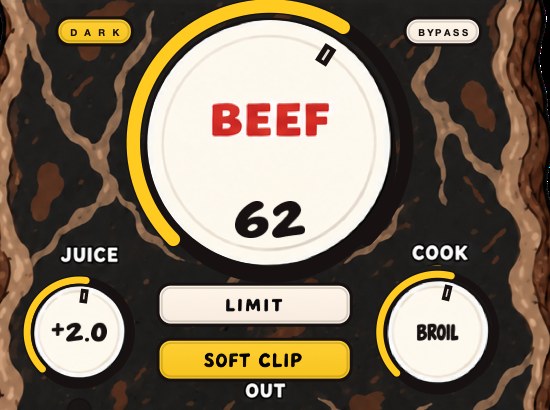
BEEFY is our saturation and loudness plugin, for making sounds thicker, punchier and more up front. It isn't sold as a tape or tube emulation: it's built around weight, density and loudness. BEEF is the main control, COOK moves the color from a rounder feel toward a brighter, more cooked edge, and SOFT CLIP, on by default, brings rounded, fuzzy edges to the loudest parts.
So the honest answer to the question in the title, where BEEFY is concerned, is neither one. Treat it the way this page asks you to treat any saturation stage: send a 1 kHz sine through it, look at what comes out, and set it by the picture as well as by the ear.
The four-track machine never had a preset menu. It had a limit, and the records were made by people who leaned on it.
BEEFY — saturation and loudness plugin for Mac and Windows. There is a 28-second demo with three without/with comparisons on the page.
Keep reading
- Saturation vs distortion — Saturation, overdrive, distortion and fuzz: what changes, and which one you want.
- Parallel saturation — Set it up on a return, drive it hard, filter the burnt copy, and blend it under the dry signal.
- How to make boom bap drums — Tempo, sounds, a starting pattern, swing, drum bus processing and structure.
- How to get analog warmth without buying hardware — Four mechanisms hide behind one word, and naming the one you want is most of the work.